介绍
这里是小编成长之路的历程,也是小编的学习之路。希望和各位大佬们一起成长!
以下为小编最喜欢的两句话:
要有最朴素的生活和最遥远的梦想,即使明天天寒地冻,山高水远,路远马亡。
一个人为什么要努力? 我见过最好的答案就是:因为我喜欢的东西都很贵,我想去的地方都很远,我爱的人超完美。因此,小编想说:共勉!
目录
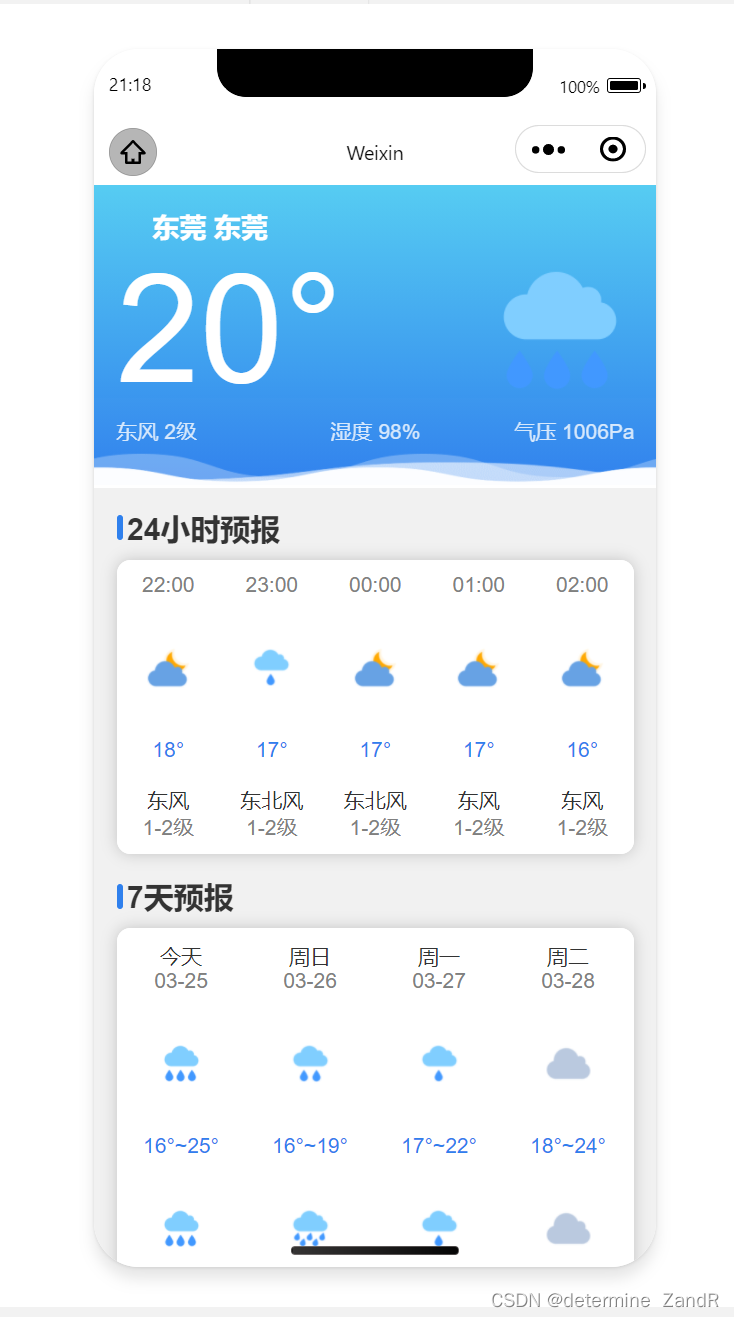
和风天气的官网
和风天气插件 | 和风天气插件产品,免费、跨终端。适配你的网站、APP、公众号 (qweather.com)
控制台===》项目管理===》创建项目 就可以看到以下页面(注意:如果页面不一样的话,可能是更新了)
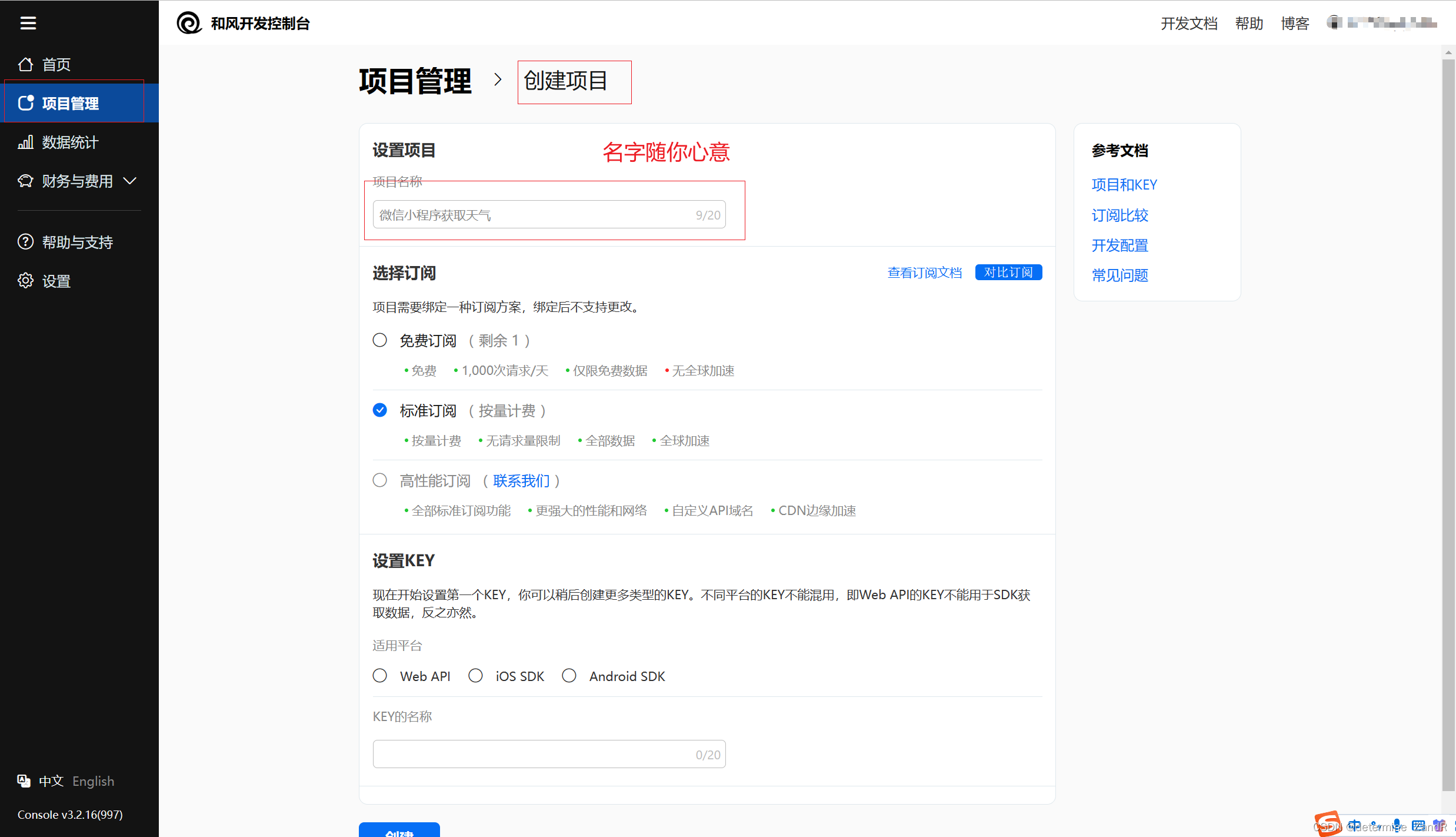
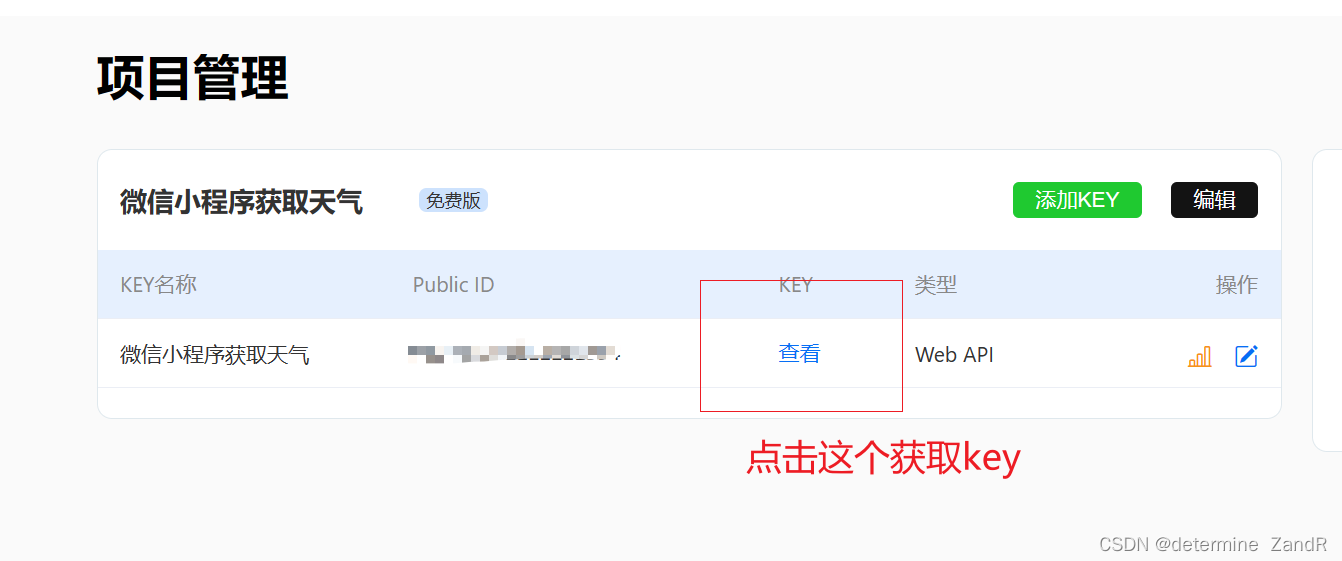
这个地方注意一下,看你是做案例还是,公司使用,如果是做案例,可以和小编一样选择免费订阅。设置key的地方你可以选择Web API,如果你选择了 Android SDK / iOS SDK,那么生成的密钥只能使用官方的 SDK 进行数据访问,如果是 Web API的话,可以自己编程获取并解析数据。(当然WebAPI解析比较慢一点,可以稍微等一会)
如果是小白的话,没有账号,建议注册一个小程序的账号,具体看小编的这篇文章。有账号跳过这个步骤
【微信小程序】注册小程序账号、做一个案例——你好我的小程序_determine ZandR的博客-CSDN博客
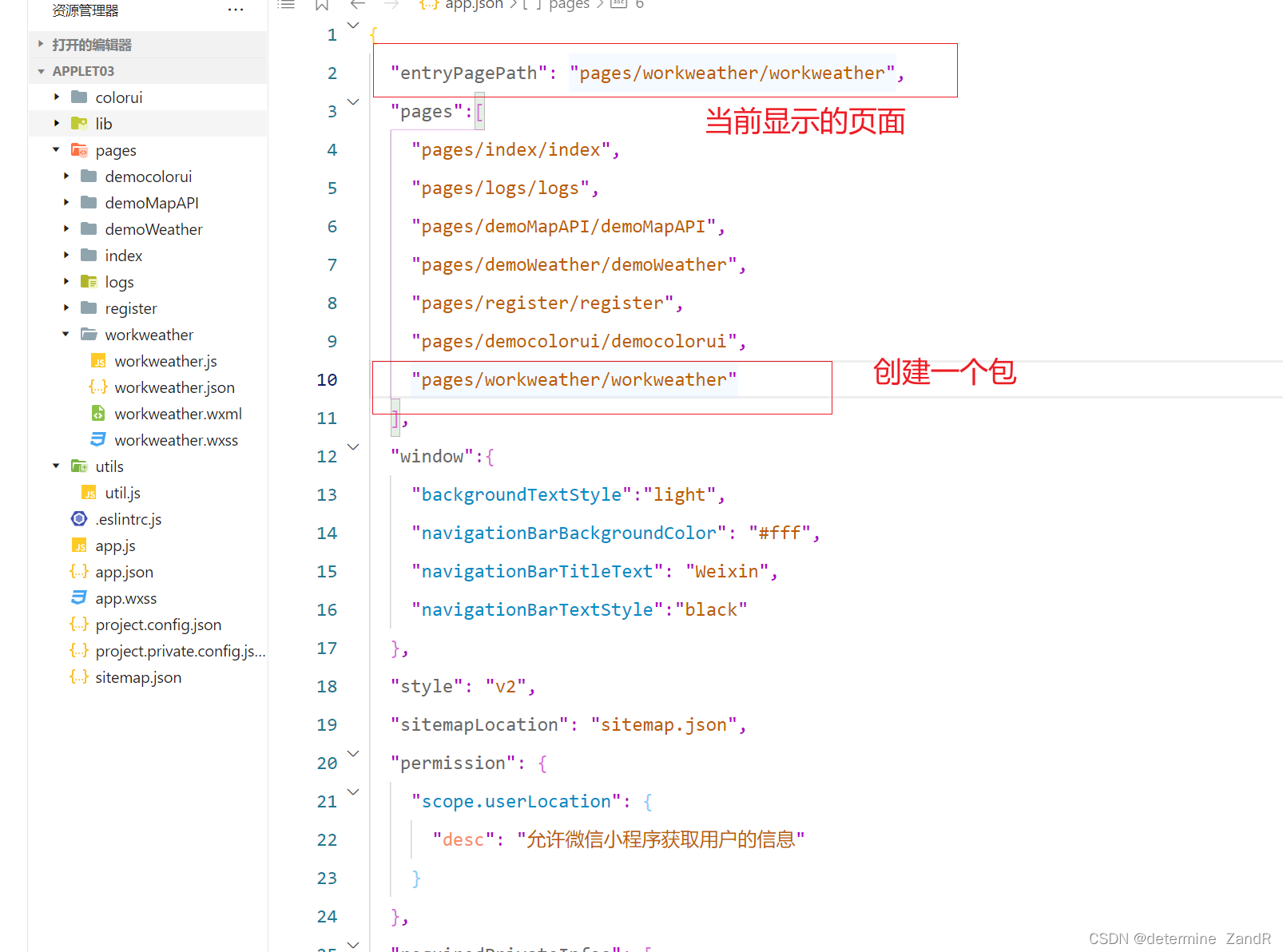
<view class="header-modular" wx:if="{{now}}">
	<image class="bg-wave" src="https://codermoyv.gitee.io/coder-moyv/assets/images/wechat/bg_wave.gif"></image>
	<view class="row">
		<view class="row location-wrap" bindtap="selectLocation">
			<image class="icon" src=""></image>
			<view class="title">{{City}} {{County}}</view>
		</view>

	</view>
	<view class="row">
		<view class="tmp">{{now.temp}}°</view>
		<image class="icon-weather" src="https://codermoyv.gitee.io/coder-moyv/assets/images/wechat/weather_custom/{{now.icon}}.png"></image>
	</view>
	<view class="tips-wrap">
		<view class="tips ">{{now.windDir}} {{now.windScale}}级</view>
		<view class="tips ">湿度 {{now.humidity}}%</view>
		<view class="tips ">气压 {{now.pressure}}Pa</view>
	</view>
</view>

<view class="card-modular " wx:if="{{hourly}}">
	<view class="title">24小时预报</view>
	<view class="card-wrap">
		<block wx:for="{{hourly}}" wx:key="index">
			<view class="item hourly">
				<view class="text-gray">{{item.time}}</view>
				<image class="icon" src="https://codermoyv.gitee.io/coder-moyv/assets/images/wechat/weather_custom/{{item.icon}}.png"></image>
				<view class="text-primary mb-32">{{item.temp}}°</view>
				<view>{{item.windDir}}</view>
				<view class="text-gray">{{item.windScale}}级</view>
			</view>
		</block>
	</view>
</view>

<view class="card-modular" wx:if="{{daily}}">
	<view class="title">7天预报</view>
	<view class="card-wrap">
		<block wx:for="{{daily}}" wx:key="index">
			<view class="item daily">
				<view>{{item.dateToString}}</view>
				<view class="text-gray">{{item.date}}</view>
				<image class="icon" src="https://codermoyv.gitee.io/coder-moyv/assets/images/wechat/weather_custom/{{item.iconDay}}.png"></image>
				<view class="text-primary ">{{item.tempMin}}°~{{item.tempMax}}°</view>
				<image class="icon" src="https://codermoyv.gitee.io/coder-moyv/assets/images/wechat/weather_custom/{{item.iconNight}}.png"></image>
				<view>{{item.windDirDay}}</view>
				<view class="text-gray">{{item.windScaleDay}}级</view>
			</view>
		</block>
	</view>
</view> page {
background-color: linear-gradient(to bottom, #ffffff,#ffffff, #F6F6F6);
padding-bottom: 60rpx;
}
/* 工具类 */
.row {
display: flex;
align-items: center;
}
.mb-32{
margin-bottom: 32rpx;
}
/* 页面样式 */
.header-modular {
height: 400rpx;
background-color: #64C8FA;
background: linear-gradient(to bottom, #56CCF2, #2F80ED);
position: relative;
padding: 30rpx;
}
.header-modular .bg-wave {
width: 100vw;
position: absolute;
bottom: -2px;
left: 0;
right: 0;
height: 120rpx;
mix-blend-mode: screen;
}
.header-modular .location-wrap {
color: #ffffff;
font-weight: bold;
font-size: 36rpx;
}
.header-modular .location-wrap .icon {
width: 40rpx;
height: 40rpx;
margin-right: 8rpx;
}
.header-modular .tmp {
font-size: 200rpx;
/* font-weight: bold; */
color: #ffffff;
margin-right: auto;
}
.header-modular .icon-weather {
width: 200rpx;
height: 200rpx;
}
.header-modular .tips-wrap {
display: flex;
justify-content: space-between;
}
.header-modular .tips {
font-size: 28rpx;
opacity: 0.8;
color: #ffffff;
flex: 1;
}
.header-modular .tips:nth-child(3) {
text-align: right;
}
.header-modular .tips:nth-child(2) {
text-align: center;
}
.card-modular {
padding:0 30rpx;
margin-top: 30rpx;
}
.card-modular>.title {
font-size: 40rpx;
font-weight: bold;
position: relative;
margin-left: 14rpx;
margin-bottom: 16rpx;
}
.card-modular>.title::before {
content: "";
position: absolute;
left: -14rpx;
top: 10rpx;
bottom: 10rpx;
width: 8rpx;
border-radius: 10rpx;
background-color: #2F80ED;
}
.card-modular .card-wrap {
width: 690rpx;
border-radius: 18rpx;
background-color: #ffffff;
box-shadow: 0 0 20rpx 0 rgba(0, 0, 0, 0.2);
overflow-x: auto;
white-space: nowrap;
}
.card-modular .card-wrap .item {
display: inline-flex;
flex-direction: column;
align-items: center;
font-size: 28rpx;
padding: 18rpx 0;
}
.card-modular .card-wrap .item.hourly{
width: 138rpx;
}
.card-modular .card-wrap .item.daily{
width: 172.5rpx;
}
.card-modular .card-wrap .item .icon {
width: 60rpx;
height: 60rpx;
margin: 64rpx 0;
}
.card-modular .card-wrap .item .text-gray {
color: gray;
}
.card-modular .card-wrap .item .text-primary {
color: #2F80ED;
}
const APIKEY = "";// 填入你申请的KEY
Page({

  /**
   * 页面的初始数据
   */
  data: {

  },

  /**
   * 生命周期函数--监听页面加载
   */
  onLoad: function (options) {
    this.getLocation()
  },
  //选择定位
  selectLocation() {
    var that = this
    wx.chooseLocation({
      success(res) {
        //console.log(res)
        that.setData({
          location: res.longitude + "," + res.latitude
        })
        that.getWeather()
        that.getCityByLoaction()
      }
      , fail() {
        wx.getLocation({
          type: 'gcj02',
          fail() {
            wx.showModal({
              title: '获取地图位置失败',
              content: '为了给您提供准确的天气预报服务,请在设置中授权【位置信息】',
              success(mRes) {
                if (mRes.confirm) {
                  wx.openSetting({
                    success: function (data) {
                      if (data.authSetting["scope.userLocation"] === true) {
                        that.selectLocation()
                      } else {
                        wx.showToast({
                          title: '授权失败',
                          icon: 'none',
                          duration: 1000
                        })
                      }
                    }, fail(err) {
                      console.log(err)
                      wx.showToast({
                        title: '唤起设置页失败,请手动打开',
                        icon: 'none',
                        duration: 1000
                      })
                    }
                  })
                }
              }
            })
          }
        })

      }
    })
  },
  /**
   * 获取定位
   */
  getLocation() {
    var that = this
    wx.getLocation({
      type: 'gcj02',
      success(res) {
        that.setData({
          location: res.longitude + "," + res.latitude
        })
        that.getWeather()
        that.getCityByLoaction()
      }, fail(err) {
        wx.showModal({
          title: '获取定位信息失败',
          content: '为了给您提供准确的天气预报服务,请在设置中授权【位置信息】',
          success(mRes) {
            if (mRes.confirm) {
              wx.openSetting({
                success: function (data) {
                  if (data.authSetting["scope.userLocation"] === true) {
                    wx.showToast({
                      title: '授权成功',
                      icon: 'success',
                      duration: 1000
                    })
                    that.getLocation()
                  } else {
                    wx.showToast({
                      title: '授权失败',
                      icon: 'none',
                      duration: 1000
                    })
                    that.setData({
                      location: "地理位置"
                    })
                    that.getWeather()
                    that.getCityByLoaction()
                  }
                }, fail(err) {
                  console.log(err)
                  wx.showToast({
                    title: '唤起设置页失败,请手动打开',
                    icon: 'none',
                    duration: 1000
                  })
                  that.setData({
                    location: "地理位置"
                  })
                  that.getWeather()
                  that.getCityByLoaction()
                }
              })
            } else if (mRes.cancel) {
              that.setData({
                location: "地理位置"
              })
              that.getWeather()
              that.getCityByLoaction()
            }
          }
        })
      }
    })
  },
  /**
   * 根据坐标获取城市信息
   */
  getCityByLoaction() {
    var that = this
    wx.request({
      url: 'https://geoapi.qweather.com/v2/city/lookup?key=' + APIKEY + "&location=" + that.data.location,
      success(result) {
        var res = result.data
        if (res.code == "200") {
          var data = res.location[0]
          that.setData({
            City: data.adm2,
            County: data.name
          })
        } else {
          wx.showToast({
            title: '获取城市信息失败',
            icon: 'none'
          })
        }

      }
    })
  },
  /**
   * 获取天气
   */
  getWeather() {
    var that = this
    wx.showLoading({
      title: '加载中',
    })
    wx.request({
      url: 'https://devapi.qweather.com/v7/weather/now?key=' + APIKEY + "&location=" + that.data.location,
      success(result) {
        var res = result.data
        //console.log(res)
        that.setData({
          now: res.now
        })
      }
    })
    wx.request({
      url: 'https://devapi.qweather.com/v7/weather/24h?key=' + APIKEY + "&location=" + that.data.location,
      success(result) {
        var res = result.data
        //console.log(res)
        res.hourly.forEach(function (item) {
          item.time = that.formatTime(new Date(item.fxTime)).hourly
        })
        that.setData({
          hourly: res.hourly
        })
      }
    })
    wx.request({
      url: 'https://devapi.qweather.com/v7/weather/7d?key=' + APIKEY + "&location=" + that.data.location,
      success(result) {
        var res = result.data
        //console.log(res)
        res.daily.forEach(function (item) {
          item.date = that.formatTime(new Date(item.fxDate)).daily
          item.dateToString = that.formatTime(new Date(item.fxDate)).dailyToString
        })
        that.setData({
          daily: res.daily
        })
        wx.hideLoading()
      }
    })
  },
  // 格式时间
  formatTime(date) {
    const year = date.getFullYear()
    const month = date.getMonth() + 1
    const day = date.getDate()
    const hour = date.getHours()
    const minute = date.getMinutes()
    const second = date.getSeconds()
    const weekArray = ["周日", "周一", "周二", "周三", "周四", "周五", "周六"]
    const isToday = date.setHours(0, 0, 0, 0) == new Date().setHours(0, 0, 0, 0)
    return {
      hourly: [hour, minute].map(this.formatNumber).join(":"),
      daily: [month, day].map(this.formatNumber).join("-"),
      dailyToString: isToday ? "今天" : weekArray[date.getDay()]
    }
  },
  // 补零
  formatNumber(n) {
    n = n.toString()
    return n[1] ? n : '0' + n
  },
  /**
   * 生命周期函数--监听页面初次渲染完成
   */
  onReady: function () {

  },

  /**
   * 生命周期函数--监听页面显示
   */
  onShow: function () {

  },

  /**
   * 生命周期函数--监听页面隐藏
   */
  onHide: function () {

  },

  /**
   * 生命周期函数--监听页面卸载
   */
  onUnload: function () {

  },

  /**
   * 页面相关事件处理函数--监听用户下拉动作
   */
  onPullDownRefresh: function () {

  },

  /**
   * 页面上拉触底事件的处理函数
   */
  onReachBottom: function () {

  },

  /**
   * 用户点击右上角分享
   */
  onShareAppMessage: function () {

  }
})
以上就是小编做的一个小案例,希望各位大佬多多指教!!!
我正在学习如何使用Nokogiri,根据这段代码我遇到了一些问题:require'rubygems'require'mechanize'post_agent=WWW::Mechanize.newpost_page=post_agent.get('http://www.vbulletin.org/forum/showthread.php?t=230708')puts"\nabsolutepathwithtbodygivesnil"putspost_page.parser.xpath('/html/body/div/div/div/div/div/table/tbody/tr/td/div
我有一个Ruby程序,它使用rubyzip压缩XML文件的目录树。gem。我的问题是文件开始变得很重,我想提高压缩级别,因为压缩时间不是问题。我在rubyzipdocumentation中找不到一种为创建的ZIP文件指定压缩级别的方法。有人知道如何更改此设置吗?是否有另一个允许指定压缩级别的Ruby库? 最佳答案 这是我通过查看rubyzip内部创建的代码。level=Zlib::BEST_COMPRESSIONZip::ZipOutputStream.open(zip_file)do|zip|Dir.glob("**/*")d
类classAprivatedeffooputs:fooendpublicdefbarputs:barendprivatedefzimputs:zimendprotecteddefdibputs:dibendendA的实例a=A.new测试a.foorescueputs:faila.barrescueputs:faila.zimrescueputs:faila.dibrescueputs:faila.gazrescueputs:fail测试输出failbarfailfailfail.发送测试[:foo,:bar,:zim,:dib,:gaz].each{|m|a.send(m)resc
很好奇,就使用rubyonrails自动化单元测试而言,你们正在做什么?您是否创建了一个脚本来在cron中运行rake作业并将结果邮寄给您?git中的预提交Hook?只是手动调用?我完全理解测试,但想知道在错误发生之前捕获错误的最佳实践是什么。让我们理所当然地认为测试本身是完美无缺的,并且可以正常工作。下一步是什么以确保他们在正确的时间将可能有害的结果传达给您? 最佳答案 不确定您到底想听什么,但是有几个级别的自动代码库控制:在处理某项功能时,您可以使用类似autotest的内容获得关于哪些有效,哪些无效的即时反馈。要确保您的提
假设我做了一个模块如下:m=Module.newdoclassCendend三个问题:除了对m的引用之外,还有什么方法可以访问C和m中的其他内容?我可以在创建匿名模块后为其命名吗(就像我输入“module...”一样)?如何在使用完匿名模块后将其删除,使其定义的常量不再存在? 最佳答案 三个答案:是的,使用ObjectSpace.此代码使c引用你的类(class)C不引用m:c=nilObjectSpace.each_object{|obj|c=objif(Class===objandobj.name=~/::C$/)}当然这取决于
我正在尝试使用ruby和Savon来使用网络服务。测试服务为http://www.webservicex.net/WS/WSDetails.aspx?WSID=9&CATID=2require'rubygems'require'savon'client=Savon::Client.new"http://www.webservicex.net/stockquote.asmx?WSDL"client.get_quotedo|soap|soap.body={:symbol=>"AAPL"}end返回SOAP异常。检查soap信封,在我看来soap请求没有正确的命名空间。任何人都可以建议我
关闭。这个问题是opinion-based.它目前不接受答案。想要改进这个问题?更新问题,以便editingthispost可以用事实和引用来回答它.关闭4年前。Improvethisquestion我想在固定时间创建一系列低音和高音调的哔哔声。例如:在150毫秒时发出高音调的蜂鸣声在151毫秒时发出低音调的蜂鸣声200毫秒时发出低音调的蜂鸣声250毫秒的高音调蜂鸣声有没有办法在Ruby或Python中做到这一点?我真的不在乎输出编码是什么(.wav、.mp3、.ogg等等),但我确实想创建一个输出文件。
我在我的项目目录中完成了compasscreate.和compassinitrails。几个问题:我已将我的.sass文件放在public/stylesheets中。这是放置它们的正确位置吗?当我运行compasswatch时,它不会自动编译这些.sass文件。我必须手动指定文件:compasswatchpublic/stylesheets/myfile.sass等。如何让它自动运行?文件ie.css、print.css和screen.css已放在stylesheets/compiled。如何在编译后不让它们重新出现的情况下删除它们?我自己编译的.sass文件编译成compiled/t
我想将html转换为纯文本。不过,我不想只删除标签,我想智能地保留尽可能多的格式。为插入换行符标签,检测段落并格式化它们等。输入非常简单,通常是格式良好的html(不是整个文档,只是一堆内容,通常没有anchor或图像)。我可以将几个正则表达式放在一起,让我达到80%,但我认为可能有一些现有的解决方案更智能。 最佳答案 首先,不要尝试为此使用正则表达式。很有可能你会想出一个脆弱/脆弱的解决方案,它会随着HTML的变化而崩溃,或者很难管理和维护。您可以使用Nokogiri快速解析HTML并提取文本:require'nokogiri'h
我想为Heroku构建一个Rails3应用程序。他们使用Postgres作为他们的数据库,所以我通过MacPorts安装了postgres9.0。现在我需要一个postgresgem并且共识是出于性能原因你想要pggem。但是我对我得到的错误感到非常困惑当我尝试在rvm下通过geminstall安装pg时。我已经非常明确地指定了所有postgres目录的位置可以找到但仍然无法完成安装:$envARCHFLAGS='-archx86_64'geminstallpg--\--with-pg-config=/opt/local/var/db/postgresql90/defaultdb/po
