// 项目环境信息
npm: 8.1.0
node: 16.13.0
vue": ^3.2.45
vue-router: ^4.1.6
vite: ^4.0.0
typescript: ~4.7.4
less: ^4.1.3
目标:创建 vue-amazing-ui 组件库,并发布到npm,效果如下图:
(已成功上传至npm,可自行安装使用,目前已包含27个常用UI组件,持续更新中...)
若文章不够详细,建议直接git clone vue-amazing-ui 进行查看!
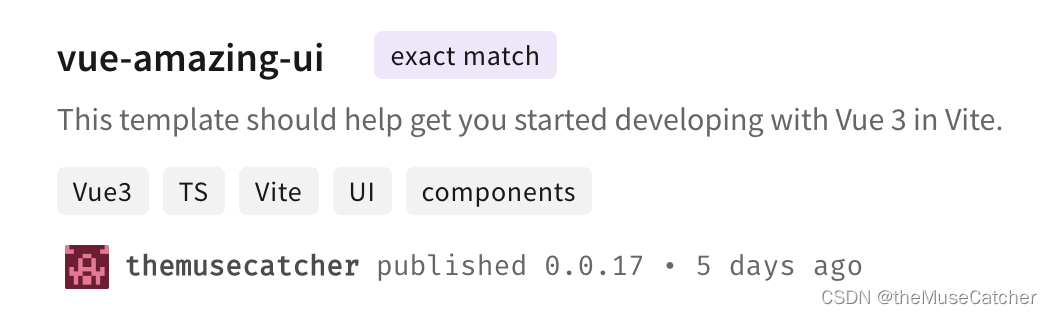
目前拥有的组件:
面包屑、按钮、走马灯、级联选择、多选框、折叠面板、倒计时、日期选择器、对话框、全局提示、信息提示、通知提醒框、分页器、进度条、单选框、选择器、滑动输入条、加载中、步骤条、触摸滑动插件、开关、表格、文字滚动、时间轴、文字提示、播放器、瀑布流
①创建vue3+ts+vite项目:
npm init vue@latest(输入项目名称,并依次选择需要安装的依赖项)
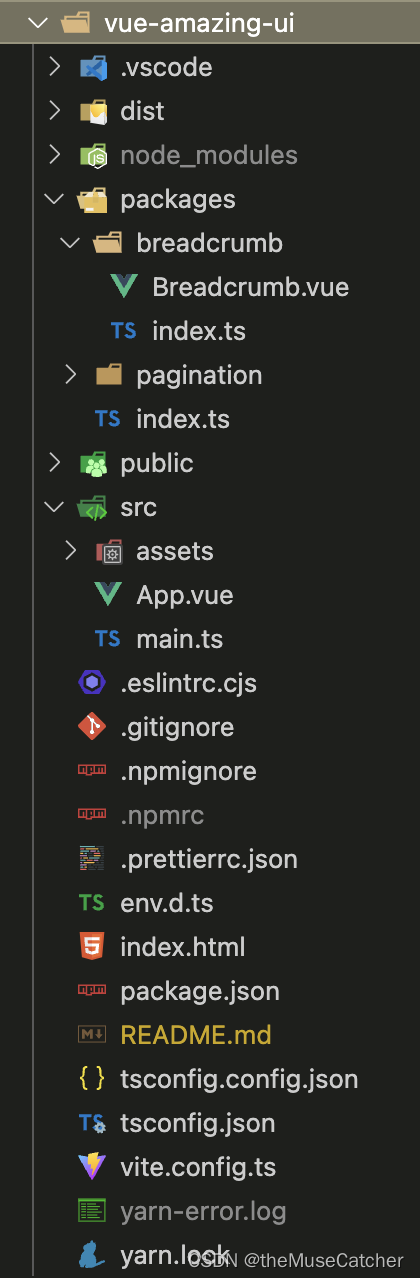
②项目目录结构截图如下:
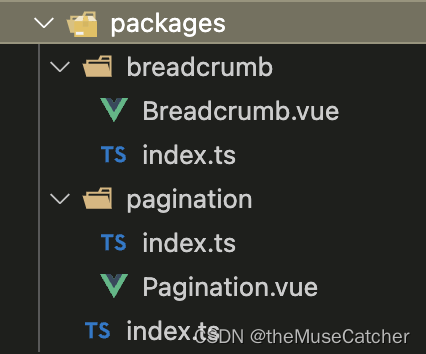
③在项目根目录新建 packages/ 文件夹用于存放组件 (以Breadcrumb为例,其他类似)
④在项目根目录中的 vite.config.ts 中写入相关配置项:
import { fileURLToPath, URL } from 'node:url'

import { resolve } from 'path'
import { defineConfig } from 'vite'
import vue from '@vitejs/plugin-vue'

// https://vitejs.dev/config/
export default defineConfig({
  plugins: [vue()],
  resolve: {
    alias: {
      '@': fileURLToPath(new URL('./src', import.meta.url))
    }
  },
  css: {
    preprocessorOptions: {
      less: {
        modifyVars: { // 或者globalVars
          // `themeColor` is global variables fields name
          themeColor: '#1890FF'
        },
        javascriptEnabled: true
      },
    },
  },
  // 配置打包入口
  build: {
    lib: { // 构建为库。如果指定了 build.lib,build.cssCodeSplit 会默认为 false。
      // __dirname的值是vite.config.ts文件所在目录
      entry: resolve(__dirname, 'packages/index.ts'),  // entry是必需的,因为库不能使用HTML作为入口。
      name: 'VueAmazingUI', // 暴露的全局变量
      fileName: 'vue-amazing-ui' // 输出的包文件名,默认是package.json的name选项
    },
    rollupOptions: { // 自定义底层的Rollup打包配置
      // https://rollupjs.org/configuration-options/
      // 确保外部化处理那些你不想打包进库的依赖
      external: ['vue', 'vue-router'],
      output: {
        exports: 'named', // https://rollupjs.org/configuration-options/#output-exports
        // 在 UMD 构建模式下为这些外部化的依赖提供一个全局变量
        globals: {
          vue: 'Vue',
          'vue-router': 'VueRouter' // 引入vue-router全局变量,否则router.push将无法使用
        }
      }
    },
    /** 设置为 false 可以禁用最小化混淆,或是用来指定使用哪种混淆器。
        默认为 Esbuild,它比 terser 快 20-40 倍,压缩率只差 1%-2%。
        注意,在 lib 模式下使用 'es' 时,build.minify 选项不会缩减空格,因为会移除掉 pure 标注,导致破坏 tree-shaking。
        当设置为 'terser' 时必须先安装 Terser。(yarn add terser -D)
    */
    minify: 'terser', // Vite 2.6.x 以上需要配置 minify: "terser", terserOptions 才能生效
    terserOptions: { // 在打包代码时移除 console、debugger 和 注释
      compress: {
        /* (default: false) -- Pass true to discard calls to console.* functions.
          If you wish to drop a specific function call such as console.info and/or
          retain side effects from function arguments after dropping the function
          call then use pure_funcs instead
        */
        drop_console: true, // 生产环境时移除console
        drop_debugger: true
      },
      format: {
        comments: false // 删除注释comments
      }
    }
  }
})
⑤在 packages/ 文件夹下创建UI组件,例如:新建 breadcrumb/ 和 pagination/ 文件夹,截图如下:

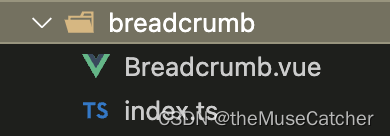
⑥在 breadcrumb/ 文件夹下新建 Breadcrumb.vue 组件文件和 index.ts 文件,截图如下:
⑦在Breadcrumb.vue 中编写组件代码:
<script setup lang="ts">
import { computed } from 'vue'
import { useRouter } from 'vue-router'
interface Route {
  path: string,
  query: object,
  name: string
}
interface Props {
  routes: Array<Route>, // 或者Route[] router的路由数组,没有 ? 时,即表示 required: true
  height?: number, // 面包屑高度
  separator?: string // 自定义分隔符
}
const props = withDefaults(defineProps<Props>(), {
  routes: () => [],
  height: 60,
  separator: ''
})

const len = computed(() => {
  return props.routes.length
})
const router = useRouter()
function goRouter (route: any): void {
  router.push({ path: route.path, query: route.query || {} })
}
</script>
<template>
  <div class="m-breadcrumb" :style="`height: ${height}px;`">
    <div class="m-bread" v-for="(route, index) in routes" :key="index">
      <a
        :class="['u-route',{ active: index===len-1 }]"
        @click="index === len - 1 ? (e:Event) => e.preventDefault() : goRouter(route)"
        :title="route.name">
        {{ route.name || '--' }}
      </a>
      <template v-if="index !== len - 1">
        <span v-if="separator" class="u-separator">{{ separator }}</span>
        <svg v-else class="u-arrow" viewBox="64 64 896 896" data-icon="right" aria-hidden="true" focusable="false"><path d="M765.7 486.8L314.9 134.7A7.97 7.97 0 0 0 302 141v77.3c0 4.9 2.3 9.6 6.1 12.6l360 281.1-360 281.1c-3.9 3-6.1 7.7-6.1 12.6V883c0 6.7 7.7 10.4 12.9 6.3l450.8-352.1a31.96 31.96 0 0 0 0-50.4z"></path></svg>
      </template>
    </div>
    <div class="assist"></div>
  </div>
</template>
<style lang="less" scoped>
.m-breadcrumb {
  .m-bread {
    display: inline-block;
    vertical-align: middle;
    .u-route {
      height: 22px;
      font-size: 16px;
      font-weight: 400;
      line-height: 22px;
      color: #333;
      display: inline-block;
      vertical-align: middle;
      max-width: 240px;
      overflow: hidden;
      white-space: nowrap;
      text-overflow: ellipsis;
      cursor: pointer;
      &:hover {
        color: @themeColor;
      }
    }
    .active {
      color: @themeColor;
      cursor: default;
    }
    .u-separator {
      display: inline-block;
      vertical-align: middle;
      margin: 0 6px;
    }
    .u-arrow {
      .u-separator();
      margin: 0 5px;
      width: 12px;
      height: 12px;
    }
  }
  .assist {
    height: 100%;
    width: 0;
    display: inline-block;
    vertical-align: middle;
  }
}
</style>
⑧在 breadcrumb/index.ts 中导出组件
import type { App } from 'vue'
import Breadcrumb from './Breadcrumb.vue'

// 使用install方法,在app.use挂载
Breadcrumb.install = (app: App) => {
  app.component(Breadcrumb.__name as string, Breadcrumb)
}

export default Breadcrumb
⑨在 packages/index.ts 文件中对整个组件库进行导出:
import type { App } from 'vue'
import Breadcrumb from './breadcrumb'
import Pagination from './pagination'

// 所有组件列表
const components = [
  Breadcrumb,
  Pagination
]

// 定义 install 方法
const install = (app: App): void => {
  // 遍历注册所有组件
  /*
    component.__name ts报错
    Argument of type 'string | undefined' is not assignable to parameter of type 'string'.
    Type 'undefined' is not assignable to type 'string'.ts(2345)
    解决方式一:使用// @ts-ignore
    解决方式二:使用类型断言 尖括号语法(<string>component.__name) 或 as语法(component.__name as string)
  */
  components.forEach(component => app.component(component.__name as string, component))
}

export {
  Breadcrumb,
  Pagination
}

const VueAmazingUI = {
  install
}

export default VueAmazingUI
⑩在 src/main.ts 中导入刚创建的组件,检测是否正常可用
// import VueAmazingUI from '../packages'
import VueAmazingUI from '../dist/vue-amazing-ui.js'
import '../dist/style.css'
// import { Breadcrumb } from '../dist/vue-amazing-ui.js'

const app = createApp(App)

app.use(VueAmazingUI)
// app.use(Breadcrumb)

app.mount('#app')
⑪在终端执行 npm init 初始化包,选填并配置package.json:
{
  "name": "vue-amazing-ui",
  "version": "0.0.18",
  "private": false,
  "type": "module", // 如果 package.json 不包含 "type": "module",Vite 会生成不同的文件后缀名以兼容 Node.js。.js 会变为 .mjs 而 .cjs 会变为 .js
  "files": [ // 检测dist打包目录的所有文件
    "dist"
  ],
  "main": "./dist/vue-amazing-ui.umd.cjs",
  "module": "./dist/vue-amazing-ui.js",
  "exports": {
    "./dist/style.css": "./dist/style.css", // 子目录别名,方便样式引入
    "./css": "./dist/style.css",
    ".": { // 模块的主入口,优先级高于main字段,利用.这个别名,为 ES6 模块(import)和 CommonJS (require)指定不同的入口
      "import": "./dist/vue-amazing-ui.js",
      "require": "./dist/vue-amazing-ui.umd.cjs"
    }
  },
  "scripts": {
    "dev": "vite --port 9000 --open --force",
    "build": "run-p type-check build-only",
    "preview": "vite preview",
    "build-only": "vite build --watch",
    "type-check": "vue-tsc --noEmit",
    "lint": "eslint . --ext .vue,.js,.jsx,.cjs,.mjs,.ts,.tsx,.cts,.mts --fix --ignore-path .gitignore"
  },
  "dependencies": {
    "core-js": "^3.28.0",
    "vue": "^3.2.45",
    "vue-router": "^4.1.6"
  },
  "devDependencies": {
    "@rushstack/eslint-patch": "^1.1.4",
    "@types/node": "^18.11.12",
    "@vitejs/plugin-vue": "^4.0.0",
    "@vue/eslint-config-typescript": "^11.0.0",
    "@vue/tsconfig": "^0.1.3",
    "eslint": "^8.22.0",
    "eslint-plugin-vue": "^9.3.0",
    "less": "^4.1.3",
    "npm-run-all": "^4.1.5",
    "prettier": "^2.7.1",
    "terser": "^5.16.4",
    "typescript": "~4.7.4",
    "vite": "^4.0.0",
    "vue-tsc": "^1.0.12"
  },
  "description": "This template should help get you started developing with Vue 3 in Vite.",
  "repository": {
    "type": "git",
    "url": "git+https://github.com/themusecatcher/vue-amazing-ui.git"
  },
  "keywords": [
    "Vue3",
    "TS",
    "Vite",
    "UI",
    "components"
  ],
  "author": "theMuseCatcher",
  "license": "ISC",
  "bugs": {
    "url": "https://github.com/themusecatcher/vue-amazing-ui/issues"
  },
  "homepage": "https://github.com/themusecatcher/vue-amazing-ui#readme"
}
name: 包名,该名字是唯一的。可在 npm 官网搜索名字,不可重复。
version: 版本号,每次发布至 npm 需要修改版本号,不能和历史版本号相同。
private:是否私有,需要修改为 false 才能发布到 npm
description: 关于包的描述。
main: 入口文件,需指向最终编译后的包文件。
keywords:关键字,以空格分离希望用户最终搜索的词。
author:作者
license: 开源协议
vite build --watch:当启用 --watch 标志时(启用 rollup 的监听器),对 vite.config.ts 的改动,以及任何要打包的文件,都将触发重新构建
vite --port 9000 --open --force:指定端口9000,启动时打开浏览器,强制优化器忽略缓存并重新构建。
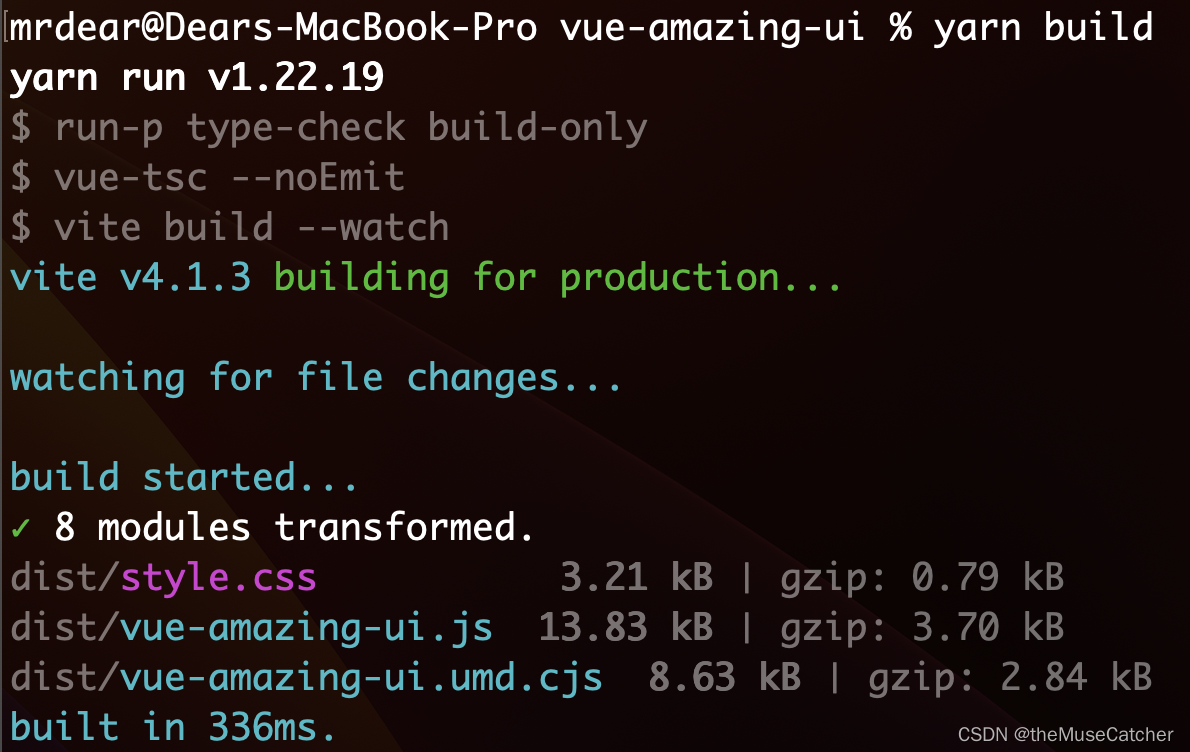
⑫执行编译命令
yarn build(或num run build)
执行结果如下图:
⑬在项目根目录创建 .npmignore 文件,设置忽略发布的文件,类似 .gitignore 文件
只有编译后的 dist 目录、package.json、README.md是需要被发布的
# 忽略目录
.DS_Store
.vscode/
node_modules
packages/
public/
src/

# 忽略指定文件
.eslintrc.cjs
.gitignore
.npmignore
.npmrc
.prettierrc.json
env.d.ts
index.html
tsconfig.config.json
tsconfig.json
vite.config.ts
yarn.lock
⑭编写README.md文件(使用markdown格式)
# vue-amazing-ui

## Install & Use

```sh
npm install vue-amazing-ui
#or
yarn add vue-amazing-ui
```

Import and register component

**Global**

```ts
import { createApp } from 'vue'
import App from './App.vue'

import VueAmazingUI from 'vue-amazing-ui'
import 'vue-amazing-ui/css'

const app = createApp(App)
app.use(VueAmazingUI)
```

**Local**

```vue
<script setup lang="ts">
import { Button } from 'vue-amazing-ui'
import 'vue-amazing-ui/css'
</script>
```

## Project

- Get the project code

```sh
git clone https://github.com/themusecatcher/vue-amazing-ui.git
```

- Install dependencies

```sh
cd vue-amazing-ui

yarn
#or
yarn install
```

- Run project

```sh
yarn dev
```

## Components

| Component name | Descriptions |
| :--- | :--- |
Breadcrumb | 面包屑
Button | 按钮
Carousel | 走马灯
Cascader | 级联选择
Checkbox | 多选框
Collapse | 折叠面板
Countdown | 倒计时
DatePicker | 日期选择器
Dialog | 对话框
Message | 全局提示
Modal | 信息提示
Notification | 通知提醒框
Pagination | 分页器
Progress | 进度条
Radio | 单选框
Select | 选择器
Slider | 滑动输入条
Swiper | 触摸滑动插件
Spin | 加载中
Steps | 步骤条
Switch | 开关
Table | 表格
TextScroll | 文字滚动
Tooltip | 文字提示
Video | 播放器
Waterfall | 瀑布流

## Details

[My CSDN Blogs](https://blog.csdn.net/Dandrose)
⑮登录npm
如果没有npm账号,可以去npm官网( npm) 注册一个账号
注册成功后在本地查看npm镜像:
npm config get registry
输出:http://registry.npmjs.org 即可
如果不是则需要设置为npm镜像:
npm config set registry https://registry.npmjs.org
然后在终端执行:
npm login
依次输入用户名,密码,邮箱
输出Logged in as…即可
npm whoami // 查看当前用户是否已登录
⑯发布组件到npm
在终端执行:npm publish
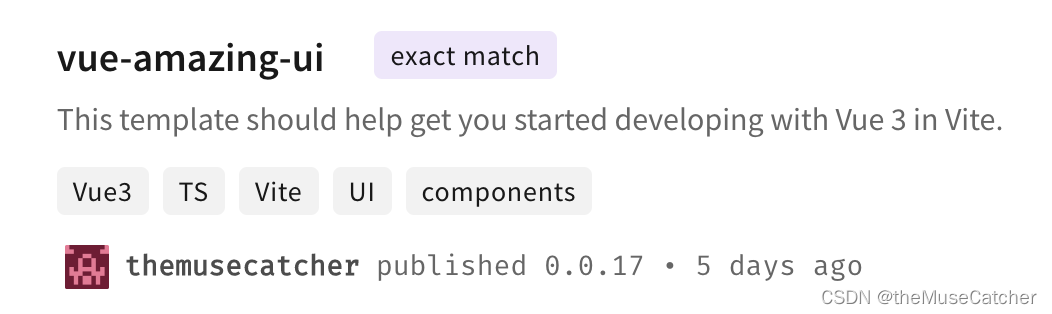
发布成功后即可在npm官网搜索到该组件,如下图;并可以通过 npm install vue-amazing-ui(或yarn add vue-amazing-ui)进行安装
⑰在要使用的项目中安装并注册插件:
yarn add vue-amazing-ui
然后在 main.ts 文件中引入并注册:
import VueAmazingUI from 'vue-amazing-ui'
// import { Pagination, Breadcrumb } from 'vue-amazing-ui'
import 'vue-amazing-ui/css'

app.use(VueAmazingUI)
// app.use(Pagination).use(Breadcrumb)
在要使用组件的页面直接使用即可:
<Breadcrumb :routes="routes" :height="60" />
在选择我想要运行操作的频率时,唯一的选项是“每天”、“每小时”和“每10分钟”。谢谢!我想为我的Rails3.1应用程序运行调度程序。 最佳答案 这不是一个优雅的解决方案,但您可以安排它每天运行,并在实际开始工作之前检查日期是否为当月的第一天。 关于ruby-如何每月在Heroku运行一次Scheduler插件?,我们在StackOverflow上找到一个类似的问题: https://stackoverflow.com/questions/8692687/
我对最新版本的Rails有疑问。我创建了一个新应用程序(railsnewMyProject),但我没有脚本/生成,只有脚本/rails,当我输入ruby./script/railsgeneratepluginmy_plugin"Couldnotfindgeneratorplugin.".你知道如何生成插件模板吗?没有这个命令可以创建插件吗?PS:我正在使用Rails3.2.1和ruby1.8.7[universal-darwin11.0] 最佳答案 随着Rails3.2.0的发布,插件生成器已经被移除。查看变更日志here.现在
我正在编写一个包含C扩展的gem。通常当我写一个gem时,我会遵循TDD的过程,我会写一个失败的规范,然后处理代码直到它通过,等等......在“ext/mygem/mygem.c”中我的C扩展和在gemspec的“扩展”中配置的有效extconf.rb,如何运行我的规范并仍然加载我的C扩展?当我更改C代码时,我需要采取哪些步骤来重新编译代码?这可能是个愚蠢的问题,但是从我的gem的开发源代码树中输入“bundleinstall”不会构建任何native扩展。当我手动运行rubyext/mygem/extconf.rb时,我确实得到了一个Makefile(在整个项目的根目录中),然后当
我已经在Sinatra上创建了应用程序,它代表了一个简单的API。我想在生产和开发上进行部署。我想在部署时选择,是开发还是生产,一些方法的逻辑应该改变,这取决于部署类型。是否有任何想法,如何完成以及解决此问题的一些示例。例子:我有代码get'/api/test'doreturn"Itisdev"end但是在部署到生产环境之后我想在运行/api/test之后看到ItisPROD如何实现? 最佳答案 根据SinatraDocumentation:EnvironmentscanbesetthroughtheRACK_ENVenvironm
我们的git存储库中目前有一个Gemfile。但是,有一个gem我只在我的环境中本地使用(我的团队不使用它)。为了使用它,我必须将它添加到我们的Gemfile中,但每次我checkout到我们的master/dev主分支时,由于与跟踪的gemfile冲突,我必须删除它。我想要的是类似Gemfile.local的东西,它将继承从Gemfile导入的gems,但也允许在那里导入新的gems以供使用只有我的机器。此文件将在.gitignore中被忽略。这可能吗? 最佳答案 设置BUNDLE_GEMFILE环境变量:BUNDLE_GEMFI
这似乎非常适得其反,因为太多的gem会在window上破裂。我一直在处理很多mysql和ruby-mysqlgem问题(gem本身发生段错误,一个名为UnixSocket的类显然在Windows机器上不能正常工作,等等)。我只是在浪费时间吗?我应该转向不同的脚本语言吗? 最佳答案 我在Windows上使用Ruby的经验很少,但是当我开始使用Ruby时,我是在Windows上,我的总体印象是它不是Windows原生系统。因此,在主要使用Windows多年之后,开始使用Ruby促使我切换回原来的系统Unix,这次是Linux。Rub
我正在玩HTML5视频并且在ERB中有以下片段:mp4视频从在我的开发环境中运行的服务器很好地流式传输到chrome。然而firefox显示带有海报图像的视频播放器,但带有一个大X。问题似乎是mongrel不确定ogv扩展的mime类型,并且只返回text/plain,如curl所示:$curl-Ihttp://0.0.0.0:3000/pr6.ogvHTTP/1.1200OKConnection:closeDate:Mon,19Apr201012:33:50GMTLast-Modified:Sun,18Apr201012:46:07GMTContent-Type:text/plain
无论您是想搭建桌面端、WEB端或者移动端APP应用,HOOPSPlatform组件都可以为您提供弹性的3D集成架构,同时,由工业领域3D技术专家组成的HOOPS技术团队也能为您提供技术支持服务。如果您的客户期望有一种在多个平台(桌面/WEB/APP,而且某些客户端是“瘦”客户端)快速、方便地将数据接入到3D应用系统的解决方案,并且当访问数据时,在各个平台上的性能和用户体验保持一致,HOOPSPlatform将帮助您完成。利用HOOPSPlatform,您可以开发在任何环境下的3D基础应用架构。HOOPSPlatform可以帮您打造3D创新型产品,HOOPSSDK包含的技术有:快速且准确的CAD
在应用开发中,有时候我们需要获取系统的设备信息,用于数据上报和行为分析。那在鸿蒙系统中,我们应该怎么去获取设备的系统信息呢,比如说获取手机的系统版本号、手机的制造商、手机型号等数据。1、获取方式这里分为两种情况,一种是设备信息的获取,一种是系统信息的获取。1.1、获取设备信息获取设备信息,鸿蒙的SDK包为我们提供了DeviceInfo类,通过该类的一些静态方法,可以获取设备信息,DeviceInfo类的包路径为:ohos.system.DeviceInfo.具体的方法如下:ModifierandTypeMethodDescriptionstatic StringgetAbiList()Obt
项目介绍随着我国经济迅速发展,人们对手机的需求越来越大,各种手机软件也都在被广泛应用,但是对于手机进行数据信息管理,对于手机的各种软件也是备受用户的喜爱小学生兴趣延时班预约小程序的设计与开发被用户普遍使用,为方便用户能够可以随时进行小学生兴趣延时班预约小程序的设计与开发的数据信息管理,特开发了小程序的设计与开发的管理系统。小学生兴趣延时班预约小程序的设计与开发的开发利用现有的成熟技术参考,以源代码为模板,分析功能调整与小学生兴趣延时班预约小程序的设计与开发的实际需求相结合,讨论了小学生兴趣延时班预约小程序的设计与开发的使用。开发环境开发说明:前端使用微信微信小程序开发工具:后端使用ssm:VU
