最近需要使用一下selenium,刚运行就报错了。。。
前提准备:
1.安装selenium
2.下载chrome对应版本的chromedriver
代码就是一个简单的demo:
from selenium import webdriver
import time

browser = webdriver.Chrome()
browser.get('http://www.baidu.com/')
time.sleep(10)
运行报错:
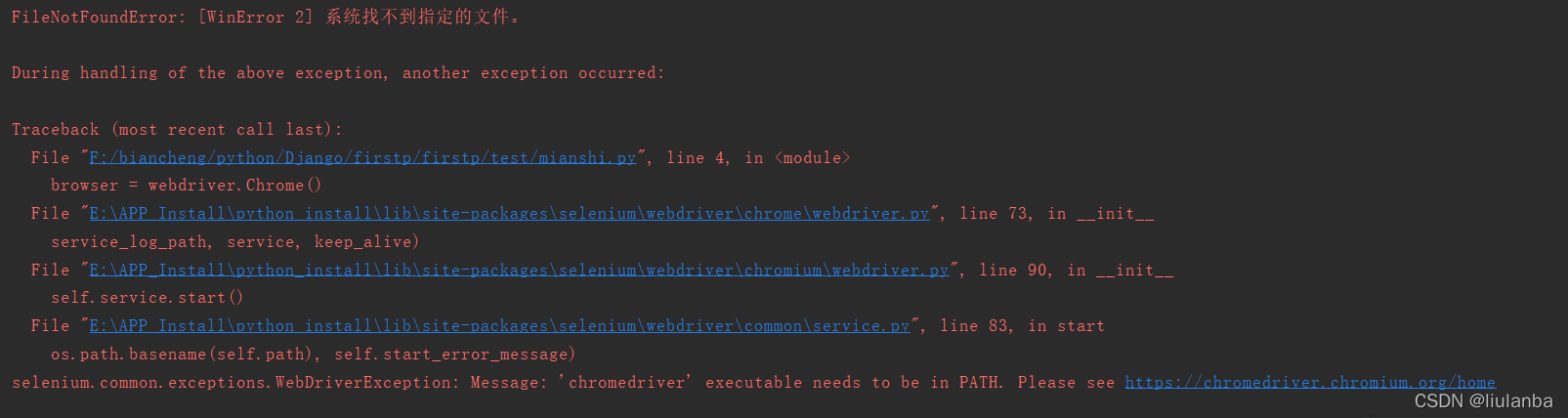
网上说要把chromedriver放到环境变量,放进去还是报错!!
然后就直接看源码吧:
这个过程很繁琐,很枯燥,嫌废话连篇请直接翻到文末解决方法~~
这个过程很繁琐,很枯燥,嫌废话连篇请直接翻到文末解决方法~~
这个过程很繁琐,很枯燥,嫌废话连篇请直接翻到文末解决方法~~
1.代码报错入口:
browser = webdriver.Chrome()
2.首先看报错被挂起的地方:
File “E:\APP_Install\python_install\lib\site-packages\selenium\webdriver\common\service.py”, line 83, in start
os.path.basename(self.path), self.start_error_message)
对应代码:
    def start(self):
        """
        Starts the Service.

        :Exceptions:
         - WebDriverException : Raised either when it can't start the service
           or when it can't connect to the service
        """
        try:
            cmd = [self.path]
            cmd.extend(self.command_line_args())
            self.process = subprocess.Popen(cmd, env=self.env,
                                            close_fds=system() != 'Windows',
                                            stdout=self.log_file,
                                            stderr=self.log_file,
                                            stdin=PIPE,
                                            creationflags=self.creationflags)
        except TypeError:
            raise
        except OSError as err:
            if err.errno == errno.ENOENT:
                raise WebDriverException(
                    "'%s' executable needs to be in PATH. %s" % (
                        os.path.basename(self.path), self.start_error_message)
                )
            elif err.errno == errno.EACCES:
                raise WebDriverException(
                    "'%s' executable may have wrong permissions. %s" % (
                        os.path.basename(self.path), self.start_error_message)
                )
            else:
                raise
3.是start()方法的try失败了,这里可以看到是self.path的问题,再往上回溯看调用start方法的地方,self.path = executable找到传值 executable的地方:
File “E:\APP_Install\python_install\lib\site-packages\selenium\webdriver\chromium\webdriver.py”, line 90, in init
self.service.start()
相关代码如下:
class ChromiumDriver(RemoteWebDriver):
    """
    Controls the WebDriver instance of ChromiumDriver and allows you to drive the browser.
    """

    def __init__(self, browser_name, vendor_prefix,
                 port=DEFAULT_PORT, options: BaseOptions = None, service_args=None,
                 desired_capabilities=None, service_log_path=DEFAULT_SERVICE_LOG_PATH,
                 service: Service = None, keep_alive=DEFAULT_KEEP_ALIVE):
        if desired_capabilities:
            warnings.warn('desired_capabilities has been deprecated, please pass in a Service object',
                          DeprecationWarning, stacklevel=2)
        if port != DEFAULT_PORT:
            warnings.warn('port has been deprecated, please pass in a Service object',
                          DeprecationWarning, stacklevel=2)
        self.port = port
        if service_log_path != DEFAULT_SERVICE_LOG_PATH:
            warnings.warn('service_log_path has been deprecated, please pass in a Service object',
                          DeprecationWarning, stacklevel=2)
        if keep_alive != DEFAULT_KEEP_ALIVE and type(self) == __class__:
            warnings.warn('keep_alive has been deprecated, please pass in a Service object',
                          DeprecationWarning, stacklevel=2)
        else:
            keep_alive = True

        self.vendor_prefix = vendor_prefix

        _ignore_proxy = None
        if not options:
            options = self.create_options()

        if desired_capabilities:
            for key, value in desired_capabilities.items():
                options.set_capability(key, value)

        if options._ignore_local_proxy:
            _ignore_proxy = options._ignore_local_proxy

        if not service:
            raise AttributeError('service cannot be None')

        self.service = service
        self.service.start()
4.粗看似乎没什么问题,self.service.start()前面并没有进行什么特殊定义和处理,并没有进行传参"self.path",这时候就要考虑python 的继承问题了,我进入它的父类RemoteWebDriver也没有发现导致该报错的问题,这时就要考虑子类了,我们此时还忽略了一个问题:报错入口: browser = webdriver.Chrome()
webdriver.Chrome()代码如下:
E:\APP_Install\python_install\Lib\site-packages\selenium\webdriver\chrome\webdriver.py
class WebDriver(ChromiumDriver):
    def __init__(self, executable_path=DEFAULT_EXECUTABLE_PATH, port=DEFAULT_PORT,
                 options: Options = None, service_args=None,
                 desired_capabilities=None, service_log_path=DEFAULT_SERVICE_LOG_PATH,
                 chrome_options=None, service: Service = None, keep_alive=DEFAULT_KEEP_ALIVE):
        if executable_path != 'chromedriver':
            warnings.warn('executable_path has been deprecated, please pass in a Service object',
                          DeprecationWarning, stacklevel=2)
        if chrome_options:
            warnings.warn('use options instead of chrome_options',
                          DeprecationWarning, stacklevel=2)
            options = chrome_options
        if keep_alive != DEFAULT_KEEP_ALIVE:
            warnings.warn('keep_alive has been deprecated, please pass in a Service object',
                          DeprecationWarning, stacklevel=2)
        else:
            keep_alive = True
        if not service:
            service = Service(executable_path, port, service_args, service_log_path)

        super(WebDriver, self).__init__(DesiredCapabilities.CHROME['browserName'], "goog",
                                        port, options,
                                        service_args, desired_capabilities,
                                        service_log_path, service, keep_alive)
5.这不就连起来了吗,子类调用父类的__init__方法:
super(WebDriver, self).__init__ #和第3步相连
6.这个时候我们要关注Service类的传参,即super(WebDriver, self).__init__的倒数第二个参数service:
service = Service(executable_path, port, service_args, service_log_path)
对应代码:
E:\APP_Install\python_install\Lib\site-packages\selenium\webdriver\chrome\service.py
class Service(service.ChromiumService):
    def __init__(self, executable_path: str = DEFAULT_EXECUTABLE_PATH,
                 port: int = 0, service_args: List[str] = None,
                 log_path: str = None, env: dict = None):
        super(Service, self).__init__(
            executable_path,
            port,
            service_args,
            log_path,
            env,
            "Please see https://chromedriver.chromium.org/home")
这里有同学可能有疑问了?
此处的Service和第2步的Service不是一个类啊!
是的,这里还有两层嵌套关系,直接ctrl点击进去就可以看:
1.super(Service, self).__init__
2.service.Service.__init__(self, executable_path, port=port, env=env, start_error_message=start_error_message)
7.根据第6步的关系我们知道:在第2步Service出现问题的self.path就是这里面的executable_path,我们来看下这个参数的定义:
executable_path=DEFAULT_EXECUTABLE_PATH
8.刨根究底来看这个常量的定义:
DEFAULT_EXECUTABLE_PATH = "chromedriver"
9.这不就出来了,定义的executable_path 解释器没有找到,就直接使用chromedriver了,所以导致报错,我们确认一下这个参数的定义:
- executable_path - Deprecated: path to the executable. If the default is used it assumes the executable is in the $PATH
10.至此,有两个解决办法:
1.直接修改DEFAULT_EXECUTABLE_PATH 为你机器的chromedriver的路径
哈哈,但是这个方法只适用于你的机器了,因此我们考虑脚本传参executable_path:
那不就是第一个参数吗?直接传进去,大功告成:
from selenium import webdriver
import time

browser = webdriver.Chrome("F:\google_download\chromedriver_99.0/chromedriver.exe")
browser.get('http://www.baidu.com/')
time.sleep(10)
本文主要介绍在使用Selenium进行自动化测试或者任务时,对于使用了iframe的页面,如何定位iframe中的元素文章目录场景描述解决方案具体代码场景描述当我们在使用Selenium进行自动化测试的时候,可能会遇到一些界面或者窗体是使用HTML的iframe标签进行承载的。对于iframe中的标签,如果直接查找是无法找到的,会抛出没有找到元素的异常。比如近在咫尺的例子就是,CSDN的登录窗体就是使用的iframe,大家可以尝试通过F12开发者模式查看到的tag_name,class_name,id或者xpath来定位中的页面元素,会抛出NoSuchElementException异常。解决
我有一个使用SeleniumWebdriver和Nokogiri的Ruby应用程序。我想选择一个类,然后对于那个类对应的每个div,我想根据div的内容执行一个Action。例如,我正在解析以下页面:https://www.google.com/webhp?sourceid=chrome-instant&ion=1&espv=2&ie=UTF-8#q=puppies这是一个搜索结果页面,我正在寻找描述中包含“Adoption”一词的第一个结果。因此机器人应该寻找带有className:"result"的div,对于每个检查它的.descriptiondiv是否包含单词“adoption
我在思考流量控制的最佳实践。我应该走哪条路?1)不要检查任何东西并让程序失败(更清晰的代码,自然的错误消息):defself.fetch(feed_id)feed=Feed.find(feed_id)feed.fetchend2)通过返回nil静默失败(但是,“CleanCode”说,你永远不应该返回null):defself.fetch(feed_id)returnunlessfeed_idfeed=Feed.find(feed_id)returnunlessfeedfeed.fetchend3)抛出异常(因为不按id查找feed是异常的):defself.fetch(feed_id
我将Cucumber与Ruby结合使用。通过Selenium-Webdriver在Chrome中运行测试时,我想将下载位置更改为测试文件夹而不是用户下载文件夹。我当前的chrome驱动程序是这样设置的:Capybara.default_driver=:seleniumCapybara.register_driver:seleniumdo|app|Capybara::Selenium::Driver.new(app,:browser=>:chrome,desired_capabilities:{'chromeOptions'=>{'args'=>%w{window-size=1920,1
Asitcurrentlystands,thisquestionisnotagoodfitforourQ&Aformat.Weexpectanswerstobesupportedbyfacts,references,orexpertise,butthisquestionwilllikelysolicitdebate,arguments,polling,orextendeddiscussion.Ifyoufeelthatthisquestioncanbeimprovedandpossiblyreopened,visitthehelpcenter提供指导。9年前关闭。我打算学习Seleni
我一直在工作中使用seleniumIDE。现在我们决定将Seleniumwebdriver与Ruby结合使用。我完全不知道如何设置我的Mac,MacProYosemite10.10.5。在我的终端中,我运行了这些命令:$ruby-e"$(curl-fsSLhttps://raw.githubusercontent.com/Homebrew/install/master/install)"$brewdoctorYoursystemisreadytobrew.$brewinstallruby==>Summary/usr/local/Cellar/openssl/1.0.2d_1:464fi
我正在尝试使用ruby脚本进行一些headless测试。本质上,我在显示器:1上执行Xvfb,然后使用watir-webdriver启动Watir::Browser.new(:firefox)。如果您以root身份运行脚本,效果会很好-我可以运行x11vnc并观察脚本执行浏览器并与之交互。问题是,我需要能够从Rails应用程序调用这个ruby脚本,而不是以root身份运行它...如果我尝试以普通用户身份从命令行运行脚本,Xvfb会启动on:1像往常一样,但Watir不会启动浏览器......它最终会在60秒后超时。通过VNC连接会显示带有鼠标光标的黑屏。我可以从命令行完成所有操
出于某种原因,我必须为Firefox禁用javascript(手动,我们按照提到的步骤执行http://support.mozilla.org/en-US/kb/javascript-settings-for-interactive-web-pages#w_enabling-and-disabling-javascript)。使用Ruby的SeleniumWebDriver如何实现这一点? 最佳答案 是的,这是可能的。而是另一种方式。您首先需要查看链接Selenium::WebDriver::Firefox::Profile#[]=
在ruby中,begin#...rescue#...end不会捕获不是StandardError子类的异常。在C中,rb_rescue(x,Qnil,y,Qnil);VALUEx(void){/*...*/returnQnil;}VALUEy(void){/*...*/returnQnil;}会做同样的事情。我如何从rubyC扩展中rescueException=>e(而不仅仅是rescue=>e)? 最佳答案 Ruby需要更多文档。我不得不进入ruby源代码,这是我发现的:VALUErb_rescue(VALUE(*b_p
我正在尝试使用Ruby中的SeleniumWebDriver2.4模拟鼠标移动如果我运行测试,是否应该看到鼠标在我的屏幕上移动?我很困惑。我试过很多不同的方法示例代码:require'selenium-webdriver'driver=Selenium::WebDriver.for:firefoxdriver.navigate.to'http://www.google.com'element=driver.find_element(:id,'gbqfba')那我试过了driver.action.move_to(element).performdriver.mouse.move_to(e
