https://gitee.com/javadog-net/boot-apose.git
| 文件夹 | 描述 |
|---|---|
| boot-apose | java后台 |
| vue-apose | 前端vue |
| 工具 | 描述| 地址|
| ----- | ----- |
| aspose-words-19.1| word三方库|https://download.csdn.net/download/baidu_25986059/85390408 |
| javadog-vue-pdf| 因原版vue-pdf有兼容错误,此版本为本人修订自用版| https://www.npmjs.com/package/javadog-vue-pdf|
| 技术 | 名称 | 参考网站 |
|---|---|---|
| Spring Boot | MVC框架 | https://spring.io/projects/spring-boot |
| Maven | 项目构建 | http://maven.apache.org |
| aspose-words | 本地依赖word工具包 | https://download.csdn.net/download/baidu_25986059/85390408 |
| lombok | Java库 | https://projectlombok.org/ |
| hutool | 工具类 | http://hutool.mydoc.io |
| 技术 | 名称 | 参考网站 |
| ----- | ----- |
| VUE| MVVM框架 | https://cn.vuejs.org// |
| Element UI| UI库 | https://element.eleme.cn/2.0/#/zh-CN |
| javadog-vue-pdf| PDF文件在线预览库(个人修复兼容版) | https://www.npmjs.com/package/javadog-vue-pdf |
| axios| 基于promise网络请求库 | http://www.axios-js.com/ |
虽然浪费的时间有点多,不过磨刀不误砍柴工
⭐ 如没有基础代码可以直接下载狗哥Gitee源码
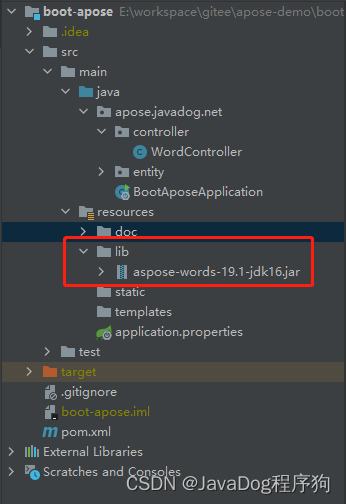
因原版收费且会有水印等不确定因素,直接下载jar包本地依赖或者上传私服
 <!-- 本地依赖 aspose-words-->
        <dependency>
            <groupId>com.aspose</groupId>
            <artifactId>aspose-words</artifactId>
            <classifier>jdk16</classifier>
            <scope>system</scope>
            <version>1.0</version>
            <systemPath>${project.basedir}/src/main/resources/lib/aspose-words-19.1-jdk16.jar</systemPath>
        </dependency>
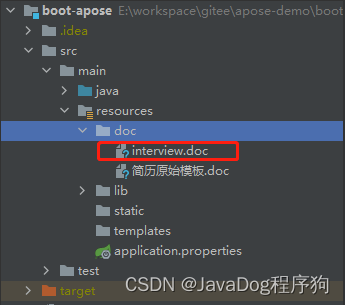

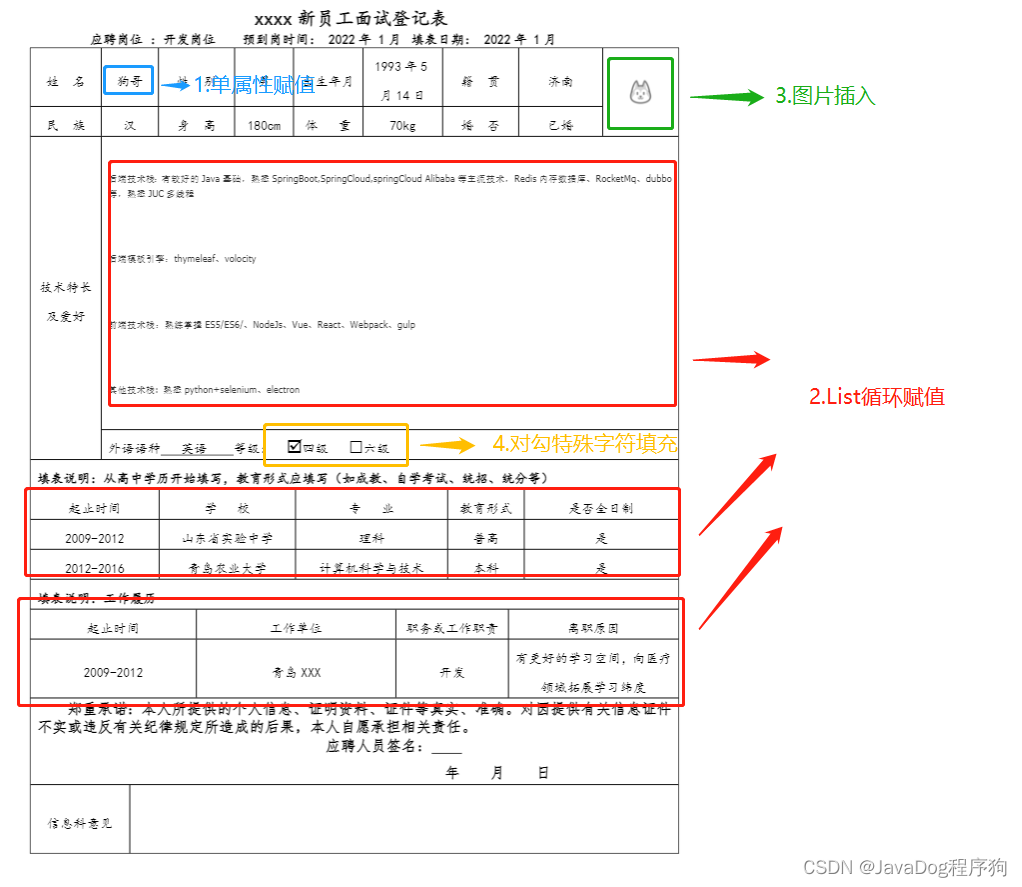
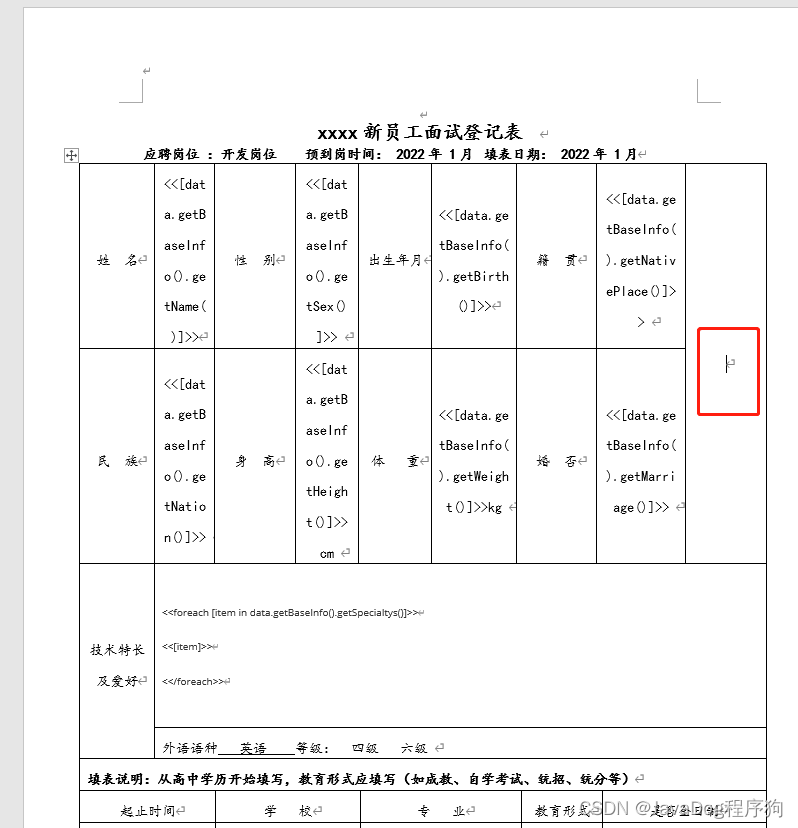
找到需要插入的图片的地方,鼠标焦点聚焦
点击【插入】找到书签并点击,然后录入书签名,并点击添加
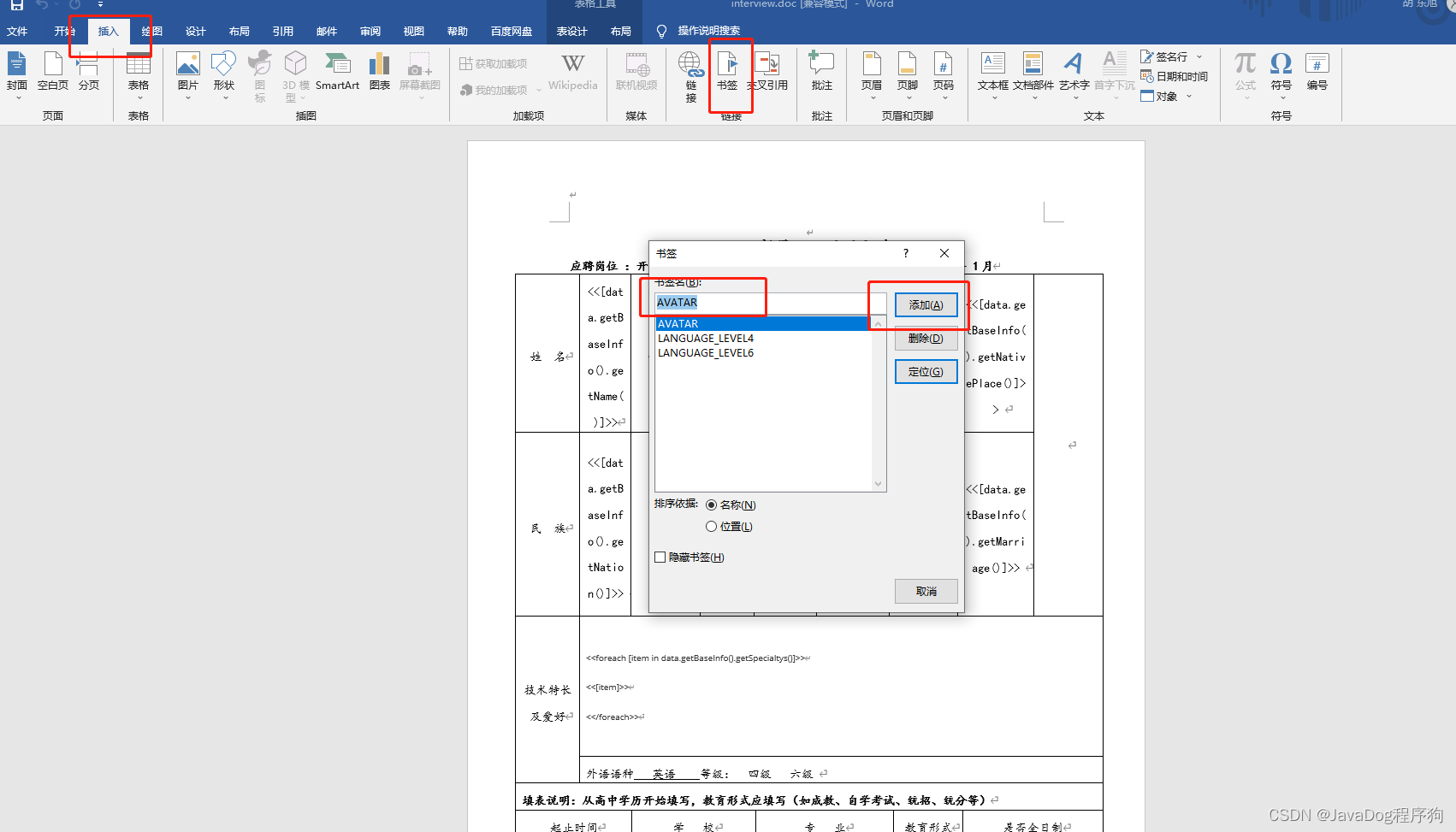
检查书签是否添加成功
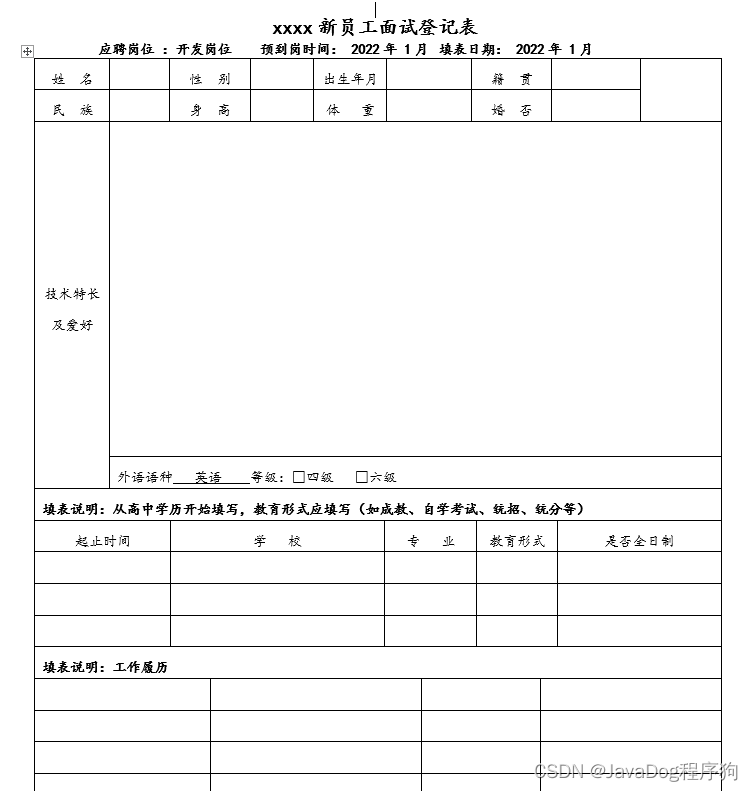
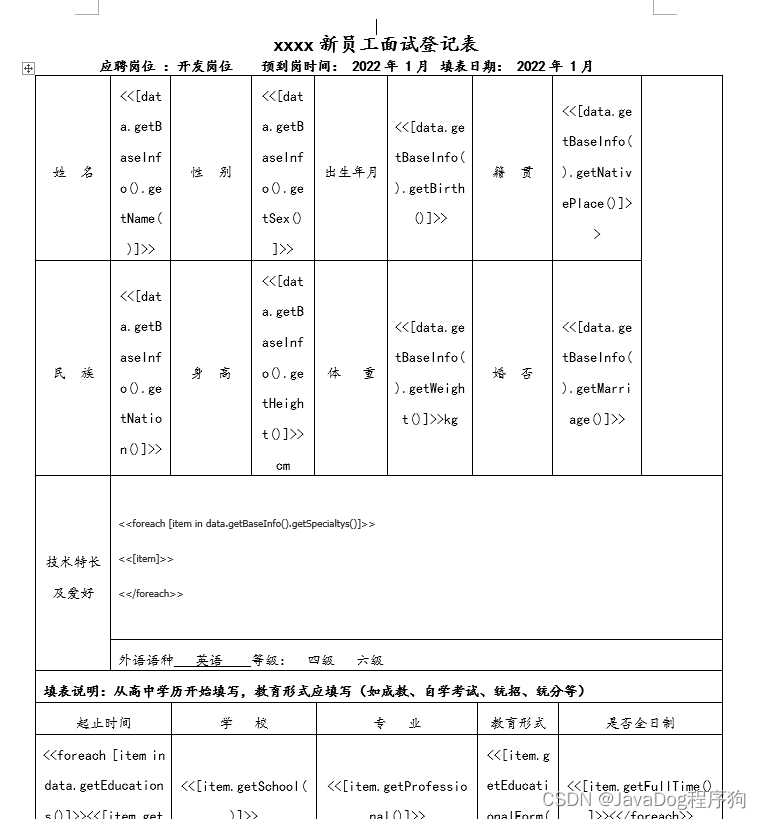
更新doc
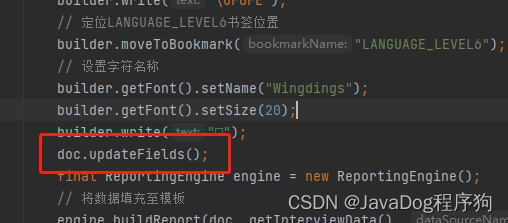
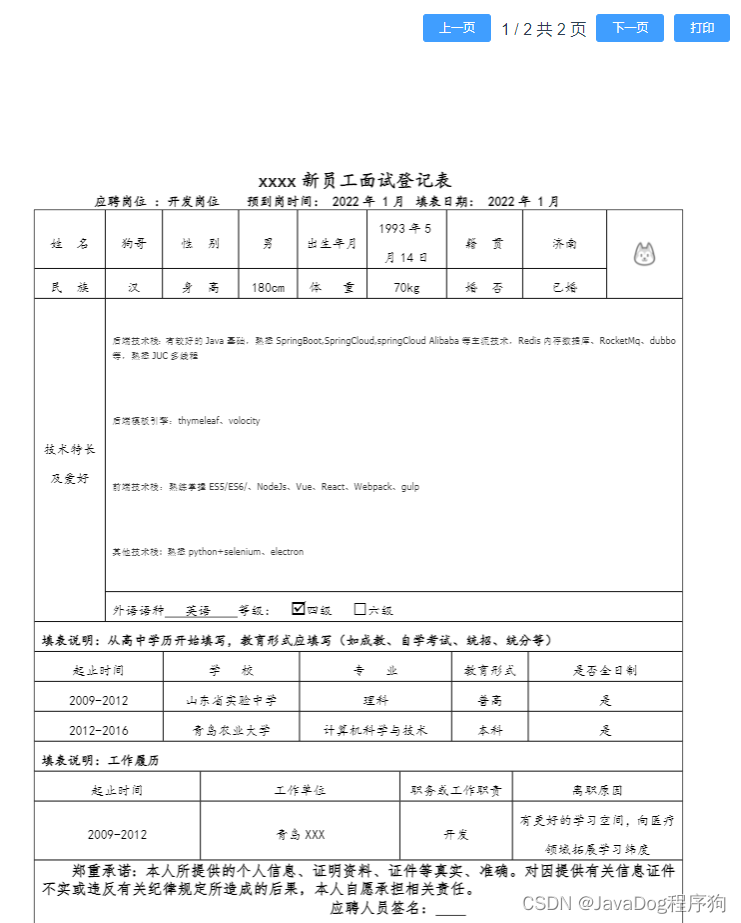
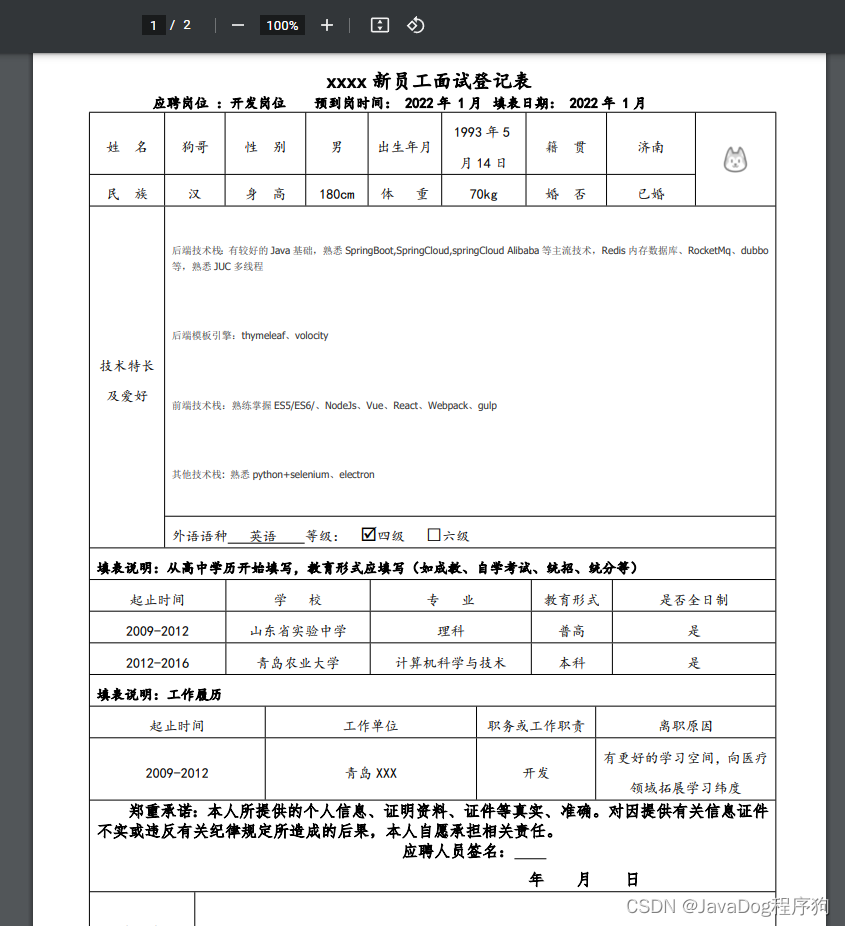
将基础数据填充后并转为PDF
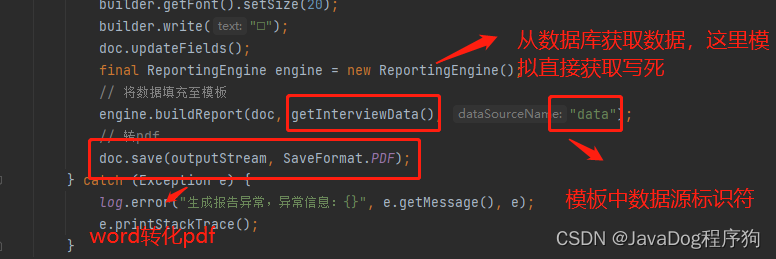
详见如下代码
package apose.javadog.net.controller;
import apose.javadog.net.entity.BaseInfo;
import apose.javadog.net.entity.Education;
import apose.javadog.net.entity.Interview;
import apose.javadog.net.entity.WorkExperience;
import cn.hutool.core.util.CharsetUtil;
import com.aspose.words.Document;
import com.aspose.words.DocumentBuilder;
import com.aspose.words.ReportingEngine;
import com.aspose.words.SaveFormat;
import lombok.extern.slf4j.Slf4j;
import org.springframework.core.io.ClassPathResource;
import org.springframework.web.bind.annotation.GetMapping;
import org.springframework.web.bind.annotation.RequestMapping;
import org.springframework.web.bind.annotation.RestController;
import javax.servlet.ServletOutputStream;
import javax.servlet.http.HttpServletResponse;
import java.io.InputStream;
import java.net.URLEncoder;
import java.util.ArrayList;
import java.util.List;

@RestController
@RequestMapping("/word")
@Slf4j
public class WordController {

    @GetMapping("/pdf")
    void pdf(HttpServletResponse response){
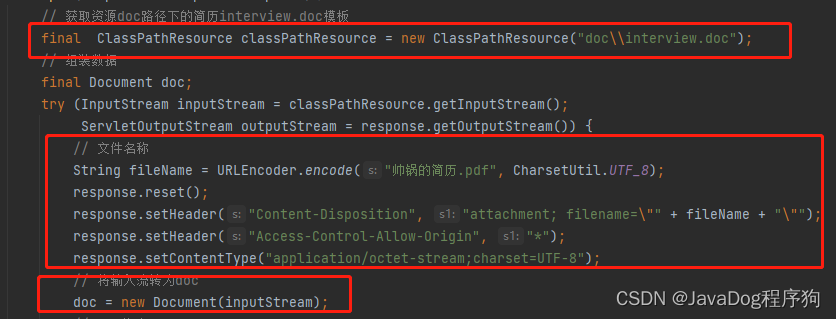
        // 获取资源doc路径下的简历interview.doc模板
        final  ClassPathResource classPathResource = new ClassPathResource("doc\\interview.doc");
        // 组装数据
        final Document doc;
        try (InputStream inputStream = classPathResource.getInputStream();
             ServletOutputStream outputStream = response.getOutputStream()) {
            // 文件名称
            String fileName = URLEncoder.encode("帅锅的简历.pdf", CharsetUtil.UTF_8);
            response.reset();
            response.setHeader("Content-Disposition", "attachment; filename=\"" + fileName + "\"");
            response.setHeader("Access-Control-Allow-Origin", "*");
            response.setContentType("application/octet-stream;charset=UTF-8");
            // 将输入流转为doc
            doc = new Document(inputStream);
            // doc构建
            DocumentBuilder builder = new DocumentBuilder(doc);
            // 定位书签位置
            builder.moveToBookmark("AVATAR");
            // 插入图片
            builder.insertImage("https://portrait.gitee.com/uploads/avatars/user/491/1474070_javadog-net_1616995139.png!avatar30");
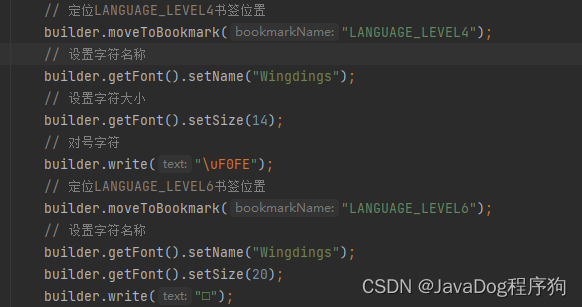
            // 定位LANGUAGE_LEVEL4书签位置
            builder.moveToBookmark("LANGUAGE_LEVEL4");
            // 设置字符名称
            builder.getFont().setName("Wingdings");
            // 设置字符大小
            builder.getFont().setSize(14);
            // 对号字符
            builder.write("\uF0FE");
            // 定位LANGUAGE_LEVEL6书签位置
            builder.moveToBookmark("LANGUAGE_LEVEL6");
            // 设置字符名称
            builder.getFont().setName("Wingdings");
            builder.getFont().setSize(20);
            builder.write("□");
            doc.updateFields();
            final ReportingEngine engine = new ReportingEngine();
            // 将数据填充至模板
            engine.buildReport(doc, getInterviewData(), "data");
            // 转pdf
            doc.save(outputStream, SaveFormat.PDF);
        } catch (Exception e) {
            log.error("生成报告异常,异常信息:{}", e.getMessage(), e);
            e.printStackTrace();
        }
    }

    private Interview getInterviewData(){
        Interview interview = new Interview();
        this.getBaseInfo(interview);
        this.getEducations(interview);
        this.getWorkExperiences(interview);
        return interview;
    }

    /**
     * @Description: 组装基本数据
     * @Param: [interview]
     * @return: [apose.javadog.net.entity.Interview]
     * @Author: hdx
     * @Date: 2022/5/10 15:39
     */
    private void getBaseInfo(Interview interview){
        // 基本数据
        BaseInfo baseInfo = new BaseInfo();
        List<String> listStr = new ArrayList<>();
        listStr.add("后端技术栈:有较好的Java基础,熟悉SpringBoot,SpringCloud,springCloud Alibaba等主流技术,Redis内存数据库、RocketMq、dubbo等,熟悉JUC多线程");
        listStr.add("后端模板引擎:thymeleaf、volocity");
        listStr.add("前端技术栈:熟练掌握ES5/ES6/、NodeJs、Vue、React、Webpack、gulp");
        listStr.add("其他技术栈: 熟悉python+selenium、electron");
        baseInfo.setName("狗哥")
                .setBirth("1993年5月14日")
                .setHeight("180")
                .setWeight("70")
                .setNation("汉")
                .setSex("男")
                .setNativePlace("济南")
                .setMarriage("已婚")
                .setSpecialtys(listStr);
        interview.setBaseInfo(baseInfo);
    }
    /**
     * @Description: 组装教育经历
     * @Param: [interview]
     * @return: [apose.javadog.net.entity.Interview]
     * @Author: hdx
     * @Date: 2022/5/10 15:40
     */
    private void getEducations(Interview interview){
        // 高中
        List<Education> educations = new ArrayList<>();
        Education education = new Education();
        education.setStartEndTime("2009-2012")
                .setSchool("山东省实验中学")
                .setFullTime("是")
                .setProfessional("理科")
                .setEducationalForm("普高");
        educations.add(education);
        // 大学
        Education educationUniversity = new Education();
        educationUniversity.setStartEndTime("2012-2016")
                .setSchool("青岛农业大学")
                .setFullTime("是")
                .setProfessional("计算机科学与技术")
                .setEducationalForm("本科");
        educations.add(educationUniversity);
        interview.setEducations(educations);
    }

    /**
     * @Description: 组装工作经历
     * @Param: [interview]
     * @return: [apose.javadog.net.entity.Interview]
     * @Author: hdx
     * @Date: 2022/5/10 15:40
     */
    private void getWorkExperiences(Interview interview){
        // 工作记录
        List<WorkExperience> workExperiences = new ArrayList<>();
        WorkExperience workExperience = new WorkExperience();
        workExperience.setStartEndTime("2009-2012")
                .setWorkUnit("青岛XXX")
                .setPosition("开发")
                .setResignation("有更好的学习空间,向医疗领域拓展学习纬度");
        workExperiences.add(workExperience);
        interview.setWorkExperiences(workExperiences);
    }
}
npm install
const { defineConfig } = require('@vue/cli-service')
module.exports = defineConfig({
  devServer: {
    port: 1026,
    proxy: {
      '/': {
        target: 'http://localhost:8082', //请求本地 需要ipps-boot后台项目
        ws: false,
        changeOrigin: true
      }
    }
  }
})
npm install
import Vue from 'vue'
import App from './App.vue'
Vue.config.productionTip = false
import axios from 'axios'
Vue.prototype.$http = axios
import ElementUI from 'element-ui';
import 'element-ui/lib/theme-chalk/index.css';
Vue.use(ElementUI);
new Vue({
  render: h => h(App),
}).$mount('#app')
  <pdf v-if="showPdf" ref="pdf" :src="pdfUrl" :page="currentPage" @num-pages="pageCount=$event"
               @page-loaded="currentPage=$event" @loaded="loadPdfHandler">
   </pdf>
?注意responseType类型为blob
this.$http({
      method: 'get',
      url: `/word/pdf`,
      responseType: 'blob'
    }).then(res=>{
      console.log(res)
      this.pdfUrl = this.getObjectURL(res.data)
      console.log(this.pdfUrl)
      const loadingTask = pdf.createLoadingTask(this.pdfUrl)
      // // 注意这里一定要这样写
      loadingTask.promise.then(load => {
        this.numberPage = load.numPages
      }).catch(err => {
        console.log(err)
      })
      this.loading = false;
    })
页面完整代码如下
<template>
  <div class="pdf_wrap">
    <template>
      <el-form ref="form" label-width="80px">
        <div style='text-align: center;margin: 30px;' v-if="loading">
          数据加载中...
        </div>
        <div v-if="loading==false" style="display: flex;align-items: center;">
          <div style="flex: 1;"></div>
          <el-button size="mini" @click="changePdfPage(0)" type="primary">上一页</el-button>
          <div style="position: relative; margin: 0px 10px; top: -10px;">
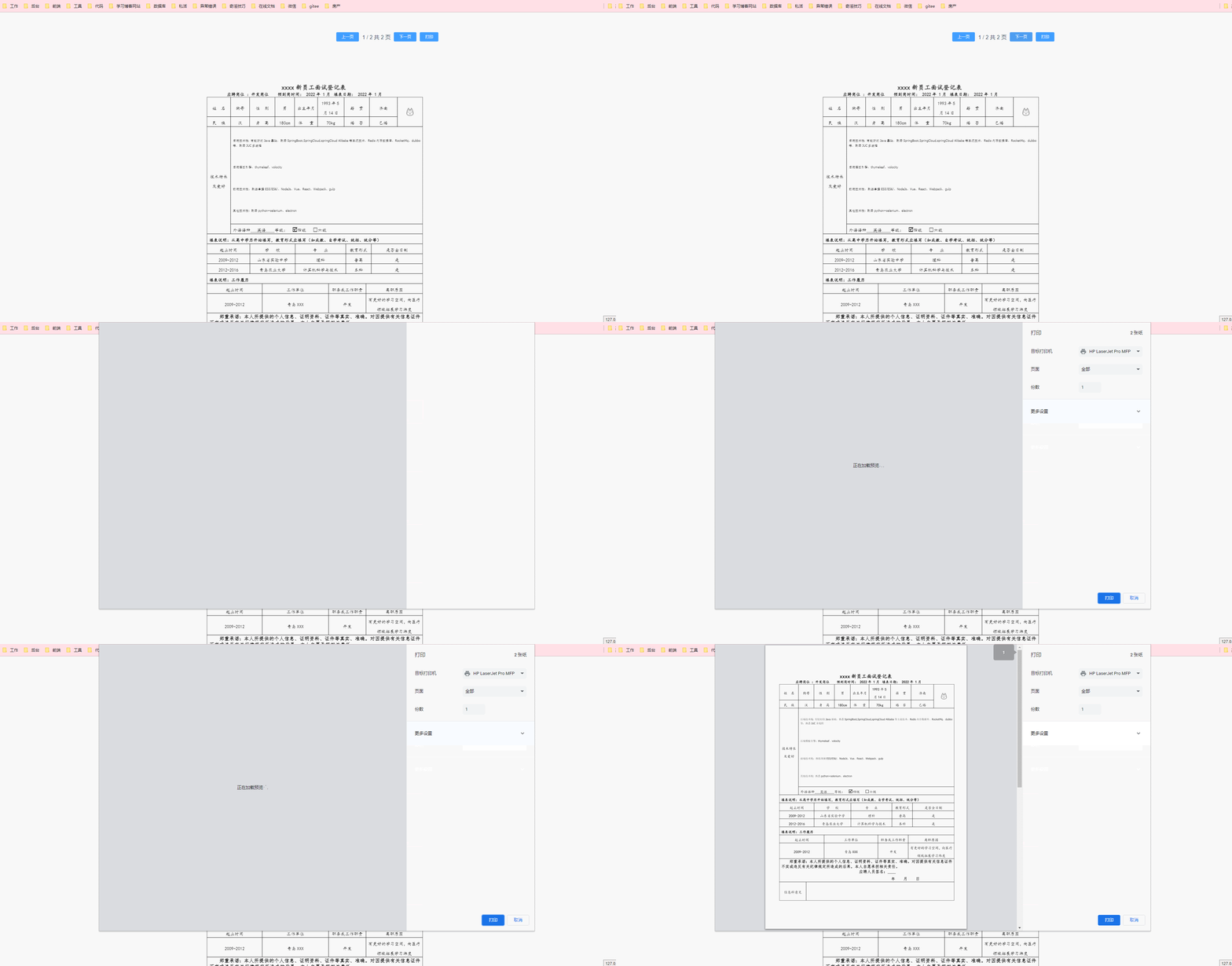
            {{currentPage}} / {{pageCount}}  共 {{numberPage}} 页
          </div>
          <el-button size="mini" @click="changePdfPage(1)" type="primary">下一页</el-button>
          <el-button size="mini" @click='print' type="primary">打印</el-button>
        </div>
        <div v-show="loading==false">
          <pdf v-if="showPdf" ref="pdf" :src="pdfUrl" :page="currentPage" @num-pages="pageCount=$event"
               @page-loaded="currentPage=$event" @loaded="loadPdfHandler">
          </pdf>
        </div>
      </el-form>
    </template>
  </div>
</template>

<script>
import pdf from 'javadog-vue-pdf'
export default {
  components: {
    pdf
  },
  data () {
    return {
      loading: true,
      showPdf: false,
      currentPage: 1, // pdf文件页码
      pageCount: 1, // pdf文件总页数
      fileType: 'pdf', // 文件类型
      pdfUrl: '',
      numberPage:1
    }
  },
  mounted () {
    this.showPdf = true;
    this.$http({
      method: 'get',
      url: `/word/pdf`,
      responseType: 'blob'
    }).then(res=>{
      console.log(res)
      this.pdfUrl = this.getObjectURL(res.data)
      console.log(this.pdfUrl)
      const loadingTask = pdf.createLoadingTask(this.pdfUrl)
      // // 注意这里一定要这样写
      loadingTask.promise.then(load => {
        this.numberPage = load.numPages
      }).catch(err => {
        console.log(err)
      })
      this.loading = false;
    })
  },
  methods: {
    print(){
      this.$refs.pdf.print(600)
    },
    getObjectURL(file) {
      let url = null
      if (window.createObjectURL !== undefined) { // basic
        url = window.createObjectURL(file)
      } else if (window.webkitURL !== undefined) { // webkit or chrome
        // try {
        let blob = new Blob([file], {
          type: "application/pdf"
        });
        url = window.URL.createObjectURL(blob)
        console.log(url)
      } else if (window.URL !== undefined) { // mozilla(firefox)
        try {
          url = window.URL.createObjectURL(file)
        } catch (error) {
          console.log(error)
        }
      }
      return url
    },
    changePdfPage(val) {
      console.log(val)
      if (val === 0 && this.currentPage > 1) {
        this.currentPage--
        // console.log(this.currentPage)
      }
      if (val === 1 && this.currentPage < this.pageCount) {
        this.currentPage++
        // console.log(this.currentPage)
      }
    },
    // pdf加载时
    loadPdfHandler() {
      console.log('jiazai')
      this.currentPage = 1 // 加载的时候先加载第一页
      this.loading = false;
    }
  }
}
</script>
<style scoped>
.pdf_wrap {
  background: #fff;
  height: 100vh;
  width: 80vh;
  margin: 0 auto;
}
.pdf_list {
  height: 80vh;
  overflow: scroll;
}
button {
  margin-bottom: 20px;
}
</style>

我看到这个错误:translationmissing:da.datetime.distance_in_words.about_x_hours我的语言环境文件:http://pastie.org/2944890我的看法:我已将其添加到我的application.rb中:config.i18n.load_path+=Dir[Rails.root.join('my','locales','*.{rb,yml}').to_s]config.i18n.default_locale=:da如果我删除I18配置,帮助程序会处理英语。更新:我在config/enviorments/devolpment
我需要一个表,其中行实际上是2行表,一个嵌套表是..我怎样才能在Prawn中做到这一点?也许我需要延期..但哪一个? 最佳答案 现在支持子表:Prawn::Document.generate("subtable.pdf")do|pdf|subtable=pdf.make_table([["sub"],["table"]])pdf.table([[subtable,"original"]])end 关于ruby-on-rails-PrawnPDF:Ineedtogeneratenested
项目介绍随着我国经济迅速发展,人们对手机的需求越来越大,各种手机软件也都在被广泛应用,但是对于手机进行数据信息管理,对于手机的各种软件也是备受用户的喜爱小学生兴趣延时班预约小程序的设计与开发被用户普遍使用,为方便用户能够可以随时进行小学生兴趣延时班预约小程序的设计与开发的数据信息管理,特开发了小程序的设计与开发的管理系统。小学生兴趣延时班预约小程序的设计与开发的开发利用现有的成熟技术参考,以源代码为模板,分析功能调整与小学生兴趣延时班预约小程序的设计与开发的实际需求相结合,讨论了小学生兴趣延时班预约小程序的设计与开发的使用。开发环境开发说明:前端使用微信微信小程序开发工具:后端使用ssm:VU
我的Rails应用程序中安装了carrierwave。但是,当用户上传多页pdf时,我只希望应用程序获取文档中的第一页并将其转换为jpeg。这可能吗?用什么命令?这是我的uploader。#encoding:utf-8classImageUploader[200,300]##defscale(width,height)##dosomething#end#Createdifferentversionsofyouruploadedfiles:version:thumbdoprocess:resize_to_fill=>[150,210]process:convert=>:jpgdefful
参考文章搭建文章gitte源码在线体验可以注册两个号来测试演示图:一.整体介绍 介绍SignalR一种通讯模型Hub(中心模型,或者叫集线器模型),调用这个模型写好的方法,去发送消息。 内容有: ①:Hub模型的方法介绍 ②:服务器端代码介绍 ③:前端vue3安装并调用后端方法 ④:聊天室样例整体流程:1、进入网站->调用连接SignalR的方法2、与好友发送消息->调用SignalR的自定义方法 前端通过,signalR内置方法.invoke() 去请求接口3、监听接受方法(渲染消息)通过new signalR.HubConnectionBuilder().on
如何将Confluence的“空间”导出为pdf文件?看起来Confluence5.0可能仍然支持使用XML-RPCAPI。不过,我找不到调用什么的示例。https://developer.atlassian.com/display/CONFDEV/Remote+API+Specification+for+PDF+Export#RemoteAPISpecificationforPDFExport-XML-RPCInformation该链接表示调用应以pdfexport为前缀,但没有列出任何调用或给出示例。 最佳答案 这可以使用Bob
如果有人有兴趣将PDF文件保存在PDFKit中间件gem显示的文件系统中,那么这里是...重写middleware.rb文件的call方法。在覆盖中只需替换这一行:body=PDFKit.new(translate_paths(body,env),@options).to_pdf与pdf=PDFKit.new(translate_paths(body,env),@options)file=pdf.to_file('Your/file/name/path')Mymodel.my_method()#Youcanwriteyourmethodheretousethatfilebody=pdf
-你好桑迪普。我是绝地大师尤达的学徒。我的主人相信Ruby社区的力量很强大,并选择了我来完成一项使用Ruby语言完成的简单任务:我需要使用PrawnPDFgem来完成任务。我有一个名为Dooku.pdf的现有pdf文档-它包含有关EvilCountDooku事件的敏感信息。在Dooku.pdf中有一个名为{galaxy}的文本。{galaxy}始终位于pdf文档每一页的相同位置。我需要打开Dooku.pdf,将{galaxy}的每个实例替换为{planet},然后保存/关闭Dooku.pdf。我如何使用PrawnPDFgem完成这个任务?-愿原力与你同在 最
我正在使用Rails5。我想从Word文档(.doc)中获取文本,所以我正在使用这段代码text=nilMSWordDoc::Extractor.load(file_location)do|ctl00_MainContent_List1_grdData|text=contents.whole_contentsend但我收到以下错误。我的Gemfile中有这个gemgem'msworddoc-extractor'我还需要做什么才能从Word文档中获取内容?如果我可以像对.doc文件一样对.docx文件应用相同的代码,那就太好了。/Users/davea/.rvm/gems/ruby-2.
我通过ruby-gnuplot在Mac上使用Gnuplot绘制了十几个图.如果我重新运行我的ruby脚本,那么带有绘图的打开窗口的数量就会翻倍。如果我可以在预览中打开的PDF中输出所有这些图,那么该文件将在每次重新运行后自动更新,我不需要费心关闭众多窗口。目前我只能通过每个PDF文件绘制一个图来实现这一点:Gnuplot.opendo|gp|Gnuplot::Plot.new(gp)do|plot|plot.arbitrary_lines我如何使用Gnuplot将我的所有图形制作成一个PDF? 最佳答案 嗯,至少在UN*x的gn
