?博客主页: 微笑的段嘉许博客主页⭐本文介绍⭐Nginx的URL重写也被称为Rewrite,主要作用是实现当客户端对特定URL访问的时候,根据客户端的访问信息实现跳转到其他URL处。URL重写在现在的网站中经常常见,比如:
?欢迎关注?点赞?收藏⭐留言??本文由微笑的段嘉许原创!?51TOP红人、阿里专家博主~
?51CTO首发时间:?2022年2月日14?✉️坚持和努力一定能换来诗与远方!?作者水平很有限,如果发现错误,一定要及时告知作者哦!感谢感谢!
语法:| last | 表示完成rewrite,一般在if和server语句中,不终止重写后的url |
| break | 完成本条规则后不在匹配其他的,一般在location中 |
| redirect ==302 | 返回带有302代码的临时重定向,浏览器地址会显示跳转后的URL地址。 |
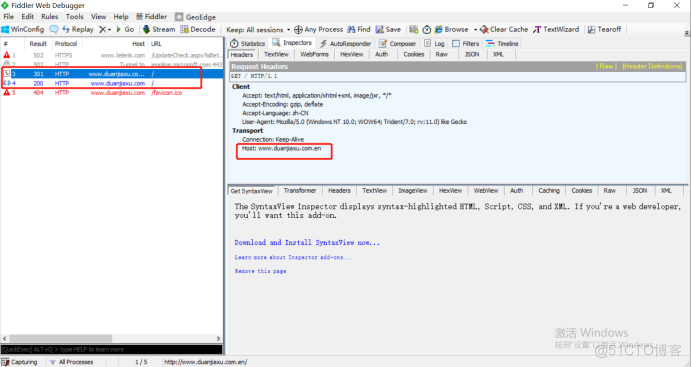
| permanent ==301 | 返回301代码的永久重定向,浏览器地址栏会显示跳转后的URL地址。 |
redirect和permanent有一定区别,301会将老地址数据带到新地址上,搜索引擎会把老地址彻底废除,302重定性时,搜索引擎会查看跳转前后哪一个地址更直观而自己选择是否跳转,所以会出现网页劫持现象。?地址重写的作用和特点?| 作用 | 特点 |
| 修改用户请求内容 | 通过ngx_http_rewrite_module模块实现 |
| 方便用户维护网站 | 支持if判断用户输入内容匹配条件地址重写 |
| 不支持else嵌套到if中循环判断跳转 | |
| 支持set定义环境变量和if结合判断地址重写 |
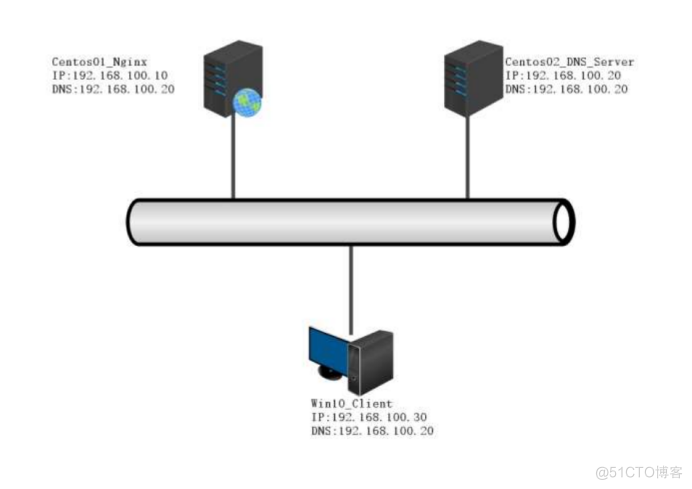 推荐步骤:
推荐步骤:[root@centos01 ~]# mount /dev/cdrom /mnt/ //挂载系统光盘
mount: /dev/sr0 写保护,将以只读方式挂载
[root@centos01 ~]# ls /mnt/ //查看是哦福挂载成功
CentOS_BuildTag GPL LiveOS RPM-GPG-KEY-CentOS-7
EFI images Packages RPM-GPG-KEY-CentOS-Testing-7
EULA isolinux repodata TRANS.TBL
[root@centos01 ~]# rm -rf /etc/yum.repos.d/CentOS-* //删除系统自带的yum仓库
[root@centos01 ~]# ls /etc/yum.repos.d/
local.repo
[root@centos01 ~]# cat /etc/yum.repos.d/local.repo //查看yum仓库
[local]
name=centos
baseurl=file:///mnt
enabled=1
gpgcheck=0
[root@centos01 ~]# rz //上传nginx源代码程序
z waiting to receive.**B0100000023be50
[root@centos01 ~]# ls //查看是否上传成功
anaconda-ks.cfg nginx-1.16.1.tar.gz 模板 图片 下载 桌面
initial-setup-ks.cfg 公共 视频 文档 音乐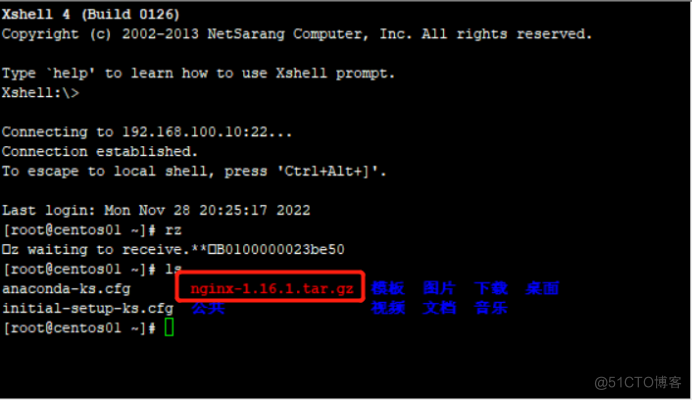 2)安装nginx依赖程序
[root@centos01 ~]# useradd -M -s /sbin/nologin nginx //创建nginx用户
[root@centos01 ~]# yum -y install pcre-devel zlib-devel //安装nginx依赖程序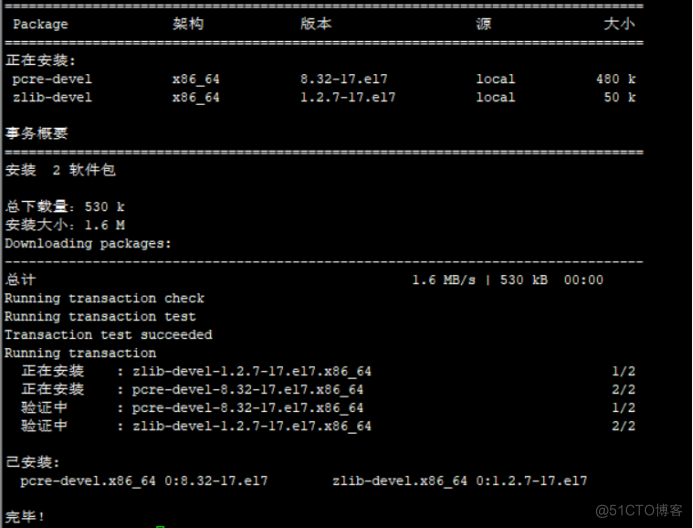 3)解压nginx程序包
[root@centos01 ~]# tar zxf ./nginx-1.16.1.tar.gz -C /usr/src/ //解压nginx程序包[root@centos01 nginx-1.16.1]# ./configure --prefix=/usr/local/nginx --user=nginx --group=nginx --with-http_stub_status_module //安装模块
[root@centos01 nginx-1.16.1]# make && make install //编译安装nginx程序
[root@centos01 nginx-1.16.1]# ln -s /usr/local/nginx/sbin/* /usr/local/sbin/ //优化命令
[root@centos01 nginx-1.16.1]# nginx -t
nginx: the configuration file /usr/local/nginx/conf/nginx.conf syntax is ok
nginx: configuration file /usr/local/nginx/conf/nginx.conf test is successful[root@centos01 ~]# mkdir /www //创建网站根目录
[root@centos01 ~]# echo "www.duanjiaxu.com" > /www/index.html //设置网站主页[root@centos01 ~]# vim /etc/sysconfig/network-scripts/ifcfg-ens32 //进入网卡配置文件
---
TYPE=Ethernet
BOOTPROTO=static
NAME=ens32
DEVICE=ens32
ONBOOT=yes
IPADDR=192.168.100.10
NETMASK=255.255.255.0
DNS1=192.168.100.20
---
[root@centos01 ~]# systemctl restart network //重新启动网卡服务
[root@centos01 ~]# cat /etc/resolv.conf //查看DNS是否配置成功
# Generated by NetworkManager
nameserver 192.168.100.20[root@centos01 ~]# vim /usr/local/nginx/conf/nginx.conf //进入nginx主配置文件
---
2 user nginx; //nginx管理用户
36 listen 192.168.100.10:80; //监听的IP地址和端口
39 charset utf-8; //支持中文
44 root /www/; //网站根目录
2)使用win10虚拟机验证是否能够正常访问网站
[root@centos01 ~]# nginx //启动nginx服务
[root@centos01 ~]# netstat -anptu | grep nginx //监听端口
tcp 0 0 192.168.100.10:80 0.0.0.0:* LISTEN 4193/nginx: master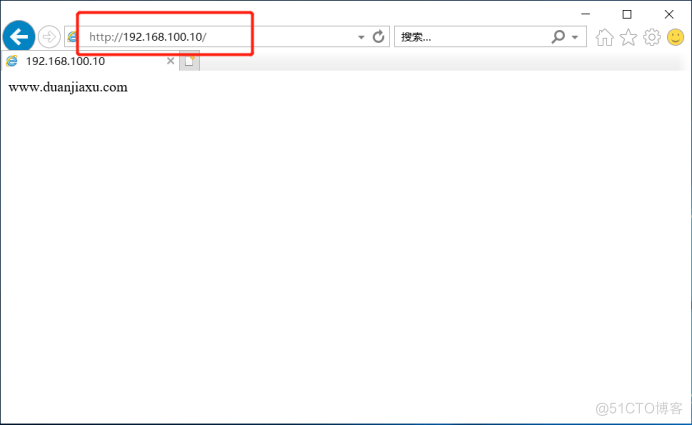
[root@centos02 ~]# vim /etc/sysconfig/network-scripts/ifcfg-ens32 //进入网卡配置文件
---
TYPE=Ethernet
BOOTPROTO=static
NAME=ens32
DEVICE=ens32
ONBOOT=yes
IPADDR=192.168.100.20 //IP地址
NETMASK=255.255.255.0 //子网掩码
DNS1=192.168.100.20 //DNS
----
[root@centos02 ~]# systemctl restart network //重新启动网卡服务
[root@centos02 ~]# cat /etc/resolv.conf //查看DNS是否配置成功
# Generated by NetworkManager
nameserver 192.168.100.20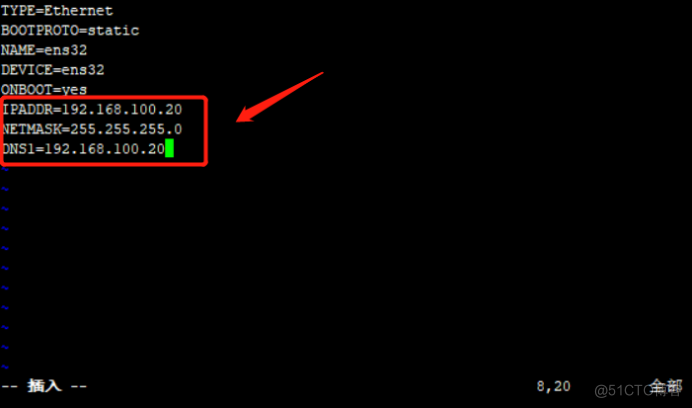 2)安装DNS服务
[root@centos02 ~]# mount /dev/cdrom /mnt/ //挂载系统光盘
mount: /dev/sr0 写保护,将以只读方式挂载
[root@centos02 ~]# ls /mnt/ //查看系统光盘是否挂载成功
CentOS_BuildTag GPL LiveOS RPM-GPG-KEY-CentOS-7
EFI images Packages RPM-GPG-KEY-CentOS-Testing-7
EULA isolinux repodata TRANS.TBL[root@centos02 ~]# rpm -ivh /mnt/Packages/bind-9.9.4-50.el7.x86_64.rpm
警告:/mnt/Packages/bind-9.9.4-50.el7.x86_64.rpm: 头V3 RSA/SHA256 Signature, 密钥 ID f4a80eb5: NOKEY
准备中... ################################# [100%]
正在升级/安装...
1:bind-32:9.9.4-50.el7 ################################# [100%]
[root@centos02 ~]# rpm -ivh /mnt/Packages/bind-chroot-9.9.4-50.el7.x86_64.rpm
警告:/mnt/Packages/bind-chroot-9.9.4-50.el7.x86_64.rpm: 头V3 RSA/SHA256 Signature, 密钥 ID f4a80eb5: NOKEY
准备中... ################################# [100%]
正在升级/安装...
1:bind-chroot-32:9.9.4-50.el7 ################################# [100%][root@centos02 ~]# echo "" > /etc/named.conf //清空主配置文件
[root@centos02 ~]# vim /etc/named.conf //进入主配置文件
---
options {
listen-on port 53 { any; };
};
zone "duanjiaxu.com" IN {
type master;
file "var/named/duanjiaxu.com.zone";
};
zone "duanjiaxu.com.cn" IN {
type master;
file "var/named/duanjiaxu.com.cn.zone";
};
zone "duanjiaxu.com.en" IN {
type master;
file "var/named/duanjiaxu.com.en.zone";
};
[root@centos02 ~]# named-checkconf /etc/named.conf //检查主配置文件是否修改正确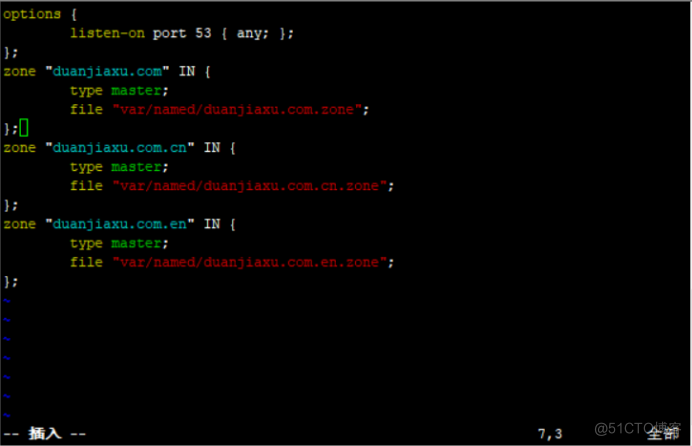 4)修改第一个DNS区域配置文件
[root@centos02 ~]# vim /var/named/duanjiaxu.com.zone //进入第一个区域配置文件
---
$TTL 86400
@ SOA duanjiaxu.com. root.duanjiaxu.com. (
2023021310
1H
15M
1W
1D
)
@ NS centos02.duanjiaxu.com.
centos02 A 192.168.100.20
www A 192.168.100.10
---
[root@centos02 ~]# named-checkzone duanjiaxu.com /var/named/duanjiaxu.com.zone //查看区域配置文件语法是否有误
zone duanjiaxu.com/IN: loaded serial 2023021310
OK[root@centos02 ~]# cp /var/named/duanjiaxu.com.zone /var/named/duanjiaxu.com.cn.zone //复制第一个区域配置文件
[root@centos02 ~]# vim /var/named/duanjiaxu.com.cn.zone //进入第二个区域配置文件
---
:%s/duanjiaxu.com/duanjiaxu.com.cn/g //把duanjiaxu.com替换为duanjiaxu.com.cn
---
$TTL 86400
@ SOA duanjiaxu.com.cn. root.duanjiaxu.com.cn. (
2023021310
1H
15M
1W
1D
)
@ NS centos02.duanjiaxu.com.cn.
centos02 A 192.168.100.20
www A 192.168.100.10
---
[root@centos02 ~]# named-checkzone duanjiaxu.com.cn /var/named/duanjiaxu.com.cn.zone //检查配置文件修改是否有误
zone duanjiaxu.com.cn/IN: loaded serial 2023021310
OK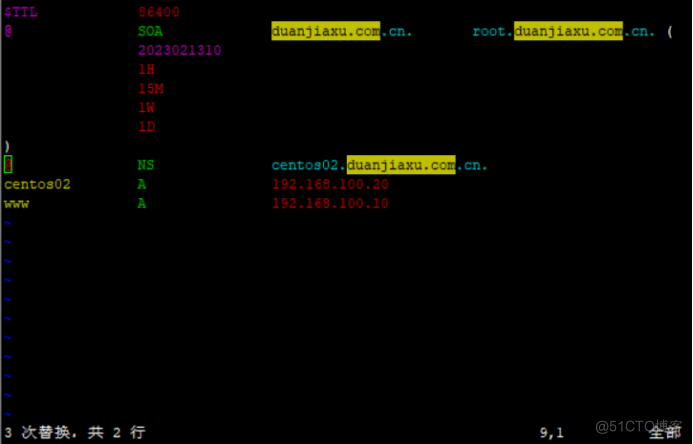 6)修改第三个DNS区域配置文件
[root@centos02 ~]# cp /var/named/duanjiaxu.com.zone /var/named/duanjiaxu.com.en.zone //复制第一个区域配置文件
[root@centos02 ~]# vim /var/named/duanjiaxu.com.en.zone //进入第三个区域配置文件
---
:%s/duanjiaxu.com/duanjiaxu.con.en/g //把duanjiaxu.com替换为duanjiaxu.com.en
---
$TTL 86400
@ SOA duanjiaxu.con.en. root.duanjiaxu.con.en. (
2023021310
1H
15M
1W
1D
)
@ NS centos02.duanjiaxu.con.en.
centos02 A 192.168.100.20
www A 192.168.100.10
---
[root@centos02 ~]# named-checkzone duanjiaxu.com.en /var/named/duanjiaxu.com.en.zone
zone duanjiaxu.com.en/IN: loaded serial 2023021310
OK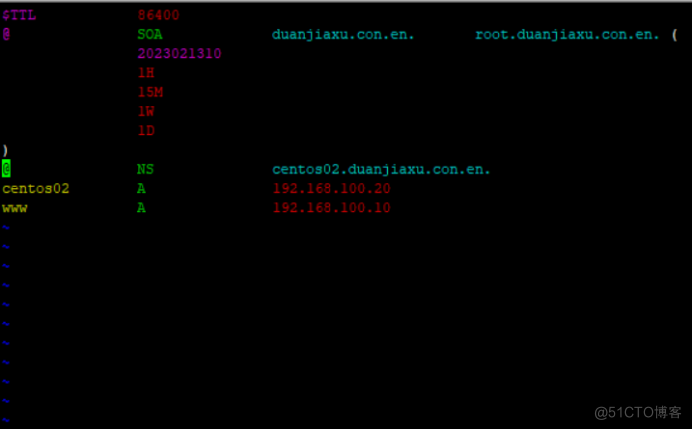 7)重新启动DNS服务
[root@centos02 ~]# systemctl restart named //重新启动DNS服务
[root@centos02 ~]# netstat -anptu | grep named //监听网卡
tcp 0 0 192.168.100.20:53 0.0.0.0:* LISTEN 41066/named
tcp 0 0 127.0.0.1:53 0.0.0.0:* LISTEN 41066/named
tcp 0 0 127.0.0.1:953 0.0.0.0:* LISTEN 41066/named
tcp6 0 0 ::1:953 :::* LISTEN 41066/named
udp 0 0 192.168.122.1:53 0.0.0.0:* 41066/named
udp 0 0 192.168.100.20:53 0.0.0.0:* 41066/named
udp 0 0 127.0.0.1:53 0.0.0.0:* 41066/named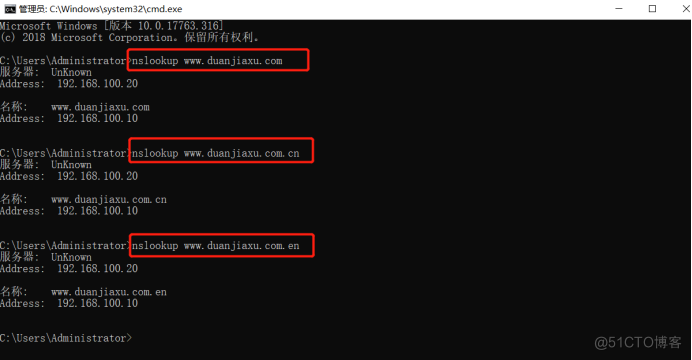 9)使用win10虚拟机验证第一个nginx网站是否能够正常访问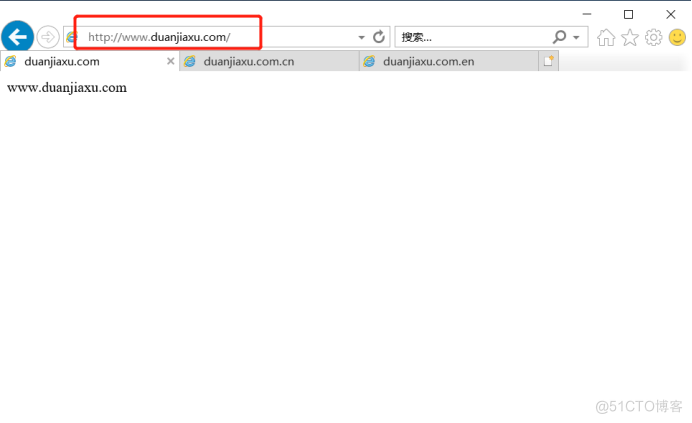
[root@centos01 ~]# mkdir /www/cn      //创建中文网站根目录
[root@centos01 ~]# echo "cn" > /www/cn/index.html //设置网站主页[root@centos01 ~]# mkdir /www/en //创建英文网站根目录
[root@centos01 ~]# echo "en" > /www/en/index.html //设置网站主页[root@centos01 ~]# ls -R /www/ //循环列出网站根目录
/www/:
cn en index.html
/www/cn:
index.html
/www/en:
index.html[root@centos01 ~]# vim /usr/local/nginx/conf/nginx.conf
---
http {
include mime.types;
default_type application/octet-stream;
sendfile on;
keepalive_timeout 65;
server {
listen 192.168.100.10:80;
server_name www.duanjiaxu.com;
charset utf-8;
access_log logs/www.duanjiaxu.com.access.log;
location / {
root /www;
index index.html index.htm;
}
}
server {
listen 192.168.100.10:80;
server_name www.duanjiaxu.com.cn;
charset utf-8;
access_log logs/www.duanjiaxu.com.cn.access.log;
location / {
set $language 'cn';
rewrite ^/$ http://www.duanjiaxu.com/$language;
}
}
server {
listen 192.168.100.10:80;
server_name www.duanjiaxu.com.en;
charset utf-8;
access_log logs/www.duanjiaxu.com.access.log;
location / {
set $language 'en';
rewrite ^/$ http://www.duanjiaxu.com/$language;
}
}
}
---
[root@centos01 ~]# nginx -t //检查主配置文件修改是否有误
nginx: the configuration file /usr/local/nginx/conf/nginx.conf syntax is ok
nginx: configuration file /usr/local/nginx/conf/nginx.conf test is successful[root@centos01 ~]# killall nginx //停止nginx服务
nginx: no process found
[root@centos01 ~]# nginx //启动nginx服务
[root@centos01 ~]# netstat -anptu | grep nginx //监听网卡
tcp 0 0 192.168.100.10:80 0.0.0.0:* LISTEN 44007/nginx: master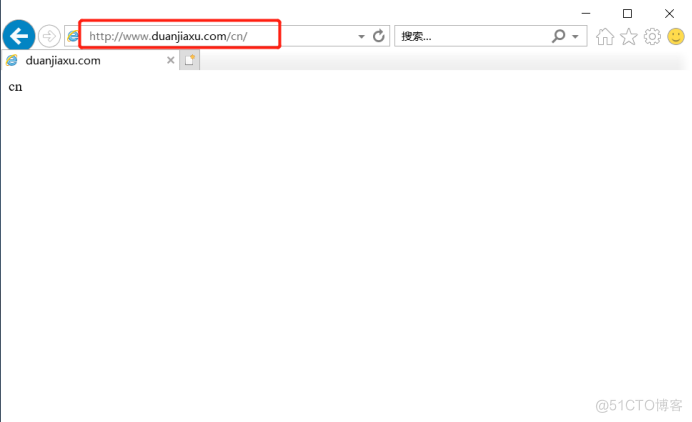 2)客户端访问英文网站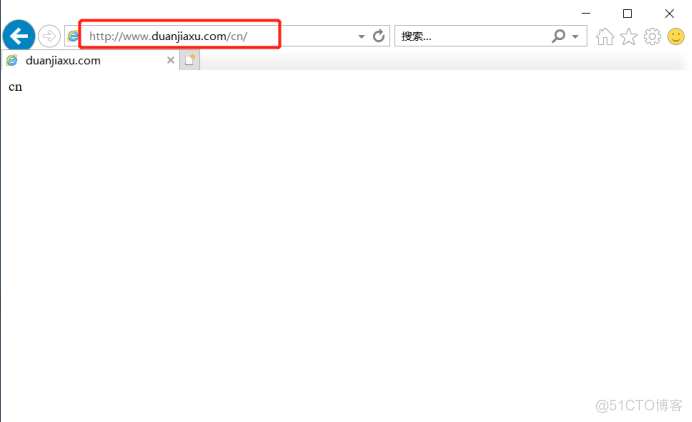
[root@centos01 ~]# vim /usr/local/nginx/conf/nginx.conf
---
user  nginx;
worker_processes  1;
pid        logs/nginx.pid;
events {
    worker_connections  1024;
}
http {
    include       mime.types;
    default_type  application/octet-stream;
    sendfile        on;
    keepalive_timeout  65;
    server {
        listen       192.168.100.10:80;
        server_name  www.duanjiaxu.com;
        charset  utf-8;
        access_log  logs/www.duanjiaxu.com.access.log;
        location / {
            root   /www;
            index  index.html index.htm;
        }
    }
    server {
        listen       192.168.100.10:80;
        server_name  www.duanjiaxu.com.cn www.duanjiaxu.com.en;
        charset  utf-8;
        #access_log  logs/www.duanjiaxu.com.cn.access.log;
        location / {
            if ($http_host ~ (cn)$) {
            set $language 'cn';
            rewrite ^/$ http://www.duanjiaxu.com/$language;
        }
            if ($http_host ~ (en)$) {
            set $language 'en';
            rewrite ^/$ http://www.duanjiaxu.com/$language;
    }
   }
 }
}
2)重新启动nginx服务
[root@centos01 ~]# killall nginx       //停止nginx服务
nginx: no process found
[root@centos01 ~]# nginx         //启动nginx服务
[root@centos01 ~]# netstat -anptu | grep nginx        //监听网卡
tcp 0 0 192.168.100.10:80 0.0.0.0:* LISTEN 44357/nginx: master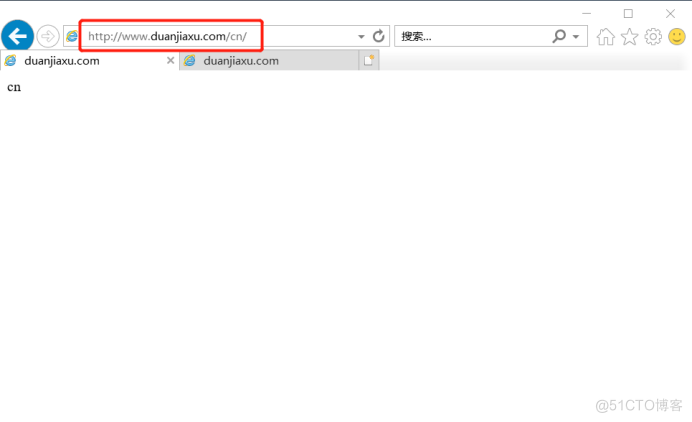 4)访问英文网站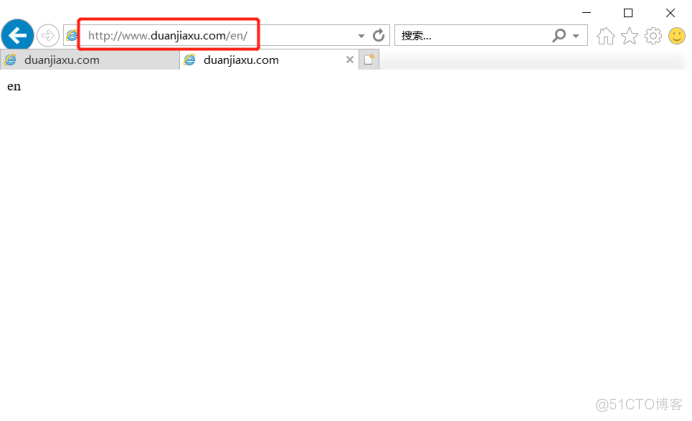
[root@centos01 ~]# vim /usr/local/nginx/conf/nginx.conf
---
user  nginx;
worker_processes  1;
pid        logs/nginx.pid;
events {
    worker_connections  1024;
}
http {
    include       mime.types;
    default_type  application/octet-stream;
    sendfile        on;
    keepalive_timeout  65;
    server {
        listen       192.168.100.10:80;
        server_name  www.duanjiaxu.com;
        charset  utf-8;
        access_log  logs/www.duanjiaxu.com.access.log;
        location / {
            root   /www;
            index  index.html index.htm;
        }
    }
    server {
        listen       192.168.100.10:80;
        server_name  www.duanjiaxu.com.cn;
        charset  utf-8;
        access_log  logs/www.duanjiaxu.com.access.log;
        location / {
            if ($http_host = "www.duanjiaxu.com.cn") {
            return 404;
         }
       }
     }
   }
[root@centos01 ~]# killall nginx       //停止nginx服务
nginx: no process found
[root@centos01 ~]# nginx         //启动nginx服务
[root@centos01 ~]# netstat -anptu | grep nginx        //监听nginx网卡服务
tcp        0      0 192.168.100.10:80       0.0.0.0:*               LISTEN      46316/nginx: master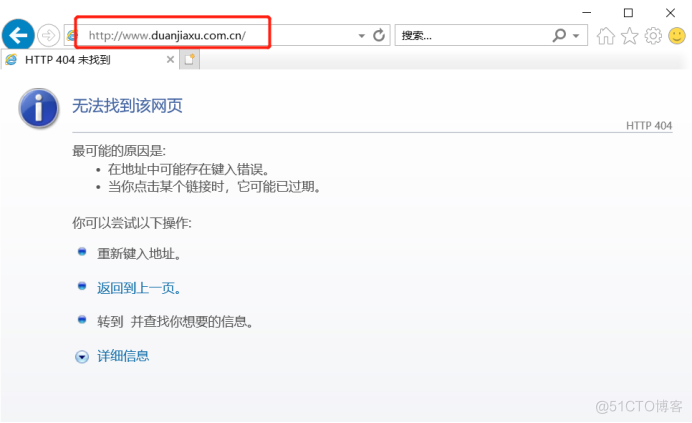
[root@centos01 ~]# vim /usr/local/nginx/conf/nginx.conf
---
user  nginx;
worker_processes  1;
pid        logs/nginx.pid;
events {
    worker_connections  1024;
}
http {
    include       mime.types;
    default_type  application/octet-stream;
    sendfile        on;
    keepalive_timeout  65;
    server {
        listen       192.168.100.10:80;
        server_name  www.duanjiaxu.com;
        charset  utf-8;
        access_log  logs/www.duanjiaxu.com.access.log;
        location / {
            root   /www;
            index  index.html index.htm;
        }
    }
    server {
        listen       192.168.100.10:80;
        server_name  www.duanjiaxu.com.en;
        charset  utf-8;
        access_log  logs/www.duanjiaxu.com.access.log;
        location / {
            if ($http_host = "www.duanjiaxu.com.en") {
            rewrite ^/$ http://www.duanjiaxu.com;
         }
       }
     }
   }
[root@centos01 ~]# killall nginx
nginx: no process found
[root@centos01 ~]# nginx
[root@centos01 ~]# netstat -anptu | grep nginx
tcp        0      0 192.168.100.10:80       0.0.0.0:*               LISTEN      46435/nginx: master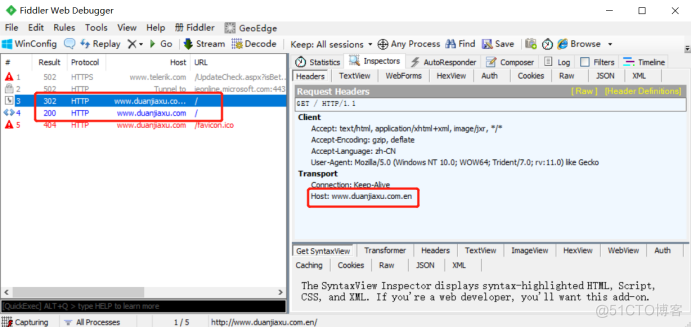
[root@centos01 ~]# vim /usr/local/nginx/conf/nginx.conf
---
user  nginx;
worker_processes  1;
pid        logs/nginx.pid;
events {
    worker_connections  1024;
}
http {
    include       mime.types;
    default_type  application/octet-stream;
    sendfile        on;
    keepalive_timeout  65;
    server {
        listen       192.168.100.10:80;
        server_name  www.duanjiaxu.com;
        charset  utf-8;
        access_log  logs/www.duanjiaxu.com.access.log;
        location / {
            root   /www;
            index  index.html index.htm;
        }
    }
    server {
        listen       192.168.100.10:80;
        server_name  www.duanjiaxu.com.en;
        charset  utf-8;
        access_log  logs/www.duanjiaxu.com.access.log;
        location / {
            if ($http_host = "www.duanjiaxu.com.en") {
            break;
            rewrite ^/$ http://www.duanjiaxu.com;
         }
       }
     }
   }
[root@centos01 ~]# killall nginx
nginx: no process found
[root@centos01 ~]# nginx
[root@centos01 ~]# netstat -anptu | grep nginx
tcp        0      0 192.168.100.10:80       0.0.0.0:*               LISTEN      46507/nginx: master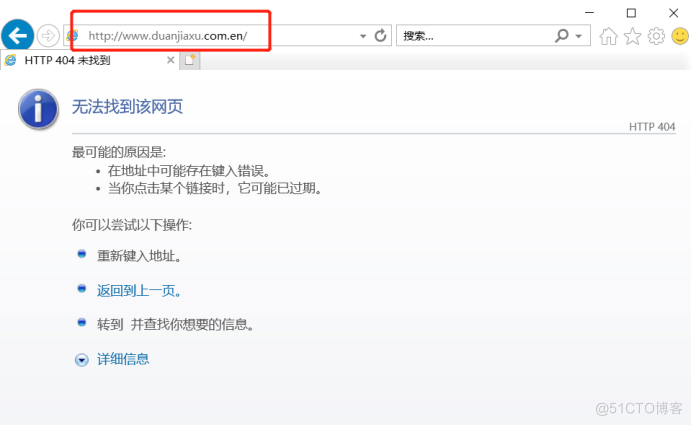
[root@centos01 ~]# vim /usr/local/nginx/conf/nginx.conf
---
user  nginx;
worker_processes  1;
pid        logs/nginx.pid;
events {
    worker_connections  1024;
}
http {
    include       mime.types;
    default_type  application/octet-stream;
    sendfile        on;
    keepalive_timeout  65;
    server {
        listen       192.168.100.10:80;
        server_name  www.duanjiaxu.com;
        charset  utf-8;
        access_log  logs/www.duanjiaxu.com.access.log;
        location / {
            root   /www;
            index  index.html index.htm;
        }
    }
    server {
        listen       192.168.100.10:80;
        server_name  www.duanjiaxu.com.cn www.duanjiaxu.com.en;
        charset  utf-8;
        #access_log  logs/www.duanjiaxu.com.access.log;
        location / {
            rewrite ^/$ http://www.duanjiaxu.com permanent;     //永久重定向到www.duanjiaxu.com
  }
 }
}
---
[root@centos01 ~]# killall nginx      //停止nginx服务
nginx: no process found
[root@centos01 ~]# nginx        //启动nginx服务
[root@centos01 ~]# netstat -anptu | grep nginx      //监听nginx网卡
tcp        0      0 192.168.100.10:80       0.0.0.0:*               LISTEN      44963/nginx: master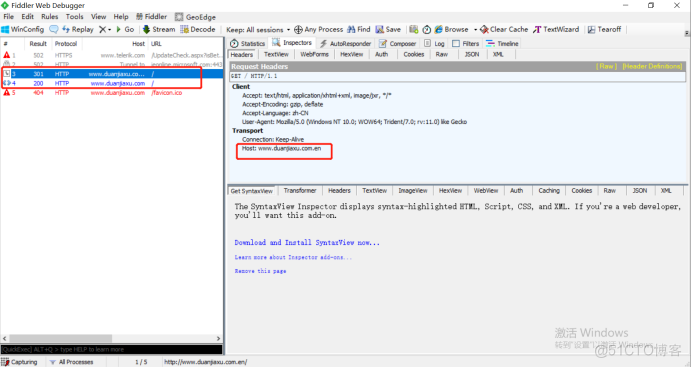
[root@centos01 ~]# vim /usr/local/nginx/conf/nginx.conf
---
user  nginx;
worker_processes  1;
pid        logs/nginx.pid;
events {
    worker_connections  1024;
}
http {
    include       mime.types;
    default_type  application/octet-stream;
    sendfile        on;
    keepalive_timeout  65;
    server {
        listen       192.168.100.10:80;
        server_name  www.duanjiaxu.com;
        charset  utf-8;
        access_log  logs/www.duanjiaxu.com.access.log;
        location / {
            root   /www;
            index  index.html index.htm;
        }
    }
    server {
        listen       192.168.100.10:80;
        server_name  www.duanjiaxu.com.cn www.duanjiaxu.com.en;
        charset  utf-8;
        #access_log  logs/www.duanjiaxu.com.access.log;
        location / {
            rewrite ^/$ http://www.duanjiaxu.com redirect;      //临时重定向到www.duanjiaxu.com
  }
 }
}
---
[root@centos01 ~]# killall nginx      //停止nginx服务
nginx: no process found
[root@centos01 ~]# nginx      //启动nginx服务
[root@centos01 ~]# netstat -anptu | grep nginx      //监听nginx网卡
tcp        0      0 192.168.100.10:80       0.0.0.0:*               LISTEN      45273/nginx: master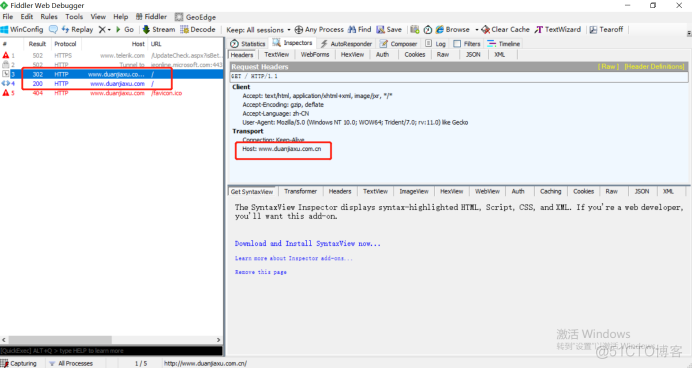
[root@centos01 ~]# vim /usr/local/nginx/conf/nginx.conf
---
user  nginx;
worker_processes  1;
pid        logs/nginx.pid;
events {
    worker_connections  1024;
}
http {
    include       mime.types;
    default_type  application/octet-stream;
    sendfile        on;
    keepalive_timeout  65;
    server {
        listen       192.168.100.10:80;
        server_name  www.duanjiaxu.com;
        charset  utf-8;
        access_log  logs/www.duanjiaxu.com.access.log;
        location / {
            root   /www;
            index  index.html index.htm;
        }
    }
    server {
        listen       192.168.100.10:80;
        server_name  www.duanjiaxu.com.cn;
        charset  utf-8;
        #access_log  logs/www.duanjiaxu.com.access.log;
        location / {
            if ($http_host ~* (cn)$) {
            rewrite ^/$ http://www.duanjiaxu.com last;
  }
        location /en {
        root /www/en/;
        index index.html index.html;
        }
     }
   }
}
---
[root@centos01 ~]# killall nginx      //停止nginx服务
nginx: no process found
[root@centos01 ~]# nginx      //启动nginx服务
[root@centos01 ~]# netstat -anptu | grep nginx      //监听nginx网卡
tcp 0 0 192.168.100.10:80 0.0.0.0:* LISTEN 45524/nginx: master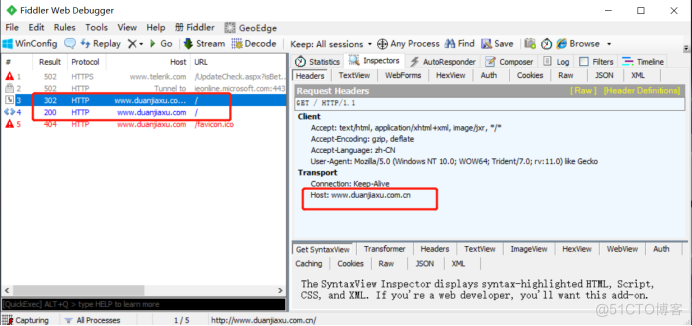 3)输入www.duanjiaxu.com.cn/en跳转到英文网站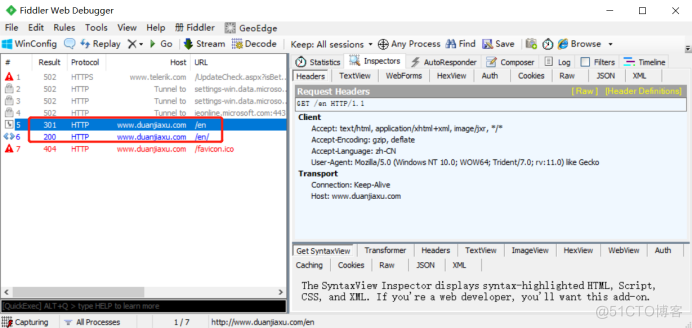
[root@centos01 ~]# mkdir /www/error         //创建错误页面根目录
[root@centos01 ~]# echo "error" > /www/error/error.html          //设置错误页面主页
[root@centos01 ~]# ls -R /www/              //查看
/www/:
cn  en  error  index.html

/www/cn:
index.html

/www/en:
index.html

/www/error:
error.html
2)修改nginx主配置文件
user  nginx;
worker_processes  1;
pid        logs/nginx.pid;
events {
    worker_connections  1024;
}
http {
    include       mime.types;
    default_type  application/octet-stream;
    sendfile        on;
    keepalive_timeout  65;
    server {
        listen       192.168.100.10:80;
        server_name  www.duanjiaxu.com;
        charset  utf-8;
        access_log  logs/www.duanjiaxu.com.access.log;
        location / {
            root   /www;
            index  index.html index.htm;
            set $rewrite true;
            if ($remote_addr = "192.168.100.30") {
            set $rewrite fales;
        }
            if ($rewrite = true) {
            rewrite (.+) /error.html;
        }
        location =/error.html {
                root /www/error/;
}
}
}
}
---
[root@centos01 ~]# killall nginx            //停止nginx服务
nginx: no process found
[root@centos01 ~]# nginx            //启动nginx服务
[root@centos01 ~]# netstat -anptu | grep nginx          //监听网卡
tcp 0 0 192.168.100.10:80 0.0.0.0:* LISTEN 46134/nginx: master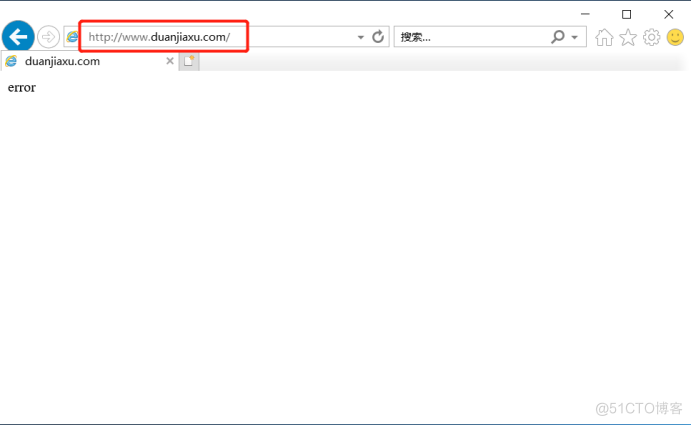 3)是192.168.100.30主机访问显示主页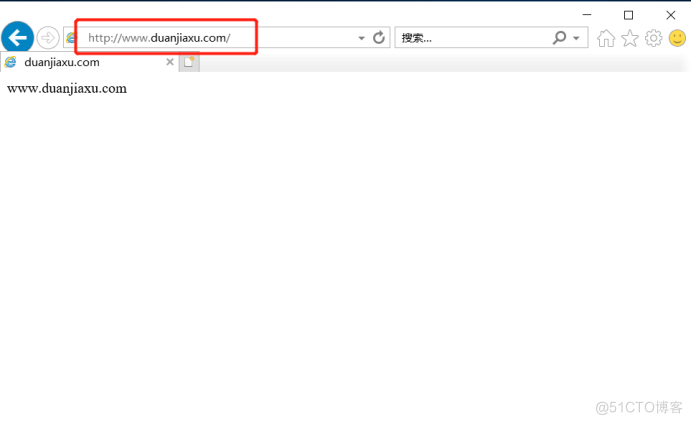

我的瘦服务器配置了nginx,我的ROR应用程序正在它们上运行。在我发布代码更新时运行thinrestart会给我的应用程序带来一些停机时间。我试图弄清楚如何优雅地重启正在运行的Thin实例,但找不到好的解决方案。有没有人能做到这一点? 最佳答案 #Restartjustthethinserverdescribedbythatconfigsudothin-C/etc/thin/mysite.ymlrestartNginx将继续运行并代理请求。如果您将Nginx设置为使用多个上游服务器,例如server{listen80;server
我有一个存储主机名的Ruby数组server_names。如果我打印出来,它看起来像这样:["hostname.abc.com","hostname2.abc.com","hostname3.abc.com"]相当标准。我想要做的是获取这些服务器的IP(可能将它们存储在另一个变量中)。看起来IPSocket类可以做到这一点,但我不确定如何使用IPSocket类遍历它。如果它只是尝试像这样打印出IP:server_names.eachdo|name|IPSocket::getaddress(name)pnameend它提示我没有提供服务器名称。这是语法问题还是我没有正确使用类?输出:ge
只是想确保我理解了事情。据我目前收集到的信息,Cucumber只是一个“包装器”,或者是一种通过将事物分类为功能和步骤来组织测试的好方法,其中实际的单元测试处于步骤阶段。它允许您根据事物的工作方式组织您的测试。对吗? 最佳答案 有点。它是一种组织测试的方式,但不仅如此。它的行为就像最初的Rails集成测试一样,但更易于使用。这里最大的好处是您的session在整个Scenario中保持透明。关于Cucumber的另一件事是您(应该)从使用您的代码的浏览器或客户端的角度进行测试。如果您愿意,您可以使用步骤来构建对象和设置状态,但通常您
A/ctohttp://wiki.nginx.org/CoreModule#usermaster进程曾经以root用户运行,是否可以以不同的用户运行nginxmaster进程? 最佳答案 只需以非root身份运行init脚本(即/etc/init.d/nginxstart),就可以用不同的用户运行nginxmaster进程。如果这真的是你想要做的,你将需要确保日志和pid目录(通常是/var/log/nginx&/var/run/nginx.pid)对该用户是可写的,并且您所有的listen调用都是针对大于1024的端口(因为绑定(
在Rails自动生成的功能测试(test/functional/products_controller_test.rb)中,我看到以下代码:classProductsControllerTest我的问题是:方法调用products()在哪里/如何定义?products(:one)到底是什么意思?看代码,大概意思是“创建一个产品”,但是它是如何工作的呢?注意我是Ruby/Rails的新手,如果这些是微不足道的问题,我深表歉意。 最佳答案 如果您查看test/fixtures文件夹,您会看到一个products.yml文件。这是在您创建
我想验证一个电子邮件地址是否是PayPal用户。是否有API调用来执行此操作?是否有执行此操作的ruby库?谢谢 最佳答案 GetVerifiedStatus来自PayPal'sAdaptiveAccounts平台会为您做这件事。PayPal没有任何codesamples或SDKs用于Ruby中的自适应帐户,但我确实找到了编写codeforGetVerifiedStatusinRuby的人.您需要更改该代码以检查他们拥有的帐户类型的唯一更改是更改if@xml['accountStatus']!=nilaccount_status
在我的一些Controller中,我有一个before_filter检查用户是否登录?用于CRUD操作。application.rbdeflogged_in?unlesscurrent_userredirect_toroot_pathendendprivatedefcurrent_user_sessionreturn@current_user_sessionifdefined?(@current_user_session)@current_user_session=UserSession.findenddefcurrent_userreturn@current_userifdefine
require'pp'p*1..10这会打印出1-10。为什么这么简洁?您还可以用它做什么? 最佳答案 它是“splat”运算符。它可用于分解数组和范围并在赋值期间收集值。这里收集赋值中的值:a,*b=1,2,3,4=>a=1b=[2,3,4]在此示例中,内部数组([3,4])中的值被分解并收集到包含数组中:a=[1,2,*[3,4]]=>a=[1,2,3,4]您可以定义将参数收集到数组中的函数:deffoo(*args)pargsendfoo(1,2,"three",4)=>[1,2,"three",4]
对于我的大部分应用程序,我从Geocoder获取城镇/城市的纬度、经度、邮政编码等。我只是投入城市和州,作为返回,我得到了我处于一个有field的场景中。该场所需要一个地址,我正在从另一个来源获取该场所的纬度和经度。使用Geocodergem,我可以通过给地址提供经纬度来获取地址吗? 最佳答案 在Rails控制台中运行。latitude=40.0397longitude=-76.30144geo_localization="#{latitude},#{longitude}"query=Geocoder.search(geo_loca
我读过的关于Ruby符号的每一篇文章都在谈论符号相对于字符串的效率。但是,这不是1970年代。我的电脑可以处理一些额外的垃圾收集。我错了吗?我拥有最新最好的奔腾双核处理器和4GBRAM。我认为这应该足以处理一些字符串。 最佳答案 您的计算机可能能够处理“一点点额外的垃圾收集”,但是当“一点点”发生在运行数百万次的内部循环中时呢?如果它在内存有限的嵌入式系统上运行呢?有很多地方你可以随意使用字符串,但在某些地方你不能。这完全取决于上下文。 关于ruby-现代计算机的功能是否不足以处理字符串
