目录
Atlas 是一个可伸缩和可扩展的核心基础数据治理服务集合 ,使企业能够有效地和高效地满足 Hadoop 中的合规性要求,并允许与整个企业数据生态系统的集成。
项目地址:
https://github.com/apache/atlas
详细介绍:
https://blog.csdn.net/qq_38247150/article/details/108756790
版本
Apache Atlas 2.1.0
Apache Maven 3.6.3
JDK 1.8
Python 2.7.18
Ubuntu 20.04.2 LTS
注意:
不建议使用win10打包!!!
语言方面jdk必须是1.8!!!
python必须是2.7!!!
笔者使用的是win10的WSL2打包的
Apache Atlas不提供安装包,需要自己下载源码打包。
官网地址:
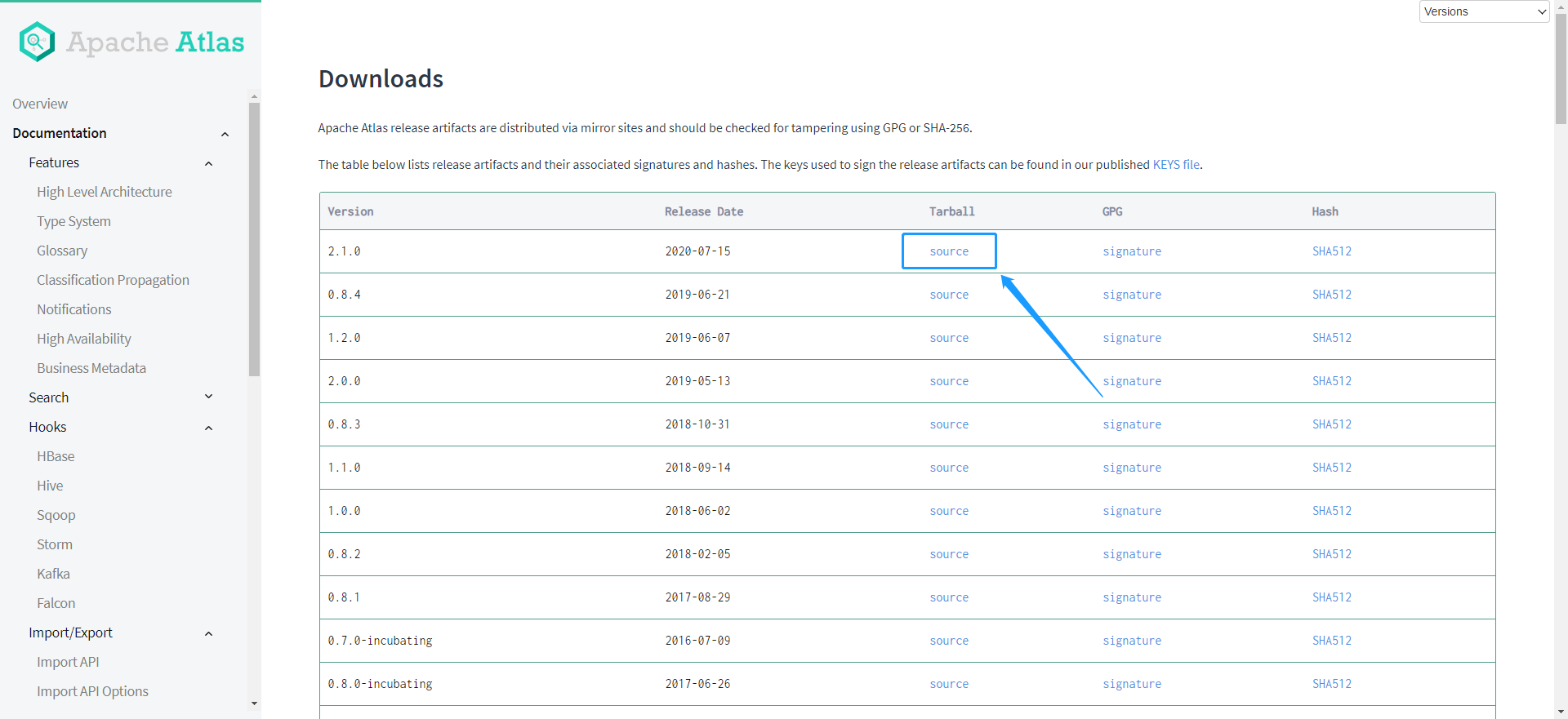
https://atlas.apache.org/2.1.0/index#/Downloads
笔者这里下载2.1.0的source
wget https://www.apache.org/dyn/closer.cgi/atlas/2.1.0/apache-atlas-2.1.0-sources.tar.gz
tar -zxvf apache-atlas-2.1.0-sources.tar.gz
# 进入打包后的目录
cd apache-atlas-sources-2.1.0

# 设置maven打包进程的jvm参数。(-Xms表示初始化JAVA堆的大小及该进程刚创建出来的时候,他的专属JAVA堆的大小,一旦对象容量超过了JAVA堆的初始容量,JAVA堆将会自动扩容到-Xmx大小)
export MAVEN_OPTS="-Xms3g -Xmx3g"
如果环境中已经有装好Apache Hbase和Apache Solr,执行这条
mvn clean -DskipTests package -Pdist
如果环境中没有Hbase和Solr,希望使用Atlas内置的Hbase和Solr,执行这条;
笔者这里没有hadoop环境,只好使用这条命令了。
mvn clean -DskipTests package -Pdist,embedded-hbase-solr
如果希望使用Atlas内置的Apache Cassandra 和 Apache Solr,执行这条命令
mvn clean package -Pdist,embedded-cassandra-solr
打包过程要下很多jar包和node安装包,速度快慢看网络速度,网络慢或者有波动的话下载会中断,需要要多重试几次。
打包过程中会下载node安装包,如果有代理可以手动提前下载好放到指定目录,这样会快不少。
[INFO] Installing node version v12.16.0
[INFO] Downloading https://nodejs.org/dist/v12.16.0/node-v12.16.0-linux-x64.tar.gz to /root/.m2/repository/com/github/eirslett/node/12.16.0/node-12.16.0-linux-x64.tar.gz
[INFO] No proxies configured
[INFO] No proxy was configured, downloading directly
Too many files with unapproved license
[ERROR] Failed to execute goal org.apache.rat:apache-rat-plugin:0.13:check (rat-check) on project apache-atlas: Too many files with unapproved license: 1274 See RAT report in: /opt/soft/apache-atlas-sources-2.1.0/target/rat.txt -> [Help 1]
[ERROR]
[ERROR] To see the full stack trace of the errors, re-run Maven with the -e switch.
[ERROR] Re-run Maven using the -X switch to enable full debug logging.
[ERROR]
[ERROR] For more information about the errors and possible solutions, please read the following articles:
[ERROR] [Help 1] http://cwiki.apache.org/confluence/display/MAVEN/MojoFailureException
[ERROR]
[ERROR] After correcting the problems, you can resume the build with the command
[ERROR]   mvn <args> -rf :apache-atlas
检查license报错,添加参数-Drat.skip=true跳过license检查。再次执行命令
# 修改前命令
mvn clean -DskipTests package -Pdist,embedded-hbase-solr

# 修改后命令
mvn clean -DskipTests package -Pdist,embedded-hbase-solr -Drat.skip=true
最后,终于打包成功了
[INFO] Apache Atlas Server Build Tools 1.0 ................ SUCCESS [  0.511 s]
[INFO] apache-atlas 2.1.0 ................................. SUCCESS [  1.734 s]
[INFO] Apache Atlas Test Utility Tools 2.1.0 .............. SUCCESS [  2.081 s]
[INFO] Apache Atlas Integration 2.1.0 ..................... SUCCESS [  3.208 s]
[INFO] Apache Atlas Common 2.1.0 .......................... SUCCESS [  1.013 s]
[INFO] Apache Atlas Client 2.1.0 .......................... SUCCESS [  0.079 s]
[INFO] atlas-client-common 2.1.0 .......................... SUCCESS [  0.391 s]
[INFO] atlas-client-v1 2.1.0 .............................. SUCCESS [  0.582 s]
[INFO] Apache Atlas Server API 2.1.0 ...................... SUCCESS [  0.819 s]
[INFO] Apache Atlas Notification 2.1.0 .................... SUCCESS [  1.437 s]
[INFO] atlas-client-v2 2.1.0 .............................. SUCCESS [  0.312 s]
[INFO] Apache Atlas Graph Database Projects 2.1.0 ......... SUCCESS [  0.036 s]
[INFO] Apache Atlas Graph Database API 2.1.0 .............. SUCCESS [  0.481 s]
[INFO] Graph Database Common Code 2.1.0 ................... SUCCESS [  0.443 s]
[INFO] Apache Atlas JanusGraph-HBase2 Module 2.1.0 ........ SUCCESS [  0.574 s]
[INFO] Apache Atlas JanusGraph DB Impl 2.1.0 .............. SUCCESS [  2.195 s]
[INFO] Apache Atlas Graph DB Dependencies 2.1.0 ........... SUCCESS [  0.749 s]
[INFO] Apache Atlas Authorization 2.1.0 ................... SUCCESS [  0.772 s]
[INFO] Apache Atlas Repository 2.1.0 ...................... SUCCESS [  4.489 s]
[INFO] Apache Atlas UI 2.1.0 .............................. SUCCESS [ 35.856 s]
[INFO] Apache Atlas New UI 2.1.0 .......................... SUCCESS [ 22.718 s]
[INFO] Apache Atlas Web Application 2.1.0 ................. SUCCESS [ 36.700 s]
[INFO] Apache Atlas Documentation 2.1.0 ................... SUCCESS [  0.569 s]
[INFO] Apache Atlas FileSystem Model 2.1.0 ................ SUCCESS [  0.709 s]
[INFO] Apache Atlas Plugin Classloader 2.1.0 .............. SUCCESS [  0.455 s]
[INFO] Apache Atlas Hive Bridge Shim 2.1.0 ................ SUCCESS [  0.919 s]
[INFO] Apache Atlas Hive Bridge 2.1.0 ..................... SUCCESS [  2.675 s]
[INFO] Apache Atlas Falcon Bridge Shim 2.1.0 .............. SUCCESS [  0.396 s]
[INFO] Apache Atlas Falcon Bridge 2.1.0 ................... SUCCESS [  0.789 s]
[INFO] Apache Atlas Sqoop Bridge Shim 2.1.0 ............... SUCCESS [  0.054 s]
[INFO] Apache Atlas Sqoop Bridge 2.1.0 .................... SUCCESS [  2.056 s]
[INFO] Apache Atlas Storm Bridge Shim 2.1.0 ............... SUCCESS [  0.160 s]
[INFO] Apache Atlas Storm Bridge 2.1.0 .................... SUCCESS [  1.137 s]
[INFO] Apache Atlas Hbase Bridge Shim 2.1.0 ............... SUCCESS [  0.586 s]
[INFO] Apache Atlas Hbase Bridge 2.1.0 .................... SUCCESS [  1.855 s]
[INFO] Apache HBase - Testing Util 2.1.0 .................. SUCCESS [  1.284 s]
[INFO] Apache Atlas Kafka Bridge 2.1.0 .................... SUCCESS [  0.795 s]
[INFO] Apache Atlas classification updater 2.1.0 .......... SUCCESS [  0.330 s]
[INFO] Apache Atlas Impala Hook API 2.1.0 ................. SUCCESS [  0.045 s]
[INFO] Apache Atlas Impala Bridge Shim 2.1.0 .............. SUCCESS [  0.049 s]
[INFO] Apache Atlas Impala Bridge 2.1.0 ................... SUCCESS [  1.668 s]
[INFO] Apache Atlas Distribution 2.1.0 .................... SUCCESS [01:42 min]
[INFO] ------------------------------------------------------------------------
[INFO] BUILD SUCCESS
[INFO] ------------------------------------------------------------------------
[INFO] Total time:  03:56 min
[INFO] Finished at: 2021-07-23T10:49:28+08:00
[INFO] ------------------------------------------------------------------------
打包成功后会生成如下文件
root@company:/opt/soft/apache-atlas-sources-2.1.0/distro/target# pwd
/opt/soft/apache-atlas-sources-2.1.0/distro/target
root@company:/opt/soft/apache-atlas-sources-2.1.0/distro/target# ll
total 2080588
drwxr-xr-x 24 root root       4096 Jul 23 10:49 ./
drwxr-xr-x  6 root staff      4096 Jul 23 10:47 ../
-rw-r--r--  1 root root         30 Jul 23 10:47 .plxarc
drwxr-xr-x  2 root root       4096 Jul 23 10:47 META-INF/
drwxr-xr-x  2 root root       4096 Jul 23 10:47 antrun/
drwxr-xr-x  3 root root       4096 Jul 23 10:49 apache-atlas-2.1.0-bin/
-rw-r--r--  1 root root  708347094 Jul 23 10:49 apache-atlas-2.1.0-bin.tar.gz
drwxr-xr-x  3 root root       4096 Jul 23 10:49 apache-atlas-2.1.0-classification-updater/
-rw-r--r--  1 root root      28455 Jul 23 10:49 apache-atlas-2.1.0-classification-updater.zip
drwxr-xr-x  3 root root       4096 Jul 23 10:48 apache-atlas-2.1.0-falcon-hook/
-rw-r--r--  1 root root    9266781 Jul 23 10:48 apache-atlas-2.1.0-falcon-hook.tar.gz
drwxr-xr-x  3 root root       4096 Jul 23 10:48 apache-atlas-2.1.0-hbase-hook/
-rw-r--r--  1 root root   11177405 Jul 23 10:48 apache-atlas-2.1.0-hbase-hook.tar.gz
drwxr-xr-x  3 root root       4096 Jul 23 10:48 apache-atlas-2.1.0-hive-hook/
-rw-r--r--  1 root root   11265413 Jul 23 10:48 apache-atlas-2.1.0-hive-hook.tar.gz
drwxr-xr-x  3 root root       4096 Jul 23 10:48 apache-atlas-2.1.0-impala-hook/
-rw-r--r--  1 root root   11227674 Jul 23 10:48 apache-atlas-2.1.0-impala-hook.tar.gz
drwxr-xr-x  3 root root       4096 Jul 23 10:48 apache-atlas-2.1.0-kafka-hook/
-rw-r--r--  1 root root    9277583 Jul 23 10:48 apache-atlas-2.1.0-kafka-hook.tar.gz
drwxr-xr-x  3 root root       4096 Jul 23 10:48 apache-atlas-2.1.0-server/
-rw-r--r--  1 root root  608395302 Jul 23 10:48 apache-atlas-2.1.0-server.tar.gz
-rw-r--r--  1 root root   14224122 Jul 23 10:49 apache-atlas-2.1.0-sources.tar.gz
drwxr-xr-x  3 root root       4096 Jul 23 10:48 apache-atlas-2.1.0-sqoop-hook/
-rw-r--r--  1 root root    9257171 Jul 23 10:48 apache-atlas-2.1.0-sqoop-hook.tar.gz
drwxr-xr-x  3 root root       4096 Jul 23 10:48 apache-atlas-2.1.0-storm-hook/
-rw-r--r--  1 root root   59010373 Jul 23 10:48 apache-atlas-2.1.0-storm-hook.tar.gz
drwxr-xr-x  2 root root       4096 Jul 23 10:48 archive-tmp/
-rw-r--r--  1 root root  678902100 Jul 23 10:48 atlas-distro-2.1.0.jar
drwxr-xr-x  2 root root       4096 Jul 23 10:47 bin/
drwxr-xr-x  5 root root       4096 Jul 23 10:47 conf/
drwxr-xr-x  7 root root       4096 Jul 23 10:47 hbase/
drwxr-xr-x  3 root root       4096 Jul 23 10:47 hbase.temp/
drwxr-xr-x  2 root root       4096 Jul 23 10:47 maven-archiver/
drwxr-xr-x  3 root root       4096 Jul 23 10:47 maven-shared-archive-resources/
drwxr-xr-x  9 root root       4096 Jul 23 10:47 solr/
drwxr-xr-x  3 root root       4096 Jul 23 10:47 solr.temp/
drwxr-xr-x  3 root root       4096 Jul 23 10:47 test-classes/
其中有用的是这2个
apache-atlas-2.1.0-bin
apache-atlas-2.1.0-bin.tar.gz
如果要部署atlas的服务器不是当前服务器,可以将压缩包apache-atlas-2.1.0-bin.tar.gz复制到目标服务器;
如果要部署的服务器就是当前服务器,那么把apache-atlas-2.1.0-bin目录拷贝到要安装的目录即可。笔者这里就是当前服务器
mv apache-atlas-2.1.0-bin /opt/soft
cd /opt/soft/apache-atlas-2.1.0-bin/apache-atlas-2.1.0/

bin/atlas_start.py

查看进程和端口发现hbase和solr并没有启动

运行官网提供的验证是否启动成功的命令,提示failed
curl -u admin:admin http://localhost:21000/api/atlas/admin/version
尝试访问登录页面,发现无法访问,至此可以确认Atlas没有启动成功
停掉Atlas
bin/atlas_stop.py
# 进入hbase启动脚本所在目录
cd ./hbase/bin

sh start-hbase.sh
提示输入密码
输入密码,按Enter
此时页面已经可以打开了
master(http://localhost:61530/rs-status)

regionserver(http://localhost:61510/master-status)

# 回到项目跟目录
cd -
# 进入solr启动脚本所在目录
cd ./solr/bin

./solr start -c -z localhost:2181 -p 9838 -force
此时页面已经可以打开了
solr地址(http://localhost:9838/solr/#/)

cd -

bin/atlas_start.py
启动未报错,后台日志./logs/application.log中有报错
Can not find the specified config set: vertex_index
2021-07-23 12:23:05,163 ERROR - [main:] ~ GraphBackedSearchIndexer.initialize() failed (GraphBackedSearchIndexer:367)
org.apache.solr.client.solrj.impl.HttpSolrClient$RemoteSolrException: Error from server at http://192.168.50.16:9838/solr: Can not find the specified config set: vertex_index
        at org.apache.solr.client.solrj.impl.HttpSolrClient.executeMethod(HttpSolrClient.java:627)
        at org.apache.solr.client.solrj.impl.HttpSolrClient.request(HttpSolrClient.java:253)
        at org.apache.solr.client.solrj.impl.HttpSolrClient.request(HttpSolrClient.java:242)
        at org.apache.solr.client.solrj.impl.LBHttpSolrClient.doRequest(LBHttpSolrClient.java:483)
        at org.apache.solr.client.solrj.impl.LBHttpSolrClient.request(LBHttpSolrClient.java:413)
        at org.apache.solr.client.solrj.impl.CloudSolrClient.sendRequest(CloudSolrClient.java:1121)
        at org.apache.solr.client.solrj.impl.CloudSolrClient.requestWithRetryOnStaleState(CloudSolrClient.java:862)
        at org.apache.solr.client.solrj.impl.CloudSolrClient.request(CloudSolrClient.java:793)
        at org.apache.solr.client.solrj.SolrRequest.process(SolrRequest.java:178)
        at org.apache.solr.client.solrj.SolrRequest.process(SolrRequest.java:195)
        at org.janusgraph.diskstorage.solr.Solr6Index.createCollectionIfNotExists(Solr6Index.java:1182)
        at org.janusgraph.diskstorage.solr.Solr6Index.register(Solr6Index.java:376)
        at org.janusgraph.diskstorage.indexing.IndexTransaction.register(IndexTransaction.java:96)
        at org.janusgraph.graphdb.database.IndexSerializer.register(IndexSerializer.java:108)
        at org.janusgraph.graphdb.database.management.ManagementSystem.addIndexKey(ManagementSystem.java:657)
        at org.apache.atlas.repository.graphdb.janus.AtlasJanusGraphManagement.addMixedIndex(AtlasJanusGraphManagement.java:204)
尝试手动创建三个collection:vertex_index、edge_index、fulltext_index
solr管理页面
http://localhost:9838/solr/#/
下面是添加一个Collection的操作步骤,依次添加3个collection
回到根目录,再次启动Atlas
bin/atlas_start.py
再打开一个ssh窗口用来看log
tail -f 100 ./logs/application.log
发现后台没有再报错
等待了大概几分钟后打开登录页面 http://localhost:21000/login.jsp
终于看到了盼望已久的Atlas美观大方的登录页面

默认用户名密码是 admin/admin
输入用户名密码

再次验证是否成功运行的命令,发现返回值已经正常
curl -u admin:admin http://localhost:21000/api/atlas/admin/version
{"Description":"Metadata Management and Data Governance Platform over Hadoop","Revision":"release","Version":"2.1.0","Name":"apache-atlas"}root@company:/opt/soft/apache-atlas-2.1.0-bin/apache-atlas-2.1.0/logs
至此已安装成功,导入官方案例数据跑个helloworld试试看
官方提供了一些样例数据
类型定义样例

实体样例图

bin/quick_start.py
提示输入Atlas用户名密码,依次输入
admin
admin
日志
Enter username for atlas :- admin
Enter password for atlas :-

Creating sample types:
Created type [DB]
Created type [Table]
Created type [StorageDesc]
Created type [Column]
Created type [LoadProcess]
Created type [LoadProcessExecution]
Created type [View]
Created type [JdbcAccess]
Created type [ETL]
Created type [Metric]
Created type [PII]
Created type [Fact]
Created type [Dimension]
Created type [Log Data]
Created type [Table_DB]
Created type [View_DB]
Created type [View_Tables]
Created type [Table_Columns]
Created type [Table_StorageDesc]

Creating sample entities:
Created entity of type [DB], guid: e30002b4-56fe-43ed-9a00-fea9a26b51ef
Created entity of type [DB], guid: 96d7ee43-6e92-44b5-aa0e-e908a77528ae
Created entity of type [DB], guid: ea352c2f-1e3b-4726-9946-c2c465ad7b43
Created entity of type [Table], guid: 9623e3ee-e719-4ab9-b28e-b8b1364c43b6
Created entity of type [Table], guid: 6964f753-dde2-4055-8a20-592a94944234
Created entity of type [Table], guid: 8a4b6a8f-1a76-4926-8c99-a8238cfd5968
Created entity of type [Table], guid: fd21256c-71e4-4566-b6dc-2cc142ac9268
Created entity of type [Table], guid: ca8dca65-761a-455f-934d-02a743580ea5
Created entity of type [Table], guid: 67c57368-d363-436b-bbde-5f4227454bad
Created entity of type [Table], guid: 960ad166-5b2a-4b35-b4d4-d6b5a04af733
Created entity of type [Table], guid: 96153ee0-9a40-440b-8ade-074e2d74a9b1
Created entity of type [View], guid: 8edccae2-0d28-4c28-9c58-d78da72bde25
Created entity of type [View], guid: 1c7a5891-4de3-4a4e-9abf-51c92f954951
Created entity of type [LoadProcess], guid: e59a7d24-fc29-4b60-9be2-666fc78bea35
Created entity of type [LoadProcessExecution], guid: 6040b64b-5485-43e0-9f81-eeb6158a1b1d
Created entity of type [LoadProcessExecution], guid: 34da9320-5e0d-48f0-a8e0-07b2a41eafaf
Created entity of type [LoadProcess], guid: 2461bd99-1149-4027-8580-3cf5e228d913
Created entity of type [LoadProcessExecution], guid: a0f39e81-14e9-47b1-a198-ffcbbb2ef156
Created entity of type [LoadProcessExecution], guid: 0b5904fa-463e-42cd-9ebb-cd638a4576e8
Created entity of type [LoadProcess], guid: 7f1cb984-3bbd-4c51-9d91-bb6ae9df6bad
Created entity of type [LoadProcessExecution], guid: a6e6a0c6-53cd-4c81-b391-48174f29645a
Created entity of type [LoadProcessExecution], guid: c38056ba-c824-45d2-98a7-190e8e865573

Sample DSL Queries:
query [from DB] returned [3] rows.
query [DB] returned [3] rows.
query [DB where name=%22Reporting%22] returned [1] rows.
query [DB where name=%22encode_db_name%22] returned [ 0 ] rows.
query [Table where name=%2522sales_fact%2522] returned [1] rows.
query [DB where name="Reporting"] returned [1] rows.
query [DB where DB.name="Reporting"] returned [1] rows.
query [DB name = "Reporting"] returned [1] rows.
query [DB DB.name = "Reporting"] returned [1] rows.
query [DB where name="Reporting" select name, owner] returned [1] rows.
query [DB where DB.name="Reporting" select name, owner] returned [1] rows.
query [DB has name] returned [3] rows.
query [DB where DB has name] returned [3] rows.
query [DB is JdbcAccess] returned [ 0 ] rows.
query [from Table] returned [8] rows.
query [Table] returned [8] rows.
query [Table is Dimension] returned [5] rows.
query [Column where Column isa PII] returned [3] rows.
query [View is Dimension] returned [2] rows.
query [Column select Column.name] returned [10] rows.
query [Column select name] returned [9] rows.
query [Column where Column.name="customer_id"] returned [1] rows.
query [from Table select Table.name] returned [8] rows.
query [DB where (name = "Reporting")] returned [1] rows.
query [DB where DB is JdbcAccess] returned [ 0 ] rows.
query [DB where DB has name] returned [3] rows.
query [DB as db1 Table where (db1.name = "Reporting")] returned [ 0 ] rows.
query [Dimension] returned [9] rows.
query [JdbcAccess] returned [2] rows.
query [ETL] returned [10] rows.
query [Metric] returned [4] rows.
query [PII] returned [3] rows.
query [`Log Data`] returned [4] rows.
query [Table where name="sales_fact", columns] returned [4] rows.
query [Table where name="sales_fact", columns as column select column.name, column.dataType, column.comment] returned [4] rows.
query [from DataSet] returned [10] rows.
query [from Process] returned [3] rows.

Sample Lineage Info:
time_dim(Table) -> loadSalesDaily(LoadProcess)
sales_fact_daily_mv(Table) -> loadSalesMonthly(LoadProcess)
loadSalesDaily(LoadProcess) -> sales_fact_daily_mv(Table)
sales_fact(Table) -> loadSalesDaily(LoadProcess)
loadSalesMonthly(LoadProcess) -> sales_fact_monthly_mv(Table)
Sample data added to Apache Atlas Server.
导入完成,可以看到导入了一些type(类型),entity(实体),DSL Queries(查询),Lineage Info(关系线)
打开登录页面 http://localhost21000/
点击CLASSIFICITION

打开页面就能看到一共三块SEARCH(搜索)、CLASSIFICITION(分类)、GLOSSARY术语表
搜索分两种模式Basic(基础)、Advance(进阶)
基础只能根据类型、分类、术语、文本搜索元数据
进阶可以根据类型、DSL查询语言搜索元数据
这里感觉包括了UI至少60%的功能,包括属性、血缘、分类、标签的查看

根据术语搜索
Apache Atlas 官方文档 https://atlas.apache.org/#/
六子大数据 大佬的博客 https://blog.csdn.net/qq_38247150/article/details/108756790
Y_尘 大佬的博客 https://blog.csdn.net/Y_anger/article/details/105514126
PS:有误之处,请不吝赐教!
我想为Heroku构建一个Rails3应用程序。他们使用Postgres作为他们的数据库,所以我通过MacPorts安装了postgres9.0。现在我需要一个postgresgem并且共识是出于性能原因你想要pggem。但是我对我得到的错误感到非常困惑当我尝试在rvm下通过geminstall安装pg时。我已经非常明确地指定了所有postgres目录的位置可以找到但仍然无法完成安装:$envARCHFLAGS='-archx86_64'geminstallpg--\--with-pg-config=/opt/local/var/db/postgresql90/defaultdb/po
我打算为ruby脚本创建一个安装程序,但我希望能够确保机器安装了RVM。有没有一种方法可以完全离线安装RVM并且不引人注目(通过不引人注目,就像创建一个可以做所有事情的脚本而不是要求用户向他们的bash_profile或bashrc添加一些东西)我不是要脚本本身,只是一个关于如何走这条路的快速指针(如果可能的话)。我们还研究了这个很有帮助的问题:RVM-isthereawayforsimpleofflineinstall?但有点误导,因为答案只向我们展示了如何离线在RVM中安装ruby。我们需要能够离线安装RVM本身,并查看脚本https://raw.github.com/wayn
我有一个奇怪的问题:我在rvm上安装了rubyonrails。一切正常,我可以创建项目。但是在我输入“railsnew”时重新启动后,我有“程序'rails'当前未安装。”。SystemUbuntu12.04ruby-v"1.9.3p194"gemlistactionmailer(3.2.5)actionpack(3.2.5)activemodel(3.2.5)activerecord(3.2.5)activeresource(3.2.5)activesupport(3.2.5)arel(3.0.2)builder(3.0.0)bundler(1.1.4)coffee-rails(
我刚刚为fedora安装了emacs。我想用emacs编写ruby。为ruby提供代码提示、代码完成类型功能所需的工具、扩展是什么? 最佳答案 ruby-mode已经包含在Emacs23之后的版本中。不过,它也可以通过ELPA获得。您可能感兴趣的其他一些事情是集成RVM、feature-mode(Cucumber)、rspec-mode、ruby-electric、inf-ruby、rinari(用于Rails)等。这是我当前用于Ruby开发的Emacs配置:https://github.com/citizen428/emacs
我正在尝试在我的centos服务器上安装therubyracer,但遇到了麻烦。$geminstalltherubyracerBuildingnativeextensions.Thiscouldtakeawhile...ERROR:Errorinstallingtherubyracer:ERROR:Failedtobuildgemnativeextension./usr/local/rvm/rubies/ruby-1.9.3-p125/bin/rubyextconf.rbcheckingformain()in-lpthread...yescheckingforv8.h...no***e
我的最终目标是安装当前版本的RubyonRails。我在OSXMountainLion上运行。到目前为止,这是我的过程:已安装的RVM$\curl-Lhttps://get.rvm.io|bash-sstable检查已知(我假设已批准)安装$rvmlistknown我看到当前的稳定版本可用[ruby-]2.0.0[-p247]输入命令安装$rvminstall2.0.0-p247注意:我也试过这些安装命令$rvminstallruby-2.0.0-p247$rvminstallruby=2.0.0-p247我很快就无处可去了。结果:$rvminstall2.0.0-p247Search
我实际上是在尝试使用RVM在我的OSX10.7.5上更新ruby,并在输入以下命令后:rvminstallruby我得到了以下回复:Searchingforbinaryrubies,thismighttakesometime.Checkingrequirementsforosx.Installingrequirementsforosx.Updatingsystem.......Errorrunning'requirements_osx_brew_update_systemruby-2.0.0-p247',pleaseread/Users/username/.rvm/log/138121
Sinatra新手;我正在运行一些rspec测试,但在日志中收到了一堆不需要的噪音。如何消除日志中过多的噪音?我仔细检查了环境是否设置为:test,这意味着记录器级别应设置为WARN而不是DEBUG。spec_helper:require"./app"require"sinatra"require"rspec"require"rack/test"require"database_cleaner"require"factory_girl"set:environment,:testFactoryGirl.definition_file_paths=%w{./factories./test/
由于fast-stemmer的问题,我很难安装我想要的任何rubygem。我把我得到的错误放在下面。Buildingnativeextensions.Thiscouldtakeawhile...ERROR:Errorinstallingfast-stemmer:ERROR:Failedtobuildgemnativeextension./System/Library/Frameworks/Ruby.framework/Versions/2.0/usr/bin/rubyextconf.rbcreatingMakefilemake"DESTDIR="cleanmake"DESTDIR=
当我尝试安装Ruby时遇到此错误。我试过查看this和this但无济于事➜~brewinstallrubyWarning:YouareusingOSX10.12.Wedonotprovidesupportforthispre-releaseversion.Youmayencounterbuildfailuresorotherbreakages.Pleasecreatepull-requestsinsteadoffilingissues.==>Installingdependenciesforruby:readline,libyaml,makedepend==>Installingrub
