常用的mysql压测工具有两个
1、Mysql自带的压力测试工具——Mysqlslap
2、第三方工具sysbench进行压力测试
mysqlslap是mysql自带的基准测试工具,该工具查询数据,语法简单,灵活容易使用.该工具可以模拟多个客户端同时并发的向服务器发出查询更新,给出了性能测试数据而且提供了多种引擎的性能比较。mysqlslap为mysql性能优化前后提供了直观的验证依据,系统运维和DBA人员应该掌握一些常见的压力测试工具,才能准确的掌握线上数据库支撑的用户流量上限及其抗压性等问题。
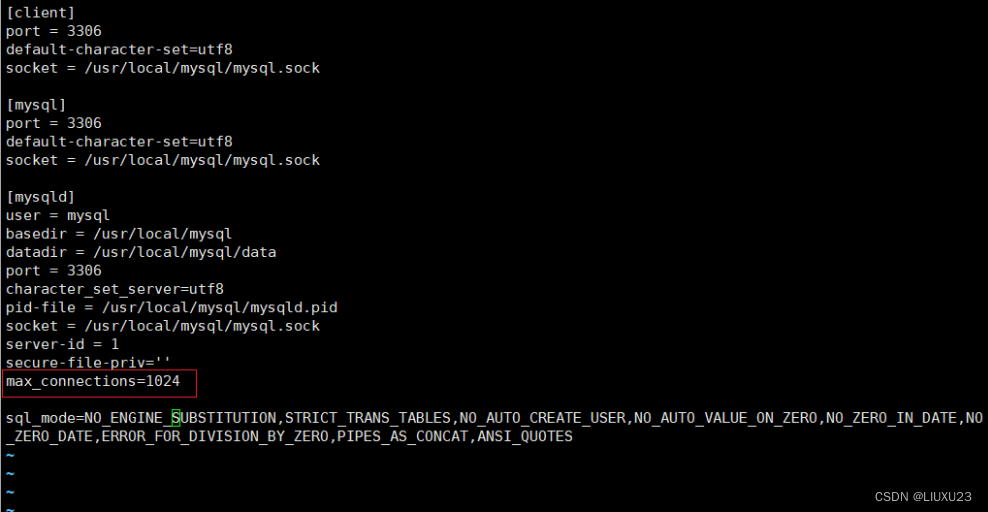
再对mysql进行压力测试之前,需要更改其默认的最大连接数,
vim /etc/my.cnf
systemctl restart mysqld.service
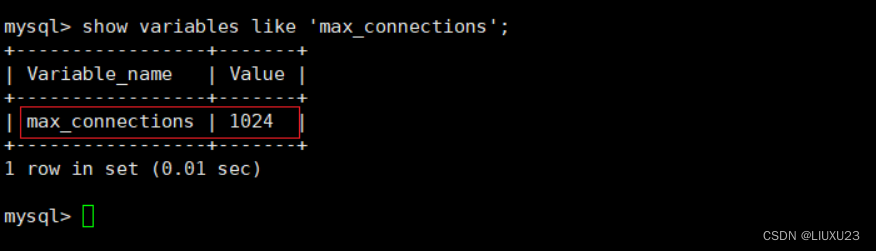
进入mysql中查看最大连接数
进行压力测试
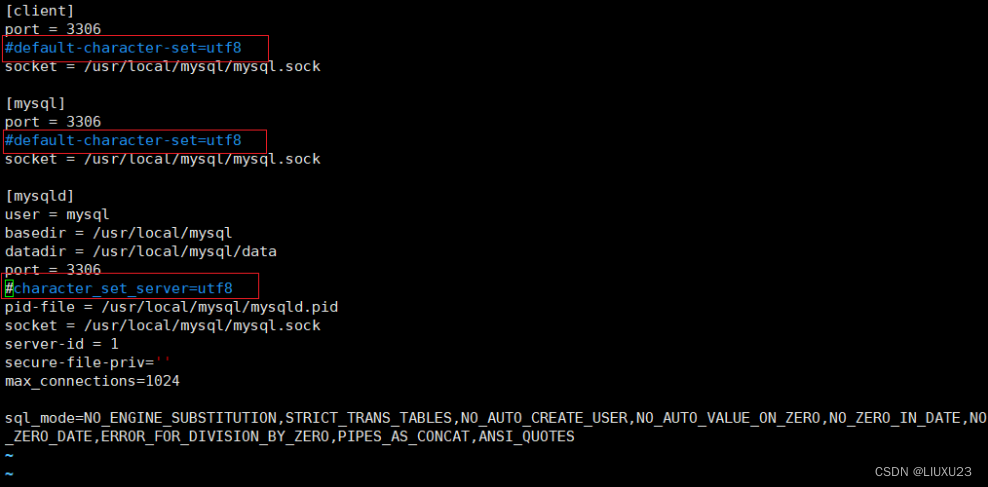
注意:mysqlslap好像会与default-character-set=utf8冲突
建议测试前先my.cnf文件中的default-character-set=utf8注释掉

mysqlslap --defaults-file=/etc/my.cnf --concurrency=100,200 --iterations=1 --number-int-cols=20 --number-char-cols=30 --auto-generate-sql --auto-generate-sql-add-autoincrement --auto-generate-sql-load-type=mixed --engine=myisam,innodb --number-of-queries=2000 -uroot -pabc123 --verbose
#模拟测试两次读写并发,第一次100,第二次200,自动生成SQL脚本,测试表包含20个init字段,30个char字段,每次执行2000查询请求。测试引擎分别是myisam,innodb。
–defaults-file=/etc/my.cnf 从/etc/my.cnf文件中读取默认选项
–concurrency=100,200 测试并发的线程数/客户端数,第一次100,第二次200
–iterations=1 指定测试重复次数1次
–number-int-cols=20 指定测试表中int列的数量
–number-char-cols=30 指定测试表中varchar列的数量
–auto-generate-sql 自动生成 SQL 语句
–auto-generate-sql-add-autoincrement 在自动生成的表中添加自增列
–auto-generate-sql-load-type=mixed 测试的负载模型,包括 mixed, update, write, key,read,默认是 mix
–engine=myisam,innodb 指定建表时的存储引擎
–number-of-queries=2000 指定每个线程执行的 SQL 语句数量上限(不精确)
–verbose 更详细的输出
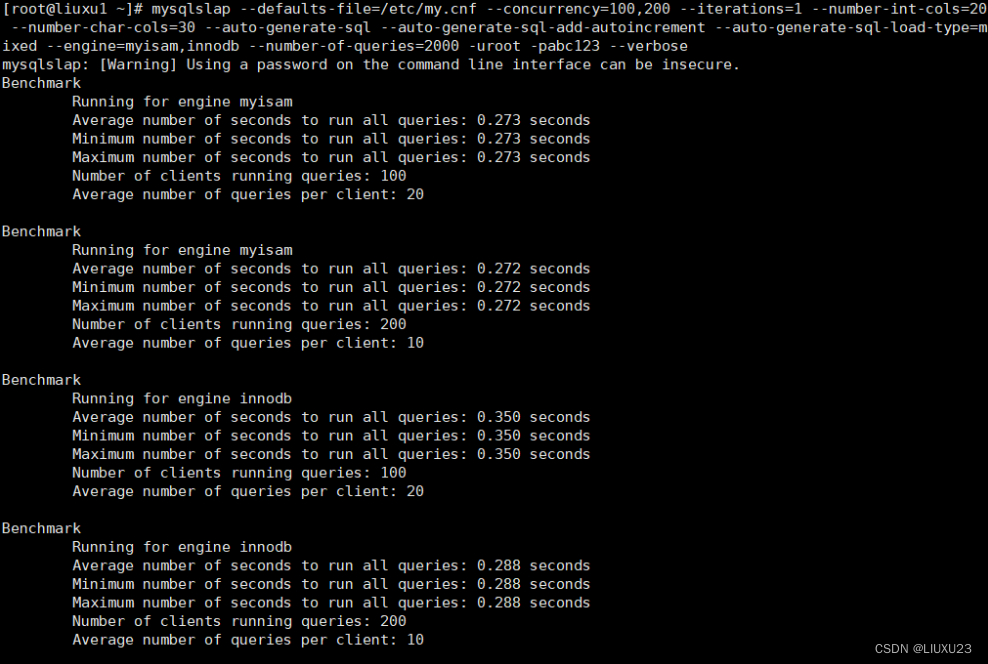
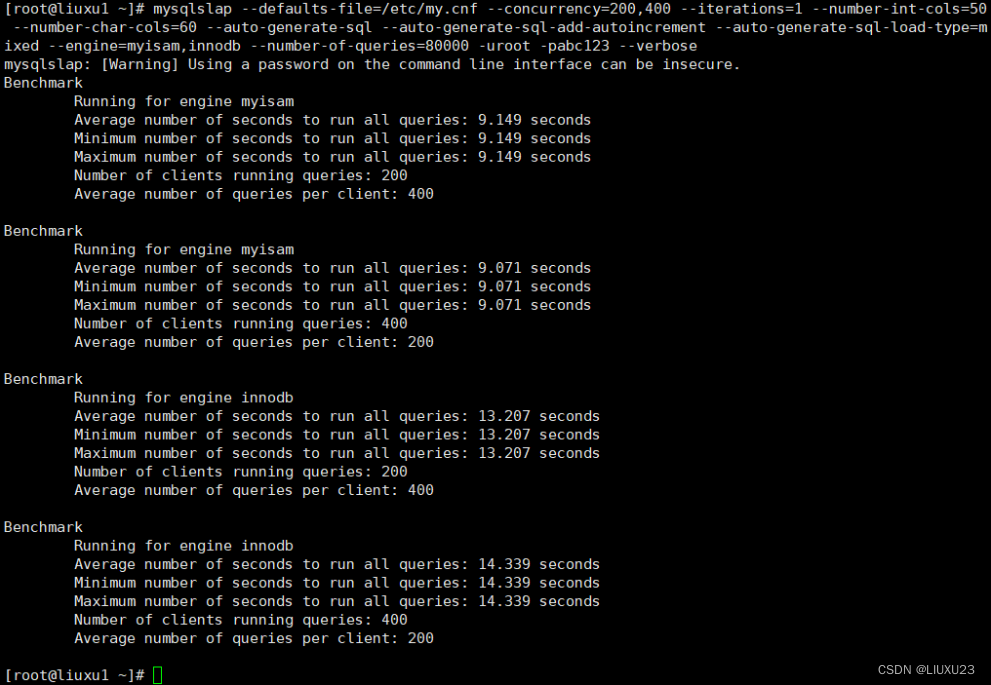
Average number of seconds to run all queries #运行所有查询的平均秒数
Minimum number of seconds to run all queries #运行所有查询所需的最小秒数
Maximum number of seconds to run all queries #运行所有查询的最大秒数
Number of clients running queries #运行查询的客户端数量
Average number of queries per client #每个客户端的平均查询数
看来这点压力不是问题,压力测试大胆一点
mysqlslap --defaults-file=/etc/my.cnf --concurrency=200,400 --iterations=1 --number-int-cols=50 --number-char-cols=60 --auto-generate-sql --auto-generate-sql-add-autoincrement --auto-generate-sql-load-type=mixed --engine=myisam,innodb --number-of-queries=80000 -uroot -pabc123 --verbose
压力调大测试,发现明显现在查询时间明显变慢了
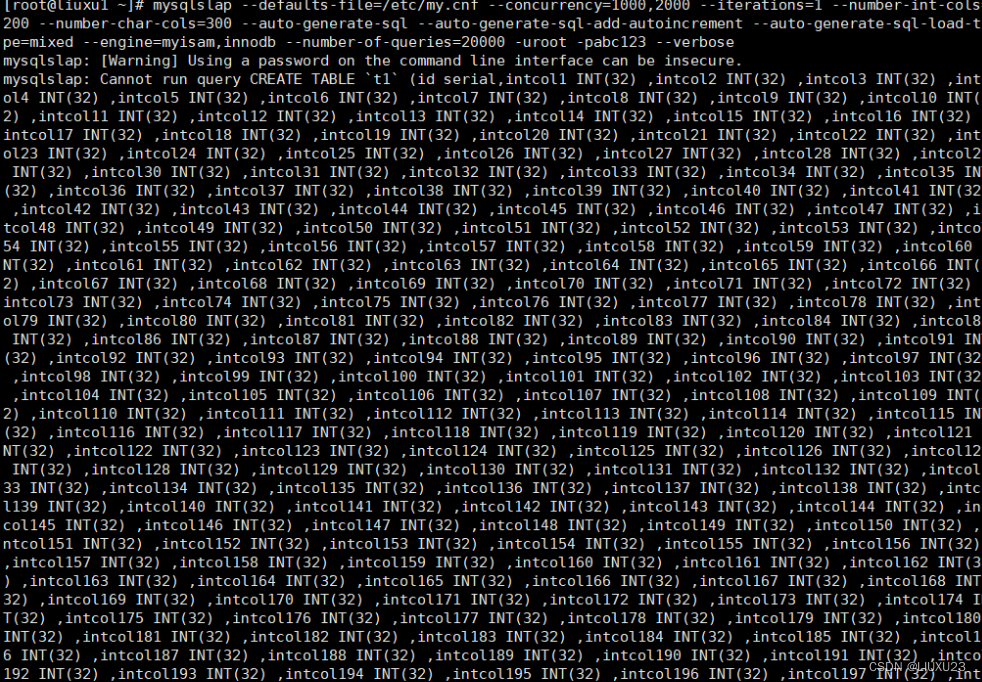
压力也不要调太大,会出现下面的场景
系统平台/自述文件在硕士 ·阿科皮托夫/系统台 ·吉特哈布 (github.com)
https://github.com/akopytov/sysbench/blob/master/README.md#general-command-line-options
sysbench]是一款开源的多线程性能测试工具,可以执行CPU/内存/线程/IO/数据库等方面的性能测试。数据库目前支持MySQL/Oracle/PostgreSQL。本文只是简单演示一下几种测试的用法,后续准备利用sysbench来对MySQL进行一系列的测试。具体的一些参数设置,需要根据不同的测试要求来进行调整。
默认支持mysql
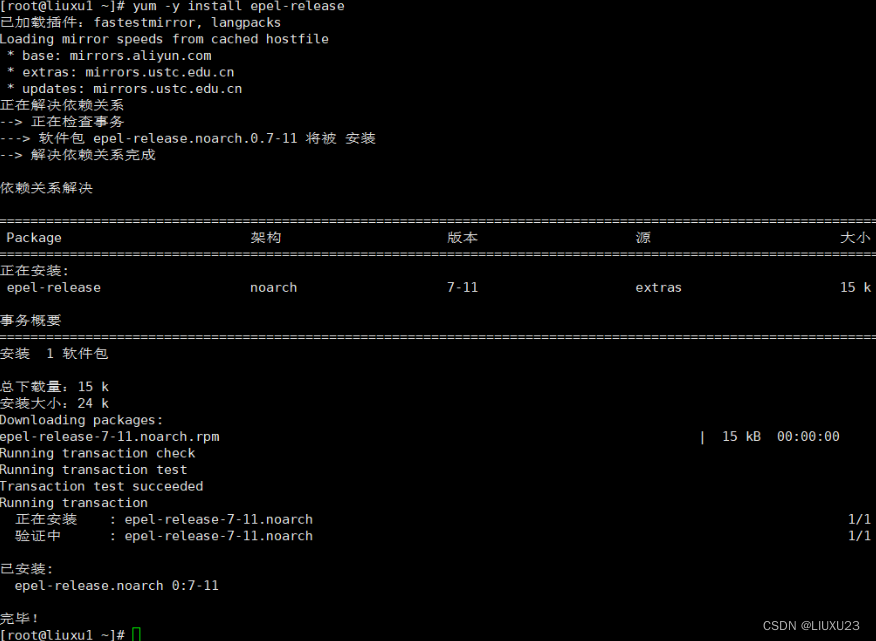
yum -y install epel-release #安装第三方epel源
yum -y install sysbench #安装sysbench工具
sysbench --version #确定工具已安装
sysbench 1.0.17


testname 是内置测试的可选名称(例如 ,,等),或捆绑的 Lua 脚本之一的名称(例如),或自定义 Lua 脚本的路径。如果在命令行上没有指定测试名称(因此,也没有命令,因为在这种情况下,它将被解析为测试名称),或者测试名称是破折号(“”),则 sysbench 期望 Lua 脚本在其标准输入上执行。
command 是一个可选参数,它将通过系统平台传递到使用测试名称指定的内置测试或脚本。命令定义测试必须执行的操作。可用命令的列表取决于特定的测试。某些测试还实现自己的自定义命令。
以下是对典型测试命令及其用途的描述:
prepare:为那些需要它们的测试执行准备操作,例如,在磁盘上为测试创建必要的文件,或为数据库基准测试填充测试数据库。run:运行使用测试名称参数指定的实际测试。此命令由所有测试提供。cleanup:在创建临时数据的测试中,删除测试运行后的临时数据。help:显示使用测试名参数指定的测试的用法信息。这包括测试提供的命令的完整列表,因此应使用它来获取可用命令。optiond是以 开头的零个或多个命令行选项的列表。与命令一样,该命令应用于描述特定测试提供的可用选项。
有关 sysbench 本身提供的常规选项的说明,请参阅常规命令行选项。
可用于显示常规命令行语法和选项。sysbench --help
[root@liuxu1 ~]# sysbench --help
Usage:
  sysbench [options]... [testname] [command]

Commands implemented by most tests: prepare run cleanup help

General options:  #普通功能
  --threads=N                     要使用的线程数,默认 1 个 [1]
  --events=N                      最大允许的事件个数 [0]
  --time=N                        最大的总执行时间,以秒为单位 [10]
  --forced-shutdown=STRING        在 --time 时间限制到达后,强制关闭之前等待的秒数,默认“off”禁用
  --thread-stack-size=SIZE        每个线程的堆栈大小 [64K]
  --rate=N                        平均传输速率。0 则无限制 [0]
  --report-interval=N             以秒为单位定期报告具有指定间隔的中间统计信息 0 禁用中间报告 [0]
  --report-checkpoints=[LIST,...] 转储完整的统计信息并在指定的时间点重置所有计数器。参数是一个逗号分隔的值列表,表示从测试开始经过这个时间量时必须执行报告检查点(以秒为单位)。报告检查点默认关闭。 []
  --debug[=on|off]                打印更多 debug 信息 [off]
  --validate[=on|off]             尽可能执行验证检查 [off]
  --help[=on|off]                 显示帮助信息并退出 [off]
  --version[=on|off]              显示版本信息并退出 [off]
  --config-file=FILENAME          包含命令行选项的文件
  --tx-rate=N                     已弃用——rate [0]的别名
  --max-requests=N                已弃用 --events [0]的别名
  --max-time=N                    已弃用 --time [0]的别名
  --num-threads=N                 已弃用 --threads [1]的别名

Pseudo-Random Numbers Generator options: #伪随机数生成器选项
  --rand-type=STRING 随机数分布 {uniform,gaussian,special,pareto} 默认使用[special]
  --rand-spec-iter=N 生成数字的迭代次数[12]
  --rand-spec-pct=N  被视为“特殊”(用于特殊分布)的值的百分比[1]
  --rand-spec-res=N  使用的“特殊”值的百分比(用于特殊分布)[75]
  --rand-seed=N      随机数生成器的种子。0时,当前时间作为RNG的种子。[0]
  --rand-pareto-h=N  pareto分布的参数h [0.2]

Log options:  #日志选项
  --verbosity=N verbosity level {5 - debug, 0 - only critical messages} [3]

  --percentile=N       percentile to calculate in latency statistics (1-100). Use the special value of 0 to disable percentile calculations [95]
  --histogram[=on|off] print latency histogram in report [off]

General database options:

  --db-driver=STRING  specifies database driver to use ('help' to get list of available drivers) [mysql]
  --db-ps-mode=STRING prepared statements usage mode {auto, disable} [auto]
  --db-debug[=on|off] print database-specific debug information [off]


Compiled-in database drivers:
  mysql - MySQL driver
  pgsql - PostgreSQL driver

mysql options:
  --mysql-host=[LIST,...]          MySQL server host [localhost]
  --mysql-port=[LIST,...]          MySQL server port [3306]
  --mysql-socket=[LIST,...]        MySQL socket
  --mysql-user=STRING              MySQL user [sbtest]
  --mysql-password=STRING          MySQL password []
  --mysql-db=STRING                MySQL database name [sbtest]
  --mysql-ssl[=on|off]             use SSL connections, if available in the client library [off]
  --mysql-ssl-cipher=STRING        use specific cipher for SSL connections []
  --mysql-compression[=on|off]     use compression, if available in the client library [off]
  --mysql-debug[=on|off]           trace all client library calls [off]
  --mysql-ignore-errors=[LIST,...] list of errors to ignore, or "all" [1213,1020,1205]
  --mysql-dry-run[=on|off]         Dry run, pretend that all MySQL client API calls are successful without executing them [off]

pgsql options:
  --pgsql-host=STRING     PostgreSQL server host [localhost]
  --pgsql-port=N          PostgreSQL server port [5432]
  --pgsql-user=STRING     PostgreSQL user [sbtest]
  --pgsql-password=STRING PostgreSQL password []
  --pgsql-db=STRING       PostgreSQL database name [sbtest]

Compiled-in tests:
  fileio - File I/O test
  cpu - CPU performance test
  memory - Memory functions speed test
  threads - Threads subsystem performance test
  mutex - Mutex performance test

See 'sysbench <testname> help' for a list of options for each test.
mysql options:
–mysql-host=[LIST,…] MySQL server host [localhost] #MySQL服务器主机
–mysql-port=[LIST,…] MySQL server port [3306] #MySQL服务器端口
–mysql-socket=[LIST,…] MySQL socket #MySQL的套接字
–mysql-user=STRING MySQL user [sbtest] #MySQL用户
–mysql-password=STRING MySQL password [] #MySQL密码
–mysql-db=STRING MySQL database name [sbtest] #MySQL数据库名称
–mysql-ssl[=on|off] use SSL connections, if available in the client library [off] #是否开启ssl连接
–mysql-ssl-cipher=STRING use specific cipher for SSL connections [] #对SSL连接使用特定的密码
–mysql-compression[=on|off] use compression, if available in the client library [off] #是否开启压缩功能
–mysql-debug[=on|off] trace all client library calls [off] #是否跟踪所有客户端库调用
–mysql-ignore-errors=[LIST,…] list of errors to ignore, or “all” [1213,1020,1205] #要忽略或“全部”的错误列表 --mysql-dry-run[=on|off] Dry run, pretend that all MySQL client API calls are successful without executing them [off] #模拟运行,假设所有的MySQL客户端API调用都是成功的,但没有执行它们
1、准备测试数据
#查看sysbench自带的lua脚本使用方法
sysbench /usr/share/sysbench/oltp_common.lua help
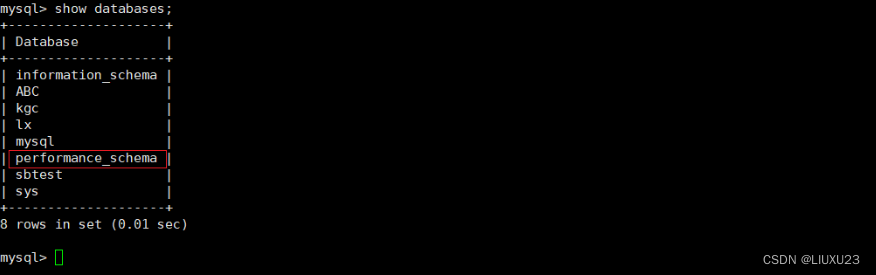
#必须创建sbtest库,sbtest事sysbench默认使用的库名
mysqladmin -uroot -pabc123 create sbtest;
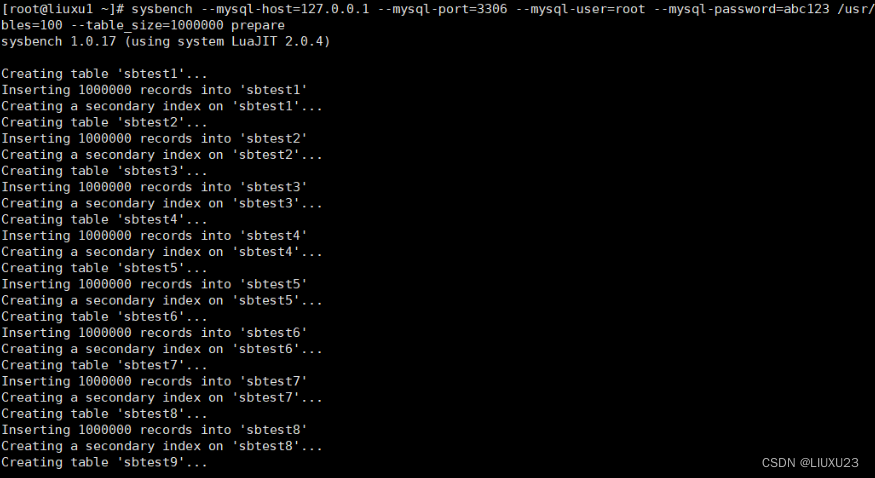
#然后,准备测试所用的表,这些测试表放在测试库sbtest中。这里使用的lua脚本为/usr/share/sysbench/oltp_common.lua
sysbench --mysql-host=127.0.0.1 \
--mysql-port=3306 \
--mysql-user=root \
--mysql-password=abc123 \
/usr/share/sysbench/oltp_common.lua \
--tables=10 \
--table_size=100000 \
prepare
#其中--tables=10表示创建10个测试表,
#--table_size=100000表示每个表中插入10W行数据,
#prepare表示这是准备数的过程。
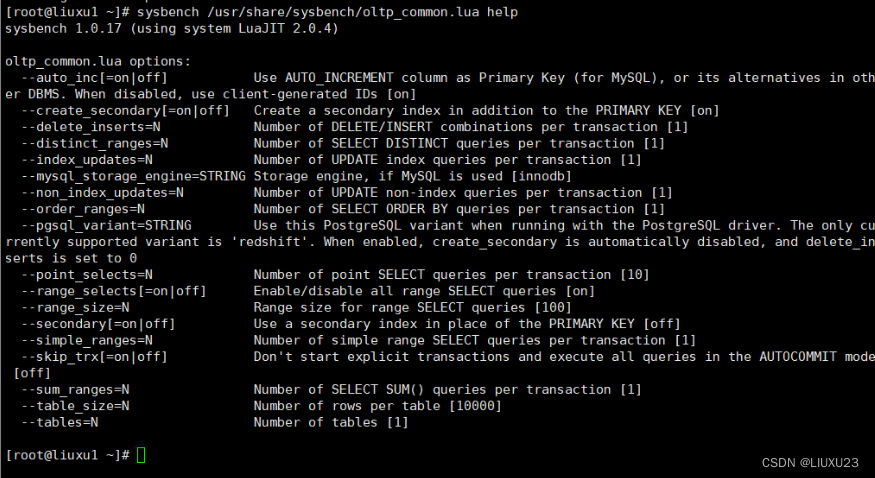
--auto_inc[=on|off]     id列默认自增,默认[on]
--create_secondary[=on|off]   索引不是主键索引而是二级索引,默认[off]
--delete_inserts=N     每个事务的delete、insert的组合数,默认[1]
--distinct_ranges=N      单个事务中执行范围distinct查询的数量,默认[1]
--index_updates=N    单个事务中执行索引更新的操作的数量,默认[1]
--mysql_storage_engine=STRING  mysql的存储引擎,默认是[innodb]
--non_index_updates=N    单个事务中执行索引更新的操作的数量,默认[1]
--order_ranges=N    单个事务中执行范围order by查询的数量,默认[1]
--pgsql_variant=STRING  在运行pgsql的驱动程序时,使用了pgsql的变体,当前仅仅支持的variant是'redshift',当启动时,将自动禁用create_secondary为不可用,并将delete_insert设置为0
--point_selects=N  单个事务中select查询的数量,默认 [10]
--range_selects[=on|off]   启用/禁用所有SELECT查询[on]
--secondary[=on|off]    使用二级索引代替逐渐,默认[off]
--range_size=N    查询范围。默认是100
--simple_ranges=N     每个事务的简单查询范围select,默认[1]
--skip_trx[=on|off]     语句以bigin/commit开始结尾,默认[off]
--sum_ranges=N      每个事务的select sum的查询总量,默认[1]
--table_size=N     指定表的记录大小(行的数量),默认[10000]
--tables=N  创建的表数量,默认[1]

sysbench --threads=4 \
--time=20 \
--report-interval=5 \
--mysql-host=127.0.0.1 \
--mysql-port=3306 \
--mysql-user=root \
--mysql-password=abc123 \
/usr/share/sysbench/oltp_read_write.lua \
--tables=100 \
--table_size=1000000 \
run
[root@liuxu1 ~]# sysbench --threads=4 \  #使用4个线程
> --time=20 \ #最大的总执行时间20秒
> --report-interval=5 \ #
> --mysql-host=127.0.0.1 \
> --mysql-port=3306 \
> --mysql-user=root \
> --mysql-password=abc123 \
> /usr/share/sysbench/oltp_read_write.lua \
> --tables=100 \
> --table_size=1000000 \
> run
sysbench 1.0.17 (using system LuaJIT 2.0.4)

Running the test with following options:
Number of threads: 4   #并发数4
Report intermediate results every 5 second(s)  #每5秒报告一次测试结果
Initializing random number generator from current time


Initializing worker threads...

Threads started!
#下面是每5秒返回一次的结果,统计的指针包括:
线程数 thds 4
tps(每秒事务数)
qos(每秒查询数)
每秒的读/写/其他次数、延迟、每秒错误数、每秒重连次数
[ 5s ] thds: 4 tps: 253.12 qps: 5066.89 (r/w/o: 3547.34/1012.50/507.05) lat (ms,95%): 34.33 err/s: 0.00 reconn/s: 0
[ 10s ] thds: 4 tps: 335.20 qps: 6705.37 (r/w/o: 4693.58/1341.59/670.20) lat (ms,95%): 28.67 err/s: 0.00 reconn/s:
[ 15s ] thds: 4 tps: 343.27 qps: 6869.17 (r/w/o: 4809.56/1372.87/686.74) lat (ms,95%): 28.16 err/s: 0.00 reconn/s:
[ 20s ] thds: 4 tps: 336.91 qps: 6738.97 (r/w/o: 4716.72/1348.44/673.82) lat (ms,95%): 28.16 err/s: 0.00 reconn/s:
SQL statistics:
    queries performed:
        read:                            88858 #执行的读操作数量
        write:                           25388 #执行的写操作数量
        other:                           12694 #执行的其它操作数量
        total:                           126940 #总执行的操作数量
    transactions:                        6347   (316.93 per sec.)#总事务数(每秒事务数)
    queries:                             126940 (6338.58 per sec.)#查询总数
    ignored errors:                      0      (0.00 per sec.)#忽略错误数
    reconnects:                          0      (0.00 per sec.)#重新连接数

General statistics:
    total time:                          20.0254s# 总消耗时间
    total number of events:              6347 # 总请求数量(读、写、其它)

Latency (ms): #等待时间
         min:                                    3.92 #最小耗时
         avg:                                   12.60 #平均耗时
         max:                                   61.54 #最长耗时
         95th percentile:                       29.72 #超过99%平均耗时
         sum:                                80002.95 #总时间

Threads fairness: #并发统计
    events (avg/stddev):           1586.7500/6.26 #总处理事件数/标准偏差
    execution time (avg/stddev):   20.0007/0.01  #平均处理事件时间/标准偏差
平均耗时
         max:                                   61.54 #最长耗时
         95th percentile:                       29.72 #超过99%平均耗时
         sum:                                80002.95 #总时间

Threads fairness: #并发统计
    events (avg/stddev):           1586.7500/6.26 #总处理事件数/标准偏差
    execution time (avg/stddev):   20.0007/0.01  #平均处理事件时间/标准偏差
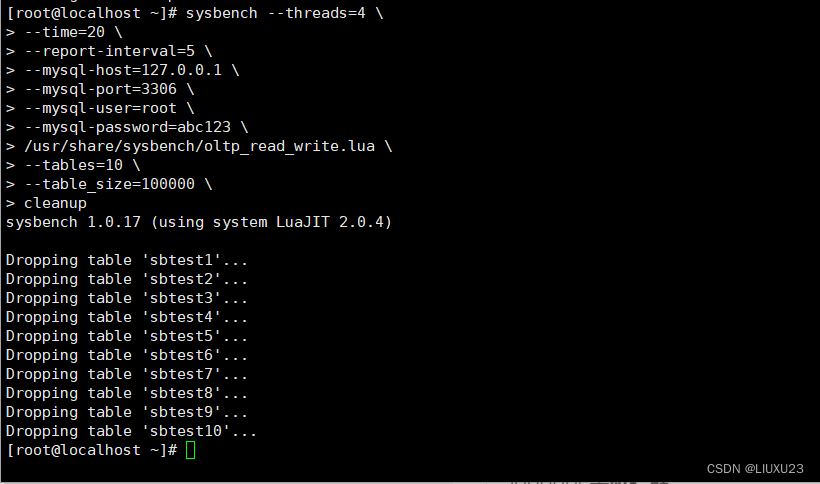
sysbench --threads=4
–time=20
–report-interval=5
–mysql-host=127.0.0.1
–mysql-port=3306
–mysql-user=root
–mysql-password=abc123
/usr/share/sysbench/oltp_read_write.lua
–tables=10
–table_size=100000
cleanup #删除刚刚的数据
文章目录一、概述简介原理模块二、配置Mysql使用版本环境要求1.操作系统2.mysql要求三、配置canal-server离线下载在线下载上传解压修改配置单机配置集群配置分库分表配置1.修改全局配置2.实例配置垂直分库水平分库3.修改group-instance.xml4.启动监听四、配置canal-adapter1修改启动配置2配置映射文件3启动ES数据同步查询所有订阅同步数据同步开关启动4.验证五、配置canal-admin一、概述简介canal是Alibaba旗下的一款开源项目,Java开发。基于数据库增量日志解析,提供增量数据订阅&消费。Git地址:https://github.co
我看到其他人也遇到过类似的问题,但没有一个解决方案对我有用。0.3.14gem与其他gem文件一起存在。我已经完全按照此处指示完成了所有操作:https://github.com/brianmario/mysql2.我仍然得到以下信息。我不知道为什么安装程序指示它找不到include目录,因为我已经检查过它存在。thread.h文件存在,但不在ruby目录中。相反,它在这里:C:\RailsInstaller\DevKit\lib\perl5\5.8\msys\CORE\我正在运行Windows7并尝试在Aptana3中构建我的Rails项目。我的Ruby是1.9.3。$gemin
我已经开始使用mysql2gem。我试图弄清楚一些基本的事情——其中之一是如何明确地执行事务(对于批处理操作,比如多个INSERT/UPDATE查询)。在旧的ruby-mysql中,这是我的方法:client=Mysql.real_connect(...)inserts=["INSERTINTO...","UPDATE..WHEREid=..",#etc]client.autocommit(false)inserts.eachdo|ins|beginclient.query(ins)rescue#handleerrorsorabortentirelyendendclient.commi
我正在尝试绕过rails配置这个极其复杂的迷宫。到目前为止,我设法在ubuntu上设置了rvm(出于某种原因,ruby在ubuntu存储库中已经过时了)。我设法建立了一个Rails项目。我希望我的测试项目使用mysql而不是mysqlite。当我尝试“rakedb:migrate”时,出现错误:“!!!缺少mysql2gem。将其添加到您的Gemfile:gem'mysql2'”当我尝试“geminstallmysql”时,出现错误,告诉我需要为安装命令提供参数。但是,参数列表很大,我不知道该选择哪些。如何通过在ubuntu上运行的rvm和mysql获取rails3?谢谢。
目录1、yum安装mysql修改密码(1)在mysql里面修改(2)第二种方式,利用mysqladmin修改密码2、没有密码,登录mysql修改密码3、mysql的安全设置1、yum安装mysql在CentOS中默认安装有MariaDB(MySQL的一个分支),安装完成之后可以直接覆盖MariaDB。rpm-qa|grepmariadb查询是否安装了mariadbrpm-e--nodepsmariadb-libs-5.5.60-1.el7_5.x86_64卸载mariadwgethttp://dev.mysql.com/get/mysql57-community-release-el7-11.
我是Ruby的新手。我安装了DataMapper并且正在尝试安装dm-mysql-adapter-1.0.2gem。但是当我尝试安装时,出现以下错误。我正在使用ubuntu操作系统。vinoth@vinoth-laptop:~/Downloads$geminstalldm-mysql-adapter-1.0.2----with-mysql-lib=/usr/lib/mysql----with-mysql-conf=/usr/bin/mysqlWARNING:Installingto~/.gemsince/home/vinoth/gemsand/home/vinoth/gems/bina
我目前正在构建一个需要mysql2gem的RoR项目。我成功安装了gem。因为它出现在我的gem列表中。[root@vc2cmmka035538nsimple_cms]#gemlist***LOCALGEMS***actionmailer(3.2.3)actionpack(3.2.3)activemodel(3.2.3)activerecord(3.2.3)activeresource(3.2.3)activesupport(3.2.14,3.2.3)arel(3.0.2)bigdecimal(1.1.0)builder(3.2.2,3.0.0)bundler(1.1.5)c2c_li
我想使用托管在我自己服务器上的mysql数据库。我已经更改了DATABASE_URL和SHARED_DATABASE_URL配置变量以指向我的服务器,但它仍在尝试连接到heroku的amazonaws服务器。我该如何解决? 最佳答案 根据Herokudocumentation,更改DATABASE_URL是正确的方法。Ifyouwouldliketohaveyourrailsapplicationconnecttoanon-Herokuprovideddatabase,youcantakeadvantageofthissamemec
使用mysql2做查询总是得到警告/usr/local/lib/ruby/gems/1.9.1/gems/mysql2-0.2.6/lib/active_record/connection_adapters/mysql2_adapter.rb:463:warning::database_timezoneoptionmustbe:utcor:local-defaultingto:local我确实看到了时区选项Mysql2现在支持两个时区选项::database_timezone-thisisthetimezoneMysql2willassumefieldsarealreadystored
每次我跑:gitpushherokumaster我收到以下错误:Running:rakeassets:precompilerakeaborted!Can'tconnecttoMySQLserveron'127.0.0.1'我在运行rails-vRails3.2.11和ruby-vruby1.9.3p194(2012-04-20revision35410)[x86_64-darwin12.2.0]我已经通过HerokuCLI安装了ClearDB,它似乎工作正常,但我无法找出这个错误。这是我用于生产的yml:production:adapter:mysql2encoding:utf8hos
