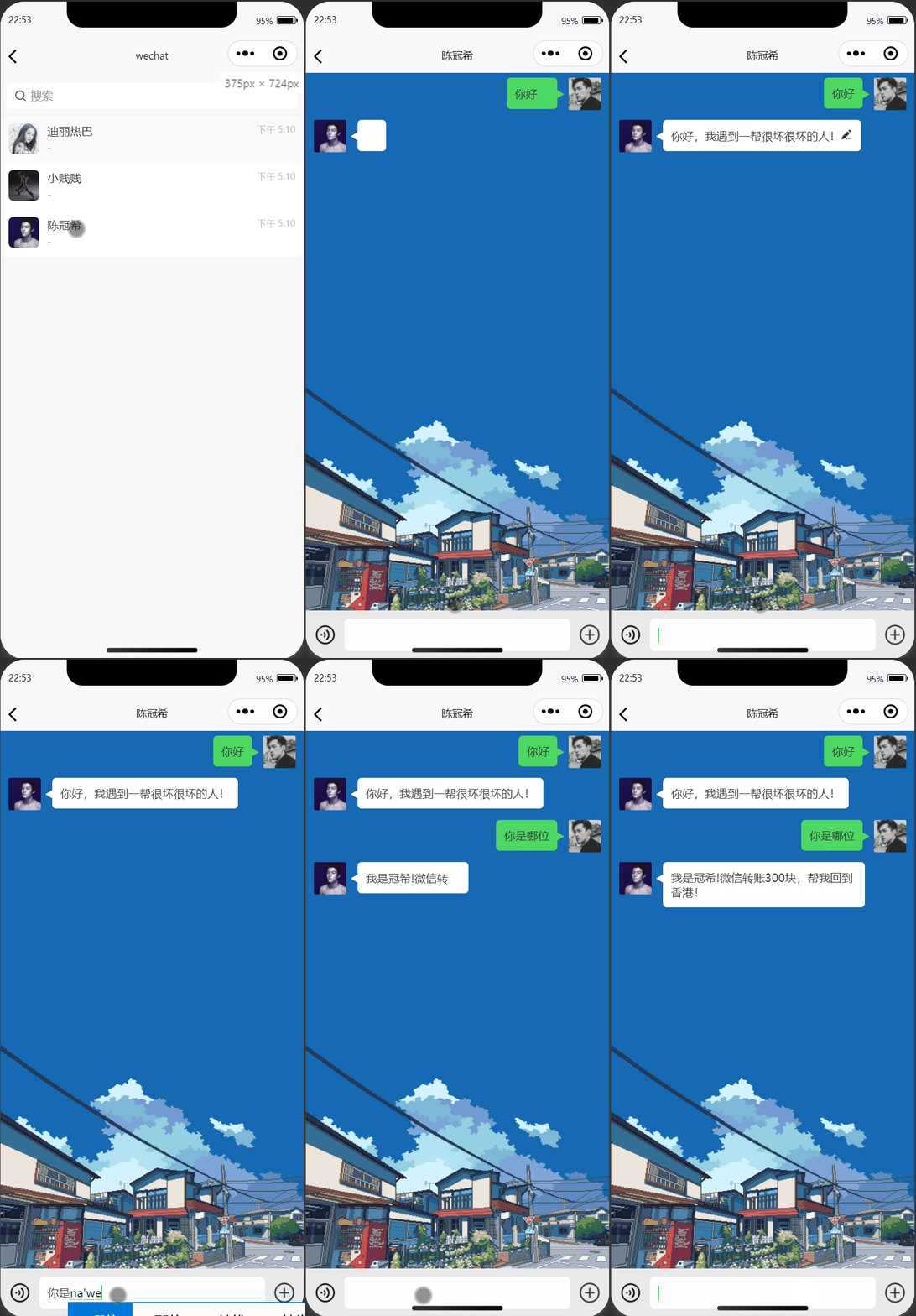

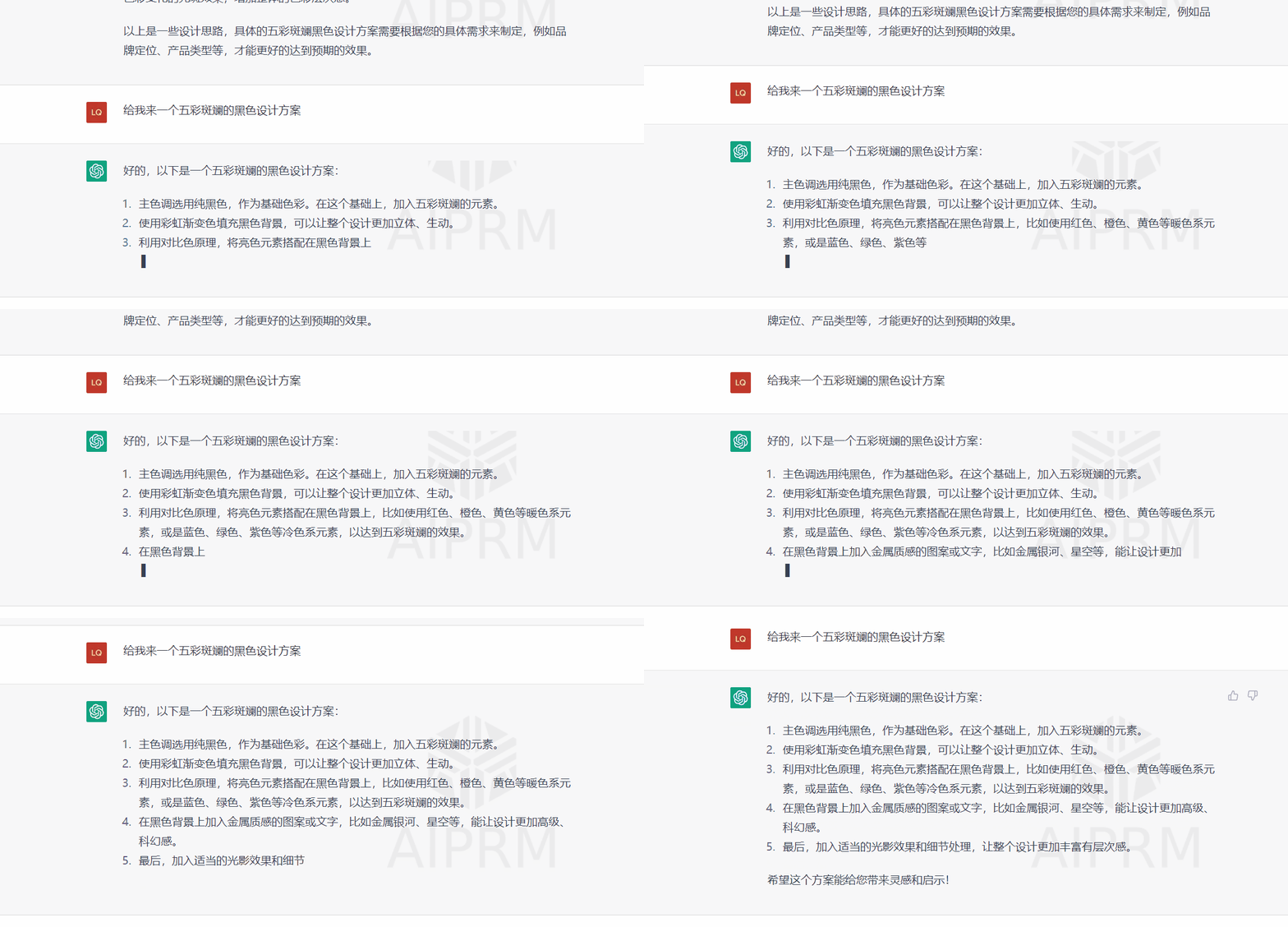
体验过ChatGPT这一产品的小伙伴对于GPT模型的恢复效果不知道有没有一种让人感觉到真的在和真人交流的感觉。不管你的问题有多么的刁钻,它总是能以一种宠辱不惊的状态回复你。
但是对于一些很无理的要求,它有的时候也是很果断的😂

没有体验过的小伙伴也可以直接从效果图中看出,AI的每一句回答都是一个字一个字或者一小段一小段地给予回复,给人一种无比地丝滑感,这才是真的真的聊天啊!
那么这个时候,如果可以把ChatGPT这个AI的丝滑聊天动效直接迁移到我们现在使用的聊天场景中来,把这些死板的、一次性的消息框效果直接全量优化!让我们的社交更加具有趣味性!😜
针对这一效果我们静下心来思考一下你会发现:ChatGPT的这个聊天框的响应反馈不仅仅是有一个动态光标的存在,更重要的是它返回的真的有够快的。
试想一下,按照我们在日常开发中的发起Http请求业务开发过程中,都是在三次握手之后客户端与服务端才开始交流感情!而且都是要到后端处理完全部逻辑之后才进行数据的返回,然后前端再拿这些数据进行渲染操作,所以要做到这么快就有两种设想:
Bug:数据量一爆炸,前端的响应速度并不能保证!)后端服务采用流式数据响应,从而实现不等待式实时渲染)ChatGPT中对话框进行文字输入的时候,我们可以明显看到,在每个文字的后面都有一个闪烁的光标,正是这一效果可以给予用户一种真在动态输入的感觉,让体验倍加丝滑!
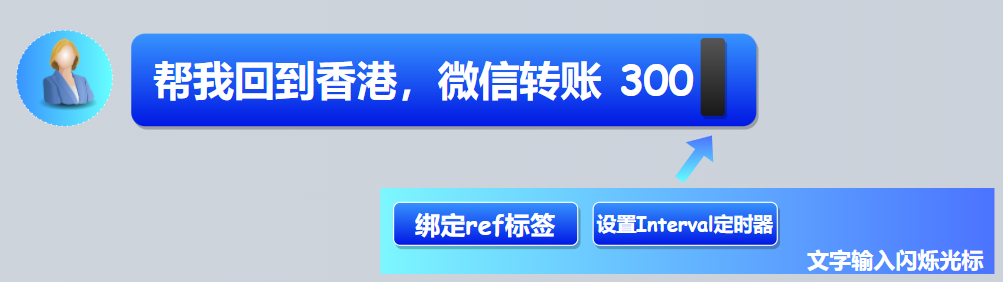
要实现这一效果,我们可以使用定时器,每100毫秒逐个渲染出文本内容,并在文本后面添加了一个闪烁的光标。注意要在组件中设置ref属性来获取span元素的引用。
<template>
  <div>
    <span ref="text"></span><span ref="cursor" class="blink">_</span>
  </div>
</template>

<script>
export default {
  mounted() {
    const text = this.$refs.text;
    const cursor = this.$refs.cursor;
    const textContent = "这是一段需要逐个渲染的文字";
    let index = 0;

    setInterval(() => {
      if (index <= textContent.length) {
        text.textContent = textContent.slice(0, index);
        cursor.style.opacity = index % 2 === 0 ? 1 : 0;
        index++;
      }
    }, 100);
  },
};
</script>

<style>
.blink {
  animation: blink-animation 1s steps(1) infinite;
}

@keyframes blink-animation {
  0% {
    opacity: 0;
  }

  50% {
    opacity: 1;
  }

  100% {
    opacity: 0;
  }
}
</style>
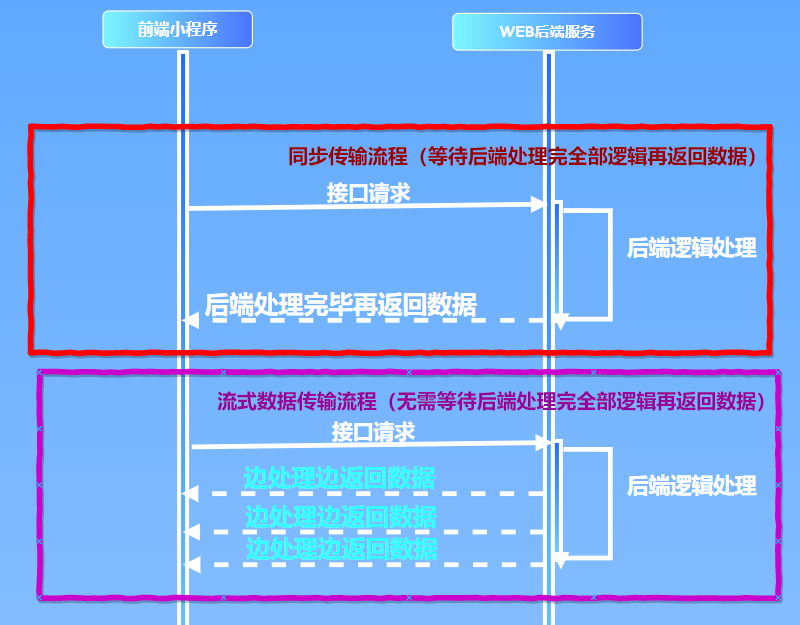
在前端中,可以使用流式处理(Streaming)的方式,实时加载从 HTTP 请求返回的 JSON 数据。这种方式可以避免一次性加载大量数据所造成的性能问题,而是在数据流到达时逐步处理数据。
以下是使用流式处理加载 JSON 数据的示例代码:
function loadJSON(url, onData) {
  let xhr = new XMLHttpRequest()
  xhr.open('GET', url, true)
  xhr.responseType = 'json'
  xhr.onprogress = function() {
    let chunk = xhr.response.slice(xhr.loaded, xhr.response.length)
    onData(chunk)
  }
  xhr.onload = function() {
    if (xhr.status === 200) {
      onData(xhr.response)
    }
  }
  xhr.send()
}
在上面的代码中,定义了一个 loadJSON 函数,该函数使用 XMLHttpRequest 对象发送 GET 请求,并指定 responseType:json 参数。然后,在 onprogress 事件中,获取从服务器返回的 JSON 数据的最新一块数据,并通过 onData 回调函数将数据传递给客户端。在 onload 事件中,将最后一块数据发送给客户端。

<template>
	<view class="content">
		<view class="content-box" @touchstart="touchstart" id="content-box" :class="{'content-showfn':showFunBtn}">
			<!-- 背景图- 定位方式 -->
			<image class="content-box-bg" :src="_user_info.chatBgImg" :style="{ height: imgHeight }"></image>
			<view class="content-box-loading" v-if="!loading"><u-loading mode="flower"></u-loading></view>
			<view class="message" v-for="(item, index) in messageList" :key="index" :id="`msg-${item.hasBeenSentId}`">
				<view class="message-item " :class="item.isItMe ? 'right' : 'left'">
					<image class="img" :src="item.fromUserHeadImg" mode="" @tap="linkToBusinessCard(item.fromUserId)"></image>
					<!-- contentType = 1 文本 -->
					<view class="content" v-if="item.contentType == 1">
						<!-- <span ref="text" value="item.content"></span><span ref="cursor" class="blink">_</span> -->
				<!-- 		{{ generateTextSpan(item,index) }}
						<span :ref="'text'+index" :value="item.content" :index="index"></span>
						<span ref="cursor" class="blink">_</span> -->
						<chat-record :content="item.content"></chat-record>

					</view>
					<!-- <view class="content" v-if="item.contentType == 1">{{ item.content }}</view> -->
					<!-- contentType = 2 语音 -->
					<view
						class="content contentType2"
						:class="[{ 'content-type-right': item.isItMe }]"
						v-if="item.contentType == 2"
						@tap="handleAudio(item)"
						hover-class="contentType2-hover-class"
						:style="{width:`${130+(item.contentDuration*2)}rpx`}"
					>
						<view
							class="voice_icon"
							:class="[
								{ voice_icon_right: item.isItMe },
								{ voice_icon_left: !item.isItMe },
								{ voice_icon_right_an: item.anmitionPlay && item.isItMe },
								{ voice_icon_left_an: item.anmitionPlay && !item.isItMe }
							]"
						></view>
						<view class="">{{ item.contentDuration }}''</view>
					</view>
					<!-- contentType = 3 图片 -->
					<view
						class="content contentType3"
						v-if="item.contentType == 3"
						@tap="viewImg([item.content])"
					>
						<image :src="item.content" class="img" mode="widthFix"></image>
					</view>
				</view>
			</view>
		</view>

		<!-- 底部聊天输入框 -->
		<view class="input-box" :class="{ 'input-box-mpInputMargin': mpInputMargin }">
			<view class="input-box-flex">
				<!-- #ifndef H5 -->
				<image v-if="chatType === 'voice'" class="icon_img" :src="require('@/static/voice.png')"  @click="switchChatType('keyboard')"></image>
				<image v-if="chatType === 'keyboard'" class="icon_img" :src="require('@/static/keyboard.png')"  @click="switchChatType('voice')"></image>
				<!-- #endif -->
				<view class="input-box-flex-grow">
					<input
						v-if="chatType === 'voice'"
						type="text"
						class="content"
						id="input"
						v-model="formData.content"
						:hold-keyboard="true"
						:confirm-type="'send'"
						:confirm-hold="true"
						placeholder-style="color:#DDDDDD;"
						:cursor-spacing="10"
						@confirm="sendMsg(null)"
					/>
					<view
						class="voice_title"
						v-if="chatType === 'keyboard'"
						:style="{ background: recording ? '#c7c6c6' : '#FFFFFF' }"
						@touchstart.stop.prevent="startVoice"
						@touchmove.stop.prevent="moveVoice"
						@touchend.stop="endVoice"
						@touchcancel.stop="cancelVoice"
					>
						{{ voiceTitle }}
					</view>
				</view>

				<!-- 功能性按钮 -->
				<image class=" icon_btn_add" :src="require('@/static/add.png')" @tap="switchFun"></image>

				<!-- #ifdef H5 -->
				<button class="btn" type="primary" size="mini" @touchend.prevent="sendMsg(null)">发送</button>
				<!-- #endif -->
			</view>

			<view class="fun-box" :class="{'show-fun-box':showFunBtn}">
				<u-grid :col="4"  hover-class="contentType2-hover-class" :border="false" @click="clickGrid">
					<u-grid-item v-for="(item, index) in funList" :index="index" :key="index" bg-color="#eaeaea">
						<u-icon :name="item.icon" :size="52"></u-icon>
						<view class="grid-text">{{ item.title }}</view>
					</u-grid-item>
				</u-grid>
			</view>

		</view>

		<!-- //语音动画 -->
		<view class="voice_an"  v-if="recording">
			<view class="voice_an_icon">
				<view id="one" class="wave"></view>
				<view id="two" class="wave"></view>
				<view id="three" class="wave"></view>
				<view id="four" class="wave"></view>
				<view id="five" class="wave"></view>
				<view id="six" class="wave"></view>
				<view id="seven" class="wave"></view>
			</view>
			<view class="text">{{voiceIconText}}</view>
		</view>
	</view>
</template>

<script>
	import chatRecord from '@/components/chatRecord/index.vue'
export default {
	components:{chatRecord},
	data() {
		return {
			lines:[],
			fromUserInfo: {},
			formData: {
				content: '',
				limit: 15,
				index: 1
			},
			messageList: [],
			loading: true, //标识是否正在获取数据
			imgHeight: '1000px',
			mpInputMargin: false, //适配微信小程序 底部输入框高度被顶起的问题
			chatType:"voice",  // 图标类型 'voice'语音 'keyboard'键盘
			voiceTitle: '按住 说话',
			Recorder: uni.getRecorderManager(),
			Audio: uni.createInnerAudioContext(),
			recording: false, //标识是否正在录音
			isStopVoice: false, //加锁 防止点击过快引起的当录音正在准备(还没有开始录音)的时候,却调用了stop方法但并不能阻止录音的问题
			voiceInterval:null,
			voiceTime:0, //总共录音时长
			canSend:true, //是否可以发送
			PointY:0, //坐标位置
			voiceIconText:"正在录音...",
			showFunBtn:false, //是否展示功能型按钮
			AudioExam:null, //正在播放音频的实例
			funList: [
				{ icon:"photo-fill",title:"照片",uploadType:["album"] },
				{ icon:"camera-fill",title:"拍摄",uploadType:["camera"] },
			],
		};
	},
	 updated() {

	  },
	methods: {
		//拼接消息 处理滚动
		async joinData() {
			if (!this.loading) {
				//如果没有获取数据 即loading为false时,return 避免用户重复上拉触发加载
				return;
			}
			this.loading = false;
			const data = await this.getMessageData();
			//获取节点信息
			const { index } = this.formData;
			const sel = `#msg-${index > 1 ? this.messageList[0].hasBeenSentId : data[data.length - 1].hasBeenSentId}`;
			this.messageList = [...data, ...this.messageList];
			console.log(this.messageList)
			//填充数据后,视图会自动滚动到最上面一层然后瞬间再跳回bindScroll的指定位置 ---体验不是很好,后期优化
			this.$nextTick(() => {
				this.bindScroll(sel);
				//如果还有数据
				if (this.formData.limit >= data.length) {
					this.formData.index++;
					setTimeout(() => {
						this.loading = true;
					}, 200);
				}
			});
		},
		//处理滚动
		bindScroll(sel, duration = 0) {
			const query = uni.createSelectorQuery().in(this);
			query
				.select(sel)
				.boundingClientRect(data => {
					uni.pageScrollTo({
						scrollTop: data && data.top - 40,
						duration
					});
				})
				.exec();
		},
		generateTextSpan(item,index){
			var name = 'text'+index
			console.log('== text ==',this.$refs.text1)


		},
		//获取消息
		getMessageData() {
			let getData = () => {
				let arr = [];
				let startIndex = (this.formData.index - 1) * this.formData.limit;
				let endIndex = startIndex + this.formData.limit;

				return arr;
			};
			return new Promise((resolve, reject) => {
				const data = getData();
				setTimeout(() => {
					resolve(data);
				}, 500);
			});
		},
		getPersonMsgData(text) {
			let getData = () => {
				let arr = [];

				const isItMe = false;
				let startIndex = (this.formData.index - 1) * this.formData.limit;
				let endIndex = startIndex + this.formData.limit;
				arr.push({
					hasBeenSentId: startIndex, //已发送过去消息的id
					content: text,
					fromUserHeadImg: isItMe ? this._user_info.headImg : this.fromUserInfo.fromUserHeadImg, //用户头像
					fromUserId: isItMe ? this._user_info.id : this.fromUserInfo.fromUserId,
					isItMe, //true此条信息是我发送的 false别人发送的
					createTime: Date.now(),
					contentType: 1, // 1文字文本 2语音
					anmitionPlay: false //标识音频是否在播放
				});
				console.log('==arr==',arr)
				return arr;
			};
			return new Promise((resolve, reject) => {
				const data = getData();
				setTimeout(() => {
					resolve(data);
				}, 500);
			});
		},
		async joinPersonData(text) {
			if (!this.loading) {
				//如果没有获取数据 即loading为false时,return 避免用户重复上拉触发加载
				return;
			}
			this.loading = false;
			const data = await this.getPersonMsgData(text);
			//获取节点信息
			const { index } = this.formData;
			const sel = `#msg-${index > 1 ? this.messageList[0].hasBeenSentId : data[data.length - 1].hasBeenSentId}`;
			this.messageList = [...data, ...this.messageList];
			console.log(this.messageList)
			//填充数据后,视图会自动滚动到最上面一层然后瞬间再跳回bindScroll的指定位置 ---体验不是很好,后期优化
			this.$nextTick(() => {
				this.bindScroll(sel);
				//如果还有数据
				if (this.formData.limit >= data.length) {
					this.formData.index++;
					setTimeout(() => {
						this.loading = true;
					}, 200);
				}
			});
		},
		//切换语音或者键盘方式
		switchChatType(type) {
			this.chatType = type;
			this.showFunBtn =false;
		},
		//切换功能性按钮
		switchFun(){
			this.chatType = 'keyboard'
			this.showFunBtn = !this.showFunBtn;
			uni.hideKeyboard()
		},
		//发送消息
		sendMsg(data) {
			var that = this
			const params = {
				hasBeenSentId: Date.now(), //已发送过去消息的id
				content: this.formData.content,
				fromUserHeadImg: this._user_info.headImg, //用户头像
				fromUserId: this._user_info.id,
				isItMe: true, //true此条信息是我发送的  false别人发送的
				createTime: Date.now(),
				contentType: 1
			};

			if (data) {
				if(data.contentType == 2){
					//说明是发送语音
					params.content = data.content;
					params.contentType = data.contentType;
					params.contentDuration = data.contentDuration;
					params.anmitionPlay = false;
				}else if(data.contentType == 3){
					//发送图片
					params.content = data.content;
					params.contentType = data.contentType;
				}
			} else if (!this.$u.trim(this.formData.content)) {
				//验证输入框书否为空字符传
				return;
			}

			this.messageList.push(params);

			let msg = that.formData.content


			uni.request({
				url: 'http://127.0.0.1:8099/chat?msg='+msg,
				responseType: 'text',
				  success: res => {
					  console.log('==res==',res)

					    const reader = res.data.getReader();
					           const decoder = new TextDecoder();
					           const read = () => {
					             reader.read().then(({ done, value }) => {
					               if (done) {
					                 return;
					               }
								   that.messageList.push({
								   	hasBeenSentId: 1, //已发送过去消息的id
								   	content: decoder.decode(value),
								   	fromUserHeadImg:  that.fromUserInfo.fromUserHeadImg, //用户头像
								   	fromUserId: that.fromUserInfo.fromUserId,
								   	isItMe: false, //true此条信息是我发送的 false别人发送的
								   	createTime: Date.now(),
								   	contentType: 1, // 1文字文本 2语音
								   	anmitionPlay: false //标识音频是否在播放
								   });
					               read();
					             });
					           };
					           read();
						  },
				  fail: err => {
					console.log('Request failed', err)
				  }
			})


			this.$nextTick(() => {
				this.formData.content = '';
				// #ifdef MP-WEIXIN
					if(params.contentType == 1){
						uni.pageScrollTo({
							scrollTop: 99999,
							duration: 0, //小程序如果有滚动效果 input的焦点也会随着页面滚动...
						});
					}else{
						setTimeout(()=>{
							uni.pageScrollTo({
								scrollTop: 99999,
								duration: 0, //小程序如果有滚动效果 input的焦点也会随着页面滚动...
							});
						},150)
					}
				// #endif

				// #ifndef MP-WEIXIN
					uni.pageScrollTo({
						scrollTop: 99999,
						duration: 100
					});
				// #endif

				if(this.showFunBtn){
					this.showFunBtn = false;
				}

				// #ifdef MP-WEIXIN
				if (params.contentType == 1) {
					this.mpInputMargin = true;
				}
				// #endif
				//h5浏览器并没有很好的办法控制键盘一直处于唤起状态 而且会有样式性的问题
				// #ifdef H5
				uni.hideKeyboard();
				// #endif
			});
		},
		//用户触摸屏幕的时候隐藏键盘
		touchstart() {
			uni.hideKeyboard();
		},
		// userid 用户id
		linkToBusinessCard(userId) {
			this.$u.route({
				url: 'pages/businessCard/businessCard',
				params: {
					userId
				}
			});
		},
		//准备开始录音
		startVoice(e) {
			if(!this.Audio.paused){
				//如果音频正在播放 先暂停。
				this.stopAudio(this.AudioExam)
			}
			this.recording = true;
			this.isStopVoice = false;
			this.canSend = true;
			this.voiceIconText = "正在录音..."
			this.PointY = e.touches[0].clientY;
			this.Recorder.start({
				format: 'mp3'
			});
		},
		//录音已经开始
		beginVoice(){
			if (this.isStopVoice) {
				this.Recorder.stop();
				return;
			}
			this.voiceTitle = '松开 结束'
			this.voiceInterval =  setInterval(()=>{
				this.voiceTime ++;
			},1000)
		},
		//move 正在录音中
		moveVoice(e){
			const PointY = e.touches[0].clientY
			const slideY = this.PointY - PointY;
			if(slideY > uni.upx2px(120)){
				this.canSend = false;
				this.voiceIconText = '松开手指 取消发送 '
			}else if(slideY > uni.upx2px(60)){
				this.canSend = true;
				this.voiceIconText = '手指上滑 取消发送 '
			}else{
				this.voiceIconText = '正在录音... '
			}
		},
		//结束录音
		endVoice() {
			this.isStopVoice = true; //加锁 确保已经结束录音并不会录制
			this.Recorder.stop();
			this.voiceTitle = '按住 说话'
		},
		//录音被打断
		cancelVoice(e){
			this.voiceTime = 0;
			this.voiceTitle = '按住 说话';
			this.canSend = false;
			this.Recorder.stop();
		},
		//处理录音文件
		handleRecorder({ tempFilePath,duration }) {
			let contentDuration;
			// #ifdef MP-WEIXIN
			this.voiceTime = 0;
			if (duration < 600) {
				this.voiceIconText="说话时间过短";
				setTimeout(()=>{
					this.recording = false;
				},200)
				return;
			}
			contentDuration = duration/1000;
			// #endif

			// #ifdef APP-PLUS
			contentDuration = this.voiceTime +1;
			this.voiceTime = 0;
			if(contentDuration <= 0) {
				this.voiceIconText="说话时间过短";
				setTimeout(()=>{
					this.recording = false;
				},200)
				return;
			};
			// #endif

			this.recording = false;
			const params = {
				contentType: 2,
				content: tempFilePath,
				contentDuration: Math.ceil(contentDuration)
			};
			this.canSend && this.sendMsg(params);
		},
		//控制播放还是暂停音频文件
		handleAudio(item) {
			this.AudioExam = item;
			this.Audio.paused ? this.playAudio(item) : this.stopAudio(item);
		},
		//播放音频
		playAudio(item) {
			this.Audio.src = item.content;
			this.Audio.hasBeenSentId = item.hasBeenSentId;
			this.Audio.play();
			item.anmitionPlay = true;
		},
		//停止音频
		stopAudio(item) {
			item.anmitionPlay = false;
			this.Audio.src = '';
			this.Audio.stop();
		},
		//关闭动画
		closeAnmition() {
			const hasBeenSentId = this.Audio.hasBeenSentId;
			const item = this.messageList.find(it => it.hasBeenSentId == hasBeenSentId);
			item.anmitionPlay = false;
		},
		//点击宫格时触发
		clickGrid(index){
			if(index == 0){
				this.chooseImage(['album'])
			}else if(index == 1){
				this.chooseImage(['camera'])
			}
		},
		//发送图片
		chooseImage(sourceType){
			uni.chooseImage({
				sourceType,
				sizeType:['compressed'],
				success:res=>{
					this.showFunBtn = false;
					for(let i = 0;i<res.tempFilePaths.length;i++){
						const params = {
							contentType: 3,
							content: res.tempFilePaths[i],
						};
						this.sendMsg(params)
					}
				}
			})
		},
		//查看大图
		viewImg(imgList){
			uni.previewImage({
				urls: imgList,
				// #ifndef MP-WEIXIN
				indicator: 'number'
				// #endif
			});
		},
	},
	onPageScroll(e) {
		if (e.scrollTop < 50) {
			this.joinData();
		}
	},
	onNavigationBarButtonTap({ index }) {
		if (index == 0) {
			//用户详情 设置
		} else if (index == 1) {
			//返回按钮
			this.$u.route({
				type: 'switchTab',
				url: 'pages/home/home'
			});
		}
	},
	//返回按钮事件
	onBackPress(e) {
		//以下内容对h5不生效
		//--所以如果用浏览器自带的返回按钮进行返回的时候页面不会重定向 正在寻找合适的解决方案
		this.$u.route({
			type: 'switchTab',
			url: 'pages/home/home'
		});
		return true;
	},
	onLoad(info) {
		// { messageId,fromUserName,fromUserHeadImg } = info
		const userInfo = this.firendList.filter(item => item.userId == info.fromUserId)[0];
		this.fromUserInfo = {
			fromUserName: userInfo.userName,
			fromUserHeadImg: userInfo.headImg,
			fromUserId: userInfo.userId,
			messageId: info.messageId
		};

		//录音开始事件
		this.Recorder.onStart(e => {

			this.beginVoice();
		});
		//录音结束事件
		this.Recorder.onStop(res => {
			clearInterval(this.voiceInterval);
			this.handleRecorder(res);
		});

		//音频停止事件
		this.Audio.onStop(e => {
			this.closeAnmition();
		});

		//音频播放结束事件
		this.Audio.onEnded(e => {
			this.closeAnmition();
		});
	},
	onReady() {
		//自定义返回按钮 因为原生的返回按钮不可阻止默认事件
		// #ifdef H5
		const icon = document.getElementsByClassName('uni-page-head-btn')[0];
		icon.style.display = 'none';
		// #endif

		uni.setNavigationBarTitle({
			title: this.fromUserInfo.fromUserName
		});
		// this.joinData();
		uni.getSystemInfo({
			success: res => {
				this.imgHeight = res.windowHeight + 'px';
			}
		});

		uni.onKeyboardHeightChange(res => {
			if (res.height == 0) {
				// #ifdef MP-WEIXIN
				this.mpInputMargin = false;
				// #endif
			}else{
				this.showFunBtn = false;
			}
		});
	}
};
</script>

<style lang="scss" scoped>
 @import './index.scss'
 </style>

 <style>
 .blink {
   animation: blink-animation 1s steps(1) infinite;
 }

 @keyframes blink-animation {
   0% {
     opacity: 0;
   }

   50% {
     opacity: 1;
   }

   100% {
     opacity: 0;
   }
 }

 </style>
Flask框架提供了一个 Response 对象,可以将流式输出的数据返回给客户端。可以使用 yield 语句逐步生成数据,并将其传递给 Response 对象,以实现流式输出的效果。
以下是一个简单的使用 Flask 框架实现流式输出的示例代码:
from flask import Flask, Response
import time

app = Flask(__name__)

@app.route('/')
def stream():
    def generate():
        for i in range(10):
            yield str(i)
            time.sleep(1)

    return Response(generate(), mimetype='text/plain')

if __name__ == '__main__':
    app.run(debug=True)
在上面的代码中,定义了一个 / 路由,当客户端访问该路由时,将执行 stream() 函数。generate() 函数使用 yield 语句逐步生成数字,并使用 time.sleep() 方法暂停一秒钟,以模拟生成数据的过程。最后,将生成的数据传递给 Response 对象,并将数据类型设置为文本类型(text/plain)。通过这种方式,实现了流式输出的效果。
package com.example.streaming;

import org.springframework.http.MediaType;
import org.springframework.stereotype.Controller;
import org.springframework.web.bind.annotation.GetMapping;
import org.springframework.web.bind.annotation.ResponseBody;
import org.springframework.web.servlet.mvc.method.annotation.ResponseBodyEmitter;
import org.springframework.web.servlet.mvc.method.annotation.SseEmitter;

import java.io.IOException;
import java.util.concurrent.ExecutorService;
import java.util.concurrent.Executors;

@Controller
public class StreamingController {

    private ExecutorService executor = Executors.newCachedThreadPool();

    @GetMapping(value = "/streaming", produces = MediaType.TEXT_PLAIN_VALUE)
    public ResponseBodyEmitter streaming() throws IOException {
        ResponseBodyEmitter emitter = new ResponseBodyEmitter();
        executor.execute(() -> {
            try {
                emitter.send("Hello\n");
                Thread.sleep(1000);
                emitter.send("World\n");
                emitter.complete();
            } catch (Exception e) {
                emitter.completeWithError(e);
            }
        });
        return emitter;
    }
}
在上面的代码中,我们定义了一个名为“StreamingController”的类,用于处理流式数据请求。在这个类中,我们定义了一个名为“streaming”的方法,该方法返回一个ResponseBodyEmitter对象,该对象用于向前端发送流式数据。在“streaming”方法中,我们创建了一个新的线程来模拟生成流式数据,通过调用ResponseBodyEmitter对象的send方法将数据发送给前端。需要注意的是,我们需要将该方法的produces属性设置为“text/plain”,以指定返回的数据类型为文本类型,方便前端的数据解析。
@RestController
public class ExampleController {

    @GetMapping("/stream")
    public void streamData(HttpServletResponse response) throws Exception {
        response.setContentType("text/plain");
        response.setCharacterEncoding("UTF-8");

        PrintWriter writer = response.getWriter();

        for(int i=1; i<=10; i++) {
            writer.write("This is line " + i + "\n");
            writer.flush();
            Thread.sleep(1000); // 模拟耗时操作
        }

        writer.close();
    }
}
在这个示例中,我们使用@RestController注解将一个Java类声明为Spring MVC控制器,然后在该类中声明一个处理GET请求的方法streamData。在该方法中,我们首先设置响应的内容类型和字符编码,然后通过response.getWriter()方法获取PrintWriter对象,将数据写入响应并使用flush()方法刷新输出流,最后关闭PrintWriter对象。
🥇入门和进阶小程序开发,不可错误的精彩内容🥇 :
我需要在客户计算机上运行Ruby应用程序。通常需要几天才能完成(复制大备份文件)。问题是如果启用sleep,它会中断应用程序。否则,计算机将持续运行数周,直到我下次访问为止。有什么方法可以防止执行期间休眠并让Windows在执行后休眠吗?欢迎任何疯狂的想法;-) 最佳答案 Here建议使用SetThreadExecutionStateWinAPI函数,使应用程序能够通知系统它正在使用中,从而防止系统在应用程序运行时进入休眠状态或关闭显示。像这样的东西:require'Win32API'ES_AWAYMODE_REQUIRED=0x0
Rackup通过Rack的默认处理程序成功运行任何Rack应用程序。例如:classRackAppdefcall(environment)['200',{'Content-Type'=>'text/html'},["Helloworld"]]endendrunRackApp.new但是当最后一行更改为使用Rack的内置CGI处理程序时,rackup给出“NoMethodErrorat/undefinedmethod`call'fornil:NilClass”:Rack::Handler::CGI.runRackApp.newRack的其他内置处理程序也提出了同样的反对意见。例如Rack
我想用ruby编写一个小的命令行实用程序并将其作为gem分发。我知道安装后,Guard、Sass和Thor等某些gem可以从命令行自行运行。为了让gem像二进制文件一样可用,我需要在我的gemspec中指定什么。 最佳答案 Gem::Specification.newdo|s|...s.executable='name_of_executable'...endhttp://docs.rubygems.org/read/chapter/20 关于ruby-在Ruby中编写命令行实用程序
我构建了两个需要相互通信和发送文件的Rails应用程序。例如,一个Rails应用程序会发送请求以查看其他应用程序数据库中的表。然后另一个应用程序将呈现该表的json并将其发回。我还希望一个应用程序将存储在其公共(public)目录中的文本文件发送到另一个应用程序的公共(public)目录。我从来没有做过这样的事情,所以我什至不知道从哪里开始。任何帮助,将不胜感激。谢谢! 最佳答案 无论Rails是什么,几乎所有Web应用程序都有您的要求,大多数现代Web应用程序都需要相互通信。但是有一个小小的理解需要你坚持下去,网站不应直接访问彼此
我尝试运行2.x应用程序。我使用rvm并为此应用程序设置其他版本的ruby:$rvmuseree-1.8.7-head我尝试运行服务器,然后出现很多错误:$script/serverNOTE:Gem.source_indexisdeprecated,useSpecification.Itwillberemovedonorafter2011-11-01.Gem.source_indexcalledfrom/Users/serg/rails_projects_terminal/work_proj/spohelp/config/../vendor/rails/railties/lib/r
刚入门rails,开始慢慢理解。有人可以解释或给我一些关于在application_controller中编码的好处或时间和原因的想法吗?有哪些用例。您如何为Rails应用程序使用应用程序Controller?我不想在那里放太多代码,因为据我了解,每个请求都会调用此Controller。这是真的? 最佳答案 ApplicationController实际上是您应用程序中的每个其他Controller都将从中继承的类(尽管这不是强制性的)。我同意不要用太多代码弄乱它并保持干净整洁的态度,尽管在某些情况下ApplicationContr
我是一个Rails初学者,但我想从我的RailsView(html.haml文件)中查看Ruby变量的内容。我试图在ruby中打印出变量(认为它会在终端中出现),但没有得到任何结果。有什么建议吗?我知道Rails调试器,但更喜欢使用inspect来打印我的变量。 最佳答案 您可以在View中使用puts方法将信息输出到服务器控制台。您应该能够在View中的任何位置使用Haml执行以下操作:-puts@my_variable.inspect 关于ruby-on-rails-如何在我的R
如何检查Ruby文件是否是通过“require”或“load”导入的,而不是简单地从命令行执行的?例如:foo.rb的内容:puts"Hello"bar.rb的内容require'foo'输出:$./foo.rbHello$./bar.rbHello基本上,我想调用bar.rb以不执行puts调用。 最佳答案 将foo.rb改为:if__FILE__==$0puts"Hello"end检查__FILE__-当前ruby文件的名称-与$0-正在运行的脚本的名称。 关于ruby-检查是否
是否可以在应用程序中包含的gem代码中知道应用程序的Rails文件系统根目录?这是gem来源的示例:moduleMyGemdefself.included(base)putsRails.root#returnnilendendActionController::Base.send:include,MyGem谢谢,抱歉我的英语不好 最佳答案 我发现解决类似问题的解决方案是使用railtie初始化程序包含我的模块。所以,在你的/lib/mygem/railtie.rbmoduleMyGemclassRailtie使用此代码,您的模块将在
我正在使用RubyonRails3.2.2,我想从我的模型/类中“提取”一些方法。也就是说,在不止一个类/模型中,我有一些方法(注意:方法与用户授权相关,并被命名为“CRUD方式”),这些方法实际上是相同的;所以我认为DRY方法是将这些方法放在“共享”模块或类似的东西中。实现该目标的常见且正确的方法是什么?例如,我应该将“共享”代码放在哪里(在哪些目录和文件中)?如何在我的类/模型中包含提到的方法?你有什么建议?注意:我正在寻找“RubyonRails制作东西的方式”。 最佳答案 一种流行的方法是使用ActiveSupport关注点
