leaflet 入门开发系列环境知识点了解:
- leaflet api文档介绍,详细介绍 leaflet 每个类的函数以及属性等等
- leaflet 在线例子
- leaflet 插件,leaflet 的插件库,非常有用
leaflet快速渲染聚合矢量瓦片
源代码demo下载
录制演示视频
效果图如下:
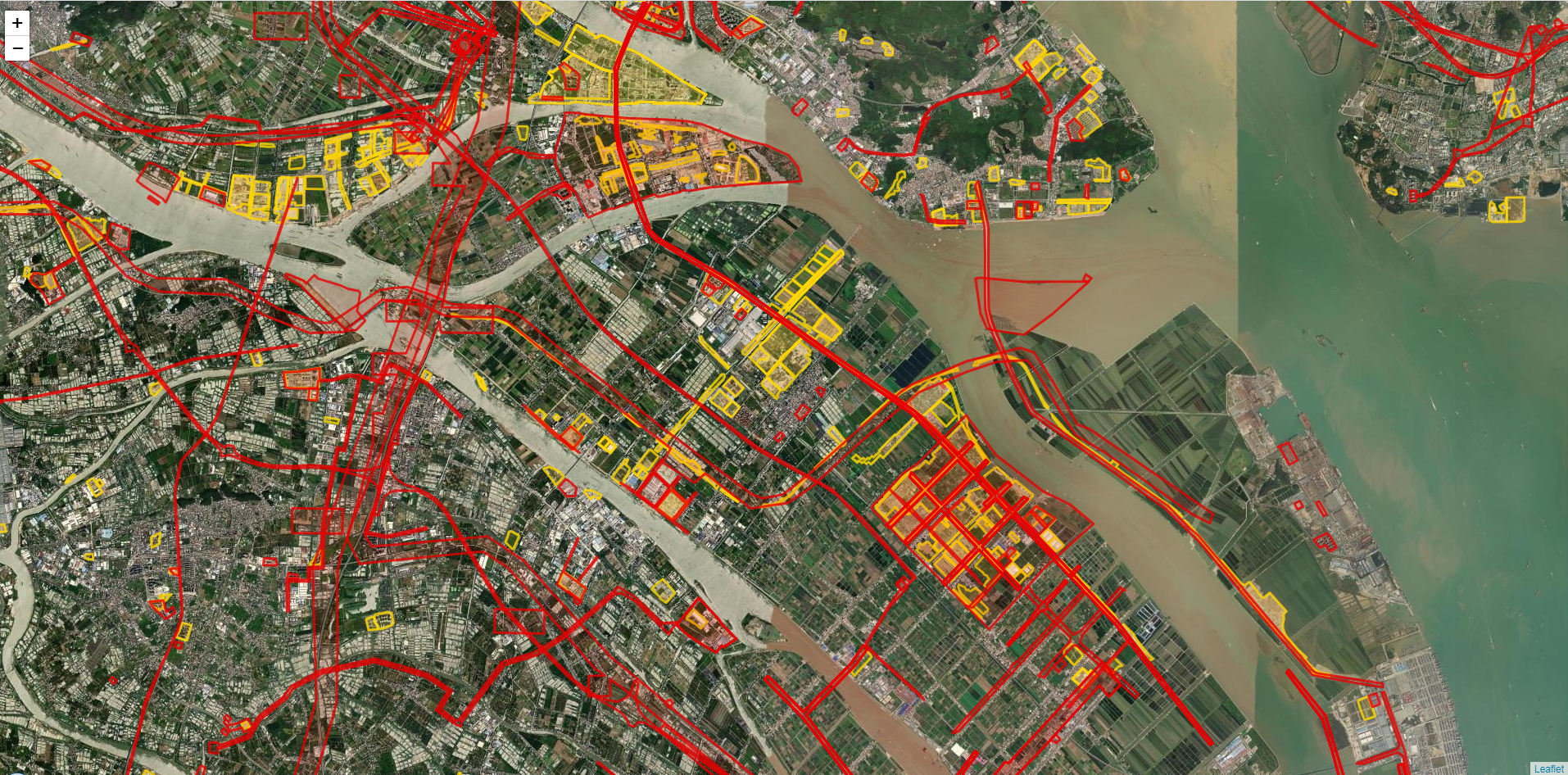
具体实现思路:leaflet结合Web Worker技术,借助supercluster插件,实现leaflet快速展示聚合效果。矢量瓦片请求数据源部分也放在Worker线程来处理,避免阻塞主线程UI交互部分响应。
测试数据:聚合点23.8w,矢量瓦片数据源15w左右。
引用关键技术点:
1.Web Worker:Web Worker的作用,就是为JavaScript创造多线程环境,允许主线程创建Worker线程,将一些任务分配给后者运行。在主线程运行的同时,Worker线程在后台运行,两者互不干扰。等到 Worker 线程完成计算任务,再把结果返回给主线程。这样的好处是,一些计算密集型或高延迟的任务,被Worker线程负担了,主线程(通常负责 UI 交互)就会很流畅,不会被阻塞或拖慢。
2.supercluster插件:supercluster插件
主线程部分:
const markers = L.geoJson(null, {
pointToLayer: createClusterIcon
}).addTo(map);
var worker = new Worker('worker.js');
let ready = false;
worker.onmessage = function (e) {
if (e.data.ready) {
ready = true;
update();
} else if (e.data.expansionZoom) {
map.flyTo(e.data.center, e.data.expansionZoom);
} else {
markers.clearLayers();
markers.addData(e.data);
}
};

function update() {
if (!ready) return;
const bounds = map.getBounds();
worker.postMessage({
bbox: [bounds.getWest(), bounds.getSouth(), bounds.getEast(), bounds.getNorth()],
zoom: map.getZoom()
});
}
map.on('moveend', update);
function createClusterIcon(feature, latlng) {
if (!feature.properties.cluster) return L.marker(latlng);
const count = feature.properties.point_count;
const size =
count < 100 ? 'small' :
count < 1000 ? 'medium' : 'large';
const icon = L.divIcon({
html: `<div><span>${ feature.properties.point_count_abbreviated }</span></div>`,
className: `marker-cluster marker-cluster-${ size}`,
iconSize: L.point(40, 40)
});
return L.marker(latlng, {icon});
}
markers.on('click', (e) => {
if (e.layer.feature.properties.cluster_id) {
worker.postMessage({
getClusterExpansionZoom: e.layer.feature.properties.cluster_id,
center: e.latlng
});
}
});

worker线程部分:
importScripts('supercluster.min.js');
const now = Date.now();
let index;
//getJSON('../test/fixtures/places.json', (geojson) => {
getJSON('spotPoints.json', (geojson) => {
//console.log(`loaded ${ geojson.length } points JSON in ${ (Date.now() - now) / 1000 }s`);
console.log(`loaded ${ geojson.features.length } points JSON in ${ (Date.now() - now) / 1000 }s`);
index = new Supercluster({
log: true,
radius: 100,//60
extent: 256,
maxZoom: 17//17
}).load(geojson.features);
console.log(index.getTile(0, 0, 0));
postMessage({ready: true});
});
self.onmessage = function (e) {
if (e.data.getClusterExpansionZoom) {
postMessage({
expansionZoom: index.getClusterExpansionZoom(e.data.getClusterExpansionZoom),
center: e.data.center
});
} else if (e.data) {
postMessage(index.getClusters(e.data.bbox, e.data.zoom));
}
};
function getJSON(url, callback) {
const xhr = new XMLHttpRequest();
xhr.open('GET', url, true);
xhr.responseType = 'json';
xhr.setRequestHeader('Accept', 'application/json');
xhr.onload = function () {
if (xhr.readyState === 4 && xhr.status >= 200 && xhr.status < 300 && xhr.response) {
callback(xhr.response);
}
};
xhr.send();
}主线程:
//矢量瓦片
var vectorworker = new Worker('vectorGridworker.js');
vectorworker.onmessage = function (e) {
//vectorworker.terminate();
if (e.data.type == "spot") {//图斑
vectorGrid = L.vectorGrid.slicer(e.data.geojson, geojsonTileOptions).addTo(map);
}
else {//项目红线
vectorRedGrid = L.vectorGrid.slicer(e.data.geojson, geojsonRedTileOptions).addTo(map);
}
};
worker线程:
const now = Date.now();
let index;
//getJSON('../test/fixtures/places.json', (geojson) => {
getJSON('quanguoSpot.json', (geojson) => {
//console.log(`loaded ${ geojson.length } points JSON in ${ (Date.now() - now) / 1000 }s`);
console.log(`loaded ${ geojson.features.length } points JSON in ${ (Date.now() - now) / 1000 }s`);
postMessage({type:"spot",geojson:geojson});
});
getJSON('quanguoRedLine.json', (geojson) => {
//console.log(`loaded ${ geojson.length } points JSON in ${ (Date.now() - now) / 1000 }s`);
console.log(`loaded ${ geojson.features.length } points JSON in ${ (Date.now() - now) / 1000 }s`);
postMessage({type:"redline",geojson:geojson});
});
function getJSON(url, callback) {
const xhr = new XMLHttpRequest();
xhr.open('GET', url, true);
xhr.responseType = 'json';
xhr.setRequestHeader('Accept', 'application/json');
xhr.onload = function () {
if (xhr.readyState === 4 && xhr.status >= 200 && xhr.status < 300 && xhr.response) {
callback(xhr.response);
}
};
xhr.send();
}完整demo源码见小专栏文章尾部:小专栏
文章尾部提供源代码下载,对本专栏感兴趣的话,可以关注一波
我想要做的是有2个不同的Controller,client和test_client。客户端Controller已经构建,我想创建一个test_clientController,我可以使用它来玩弄客户端的UI并根据需要进行调整。我主要是想绕过我在客户端中内置的验证及其对加载数据的管理Controller的依赖。所以我希望test_clientController加载示例数据集,然后呈现客户端Controller的索引View,以便我可以调整客户端UI。就是这样。我在test_clients索引方法中试过这个:classTestClientdefindexrender:template=>
我正在编写一个小脚本来定位aws存储桶中的特定文件,并创建一个临时验证的url以发送给同事。(理想情况下,这将创建类似于在控制台上右键单击存储桶中的文件并复制链接地址的结果)。我研究过回形针,它似乎不符合这个标准,但我可能只是不知道它的全部功能。我尝试了以下方法:defauthenticated_url(file_name,bucket)AWS::S3::S3Object.url_for(file_name,bucket,:secure=>true,:expires=>20*60)end产生这种类型的结果:...-1.amazonaws.com/file_path/file.zip.A
在我的Controller中,我通过以下方式在我的index方法中支持HTML和JSON:respond_todo|format|format.htmlformat.json{renderjson:@user}end在浏览器中拉起它时,它会自然地以HTML呈现。但是,当我对/user资源进行内容类型为application/json的curl调用时(因为它是索引方法),我仍然将HTML作为响应。如何获取JSON作为响应?我还需要说明什么? 最佳答案 您应该将.json附加到请求的url,提供的格式在routes.rb的路径中定义。这
当我尝试安装Ruby时遇到此错误。我试过查看this和this但无济于事➜~brewinstallrubyWarning:YouareusingOSX10.12.Wedonotprovidesupportforthispre-releaseversion.Youmayencounterbuildfailuresorotherbreakages.Pleasecreatepull-requestsinsteadoffilingissues.==>Installingdependenciesforruby:readline,libyaml,makedepend==>Installingrub
无论您是想搭建桌面端、WEB端或者移动端APP应用,HOOPSPlatform组件都可以为您提供弹性的3D集成架构,同时,由工业领域3D技术专家组成的HOOPS技术团队也能为您提供技术支持服务。如果您的客户期望有一种在多个平台(桌面/WEB/APP,而且某些客户端是“瘦”客户端)快速、方便地将数据接入到3D应用系统的解决方案,并且当访问数据时,在各个平台上的性能和用户体验保持一致,HOOPSPlatform将帮助您完成。利用HOOPSPlatform,您可以开发在任何环境下的3D基础应用架构。HOOPSPlatform可以帮您打造3D创新型产品,HOOPSSDK包含的技术有:快速且准确的CAD
一、引擎主循环UE版本:4.27一、引擎主循环的位置:Launch.cpp:GuardedMain函数二、、GuardedMain函数执行逻辑:1、EnginePreInit:加载大多数模块int32ErrorLevel=EnginePreInit(CmdLine);PreInit模块加载顺序:模块加载过程:(1)注册模块中定义的UObject,同时为每个类构造一个类默认对象(CDO,记录类的默认状态,作为模板用于子类实例创建)(2)调用模块的StartUpModule方法2、FEngineLoop::Init()1、检查Engine的配置文件找出使用了哪一个GameEngine类(UGame
?博客主页:https://xiaoy.blog.csdn.net?本文由呆呆敲代码的小Y原创,首发于CSDN??学习专栏推荐:Unity系统学习专栏?游戏制作专栏推荐:游戏制作?Unity实战100例专栏推荐:Unity实战100例教程?欢迎点赞?收藏⭐留言?如有错误敬请指正!?未来很长,值得我们全力奔赴更美好的生活✨------------------❤️分割线❤️-------------------------
我将Cucumber与Ruby结合使用。通过Selenium-Webdriver在Chrome中运行测试时,我想将下载位置更改为测试文件夹而不是用户下载文件夹。我当前的chrome驱动程序是这样设置的:Capybara.default_driver=:seleniumCapybara.register_driver:seleniumdo|app|Capybara::Selenium::Driver.new(app,:browser=>:chrome,desired_capabilities:{'chromeOptions'=>{'args'=>%w{window-size=1920,1
这会导致Ruby出现内存问题吗?我知道如果大小超过10KB,Open-URI会写入TempFile。但是HTTParty会在写入TempFile之前尝试将整个PDF保存到内存吗?src=Tempfile.new("file.pdf")src.binmodesrc.writeHTTParty.get("large_file.pdf").parsed_response 最佳答案 您可以使用Net::HTTP。参见thedocumentation(特别是标题为“流媒体响应机构”的部分)。这是文档中的示例:uri=URI('http://e
我在一个简单的RailsAPI中有以下Controller代码:classApi::V1::AccountsControllerehead:not_foundendendend问题在于,生成的json具有以下格式:{id:2,name:'Simpleaccount',cash_flows:[{id:1,amount:34.3,description:'simpledescription'},{id:2,amount:1.12,description:'otherdescription'}]}我需要我生成的json是camelCase('cashFlows'而不是'cash_flows'
