拉取centos镜像
[root@localhost ~]# docker pull centos:8
8: Pulling from library/centos
a1d0c7532777: Pull complete
Digest: sha256:a27fd8080b517143cbbbab9dfb7c8571c40d67d534bbdee55bd6c473f432b177
Status: Downloaded newer image for centos:8
docker.io/library/centos:8
[root@localhost ~]# docker images
REPOSITORY   TAG       IMAGE ID       CREATED         SIZE
centos       8         5d0da3dc9764   10 months ago   231MB
用centos生成一个容器进去
[root@localhost ~]# docker run -it --name httpd centos:8 /bin/bash
[root@6cd57ac5f6e7 /]#
在容器中阿里云的yum源和epel源
//yum源配置
[root@44293a537755 /]# cd /etc/yum.repos.d/
[root@44293a537755 yum.repos.d]# rm -rf *
[root@44293a537755 yum.repos.d]# curl -o /etc/yum.repos.d/CentOS-Base.repo https://mirrors.aliyun.com/repo/Centos-vault-8.5.2111.repo
[root@44293a537755 yum.repos.d]# sed -i -e '/mirrors.cloud.aliyuncs.com/d' -e '/mirrors.aliyuncs.com/d' /etc/yum.repos.d/CentOS-Base.repo
//配置epel源
[root@44293a537755 yum.repos.d]# yum install -y https://mirrors.aliyun.com/epel/epel-release-latest-8.noarch.rpm
[root@44293a537755 yum.repos.d]# sed -i 's|^#baseurl=https://download.example/pub|baseurl=https://mirrors.aliyun.com|' /etc/yum.repos.d/epel*
[root@44293a537755 yum.repos.d]# sed -i 's|^metalink|#metalink|' /etc/yum.repos.d/epel*
[root@44293a537755 yum.repos.d]# ls
CentOS-Base.repo  epel-modular.repo  epel-testing-modular.repo  epel-testing.repo  epel.repo
下载apache的包并复制到容器中
//新打开一个终端
[root@localhost ~]# wget https://mirrors.aliyun.com/apache/httpd/httpd-2.4.54.tar.gz http://mirrors.aliyun.com/apache/apr/apr-util-1.6.1.tar.gz http://mirrors.aliyun.com/apache/apr/apr-1.7.0.tar.gz
[root@localhost ~]# ls
anaconda-ks.cfg  apr-1.7.0.tar.gz  apr-util-1.6.1.tar.gz  httpd-2.4.54.tar.gz
[root@localhost ~]# docker cp httpd-2.4.54.tar.gz httpd:/usr/src/
[root@localhost ~]# docker cp apr-1.7.0.tar.gz httpd:/usr/src/
[root@localhost ~]# docker cp apr-util-1.6.1.tar.gz httpd://usr/src/

//在容器中查看是否复制成功
[root@44293a537755 ~]# ls /usr/src/
apr-1.7.0.tar.gz  apr-util-1.6.1.tar.gz  debug  httpd-2.4.54.tar.gz  kernels

//下载相关依赖包
[root@44293a537755 ~]# dnf -y install wget vim openssl-devel pcre-devel expat-devel libtool libxml2-devel gcc gcc-c++ make

//创建一个用户
[root@44293a537755 ~]# useradd -r -M -s /sbin/nologin apache
编译安装apache
//解压
[root@44293a537755 ~]# cd /usr/src/
[root@44293a537755 src]# tar xf apr-1.7.0.tar.gz
[root@44293a537755 src]# tar xf apr-util-1.6.1.tar.gz
[root@44293a537755 src]# tar xf httpd-2.4.54.tar.gz

//编译apr
[root@44293a537755 src]# cd apr-1.7.0/
[root@44293a537755 apr-1.7.0]# vim configure
cfgfile=${ofile}T
    trap "$RM \"$cfgfile\"; exit 1" 1 2 15
    #$RM "$cfgfile"			//注释这一行
[root@44293a537755 apr-1.7.0]# ./configure --prefix=/usr/local/apr
[root@44293a537755 apr-1.7.0]# make && make install

//解压编译apr-util
[root@44293a537755 apr-1.7.0]# cd ..
[root@44293a537755 src]# cd apr-util-1.6.1/
[root@44293a537755 apr-util-1.6.1]# ./configure --prefix=/usr/local/apr-util --with-apr=/usr/local/apr/
[root@44293a537755 apr-util-1.6.1]# make && make install

//解压编译httpd
[root@44293a537755 apr-util-1.6.1]# cd ..
[root@44293a537755 src]# cd httpd-2.4.54/
[root@44293a537755 httpd-2.4.54]# ./configure --prefix=/usr/local/apache --enable-so --enable-ssl --enable-cgi --enable-rewrite --with-zlib --with-pcre --with-apr=/usr/local/apr --with-apr-util=/usr/local/apr-util/ --enable-modules=most --enable-mpms-shared=all --with-rpm=prefork
[root@44293a537755 httpd-2.4.54]# make && make install
配置环境变量
/配置环境变量
[root@44293a537755 ~]# echo 'export PATH=/usr/local/apache/bin:$PATH' > /etc/profile.d/apache.sh
[root@44293a537755 ~]# source /etc/profile.d/apache.sh

//创建头文件
[root@44293a537755 ~]# ln -s /usr/local/apache/include/ /usr/include/apache

//取消启动警告
[root@6cd57ac5f6e7 ~]# vim /usr/local/apache/conf/httpd.conf
ServerName www.example.com:80				//取消注释

//启动apache服务
[root@6cd57ac5f6e7 ~]# apachectl start
[root@6cd57ac5f6e7 ~]# ss -anlt
State       Recv-Q      Send-Q           Local Address:Port             Peer Address:Port      Process
LISTEN      0           128                    0.0.0.0:80                    0.0.0.0:*

//验证服务是否能访问
[root@6cd57ac5f6e7 ~]# curl 127.0.0.1
<html><body><h1>It works!</h1></body></html>
在开启一个终端进行操作
[root@localhost ~]# docker ps
CONTAINER ID   IMAGE      COMMAND       CREATED        STATUS        PORTS     NAMES
6cd57ac5f6e7   centos:8   "/bin/bash"   13 hours ago   Up 12 hours             httpd
//-p参数是让正在运作中的容器先暂停等制作完镜像。-c后面跟上的命令是让该镜像作为容器启动时把httpd服务也启用
[root@localhost ~]# docker commit -p -c 'CMD ["/usr/local/apache/bin/httpd","-D","FOREGROUND"]' 6cd57ac5f6e7 xinruizhong/httpd:v1.1
sha256:65836c5507843e93afef9baf8e5dbf8c61b7166a560ff28e8f2fa9a94d4a7fbe
[root@localhost ~]# docker images
REPOSITORY          TAG       IMAGE ID       CREATED          SIZE
xinruizhong/httpd   v1.1      65836c550784   14 seconds ago   789MB
centos              8         5d0da3dc9764   10 months ago    231MB

//首次登录需要提供用户名和密码
[root@localhost ~]# docker login
Login with your Docker ID to push and pull images from Docker Hub. If you don't have a Docker ID, head over to https://hub.docker.com to create one.
Username: xinruizhong
Password:
WARNING! Your password will be stored unencrypted in /root/.docker/config.json.
Configure a credential helper to remove this warning. See
https://docs.docker.com/engine/reference/commandline/login/#credentials-store

Login Succeeded
[root@localhost ~]# docker push xinruizhong/httpd:v1.1		//上传镜像
The push refers to repository [docker.io/xinruizhong/httpd]
a3705dc88dcd: Pushed
74ddd0ec08fa: Layer already exists
v1.1: digest: sha256:a5b133a68e0bb18860b7c9361e32ae93943f95c188bf0d126d1995d4f16d02b7 size: 742
//使用创建的镜像创建容器,并挂载存储卷
[root@localhost ~]# docker run -d --name web --restart always -p 80:80 -v /root/httpd_html:/usr/local/apache/htdocs xinruizhong/httpd:v1.1
13a1d5674f411590169702d564522f95f6371e1c702749fc76e17dfa20a2860e
[root@localhost ~]# docker ps
CONTAINER ID   IMAGE                    COMMAND                  CREATED         STATUS         PORTS                               NAMES
13a1d5674f41   xinruizhong/httpd:v1.1   "/usr/local/apache/b…"   4 minutes ago   Up 4 minutes   0.0.0.0:80->80/tcp, :::80->80/tcp   web
6cd57ac5f6e7   centos:8                 "/bin/bash"              14 hours ago    Up 13 hours                                        httpd

//导入下载的压缩包,配置网站
[root@localhost ~]# cd /root/httpd_html/
[root@localhost httpd_html]# ls
youxi.zip
[root@localhost httpd_html]# unzip youxi.zip
[root@localhost httpd_html]# rm -rf youxi.zip
[root@localhost httpd_html]# ls
Web.config  from.gif  index.html
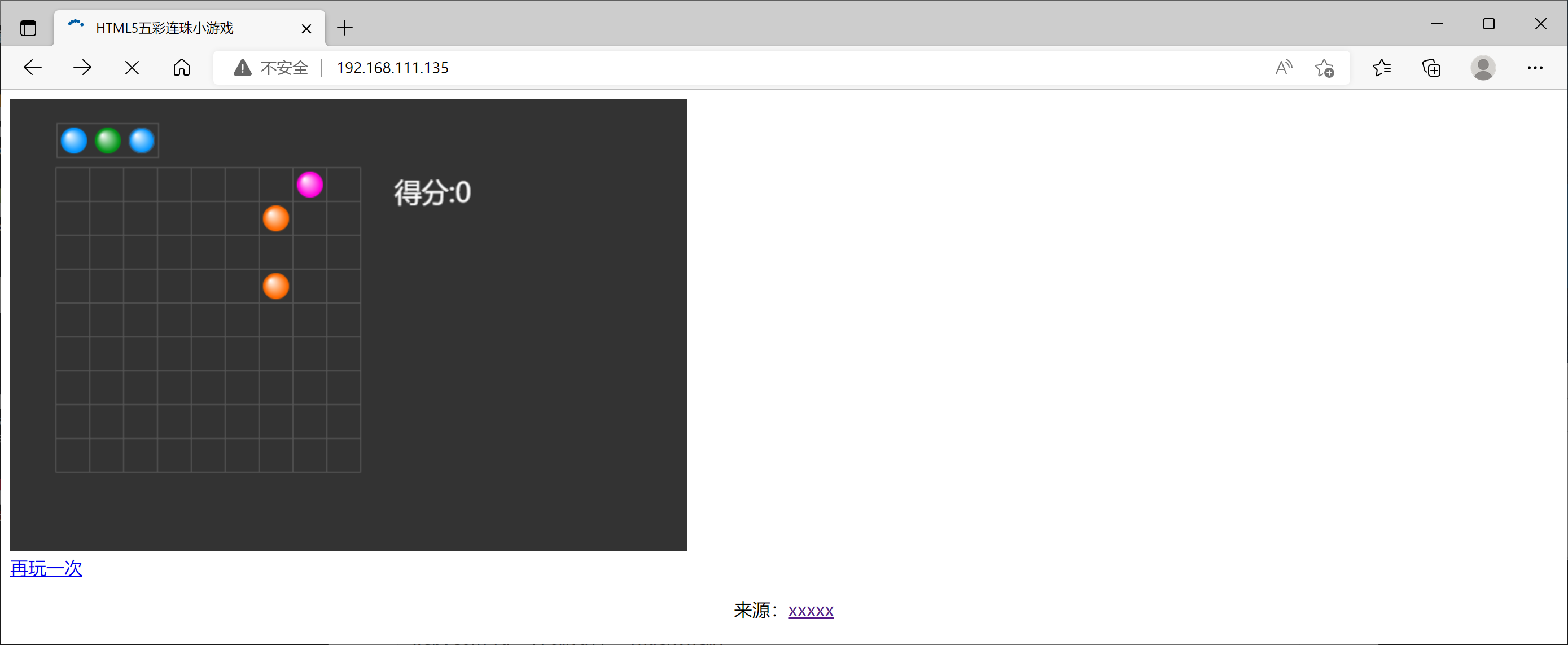
浏览器访问
使用带有Rails插件的vim,您可以创建一个迁移文件,然后一次性打开该文件吗?textmate也可以这样吗? 最佳答案 你可以使用rails.vim然后做类似的事情::Rgeneratemigratonadd_foo_to_bar插件将打开迁移生成的文件,这正是您想要的。我不能代表textmate。 关于ruby-使用VimRails,您可以创建一个新的迁移文件并一次性打开它吗?,我们在StackOverflow上找到一个类似的问题: https://sta
我需要从一个View访问多个模型。以前,我的links_controller仅用于提供以不同方式排序的链接资源。现在我想包括一个部分(我假设)显示按分数排序的顶级用户(@users=User.all.sort_by(&:score))我知道我可以将此代码插入每个链接操作并从View访问它,但这似乎不是“ruby方式”,我将需要在不久的将来访问更多模型。这可能会变得很脏,是否有针对这种情况的任何技术?注意事项:我认为我的应用程序正朝着单一格式和动态页面内容的方向发展,本质上是一个典型的网络应用程序。我知道before_filter但考虑到我希望应用程序进入的方向,这似乎很麻烦。最终从任何
我想要做的是有2个不同的Controller,client和test_client。客户端Controller已经构建,我想创建一个test_clientController,我可以使用它来玩弄客户端的UI并根据需要进行调整。我主要是想绕过我在客户端中内置的验证及其对加载数据的管理Controller的依赖。所以我希望test_clientController加载示例数据集,然后呈现客户端Controller的索引View,以便我可以调整客户端UI。就是这样。我在test_clients索引方法中试过这个:classTestClientdefindexrender:template=>
如果您尝试在Ruby中的nil对象上调用方法,则会出现NoMethodError异常并显示消息:"undefinedmethod‘...’fornil:NilClass"然而,有一个tryRails中的方法,如果它被发送到一个nil对象,它只返回nil:require'rubygems'require'active_support/all'nil.try(:nonexisting_method)#noNoMethodErrorexceptionanymore那么try如何在内部工作以防止该异常? 最佳答案 像Ruby中的所有其他对象
关闭。这个问题需要detailsorclarity.它目前不接受答案。想改进这个问题吗?通过editingthispost添加细节并澄清问题.关闭8年前。Improvethisquestion为什么SecureRandom.uuid创建一个唯一的字符串?SecureRandom.uuid#=>"35cb4e30-54e1-49f9-b5ce-4134799eb2c0"SecureRandom.uuid方法创建的字符串从不重复?
我有一个正在构建的应用程序,我需要一个模型来创建另一个模型的实例。我希望每辆车都有4个轮胎。汽车模型classCar轮胎模型classTire但是,在make_tires内部有一个错误,如果我为Tire尝试它,则没有用于创建或新建的activerecord方法。当我检查轮胎时,它没有这些方法。我该如何补救?错误是这样的:未定义的方法'create'forActiveRecord::AttributeMethods::Serialization::Tire::Module我测试了两个环境:测试和开发,它们都因相同的错误而失败。 最佳答案
我是Google云的新手,我正在尝试对其进行首次部署。我的第一个部署是RubyonRails项目。我基本上是在关注thisguideinthegoogleclouddocumentation.唯一的区别是我使用的是我自己的项目,而不是他们提供的“helloworld”项目。这是我的app.yaml文件runtime:customvm:trueentrypoint:bundleexecrackup-p8080-Eproductionconfig.ruresources:cpu:0.5memory_gb:1.3disk_size_gb:10当我转到我的项目目录并运行gcloudprevie
我想在Ruby中创建一个用于开发目的的极其简单的Web服务器(不,不想使用现成的解决方案)。代码如下:#!/usr/bin/rubyrequire'socket'server=TCPServer.new('127.0.0.1',8080)whileconnection=server.acceptheaders=[]length=0whileline=connection.getsheaders想法是从命令行运行这个脚本,提供另一个脚本,它将在其标准输入上获取请求,并在其标准输出上返回完整的响应。到目前为止一切顺利,但事实证明这真的很脆弱,因为它在第二个请求上中断并出现错误:/usr/b
我想让一个yaml对象引用另一个,如下所示:intro:"Hello,dearuser."registration:$introThanksforregistering!new_message:$introYouhaveanewmessage!上面的语法只是它如何工作的一个例子(这也是它在thiscpanmodule中的工作方式。)我正在使用标准的rubyyaml解析器。这可能吗? 最佳答案 一些yaml对象确实引用了其他对象:irb>require'yaml'#=>trueirb>str="hello"#=>"hello"ir
我的问题的一个例子是体育游戏。一场体育比赛有两支球队,一支主队和一支客队。我的事件记录模型如下:classTeam"Team"has_one:away_team,:class_name=>"Team"end我希望能够通过游戏访问一个团队,例如:Game.find(1).home_team但我收到一个单元化常量错误:Game::team。谁能告诉我我做错了什么?谢谢, 最佳答案 如果Gamehas_one:team那么Rails假设您的teams表有一个game_id列。不过,您想要的是games表有一个team_id列,在这种情况下
