视频解码
流程图
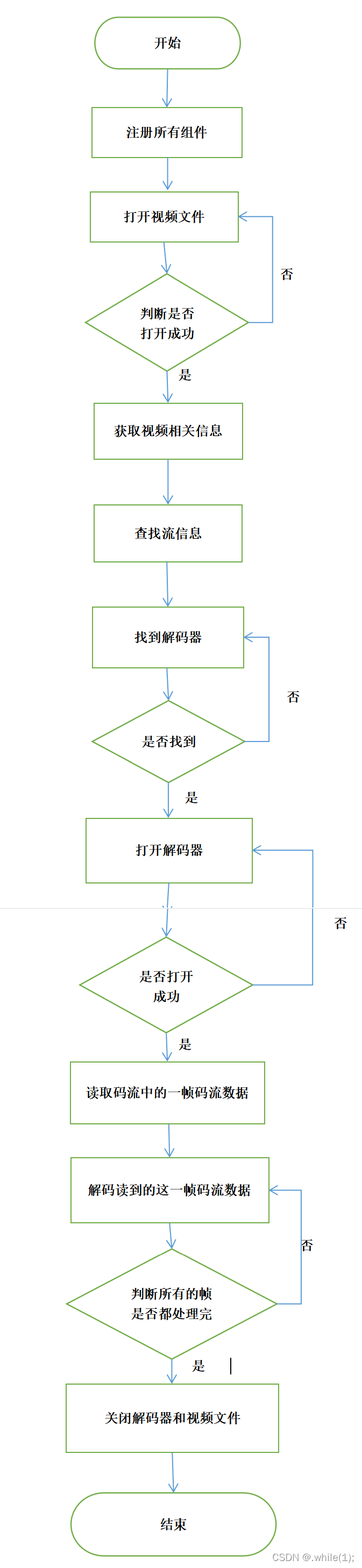
步骤
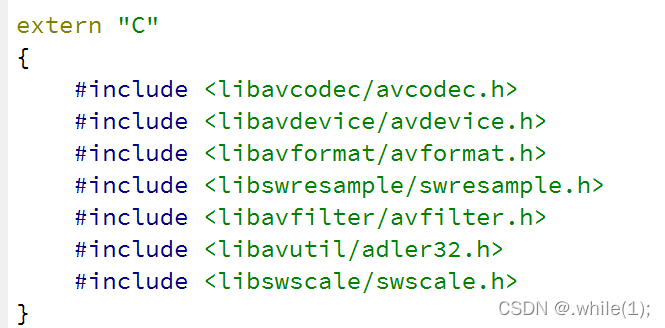
加入需要的头文件
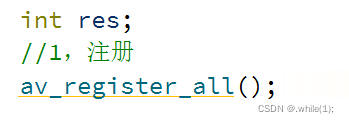
1,注册所有组件 av_register_all()
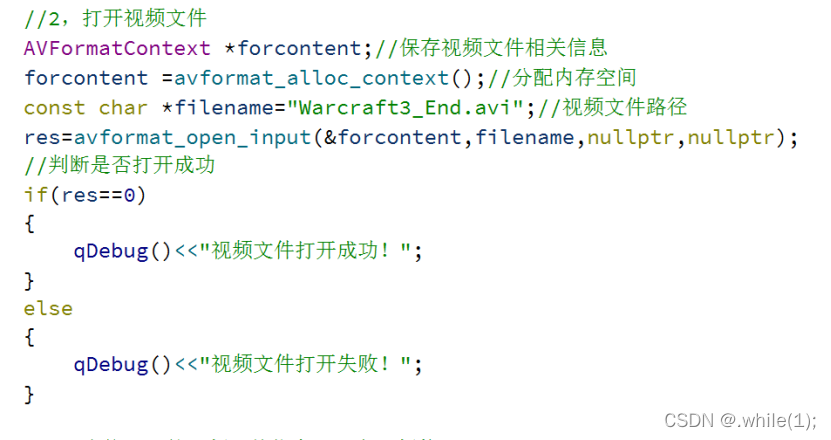
2,打开视频文件 avformat_open_input(),(判断是否打开成功)
3,取视频相关信息:视频码流,音频码流,文字码流
4,查找流信息: avformat_find_stream_infp()
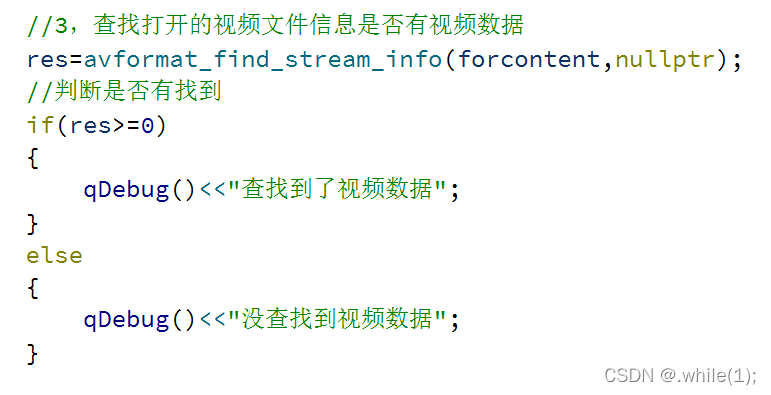
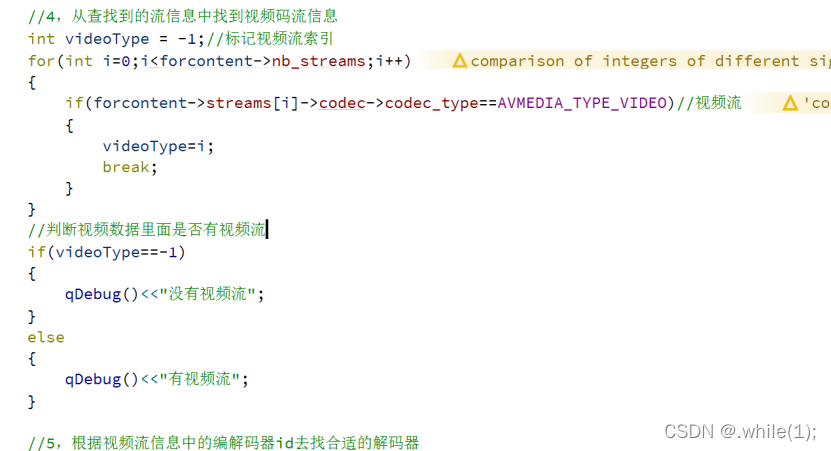
5,从查找到的流信息中找到视频码流信息
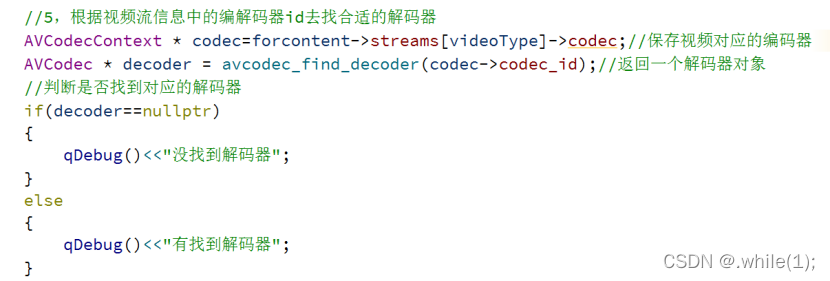
6,找到解码器 avcodec_find_decoder()(判断是否找到)
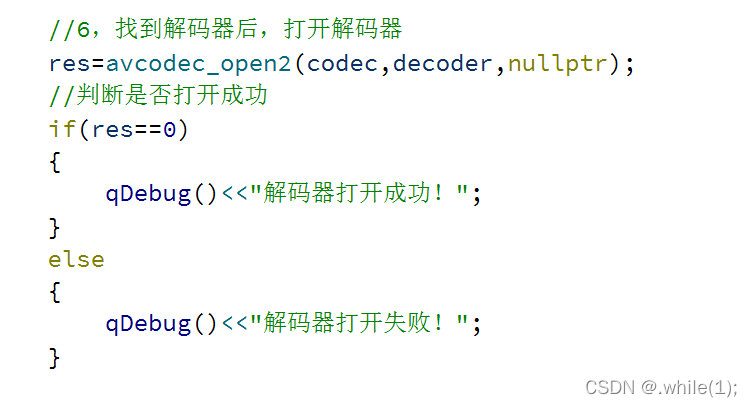
7,打开解码器 avcodec_open2()(判断是否打开成功)
8,读取码流中的一帧码流数据 av_read_frame()
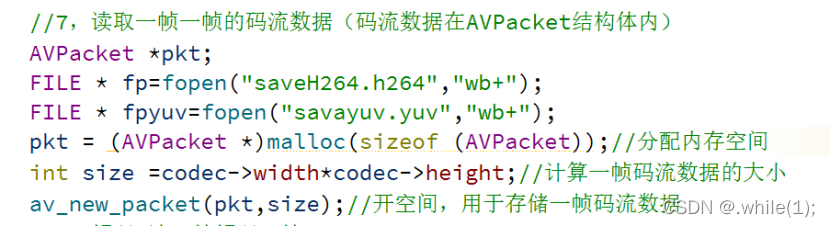
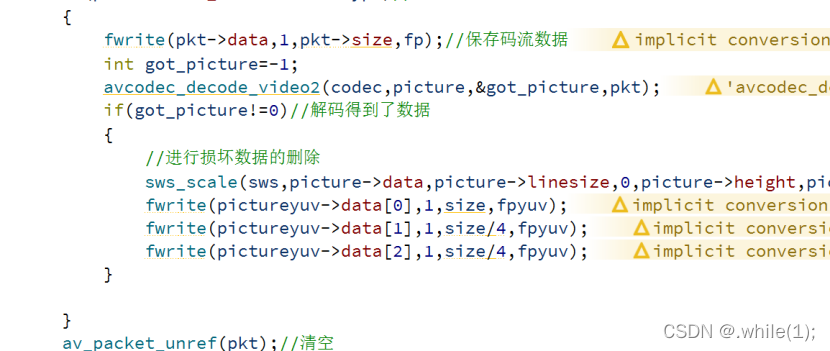
9,解码读到的这一帧码流数据,得到一帧的像素数据,YUV,RGB 进行保存
Avcodec_decode_video2()

10,重复 8,9,动作,直到视频的所有帧都处理完
11,关闭解码器 avcode_close()
12,关闭视频文件 avcode_clode_input()
解码类package_decoder代码
package_decoder.h
#ifndef PACKAGE_DECODER_H
#define PACKAGE_DECODER_H
#include <QDebug>
#include <QImage>
#include <QThread>
//#include "package_ecoder.h"
extern "C"
{
#include <libavcodec/avcodec.h>
#include <libavdevice/avdevice.h>
#include <libavformat/avformat.h>
#include <libswresample/swresample.h>
#include <libavfilter/avfilter.h>
#include <libavutil/adler32.h>
#include <libswscale/swscale.h>
}
class package_decoder:public QThread
{
Q_OBJECT
public:
package_decoder();
int opendecoderbycideo(const char *filename);
void videodecode();
void videodecodergb();
void setstate(int state);
void setspeed(int speed);
void run();
private:
AVFormatContext *forcontent;
const char *filename;
int videoType;
AVCodecContext *codec;
AVCodec *decoder;
AVPacket *pkt;
FILE *fp;
FILE *fpyuv;
int size;
AVFrame *pictureyuv;
AVFrame *picturergb;
AVFrame *picture;
AVInputFormat *fmt;
SwsContext * rgbsws;
SwsContext * sws;
//package_ecoder *ecoder;
int state;
int speed;
signals:
void sendimage(QImage img);
void sendyuv(AVFrame * yuv);
void sendend();
};
#endif // PACKAGE_DECODER_H
package_decoder.cpp
#include "package_decoder.h"
package_decoder::package_decoder()
{
av_register_all();
avdevice_register_all();//注册摄像头
forcontent =avformat_alloc_context();//分配内存空间
pkt = (AVPacket *)malloc(sizeof (AVPacket));//分配内存空间
pictureyuv=nullptr;
picturergb=nullptr;//保存rgb像素文件
picture=nullptr;//保存包含损坏数据的像素文件
pictureyuv =av_frame_alloc();
picture =av_frame_alloc();//开空间
picturergb =av_frame_alloc();
rgbsws =nullptr;
sws=nullptr;
//ecoder = new package_ecoder;
state=1;
speed=1;
}
/*
函数名:opendecoderbycideo
返回值: 如果返回值为1,执行成功;返回-1,执行失败
*/
int package_decoder::opendecoderbycideo(const char *filename)
{
int sign=-1;
fmt= av_find_input_format("dshow");//推流(windows系统)
//打开视频文件
int res=avformat_open_input(&forcontent,filename,fmt,nullptr);
//int res=avformat_open_input(&forcontent,filename,nullptr,nullptr);
if(res!=0)
{
return -1;
}
//查找流数据
res=avformat_find_stream_info(forcontent,nullptr);
if(res<0)
{
return -1;
}
//从查找到的流信息中找到视频码流信息
videoType=-1;//标记视频流索引
for(int i=0;i<forcontent->nb_streams;i++)
{
if(forcontent->streams[i]->codec->codec_type==AVMEDIA_TYPE_VIDEO)//视频流
{
videoType=i;
break;
}
}
if(videoType==-1)
{
return -1;
}
//根据视频流信息中的编解码器id去找合适的解码器
codec=forcontent->streams[videoType]->codec;
decoder = avcodec_find_decoder(codec->codec_id);
//判断是否找到对应的解码器
if(decoder==nullptr)//没找到解码器
{
return -1;
}
//找到解码器后,打开解码器
res=avcodec_open2(codec,decoder,nullptr);
if(res==0)
{
sign=1;
}
else
{
return -1;
}
return sign;
}
//
/*
解码
*/
void package_decoder::videodecode()
{
size =codec->width*codec->height;//计算一帧码流数据的大小
av_new_packet(pkt,size);//开空间,用于存储一帧码流数据
//像素数据
pictureyuv->width=codec->width;
pictureyuv->height=codec->height;
pictureyuv->format=codec->pix_fmt;//格式设置
//获取到一帧图像大小(yuv)
int numByte=avpicture_get_size(AV_PIX_FMT_YUV420P,codec->width,codec->height);
uint8_t * buffer=(uint8_t *)av_malloc(numByte *sizeof (uint8_t));//分配内存空间存像素数据
//像素数据填充到AVFvame
avpicture_fill((AVPicture *)pictureyuv,buffer,AV_PIX_FMT_YUV420P,codec->width,codec->height);
//转换的规则设置(剔除压缩后的坏数据)
sws=sws_getContext(codec->width,codec->height,codec->pix_fmt,codec->width,codec->height,AV_PIX_FMT_YUV420P,SWS_BICUBIC,nullptr,nullptr,nullptr);
//编码前准备
//ecoder->condeInit(codec->width,codec->height);
int num=0;
while(av_read_frame(forcontent,pkt)==0)//读到了一帧
{
if(pkt->stream_index==videoType)//视频流
{
fwrite(pkt->data,1,pkt->size,fp);//保存码流数据
int got_picture=-1;
avcodec_decode_video2(codec,picture,&got_picture,pkt);
if(got_picture!=0)//解码得到了数据
{
num++;
if(num==100)
{
while(1)
{
}
}
//进行损坏数据的删除
sws_scale(sws,picture->data,picture->linesize,0,picture->height,pictureyuv->data,pictureyuv->linesize);
fwrite(pictureyuv->data[0],1,size,fpyuv);
fwrite(pictureyuv->data[1],1,size/4,fpyuv);
fwrite(pictureyuv->data[2],1,size/4,fpyuv);
//ecoder->codecFrame(pictureyuv);
}
}
av_packet_unref(pkt);//清空
}
//写入尾巴帧
// ecoder->writeEnd();
qDebug()<<"写入成功";
fclose(fp);
fclose(fpyuv);
}
void package_decoder::videodecodergb()
{
size =codec->width*codec->height;//计算一帧码流数据的大小
av_new_packet(pkt,size);//开空间,用于存储一帧码流数据
//像素数据
picturergb->width=codec->width;
picturergb->height=codec->height;
picturergb->format=codec->pix_fmt;//格式设置
pictureyuv->width=codec->width;
pictureyuv->height=codec->height;
pictureyuv->format=codec->pix_fmt;//格式设置
int numrgb=avpicture_get_size(AV_PIX_FMT_RGB32,codec->width,codec->height);
uint8_t * rgbbuffer=(uint8_t *)av_malloc(numrgb *sizeof (uint8_t));//分配内存空间存像素数据
//像素数据填充到AVFvame
avpicture_fill((AVPicture *)picturergb,rgbbuffer,AV_PIX_FMT_RGB32,codec->width,codec->height);
//转换的规则设置(剔除压缩后的坏数据)
rgbsws=sws_getContext(codec->width,codec->height,codec->pix_fmt,codec->width,codec->height,AV_PIX_FMT_RGB32,SWS_BICUBIC,nullptr,nullptr,nullptr);
//yuv//
//像素数据
//获取到一帧图像大小(yuv)
int numByte=avpicture_get_size(AV_PIX_FMT_YUV420P,codec->width,codec->height);
uint8_t * buffer=(uint8_t *)av_malloc(numByte *sizeof (uint8_t));//分配内存空间存像素数据
//像素数据填充到AVFvame
avpicture_fill((AVPicture *)pictureyuv,buffer,AV_PIX_FMT_YUV420P,codec->width,codec->height);
//转换的规则设置(剔除压缩后的坏数据)
sws=sws_getContext(codec->width,codec->height,codec->pix_fmt,codec->width,codec->height,AV_PIX_FMT_YUV420P,SWS_BICUBIC,nullptr,nullptr,nullptr);
//编码前准备
//ecoder->condeInit(codec->width,codec->height);
int num=0;
QString path;
while(av_read_frame(forcontent,pkt)>=0)//读到了一帧
{
if(num==50)
{
emit sendend();
//break;
}
//暂停播放
while(this->state%2==0)
{
}
if(pkt->stream_index==videoType)//视频流
{
int got_picture=-1;
avcodec_decode_video2(codec,picture,&got_picture,pkt);
if(got_picture!=0)//解码得到了数据
{
//进行损坏数据的删除
sws_scale(sws,picture->data,picture->linesize,0,picture->height,pictureyuv->data,pictureyuv->linesize);
//编码
// ecoder->codecFrame(pictureyuv);
sws_scale(rgbsws,picture->data,picture->linesize,0,picture->height,picturergb->data,picturergb->linesize);
//每25帧保存一次图片
QImage img = QImage((uchar *)rgbbuffer,codec->width,codec->height,QImage::Format_RGB32);
//path = QString("RGB32/image%1.png").arg(num);
//img.save(path);
emit sendimage(img);
emit sendyuv(pictureyuv);
num++;
if(speed%3==1)//正常倍数
{
msleep(50);
}
else if(speed%3==2)//1.5倍数
{
msleep(50/1.5);
}
else if(speed%3==0)//2倍数
{
msleep(50/2);
}
}
}
av_packet_unref(pkt);//清空
av_frame_unref(picture);
}
//写入尾巴帧
//ecoder->writeEnd();
qDebug()<<"写入成功";
}
void package_decoder::setstate(int state)
{
this->state=state;
}
void package_decoder::setspeed(int speed)
{
this->speed=speed;
}
void package_decoder::run()
{
const char *filename="video=USB2.0 HD UVC WebCam";//视频文件路径
//const char *filename="Warcraft3_End.avi";
//根据打开一个视频文件打开一个解码器
this->opendecoderbycideo(filename);
//解码
this->videodecodergb();
}
我正在学习如何使用Nokogiri,根据这段代码我遇到了一些问题:require'rubygems'require'mechanize'post_agent=WWW::Mechanize.newpost_page=post_agent.get('http://www.vbulletin.org/forum/showthread.php?t=230708')puts"\nabsolutepathwithtbodygivesnil"putspost_page.parser.xpath('/html/body/div/div/div/div/div/table/tbody/tr/td/div
我有一个Ruby程序,它使用rubyzip压缩XML文件的目录树。gem。我的问题是文件开始变得很重,我想提高压缩级别,因为压缩时间不是问题。我在rubyzipdocumentation中找不到一种为创建的ZIP文件指定压缩级别的方法。有人知道如何更改此设置吗?是否有另一个允许指定压缩级别的Ruby库? 最佳答案 这是我通过查看rubyzip内部创建的代码。level=Zlib::BEST_COMPRESSIONZip::ZipOutputStream.open(zip_file)do|zip|Dir.glob("**/*")d
类classAprivatedeffooputs:fooendpublicdefbarputs:barendprivatedefzimputs:zimendprotecteddefdibputs:dibendendA的实例a=A.new测试a.foorescueputs:faila.barrescueputs:faila.zimrescueputs:faila.dibrescueputs:faila.gazrescueputs:fail测试输出failbarfailfailfail.发送测试[:foo,:bar,:zim,:dib,:gaz].each{|m|a.send(m)resc
很好奇,就使用rubyonrails自动化单元测试而言,你们正在做什么?您是否创建了一个脚本来在cron中运行rake作业并将结果邮寄给您?git中的预提交Hook?只是手动调用?我完全理解测试,但想知道在错误发生之前捕获错误的最佳实践是什么。让我们理所当然地认为测试本身是完美无缺的,并且可以正常工作。下一步是什么以确保他们在正确的时间将可能有害的结果传达给您? 最佳答案 不确定您到底想听什么,但是有几个级别的自动代码库控制:在处理某项功能时,您可以使用类似autotest的内容获得关于哪些有效,哪些无效的即时反馈。要确保您的提
假设我做了一个模块如下:m=Module.newdoclassCendend三个问题:除了对m的引用之外,还有什么方法可以访问C和m中的其他内容?我可以在创建匿名模块后为其命名吗(就像我输入“module...”一样)?如何在使用完匿名模块后将其删除,使其定义的常量不再存在? 最佳答案 三个答案:是的,使用ObjectSpace.此代码使c引用你的类(class)C不引用m:c=nilObjectSpace.each_object{|obj|c=objif(Class===objandobj.name=~/::C$/)}当然这取决于
我正在尝试使用ruby和Savon来使用网络服务。测试服务为http://www.webservicex.net/WS/WSDetails.aspx?WSID=9&CATID=2require'rubygems'require'savon'client=Savon::Client.new"http://www.webservicex.net/stockquote.asmx?WSDL"client.get_quotedo|soap|soap.body={:symbol=>"AAPL"}end返回SOAP异常。检查soap信封,在我看来soap请求没有正确的命名空间。任何人都可以建议我
关闭。这个问题是opinion-based.它目前不接受答案。想要改进这个问题?更新问题,以便editingthispost可以用事实和引用来回答它.关闭4年前。Improvethisquestion我想在固定时间创建一系列低音和高音调的哔哔声。例如:在150毫秒时发出高音调的蜂鸣声在151毫秒时发出低音调的蜂鸣声200毫秒时发出低音调的蜂鸣声250毫秒的高音调蜂鸣声有没有办法在Ruby或Python中做到这一点?我真的不在乎输出编码是什么(.wav、.mp3、.ogg等等),但我确实想创建一个输出文件。
我在我的项目目录中完成了compasscreate.和compassinitrails。几个问题:我已将我的.sass文件放在public/stylesheets中。这是放置它们的正确位置吗?当我运行compasswatch时,它不会自动编译这些.sass文件。我必须手动指定文件:compasswatchpublic/stylesheets/myfile.sass等。如何让它自动运行?文件ie.css、print.css和screen.css已放在stylesheets/compiled。如何在编译后不让它们重新出现的情况下删除它们?我自己编译的.sass文件编译成compiled/t
我想将html转换为纯文本。不过,我不想只删除标签,我想智能地保留尽可能多的格式。为插入换行符标签,检测段落并格式化它们等。输入非常简单,通常是格式良好的html(不是整个文档,只是一堆内容,通常没有anchor或图像)。我可以将几个正则表达式放在一起,让我达到80%,但我认为可能有一些现有的解决方案更智能。 最佳答案 首先,不要尝试为此使用正则表达式。很有可能你会想出一个脆弱/脆弱的解决方案,它会随着HTML的变化而崩溃,或者很难管理和维护。您可以使用Nokogiri快速解析HTML并提取文本:require'nokogiri'h
我想为Heroku构建一个Rails3应用程序。他们使用Postgres作为他们的数据库,所以我通过MacPorts安装了postgres9.0。现在我需要一个postgresgem并且共识是出于性能原因你想要pggem。但是我对我得到的错误感到非常困惑当我尝试在rvm下通过geminstall安装pg时。我已经非常明确地指定了所有postgres目录的位置可以找到但仍然无法完成安装:$envARCHFLAGS='-archx86_64'geminstallpg--\--with-pg-config=/opt/local/var/db/postgresql90/defaultdb/po
