注:实验报告原word文件在文章末尾;
—————————————————————————————————
"大数据技术原理与应用"课程实验报告
题目:实验二:熟悉常用的HDFS操作
姓名:朱小凡
日期:2022/3/25
1、实验环境:
设备名称 LAPTOP-9KJS8HO6
处理器 Intel® Core™ i5-10300H CPU @ 2.50GHz 2.50 GHz
机带 RAM 16.0 GB (15.8 GB 可用)
主机操作系统 Windows 10 家庭中文版
虚拟机操作系统 ubuntukylin-16.04
Hadoop 版本 3.1.3
JDK 版本 1.8
Java IDE:Eclipse
系统类型 64 位操作系统, 基于 x64 的处理器
笔和触控 没有可用于此显示器的笔或触控输入
2、实验内容与完成情况:
1、编程实现以下功能,并利用Hadoop提供的shell命令完成相同任务
(1)向HDFS中上传任意文本文件,如果指定的文件在HDFS中已经存在,则由用户来指定是追加到原有文件末尾还是覆盖原有的文件。
本地/usr/local/hadoop/文件夹下新建两个文本文件用于实验
文件一:word.txt 文本内容:1212
文件二:local_text.txt 文本内容:123456789
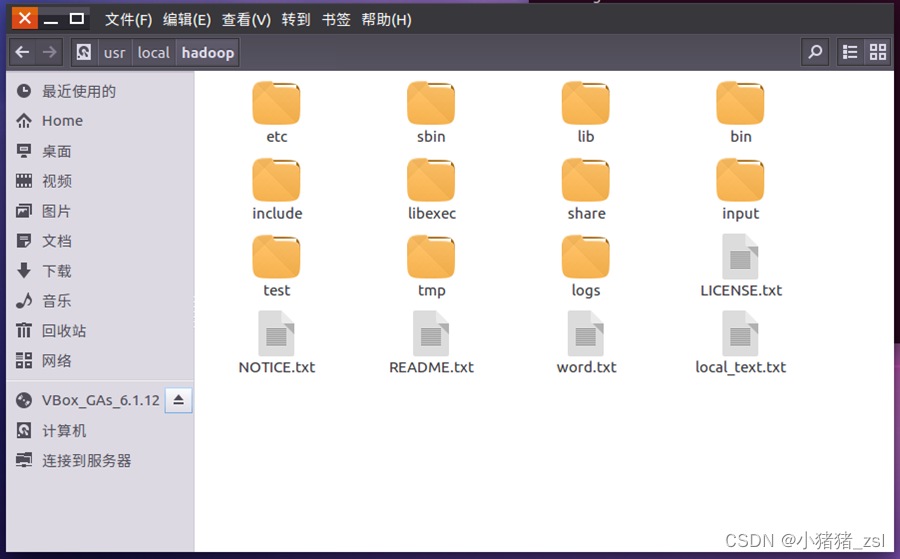
图1.创建两个实验文本
a. Shell命令
首先向HDFS上传word.txt文件到test文件夹下
./bin/hdfs dfs -put /usr/local/hadoop/word.txt test
检查文件是否存在,可以使用如下命令
cd /usr/local/hadoop
./bin/hdfs dfs -test -e test/word.txt
echo $?
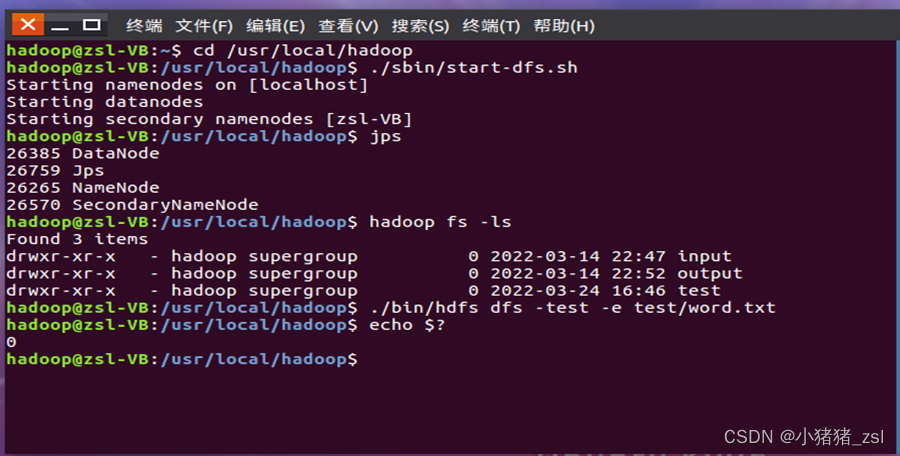
图2.上传并检查HDFS文件
执行完echo $?返回0,意味着查询成功,word.txt文件已存在
再将local_text.txt文件追加到word.txt文件末尾
hadoop fs -appendToFile local_text.txt test/word.txt
用local_text.txt文件内容覆盖原来的word.txt文件
hadoop fs -copyFromLocal -f local_text.txt test/word.txt
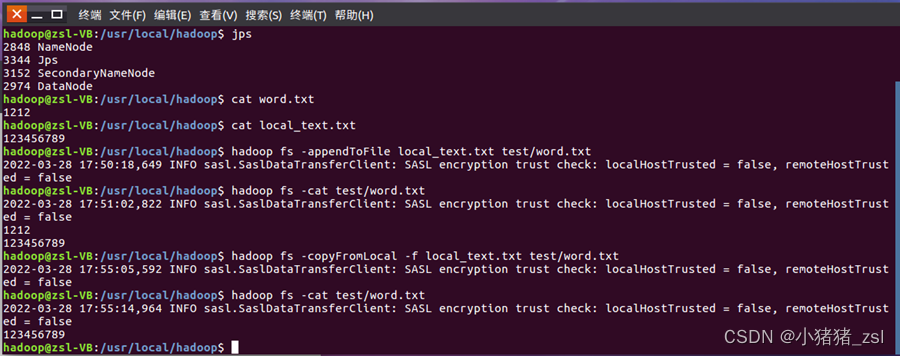
图3.追加文本或者覆盖原文本
b.java代码
import java.io.FileInputStream;
import java.io.IOException;
import org.apache.hadoop.conf.Configuration;
import org.apache.hadoop.fs.FSDataOutputStream;
import org.apache.hadoop.fs.FileSystem;
import org.apache.hadoop.fs.Path;
public class CopyFromLocalFile {
/**
* 判断路径是否存在
*/
public static boolean test(Configuration conf, String path) {
try (FileSystem fs = FileSystem.get(conf)) {
return fs.exists(new Path(path));
} catch (IOException e) {
e.printStackTrace();
return false;
}
}
/**
* 复制文件到指定路径 若路径已存在,则进行覆盖
*/
public static void copyFromLocalFile(Configuration conf,
String localFilePath, String remoteFilePath) {
Path localPath = new Path(localFilePath);
Path remotePath = new Path(remoteFilePath);
try (FileSystem fs = FileSystem.get(conf)) {
/* fs.copyFromLocalFile
第一个参数表示是否删除源文件,第二个参数表示是否覆盖 */
fs.copyFromLocalFile(false, true, localPath, remotePath);
} catch (IOException e) {
e.printStackTrace();
}
}
/**
* 追加文件内容
*/
public static void appendToFile(Configuration conf, String
localFilePath,
String remoteFilePath) {
Path remotePath = new Path(remoteFilePath);
try (FileSystem fs = FileSystem.get(conf);
FileInputStream in = new FileInputStream(localFilePath)😉 {
FSDataOutputStream out = fs.append(remotePath);
byte[] data = new byte[1024];
int read = -1;
while ((read = in.read(data)) > 0) {
out.write(data, 0, read);
}
out.close();
} catch (IOException e) {
e.printStackTrace();
}
}
/**
* 主函数
*/
public static void main(String[] args) {
Configuration conf = new Configuration();
conf.set(“fs.defaultFS”, “hdfs://localhost:9000”);
String localFilePath = “/usr/local/hadoop/word.txt”; // 本地路径
String remoteFilePath = “/user/hadoop/test/word.txt”; // HDFS路径
String choice = “append”; // 若文件存在则追加到文件末尾
// String choice = “overwrite”; // 若文件存在则覆盖
try {
/* 判断文件是否存在 */
boolean fileExists = false;
if (CopyFromLocalFile.test(conf, remoteFilePath)) {
fileExists = true;
System.out.println(remoteFilePath + " 已存在.");
} else {
System.out.println(remoteFilePath + " 不存在.");
}
/* 进行处理 */
if (!fileExists) { // 文件不存在,则上传
CopyFromLocalFile.copyFromLocalFile(conf, localFilePath,
remoteFilePath);
System.out.println(localFilePath + " 已上传至 " + remoteFilePath);
} else if (choice.equals(“overwrite”)) { // 选择覆盖
CopyFromLocalFile.copyFromLocalFile(conf, localFilePath,
remoteFilePath);
System.out.println(localFilePath + " 已覆盖 " + remoteFilePath);
} else if (choice.equals(“append”)) { // 选择追加
CopyFromLocalFile.appendToFile(conf, localFilePath,
remoteFilePath);
System.out.println(localFilePath + " 已追加至 " + remoteFilePath);
}
} catch (Exception e) {
e.printStackTrace();
}
}
}

图4.java实现向文本中追加或覆盖(java)
(2)从HDFS中下载指定文件,如果本地文件与要下载的文件名称相同,则自动对下载的文件重命名。
a.Shell命令
if $(hadoop fs -test -e /user/hadoop/test/word.txt);
then $(hadoop fs -copyToLocal test/word.txt ./word2.txt);
else $(hadoop fs -copyToLocal test/word.txt ./word.txt);
fi
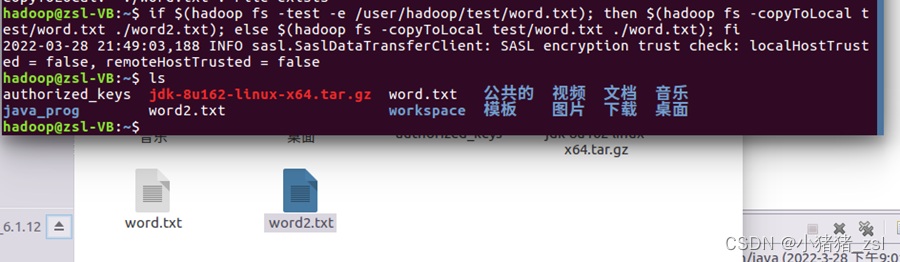
图5.从HDFS中下载指定文件
b.java代码
import org.apache.hadoop.conf.Configuration;
import org.apache.hadoop.fs.*;
import org.apache.hadoop.fs.FileSystem;
import java.io.*;
public class CopyToLocal {
/**
* 下载文件到本地 判断本地路径是否已存在,若已存在,则自动进行重命名
*/
public static void copyToLocal(Configuration conf, String
remoteFilePath,
String localFilePath) {
Path remotePath = new Path(remoteFilePath);
try (FileSystem fs = FileSystem.get(conf)) {
File f = new File(localFilePath);
/* 如果文件名存在,自动重命名(在文件名后面加上 _0, _1 …) */
if (f.exists()) {
System.out.println(localFilePath + " 已存在.");
Integer i = Integer.valueOf(0);
while (true) {
f = new File(localFilePath + “_” + i.toString());
if (!f.exists()) {
localFilePath = localFilePath + “_” + i.toString();
break;
} else {
i++;
continue;
}
}
System.out.println("将重新命名为: " + localFilePath);
}
// 下载文件到本地
Path localPath = new Path(localFilePath);
fs.copyToLocalFile(remotePath, localPath);
} catch (IOException e) {
// TODO Auto-generated catch block
e.printStackTrace();
}
}
/**
* 主函数
*/
public static void main(String[] args) {
Configuration conf = new Configuration();
conf.set(“fs.defaultFS”, “hdfs://localhost:9000”);
String localFilePath = “/home/hadoop/word.txt”; // 本地路径
String remoteFilePath = “/user/hadoop/test/word.txt”; // HDFS路径
try {
CopyToLocal.copyToLocal(conf, remoteFilePath, localFilePath);
System.out.println(“下载完成”);
} catch (Exception e) {
e.printStackTrace();
}
}
}
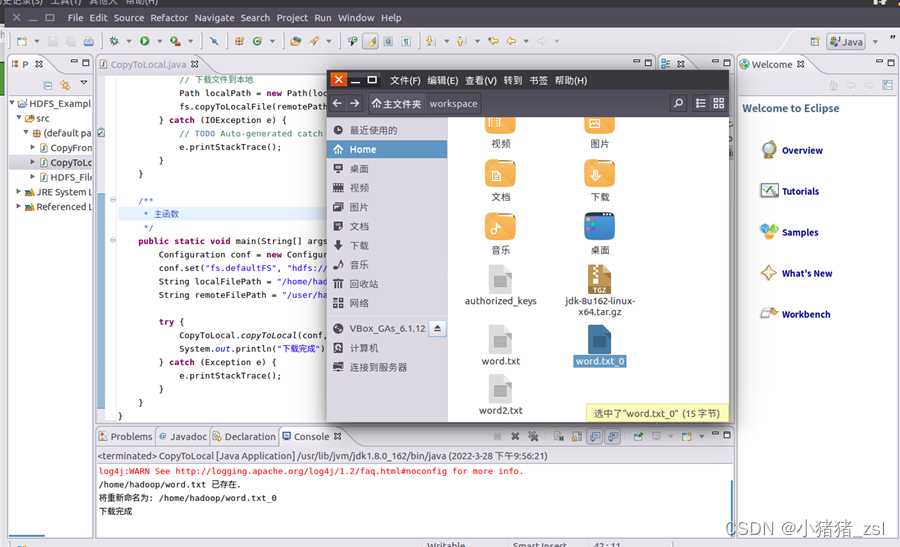
图6.从HDFS下载文件并重命名(java)
(3)将 HDFS 中指定文件的内容输出到终端中
a.Shell命令
hadoop fs -cat test/word.txt

图7.将HDFS中文件内容输出到终端
b. java代码
import org.apache.hadoop.conf.Configuration;
import org.apache.hadoop.fs.*;
import org.apache.hadoop.fs.FileSystem;
import java.io.*;
public class Cat {
/**
* 读取文件内容
*/
public static void cat(Configuration conf, String remoteFilePath) {
Path remotePath = new Path(remoteFilePath);
try (FileSystem fs = FileSystem.get(conf);
FSDataInputStream in = fs.open(remotePath);
BufferedReader d = new BufferedReader(new InputStreamReader(in))😉 {
String line;
while ((line = d.readLine()) != null) {
System.out.println(line);
}
} catch (IOException e) {
e.printStackTrace();
}
}
/**
* 主函数
*/
public static void main(String[] args) {
Configuration conf = new Configuration();
conf.set(“fs.defaultFS”, “hdfs://localhost:9000”);
String remoteFilePath = “/user/hadoop/test/word.txt”; // HDFS路径
try {
System.out.println("读取文件: " + remoteFilePath);
Cat.cat(conf, remoteFilePath);
System.out.println(“\n读取完成”);
} catch (Exception e) {
e.printStackTrace();
}
}
}
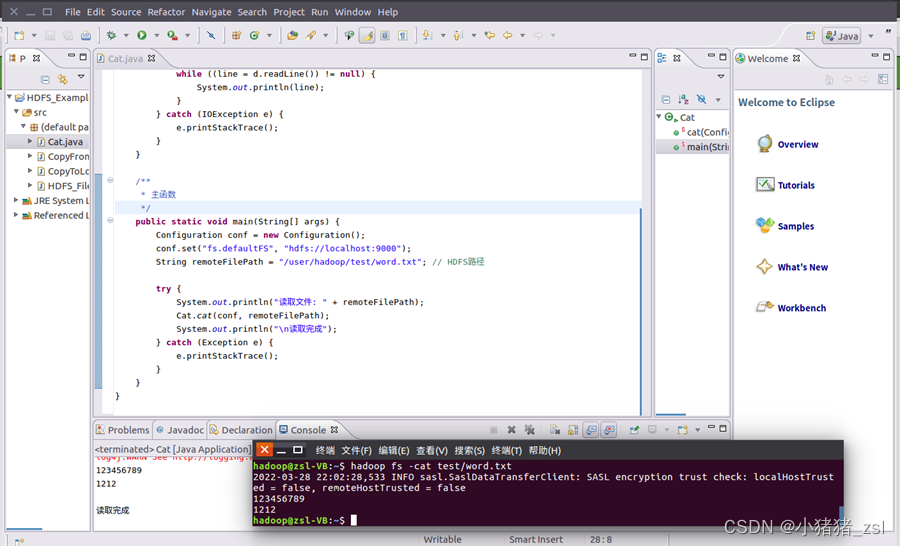
图8. 将HDFS中文件内容输出(java)
(4)显示HDFS中指定的文件的读写权限、大小、创建时间、路径等信息
a.Shell命令
hadoop fs -ls -h /test/word.txt

图9. 显示HDFS中指定的文件的读写权限、大小、创建时间、路径等信息
b.java代码
import org.apache.hadoop.conf.Configuration;
import org.apache.hadoop.fs.*;
import org.apache.hadoop.fs.FileSystem;
import java.io.*;
import java.text.SimpleDateFormat;
public class List {
/**
* 显示指定文件的信息
*/
public static void ls(Configuration conf, String remoteFilePath) {
try (FileSystem fs = FileSystem.get(conf)) {
Path remotePath = new Path(remoteFilePath);
FileStatus[] fileStatuses = fs.listStatus(remotePath);
for (FileStatus s : fileStatuses) {
System.out.println("路径: " + s.getPath().toString());
System.out.println("权限: " + s.getPermission().toString());
System.out.println("大小: " + s.getLen());
/* 返回的是时间戳,转化为时间日期格式 */
long timeStamp = s.getModificationTime();
SimpleDateFormat format = new SimpleDateFormat(
“yyyy-MM-dd HH:mm:ss”);
String date = format.format(timeStamp);
System.out.println("时间: " + date);
}
} catch (IOException e) {
e.printStackTrace();
}
}
/**
* 主函数
*/
public static void main(String[] args) {
Configuration conf = new Configuration();
conf.set(“fs.defaultFS”, “hdfs://localhost:9000”);
String remoteFilePath = “/user/hadoop/test/word.txt”; // HDFS路径
try {
System.out.println("读取文件信息: " + remoteFilePath);
List.ls(conf, remoteFilePath);
System.out.println(“\n读取完成”);
} catch (Exception e) {
e.printStackTrace();
}
}
}
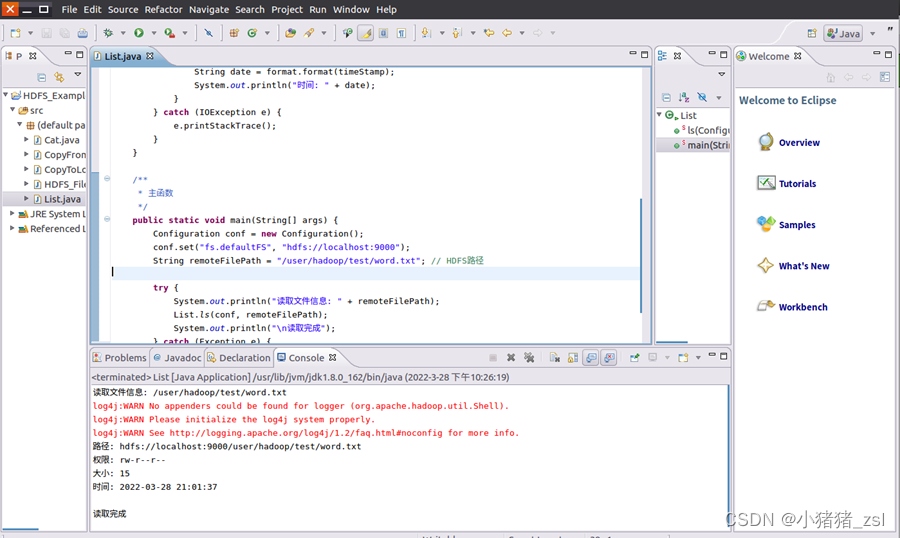
图10.
显示HDFS中指定的文件的读写权限、大小、创建时间、路径等信息(java)
(5)
给定HDFS中某一个目录,输出该目录下的所有文件的读写权限、大小、创建时间、路径等信息,如果该文件是目录,则递归输出该目录下所有文件相关信息
a.Shell命令
hadoop fs -ls -R -h test

图11. 递归输出该目录下所有文件相关信息
b.java代码
import org.apache.hadoop.conf.Configuration;
import org.apache.hadoop.fs.*;
import org.apache.hadoop.fs.FileSystem;
import java.io.*;
import java.text.SimpleDateFormat;
public class ListDir {
/**
* 显示指定文件夹下所有文件的信息(递归)
*/
public static void lsDir(Configuration conf, String remoteDir) {
try (FileSystem fs = FileSystem.get(conf)) {
Path dirPath = new Path(remoteDir);
/* 递归获取目录下的所有文件 */
RemoteIterator<LocatedFileStatus> remoteIterator = fs.listFiles(
dirPath, true);
/* 输出每个文件的信息 */
while (remoteIterator.hasNext()) {
FileStatus s = remoteIterator.next();
System.out.println("路径: " + s.getPath().toString());
System.out.println("权限: " + s.getPermission().toString());
System.out.println("大小: " + s.getLen());
/* 返回的是时间戳,转化为时间日期格式 */
Long timeStamp = s.getModificationTime();
SimpleDateFormat format = new SimpleDateFormat(
“yyyy-MM-dd HH:mm:ss”);
String date = format.format(timeStamp);
System.out.println("时间: " + date);
System.out.println();
}
} catch (IOException e) {
e.printStackTrace();
}
}
/**
* 主函数
*/
public static void main(String[] args) {
Configuration conf = new Configuration();
conf.set(“fs.defaultFS”, “hdfs://localhost:9000”);
String remoteDir = “/user/hadoop”; // HDFS路径
try {
System.out.println("(递归)读取目录下所有文件的信息: " + remoteDir);
ListDir.lsDir(conf, remoteDir);
System.out.println(“读取完成”);
} catch (Exception e) {
e.printStackTrace();
}
}
}
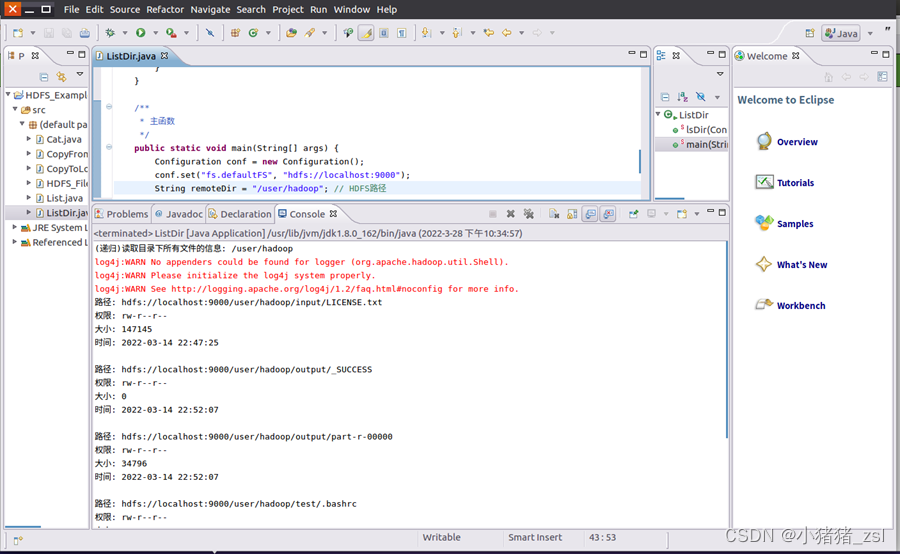
图12. 递归输出该目录下所有文件相关信息(java)
(6)
提供一个HDFS内的文件的路径,对该文件进行创建和删除操作。如果文件所在目录不存在,则自动创建目录
a.Shell命令
if $(hadoop fs -test -d test/word.txt);
then $(hadoop fs -touchz test/tests/word.txt);
else $(hadoop fs -mkdir -p test/tests && hdfs dfs -touchz
test/tests/word.txt);
fi
hadoop fs -ls test/
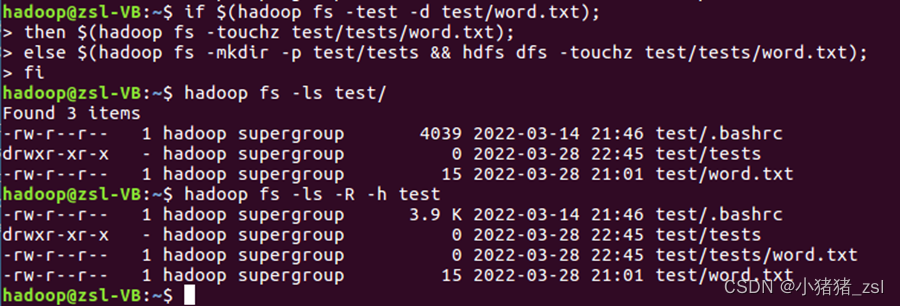
图13. 自动创建或删除文件
b.java代码
import org.apache.hadoop.conf.Configuration;
import org.apache.hadoop.fs.*;
import java.io.*;
public class RemoveOrMake {
/**
* 判断路径是否存在
*/
public static boolean test(Configuration conf, String path) {
try (FileSystem fs = FileSystem.get(conf)) {
return fs.exists(new Path(path));
} catch (IOException e) {
e.printStackTrace();
return false;
}
}
/**
* 创建目录
*/
public static boolean mkdir(Configuration conf, String remoteDir) {
try (FileSystem fs = FileSystem.get(conf)) {
Path dirPath = new Path(remoteDir);
return fs.mkdirs(dirPath);
} catch (IOException e) {
e.printStackTrace();
return false;
}
}
/**
* 创建文件
*/
public static void touchz(Configuration conf, String remoteFilePath) {
Path remotePath = new Path(remoteFilePath);
try (FileSystem fs = FileSystem.get(conf)) {
FSDataOutputStream outputStream = fs.create(remotePath);
outputStream.close();
} catch (IOException e) {
e.printStackTrace();
}
}
/**
* 删除文件
*/
public static boolean rm(Configuration conf, String remoteFilePath) {
Path remotePath = new Path(remoteFilePath);
try (FileSystem fs = FileSystem.get(conf)) {
return fs.delete(remotePath, false);
} catch (IOException e) {
e.printStackTrace();
return false;
}
}
/**
* 主函数
*/
public static void main(String[] args) {
Configuration conf = new Configuration();
conf.set(“fs.defaultFS”, “hdfs://localhost:9000”);
String remoteFilePath = “/user/hadoop/test/tests/word.txt”; //
HDFS路径
String remoteDir = “/user/hadoop/test/tests”; // HDFS路径对应的目录
try {
/* 判断路径是否存在,存在则删除,否则进行创建 */
if (RemoveOrMake.test(conf, remoteFilePath)) {
RemoveOrMake.rm(conf, remoteFilePath); // 删除
System.out.println("删除文件: " + remoteFilePath);
} else {
if (!RemoveOrMake.test(conf, remoteDir)) { // 若目录不存在,则进行创建
RemoveOrMake.mkdir(conf, remoteDir);
System.out.println("创建文件夹: " + remoteDir);
}
RemoveOrMake.touchz(conf, remoteFilePath);
System.out.println("创建文件: " + remoteFilePath);
}
} catch (Exception e) {
e.printStackTrace();
}
}
}
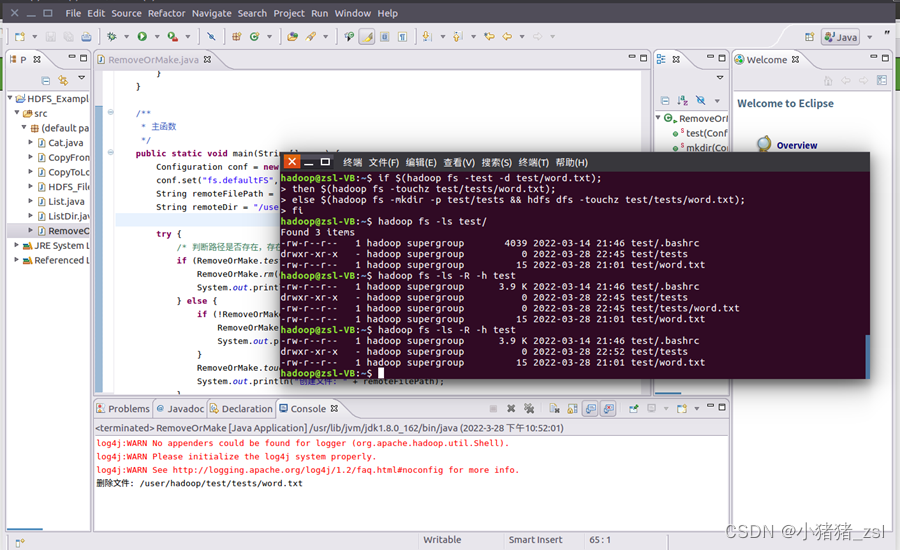
图14. 自动创建或删除文件(java)
(8)
向HDFS中指定的文件追加内容,由用户指定内容追加到原有文件的开头或结尾
a.Shell命令
追加到文件结尾
hadoop fs -appendToFile local.txt test/word.txt
追加到文件开头
hadoop fs -get test/word.txt
cat word.txt >> local.txt
hadoop fs -copyFromLocal -f word.txt test/word.txt
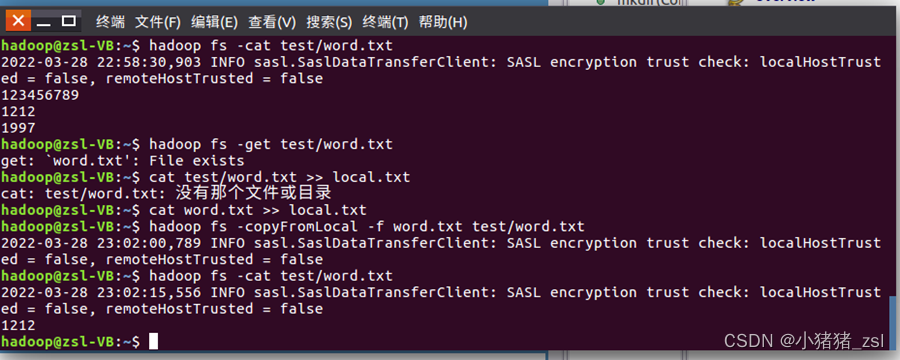
图15. 指定文件追加内容
b.java代码
import org.apache.hadoop.conf.Configuration;
import org.apache.hadoop.fs.*;
import org.apache.hadoop.fs.FileSystem;
import java.io.*;
public class AppendToFile {
/**
* 判断路径是否存在
*/
public static boolean test(Configuration conf, String path) {
try (FileSystem fs = FileSystem.get(conf)) {
return fs.exists(new Path(path));
} catch (IOException e) {
e.printStackTrace();
return false;
}
}
/**
* 追加文本内容
*/
public static void appendContentToFile(Configuration conf, String
content,
String remoteFilePath) {
try (FileSystem fs = FileSystem.get(conf)) {
Path remotePath = new Path(remoteFilePath);
/* 创建一个文件输出流,输出的内容将追加到文件末尾 */
FSDataOutputStream out = fs.append(remotePath);
out.write(content.getBytes());
out.close();
} catch (IOException e) {
e.printStackTrace();
}
}
/**
* 追加文件内容
*/
public static void appendToFile(Configuration conf, String
localFilePath,
String remoteFilePath) {
Path remotePath = new Path(remoteFilePath);
try (FileSystem fs = FileSystem.get(conf);
FileInputStream in = new FileInputStream(localFilePath); ){
FSDataOutputStream out = fs.append(remotePath);
byte[] data = new byte[1024];
int read = -1;
while ((read = in.read(data)) > 0) {
out.write(data, 0, read);
}
out.close();
} catch (IOException e) {
e.printStackTrace();
}
}
/**
* 移动文件到本地 移动后,删除源文件
*/
public static void moveToLocalFile(Configuration conf,
String remoteFilePath, String localFilePath) {
try (FileSystem fs = FileSystem.get(conf)) {
Path remotePath = new Path(remoteFilePath);
Path localPath = new Path(localFilePath);
fs.moveToLocalFile(remotePath, localPath);
} catch (IOException e) {
e.printStackTrace();
}
}
/**
* 创建文件
*/
public static void touchz(Configuration conf, String remoteFilePath) {
try (FileSystem fs = FileSystem.get(conf)) {
Path remotePath = new Path(remoteFilePath);
FSDataOutputStream outputStream = fs.create(remotePath);
outputStream.close();
} catch (IOException e) {
e.printStackTrace();
}
}
/**
* 主函数
*/
public static void main(String[] args) {
Configuration conf = new Configuration();
conf.set(“fs.defaultFS”, “hdfs://localhost:9000”);
String remoteFilePath = “/user/hadoop/test/word.txt”; // HDFS文件
String content = “新追加的内容\n”;
String choice = “after”; // 追加到文件末尾
// String choice = “before”; // 追加到文件开头
try {
/* 判断文件是否存在 */
if (!AppendToFile.test(conf, remoteFilePath)) {
System.out.println("文件不存在: " + remoteFilePath);
} else {
if (choice.equals(“after”)) { // 追加在文件末尾
AppendToFile.appendContentToFile(conf, content,
remoteFilePath);
System.out.println(“已追加内容到文件末尾” + remoteFilePath);
} else if (choice.equals(“before”)) { // 追加到文件开头
/*
没有相应的api可以直接操作,因此先把文件移动到本地,创建一个新的HDFS,再按顺序追加内容
*/
String localTmpPath = “/user/hadoop/tmp.txt”;
AppendToFile.moveToLocalFile(conf, remoteFilePath,
localTmpPath); // 移动到本地
AppendToFile.touchz(conf, remoteFilePath); // 创建一个新文件
AppendToFile.appendContentToFile(conf, content,
remoteFilePath); // 先写入新内容
AppendToFile.appendToFile(conf, localTmpPath,
remoteFilePath); // 再写入原来内容
System.out.println("已追加内容到文件开头: " + remoteFilePath);
}
}
} catch (Exception e) {
e.printStackTrace();
}
}
}
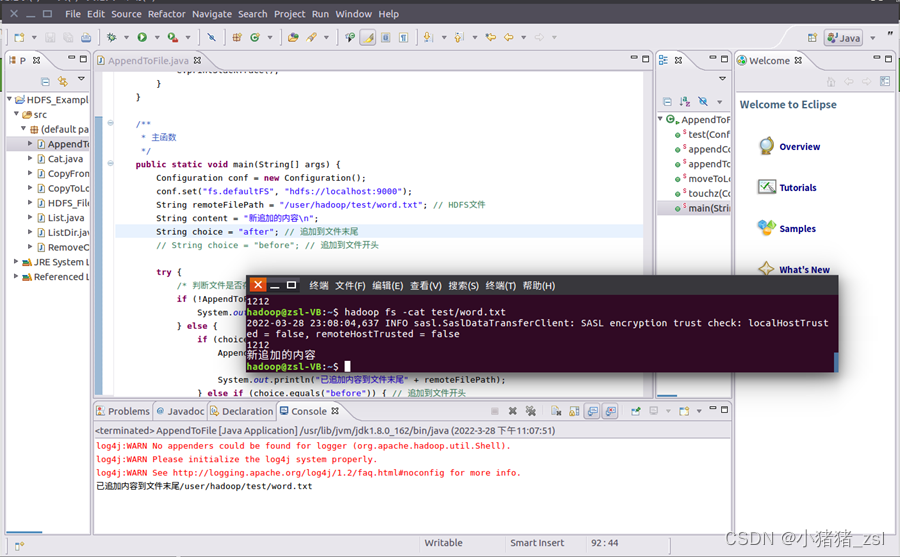
图16. 指定文件追加内容(java)
(9) 删除HDFS中指定的文件
a.Shell命令
hadoop fs -rm test/.bashrc

图17. 删除HDFS中指定的文件
b.java代码
import org.apache.hadoop.conf.Configuration;
import org.apache.hadoop.fs.*;
import java.io.*;
public class ReMoveFile{
/*删除文件
*
*/
public static boolean rm(Configuration conf, String remoteFilePath)
throws IOException{
FileSystem fs=FileSystem.get(conf);
Path remotePath=new Path(remoteFilePath);
boolean result=fs.delete(remotePath,false);
fs.close();
return result;
}
/*主函数
*
*/
public static void main(String[] args){
Configuration conf=new Configuration();
conf.set(“fs.default.name”,“hdfs://localhost:9000”);
String remoteFilePath=“/user/hadoop/.bashrc”;//HDFS文件
try{
if(ReMoveFile.rm(conf,remoteFilePath)){
System.out.println(“文件删除:”+remoteFilePath);
}else{
System.out.println(“操作失败(文件不存在或删除失败)”);
}
}catch(Exception e){
e.printStackTrace();
}
}
}

图18. 删除HDFS中指定的文件(java)
(10) 在HDFS中,将文件从源路径移动到目的路径
a.Shell命令
hadoop fs -mv test/word.txt input/
hadoop fs -cat input/word.txt

图19. 将文件从源路径移动到目的路径
b.java代码
import org.apache.hadoop.conf.Configuration;
import org.apache.hadoop.fs.*;
import org.apache.hadoop.fs.FileSystem;
import java.io.*;
public class MoveFile {
/**
* 移动文件
*/
public static boolean mv(Configuration conf, String remoteFilePath,
String remoteToFilePath) {
try (FileSystem fs = FileSystem.get(conf)) {
Path srcPath = new Path(remoteFilePath);
Path dstPath = new Path(remoteToFilePath);
return fs.rename(srcPath, dstPath);
} catch (IOException e) {
e.printStackTrace();
return false;
}
}
/**
* 主函数
*/
public static void main(String[] args) {
Configuration conf = new Configuration();
conf.set(“fs.defaultFS”, “hdfs://localhost:9000”);
String remoteFilePath = “hdfs:///user/hadoop/input/word.txt”; //
源文件HDFS路径
String remoteToFilePath = “hdfs:///user/hadoop/output/”; //
目的HDFS路径
try {
if (MoveFile.mv(conf, remoteFilePath, remoteToFilePath)) {
System.out.println("将文件 " + remoteFilePath + " 移动到 "
+ remoteToFilePath);
} else {
System.out.println(“操作失败(源文件不存在或移动失败)”);
}
} catch (Exception e) {
e.printStackTrace();
}
}
}
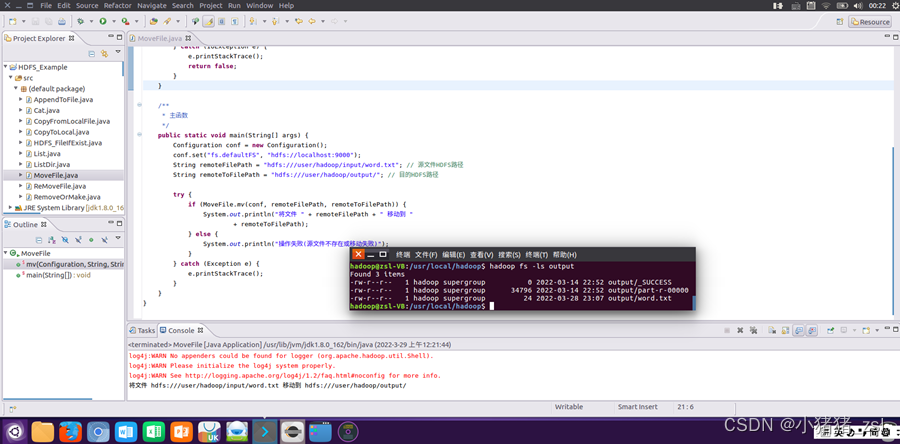
图20. 将文件从源路径移动到目的路径(java)
2、编程实现一个类"MyFSDataInputStream",该类继承"org.apache.hadoop.fs.FSDataInputStream",要求如下:
(1)实现按行读取HDFS中指定文件的方法"readLine()",如果读到文件末尾,则返回空,否则返回文件一行的文本。
(2)实现缓存功能
java代码:
import java.io.BufferedReader;
import java.io.IOException;
import java.io.InputStream;
import java.io.InputStreamReader;
import org.apache.hadoop.conf.Configuration;
import org.apache.hadoop.fs.*;
public class MyFSDataInputStream extends FSDataInputStream{
/**
* @param args
*/
public MyFSDataInputStream(InputStream in){
super(in);
}
public static String readline(Configuration conf,String remoteFilePath){
try (FileSystem fs = FileSystem.get(conf)) {
Path remotePath = new Path(remoteFilePath);
FSDataInputStream in = fs.open(remotePath);
BufferedReader d = new BufferedReader(new InputStreamReader(in));
String line = null;
if ((line = d.readLine()) != null) {
d.close();
in.close();
return line;
}
return null;
} catch (IOException e) {
// TODO Auto-generated catch block
e.printStackTrace();
return null;
}
}
public static void main(String[] args) {
// TODO Auto-generated method stub
Configuration conf=new Configuration();
conf.set(“fs.default.name”,“hdfs://localhost:9000”);
String remoteFilePath=“output/word.txt”;
System.out.println(“读取文件:”+remoteFilePath);
System.out.println(MyFSDataInputStream.readline(conf, remoteFilePath));
System.out.println(“\n读取完成”);
}
}

图21. 实现一个类"MyFSDataInputStream"(java)
3.
查看Java帮助手册或其它资料,用"java.net.URL"和"org.apache.hadoop.fs.FsURLStreamHandlerFactory"编程完成输出HDFS中指定文件的文本到终端中。
java代码:
import java.io.IOException;
import java.io.InputStream;
import java.net.URL;
import org.apache.hadoop.fs.*;
import org.apache.hadoop.io.IOUtils;
public class FsUrl {
static{;
URL.setURLStreamHandlerFactory(new FsUrlStreamHandlerFactory());
}
/**
* @param args
*/
public static void cat(String remoteFilePath){
try(InputStream in=new
URL(“hdfs”,“localhost”,9000,remoteFilePath).openStream()){
IOUtils.copyBytes(in, System.out, 4096, false);
IOUtils.closeStream(in);
}catch (IOException e) {
e.printStackTrace();
}
}
public static void main(String[] args) {
// TODO Auto-generated method stub
String remoteFilePath=“/user/hadoop/output/word.txt”;
try{
System.out.println(“去读文件:”+remoteFilePath);
FsUrl.cat(remoteFilePath);
System.out.println(“\n 读取完成”);
}catch(Exception e){
e.printStackTrace();
}
}
}
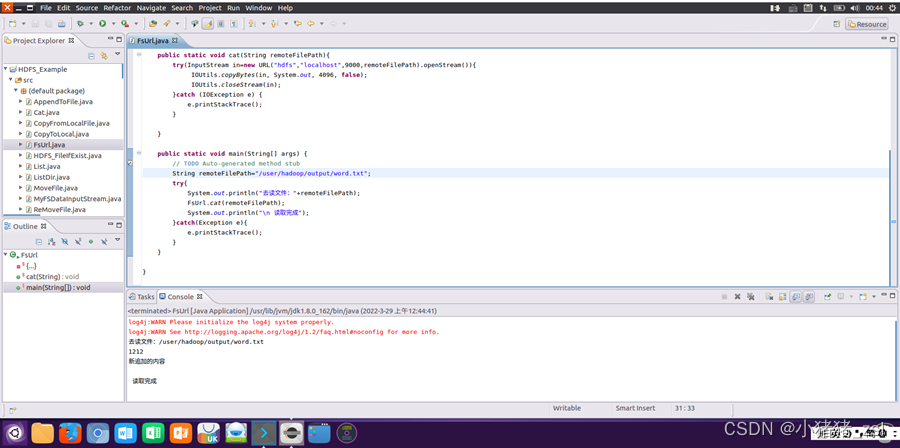
图22. 编程完成输出HDFS中指定文件的文本到终端中(java)
1、第一次检查HDFS中是否存在text.txt文件时,显示端口9000连接失败。

图23.问题1
2、第一次用Eclipse运行写好的java程序时,出现报错
Class org.apache.hadoop.hdfs.DistributedFileSystem not found

图24.问题2
3、运行java代码时,出现错误Resource specification not allowed here for source level below 1.7
1、原因是没有启动hadoop服务,在hadoop文件夹下运行以下命令启动hadoop服务即可
cd /usr/local/hadoop
./sbin/start-dfs.sh
2、原因是:我使用的hadoop版本为3.1.3
Class org.apache.hadoop.hdfs.DistributedFileSystem由原本的hadoop-hdfs.2.7.1.jar中迁移到了hadoop-hdfs-client-3.1.3.jar
在工程文件中导入hadoop-hdfs-client-3.1.3.jar这个jar包即可

图25.解决方案2
3、原因是当前java编译器的版本低于了1.7,而代码中使用了1.7版本及以上的语法规则
解决办法是,在项目属性中修改java编译器版本至1.7,并重新build该项目即可
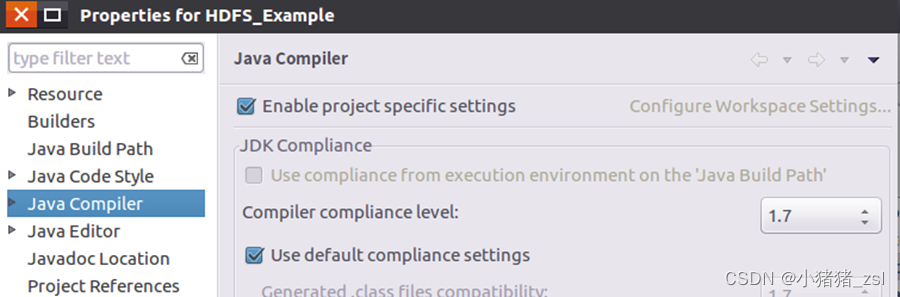
图26.解决方案3
大约一年前,我决定确保每个包含非唯一文本的Flash通知都将从模块中的方法中获取文本。我这样做的最初原因是为了避免一遍又一遍地输入相同的字符串。如果我想更改措辞,我可以在一个地方轻松完成,而且一遍又一遍地重复同一件事而出现拼写错误的可能性也会降低。我最终得到的是这样的:moduleMessagesdefformat_error_messages(errors)errors.map{|attribute,message|"Error:#{attribute.to_s.titleize}#{message}."}enddeferror_message_could_not_find(obje
我有一个使用SeleniumWebdriver和Nokogiri的Ruby应用程序。我想选择一个类,然后对于那个类对应的每个div,我想根据div的内容执行一个Action。例如,我正在解析以下页面:https://www.google.com/webhp?sourceid=chrome-instant&ion=1&espv=2&ie=UTF-8#q=puppies这是一个搜索结果页面,我正在寻找描述中包含“Adoption”一词的第一个结果。因此机器人应该寻找带有className:"result"的div,对于每个检查它的.descriptiondiv是否包含单词“adoption
我正在我的Rails项目中安装Grape以构建RESTfulAPI。现在一些端点的操作需要身份验证,而另一些则不需要身份验证。例如,我有users端点,看起来像这样:moduleBackendmoduleV1classUsers现在如您所见,除了password/forget之外的所有操作都需要用户登录/验证。创建一个新的端点也没有意义,比如passwords并且只是删除password/forget从逻辑上讲,这个端点应该与用户资源。问题是Grapebefore过滤器没有像except,only这样的选项,我可以在其中说对某些操作应用过滤器。您通常如何干净利落地处理这种情况?
在我做的一些网络开发中,我有多个操作开始,比如对外部API的GET请求,我希望它们同时开始,因为一个不依赖另一个的结果。我希望事情能够在后台运行。我找到了concurrent-rubylibrary这似乎运作良好。通过将其混合到您创建的类中,该类的方法具有在后台线程上运行的异步版本。这导致我编写如下代码,其中FirstAsyncWorker和SecondAsyncWorker是我编写的类,我在其中混合了Concurrent::Async模块,并编写了一个名为“work”的方法来发送HTTP请求:defindexop1_result=FirstAsyncWorker.new.async.
a=[3,4,7,8,3]b=[5,3,6,8,3]假设数组长度相同,是否有办法使用each或其他一些惯用方法从两个数组的每个元素中获取结果?不使用计数器?例如获取每个元素的乘积:[15,12,42,64,9](0..a.count-1).eachdo|i|太丑了...ruby1.9.3 最佳答案 使用Array.zip怎么样?:>>a=[3,4,7,8,3]=>[3,4,7,8,3]>>b=[5,3,6,8,3]=>[5,3,6,8,3]>>c=[]=>[]>>a.zip(b)do|i,j|c[[3,5],[4,3],[7,6],
我有一个非常简单的Controller来管理我的Rails应用程序中的静态页面:classPagesController我怎样才能让View模板返回它自己的名字,这样我就可以做这样的事情:#pricing.html.erb#-->"Pricing"感谢您的帮助。 最佳答案 4.3RoutingParametersTheparamshashwillalwayscontainthe:controllerand:actionkeys,butyoushouldusethemethodscontroller_nameandaction_nam
我需要在rail3中使用标准注册/登录/忘记密码功能进行身份验证。是否有大多数人为此使用的插件或其他东西? 最佳答案 我不确定最常用的方法是什么-但可以肯定的是,Plataformatec的“Devise”是一个非常流行的方法:http://github.com/plataformatec/devise我已经尝试了一些authgem,对我来说,它是最简单的设置和修改以满足我的需要。它内置了密码恢复、帐户确认(如果需要)和其他一些非常方便的功能。 关于ruby-on-rails-在Rail
我在ruby表单中有一个提交按钮f.submitbtn_text,class:"btnbtn-onemgt12mgb12",id:"btn_id"我想在不使用任何javascript的情况下通过ruby禁用此按钮 最佳答案 添加disabled:true选项。f.submitbtn_text,class:"btnbtn-onemgt12mgb12",id:"btn_id",disabled:true 关于ruby-on-rails-如何在Rails中添加禁用的提交按钮,我们在St
关闭。这个问题是off-topic.它目前不接受答案。想改进这个问题吗?Updatethequestion所以它是on-topic用于堆栈溢出。关闭11年前。Improvethisquestion我不经常使用ruby-通常它加起来相当于每两个月或更长时间编写一次脚本。我的大部分编程都是使用C++进行的,这与ruby有很大不同。由于我与ruby之间的差距如此之大,我总是忘记语言的基本方面(比如解析文本文件和其他简单的东西)。我想每天练习一些基本的东西,我想知道是否有一些我可以订阅的网站,并且会向我发送当天的Ruby问题或类似的东西。有人知道这样的站点/Internet服务吗?
电脑上可以截取图片吗?如果可以,该如何操作呢?相信很多小伙伴都只知道一两种截图的方式,知道的并不全面。其实,电脑上有多种方式截图的,而且非常方便。电脑怎么截图?今天我们就来教大家如何使用电脑截取图片的8种常用方式!操作环境:演示机型:Delloptiplex7050系统版本:Windows10方法一:系统自带截图具体操作:同时按下电脑的自带截图键【Windows+shift+S】,可以选择其中一种方式来截取图片:截屏有矩形截屏、任意形状截屏、窗口截屏和全屏截图。 方法二:QQ截图具体操作:在电脑登录QQ,然后同时按下【Ctrl+Alt+A】,可以任意截图你需要的界面,可以把截图的页面直接下载,
