✅作者简介:华为开发者联盟优质内容创作者、CSDN内容合伙人、GitHub专业技术人员🏆
📃个人主页:北雨·寒冰~ 的CSDN博客
🔥系列专栏:PyGame
💬个人格言:书山有路勤为径,学海无涯苦作舟

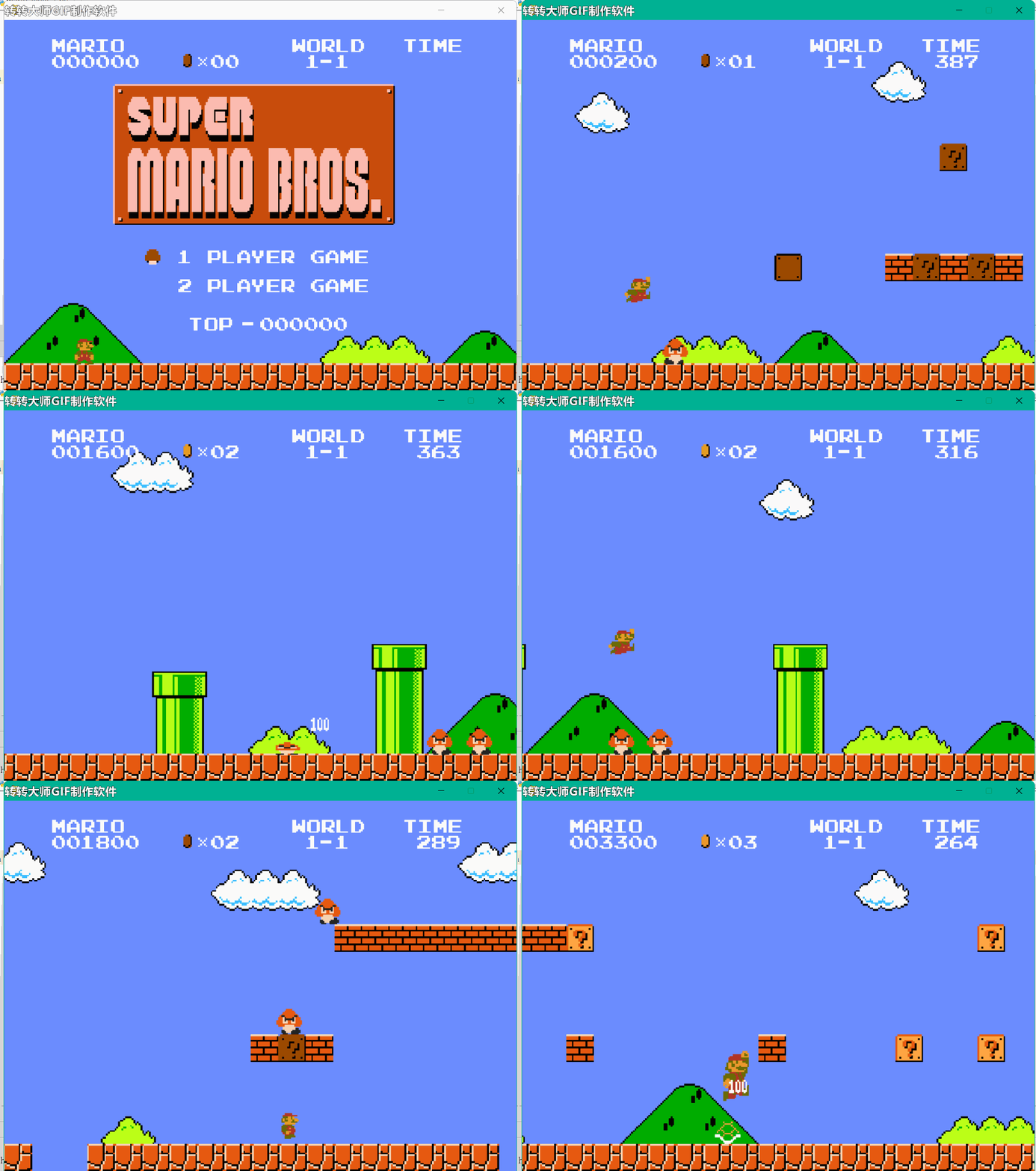
最近在家上网课,闲得无聊,就想到用PyGame包自制一个“超级马里奥”的小游戏,在同学面前秀一手。
今天,寒冰就带大家来看看“超级马里奥”的全编写过程!
这个部分设置马里奥以及游戏中蘑菇等怪的的移动设置
import os
import pygame as pg

keybinding = {
    'action':pg.K_s,
    'jump':pg.K_a,
    'left':pg.K_LEFT,
    'right':pg.K_RIGHT,
    'down':pg.K_DOWN
}

class Control(object):
    """Control class for entire project. Contains the game loop, and contains
    the event_loop which passes events to States as needed. Logic for flipping
    states is also found here."""
    def __init__(self, caption):
        self.screen = pg.display.get_surface()
        self.done = False
        self.clock = pg.time.Clock()
        self.caption = caption
        self.fps = 60
        self.show_fps = False
        self.current_time = 0.0
        self.keys = pg.key.get_pressed()
        self.state_dict = {}
        self.state_name = None
        self.state = None

    def setup_states(self, state_dict, start_state):
        self.state_dict = state_dict
        self.state_name = start_state
        self.state = self.state_dict[self.state_name]

    def update(self):
        self.current_time = pg.time.get_ticks()
        if self.state.quit:
            self.done = True
        elif self.state.done:
            self.flip_state()
        self.state.update(self.screen, self.keys, self.current_time)

    def flip_state(self):
        previous, self.state_name = self.state_name, self.state.next
        persist = self.state.cleanup()
        self.state = self.state_dict[self.state_name]
        self.state.startup(self.current_time, persist)
        self.state.previous = previous


    def event_loop(self):
        for event in pg.event.get():
            if event.type == pg.QUIT:
                self.done = True
            elif event.type == pg.KEYDOWN:
                self.keys = pg.key.get_pressed()
                self.toggle_show_fps(event.key)
            elif event.type == pg.KEYUP:
                self.keys = pg.key.get_pressed()
            self.state.get_event(event)


    def toggle_show_fps(self, key):
        if key == pg.K_F5:
            self.show_fps = not self.show_fps
            if not self.show_fps:
                pg.display.set_caption(self.caption)


    def main(self):
        """Main loop for entire program"""
        while not self.done:
            self.event_loop()
            self.update()
            pg.display.update()
            self.clock.tick(self.fps)
            if self.show_fps:
                fps = self.clock.get_fps()
                with_fps = "{} - {:.2f} FPS".format(self.caption, fps)
                pg.display.set_caption(with_fps)


class _State(object):
    def __init__(self):
        self.start_time = 0.0
        self.current_time = 0.0
        self.done = False
        self.quit = False
        self.next = None
        self.previous = None
        self.persist = {}

    def get_event(self, event):
        pass

    def startup(self, current_time, persistant):
        self.persist = persistant
        self.start_time = current_time

    def cleanup(self):
        self.done = False
        return self.persist

    def update(self, surface, keys, current_time):
        pass


def load_all_gfx(directory, colorkey=(255,0,255), accept=('.png', 'jpg', 'bmp')):
    graphics = {}
    for pic in os.listdir(directory):
        name, ext = os.path.splitext(pic)
        if ext.lower() in accept:
            img = pg.image.load(os.path.join(directory, pic))
            if img.get_alpha():
                img = img.convert_alpha()
            else:
                img = img.convert()
                img.set_colorkey(colorkey)
            graphics[name]=img
    return graphics


def load_all_music(directory, accept=('.wav', '.mp3', '.ogg', '.mdi')):
    songs = {}
    for song in os.listdir(directory):
        name,ext = os.path.splitext(song)
        if ext.lower() in accept:
            songs[name] = os.path.join(directory, song)
    return songs


def load_all_fonts(directory, accept=('.ttf')):
    return load_all_music(directory, accept)


def load_all_sfx(directory, accept=('.wav','.mpe','.ogg','.mdi')):
    effects = {}
    for fx in os.listdir(directory):
        name, ext = os.path.splitext(fx)
        if ext.lower() in accept:
            effects[name] = pg.mixer.Sound(os.path.join(directory, fx))
return effects该部分主要设置场景中的背景音乐,以及字体的显示等设置
import os
import pygame as pg
from . import tools
from .import constants as c

ORIGINAL_CAPTION = c.ORIGINAL_CAPTION


os.environ['SDL_VIDEO_CENTERED'] = '1'
pg.init()
pg.event.set_allowed([pg.KEYDOWN, pg.KEYUP, pg.QUIT])
pg.display.set_caption(c.ORIGINAL_CAPTION)
SCREEN = pg.display.set_mode(c.SCREEN_SIZE)
SCREEN_RECT = SCREEN.get_rect()


FONTS = tools.load_all_fonts(os.path.join("resources","fonts"))
MUSIC = tools.load_all_music(os.path.join("resources","music"))
GFX   = tools.load_all_gfx(os.path.join("resources","graphics"))
SFX = tools.load_all_sfx(os.path.join("resources","sound"))from .. import setup, tools
from .. import constants as c
from .. import game_sound
from ..components import info
class LoadScreen(tools._State):
def __init__(self):
tools._State.__init__(self)
def startup(self, current_time, persist):
self.start_time = current_time
self.persist = persist
self.game_info = self.persist
self.next = self.set_next_state()
info_state = self.set_overhead_info_state()
self.overhead_info = info.OverheadInfo(self.game_info, info_state)
self.sound_manager = game_sound.Sound(self.overhead_info)
def set_next_state(self):
"""Sets the next state"""
return c.LEVEL1
def set_overhead_info_state(self):
"""sets the state to send to the overhead info object"""
return c.LOAD_SCREEN
def update(self, surface, keys, current_time):
"""Updates the loading screen"""
if (current_time - self.start_time) < 2400:
surface.fill(c.BLACK)
self.overhead_info.update(self.game_info)
self.overhead_info.draw(surface)
elif (current_time - self.start_time) < 2600:
surface.fill(c.BLACK)
elif (current_time - self.start_time) < 2635:
surface.fill((106, 150, 252))
else:
self.done = True
class GameOver(LoadScreen):
"""A loading screen with Game Over"""
def __init__(self):
super(GameOver, self).__init__()
def set_next_state(self):
"""Sets next state"""
return c.MAIN_MENU
def set_overhead_info_state(self):
"""sets the state to send to the overhead info object"""
return c.GAME_OVER
def update(self, surface, keys, current_time):
self.current_time = current_time
self.sound_manager.update(self.persist, None)
if (self.current_time - self.start_time) < 7000:
surface.fill(c.BLACK)
self.overhead_info.update(self.game_info)
self.overhead_info.draw(surface)
elif (self.current_time - self.start_time) < 7200:
surface.fill(c.BLACK)
elif (self.current_time - self.start_time) < 7235:
surface.fill((106, 150, 252))
else:
self.done = True
class TimeOut(LoadScreen):
"""Loading Screen with Time Out"""
def __init__(self):
super(TimeOut, self).__init__()
def set_next_state(self):
"""Sets next state"""
if self.persist[c.LIVES] == 0:
return c.GAME_OVER
else:
return c.LOAD_SCREEN
def set_overhead_info_state(self):
"""Sets the state to send to the overhead info object"""
return c.TIME_OUT
def update(self, surface, keys, current_time):
self.current_time = current_time
if (self.current_time - self.start_time) < 2400:
surface.fill(c.BLACK)
self.overhead_info.update(self.game_info)
self.overhead_info.draw(surface)
else:
self.done = True
import pygame as pg
from .. import setup, tools
from .. import constants as c
from .. components import info, mario


class Menu(tools._State):
    def __init__(self):
        """Initializes the state"""
        tools._State.__init__(self)
        persist = {c.COIN_TOTAL: 0,
                   c.SCORE: 0,
                   c.LIVES: 3,
                   c.TOP_SCORE: 0,
                   c.CURRENT_TIME: 0.0,
                   c.LEVEL_STATE: None,
                   c.CAMERA_START_X: 0,
                   c.MARIO_DEAD: False}
        self.startup(0.0, persist)

    def startup(self, current_time, persist):
        """Called every time the game's state becomes this one.  Initializes
        certain values"""
        self.next = c.LOAD_SCREEN
        self.persist = persist
        self.game_info = persist
        self.overhead_info = info.OverheadInfo(self.game_info, c.MAIN_MENU)

        self.sprite_sheet = setup.GFX['title_screen']
        self.setup_background()
        self.setup_mario()
        self.setup_cursor()


    def setup_cursor(self):
        """Creates the mushroom cursor to select 1 or 2 player game"""
        self.cursor = pg.sprite.Sprite()
        dest = (220, 358)
        self.cursor.image, self.cursor.rect = self.get_image(
            24, 160, 8, 8, dest, setup.GFX['item_objects'])
        self.cursor.state = c.PLAYER1


    def setup_mario(self):
        """Places Mario at the beginning of the level"""
        self.mario = mario.Mario()
        self.mario.rect.x = 110
        self.mario.rect.bottom = c.GROUND_HEIGHT


    def setup_background(self):
        """Setup the background image to blit"""
        self.background = setup.GFX['level_1']
        self.background_rect = self.background.get_rect()
        self.background = pg.transform.scale(self.background,
                                   (int(self.background_rect.width*c.BACKGROUND_MULTIPLER),
                                    int(self.background_rect.height*c.BACKGROUND_MULTIPLER)))
        self.viewport = setup.SCREEN.get_rect(bottom=setup.SCREEN_RECT.bottom)

        self.image_dict = {}
        self.image_dict['GAME_NAME_BOX'] = self.get_image(
            1, 60, 176, 88, (170, 100), setup.GFX['title_screen'])


    def get_image(self, x, y, width, height, dest, sprite_sheet):
        """Returns images and rects to blit onto the screen"""
        image = pg.Surface([width, height])
        rect = image.get_rect()

        image.blit(sprite_sheet, (0, 0), (x, y, width, height))
        if sprite_sheet == setup.GFX['title_screen']:
            image.set_colorkey((255, 0, 220))
            image = pg.transform.scale(image,
                                   (int(rect.width*c.SIZE_MULTIPLIER),
                                    int(rect.height*c.SIZE_MULTIPLIER)))
        else:
            image.set_colorkey(c.BLACK)
            image = pg.transform.scale(image,
                                   (int(rect.width*3),
                                    int(rect.height*3)))

        rect = image.get_rect()
        rect.x = dest[0]
        rect.y = dest[1]
        return (image, rect)


    def update(self, surface, keys, current_time):
        """Updates the state every refresh"""
        self.current_time = current_time
        self.game_info[c.CURRENT_TIME] = self.current_time
        self.update_cursor(keys)
        self.overhead_info.update(self.game_info)

        surface.blit(self.background, self.viewport, self.viewport)
        surface.blit(self.image_dict['GAME_NAME_BOX'][0],
                     self.image_dict['GAME_NAME_BOX'][1])
        surface.blit(self.mario.image, self.mario.rect)
        surface.blit(self.cursor.image, self.cursor.rect)
        self.overhead_info.draw(surface)


    def update_cursor(self, keys):
        """Update the position of the cursor"""
        input_list = [pg.K_RETURN, pg.K_a, pg.K_s]

        if self.cursor.state == c.PLAYER1:
            self.cursor.rect.y = 358
            if keys[pg.K_DOWN]:
                self.cursor.state = c.PLAYER2
            for input in input_list:
                if keys[input]:
                    self.reset_game_info()
                    self.done = True
        elif self.cursor.state == c.PLAYER2:
            self.cursor.rect.y = 403
            if keys[pg.K_UP]:
                self.cursor.state = c.PLAYER1


    def reset_game_info(self):
        """Resets the game info in case of a Game Over and restart"""
        self.game_info[c.COIN_TOTAL] = 0
        self.game_info[c.SCORE] = 0
        self.game_info[c.LIVES] = 3
        self.game_info[c.CURRENT_TIME] = 0.0
        self.game_info[c.LEVEL_STATE] = None

self.persist = self.game_infofrom . import setup,tools
from .states import main_menu,load_screen,level1
from . import constants as c
def main():
"""Add states to control here."""
run_it = tools.Control(setup.ORIGINAL_CAPTION)
state_dict = {c.MAIN_MENU: main_menu.Menu(),
c.LOAD_SCREEN: load_screen.LoadScreen(),
c.TIME_OUT: load_screen.TimeOut(),
c.GAME_OVER: load_screen.GameOver(),
c.LEVEL1: level1.Level1()}
run_it.setup_states(state_dict, c.MAIN_MENU)
run_it.main()import sys
import pygame as pg
from 小游戏.超级玛丽.data.main import main
import cProfile
if __name__=='__main__':
main()
pg.quit()
sys.exit()在这里主要给大家展示主体的代码,完整资源戳我领取!!
今天的分享就到这里啦~,感谢你的观看,拜拜喽~

关闭。这个问题是opinion-based.它目前不接受答案。想要改进这个问题?更新问题,以便editingthispost可以用事实和引用来回答它.关闭4年前。Improvethisquestion我想在固定时间创建一系列低音和高音调的哔哔声。例如:在150毫秒时发出高音调的蜂鸣声在151毫秒时发出低音调的蜂鸣声200毫秒时发出低音调的蜂鸣声250毫秒的高音调蜂鸣声有没有办法在Ruby或Python中做到这一点?我真的不在乎输出编码是什么(.wav、.mp3、.ogg等等),但我确实想创建一个输出文件。
这个问题在这里已经有了答案:关闭10年前。PossibleDuplicate:Pythonconditionalassignmentoperator对于这样一个简单的问题表示歉意,但是谷歌搜索||=并不是很有帮助;)Python中是否有与Ruby和Perl中的||=语句等效的语句?例如:foo="hey"foo||="what"#assignfooifit'sundefined#fooisstill"hey"bar||="yeah"#baris"yeah"另外,类似这样的东西的通用术语是什么?条件分配是我的第一个猜测,但Wikipediapage跟我想的不太一样。
什么是ruby的rack或python的Java的wsgi?还有一个路由库。 最佳答案 来自Python标准PEP333:Bycontrast,althoughJavahasjustasmanywebapplicationframeworksavailable,Java's"servlet"APImakesitpossibleforapplicationswrittenwithanyJavawebapplicationframeworktoruninanywebserverthatsupportstheservletAPI.ht
华为OD机试题本篇题目:明明的随机数题目输入描述输出描述:示例1输入输出说明代码编写思路最近更新的博客华为od2023|什么是华为od,od薪资待遇,od机试题清单华为OD机试真题大全,用Python解华为机试题|机试宝典【华为OD机试】全流程解析+经验分享,题型分享,防作弊指南华为o
我想解析一个已经存在的.mid文件,改变它的乐器,例如从“acousticgrandpiano”到“violin”,然后将它保存回去或作为另一个.mid文件。根据我在文档中看到的内容,该乐器通过program_change或patch_change指令进行了更改,但我找不到任何在已经存在的MIDI文件中执行此操作的库.他们似乎都只支持从头开始创建的MIDI文件。 最佳答案 MIDIpackage会为您完成此操作,但具体方法取决于midi文件的原始内容。一个MIDI文件由一个或多个音轨组成,每个音轨是十六个channel中任何一个上的
本文主要介绍在使用Selenium进行自动化测试或者任务时,对于使用了iframe的页面,如何定位iframe中的元素文章目录场景描述解决方案具体代码场景描述当我们在使用Selenium进行自动化测试的时候,可能会遇到一些界面或者窗体是使用HTML的iframe标签进行承载的。对于iframe中的标签,如果直接查找是无法找到的,会抛出没有找到元素的异常。比如近在咫尺的例子就是,CSDN的登录窗体就是使用的iframe,大家可以尝试通过F12开发者模式查看到的tag_name,class_name,id或者xpath来定位中的页面元素,会抛出NoSuchElementException异常。解决
2022/8/4更新支持加入水印水印必须包含透明图像,并且水印图像大小要等于原图像的大小pythonconvert_image_to_video.py-f30-mwatermark.pngim_dirout.mkv2022/6/21更新让命令行参数更加易用新的命令行使用方法pythonconvert_image_to_video.py-f30im_dirout.mkvFFMPEG命令行转换一组JPG图像到视频时,是将这组图像视为MJPG流。我需要转换一组PNG图像到视频,FFMPEG就不认了。pyav内置了ffmpeg库,不需要系统带有ffmpeg工具因此我使用ffmpeg的python包装p
ValidPalindromeGivenastring,determineifitisapalindrome,consideringonlyalphanumericcharactersandignoringcases. [#125]Example:"Aman,aplan,acanal:Panama"isapalindrome."raceacar"isnotapalindrome.Haveyouconsiderthatthestringmightbeempty?Thisisagoodquestiontoaskduringaninterview.Forthepurposeofthisproblem
是否可以在PyYAML或Ruby的Psych引擎中禁用创建anchor和引用(并有效地显式列出冗余数据)?也许我在网上搜索时遗漏了一些东西,但在Psych中似乎没有太多可用的选项,而且我也无法确定PyYAML是否允许这样做.基本原理是我必须序列化一些数据并将其以可读的形式传递给一个不是真正的技术同事进行手动验证。有些数据是多余的,但我需要以最明确的方式列出它们以提高可读性(anchor和引用是提高效率的好概念,但不是人类可读性)。Ruby和Python是我选择的工具,但如果有其他一些相当简单的方法来“展开”YAML文档,它可能就可以了。 最佳答案
我很好奇.NET将如何影响Python和Ruby应用程序。用IronPython/IronRuby编写的应用程序是否会非常特定于.NET环境,以至于它们实际上将变得特定于平台?如果他们不使用任何.NET功能,那么IronPython/IronRuby相对于非.NET同类产品的优势是什么? 最佳答案 我不能说任何关于IronRuby的东西,但是大多数Python实现(如IronPython、Jython和PyPy)都试图尽可能忠实于CPython实现。不过,IronPython正在迅速成为这方面的佼佼者之一,并且在PlanetPyth
