从搜索中检索选定的字段
https://www.elastic.co/guide/en/elasticsearch/reference/7.13/search-fields.html#source-filtering
默认情况下,搜索响应中的每个命中都包括document的 _source部分,这是在索引文档时提供的整个JSON对象。
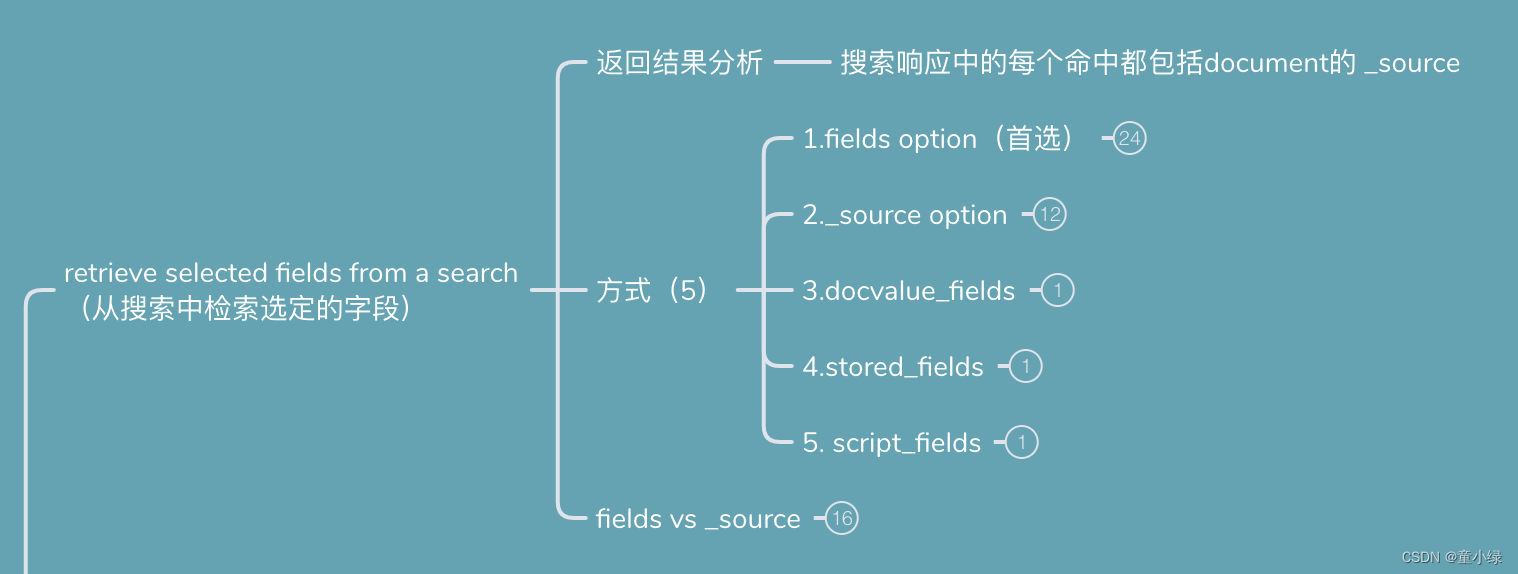
建议使用两种方法从搜索查询中检索选定字段:
(1)使用 fields 选项提取索引映射中存在的字段的值
(2)如果需要访问在索引时传递的原始数据,请使用_source选项
我们可以同时使用这两种方法,但首选fields选项,因为它同时参考文档数据和索引映射。在某些情况下,我们可能希望使用其他方法检索数据。
其他的话还有三种,补充使用
(3)docvalue_fields
使用 docvalue_fields 参数获取选定字段的值。当返回一个数量比较少的doc value(例如keyword和date),这可能是一个不错的选择。
(4)stored_fields
使用 stored_fields 参数获取特定存储字段(使用store映射选项的字段)的值。
(5)script_fields
使用 script_fields 参数来检索每个命中的脚本评估,提取/输出新字段。
要检索搜索响应中的特定字段,请使用fields参数。因为它参考索引映射,所以fields参数提供了几个优于直接引用_source的优点。具体而言,字段参数:
还考虑了其他映射选项,包括上面的ignore_above、ignore_malformed和null_value。
ignore_above
字符串元素的长度超过ignore_above不会被索引或存储
ignore_malformed
允许的映射类型中忽略格式错误的内容
null_value
fields选项返回值的方式与Elasticsearch索引值的方式相匹配。对于标准字段,这意味着fields选项在_source中查找值,然后使用映射解析并格式化它们。
搜索指定的字段。比如text,keyword,objec,nested,date,spatial等字段都可以。
使用对象表示法,可以传递format参数以自定义返回日期或地理空间值的格式。
以下搜索请求使用fields参数检索user.id字段、以http.response.开头的所有字段和@timestamp字段的值。
##数据源
DELETE my-index-000001

##spatial 要定类型,必须先创建mapping
PUT my-index-000001
{
  "mappings": {
    "properties": {
      "location.one": {"type": "geo_point"},
      "location.two": {"type": "geo_point"},
      "location.three": {"type": "geo_point"},
      "location.four": {"type": "geo_point"},
      "location.five": {"type": "geo_point"},
      "username": {
        "type": "nested",
        "properties": {
          "first" : { "type" : "keyword" },
          "last" : { "type" : "keyword" }
        }
      },
      "timestamp":{
           "type": "date",
           "format": "yyyy-MM-dd HH:mm:ss||yyyy-MM-dd||epoch_millis",
           "ignore_malformed": false,
           "null_value": null
      }
    }
  }
}

PUT my-index-000001/_doc/1
{
  "user": {
    "id": "kimchy",
    "name": "kimchy wang",
    "age": 12
  },
  "http": {
    "response": {
      "status_code": 200,
      "bytes": "1070000"
    }
  },
  "@timestamp": "2018-10-18T12:20:51.603Z",
  "timestamp": 1539865251603,
  "ip_addr": "192.168.1.1",
  "location": {
    "one": {"lat": 41.12,"lon": -71.34},
    "two": "41.12,-71.34",
    "three": "drm3btev3e86",
    "four": [41.12, -71.34],
    "five" : "POINT (41.12 -71.34)"
  },
  "username":{
    "first": "John",
    "last": "Smith"
  }
}

##查看mapping结构
GET /my-index-000001/_mapping
##1.object字段
##2.前缀模糊匹配
##3.date 用户epoch_millis输出
##4.Spatial 用wkt输出
##"_source": false 不返回_source
POST my-index-000001/_search
{
  "query": {
    "match": {
      "user.id": "kimchy"
    }
  },
  "fields": [
    "user.id",
    "http.response.*",
    {
      "field": "@timestamp",
      "format": "epoch_millis"
    },
    {
      "field": "location.*",
      "format": "geojson"
    },
     {
      "field": "location.*",
      "format": "wkt"
    }
  ],
  "_source": false
}
##1.object字段
##2.前缀模糊匹配
##3.date 用户epoch_millis输出
##4.Spatial 用wkt输出
##"_source": false 不返回_source
{
  "took" : 2,
  "timed_out" : false,
  "_shards" : {
    "total" : 1,
    "successful" : 1,
    "skipped" : 0,
    "failed" : 0
  },
  "hits" : {
    "total" : {
      "value" : 1,
      "relation" : "eq"
    },
    "max_score" : 0.2876821,
    "hits" : [
      {
        "_index" : "my-index-000001",
        "_type" : "_doc",
        "_id" : "1",
        "_score" : 0.2876821,
        "fields" : {
          "@timestamp" : [
            "1539865251603"
          ],
          "location.three" : [
            "POINT (-71.34000029414892 41.119999922811985)"
          ],
          "user.id" : [
            "kimchy"
          ],
          "http.response.bytes.keyword" : [
            "1070000"
          ],
          "http.response.bytes" : [
            "1070000"
          ],
          "location.two" : [
            "POINT (-71.34 41.12)"
          ],
          "location.one" : [
            "POINT (-71.34 41.12)"
          ],
          "location.five" : [
            "POINT (41.12 -71.34)"
          ],
          "http.response.status_code" : [
            200
          ],
          "location.four" : [
            "POINT (41.12 -71.34)"
          ]
        }
      }
    ]
  }
}
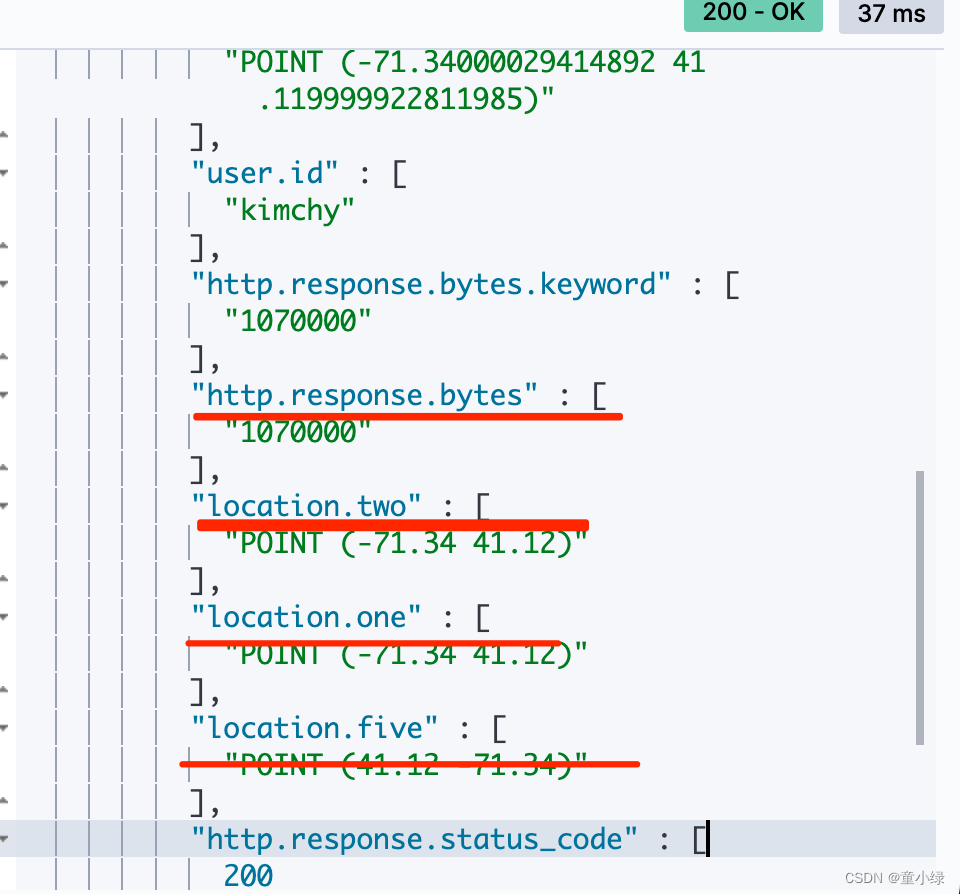
DELETE my-index-000002

PUT my-index-000002
{
  "mappings": {
    "properties": {
      "group" : { "type" : "keyword" },
      "user": {
        "type": "nested",
        "properties": {
          "first" : { "type" : "keyword" },
          "last" : { "type" : "keyword" }
        }
      },
      "addr":{
        "properties": {
          "country": { "type" : "keyword" },
          "province": { "type" : "keyword" },
          "city": { "type" : "keyword" },
          "description": { "type" : "keyword" }
        }
      }
    }
  }
}
##user-nested tel-object(非定义) add-object(定义)
PUT my-index-000002/_doc/1?refresh=true
{
  "group": "fans",
  "user": [
    {
      "first": "John",
      "last": "Smith"
    },
    {
      "first": "Alice",
      "last": "White"
    }
  ],
  "tel": {
    "number": "13334567890",
    "area_code": "86"
  },
  "addr": {
    "country": "CN",
    "province": "YN",
    "city": "KM",
    "description": "地址信息"
  }
}

GET /my-index-000002/_mapping
POST my-index-000002/_search
{
  "fields": ["*"],
  "_source": false
}

## 或者
POST my-index-000002/_search
{
  "fields": ["user.first","user.last"],
  "_source": false
}
##响应
##1.tel-object(非定义) 区分了text,keyword
##"tel.number"
##"tel.number.keyword"
##"tel.area_code"
##"tel.area_code.keyword"
##2.add-object(定义) keyword
##"addr.country"
##"addr.description"
##"addr.province"
##"addr.city"
##3.user-nested (一层一层的以数组形式组织,而不是平铺的设计)
##"user" : ["last" : ["Smith" ],"first" : [ "John"] },{"last" : ["White"],"first" : ["Alice"]}]

{
  "took" : 1,
  "timed_out" : false,
  "_shards" : {
    "total" : 1,
    "successful" : 1,
    "skipped" : 0,
    "failed" : 0
  },
  "hits" : {
    "total" : {
      "value" : 1,
      "relation" : "eq"
    },
    "max_score" : 1.0,
    "hits" : [
      {
        "_index" : "my-index-000002",
        "_type" : "_doc",
        "_id" : "1",
        "_score" : 1.0,
        "fields" : {
          "tel.number" : [
            "13334567890"
          ],
          "tel.area_code.keyword" : [
            "86"
          ],
          "tel.number.keyword" : [
            "13334567890"
          ],
          "addr.country" : [
            "CN"
          ],
          "tel.area_code" : [
            "86"
          ],
          "addr.description" : [
            "地址信息"
          ],
          "addr.province" : [
            "YN"
          ],
          "addr.city" : [
            "KM"
          ],
          "user" : [
            {
              "last" : [
                "Smith"
              ],
              "first" : [
                "John"
              ]
            },
            {
              "last" : [
                "White"
              ],
              "first" : [
                "Alice"
              ]
            }
          ],
          "group" : [
            "fans"
          ]
        }
      }
    ]
  }
}
DELETE my-index-000003

##禁用所有映射
PUT my-index-000003
{
  "mappings": {
    "enabled": false
  }
}

##index
PUT my-index-000003/_doc/1?refresh=true
{
  "user": {
    "id": "kimchy"
  },
  "session_data": {
    "object": {
      "some_field": "some_value"
    }
  }
}
include_unmapped设置返回为映射的字段,也包括与此字段模式匹配的未映射字段。
##设置session_data.object.* 的include_unmapped属性为true可查询到为未映射的session_data.object.* 前缀开头的字段。
POST my-index-000003/_search
{
  "fields": [
    "user.id",
    {
      "field": "session_data.object.*",
      "include_unmapped" : true
    }
  ],
  "_source": false
}

POST my-index-000003/_search
{
  "fields": [
    "user.id",
    {
      "field": "session_data.object.*",
      "include_unmapped" : true
    }
  ],
  "_source": false
}
{
  "took" : 0,
  "timed_out" : false,
  "_shards" : {
    "total" : 1,
    "successful" : 1,
    "skipped" : 0,
    "failed" : 0
  },
  "hits" : {
    "total" : {
      "value" : 1,
      "relation" : "eq"
    },
    "max_score" : 1.0,
    "hits" : [
      {
        "_index" : "my-index-000003",
        "_type" : "_doc",
        "_id" : "1",
        "_score" : 1.0,
        "fields" : {
          "session_data.object.some_field" : [
            "some_value"
          ]
        }
      }
    ]
  }
}
DELETE my-index-000004
PUT my-index-000004/_doc/1?refresh=true
{
  "group": "fans",
  "user": {
    "id": "kimchy",
    "age": 12,
    "description": "用户信息"
  },
  "tel": {
    "number": "13334567890",
    "area_code": "86",
     "description": "手机信息"
  },
  "addr": {
    "country": "CN",
    "province": "YN",
    "city": "KM",
    "description": "地址信息"
  }
}
GET /my-index-000004/_search
{
  "_source": true,
  "query": {
    "match": {
      "user.id": "kimchy"
    }
  }
}
  "hits" : [
      {
        "_index" : "my-index-000004",
        "_type" : "_doc",
        "_id" : "1",
        "_score" : 0.2876821,
        "_source" : {
          "group" : "fans",
          "user" : {
            "id" : "kimchy",
            "age" : 12,
            "description" : "用户信息"
          },
          "tel" : {
            "number" : "13334567890",
            "area_code" : "86",
            "description" : "手机信息"
          },
          "addr" : {
            "country" : "CN",
            "province" : "YN",
            "city" : "KM",
            "description" : "地址信息"
          }
        }
      }
    ]
GET /my-index-000004/_search
{
  "_source": false,
  "query": {
    "match": {
      "user.id": "kimchy"
    }
  }
}
"hits" : [
      {
        "_index" : "my-index-000004",
        "_type" : "_doc",
        "_id" : "1",
        "_score" : 0.2876821
      }
    ]
若要仅返回源字段的子集,请在_source参数中指定通配符(*)模式。以下搜索API请求仅返回tel字段及其属性的源。
GET /my-index-000004/_search
{
  "_source": ["tel.*"],
  "query": {
    "match": {
      "user.id": "kimchy"
    }
  }
}
{
  "took" : 0,
  "timed_out" : false,
  "_shards" : {
    "total" : 1,
    "successful" : 1,
    "skipped" : 0,
    "failed" : 0
  },
  "hits" : {
    "total" : {
      "value" : 1,
      "relation" : "eq"
    },
    "max_score" : 0.2876821,
    "hits" : [
      {
        "_index" : "my-index-000004",
        "_type" : "_doc",
        "_id" : "1",
        "_score" : 0.2876821,
        "_source" : {
          "tel" : {
            "number" : "13334567890",
            "area_code" : "86",
            "description" : "手机信息"
          }
        }
      }
    ]
  }
}
我们还可以在_source字段中指定通配符模式数组。以下搜索API请求仅返回tel和user字段及其属性的源。
GET /my-index-000004/_search
{
  "_source": ["tel.*","user.*"],
  "query": {
    "match": {
      "user.id": "kimchy"
    }
  }
}
{
  "took" : 1,
  "timed_out" : false,
  "_shards" : {
    "total" : 1,
    "successful" : 1,
    "skipped" : 0,
    "failed" : 0
  },
  "hits" : {
    "total" : {
      "value" : 1,
      "relation" : "eq"
    },
    "max_score" : 0.2876821,
    "hits" : [
      {
        "_index" : "my-index-000004",
        "_type" : "_doc",
        "_id" : "1",
        "_score" : 0.2876821,
        "_source" : {
          "tel" : {
            "number" : "13334567890",
            "area_code" : "86",
            "description" : "手机信息"
          },
          "user" : {
            "description" : "用户信息",
            "id" : "kimchy",
            "age" : 12
          }
        }
      }
    ]
  }
}
以下搜索API请求仅返回 tel和user 字段及其属性的源,不包括任何子description字段。
GET /my-index-000004/_search
{
  "_source": {
    "includes": ["tel.*","user.*"],
     "excludes": [ "*.description" ]
  },
  "query": {
    "match": {
      "user.id": "kimchy"
    }
  }
}
{
  "took" : 1,
  "timed_out" : false,
  "_shards" : {
    "total" : 1,
    "successful" : 1,
    "skipped" : 0,
    "failed" : 0
  },
  "hits" : {
    "total" : {
      "value" : 1,
      "relation" : "eq"
    },
    "max_score" : 0.2876821,
    "hits" : [
      {
        "_index" : "my-index-000004",
        "_type" : "_doc",
        "_id" : "1",
        "_score" : 0.2876821,
        "_source" : {
          "tel" : {
            "number" : "13334567890",
            "area_code" : "86"
          },
          "user" : {
            "id" : "kimchy",
            "age" : 12
          }
        }
      }
    ]
  }
}
使用fields 选项通常是更好的选择,除非您绝对需要强制加载存储的或 docvalue_fields。
文档的_source 在 Lucene 中存储为单个字段。这种结构意味着必须加载和解析整个 _source对象,即使您只请求它的一部分。
使用 docvalue_fields 参数返回搜索响应中一个或多个字段的文档值(doc value)。
在lucene中将一个文档编入索引时,字段的原始值会丢失. 字段被分析(analyze),转换(transform)以至编入索引. 在没有其他额外添加的数据结构的情况下,当我们检索文档时,我们只能得到被检索文档的id,而没有文档的原始字段. 为了去获得这些信息,我们需要额外的数据结构. lucene提供了两种可能性来实现这个,stored fields 和 doc values.
store fields
stored fields用于存储没有经过任何分析(without any analysis)的字段值,以实现在查询时能得到这些原始值.
stored fields在磁盘上以行的方式放置: 每个文档对应一个行,这个行包含该文档所有的stored fields.
doc values
doc values用于加速一些诸如聚合(aggregation),排序(sorting),分组(grouping)的操作. doc values 也可以被用来在查询时返回字段值. 例外是doc values不能用来存储text类型的字段.
doc values 以列的方式存储. 不同文档的相同字段被连续地存储在一起。 这种存储方式,可以直接访问一个特定的文档的特定字段. 更有效率。doc_value由于每个字段是分开存储的,Elasticsearch 只读取请求的字段值,可以避免加载整个文档_source。
ES排序是针对字段原始内容进⾏的。 倒排索引⽆法发挥作⽤
需要⽤到正排索引。通过⽂档 Id 和字段快速得到字段原始内容
Elasticsearch 有两种实现⽅法
1.Fielddata (打开fielddata,可对 text 字段进行排序)
2.Doc Values (列式存储,对 Text 类型⽆效)
| vs | Doc Values | Field data |
|---|---|---|
| 创建时间 | 索引时,和倒排索引⼀起创建 | 搜索时候动态创建 |
| 创建位置 | 磁盘⽂件 | JVM Heap |
| 优点 | 避免⼤量内存占⽤ | 索引速度快,不占⽤额外的磁盘空间 |
| 缺点 | 降低索引速度,占⽤额外磁盘空间 | ⽂档过多时,动态创建开销⼤,占⽤过多JVM Heap |
| 缺省值 | ES 2.x 之后 | ES 1.x 及之前 |
以下搜索请求使用 docvalue_fields 参数检索 user.id 字段、所有以 http.response. 开头的字段和 @timestamp 字段的文档值:
GET my-index-000001/_search
{
  "query": {
    "match": {
      "user.id": "kimchy"
    }
  },
  "docvalue_fields": [
    "user.id",
    "http.response.*",
    {
      "field": "date",
      "format": "epoch_millis"
    },
    {
      "field": "location.*",
      "format": "wkt"
    }
  ]
}
"Text fields are not optimised for operations that require per-document field data like aggregations and sorting, so these operations are disabled by default. Please use a keyword field instead. Alternatively, set fielddata=true on [user.id] in order to load field data by uninverting the inverted index. Note that this can use significant memory.
| 项目 | Value |
|---|---|
| user.id 字段 | text类型 |
| http.response.* | 部分text类型 |
| @timestamp字段 | date类型 |
| http.response.status_code: | long |
| user.age字段 | long |
| date字段 | date类型 |
| location.* | 不支持geo_point… Field [location.three] of type [geo_point] does not support custom formats |
| username | nested,不能使用 docvalue_fields 参数来检索嵌套对象的文档值。如果您指定一个嵌套对象,则搜索会为该字段返回一个空数组 ([ ])。要访问嵌套字段,请使用 inner_hits 参数的 docvalue_fields 属性。 |
GET my-index-000001/_search
{
  "_source": "false",
  "query": {
    "match": {
      "user.id": "kimchy"
    }
  },
  "docvalue_fields": [
    "@timestamp",
    "http.response.status_code",
    "user.age",
    {
      "field": "date",
      "format": "epoch_millis"
    },
    "username"
  ]
}
{
  "took" : 1,
  "timed_out" : false,
  "_shards" : {
    "total" : 1,
    "successful" : 1,
    "skipped" : 0,
    "failed" : 0
  },
  "hits" : {
    "total" : {
      "value" : 1,
      "relation" : "eq"
    },
    "max_score" : 0.2876821,
    "hits" : [
      {
        "_index" : "my-index-000001",
        "_type" : "_doc",
        "_id" : "1",
        "_score" : 0.2876821,
        "_source" : { },
        "fields" : {
          "user.age" : [
            12
          ],
          "@timestamp" : [
            "2018-10-18T12:20:51.603Z"
          ],
          "http.response.status_code" : [
            200
          ]
        }
      }
    ]
  }
}
GET my-index-000001/_search
{
  "_source": "false",
  "query": {
    "nested": {
      "path": "username",
      "query": {
        "match_all": {}
      },
      "inner_hits": {
        "docvalue_fields": [
            "username.id","username.name"
          ]
      }
    }
  }
}
{
  "took" : 1,
  "timed_out" : false,
  "_shards" : {
    "total" : 1,
    "successful" : 1,
    "skipped" : 0,
    "failed" : 0
  },
  "hits" : {
    "total" : {
      "value" : 1,
      "relation" : "eq"
    },
    "max_score" : 1.0,
    "hits" : [
      {
        "_index" : "my-index-000001",
        "_type" : "_doc",
        "_id" : "1",
        "_score" : 1.0,
        "_source" : { },
        "inner_hits" : {
          "username" : {
            "hits" : {
              "total" : {
                "value" : 1,
                "relation" : "eq"
              },
              "max_score" : 1.0,
              "hits" : [
                {
                  "_index" : "my-index-000001",
                  "_type" : "_doc",
                  "_id" : "1",
                  "_nested" : {
                    "field" : "username",
                    "offset" : 0
                  },
                  "_score" : 1.0,
                  "_source" : {
                    "last" : "Smith",
                    "first" : "John"
                  }
                }
              ]
            }
          }
        }
      }
    ]
  }
}
##nested 中不要加分词,并且不要使用type=text的类型
DELETE my-index-store
PUT my-index-store
{
  "mappings": {
    "properties": {
      "title": {
        "type": "text",
        "store": true
      },
      "date": {
        "type": "date",
        "store": true
      },
      "content": {
        "type": "text"
      },
      "likes": {
        "type": "long",
        "store": false
      },
      "fans": {
        "type": "nested",
        "properties": {
          "id": {
            "type": "keyword",
            "store": true,
            "ignore_above": 256
          },
          "name": {
            "type": "text"
          }
        }
      }
    }
  }
}


PUT my-index-store/_doc/1
{
  "title":   "Some short title",
  "date":    "2015-01-01",
  "content": "A very long content field...",
  "likes": 345,
  "fans":[
      {"id":"123","name":"木头人"},
      {"id":"321","name":"上链接"}
    ]
}

GET my-index-store/_mapping
GET my-index-store/_search
{
  "stored_fields": [ "title", "date", "content", "likes" ]
}
## "title", "date":store 为 true,能被查询到
## "content":store 默认 false,不能被查询到
## "likes":store 指定为 false,不能被查询到
{
  "took" : 0,
  "timed_out" : false,
  "_shards" : {
    "total" : 1,
    "successful" : 1,
    "skipped" : 0,
    "failed" : 0
  },
  "hits" : {
    "total" : {
      "value" : 1,
      "relation" : "eq"
    },
    "max_score" : 1.0,
    "hits" : [
      {
        "_index" : "my-index-store",
        "_type" : "_doc",
        "_id" : "1",
        "_score" : 1.0,
        "fields" : {
          "date" : [
            "2015-01-01T00:00:00.000Z"
          ],
          "title" : [
            "Some short title"
          ]
        }
      }
    ]
  }
}
GET my-index-store/_search
{
  "stored_fields": []
}
{
  "took" : 0,
  "timed_out" : false,
  "_shards" : {
    "total" : 1,
    "successful" : 1,
    "skipped" : 0,
    "failed" : 0
  },
  "hits" : {
    "total" : {
      "value" : 1,
      "relation" : "eq"
    },
    "max_score" : 1.0,
    "hits" : [
      {
        "_index" : "my-index-store",
        "_type" : "_doc",
        "_id" : "1",
        "_score" : 1.0
      }
    ]
  }
}
GET my-index-store/_search
{
  "stored_fields": [ "fans.id", "fans.name"]
}
{
  "took" : 0,
  "timed_out" : false,
  "_shards" : {
    "total" : 1,
    "successful" : 1,
    "skipped" : 0,
    "failed" : 0
  },
  "hits" : {
    "total" : {
      "value" : 1,
      "relation" : "eq"
    },
    "max_score" : 1.0,
    "hits" : [
      {
        "_index" : "my-index-store",
        "_type" : "_doc",
        "_id" : "1",
        "_score" : 1.0
      }
    ]
  }
}
GET my-index-store/_search
{
  "_source": "false",
  "query": {
    "nested": {
      "path": "fans",
      "query": {
        "match_all": {}
      },
      "inner_hits": {
        "_source": "false",
        "stored_fields": [
          "fans.id",
          "fans.name"
        ]
      }
    }
  }
}
{
  "took" : 9,
  "timed_out" : false,
  "_shards" : {
    "total" : 1,
    "successful" : 1,
    "skipped" : 0,
    "failed" : 0
  },
  "hits" : {
    "total" : {
      "value" : 1,
      "relation" : "eq"
    },
    "max_score" : 1.0,
    "hits" : [
      {
        "_index" : "my-index-store",
        "_type" : "_doc",
        "_id" : "1",
        "_score" : 1.0,
        "_source" : { },
        "inner_hits" : {
          "fans" : {
            "hits" : {
              "total" : {
                "value" : 2,
                "relation" : "eq"
              },
              "max_score" : 1.0,
              "hits" : [
                {
                  "_index" : "my-index-store",
                  "_type" : "_doc",
                  "_id" : "1",
                  "_nested" : {
                    "field" : "fans",
                    "offset" : 0
                  },
                  "_score" : 1.0,
                  "_source" : { },
                  "fields" : {
                    "fans.id" : [
                      "123"
                    ]
                  }
                },
                {
                  "_index" : "my-index-store",
                  "_type" : "_doc",
                  "_id" : "1",
                  "_nested" : {
                    "field" : "fans",
                    "offset" : 1
                  },
                  "_score" : 1.0,
                  "_source" : { },
                  "fields" : {
                    "fans.id" : [
                      "321"
                    ]
                  }
                }
              ]
            }
          }
        }
      }
    ]
  }
}
GET my-index-store/_search
{
  "stored_fields": "_none_"
}
{
  "took" : 0,
  "timed_out" : false,
  "_shards" : {
    "total" : 1,
    "successful" : 1,
    "skipped" : 0,
    "failed" : 0
  },
  "hits" : {
    "total" : {
      "value" : 1,
      "relation" : "eq"
    },
    "max_score" : 1.0,
    "hits" : [
      {
        "_index" : "my-index-store",
        "_type" : "_doc",
        "_score" : 1.0
      }
    ]
  }
}
##doc['user.age'].value 提取age的信息作为新字段输出
##"@timestamp": "2018-10-18T12:20:51.603Z", 提取year 作为新字段输出
GET my-index-000001/_search
{
  "query": {
    "match_all": {}
  },
  "script_fields": {
    "test1": {
      "script": {
        "lang": "painless",
        "source": "doc['age'].value * 2"
      }
    },
    "test3": {
      "script": {
        "lang": "painless",
        "source": "doc['@timestamp'].value.year"
      }
    }
  }
}
{
  "took" : 1,
  "timed_out" : false,
  "_shards" : {
    "total" : 1,
    "successful" : 1,
    "skipped" : 0,
    "failed" : 0
  },
  "hits" : {
    "total" : {
      "value" : 1,
      "relation" : "eq"
    },
    "max_score" : 1.0,
    "hits" : [
      {
        "_index" : "my-index-000001",
        "_type" : "_doc",
        "_id" : "1",
        "_score" : 1.0,
        "fields" : {
          "test3" : [
            2018
          ],
          "test1" : [
            24
          ]
        }
      }
    ]
  }
}
GET my-index-000001/_search
{
  "query": {
    "match_all": {}
  },
  "script_fields": {
    "test1": {
      "script": "params['_source']['user']"
    }
  }
}
{
  "took" : 0,
  "timed_out" : false,
  "_shards" : {
    "total" : 1,
    "successful" : 1,
    "skipped" : 0,
    "failed" : 0
  },
  "hits" : {
    "total" : {
      "value" : 1,
      "relation" : "eq"
    },
    "max_score" : 1.0,
    "hits" : [
      {
        "_index" : "my-index-000001",
        "_type" : "_doc",
        "_id" : "1",
        "_score" : 1.0,
        "fields" : {
          "test1" : [
            {
              "name" : "kimchy wang",
              "id" : "kimchy",
              "age" : 12
            }
          ]
        }
      }
    ]
  }
}
1.使用doc,doc是加载到内存中,直接从内存中获取对象的,会消耗更多的内存,查询也更快。doc另外一个显著特点就是只能访问简单字段值,doc[…] 表示法仅允许简单的值字段(您不能从中返回 json 对象)并且仅对未分析或基于单个术语的字段有意义。
2.params是从磁盘中获取的,每次都要从磁盘取一次,所以速度相对较慢。所以一般情况下,我们更加推荐使用doc。
根据官方的描述:Doc-values can only return “simple” field values like numbers, dates, geo- points, terms, etc, or arrays of these values if the field is multi-valued. It cannot return JSON objects.
即数字、日期、地理点、术语等或者这些值的数组,所以doc不支持json对象
(1)fields
使用fields 选项提取索引映射中存在的字段的值
(2)_source
使用_source选项访问在索引时传递的原始数据
(3)docvalue_fields
使用 docvalue_fields 参数获取选定字段的值。doc value类型主要是keyword和date,不支持text类型
(4)stored_fields
使用 stored_fields 参数获取特定存储字段(使用store映射选项的字段)的值。stored是要消耗内存的,有性能瓶颈
(5)script_fields
使用 script_fields 参数来检索每个命中的脚本评估,提取/输出新字段。doc[‘my_field’].value 是基于内存查询字段,params[‘_source’][‘my_field’] 是基于磁盘查询字段
我有一个表单,其中有很多字段取自数组(而不是模型或对象)。我如何验证这些字段的存在?solve_problem_pathdo|f|%>... 最佳答案 创建一个简单的类来包装请求参数并使用ActiveModel::Validations。#definedsomewhere,atthesimplest:require'ostruct'classSolvetrue#youcouldevencheckthesolutionwithavalidatorvalidatedoerrors.add(:base,"WRONG!!!")unlesss
我想向我的Controller传递一个参数,它是一个简单的复选框,但我不知道如何在模型的form_for中引入它,这是我的观点:{:id=>'go_finance'}do|f|%>Transferirde:para:Entrada:"input",:placeholder=>"Quantofoiganho?"%>Saída:"output",:placeholder=>"Quantofoigasto?"%>Nota:我想做一个额外的复选框,但我该怎么做,模型中没有一个对象,而是一个要检查的对象,以便在Controller中创建一个ifelse,如果没有检查,请帮助我,非常感谢,谢谢
我知道我可以指定某些字段来使用pluck查询数据库。ids=Item.where('due_at但是我想知道,是否有一种方法可以指定我想避免从数据库查询的某些字段。某种反拔?posts=Post.where(published:true).do_not_lookup(:enormous_field) 最佳答案 Model#attribute_names应该返回列/属性数组。您可以排除其中一些并传递给pluck或select方法。像这样:posts=Post.where(published:true).select(Post.attr
我使用Nokogiri(Rubygem)css搜索寻找某些在我的html里面。看起来Nokogiri的css搜索不喜欢正则表达式。我想切换到Nokogiri的xpath搜索,因为这似乎支持搜索字符串中的正则表达式。如何在xpath搜索中实现下面提到的(伪)css搜索?require'rubygems'require'nokogiri'value=Nokogiri::HTML.parse(ABBlaCD3"HTML_END#my_blockisgivenmy_bl="1"#my_eqcorrespondstothisregexmy_eq="\/[0-9]+\/"#FIXMEThefoll
文章目录一、概述简介原理模块二、配置Mysql使用版本环境要求1.操作系统2.mysql要求三、配置canal-server离线下载在线下载上传解压修改配置单机配置集群配置分库分表配置1.修改全局配置2.实例配置垂直分库水平分库3.修改group-instance.xml4.启动监听四、配置canal-adapter1修改启动配置2配置映射文件3启动ES数据同步查询所有订阅同步数据同步开关启动4.验证五、配置canal-admin一、概述简介canal是Alibaba旗下的一款开源项目,Java开发。基于数据库增量日志解析,提供增量数据订阅&消费。Git地址:https://github.co
ES一、简介1、ElasticStackES技术栈:ElasticSearch:存数据+搜索;QL;Kibana:Web可视化平台,分析。LogStash:日志收集,Log4j:产生日志;log.info(xxx)。。。。使用场景:metrics:指标监控…2、基本概念Index(索引)动词:保存(插入)名词:类似MySQL数据库,给数据Type(类型)已废弃,以前类似MySQL的表现在用索引对数据分类Document(文档)真正要保存的一个JSON数据{name:"tcx"}二、入门实战{"name":"DESKTOP-1TSVGKG","cluster_name":"elasticsear
我几天前在我的rubyonrails2.3.2上安装了Sphinx和Thinking-Sphinx,基本搜索效果很好。这意味着,没有任何条件。现在,我想用一些条件过滤搜索。我有公告模型,索引如下所示:define_indexdoindexestitle,:as=>:title,:sortable=>trueindexesdescription,:as=>:description,:sortable=>trueend也许我错了,但我注意到只有当我将:sortable=>true语法添加到这些属性时,我才能将它们用作搜索条件。否则它找不到任何东西。现在,我还在使用acts_as_tag
寻找有用的ruby的好网站是什么? 最佳答案 AgileWebDevelopment列出插件(虽然不是rubygems,我不确定为什么),并允许人们对它们进行评级。RubyToolbox按类别列出gem并比较它们的受欢迎程度。Rubygems有一个搜索框。StackOverflow对最有用的rails插件和rubygems有疑问。 关于ruby-如何搜索有用的ruby,我们在StackOverflow上找到一个类似的问题: https://stacko
假设您编写了一个类Sup,我决定将其扩展为SubSup。我不仅需要了解你发布的接口(interface),还需要了解你的私有(private)字段。见证这次失败:classSupdefinitialize@privateField="fromsup"enddefgetXreturn@privateFieldendendclassSub问题是,解决这个问题的正确方法是什么?看起来子类应该能够使用它想要的任何字段而不会弄乱父类(superclass)。编辑:equivalentexampleinJava返回"fromSup",这也是它应该产生的答案。 最佳答案
我有很多这样的文档:foo_1foo_2foo_3bar_1foo_4...我想通过获取foo_[X]的所有实例并将它们中的每一个替换为foo_[X+1]来转换它们。在这个例子中:foo_2foo_3foo_4bar_1foo_5...我可以用gsub和一个block来做到这一点吗?如果不是,最干净的方法是什么?我真的在寻找一个优雅的解决方案,因为我总是可以暴力破解它,但我觉得有一些正则表达式技巧值得学习。 最佳答案 我(完全)不懂Ruby,但类似这样的东西应该可以工作:"foo_1foo_2".gsub(/(foo_)(\d+)/
