微信小程序对敏感数据加解密算法
微信小程序对敏感数据加解密算法,以获取微信的群ID(opengid)为例
微信端通过转发获取加密数据
微信端通过获取微信群聊场景下的小程序启动信息
获取的相关参数
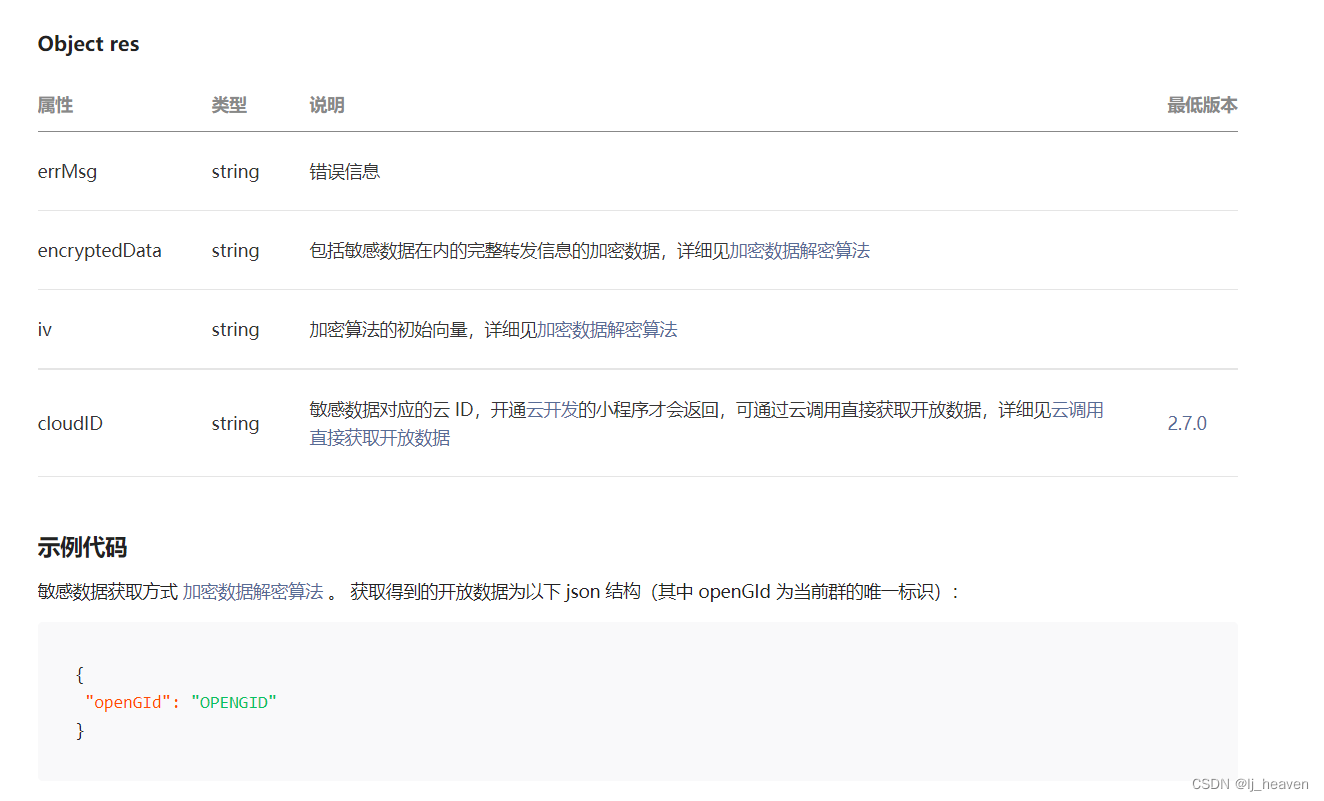
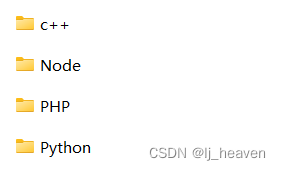
但官方提供的加密数据加解密算法所支持的语言却不包括Java
接口如果涉及敏感数据(如wx.getUserInfo当中的 openId 和
unionId),接口的明文内容将不包含这些敏感数据。开发者如需要获取敏感数据,需要对接口返回的加密数据(encryptedData)
进行对称解密。 解密算法如下:对称解密使用的算法为 AES-128-CBC,数据采用PKCS#7填充。 对称解密的目标密文为
Base64_Decode(encryptedData)。 对称解密秘钥 aeskey =
Base64_Decode(session_key), aeskey 是16字节。 对称解密算法初始向量
为Base64_Decode(iv),其中 iv 由数据接口返回。
微信官方提供了多种编程语言的示例代码((点击下载)。每种语言类型的接口名字均一致。调用方式可以参照示例。另外,为了应用能校验数据的有效性,会在敏感数据加上数据水印( watermark )。
Entity类
@ApiModel(value = "OpenGIdDTO", description = "获取openGId的解密参数")
public class OpenGIdDTO {
    @ApiModelProperty(value = "需要加密的数据")
    private String encrypt;

    @ApiModelProperty(value = "对称加密秘钥")
    private String sessionKey;

    @ApiModelProperty(value = "对称加密算法初始向量")
    private String iv;

    public String getEncrypt() {
        return encrypt;
    }

    public void setEncrypt(String encrypt) {
        this.encrypt = encrypt;
    }

    public String getSessionKey() {
        return sessionKey;
    }

    public void setSessionKey(String sessionKey) {
        this.sessionKey = sessionKey;
    }

    public String getIv() {
        return iv;
    }

    public void setIv(String iv) {
        this.iv = iv;
    }
}
Controller层
    @ApiOperation(value = "获取openGId")
    @PostMapping(value = "/getOpenGId")
    public JSONObject getOpenId(@RequestBody OpenGIdDTO openGIdDTO) throws Exception {
        String decrypt = WXCore.decrypt(APPID, openGIdDTO.getEncrypt(), openGIdDTO.getSessionKey(), openGIdDTO.getIv());
        JSONObject json = JSON.parseObject(decrypt);
        return json;
    }
工具类
public class WXCore {

    private static final String WATERMARK = "watermark";
    private static final String APPID = "openGId";
    /**
     * 解密数据
     * @return
     * @throws Exception
     */
    public static String decrypt(String appId, String encryptedData, String sessionKey, String iv){
        String result = "";
        try {
            AES aes = new AES();
            byte[] resultByte = aes.decrypt(Base64.decodeBase64(encryptedData), Base64.decodeBase64(sessionKey), Base64.decodeBase64(iv));
            if(null != resultByte && resultByte.length > 0){
                result = new String(WxPKCS7Encoder.decode(resultByte));
                JSONObject jsonObject = JSONObject.parseObject(result);
                String decryptAppid = jsonObject.getJSONObject(WATERMARK).getString("appid");
                if(!appId.equals(decryptAppid)){
                    result = "";
                }
            }
        } catch (Exception e) {
            result = "";
            e.printStackTrace();
        }
        return result;
    }
}
public class AES {

    public static boolean initialized = false;

    /**
     * AES解密
     *
     * @param content
     * 密文
     * @return
     * @throws InvalidAlgorithmParameterException
     * @throws NoSuchProviderException
     */
    public byte[] decrypt(byte[] content, byte[] keyByte, byte[] ivByte) throws InvalidAlgorithmParameterException {
        initialize();
        try {
            Cipher cipher = Cipher.getInstance("AES/CBC/PKCS7Padding");
            Key sKeySpec = new SecretKeySpec(keyByte, "AES");
            cipher.init(Cipher.DECRYPT_MODE, sKeySpec, generateIV(ivByte));// 初始化
            byte[] result = cipher.doFinal(content);
            return result;
        } catch (NoSuchAlgorithmException e) {
            e.printStackTrace();
        } catch (NoSuchPaddingException e) {
            e.printStackTrace();
        } catch (InvalidKeyException e) {
            e.printStackTrace();
        } catch (IllegalBlockSizeException e) {
            e.printStackTrace();
        } catch (BadPaddingException e) {
            e.printStackTrace();
        } catch (NoSuchProviderException e) {
            // TODO Auto-generated catch block
            e.printStackTrace();
        } catch (Exception e) {
            // TODO Auto-generated catch block
            e.printStackTrace();
        }
        return null;
    }

    public static void initialize() {
        if (initialized)
            return;
        Security.addProvider(new BouncyCastleProvider());
        initialized = true;
    }

    // 生成iv
    public static AlgorithmParameters generateIV(byte[] iv) throws Exception {
        AlgorithmParameters params = AlgorithmParameters.getInstance("AES");
        params.init(new IvParameterSpec(iv));
        return params;
    }
}
Entity类一致
Controller层
    @ApiOperation(value = "解密返参信息")
    @PostMapping(value = "/getMess")
    @UserAnnotation()
    public JSONObject getMess(@RequestBody OpenGIdDTO openGIdDTO) throws Exception {
        String decrypt = WxCryptUtils.decrypt(openGIdDTO.getEncrypt(), openGIdDTO.getIv(), openGIdDTO.getSessionKey());
        JSONObject json = JSON.parseObject(decrypt);
        return json;
    }
工具类
public class WxCryptUtils {

    /**
     * 小程序 数据解密
     *
     * @param encryptData 加密数据
     * @param iv          对称解密算法初始向量
     * @param sessionKey  对称解密秘钥
     * @return 解密数据
     */
    public static String decrypt(String encryptData, String iv, String sessionKey) throws Exception {
        AlgorithmParameters algorithmParameters = AlgorithmParameters.getInstance("AES");
        algorithmParameters.init(new IvParameterSpec(Base64.decodeBase64(iv)));
        Cipher cipher = Cipher.getInstance("AES/CBC/NoPadding");
        cipher.init(Cipher.DECRYPT_MODE, new SecretKeySpec(Base64.decodeBase64(sessionKey), "AES"), algorithmParameters);
        byte[] decode = PKCS7Encoder.decode(cipher.doFinal(Base64.decodeBase64(encryptData)));
        String decryptStr = new String(decode, StandardCharsets.UTF_8);
        return decryptStr;
    }

    /**
     * 数据加密
     *
     * @param data          需要加密的数据
     * @param iv            对称加密算法初始向量
     * @param sessionKey    对称加密秘钥
     * @return  加密数据
     */
    public static String encrypt(String data, String iv, String sessionKey) throws Exception {
        AlgorithmParameters algorithmParameters = AlgorithmParameters.getInstance("AES");
        algorithmParameters.init(new IvParameterSpec(Base64.decodeBase64(iv)));
        Cipher cipher = Cipher.getInstance("AES/CBC/NoPadding");
        cipher.init(Cipher.ENCRYPT_MODE, new SecretKeySpec(Base64.decodeBase64(sessionKey), "AES"), algorithmParameters);
        byte[] textBytes = data.getBytes(StandardCharsets.UTF_8);
        ByteGroup byteGroup= new ByteGroup();
        byteGroup.addBytes(textBytes);
        byte[] padBytes = PKCS7Encoder.encode(byteGroup.size());
        byteGroup.addBytes(padBytes);
        byte[] encryptBytes = cipher.doFinal(byteGroup.toBytes());
        return Base64.encodeBase64String(encryptBytes);
    }
}
public class PKCS7Encoder {

    static Charset CHARSET = Charset.forName("utf-8");
    static int BLOCK_SIZE = 32;

    /**
     * 获得对明文进行补位填充的字节.
     *
     * @param count 需要进行填充补位操作的明文字节个数
     * @return 补齐用的字节数组
     */
    public static byte[] encode(int count) {
        // 计算需要填充的位数
        int amountToPad = BLOCK_SIZE - (count % BLOCK_SIZE);
        if (amountToPad == 0) {
            amountToPad = BLOCK_SIZE;
        }
        // 获得补位所用的字符
        char padChr = chr(amountToPad);
        String tmp = new String();
        for (int index = 0; index < amountToPad; index++) {
            tmp += padChr;
        }
        return tmp.getBytes(CHARSET);
    }

    /**
     * 删除解密后明文的补位字符
     *
     * @param decrypted 解密后的明文
     * @return 删除补位字符后的明文
     */
    public static byte[] decode(byte[] decrypted) {
        int pad = decrypted[decrypted.length - 1];
        if (pad < 1 || pad > 32) {
            pad = 0;
        }
        return Arrays.copyOfRange(decrypted, 0, decrypted.length - pad);
    }

    /**
     * 将数字转化成ASCII码对应的字符,用于对明文进行补码
     *
     * @param a 需要转化的数字
     * @return 转化得到的字符
     */
    static char chr(int a) {
        byte target = (byte) (a & 0xFF);
        return (char) target;
    }
}
public class ByteGroup {

    ArrayList<Byte> byteContainer = new ArrayList<Byte>();

    public byte[] toBytes() {
        byte[] bytes = new byte[byteContainer.size()];
        for (int i = 0; i < byteContainer.size(); i++) {
            bytes[i] = byteContainer.get(i);
        }
        return bytes;
    }

    public ByteGroup addBytes(byte[] bytes) {
        for (byte b : bytes) {
            byteContainer.add(b);
        }
        return this;
    }

    public int size() {
        return byteContainer.size();
    }
}
出现原因:前端在调用取用户手机号的回调函数中,又调用了一遍login()方法,然后把加密数据传给我们来解密,在回调中不应该调用登陆的方法,这样会导致刷新sessionkey,当我们用之前保存的sessionkey时,可能导致sessionkey过期。用旧的sessionkey解密显sessionkey加密的数据,当然会报错。
解决方案:前端不要调用2次login()方法
我主要使用Ruby来执行此操作,但到目前为止我的攻击计划如下:使用gemsrdf、rdf-rdfa和rdf-microdata或mida来解析给定任何URI的数据。我认为最好映射到像schema.org这样的统一模式,例如使用这个yaml文件,它试图描述数据词汇表和opengraph到schema.org之间的转换:#SchemaXtoschema.orgconversion#data-vocabularyDV:name:namestreet-address:streetAddressregion:addressRegionlocality:addressLocalityphoto:i
我真的很习惯使用Ruby编写以下代码:my_hash={}my_hash['test']=1Java中对应的数据结构是什么? 最佳答案 HashMapmap=newHashMap();map.put("test",1);我假设? 关于java-等价于Java中的RubyHash,我们在StackOverflow上找到一个类似的问题: https://stackoverflow.com/questions/22737685/
有时我需要处理键/值数据。我不喜欢使用数组,因为它们在大小上没有限制(很容易不小心添加超过2个项目,而且您最终需要稍后验证大小)。此外,0和1的索引变成了魔数(MagicNumber),并且在传达含义方面做得很差(“当我说0时,我的意思是head...”)。散列也不合适,因为可能会不小心添加额外的条目。我写了下面的类来解决这个问题:classPairattr_accessor:head,:taildefinitialize(h,t)@head,@tail=h,tendend它工作得很好并且解决了问题,但我很想知道:Ruby标准库是否已经带有这样一个类? 最佳
我正在尝试使用boilerpipe来自JRuby。我看过guide从JRuby调用Java,并成功地将它与另一个Java包一起使用,但无法弄清楚为什么同样的东西不能用于boilerpipe。我正在尝试基本上从JRuby中执行与此Java等效的操作:URLurl=newURL("http://www.example.com/some-location/index.html");Stringtext=ArticleExtractor.INSTANCE.getText(url);在JRuby中试过这个:require'java'url=java.net.URL.new("http://www
我只想对我一直在思考的这个问题有其他意见,例如我有classuser_controller和classuserclassUserattr_accessor:name,:usernameendclassUserController//dosomethingaboutanythingaboutusersend问题是我的User类中是否应该有逻辑user=User.newuser.do_something(user1)oritshouldbeuser_controller=UserController.newuser_controller.do_something(user1,user2)我
什么是ruby的rack或python的Java的wsgi?还有一个路由库。 最佳答案 来自Python标准PEP333:Bycontrast,althoughJavahasjustasmanywebapplicationframeworksavailable,Java's"servlet"APImakesitpossibleforapplicationswrittenwithanyJavawebapplicationframeworktoruninanywebserverthatsupportstheservletAPI.ht
我正在尝试使用Curbgem执行以下POST以解析云curl-XPOST\-H"X-Parse-Application-Id:PARSE_APP_ID"\-H"X-Parse-REST-API-Key:PARSE_API_KEY"\-H"Content-Type:image/jpeg"\--data-binary'@myPicture.jpg'\https://api.parse.com/1/files/pic.jpg用这个:curl=Curl::Easy.new("https://api.parse.com/1/files/lion.jpg")curl.multipart_form_
无论您是想搭建桌面端、WEB端或者移动端APP应用,HOOPSPlatform组件都可以为您提供弹性的3D集成架构,同时,由工业领域3D技术专家组成的HOOPS技术团队也能为您提供技术支持服务。如果您的客户期望有一种在多个平台(桌面/WEB/APP,而且某些客户端是“瘦”客户端)快速、方便地将数据接入到3D应用系统的解决方案,并且当访问数据时,在各个平台上的性能和用户体验保持一致,HOOPSPlatform将帮助您完成。利用HOOPSPlatform,您可以开发在任何环境下的3D基础应用架构。HOOPSPlatform可以帮您打造3D创新型产品,HOOPSSDK包含的技术有:快速且准确的CAD
目录一.加解密算法数字签名对称加密DES(DataEncryptionStandard)3DES(TripleDES)AES(AdvancedEncryptionStandard)RSA加密法DSA(DigitalSignatureAlgorithm)ECC(EllipticCurvesCryptography)非对称加密签名与加密过程非对称加密的应用对称加密与非对称加密的结合二.数字证书图解一.加解密算法加密简单而言就是通过一种算法将明文信息转换成密文信息,信息的的接收方能够通过密钥对密文信息进行解密获得明文信息的过程。根据加解密的密钥是否相同,算法可以分为对称加密、非对称加密、对称加密和非
本教程将在Unity3D中混合Optitrack与数据手套的数据流,在人体运动的基础上,添加双手手指部分的运动。双手手背的角度仍由Optitrack提供,数据手套提供双手手指的角度。 01 客户端软件分别安装MotiveBody与MotionVenus并校准人体与数据手套。MotiveBodyMotionVenus数据手套使用、校准流程参照:https://gitee.com/foheart_1/foheart-h1-data-summary.git02 数据转发打开MotiveBody软件的Streaming,开始向Unity3D广播数据;MotionVenus中设置->选项选择Unit
