

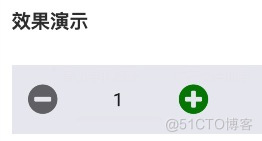


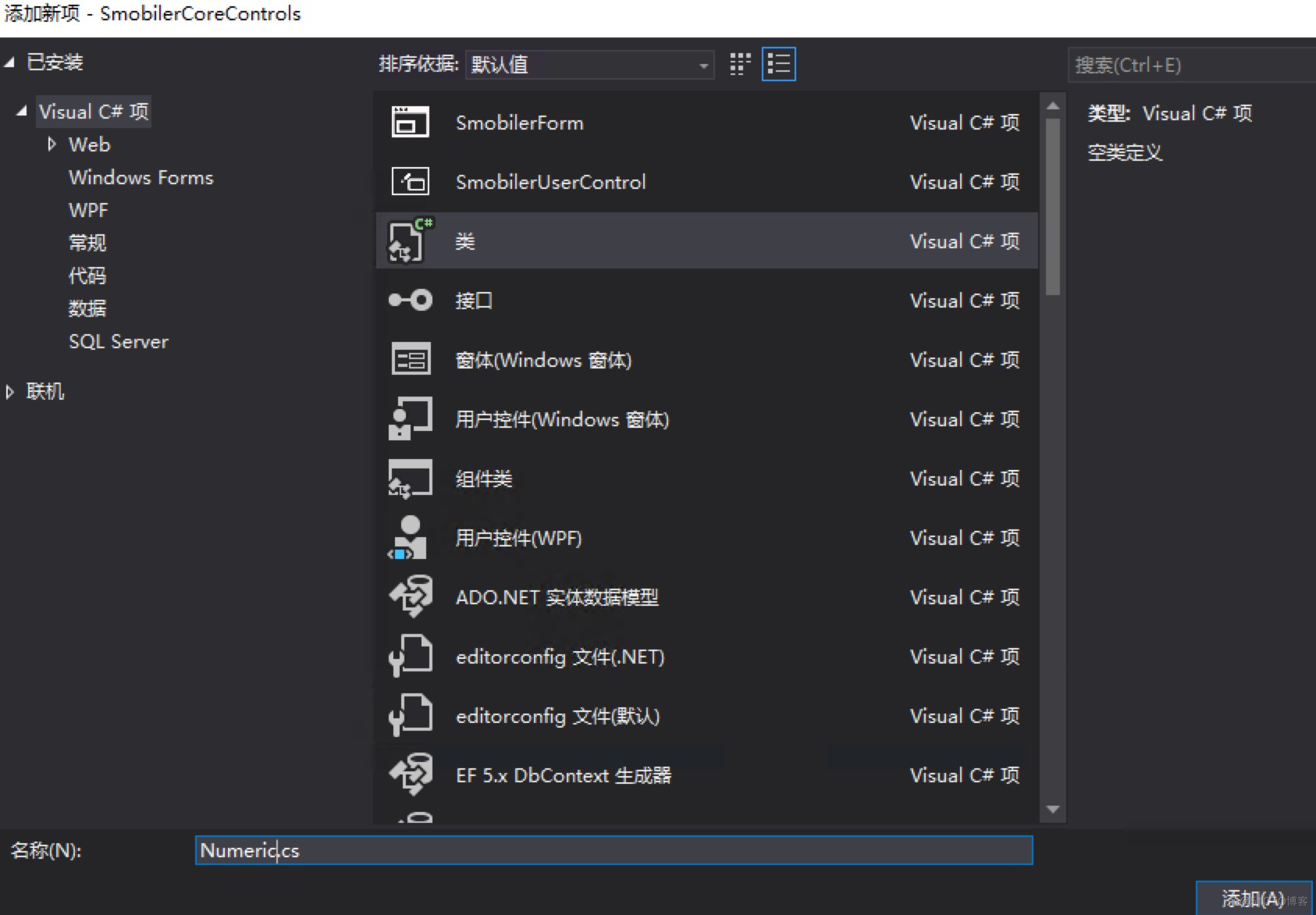
 之后代码中取名为数量控件。
/// <summary>
/// 数量控件
/// </summary>
//下面代码可使控件显示在工具箱中。
[System.ComponentModel.ToolboxItem(true), System.ComponentModel.ToolboxItemFilter("Smobiler.Core.Controls")]
//取名,继承MobileLayoutControl布局控件、IMobileBindableControl数据绑定控件接口
public class Numeric : MobileLayoutControl, IMobileBindableControl
{   }
    //Numeric中间的输入框
    private TextBox txtValue;
    //Numeric左边的减少的图标
    private FontIcon fontMinus;
    //Numeric右边的增加的图标
    private FontIcon fontPlus;
    //使左边图标可点击
    private Panel Minus;
    //使右边图标可点击
    private Panel Plus;
    /// <summary>
    /// 初始化Numeric类的一个新实例
    /// </summary>
    public Numeric()
    {
        //本界面使用相对布局的方式,可按照自己顺手方式。
        this.Layout = LayoutPosition.Relative;
        //最外层添加一个Panel装所有的控件。
        Panel NPanel = new Panel();
        NPanel.Layout = LayoutPosition.Relative;
        //numeric需要横向排列设置容器主轴方向为Row。
        NPanel.Direction = LayoutDirection.Row;
        //在相对布局下使用Flex属性撑满界面
        NPanel.Flex = 1;
        NPanel.Width = 0;

        //设计左边可点击的Panel样式
        Minus = new Panel();
        Minus.Touchable = true;
        Minus.Layout = LayoutPosition.Relative;
        Minus.Flex = 1;
        Minus.Height = 0;
        Minus.Padding = new Padding(5, 0, 0, 0);
         Minus.BackColor = System.Drawing.Color.Transparent;

       //设计左边的减少的图标的样式
       fontMinus = new FontIcon
        {
            FontName = FontIconName.FontAwesome,
            ResourceID = "minus-circle",
            ForeColor = System.Drawing.Color.DarkGray,
            Width = 0,
            Flex = 1
        };
       //设计完样式之后把图标放入Panel容器中,即右边点击图标部分即完成了。
       Minus.Controls.Add(fontMinus);

     //以同样的方式设计右边的点击图标。
     .......
     .......
     Plus.Controls.Add(fontPlus);

     //设计中间的TextBox的样式。
     txtValue = new TextBox();
     txtValue.Text = mValue.ToString();
     //相对布局中设置txtValue的Flex为3,则对比Minus与Plus的1,表示txtValue为同一容器中大小占据3的份额,Minus与Plus个占据1.
     txtValue.Flex = 3;
     txtValue.Height = 0;
     txtValue.FontSize = 18;
     txtValue.KeyboardType = KeyboardType.Numeric;
     txtValue.HorizontalAlignment = HorizontalAlignment.Center;
     txtValue.BackColor = System.Drawing.Color.Transparent;

     //所有的样式都设计完了,这时就可以组合在一起了。
     NPanel.Controls.AddRange(new MobileControl[] { Minus, txtValue, Plus });
        //自定义控件需要添加在SmobilerUserControl。
        var mControls = new MobileControlCollection();
        //注册控件的集合
        base.RegisterControls(mControls);
        mControls.Add(NPanel);
    }
        Minus.Press += (obj, args) =>
        {
            if (string.IsNullOrEmpty(txtValue.Text.Trim()) == false)
            {
                decimal inputValue = 0;
                if (decimal.TryParse(txtValue.Text, out inputValue) == true)
                {
                    Value = inputValue - Variation;
                    initValue = Value;
                }
                else
                {
                    Value = Value;
                }
            }
            else{
                Value = mMinValue;
            }
        };
 txtValue.TextChanged += (obj, args) =>
        {
         ......
        };
 txtValue.TouchEnter += (obj, args) =>
        {
         ......
        };
        txtValue.TouchLeave += (obj, args) =>
        {
         ......
        };
    private decimal mValue = 0;
    /// <summary>
    /// 设置控件显示的默认值
    /// </summary>
    [Browsable(true), Category("Behavior"), DefaultValue(typeof(decimal), "0"), Description("显示默认值")]
    public decimal Value
    {
        get
        {
            return mValue;
        }
        set
        {
            //添加判断
            value = (decimal)Math.Round(value, mDecimals);

            if (this.Parent != null && this.Parent.Controls.Contains(this) == true && (value > mMaxValue))
                value = MaxValue;
            else if (this.Parent != null && this.Parent.Controls.Contains(this) == true && (value < mMinValue))
                value = MinValue;
            if (initValue==value)
            {
                TextChanged = false;
                mValue = value;
            }
           else if (mValue != value||TextChanged==true)
            {
                TextChanged = false;
                mValue = value;
                //if (ValueChanged != null)
                //ValueChanged.Invoke(this, new EventArgs());
            }
            //给txtValue赋值显示。
            txtValue.Text = mValue.ToString("f" + Decimals);
        }
    }
    /// <summary>
    /// 使控件获取焦点。
    /// </summary>
    public void Focus()
    {
        txtValue.Focus();
    }
    /// <summary>
    /// 使控件失去焦点。
    /// </summary>
    public void Blur()
    {
        txtValue.Blur();
    }
    private string mDisplayMember = "";
    /// <summary>
    /// 获取和设置显示绑定字段。
    /// </summary>
    [Browsable(true), Category("Data"), Description("显示绑定字段"), DefaultValue("")]
    public string DisplayMember { get { return mDisplayMember; } set { mDisplayMember = value; } }

     .......

   [Browsable(false), DesignerSerializationVisibility(DesignerSerializationVisibility.Hidden)]
    public object BindDisplayValue
    {
        get
        {
            return Value;
        }
        set
        {
            if (value != null)
            {
                this.Value = decimal.Parse(value.ToString());
            }
        }
    }
    /// <summary>
    /// 值改变时发生
    /// </summary>
    [Description("值改变时发生")]
    public event EventHandler ValueChanged;
if (ValueChanged != null) ValueChanged.Invoke(this, new EventArgs());
我在加密来self正在使用的第三方供应商的值时遇到问题。他们的指令如下:1)Converttheencryptionpasswordtoabytearray.2)Convertthevaluetobeencryptedtoabytearray.3)Theentirelengthofthearrayisinsertedasthefirstfourbytesontothefrontofthefirstblockoftheresultantbytearraybeforeencryption.4)EncryptthevalueusingAESwith:1.256-bitkeysize,2.25
我正在开发西洋跳棋实现,其中有许多易于测试的方法,但我不确定如何测试我的主要#play_game方法。我的大多数方法都可以很容易地确定输入和输出,因此也很容易测试,但这种方法是多方面的,实际上并没有容易辨别的输出。这是代码:defplay_gameputs@gui.introwhile(game_over?==false)message=nil@gui.render_board(@board)@gui.move_requestplayer_input=getscoordinates=UserInput.translate_move_request_to_coordinates(play
方法应返回-1,0或1分别表示“小于”、“等于”和“大于”。对于某些类型的可排序对象,通常将排序顺序基于多个属性。以下是可行的,但我认为它看起来很笨拙:classLeagueStatsattr_accessor:points,:goal_diffdefinitializepts,gd@points=pts@goal_diff=gdenddefothercompare_pts=pointsother.pointsreturncompare_ptsunlesscompare_pts==0goal_diffother.goal_diffendend尝试一下:[LeagueStats.new(
关闭。这个问题需要更多focused.它目前不接受答案。想改进这个问题吗?更新问题,使其只关注一个问题editingthispost.关闭8年前。Improvethisquestion我们有以下(以及更多)系统,我们将数据从一个应用推送/拉取到另一个:托管CRM(InsideSales.com)Asterisk电话系统(内部)横幅广告系统(openx,我们托管)潜在客户生成系统(自行开发)电子商务商店(spree,我们托管)工作板(本土)一些工作网站抓取+入站工作提要电子邮件传送系统(如Mailchimp,自主开发)事件管理系统(如eventbrite,自主开发)仪表板系统(大量图表和
假设我有一个函数defodd_or_evennifn%2==0return:evenelsereturn:oddendend我有一个简单的可枚举数组simple=[1,2,3,4,5]然后我用我的函数在map中运行它,使用一个do-endblock:simple.mapdo|n|odd_or_even(n)end#=>[:odd,:even,:odd,:even,:odd]如果不首先定义函数,我怎么能做到这一点?例如,#doesnotworksimple.mapdo|n|ifn%2==0return:evenelsereturn:oddendend#Desiredresult:#=>[
这行ruby代码检测素数(太棒了!)。("1"*n)!~/^1?$|^(11+?)\1+$/#wherenisapositiveinteger详细信息在这篇博文中解释http://www.noulakaz.net/weblog/2007/03/18/a-regular-expression-to-check-for-prime-numbers/我很好奇它在BIG-O表示法中的表现。有人帮忙吗? 最佳答案 根据经验数据,它似乎是O(n2)。我对前10000个质数中的每100个运行Ruby代码。以下是结果:蓝点是记录的时间,橙色线是
link有两个组件:componenta_id和componentb_id。为此,在Link模型文件中我有:belongs_to:componenta,class_name:"Component"belongs_to:componentb,class_name:"Component"validates:componenta_id,presence:truevalidates:componentb_id,presence:truevalidates:componenta_id,uniqueness:{scope::componentb_id}validates:componentb_id
我正在使用searchkick库作为产品搜索的elasticsearch客户端。https://github.com/ankane/searchkick可以创建'OR'条件和'AND'条件;AND运算Product.search其中:{price:{lte:200},in_stock:true}或运算Product.search其中:{或:[[{in_stock:true},{backordered:true}]]}但我坚持使用searchkick创建多个“AND”“OR”条件。我需要类似的东西A或B或(C和D)或者我需要这样,A与B与(C或D)请指导我,如何实现这一目标谢谢
前文,我们实现了认识了链表这一结构,并实现了无头单向非循环链表,接下来我们实现另一种常用的链表结构,带头双向循环链表。如有仍不了解单向链表的,请看这一篇文章(7条消息)【数据结构和算法】认识线性表中的链表,并实现单向链表_小王学代码的博客-CSDN博客目录前言一、带头双向循环链表是什么?二、实现带头双向循环链表1.结构体和要实现函数2.初始化和打印链表3.头插和尾插4.头删和尾删5.查找和返回结点个数6.在pos位置之前插入结点7.删除指定pos结点8.摧毁链表三、完整代码1.DSLinkList.h2.DSLinkList.c3.test.c总结前言带头双向循环链表,是链表中最为复杂的一种结
我对RubyGUI设计做了很多研究,这似乎是Ruby倾向于落后的领域。我探索了MonkeyBars、wxRuby、fxRuby、Shoes等选项,只是想从Ruby社区获得一些意见。虽然它们绝对可用,但每一个的开发似乎都在下降。我在任何(减去fxRuby书)上都找不到大量有用的文档或用户基础。我只是想制作一个简单的GUI,所以我真的不想花费数百小时来学习更复杂的工具的复杂性或尝试使用甚至不再开发的东西(鞋子是应用程序的类型我正在寻找,但它有很多问题并且没有得到积极开发。)在所有选项中,你们会推荐哪个选项是最快的,并且仍然具有某种开发基础?谢谢! 最佳答案
