对于文件上传,在开发主要涉及到以下两个方面:
element-ui中的el-upload组件默认发送post请求,在使用upload组件自动携带的请求方式发送。因此详情可参考elenent-ui官网 Element-UI官网
以下使用手动上传着重介绍一下el-upload的一部分属性参数
<el-upload
  class="upload-demo"
  ref="upload"
  action="https://jsonplaceholder.typicode.com/posts/"
  :on-preview="handlePreview"
  :on-remove="handleRemove"
  :auto-upload="false"
  list-type="picture">
  <el-button slot="trigger" size="small" type="primary">选取文件</el-button>
  <el-button style="margin-left: 10px;" size="small" type="success" @click="submitUpload">上传到服务器</el-button>
  <div slot="tip" class="el-upload__tip">只能上传jpg/png文件,且不超过500kb</div>
</el-upload>
<script>
  export default {
    data() {
      return {
        fileList: []
      };
    },
    methods: {
      handleRemove(file, fileList) {
        console.log(file, fileList);
      },
      handlePreview(file) {
        console.log(file);
      },
      submitUpload() {
        this.$refs.upload.submit();
      },
    }
  }
</script>
关键点:el-upload的http-request方法获取文件File信息和FormData方式传参
http-request :覆盖默认的上传行为,可以自定义上传的实现;函数的参数里包含file对象,filename字段,action字段,以及onProgress,onSuccess,onError三个函数,可以在自定义上传中,在不同时机调用这些函数,会触发upload组件传入的上传钩子函数
<!-- 文件上传-->
<el-form :rules="rules" :model="dataForm" ref="dataForm" label-width="150px" @submit.native.prevent>
      <el-form-item label="名称:" prop="name">
        <el-input type="text" v-model.trim="dataForm.name" clearable></el-input>
      </el-form-item>
      <el-form-item label="文件:" prop="file" >
        <el-upload
            class="upload-import"
            ref="uploadImport"
            :http-request="httpRequest"
            action=""
            :on-remove="handleRemove"
            :file-list="fileList"
            :limit="1" <!-- 限制上传数量-->
            :on-change="handleChange"
            :auto-upload="false"	<!-- 关闭自动上传-->
            accept="application/zip,.zip">  <!-- 设置接收的文件类型-->
          <el-button v-show="!hasFile" slot="trigger" size="small" type="primary" >选取文件</el-button>
          <div slot="tip" class="el-upload__tip">只能上传zip文件,且不超过10M</div>
        </el-upload>
      </el-form-item>
      <el-form-item>
         <el-button type="primary" @click="submitUpload">提交</el-button>
         <el-button @click="resetForm('ruleForm')">重置</el-button>
         <el-button @click="dialogFormVisible = false">取 消</el-button>
      </el-form-item>
 </el-form>

<script>
export default {
	data(){
		return {
			dataForm: {
	          name: '',
	          file: null
	        },
	        rules: {
	          name: [
	            {required: true, message: "请输入名称", trigger: "blur"},
	            {max: 50, message: "最长可输入50个字符", trigger: "blur"},
	            {validator: isvalidatName, trigger: "blur" },
	          ],
	          file: [
	            {required: true, message: "请选择上传文件", trigger: "blur"},
	          ]
        },
        hasFile: false,
        fileList: []
	},
	methods: {
		 handleRemove(file, fileList) {
	        if (!fileList.length) {
	          this.hasFile = false;
	        }
	        this.dataForm.file = null;
	      },
	      handleChange(file, fileList) {
    	    if (fileList.length >= 2) {
	          return;
	        }
	        if (fileList.length === 1) {
	          this.hasFile = true;
	        }
	        this.dataForm.file = file;
	      },
	      //确定按钮
	      //调用组件upload的submit方法,从而触发httpRequest方法,实现手动上传
	      submitUpload() {
	      	this.$refs.dataForm.validate(valid => {
	      		if(vaild){
	      			this.$refs.uploadImport.submit();
	      		}
			})
    	  },
    	  httpRequest(param) {
	    	  let fd = new FormData();
		      fd.append('file', param.file); // 传文件
		      fd.append('name',  dataForm.name);
		      //dataPar.file.raw
		      axios.post('/interface/importProject', fd , {
				headers: {'Content-Type': 'multipart/form-data'},//定义内容格式,很重要
				timeout: 20000,
			  }).then(response => {
				console.log(res)
			    //接口成功调用params上的onSuccess函数,会触发默认的successHandler函数
          		//这样可以用自带的ui等
          		///params.onSuccess({name: 'eric'})
			    }).catch(err =>{})
		      }
			})
   		 }
	}
}
</script>
关键点:把表单数据作为上传时附带的额外参数提交给后台就好了。
<el-dialog title="添加歌曲" :visible.sync="dialogFormVisible">
   <el-form :model="form" :rules="rules" ref="ruleForm" label-width="100px" class="demo-ruleForm">
     <el-form-item label="曲名" prop="name">
       <el-input v-model="ruleForm.name"></el-input>
     </el-form-item>
     <el-form-item label="专辑" prop="introduction">
       <el-input  v-model="ruleForm.introduction"></el-input>
     </el-form-item>
     <el-form-item label="歌词" prop="lyric">
       <el-input type="textarea" v-model="ruleForm.lyric"></el-input>
     </el-form-item>
     <el-form-item label="歌曲文件" prop="introduction">
       <el-upload
		   ref="upload"
		   :action="url"
		   :limit="2"
		   multiple
		   :with-credentials="true"
		   :on-success="upFile"
		   :on-remove="handleRemove"
		   :on-exceed="handleExceed"
		   :data="upData"
		   :auto-upload="false"
		   accept=".KEY, .CRT">
		   <img src="/static/images/web/upload.png" alt>
		    <span>选择上传文件</span>
		   <div slot="tip" class="el-upload__tip">只能上传.key/.crt文件,且只能上传两个</div>
		 </el-upload>
     </el-form-item>
     <el-form-item>
       <el-button type="primary" @click="submitUpload">提交</el-button>
       <el-button @click="resetForm('ruleForm')">重置</el-button>
       <el-button @click="dialogFormVisible = false">取 消</el-button>
     </el-form-item>
   </el-form>
</el-dialog>
data() {
    return {
      url: service.defaults.baseURL + "aaa/bbb", // 这里写上传文件的地址
      form: {
        name: "",
        introduction: "",
        lyric: "",
      }
    };
  },
computed: {
   // 这里定义上传文件时携带的参数,即表单数据
    upData: function() {
      return {
        body: JSON.stringify(this.form)
      }
    }
  },
methods: {
  add(form) {
    this.$refs[form].validate(async valid => {
      if (valid) {
      // 表单验证通过后使用组件自带的方法触发上传事件
        this.$refs.upload.submit()
      } else {
        return false;
      }
    });
},
  // 成功上传文件
  upFile(res, file) {
    if (res.status == 200) {
      // 文件上传成功后的回调,比如一些提示信息或者页面跳转都写在这里
      this.$message.success(res.info);
    } else {
      this.$message.warning(res.info);
      let _this = this;
      setTimeout(function() {
        _this.$refs.upload.clearFiles();
      }, 1000);
    }
  },
 // 上传文件超出个数
  handleExceed(files, fileList) {
    this.$message.warning(`当前只能选择上传2 个证书`);
  },
 //  移除文件
 handleRemove(res, file, fileList) {
   this.$message.warning(`移除当前${res.name}证书,请重新选择证书上传!`);
 }
}
因为文件上传使用的是Content-Type: multipart/form-data;携带参数使用的是FormData格式,我们需要把表单数据转换一下格式,后台才能接收到。
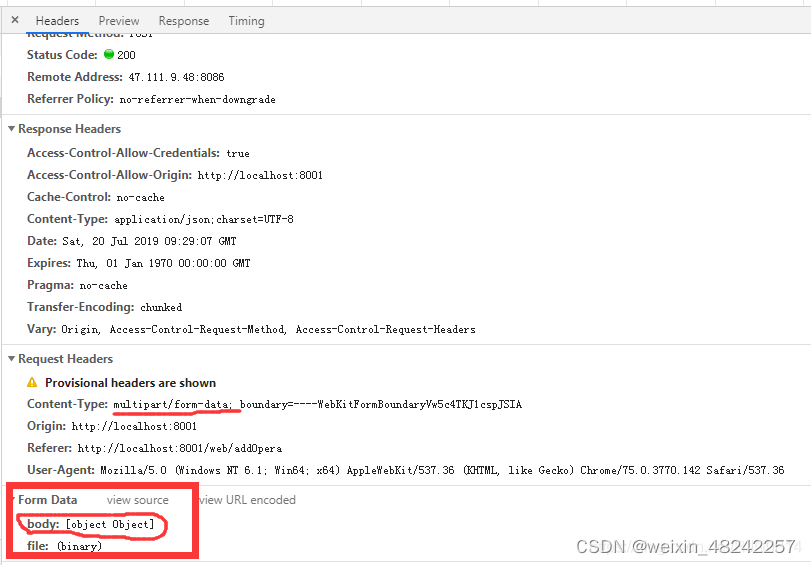
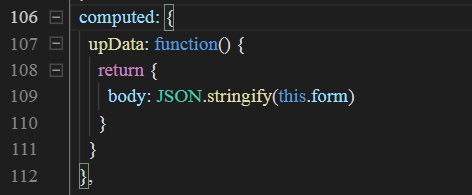
将body的格式进行转换一下:
JSON.stringify() 方法将一个 JavaScript 对象或值转换为 JSON 字符串
JSON.parse()可以将JSON字符串转为一个对象。
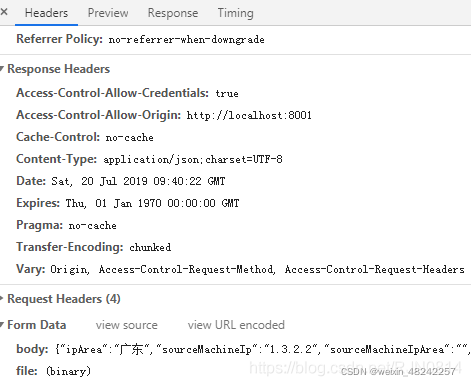
在此之前可以先了解一下文件上传的编码方式
http协议规定 POST 提交的数据必须放在消息主体(entity-body)中,但协议并没有规定数据必须使用什么编码方式。实际上,开发者完全可以自己决定消息主体的格式,只要最后发送的 HTTP 请求满足上面的格式就可以。
但是,数据发送出去,还要服务端解析成功才有意义。一般服务端语言如 php、python ,java等,以及它们的 framework,都内置了自动解析常见数据格式的功能。服务端通常是根据请求头(headers)中的 Content-Type 字段来获知请求中的消息主体是用何种方式编码,再对主体进行解析。
action:代表上传的地址,在开发中一般写成动态绑定的属性,在计算属性中决定其最终值。
<el-upload
  :action="uploadURL">
</el-upload>
<script>
  export default {
    data() {
      return {
        uploadURL: '',
      };
    },
    computed: {
	    uploadURL() {
	      if(process.env.NODE_ENV === 'production'){
	        return '/api/uploadFile'
	      }
	      return '/dev-api/api/uploadFile'
	    }
  	}
  }
</script>
为什么要区分运行环境来使用不同的url?因为开发环境配置了代理
 proxy: {
    [REQUEST_PRE]: {
       target: 'http://localhost:88',
       changeOrigin: true,
       secure: false,
       pathRewrite: {
         ['^' + process.env.VUE_APP_BASE_API]: ''
       }
    },
 }
而这个值在开发环境中是"/dev-api",在生产环境是“/”
所以开发环境需要在开头加上"/dev-api",生产环境则不需要
那为什么只有这一个要单独处理,其他的url不需要呢?因为其他的url是通过axios请求的,axios中配置了baseUrl,所以其他的url不需要单独处理了
因为开发环境是配置了代理的,代理就是通过一个特殊的网络服务去访问另一个网络服务的一种间接访问方式。像我们不能直接访问国外的网站,只能使用VPN,就是是使用了代理。
那么前端为什么要代理?
因此使用代理来解决跨域问题
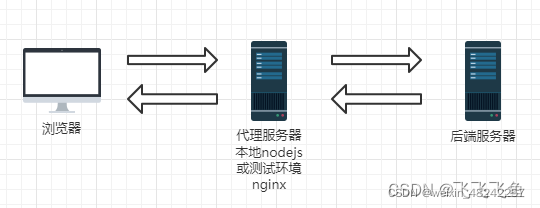
vuecli3的代理设置在vue.config.js->devServer->proxy
vite构建的vue代理设置在 vite.config.js->server->proxy
(Vite 是 vue 的作者尤雨溪在开发 vue3.0 的时候开发的一个 基于原生 ES-Module 的前端构建工具)
他们的代理配置是一样的,这里以vuecli3为例:
const REQUEST_PRE = "/api"
module.exports = {
	// 其他配置省略

	// 本地代理配置
	devServer: {
		// 默认是false,可以将http://localhost:8080 变为 https://localhost:8080
        https: true,
        // 代理配置
        proxy: {
        	// 简单写法
        	"/normal":{
        		target: 'http://localhost:80',
        		ws: true,  // 允许websocket代理
                changeOrigin: true //允许跨域
        	},

        	// 变量写法
            [REQUEST_PRE]: {
                target: 'http://localhost:88',
                ws: true,
                changeOrigin: true
            },

            // 重写,当访问http://localhost:80/req/getData
            // 实际上访问的是 http://localhost:8888/module/getData
            '/req': {
                target: 'http://localhost:8888',
                pathRewrite: path => path.replace('/req', '/module'),//replace方法返回一个替换好的新的字符串
                ws: true,
                changeOrigin: true
            },
        },
        open: true
    }
}
注意(坑点):
1、后面的反斜杠要保持一致,虽然对接口调用没有影响,但是对代理文件的相对路径有影响
如 /req,target就写 http://localhost:8888
如 /req/,target就写 http://localhost:8888/
2、不管是vuecli还是vite,同前缀代理是有前后顺序的,只生效前面的
比如当你调用 localhost:8080/api/other/getData
下面的写法会代理到 8888
'/api': 'http://localhost:8888',
'/api/other': 'http://localhost:88'
下面的写法会代理到 88
'/api/other': 'http://localhost:88',
'/api': 'http://localhost:8888'
接口调用
const REQUEST_PRE = '/api'
axios.get({
	url: `${REQUEST_PRE}/getData`
}).then(res=>{
	console.log(res)
})
3、pathRewrite:对象/函数,重写目标的 url 路径。对象键将用作正则表达式来匹配路径。
// 重写路径
pathRewrite: { '^/old/api' : '/new/api' }

// 删除路径
pathRewrite: { '^/remove/api' : '' }

// 添加基本路径
pathRewrite: { '^/' : '/basepath/' }

// 自定义重写
pathRewrite: function  ( path ,  req )  {  return  path . 替换('/api' , '/base/api' ) }

// 自定义重写,返回 Promise
pathRewrite: async  function  ( path ,  req )  {
  const  should_add_something  =  await  httpRequestToDecideSomething ( path ) ;
  if  ( should_add_something )  path  +=  "something" ;
  返回 路径;
}
mode: development --> process.env.NODE_ENV = development
mode: production --> process.env.NODE_ENV = production
默认情况下 --> process.env.NODE_ENV = production
我有一个Ruby程序,它使用rubyzip压缩XML文件的目录树。gem。我的问题是文件开始变得很重,我想提高压缩级别,因为压缩时间不是问题。我在rubyzipdocumentation中找不到一种为创建的ZIP文件指定压缩级别的方法。有人知道如何更改此设置吗?是否有另一个允许指定压缩级别的Ruby库? 最佳答案 这是我通过查看rubyzip内部创建的代码。level=Zlib::BEST_COMPRESSIONZip::ZipOutputStream.open(zip_file)do|zip|Dir.glob("**/*")d
我试图在一个项目中使用rake,如果我把所有东西都放到Rakefile中,它会很大并且很难读取/找到东西,所以我试着将每个命名空间放在lib/rake中它自己的文件中,我添加了这个到我的rake文件的顶部:Dir['#{File.dirname(__FILE__)}/lib/rake/*.rake'].map{|f|requiref}它加载文件没问题,但没有任务。我现在只有一个.rake文件作为测试,名为“servers.rake”,它看起来像这样:namespace:serverdotask:testdoputs"test"endend所以当我运行rakeserver:testid时
我的目标是转换表单输入,例如“100兆字节”或“1GB”,并将其转换为我可以存储在数据库中的文件大小(以千字节为单位)。目前,我有这个:defquota_convert@regex=/([0-9]+)(.*)s/@sizes=%w{kilobytemegabytegigabyte}m=self.quota.match(@regex)if@sizes.include?m[2]eval("self.quota=#{m[1]}.#{m[2]}")endend这有效,但前提是输入是倍数(“gigabytes”,而不是“gigabyte”)并且由于使用了eval看起来疯狂不安全。所以,功能正常,
我正在使用i18n从头开始构建一个多语言网络应用程序,虽然我自己可以处理一大堆yml文件,但我说的语言(非常)有限,最终我想寻求外部帮助帮助。我想知道这里是否有人在使用UI插件/gem(与django上的django-rosetta不同)来处理多个翻译器,其中一些翻译器不愿意或无法处理存储库中的100多个文件,处理语言数据。谢谢&问候,安德拉斯(如果您已经在rubyonrails-talk上遇到了这个问题,我们深表歉意) 最佳答案 有一个rails3branchofthetolkgem在github上。您可以通过在Gemfi
Rails2.3可以选择随时使用RouteSet#add_configuration_file添加更多路由。是否可以在Rails3项目中做同样的事情? 最佳答案 在config/application.rb中:config.paths.config.routes在Rails3.2(也可能是Rails3.1)中,使用:config.paths["config/routes"] 关于ruby-on-rails-Rails3中的多个路由文件,我们在StackOverflow上找到一个类似的问题
对于具有离线功能的智能手机应用程序,我正在为Xml文件创建单向文本同步。我希望我的服务器将增量/差异(例如GNU差异补丁)发送到目标设备。这是计划:Time=0Server:hasversion_1ofXmlfile(~800kiB)Client:hasversion_1ofXmlfile(~800kiB)Time=1Server:hasversion_1andversion_2ofXmlfile(each~800kiB)computesdeltaoftheseversions(=patch)(~10kiB)sendspatchtoClient(~10kiBtransferred)Cl
我正在寻找执行以下操作的正确语法(在Perl、Shell或Ruby中):#variabletoaccessthedatalinesappendedasafileEND_OF_SCRIPT_MARKERrawdatastartshereanditcontinues. 最佳答案 Perl用__DATA__做这个:#!/usr/bin/perlusestrict;usewarnings;while(){print;}__DATA__Texttoprintgoeshere 关于ruby-如何将脚
使用带有Rails插件的vim,您可以创建一个迁移文件,然后一次性打开该文件吗?textmate也可以这样吗? 最佳答案 你可以使用rails.vim然后做类似的事情::Rgeneratemigratonadd_foo_to_bar插件将打开迁移生成的文件,这正是您想要的。我不能代表textmate。 关于ruby-使用VimRails,您可以创建一个新的迁移文件并一次性打开它吗?,我们在StackOverflow上找到一个类似的问题: https://sta
好的,所以我的目标是轻松地将一些数据保存到磁盘以备后用。您如何简单地写入然后读取一个对象?所以如果我有一个简单的类classCattr_accessor:a,:bdefinitialize(a,b)@a,@b=a,bendend所以如果我从中非常快地制作一个objobj=C.new("foo","bar")#justgaveitsomerandomvalues然后我可以把它变成一个kindaidstring=obj.to_s#whichreturns""我终于可以将此字符串打印到文件或其他内容中。我的问题是,我该如何再次将这个id变回一个对象?我知道我可以自己挑选信息并制作一个接受该信
我正在编写一个小脚本来定位aws存储桶中的特定文件,并创建一个临时验证的url以发送给同事。(理想情况下,这将创建类似于在控制台上右键单击存储桶中的文件并复制链接地址的结果)。我研究过回形针,它似乎不符合这个标准,但我可能只是不知道它的全部功能。我尝试了以下方法:defauthenticated_url(file_name,bucket)AWS::S3::S3Object.url_for(file_name,bucket,:secure=>true,:expires=>20*60)end产生这种类型的结果:...-1.amazonaws.com/file_path/file.zip.A
