一、基本查询
1、查询多个字段
SELECT 字段1,字段2,字段3... FROM 表名;
SELECT * FROM 表名;
2、设置别名
SELECT 字段1 [AS 别名1],字段2 [AS 别名2]... FROM 表名;
3、去除重复记录
SELECT DISTINCT 字段列表 FROM 表名;
1、查询指定字段name,workno,age返回
	select name,workno,age from emp;
2、查询所有字段返回
	select id,name,gender,age,idcard,workaddress,entrydate from emp;
	select * from emp;
3、查询所有员工的工作地址,起别名
	select workaddress as '工作地址' from emp;
	select workaddress '工作地址' from emp;
4、查询公司员工的上班地址(不要重复)
	select distinct workaddress '工作地址' from emp;
二、条件查询
1、语法
SELECT 字段列表 FROM 条件 WHERE 条件列表;
2、条件
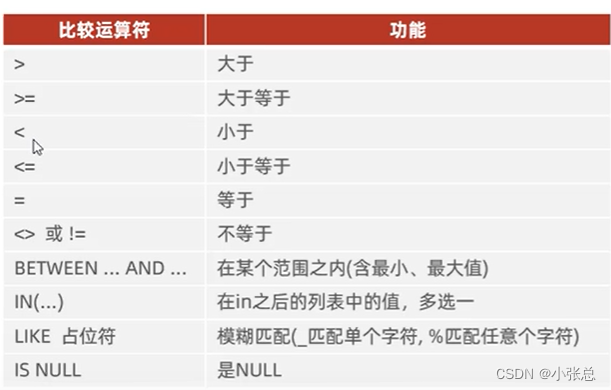
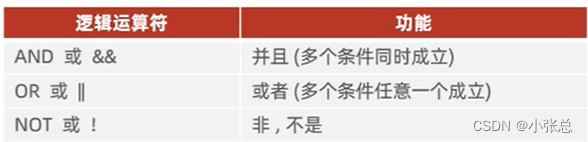
1、查询年龄等于88的员工
	select * from emp where age=88;
2、查询年龄小于20的员工信息
	select * from emp where age<20;
3、查询年龄小于等于20的员工信息
	select * from emp where age<=20;
4、查询没有身份证号的员工信息
	select * from emp where idcard is null;
5、查询有身份证号的员工信息
	select * from emp where idcard is not null;
6、查询年龄不等于88的员工信息
	select *from emp where age!=88;
	select *from emp where age<>88;
7、查询年龄在15岁(包含)到20岁之间的员工信息
	select * from emp where age>=15 && age<=20;
	select * from emp where age>=15 and age<=20;
	select * from emp where between 15 and 20;
8、查询性别为女且年龄小于25岁的员工信息
	select * from emp where gender="女" and age<25;
9、查询年龄等于18或20或40的员工信息
	select * from emp age=18 or age=20 or age=40;
	select * from emp where age in(18,20,40);
10、查询姓名为两个字的员工信息
	select * from emp where name like '_ _';
11、查询身份证号最后一位是X的员工信息
	select * from emp where  idcard like '%x';
三、聚合函数
1、介绍
将一列数据作为一个整体,进行纵向计算。
2、常见聚合函数
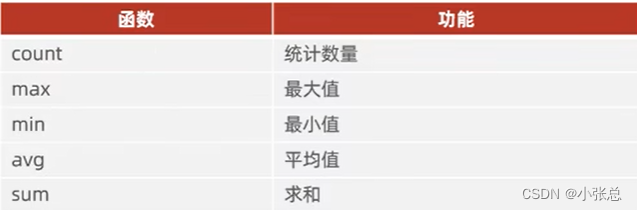
3、语法
SELECT 聚合函数(字段列表) FROM 表名;
注:null值不参与所有聚合函数运算
1、统计该企业员工数量
	select count(*) from emp;
	select count(idcard) from emp;
2、统计该企业员工的平均年龄
	select avg(age) from emp;
3、统计该企业员工的最大年龄
	select max(age) from emp;
4、统计该企业员工的最小年龄
	select min(age) from emp;
5、统计西安地区员工的年龄之和
	select sum(age) from emp where workaddress="西安";
四、分组查询
1、语法
SELECT 字段列表 FROM 表名 [WHERE 条件] GROUP BY 分组字段名 [HAVING 分组后过滤条件];
2、where与having区别

1、根据性别分组,统计男性员工和女性员工的数量
	select gender,count(*) from emp group by gender;
2、根据性别分组,统计男性员工和女性员工的平均年龄
	select gender,avg(*) from emp group by gender;
3、查询年龄小于45的员工,并根据工作地址分组,获取员工数量大于等于3的工作地址
	select workaddress,count(*) from emp where age<45 grounp by workaddress having count(*)>=3;
	select workaddress,count(*) address_count from emp where age<45 grounp by workaddress having address_count>=3;
注意:
1、执行顺序:where>聚合函数>having
2、分组之后,查询的字段一般为聚合函数和分组字段,查询其他字段无任何意义。
五、排序查询
1、语法
SELECT 字段列表 FROM 表名 ORDER BY 字段1 排序方式1,字段2 排序方式2;
2、排序方式
ASC:升序(默认值)
DESC:降序
注意:如果是多字段排序,当第一个字段值相同时,才会根据第二个字段进行排序
1、根据年龄对公司的员工进行排序
	select * from emp order by age asc;
	select * from emp order by age;(asc可以省略)
2、根据入职时间,对员工进行降序排序
	select * from emp order by entrydate desc;
3、根据年龄对公司的员工进行升序排序,年龄相同,再按照入职时间进行降序排序
	select * from order by age asc,entrydate desc
六、分页查询
1、语法
SELECT 字段列表 FROM 表名 LIMIT 起始索引,查询记录数;
注意:

1、查询第1页员工数据,每页展示10条记录
	select * from emp limit 0,10;
	select * from emp limit 10;
2、查询第2页员工数据,每页展示10条记录((页码-1)*页展示记录数)
	select * from emp limit 10,10;
七、案例
1、查询年龄为20,21,22,23岁的女性员工信息
	select * from emp where gender='女' and age in (20,21,22,23);
2、查询性别为男,并且年龄在20-40岁(含)以内的姓名为三个字的员工
	select * from emp where gender='男' and (age between 20 and 40) and name like '_ _ _';
3、统计员工表中,年龄小于60岁的,男性员工和女性员工的人数
	select gender,count(*) from emp age<60 group by gender;
4、查询所有年龄小于等于35岁员工的姓名和年龄,并对查询结构按年龄升序排序,如果年龄相同按入职时间降序排序
	select name,age from emp where age<35 order by asc,entrydate desc;
5、查询性别为男,且年龄在20-40岁(含)以内的前5个员工信息,对查询的结果按年龄升序排序,年龄相同按入职时间升序排序
	select * from emp where gender='男' and age between 20 and 40 order by age asc,entrydate asc limit 5;
八、执行顺序
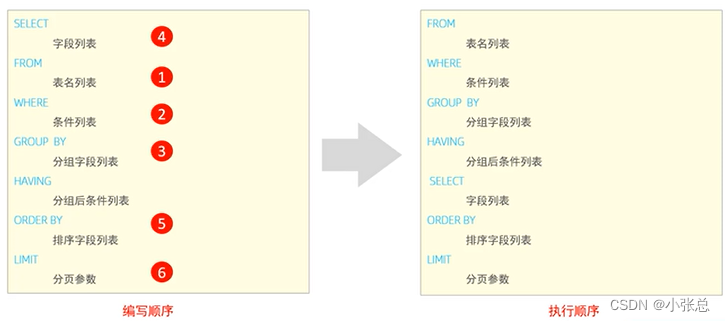
查询年龄大于15的员工的姓名、年龄,并根据年龄进行升序排序
select e.name ename,e.age eage from emp e where e.age>15 order by eage asc;
九、多表关系
1、一对多(多对一)
关系:一个部门对应多个员工,一个员工对应一个部门
实现:在多的一方建立外键,指向一的一方的主键
2、多对多
关系:一个学生可以选修多门课程,一门课程也可以供多个学生选择
实现:建立第三张中间表,中间表至少包含两个外键,分别关联两方主键
3、一对一
关系:一对一关系,多用于单表拆分,将一张表的基础字段放在一张表中,其他详情字段放在另一张表中,以提升操作效率
实现:在任意一方加入外键,关联另外一方的主键,并且设置外键为唯一的(UNIQUE)
十、多表查询
1、连接查询
(1)内连接:相当于查询A、B交集部分数据
(2)外连接:
左外连接:查询左表所有数据,以及两张表交集部分数据
右外连接:查询右表所有数据,以及两张表交集部分数据
(3)自连接:当前表与自身的连接查询,自连接必须使用表别名
2、子查询
十一、连接查询-内连接
1、内连接查询语法
(1)隐式内连接
SELECT 字段列表 FROM 表1,表2 WHERE 条件...;
(2)显式内连接
SELECT 字段列表 FROM 表1 [INNER] JOIN 表2 ON 连接条件...;
内连接查询的是两张表交集的部分
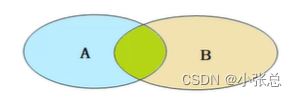
1、查询每一个员工的姓名,及关联部门的名称(隐式内连接实现)
	表结构:emp,dept
	连接条件:emp.dept_id=dept.id
	select emp.name,dept.name from emp,dept where emp.dept_id=dept.id;
	select e.name,d.name from emp e,dept d where e.dept_id=d.id;
2、查询每一个员工的姓名,及关联的部门的名称(显式内连接实现)
	表结构:emp,dept
	连接条件:emp.dept_id=dept.id
	select e.name,d.name from emp e inner join dept d on e.dept_id=d.id;
	select e.name,d.name from emp e join dept d on e.dept_id=d.id;(inner关键字可省略)
十二、连接查询-外连接
外连接查询语法
(1)左外连接
SELECT 字段列表 FROM 表1 LEFT [OUTER] JOIN 表2 ON 条件;
相当于查询表1(左表)的所有数据包含表1和表2交集部分的数据
(2)右外连接
SELECT 字段列表 FROM 表1 RIGHT [OUTER] JOIN 表2 ON 条件;
相当于查询表2(右表)的所有数据包含表1和表2交集部分的数据
1、查询emp表的所有数据,和对应的部门信息(左连接)
	表结构:emp,dept
	连接条件:emp.dept_id=dept.id
	select e.*,d.name from emp e left outer join dept d on e.dept_id=d.id;
	select e.*,d.name from emp e left join dept d on e.dept_id=d.id;(outer可省略)
2、查询dept表的所有数据,和对应的员工信息(右连接)
	select d.*,e.* from emp e right outer join dept d on e.dept_id=d.id;
	select d.*,e.* from dept d left outer join emp e on e.dept_id=d.id;
十三、连接查询-自连接
自连接查询语法:
SELECT 字段列表 FROM 表A 别名A JOIN 表A 别名B ON 条件...;
自连接查询,可以是内连接查询,也可以是外连接查询
要给表起别名,方便分析是哪一张中的字段,可读性更强一点。
1、查询员工及其所属领导的名字
	表结构:emp
	select a.name , b.name from emp a,emp b where a.managerid=b.id;
2、查询所有员工emp及其领导的名字emp,如果员工没有领导,也需要查询出来
	select a.name '员工',b.name '领导' from emp a left join emp b on a.managerid=b.id;
十四、联合查询-union,union all
对于union查询,就是把多次查询的结果合并起来,形成一个新的查询结果集。
SELECT 字段列表 FROM 表A ...
UNION[ALL]
SELECT 字段列表 FROM 表B...;
1、将薪资低于5000的员工,和年龄大于50岁的员工全部查询出来
	select * from emp where salary<5000
	union (all)
	select * from emp where age>50;
注意:
(1)对于联合查询的多张表的列数必须保持一致,字段类型也需要保持一致。
(2)union all会将全部的数据直接合并在一起,union会对合并之后的数据去重。
十五、子查询-标量子查询
子查询返回的结果是单个值(数字、字符串、日期等),最简单的形式,这种子查询成为标量子查询。
常见的操作符:= < > >= < <=
1、查询“销售部”的所有员工信息
	a.查询“销售部”部门ID
		select id from dept where name="销售部";
	b.根据销售部部门ID,查询员工信息
		select * from emp where dep_id=4;
	select * from emp where dep_id=(select id from dept where name="销售部");
2、查询表“方东白”入职之后的员工信息
	a.查询“方东白”的入职日期
		select entrydate from where name="方东白";
	b.查询指定入职日期之后的员工信息
		select * from emp where entrydate>'2009-02-12';
	select * from emp where entrydate > (select entrydate from where name="方东白");
十六、子查询-列子查询
子查询返回的结果是一列(可以是多行),这种子查询称为列子查询。
常用的操作符:IN 、NOT IN、ANY、SOME、ALL
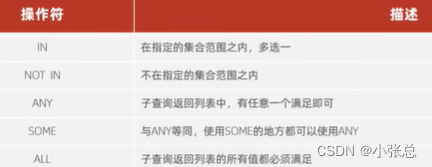
1、查询“销售部”和“市场部”的所有员工信息
	a.查询“销售部”和“市场部”的部门ID
		select id from dept where name="销售部" or name="市场部";
	b.根据部门ID,查询员工信息
		select * from emp where dept_id in (2,4);
select * from emp where dept_id in (select id from dept where name="销售部" or name="市场部");
2、查询比财务部所有人工资都高的员工信息
	a.查询所有财务部人员工资
		select id from dept where name="财务部";
		select salary from emp where dept_id=3;
	select salary from emp where dept_id = (select id from dept where name="财务部");
	b.比“财务部”所有人工资都高的员工信息
		select * from emp where salary >all (select salary from emp where dept_id = (select id from dept where name="财务部"));
3、查询比研发部其中任意一个工资高的员工信息
	a.查询所有研发部人员工资
		select salary from emp where dept_id = (select id from dept where name="研发部");
	b.比“研发部”其中任意一人工资都高的员工信息
		select * from emp where salary > any (select salary from emp where dept_id = (select id from dept where name="研发部"))
十七、子查询-行子查询
子查询返回的结果是一行(可以是多列),这种子查询称为行子查询。
常见的操作符:= 、<>、IN、NOT IN
1、查询与“张无忌”的薪资及直属领导相同的员工信息
	a.查询“张无忌”的薪资及直属领导
		select salary,managerid from emp where name="张无忌";
	b.查询与“张无忌”的薪资及直属领导相同的员工信息
		select * from emp where salary=12500 and managerid=1;
		select * from emp where (salary,managerid)=(12500,1);
	select * from emp where (salary,managerid)=(select salary,managerid from emp where name="张无忌");
十八、子查询-表子查询
子查询返回的结果是多行到列,这种子查询称为表子查询。
常用的操作符:IN
1、查询与“鹿杖客”,“宋远桥”的职位和薪资相同的员工信息
	a.查询“鹿杖客”,“宋远桥”的职位和薪资
		select job,salary from emp where name="鹿杖客" or name="宋远桥";
	b.查询与“鹿杖客”,“宋远桥”的职位和薪资相同的员工信息
		select * from emp where (job,salary) in (select job,salary from emp where name="鹿杖客" or name="宋远桥");
2、查询入职日期是“2006-01-01”之后的员工信息,及其部门信息
	a.入职日期是“2006-01-01”之后的员工信息
		select * from emp where entrydate>'2006-01-01';
	b.查询这部分员工,对应的部门信息
		select e.*,d.* from (select * from emp where entrydate>'2006-01-01') e left join dept d on e.dept_id=d.id;
十九、多表查询案例
1、查询员工的姓名、年龄、职位、部门信息(隐式内连接)
	表:emp,dept
	连接条件:emp.dept_id=dept.id
	select e.name,e.age,e.job,d.name from emp e,dept d where e.dept_id=d.id;
2、查询年龄小于30岁的员工的姓名、年龄、职位、部门信息(显示内连接)
	表:emp,dept
	连接条件:emp.dept_id=dept.id
	select e.name,e.age,e.job,d.name from emp e inner join dept d on e.dept_id=d.id where e.age<30;
3、查询拥有员工的部门ID、部门名称
	表:emp,dept
	连接条件:emp.dept_id=dept.id
	select distinct  d.id,d.name from emp e,dept d where d.dept_id=d.id;
4、查询所有年龄大于40岁的员工,及其归属的部门名称;如果员工没有分配部门,也需要展示出来
	表:emp,dept
	连接条件:emp.dept_id=dept.id
	外连接
	select e.*,d.name from emp e left join dept d on e.dept_id=dept.id where e.age>40;
5、查询所有员工的工资等级
	表:emp,salgrade
	连接条件:emp.salary>=salgrade.lasal and  emp.salary<=salgrade.hisal
	select e.*,s.grade,s.losal,s.hisal  from emp e,salgrade s where e.salary>=s.losal and e.salary<=s.hisal;
	select e.*,s.grade,s.losal,s.hisal  from emp e,salgrade s where e.salary between s.losal and s.hisal;
6、查询“研发部”所有员工的信息及工资等级
	表:emp,salgrade,dept
	连接条件:emp.salary between salgrade.losal and salgrade.hisal,emp.dept_id=dept.id
	查询条件:dept.name="研发部"
	select * from emp e,dept d,salgrade s where    (e.dept_id=d.id) and (e.salary between s.losal and s.hisal) and (d.name='研发部');
7、查询“研发部”员工的平均工资
	表:emp,dept
	连接条件:emp.dept_id=dept.id
	select avg(e.salary) from emp e,dept d where e.dept_id=d.id and d.name="研发部";
8、查询工资比“灭绝”高的员工信息
	a.查询“灭绝”的薪资
		select salary from emp where name="灭绝";
	b.查询比她工资高的员工信息
		select * from emp where salary>8500;
	select * from emp where salary>(select salary from emp where name="灭绝");
9、查询比平均薪资高的员工信息
	a.查询员工的平均薪资
		select avg(salary) from emp;
	b.查询比平均薪资高的员工信息
		select * from emp where salary > (select avg(salary) from emp);
10、查询低于本部门平均工资的员工信息
	a.查询指定部门平均薪资
		select avg(e1.salary) from emp e1 where e1.dept_id=1;
		select avg(e1.salary) from emp e1 where e1.dept_id=2;
	b.查询低于本部门平均工资的员工信息
		select * from emp;
	select *,(select avg(e1.salary) from emp e1 where e1.dept_id=2) '平均' from emp e2 where e2.salary < (select avg(e1.salary) from emp e1 where e1.dept_id=2);
11、查询所有的部门信息,并统计部门的员工人数
	select d.id,d.name,(select count(*) from emp e where e.dept_id=d.id) '人数' from dept d;
12、查询所有学生的选课情况,展示出学生名称,学号,课程名称
	表:student,course,student_course
	连接条件:student.id=student_course.studentid,course.id=student_course.courseid
	select s.name,s.no,c.name from student s ,student_course sc ,course c where s.id=sc.studentid and sc.courseid=c.id;
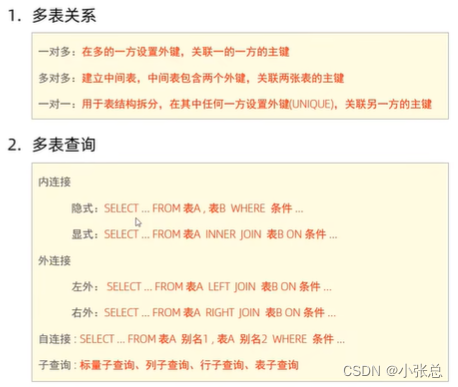
二十、多表查询总结
我正在用Ruby编写一个简单的程序来检查域列表是否被占用。基本上它循环遍历列表,并使用以下函数进行检查。require'rubygems'require'whois'defcheck_domain(domain)c=Whois::Client.newc.query("google.com").available?end程序不断出错(即使我在google.com中进行硬编码),并打印以下消息。鉴于该程序非常简单,我已经没有什么想法了-有什么建议吗?/Library/Ruby/Gems/1.8/gems/whois-2.0.2/lib/whois/server/adapters/base.
我知道我可以指定某些字段来使用pluck查询数据库。ids=Item.where('due_at但是我想知道,是否有一种方法可以指定我想避免从数据库查询的某些字段。某种反拔?posts=Post.where(published:true).do_not_lookup(:enormous_field) 最佳答案 Model#attribute_names应该返回列/属性数组。您可以排除其中一些并传递给pluck或select方法。像这样:posts=Post.where(published:true).select(Post.attr
我注意到类定义,如果我打开classMyClass,并在不覆盖的情况下添加一些东西我仍然得到了之前定义的原始方法。添加的新语句扩充了现有语句。但是对于方法定义,我仍然想要与类定义相同的行为,但是当我打开defmy_method时似乎,def中的现有语句和end被覆盖了,我需要重写一遍。那么有什么方法可以使方法定义的行为与定义相同,类似于super,但不一定是子类? 最佳答案 我想您正在寻找alias_method:classAalias_method:old_func,:funcdeffuncold_func#similartoca
文章目录一、概述简介原理模块二、配置Mysql使用版本环境要求1.操作系统2.mysql要求三、配置canal-server离线下载在线下载上传解压修改配置单机配置集群配置分库分表配置1.修改全局配置2.实例配置垂直分库水平分库3.修改group-instance.xml4.启动监听四、配置canal-adapter1修改启动配置2配置映射文件3启动ES数据同步查询所有订阅同步数据同步开关启动4.验证五、配置canal-admin一、概述简介canal是Alibaba旗下的一款开源项目,Java开发。基于数据库增量日志解析,提供增量数据订阅&消费。Git地址:https://github.co
我正在尝试查询我的Rails数据库(Postgres)中的购买表,我想查询时间范围。例如,我想知道在所有日期的下午2点到3点之间进行了多少次购买。此表中有一个created_at列,但我不知道如何在不搜索特定日期的情况下完成此操作。我试过:Purchases.where("created_atBETWEEN?and?",Time.now-1.hour,Time.now)但这最终只会搜索今天与那些时间的日期。 最佳答案 您需要使用PostgreSQL'sdate_part/extractfunction从created_at中提取小时
在添加一些空格以使代码更具可读性时(与上面的代码对齐),我遇到了这个:classCdefx42endendm=C.new现在这将给出“错误数量的参数”:m.x*m.x这将给出“语法错误,意外的tSTAR,期待$end”:2/m.x*m.x这里的解析器到底发生了什么?我使用Ruby1.9.2和2.1.5进行了测试。 最佳答案 *用于运算符(42*42)和参数解包(myfun*[42,42])。当你这样做时:m.x*m.x2/m.x*m.xRuby将此解释为参数解包,而不是*运算符(即乘法)。如果您不熟悉它,参数解包(有时也称为“spl
我想从then子句中访问case语句表达式,即food="cheese"casefoodwhen"dip"then"carrotsticks"when"cheese"then"#{expr}crackers"else"mayo"end在这种情况下,expr是食物的当前值(value)。在这种情况下,我知道,我可以简单地访问变量food,但是在某些情况下,该值可能无法再访问(array.shift等)。除了将expr移出到局部变量然后访问它之外,是否有直接访问caseexpr值的方法?罗亚附注我知道这个具体示例很简单,只是一个示例场景。 最佳答案
如何在Ruby的if语句中检查bash命令的返回值(true/false)。我想要这样的东西,if("/usr/bin/fswscell>/dev/null2>&1")has_afs="true"elsehas_afs="false"end它会提示以下错误含义,它总是返回true。(irb):5:warning:stringliteralincondition正确的语法是什么?更新:/usr/bin/fswscell寻找afs安装和运行状态。它会抛出这样的字符串,Thisworkstationbelongstocell如果afs没有运行,命令以状态1退出 最
我看到其他人也遇到过类似的问题,但没有一个解决方案对我有用。0.3.14gem与其他gem文件一起存在。我已经完全按照此处指示完成了所有操作:https://github.com/brianmario/mysql2.我仍然得到以下信息。我不知道为什么安装程序指示它找不到include目录,因为我已经检查过它存在。thread.h文件存在,但不在ruby目录中。相反,它在这里:C:\RailsInstaller\DevKit\lib\perl5\5.8\msys\CORE\我正在运行Windows7并尝试在Aptana3中构建我的Rails项目。我的Ruby是1.9.3。$gemin
我最近与一位同事讨论了以下Ruby语法:value=ifa==0"foo"elsifa>42"bar"else"fizz"end我个人并没有看到太多这种逻辑,但我的同事指出,这实际上是一种相当普遍的Rubyism。我试着用谷歌搜索这个主题,但没有找到任何文章、页面或SO问题来讨论它,这让我相信这可能是一种非常实际的技术。然而,另一位同事发现语法令人困惑,而是将上面的逻辑写成这样:ifa==0value="foo"elsifa>42value="bar"elsevalue="fizz"end缺点是value=的重复声明和隐式elsenil的丢失,如果我们想使用它的话。这也感觉它与Ruby
