先看下面一个例子:跳跃的事件响应堆栈
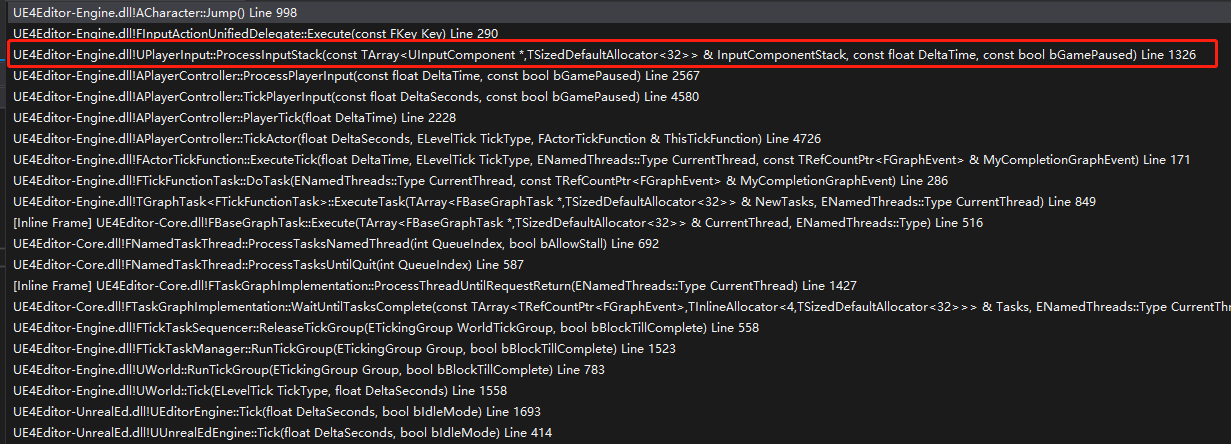
从上述堆栈我们不难发现,疑惑点主要集中于 APlayerController::ProcessPlayerInput 和 UPlayerInput::ProcessInputStack.
(APlayerController::PlayerTick之前的堆栈可以忽略)
先查看 APlayerController::ProcessPlayerInput 源码
void APlayerController::ProcessPlayerInput(const float DeltaTime, const bool bGamePaused)
{
	static TArray<UInputComponent*> InputStack;

	// must be called non-recursively and on the game thread
	check(IsInGameThread() && !InputStack.Num());

	// process all input components in the stack, top down
	{
		SCOPE_CYCLE_COUNTER(STAT_PC_BuildInputStack);
		BuildInputStack(InputStack);
	}

	// process the desired components
	{
		SCOPE_CYCLE_COUNTER(STAT_PC_ProcessInputStack);
		PlayerInput->ProcessInputStack(InputStack, DeltaTime, bGamePaused);
	}

	InputStack.Reset();
}
查看上述BuildInputStack的源码也比较简单,这里不贴了,大概的意思是把当前PlayerPawn的InputComponent组件和当前地图的InputComponent和PlayerController栈上的InputComponent组件。总之,大概意思就是把当前世界的所有打开的InputComponent全部获取。
传入到PlayerInput处理。
也就是说问题,只要弄明白UPlayerInput::ProcessInputStack即可。
因为源码过大,为了不影响阅读,下方给出的均是伪代码,对于一些次要的的特殊逻辑也抛除了。主要是围绕一个普通按键的逻辑代码。
	ConditionalBuildKeyMappings();
	static TArray<FDelegateDispatchDetails> NonAxisDelegates;
	static TArray<FKey> KeysToConsume;
	static TArray<FDelegateDispatchDetails> FoundChords;
	static TArray<TPair<FKey, FKeyState*>> KeysWithEvents;
	static TArray<TSharedPtr<FInputActionBinding>> PotentialActions;

	// copy data from accumulators to the real values
	for (TMap<FKey,FKeyState>::TIterator It(KeyStateMap); It; ++It)
	{
		bool bKeyHasEvents = false;
		FKeyState* const KeyState = &It.Value();
		const FKey& Key = It.Key();

		for (uint8 EventIndex = 0; EventIndex < IE_MAX; ++EventIndex)
		{
			KeyState->EventCounts[EventIndex].Reset();
			Exchange(KeyState->EventCounts[EventIndex], KeyState->EventAccumulator[EventIndex]);

			if (!bKeyHasEvents && KeyState->EventCounts[EventIndex].Num() > 0)
			{
				KeysWithEvents.Emplace(Key, KeyState);
				bKeyHasEvents = true;
			}
		}
	}
从源码最上方查看,ConditionalBuildKeyMappings,这个比较简单,就是检测是否需要把ProjectSetting->Engine->Input中预先绑定的值初始化到PlayerInput.
然后主要是根据KeyStateMap的数据转换成KeysWithEvents。KeyStateMap 即会记录当前局内按下的键位的状态,KeysWithEvents就是当前哪些键需要处理。为什么KeyStateMap不是直接的一个Key的结构,而是Map,因为后面会说到,存在一个键按了,后面的按键是响应还是不响应,出于满足这种需求的原因。
下述伪代码中文是我给出的解释,英文是源码注释。
	int32 StackIndex = InputComponentStack.Num()-1;
	for ( ; StackIndex >= 0; --StackIndex)
	{
		UInputComponent* const IC = InputComponentStack[StackIndex];
		if (IC)
		{
			for (const TPair<FKey,FKeyState*>& KeyWithEvent : KeysWithEvents)
			{
				if (!KeyWithEvent.Value->bConsumed)//被Consume的按键,不会被响应
				{
					FGetActionsBoundToKey::Get(IC, this, KeyWithEvent.Key, PotentialActions);
					//根据Key找出当前InputComponent中所需要响应的事件集合 PotentialActions(就是通过BindAction绑定的那些事件)
				}
			}

			for (const TSharedPtr<FInputActionBinding>& ActionBinding : PotentialActions)
			{
				GetChordsForAction(*ActionBinding.Get(), bGamePaused, FoundChords, KeysToConsume);
				//根据KeyState 检测该键是否是组合键,是否需要按Alt/Ctrl/Shift...,如果达成组合键则返回FoundChords
				//PS:这边代码写的有点烂,写死的组合键判断
			}

			PotentialActions.Reset();

			for (int32 ChordIndex=0; ChordIndex < FoundChords.Num(); ++ChordIndex)
			{
				const FDelegateDispatchDetails& FoundChord = FoundChords[ChordIndex];
				bool bFireDelegate = true;
				// If this is a paired action (implements both pressed and released) then we ensure that only one chord is
				// handling the pairing
				if (FoundChord.SourceAction && FoundChord.SourceAction->IsPaired())
				{
					FActionKeyDetails& KeyDetails = ActionKeyMap.FindChecked(FoundChord.SourceAction->GetActionName());
					if (!KeyDetails.CapturingChord.Key.IsValid() || KeyDetails.CapturingChord == FoundChord.Chord || !IsPressed(KeyDetails.CapturingChord.Key))
					{
						if (FoundChord.SourceAction->KeyEvent == IE_Pressed)
						{
							KeyDetails.CapturingChord = FoundChord.Chord;
						}
						else
						{
							KeyDetails.CapturingChord.Key = EKeys::Invalid;
						}
					}
					else
					{
						bFireDelegate = false;
					}
				}

				if (bFireDelegate && FoundChords[ChordIndex].ActionDelegate.IsBound())
				{
					FoundChords[ChordIndex].FoundIndex = NonAxisDelegates.Num();
					NonAxisDelegates.Add(FoundChords[ChordIndex]);
				}
			}
			//上述这段,就是判断是否是成对出现的事件,如果是成对出现的,只会被添加一条进NonAxisDelegates.
			if (IC->bBlockInput)
			{
				// stop traversing the stack, all input has been consumed by this InputComponent
				--StackIndex;
				KeysToConsume.Reset();
				FoundChords.Reset();
				break;
			}
			//上述这段,是判断是否bBlockInput,如果这个为true,则这个之后的InputComponent都会被吃掉,就是不会执行。

			// we do this after finishing the whole component, so we don't consume a key while there might be more bindings to it
			for (int32 KeyIndex=0; KeyIndex<KeysToConsume.Num(); ++KeyIndex)
			{
				ConsumeKey(KeysToConsume[KeyIndex]);
			}
			//上述这段,最为重要,根据当前InputComponent中的KeysToConsume,对KeyStateMap中的键Consume掉,这样在之后的InputComponent的键,可以被吃掉,不会被执行。
			KeysToConsume.Reset();
			FoundChords.Reset();
		}
	}
正常鼠标点击的Click是直接走Slate的,如果想鼠标点击Slate也走PlayerInput的分发,可在
FReply FSlateApplication::RoutePointerUpEvent(const FWidgetPath& WidgetsUnderPointer, const FPointerEvent& PointerEvent)
{
	// 略

	if (SlateUser->HasCapture(PointerEvent.GetPointerIndex()))
	{
		// 略

					if (!Event.IsTouchEvent() || (!TempReply.IsEventHandled() && this->bTouchFallbackToMouse))
					{
						TempReply = TargetWidget.Widget->OnMouseButtonUp( TargetWidget.Geometry, Event );

						//++[Add]  [10/27/2022 xxx]
						if (TempReply.IsEventHandled())
						{
							GetGameViewport()->OnMouseButtonUp(TargetWidget.Geometry, Event);
						}
						//--[Add]

					}
	}
上述 GetGameViewport()->OnMouseButtonUp(TargetWidget.Geometry, Event); GameViewPort的调用来模拟PlayerInput的分发。
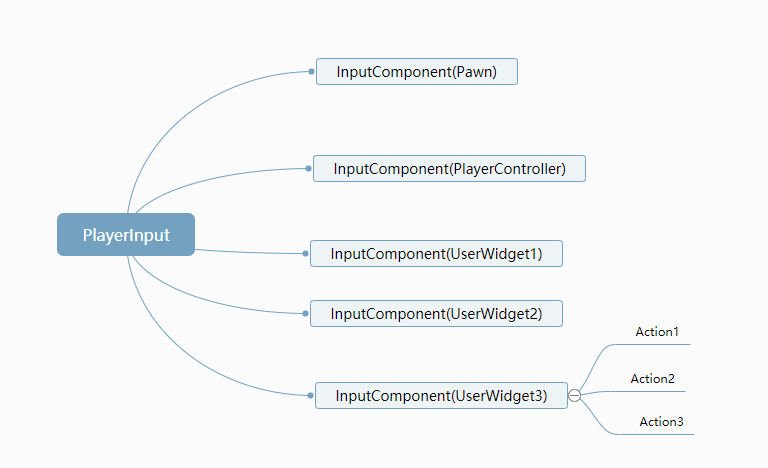
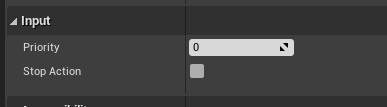
一个PlayerInput在Tick中不断执行,这个PlayerInput中存了一个包含当前世界所拥的InputComponent的栈。根据传来的当前响应的键,在这个栈中依次进行计算。根据Consume这个字段来判断之后的InputComonent中的相同的键是否被吃掉。每个InputComponent根据bBlockInput 这个字段来决定之后的InputComponent所有键被吃掉。这个一般应用搭配层级,低于这个层级的InputComponent被吃掉。
我有一个字符串input="maybe(thisis|thatwas)some((nice|ugly)(day|night)|(strange(weather|time)))"Ruby中解析该字符串的最佳方法是什么?我的意思是脚本应该能够像这样构建句子:maybethisissomeuglynightmaybethatwassomenicenightmaybethiswassomestrangetime等等,你明白了......我应该一个字符一个字符地读取字符串并构建一个带有堆栈的状态机来存储括号值以供以后计算,还是有更好的方法?也许为此目的准备了一个开箱即用的库?
我主要使用Ruby来执行此操作,但到目前为止我的攻击计划如下:使用gemsrdf、rdf-rdfa和rdf-microdata或mida来解析给定任何URI的数据。我认为最好映射到像schema.org这样的统一模式,例如使用这个yaml文件,它试图描述数据词汇表和opengraph到schema.org之间的转换:#SchemaXtoschema.orgconversion#data-vocabularyDV:name:namestreet-address:streetAddressregion:addressRegionlocality:addressLocalityphoto:i
我正在使用ruby1.9解析以下带有MacRoman字符的csv文件#encoding:ISO-8859-1#csv_parse.csvName,main-dialogue"Marceu","Giveittohimóhe,hiswife."我做了以下解析。require'csv'input_string=File.read("../csv_parse.rb").force_encoding("ISO-8859-1").encode("UTF-8")#=>"Name,main-dialogue\r\n\"Marceu\",\"Giveittohim\x97he,hiswife.\"\
简而言之错误:NOTE:Gem::SourceIndex#add_specisdeprecated,useSpecification.add_spec.Itwillberemovedonorafter2011-11-01.Gem::SourceIndex#add_speccalledfrom/opt/local/lib/ruby/site_ruby/1.8/rubygems/source_index.rb:91./opt/local/lib/ruby/gems/1.8/gems/rails-2.3.8/lib/rails/gem_dependency.rb:275:in`==':und
电脑0x0000001A蓝屏错误怎么U盘重装系统教学分享。有用户电脑开机之后遇到了系统蓝屏的情况。系统蓝屏问题很多时候都是系统bug,只有通过重装系统来进行解决。那么蓝屏问题如何通过U盘重装新系统来解决呢?来看看以下的详细操作方法教学吧。 准备工作: 1、U盘一个(尽量使用8G以上的U盘)。 2、一台正常联网可使用的电脑。 3、ghost或ISO系统镜像文件(Win10系统下载_Win10专业版_windows10正式版下载-系统之家)。 4、在本页面下载U盘启动盘制作工具:系统之家U盘启动工具。 U盘启动盘制作步骤: 注意:制作期间,U盘会被格式化,因此U盘中的重要文件请注
在应用开发中,有时候我们需要获取系统的设备信息,用于数据上报和行为分析。那在鸿蒙系统中,我们应该怎么去获取设备的系统信息呢,比如说获取手机的系统版本号、手机的制造商、手机型号等数据。1、获取方式这里分为两种情况,一种是设备信息的获取,一种是系统信息的获取。1.1、获取设备信息获取设备信息,鸿蒙的SDK包为我们提供了DeviceInfo类,通过该类的一些静态方法,可以获取设备信息,DeviceInfo类的包路径为:ohos.system.DeviceInfo.具体的方法如下:ModifierandTypeMethodDescriptionstatic StringgetAbiList()Obt
需求:要创建虚拟机,就需要给他提供一个虚拟的磁盘,我们就在/opt目录下创建一个10G大小的raw格式的虚拟磁盘CentOS-7-x86_64.raw命令格式:qemu-imgcreate-f磁盘格式磁盘名称磁盘大小qemu-imgcreate-f磁盘格式-o?1.创建磁盘qemu-imgcreate-fraw/opt/CentOS-7-x86_64.raw10G执行效果#ls/opt/CentOS-7-x86_64.raw2.安装虚拟机使用virt-install命令,基于我们提供的系统镜像和虚拟磁盘来创建一个虚拟机,另外在创建虚拟机之前,提前打开vnc客户端,在创建虚拟机的时候,通过vnc
我正在使用ruby2.1.0我有一个json文件。例如:test.json{"item":[{"apple":1},{"banana":2}]}用YAML.load加载这个文件安全吗?YAML.load(File.read('test.json'))我正在尝试加载一个json或yaml格式的文件。 最佳答案 YAML可以加载JSONYAML.load('{"something":"test","other":4}')=>{"something"=>"test","other"=>4}JSON将无法加载YAML。JSON.load("
这是针对我无法破坏的现有公共(public)API,但我确实希望对其进行扩展。目前,该方法采用字符串或符号或任何其他在作为第一个参数传递给send时有意义的内容我想添加发送字符串、符号等列表的功能。我可以只使用is_a吗?数组,但还有其他发送列表的方法,这不是很像ruby。我将调用列表中的map,所以第一个倾向是使用respond_to?:map。但是字符串也会响应:map,所以这行不通。 最佳答案 如何将它们全部视为数组?String的行为与仅包含String的Array相同:deffoo(obj,arg)[*arg].eac
我想用Nokogiri解析HTML页面。页面的一部分有一个表,它没有使用任何特定的ID。是否可以提取如下内容:Today,3,455,34Today,1,1300,3664Today,10,100000,3444,Yesterday,3454,5656,3Yesterday,3545,1000,10Yesterday,3411,36223,15来自这个HTML:TodayYesterdayQntySizeLengthLengthSizeQnty345534345456563113003664354510001010100000344434113622315
