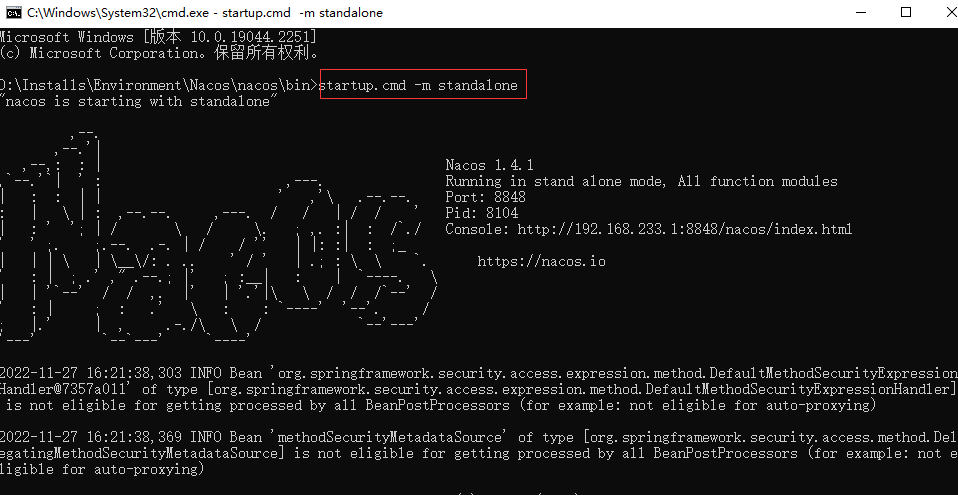
单机启动:startup.cmd -m standalone
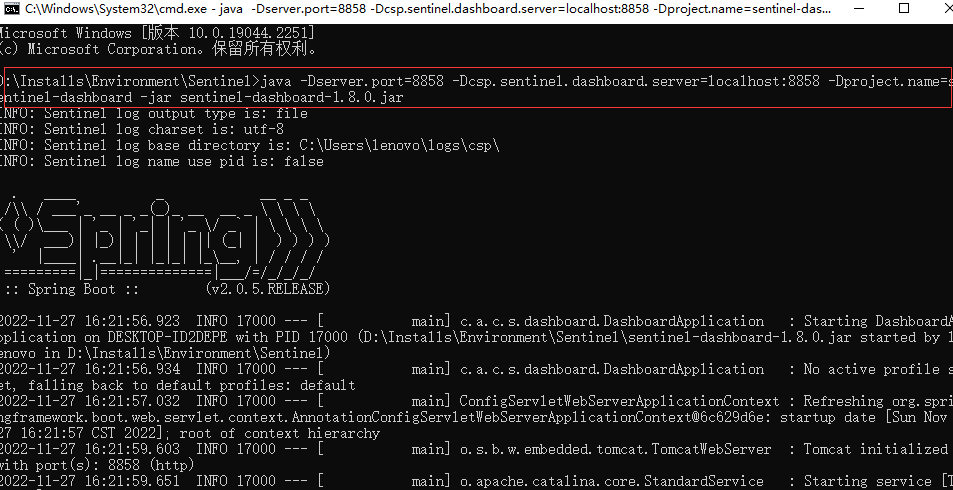
启动命令:java -Dserver.port=8858 -Dcsp.sentinel.dashboard.server=localhost:8858 -Dproject.name=sentinel-dashboard -jar sentinel-dashboard-1.8.0.jar

<!--   nacos 依赖     -->
<dependency>
    <groupId>com.alibaba.cloud</groupId>
    <artifactId>spring-cloud-starter-alibaba-nacos-discovery</artifactId>
</dependency>

<!--   sentinel 流量防卫依赖    -->
<dependency>
    <groupId>com.alibaba.cloud</groupId>
    <artifactId>spring-cloud-starter-alibaba-sentinel</artifactId>
</dependency>

<!--   暴露/actuator/sentinel端点 单独配置,management开头    -->
<dependency>
    <groupId>org.springframework.boot</groupId>
    <artifactId>spring-boot-starter-actuator</artifactId>
</dependency>
# 端口
server:
  port: 9604

# 服务名
spring:
  application:
    name: kgcmall-sentinel

  # 数据源配置
  datasource:
    driver-class-name: com.mysql.cj.jdbc.Driver
    url: jdbc:mysql://localhost:3306/kh96_alibaba_kgcmalldb?useUnicode=true&characterEncoding=utf-8&useSSL=false&serverTimezone=GMT
    username: root
    password: 17585273765

  # jpa配置
  jpa:
    hibernate:
      ddl-auto: update
    show-sql: true

  cloud:
    #nacos 配置
    nacos:
      discovery:
        server-addr: 127.0.0.1:8848

    #sentinel 配置
    sentinel:
      transport:
        dashboard: 127.0.0.1:8858 # sentinel 控制台地址
        port: 9605 # 客户端(核心应用)和控制台的通信端口,默认8719,子当以一个为被使用的唯一端口即可
      web-context-unify: false #关闭收敛

# 暴露/actuator/sentinel端点 单独配置,management 开顶格写
management:
  endpoints:
    web:
      exposure:
        include: '*'
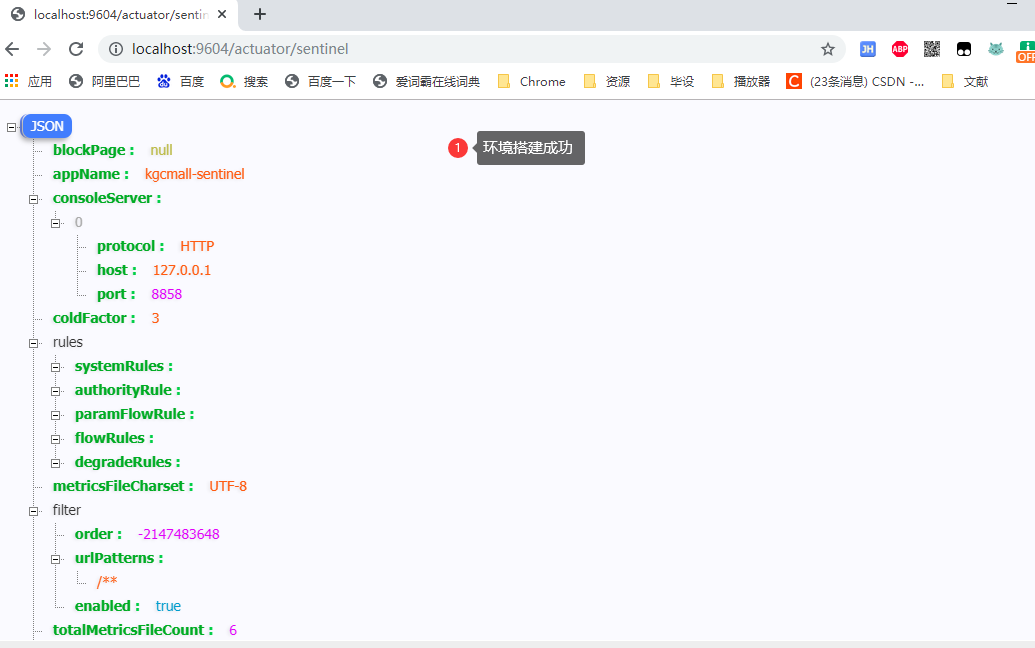
http://localhost:9604/actuator/sentinel
/**
* @param : [sentinelDesc]
* @return : java.lang.String
* @author : huayu
* @date : 26/11/2022
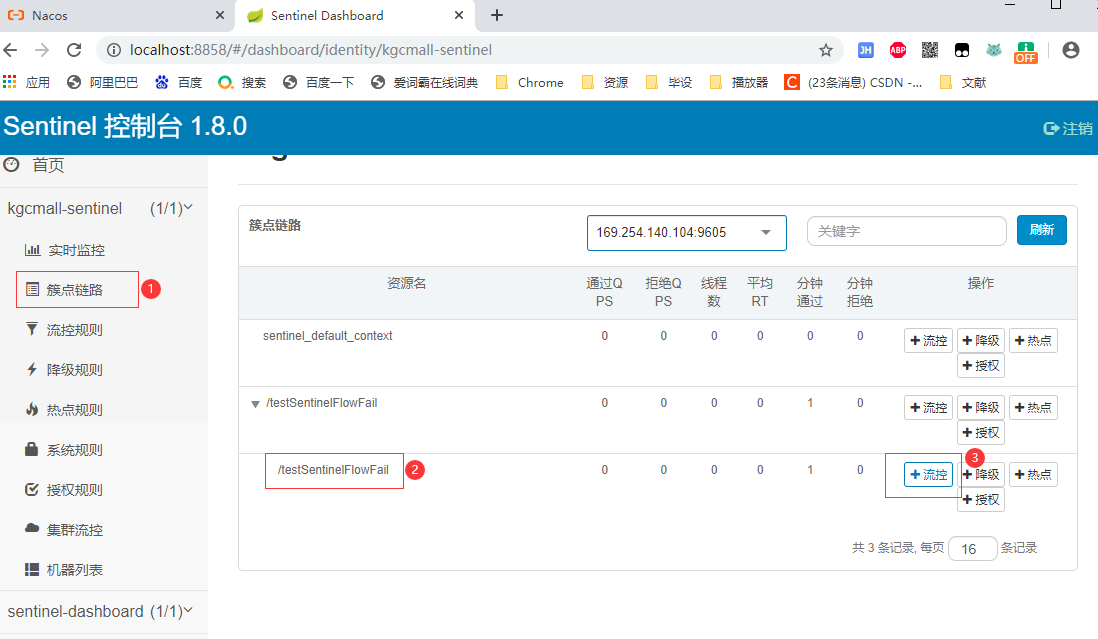
* @description : 测试 Sentinel 流控 - 直接失败
*/
@GetMapping("testSentinelFlowFail")
public String testSentinelFlowFail(@RequestParam String sentinelDesc) {
    log.info("------ testSentinelFlowFail 接口调用 ------ ");
    return sentinelDesc;
}

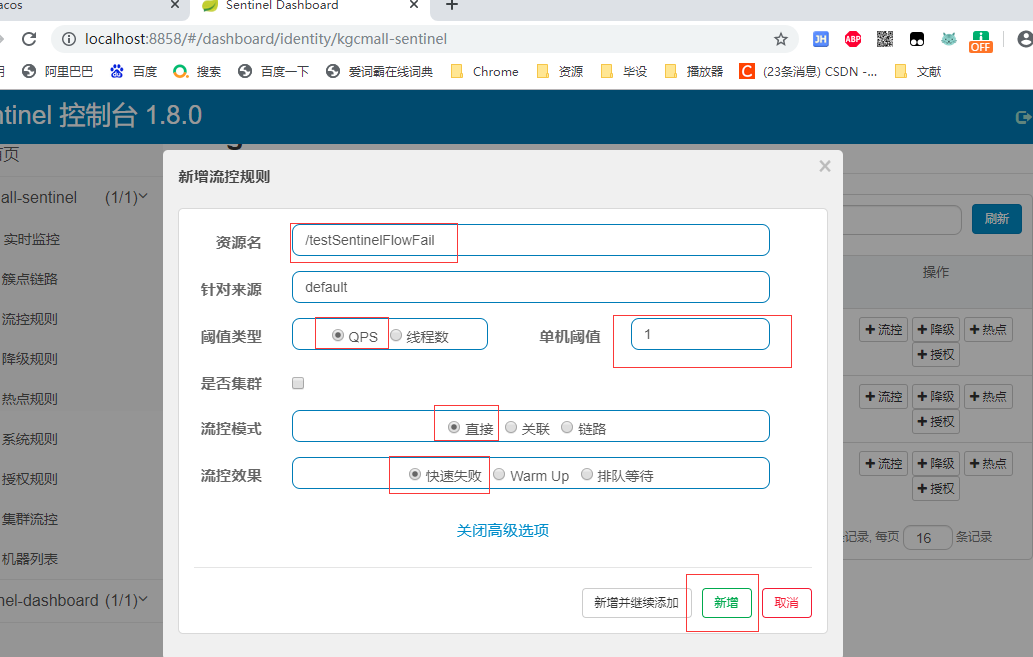
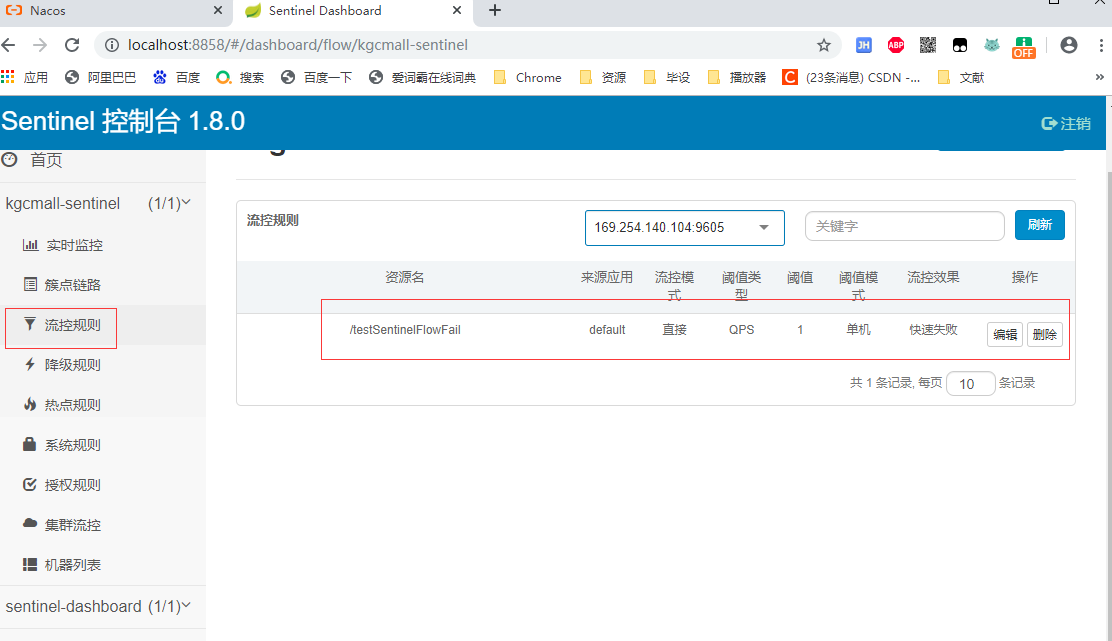
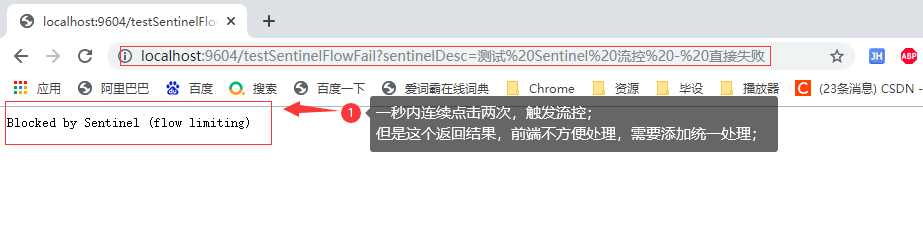
/**
 * Created On : 26/11/2022.
 * <p>
 * Author : huayu
 * <p>
 * Description: 自定义sentinel统一已成返回处理
 */
@Slf4j
@Component
public class MySentinelBlockExceptionHandler implements BlockExceptionHandler {

    @Override
    public void handle(HttpServletRequest httpServletRequest, HttpServletResponse httpServletResponse, BlockException e) throws Exception {
        // 记录异常日志
        log.warn("------ MySentinelBlockExceptionHandler 规则Rule:{} ------", e.getRule());

        // 增加自定义统一异常返回对象
        RequestResult<String> requestResult = null;

        // 针对不同的流控异常,统一返回
        if (e instanceof FlowException) {
            requestResult = ResultBuildUtil.fail("9621", "接口流量限流");
        } else if (e instanceof DegradeException) {
            requestResult = ResultBuildUtil.fail("9622", "接口服务降级");
        } else if (e instanceof ParamFlowException) {
            requestResult = ResultBuildUtil.fail("9623", "热点参数限流");
        } else if (e instanceof SystemBlockException) {
            requestResult = ResultBuildUtil.fail("9624", "触发系统保护");
        } else if (e instanceof AuthorityException) {
            requestResult = ResultBuildUtil.fail("9625", "授权规则限制");
        }

        // 统一返回json结果
        httpServletResponse.setStatus(HttpStatus.FORBIDDEN.value());
        httpServletResponse.setCharacterEncoding("utf-8");
        httpServletResponse.setContentType(MediaType.APPLICATION_JSON_VALUE);

        // 借助SpringMVC自带的Jackson工具,返回结果
        new ObjectMapper().writeValue(httpServletResponse.getWriter(), requestResult);
    }


}
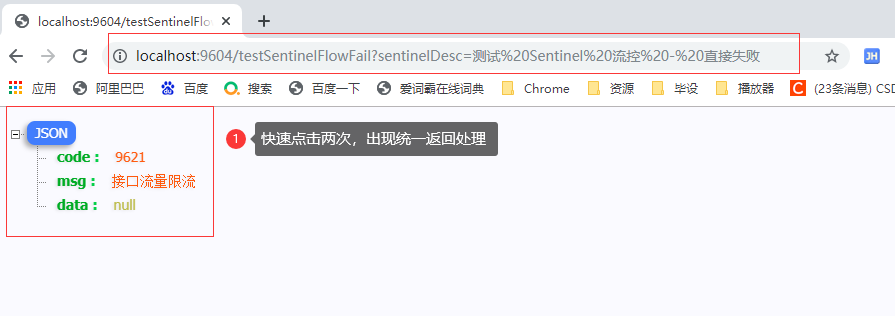
/**
* @param : [sentinelDesc]
* @return : java.lang.String
* @author : huayu
* @date : 26/11/2022
* @description : 测试 Sentinel 流控 - 关联
*/
@GetMapping("testSentinelFlowLink")
public String testSentinelFlowLink(@RequestParam String sentinelDesc) {
    log.info("------ testSentinelFlowLink 接口调用 ------ ");
    return sentinelDesc;
}
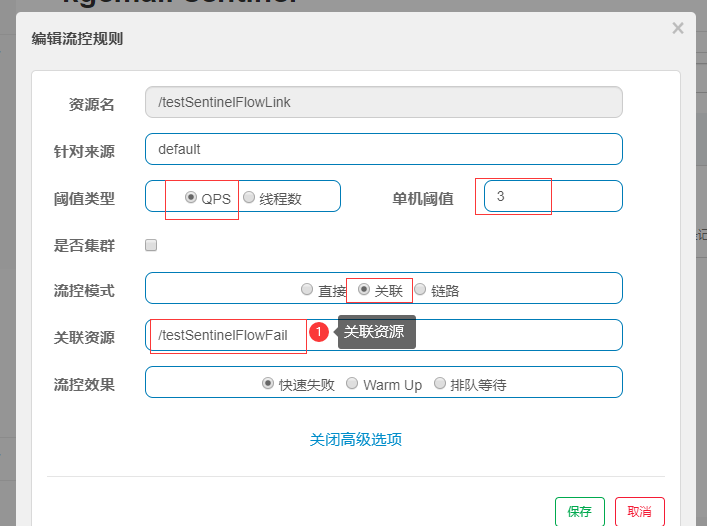
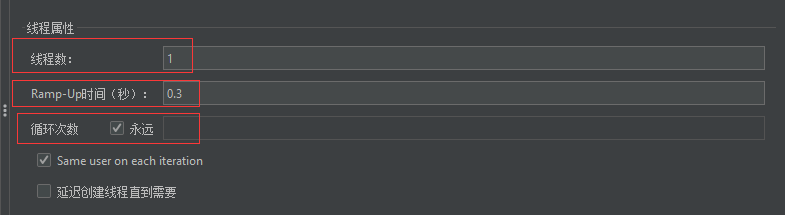

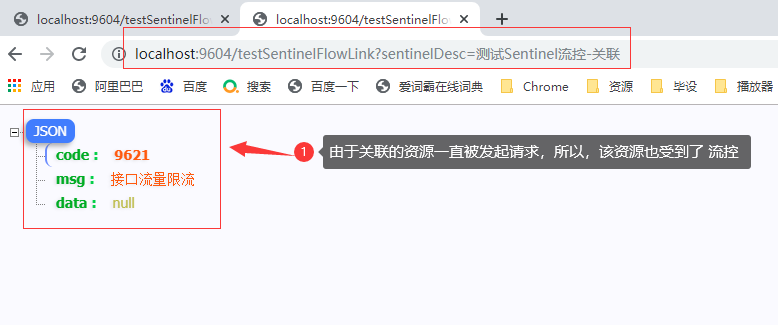
链路流控模式指的是,当从某个接口过来的资源达到限流条件时,开启限流。它的功能有点类似于针对来源配置项,区别在于:针对来源是针对上级微服务,而链路流控是针对上级接口,也就是说它的粒度更细。
/**
 * Created On : 26/11/2022.
 * <p>
 * Author : huayu
 * <p>
 * Description: 测试链路 模式
 */
public interface SentinelService {

    void message();

}
/**
 * Created On : 26/11/2022.
 * <p>
 * Author : huayu
 * <p>
 * Description: 测试链路 模式 实现类
 */
@Service
public class SentinelServiceImpl implements SentinelService {

    @Override
    @SentinelResource("message") // 在@SentinelResource中指定资源名
    public void message() {
        System.out.println("message");
    }

}
@Slf4j
@RestController
public class KgcMallSentinelController {


    @Autowired
    private SentinelService sentinelService;

  //测试 Sentinel 流控 - 直接失败
    @GetMapping("testSentinelFlowFail")
    public String testSentinelFlowFail(@RequestParam String sentinelDesc) {

        log.info("------ testSentinelFlowFail 接口调用 ------ ");

        //测试 链路模式调用相同的资源
        sentinelService.message();

        return sentinelDesc;
    }


    //测试 Sentinel 流控 - 关联
    @GetMapping("testSentinelFlowLink")
    public String testSentinelFlowLink(@RequestParam String sentinelDesc) {

        log.info("------ testSentinelFlowLink 接口调用 ------ ");

        //测试 链路模式调用相同的资源
        sentinelService.message();
        return sentinelDesc;
    }

}
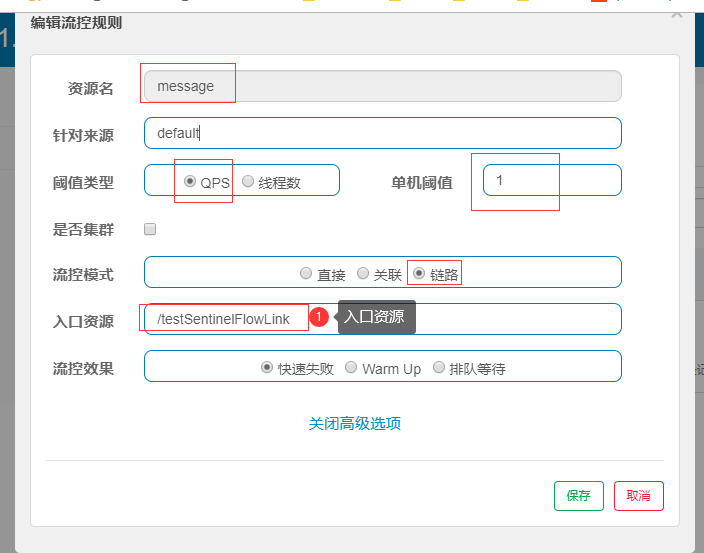
如果message触发流控,指定的入口就会被限流;
1.7.0 版本开始(对应SCA的2.1.1.RELEASE),官方在CommonFilter 引入了WEB_CONTEXT_UNIFY 参数,用于控制是否收敛context。将其配置为 false 即可根据不同的URL 进行链路限流。
spring:
  cloud:
    #sentinel 配置
    sentinel:
      web-context-unify: false #关闭收敛
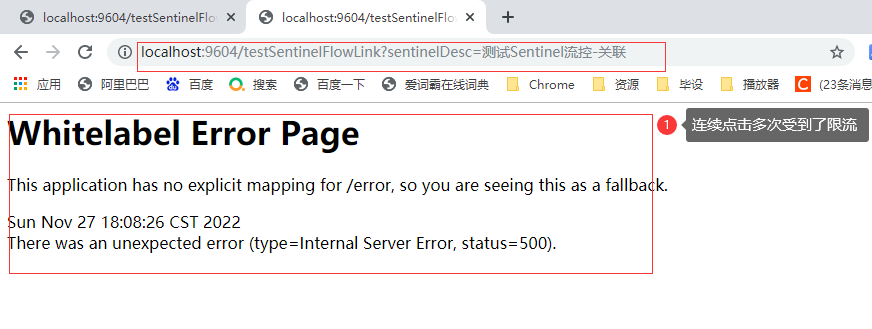
使用链路规则,会导致统一返回处理,无法生效;
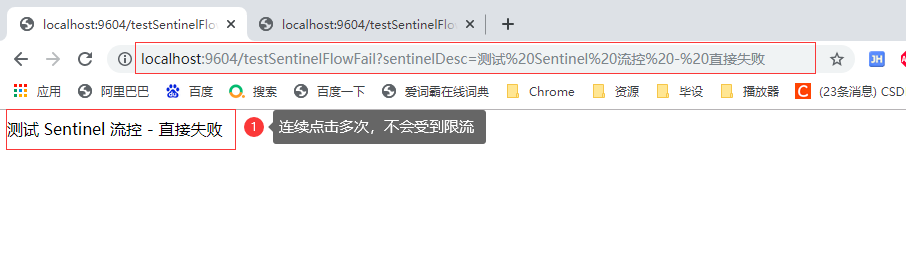
快速失败:直接抛出异常,默认的流量控制方式
当QPS超过任意规则的阈值后,新的请求就会被立即拒绝。这种方式适用于对系统处理能力确切已知的情况下;
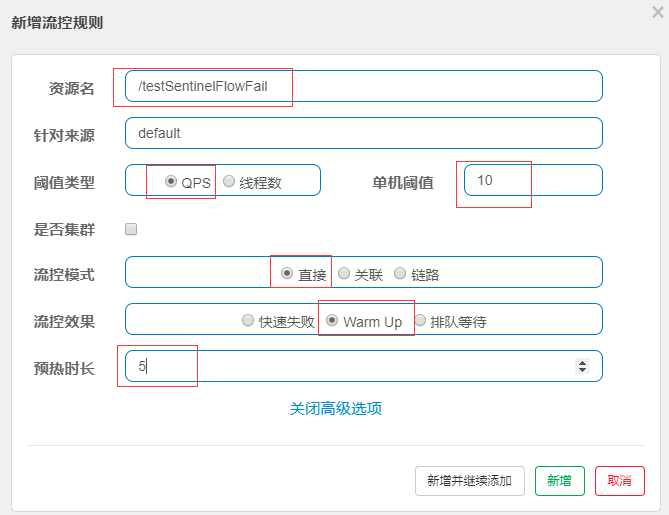
Warm Up(激增流量)即预热/冷启动方式;
冷加载因子: codeFactor 默认是3,即请求 QPS 从 1 / 3 开始,经预热时长逐渐升至设定的 QPS 阈值。
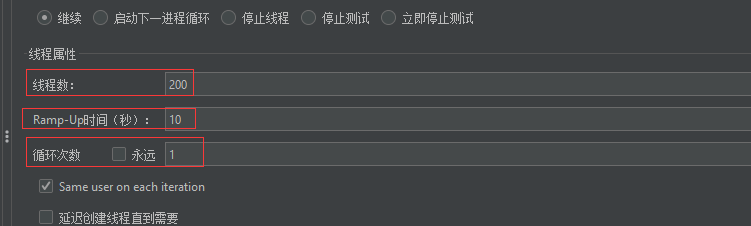
当系统长期处于低水位的情况下,当流量突然增加时,直接把系统拉升到高水位可能瞬间把系统压垮。通过"冷启动",让通过的流量缓慢增加,在一定时间内逐渐增加到阈值上限,给冷系统一个预热的时间,避免冷系统被压垮。
请求方法省略;
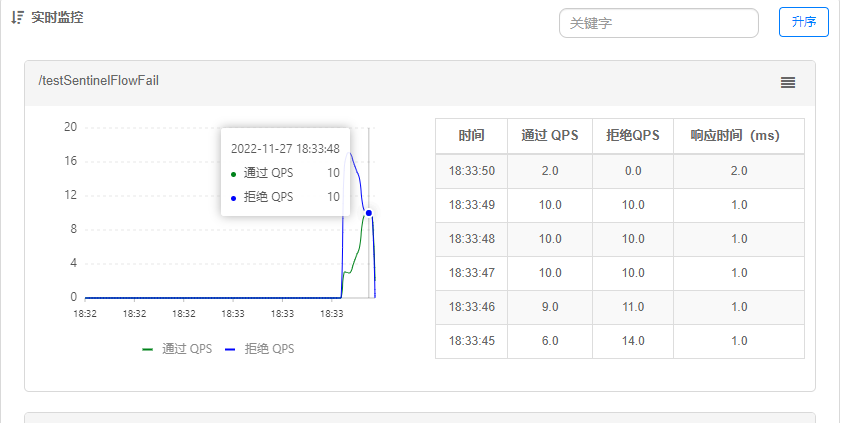
会严格控制请求通过的间隔时间,也即是让请求以均匀的速度通过,其余的排队等待,对应的是漏桶算法。
用于处理间隔性突发的流量,例如消息队列,在某一秒有大量的请求到来,而接下来的几秒则处于空闲状态,这个时候我们不希望一下子把所有的请求都通过,这样可能会把系统压垮;同时我们也期待系统以稳定的速度,逐步处理这些请求,以起到“削峰填谷”的效果,而不是第一秒拒绝所有请求。
选择排队等待的阈值类型必须是QPS,且暂不支持>1000的模式
请求方法省略;
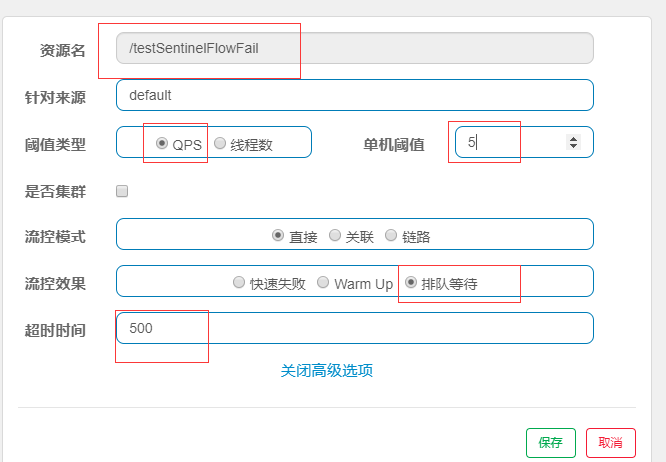
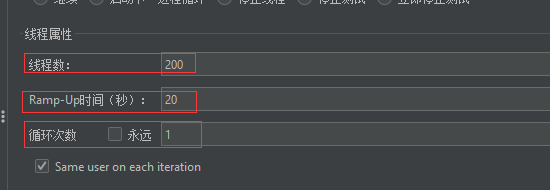
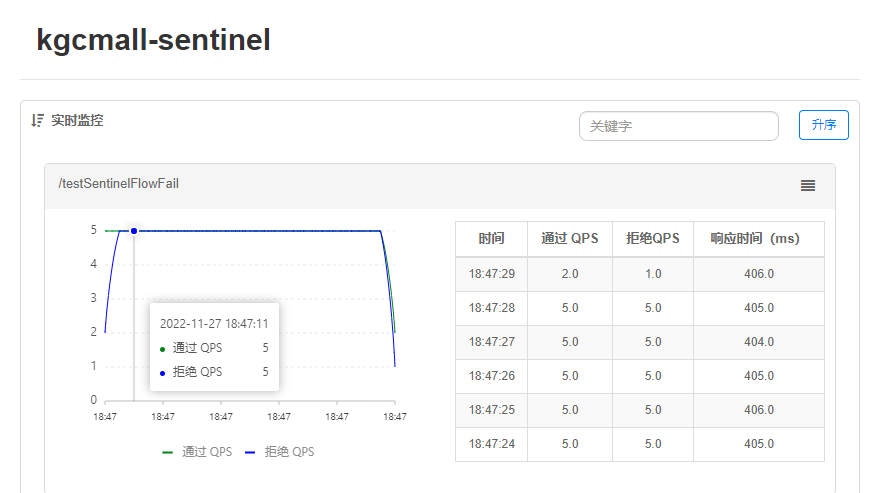
单机阈值:每秒通过的请求个数是5,则每隔200ms通过一次请求;每次请求的最大等待时间为500ms=0.5s,超过0.5S就丢弃请求。
选择以慢调用比例作为阈值,需要设置允许的慢调用 RT(即最大的响应时间),请求的响应时间大于该值则统计为慢调用。当单位统计时长(statIntervalMs)内请求数目大于设置的最小请求数目,并且慢调用的比例大于阈值,则接下来的熔断时长内请求会自动被熔断。经过熔断时长后熔断器会进入探测恢复状态(HALFOPEN 状态),若接下来的一个请求响应时间小于设置的慢调用 RT 则结束熔断,若大于设置的慢调用 RT 则会再次被熔断。
/**
* @param : [sentinelDesc]
* @return : java.lang.String
 * @author : huayu
* @date : 26/11/2022
 * @description : 测试 Sentinel-降级-慢调用
*/
@GetMapping("testSentinelDown")
public String testSentinelDown(@RequestParam String sentinelDesc) throws InterruptedException {

    log.info("------ testSentinelDown 接口调用 ------ ");

    //模拟慢调用
    TimeUnit.MILLISECONDS.sleep(100);

    return sentinelDesc;
}
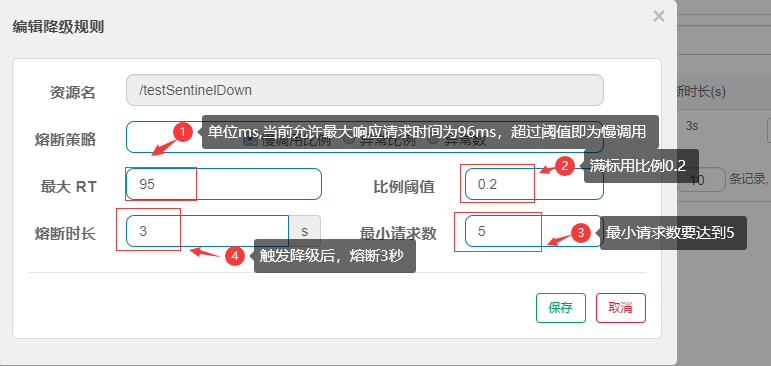
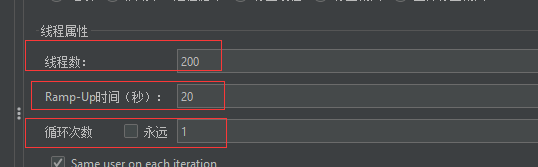
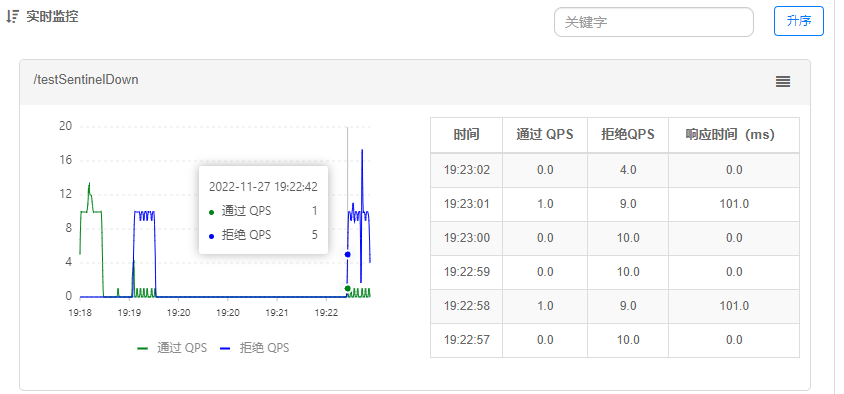
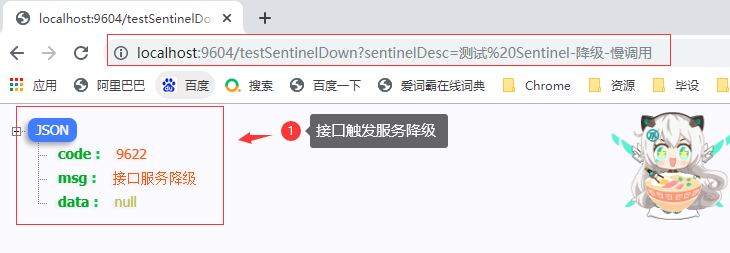
当单位统计时长(statIntervalMs)内请求数目大于设置的最小请求数目,并且异常的比例大于阈值,则接下来的熔断时长内请求会自动被熔断。
经过熔断时长后熔断器会进入探测恢复状态(HALFOPEN 状态),若接下来的一个请求成功完成(没有错误)则结束熔断,否则会再次被熔断。异常比率的阈值范围是 [0.0, 1.0],代表 0% 100%。
/**
* @param : [sentinelDesc]
* @return : java.lang.String
* @author : huayu
* @date : 26/11/2022
* @description : 测试 Sentinel-降级-异常比例    异常数
*/
@GetMapping("testSentinelDownExpScale")
public String testSentinelDownExpScale(@RequestParam String sentinelDesc) throws InterruptedException {

    log.info("------ testSentinelDownExpScale 接口调用 ------ ");

    //模拟异常
    int num = new Random().nextInt(10);
    if (num % 2 == 1) {
        num = 10 / 0;
    }
    return sentinelDesc;
}
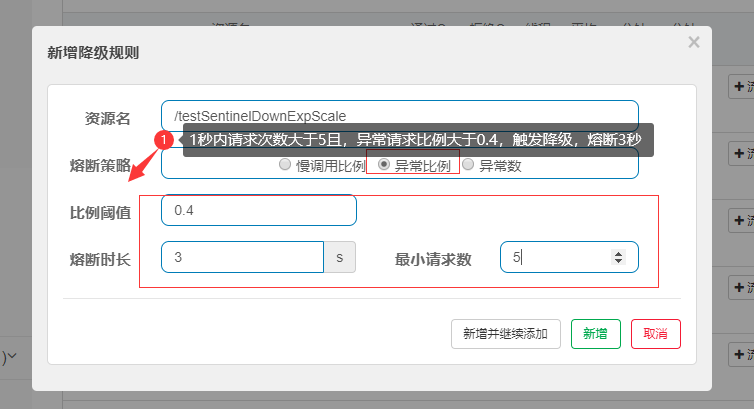
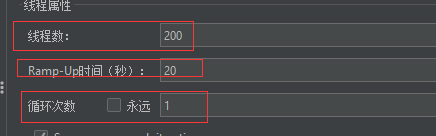
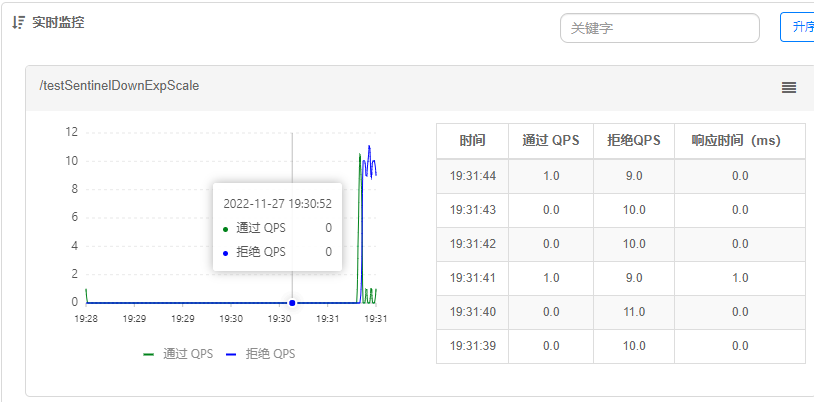
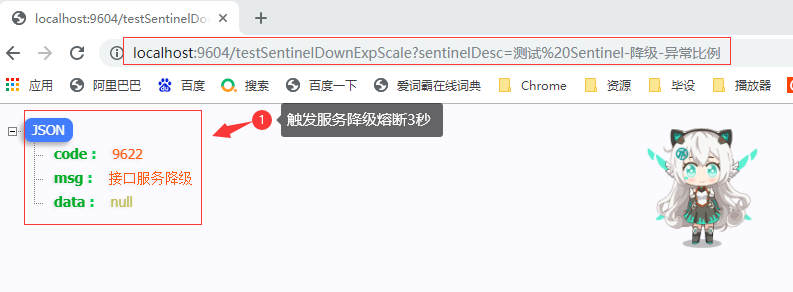
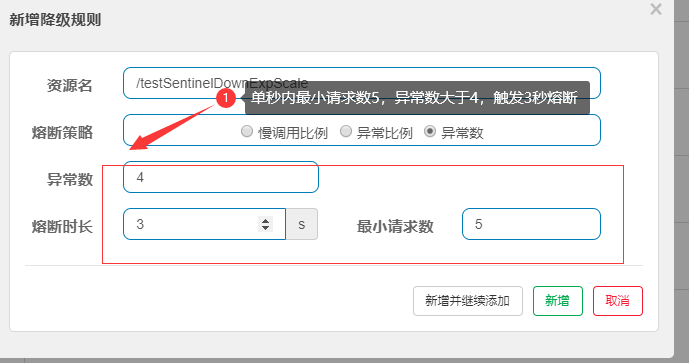
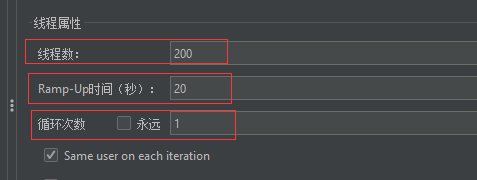
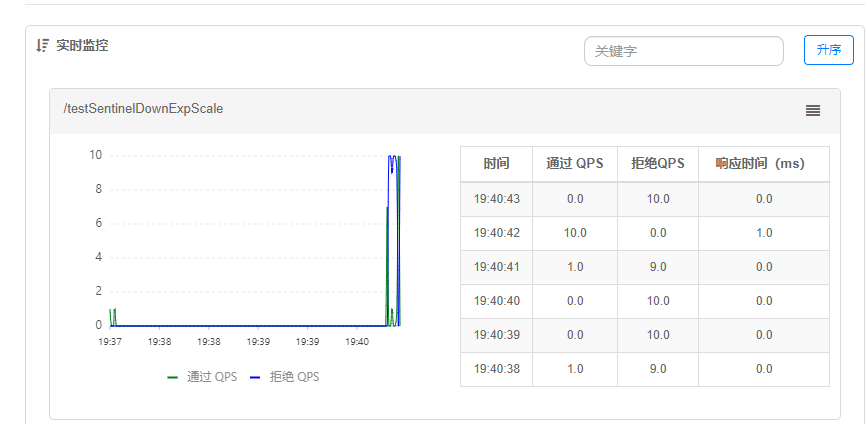
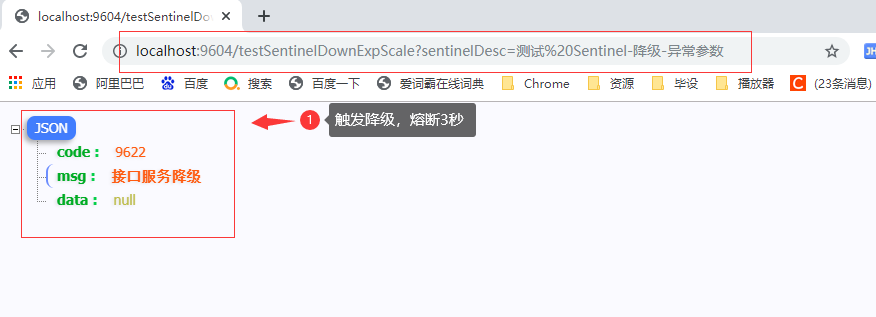
当单位统计时长内的异常数目超过阈值之后会自动进行熔断。经过熔断时长后熔断器会进入探测恢复状态(HALFOPEN 状态),若接下来的一个请求成功完成(没有错误)则结束熔断,否则会再次被熔断。
注意:异常降级仅针对业务异常,对 Sentinel 限流降级本身的异常(BlockException)不生效。
/**
* @param : [sentinelDesc]
* @return : java.lang.String
* @author : huayu
* @date : 26/11/2022
* @description : 测试 Sentinel-降级-异常比例    异常数
*/
@GetMapping("testSentinelDownExpScale")
public String testSentinelDownExpScale(@RequestParam String sentinelDesc) throws InterruptedException {

    log.info("------ testSentinelDownExpScale 接口调用 ------ ");

    //模拟异常
    int num = new Random().nextInt(10);
    if (num % 2 == 1) {
        num = 10 / 0;
    }
    return sentinelDesc;
}
何为热点?热点即经常访问的数据。很多时候我们希望统计某个热点数据中访问频次最高的数据,并对其访问进行限制。
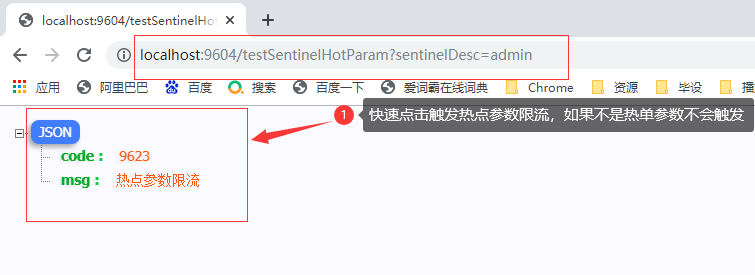
热点参数限流会统计传入参数中的热点参数,并根据配置的限流阈值与模式,对包含热点参数的资源调用进行限流。热点参数限流可以看做是一种特殊的流量控制,仅对包含热点参数的资源调用生效
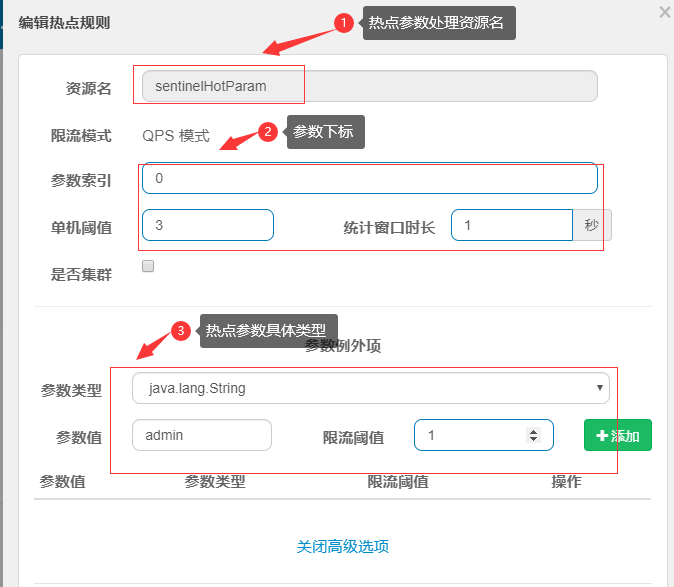
单机阈值: 针对所有参数的值进行设置的一个公共的阈值
配置热点参数规则:
资源名必须是@SentinelResource(value="资源名")中 配置的资源名,热点规则依赖于注解;
单独指定参数例外的参数具体值,必须是指定的7种数据类型才会生效;
/**
* @param : [sentinelDesc]
* @return : java.lang.String
* @author : huayu
* @date : 26/11/2022
* @description : 测试 Sentinel-热点
*/
@GetMapping("testSentinelHotParam")
@SentinelResource(value = "sentinelHotParam", blockHandlerClass = MySentinelHotBlockExceptionHandler.class, blockHandler = "hotBlockExceptionHandle")
//热点参数,必须使用此注解,指定资源名
//注意使用此注解无法处理BlockExecption,会导致统一异常处理失效
public String testSentinelHotParam(@RequestParam String sentinelDesc) {

    log.info("------ testSentinelHotParam 接口调用 ------ ");

    return sentinelDesc;
}
@GetMapping("testSentinelHotParam")
@SentinelResource(value = "sentinelHotParam",blockHandler = "hotBlockExceptionHandle")
//热点参数,必须使用此注解,指定资源名
//注意使用此注解无法处理BlockExecption,会导致统一异常处理失效
public String testSentinelHotParam(@RequestParam String sentinelDesc) {
    log.info("------ testSentinelHotParam 接口调用 ------ ");
    return sentinelDesc;
}


/**
* @author : huayu
* @date   : 26/11/2022
* @param  : [sentinelDesc, e]
* @return : java.lang.String
* @description : 类内处理方法  增加一个自定义处理方法,参数必须跟入口一致
*/
public String hotBlockExceptionHandle(@RequestParam String sentinelDesc, BlockException e){
    //记录异常日志
    log.warn("------ hotBlockExceptionHandle 规则Rule:{} ------", e.getRule());
    return JSON.toJSONString(ResultBuildUtil.fail("9623", "热点参数限流")) ;

}
@GetMapping("testSentinelHotParam")
@SentinelResource(value = "sentinelHotParam", blockHandlerClass = MySentinelHotBlockExceptionHandler.class, blockHandler = "hotBlockExceptionHandle")
//热点参数,必须使用此注解,指定资源名
//注意使用此注解无法处理BlockExecption,会导致统一异常处理失效
public String testSentinelHotParam(@RequestParam String sentinelDesc) {

    log.info("------ testSentinelHotParam 接口调用 ------ ");

    return sentinelDesc;
}


//==========处理类
/**
 * Created On : 26/11/2022.
 * <p>
 * Author : huayu
 * <p>
 * Description: 方式2 自定义热点参数限流处理异常并指定治理方法
 */
@Slf4j
public class MySentinelHotBlockExceptionHandler {

    /**
     * @param : [sentinelDesc, e]
     * @return : java.lang.String
     * @author : huayu
     * @date : 26/11/2022
     * @description : hotBlockExceptionHandle  方法 必须是 静态的  增加一个自定义处理方法,参数必须跟入口一致
     */
    public static String hotBlockExceptionHandle(@RequestParam String sentinelDesc, BlockException e) {
        //记录异常日志
        log.warn("------ hotBlockExceptionHandle 规则Rule:{} ------", e.getRule());
        return JSON.toJSONString(ResultBuildUtil.fail("9623", "热点参数限流"));

    }


}
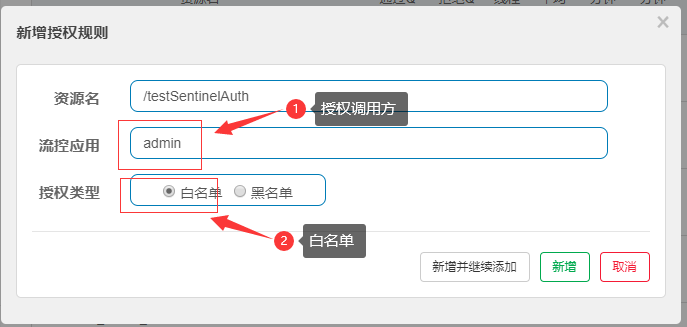
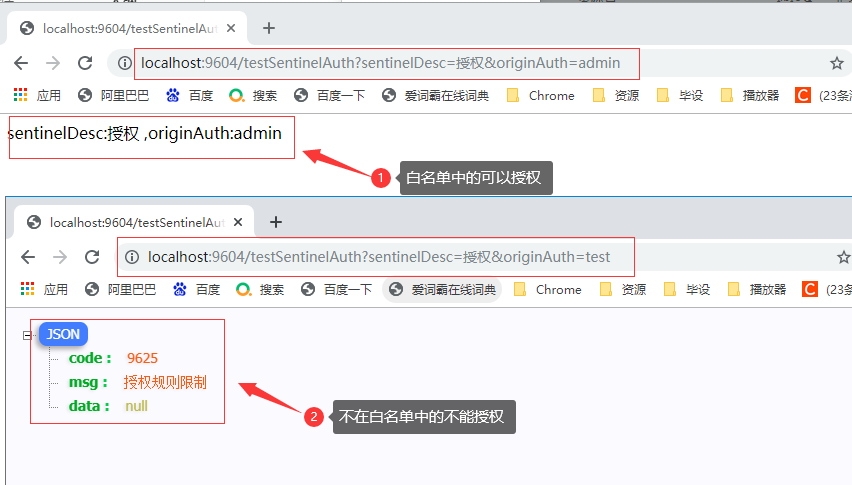
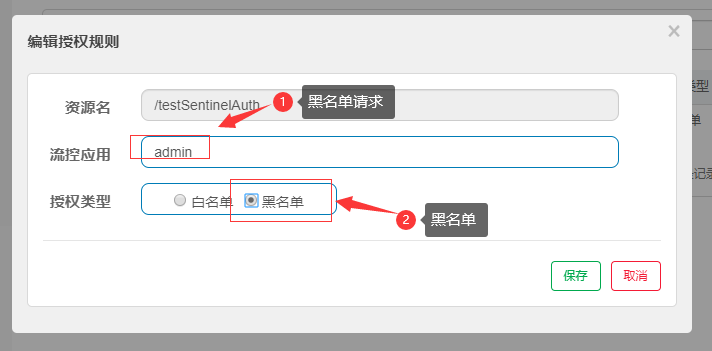
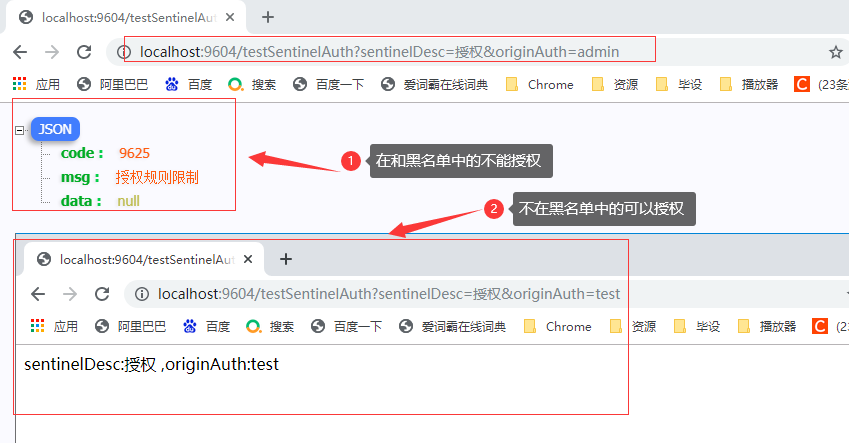
根据调用来源来判断该次请求是否允许放行,这时候可以使用 Sentinel 的来源访问控制的功能。
来源访问控制根据资源的请求来源(origin)限制资源是否通过:
配置项:
/**
 * Created On : 26/11/2022.
 * <p>
 * Author : huayu
 * <p>
 * Description: 自定义授权规则解析 来源 处理类
 */
@Component
public class MySentinelAuthRequestOriginParser implements RequestOriginParser {


    @Override
    public String parseOrigin(HttpServletRequest httpServletRequest) {

        // TODO 实际应用场景中,可以根据请求来源ip,进行ip限制
        //模拟,通过请求参数中,是否携带了自定义的来源参数OriginAuth
        //根据授权规则中的流控应用规则指定的参数列表,限制是否可以访问
        //授权规则,指定白名单,就代表请求携带的参数OriginAuth,参数值必须是在流控应用指定的参数列表中,才可以访问,否者不允许
        //黑名单相反
        return httpServletRequest.getParameter("originAuth");
    }


}
/**
* @param : [sentinelDesc]
* @return : java.lang.String
* @author : huayu
* @date : 26/11/2022
* @description : 测试 Sentinel-授权
*/
@GetMapping("testSentinelAuth")
public String testSentinelAuth(@RequestParam String sentinelDesc,
                               @RequestParam String originAuth) {

    log.info("------ testSentinelHotParam 接口调用 ------ ");

    return "sentinelDesc:" + sentinelDesc + "\n,originAuth:" + originAuth;
}
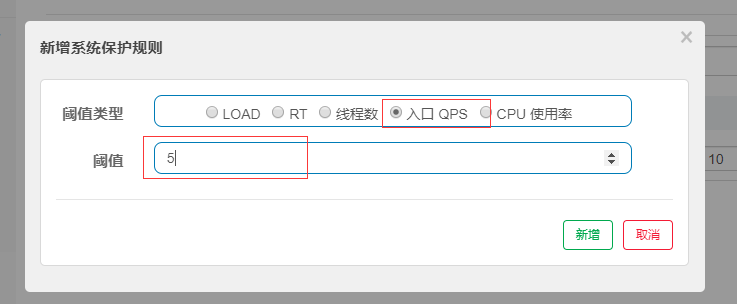
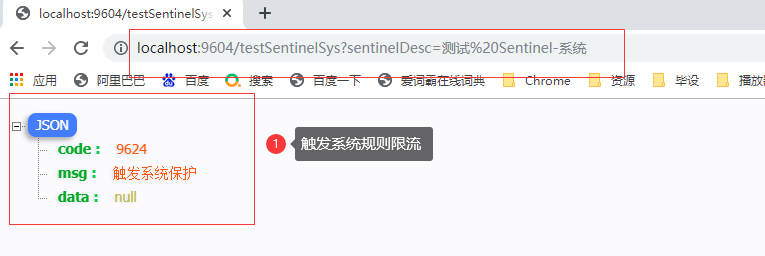
系统保护规则是从应用级别的入口流量进行控制,从单台机器的总体 Load、RT、入口 QPS 、CPU使用
率和线程数五个维度监控应用数据,让系统尽可能跑在最大吞吐量的同时保证系统整体的稳定性。系统
保护规则是应用整体维度的,而不是资源维度的,并且仅对入口流量 (进入应用的流量) 生效。
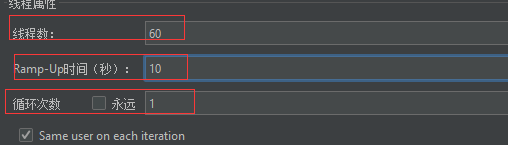
/**
* @param : [sentinelDesc]
* @return : java.lang.String
* @author : huayu
* @date : 26/11/2022
* @description : 测试 Sentinel-系统
* //设置一个, 全部请求都受限制
*/
@GetMapping("testSentinelSys")
public String testSentinelSys(@RequestParam String sentinelDesc) {

    log.info("------ testSentinelHotParam 接口调用 ------ ");

    return "sentinelDesc:" + sentinelDesc;
}
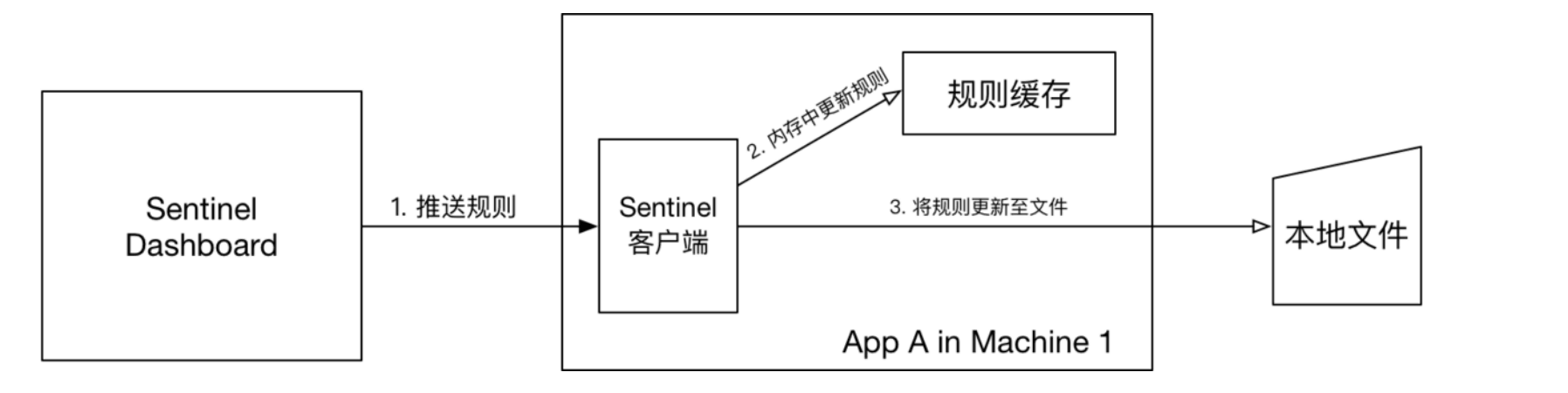
Dashboard控制台来为每个Sentinel客户端设置各种各样的规则,但是这里有一个问题,就是这些规则默认是存放在内存中,每次微服务重新启动,设置的各种规则都会消失。
本地文件数据源会定时轮询文件的变更,读取规则。这样我们既可以在应用本地直接修改文件来更新规则,也可以通过 Sentinel 控制台推送规则。
原理:首先 Sentinel 控制台通过 API 将规则推送至客户端并更新到内存中,接着注册的写数据源会将新的规则保存到本地的文件中。
创建配置类: SentinelFilePersistence
import com.alibaba.csp.sentinel.command.handler.ModifyParamFlowRulesCommandHandler;
import com.alibaba.csp.sentinel.datasource.*;
import com.alibaba.csp.sentinel.init.InitFunc;
import com.alibaba.csp.sentinel.slots.block.authority.AuthorityRule;
import com.alibaba.csp.sentinel.slots.block.authority.AuthorityRuleManager;
import com.alibaba.csp.sentinel.slots.block.degrade.DegradeRule;
import com.alibaba.csp.sentinel.slots.block.degrade.DegradeRuleManager;
import com.alibaba.csp.sentinel.slots.block.flow.FlowRule;
import com.alibaba.csp.sentinel.slots.block.flow.FlowRuleManager;
import com.alibaba.csp.sentinel.slots.block.flow.param.ParamFlowRule;
import com.alibaba.csp.sentinel.slots.block.flow.param.ParamFlowRuleManager;
import com.alibaba.csp.sentinel.slots.system.SystemRule;
import com.alibaba.csp.sentinel.slots.system.SystemRuleManager;
import com.alibaba.csp.sentinel.transport.util.WritableDataSourceRegistry;
import com.alibaba.fastjson.JSON;
import com.alibaba.fastjson.TypeReference;
import lombok.extern.slf4j.Slf4j;

import java.io.File;
import java.io.IOException;
import java.util.List;

/**
 * Created On : 26/11/2022.
 * <p>
 * Author : huayu
 * <p>
 * Description: MySentinelRulePersistenceDunc
 */
public class MySentinelRulePersistencefunc implements InitFunc{

//    String ruleDir = System.getProperty("user.home") + "/sentinel/rules/";
    //填写 规则存放的绝对路径
    String ruleDir = "D:/KEGONGCHANG/DaiMa/IDEA/KH96/SpringCloud/springcloud-alibaba-96/kgcmall96-sentinel/sentinel/rules/";
//    String ruleDir = "/kgcmall96-sentinel/sentinel/rules/";

    String flowRulePath = ruleDir + "/flow-rule.json";
    String degradeRulePath = ruleDir + "/degrade-rule.json";
    String systemRulePath = ruleDir + "/system-rule.json";
    String authorityRulePath = ruleDir + "/authority-rule.json";
    String paramFlowRulePath = ruleDir + "/param-flow-rule.json";

    @Override
    public void init() throws Exception {

        // 创建规则存放目录
        this.mkdirIfNotExits(ruleDir);

        // 创建规则存放文件
        this.createFileIfNotExits(flowRulePath);
        this.createFileIfNotExits(degradeRulePath);
        this.createFileIfNotExits(systemRulePath);
        this.createFileIfNotExits(authorityRulePath);
        this.createFileIfNotExits(paramFlowRulePath);


        // 注册一个可读数据源,用来定时读取本地的json文件,更新到规则缓存中
        // 流控规则
        ReadableDataSource<String, List<FlowRule>> flowRuleRDS =
                new FileRefreshableDataSource<>(flowRulePath, flowRuleListParser);

        // 将可读数据源注册至FlowRuleManager,这样当规则文件发生变化时,就会更新规则到内存
        FlowRuleManager.register2Property(flowRuleRDS.getProperty());
        WritableDataSource<List<FlowRule>> flowRuleWDS = new FileWritableDataSource<>(
                flowRulePath,
                this::encodeJson
        );

        // 将可写数据源注册至transport模块的WritableDataSourceRegistry中
        // 这样收到控制台推送的规则时,Sentinel会先更新到内存,然后将规则写入到文件中
        WritableDataSourceRegistry.registerFlowDataSource(flowRuleWDS);

        // 降级规则
        ReadableDataSource<String, List<DegradeRule>> degradeRuleRDS = new FileRefreshableDataSource<>(
                degradeRulePath,
                degradeRuleListParser
        );
        DegradeRuleManager.register2Property(degradeRuleRDS.getProperty());
        WritableDataSource<List<DegradeRule>> degradeRuleWDS = new FileWritableDataSource<>(
                degradeRulePath,
                this::encodeJson
        );
        WritableDataSourceRegistry.registerDegradeDataSource(degradeRuleWDS);

        // 系统规则
        ReadableDataSource<String, List<SystemRule>> systemRuleRDS = new FileRefreshableDataSource<>(
                systemRulePath,
                systemRuleListParser
        );
        SystemRuleManager.register2Property(systemRuleRDS.getProperty());
        WritableDataSource<List<SystemRule>> systemRuleWDS = new FileWritableDataSource<>(
                systemRulePath,
                this::encodeJson
        );
        WritableDataSourceRegistry.registerSystemDataSource(systemRuleWDS);

        // 授权规则
        ReadableDataSource<String, List<AuthorityRule>> authorityRuleRDS = new FileRefreshableDataSource<>(
                authorityRulePath,
                authorityRuleListParser
        );
        AuthorityRuleManager.register2Property(authorityRuleRDS.getProperty());
        WritableDataSource<List<AuthorityRule>> authorityRuleWDS = new FileWritableDataSource<>(
                authorityRulePath,
                this::encodeJson
        );
        WritableDataSourceRegistry.registerAuthorityDataSource(authorityRuleWDS);

        // 热点参数规则
        ReadableDataSource<String, List<ParamFlowRule>> paramFlowRuleRDS = new FileRefreshableDataSource<>(
                paramFlowRulePath,
                paramFlowRuleListParser
        );
        ParamFlowRuleManager.register2Property(paramFlowRuleRDS.getProperty());
        WritableDataSource<List<ParamFlowRule>> paramFlowRuleWDS = new FileWritableDataSource<>(
                paramFlowRulePath,
                this::encodeJson
        );
        ModifyParamFlowRulesCommandHandler.setWritableDataSource(paramFlowRuleWDS);

    }

        private Converter<String, List<FlowRule>> flowRuleListParser = source -> JSON.parseObject(
                source,
                new TypeReference<List<FlowRule>>() {
                }
        );
        private Converter<String, List<DegradeRule>> degradeRuleListParser = source -> JSON.parseObject(
                source,
                new TypeReference<List<DegradeRule>>() {
                }
        );
        private Converter<String, List<SystemRule>> systemRuleListParser = source -> JSON.parseObject(
                source,
                new TypeReference<List<SystemRule>>() {
                }
        );

        private Converter<String, List<AuthorityRule>> authorityRuleListParser = source -> JSON.parseObject(
                source,
                new TypeReference<List<AuthorityRule>>() {
                }
        );

        private Converter<String, List<ParamFlowRule>> paramFlowRuleListParser = source -> JSON.parseObject(
                source,
                new TypeReference<List<ParamFlowRule>>() {
                }
        );

        private void mkdirIfNotExits(String filePath) throws IOException {
            File file = new File(filePath);
            if (!file.exists()) {
                file.mkdirs();
            }
        }

        private void createFileIfNotExits(String filePath) throws IOException {
            File file = new File(filePath);
            if (!file.exists()) {
                file.createNewFile();
            }
        }

        private <T> String encodeJson(T t) {
            return JSON.toJSONString(t);
        }

}
在resources文件下创建META-INF/services文件夹;
创建文档com.alibaba.csp.sentinel.init.InitFunc,文档名就是配置类实现接口的全类名;
在文件中添加第一步配置类的全类名即可;
测试:启动服务,当访问系统规则限流接口,自动创建目录和文件,添加规则后,重启服务,刚进来,之前的配置看不到,必须先访问对应的入口才可以,要注意
com.kgc.scda.config.MySentinelRulePersistencefunc
<!--    openfeign 远程调用    -->
<dependency>
    <groupId>org.springframework.cloud</groupId>
    <artifactId>spring-cloud-starter-openfeign</artifactId>
    <version>2.1.1.RELEASE</version>
</dependency>
# 整合Sentinel 和OpenFeign ,默认关闭
feign:
  sentinel:
    enabled: true  #开启
著启动类: @EnableFeignClients

接口:@FeignClient(value = "服务名")
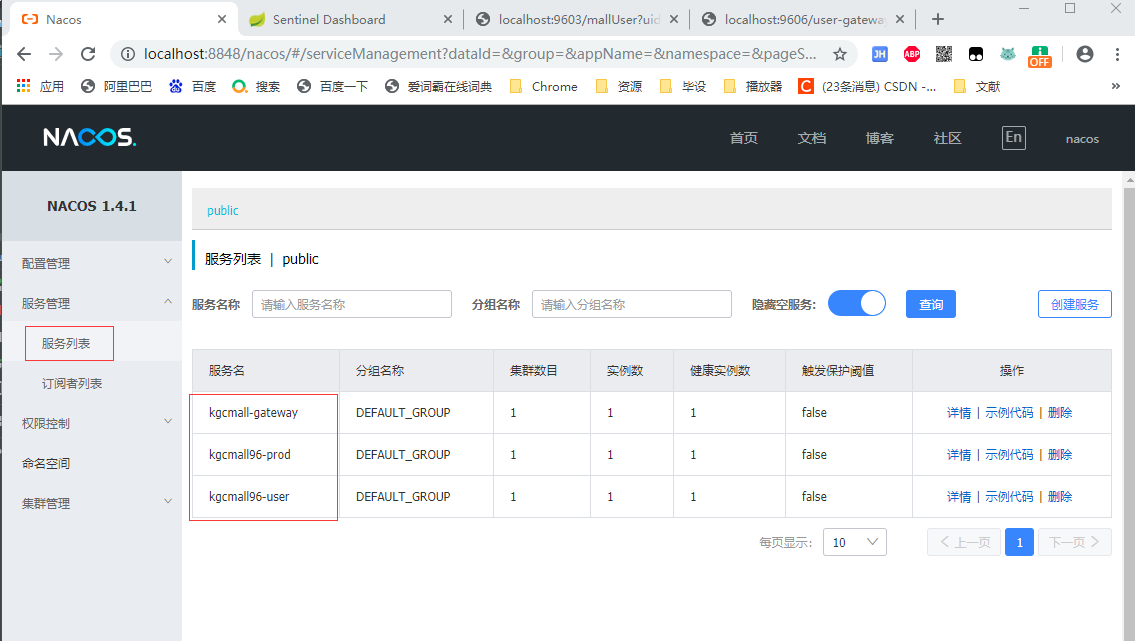
<!--  Gatway 网关会和springMvc冲突,不能添加web依赖      -->
<dependency>
    <groupId>org.springframework.boot</groupId>
    <artifactId>spring-boot-starter</artifactId>
</dependency>

<!--   gateway 依赖     -->
<dependency>
    <groupId>org.springframework.cloud</groupId>
    <artifactId>spring-cloud-starter-gateway</artifactId>
</dependency>
# 端口
server:
  port: 9606

# 服务名
spring:
  application:
    name: kgcmall-gatway

  cloud:
    #nacos 配置
    nacos:
      discovery:
        server-addr: 127.0.0.1:8848

    # 网关配置
    gateway:
      routes: # 路由,是list集合,可以配置多个路由
      	#product模块
        - id: kh96_route_first # 当前route路由的唯一标识,不能重复
          #uri: http://localhost:9602 # 路由转发的目标资源地址,不支持多负载调用,不利于扩展,不推荐
          uri: lb://kgcmall96-prod # lb 从nacos注册中心的服务列表中,根据指定的服务名,调用服务,推荐用法
          predicates: # 指定路由断言配置,支持多个断言,只要断言成功(满足路由转发条件),才会执行转发到目标资源地址访问
            - Path=/prod-gateway/** # 指定path路径断言,必须满足请求地址是/prod-gateway开始,才会执行路由转发
          filters: # 指定路由过滤配置,支持多个过滤器,在断言成功,执行路由转发时,对请求和响应数据进行过滤处理
            - StripPrefix=1 # 在请求断言成功后,执行路由转发时,自动去除第一层的访问路径/prod-gateway
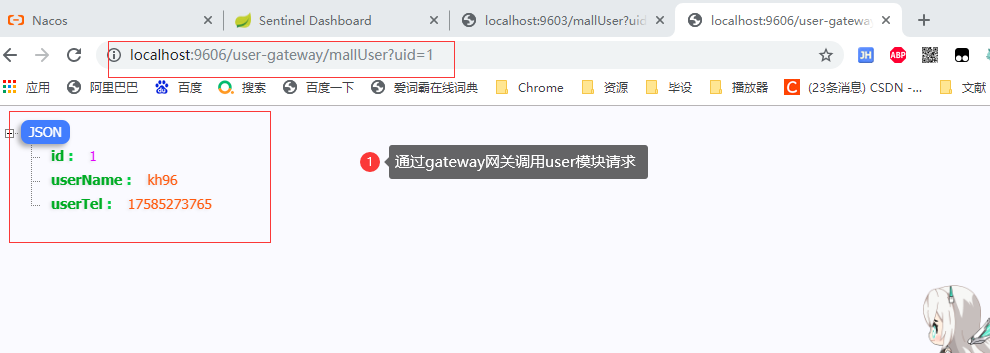
        #user模块
        - id: kh96_route_second
          uri: lb://kgcmall96-user
          predicates:
            - Path=/user-gateway/**
          filters:
            - StripPrefix=1

我正在尝试使用ruby和Savon来使用网络服务。测试服务为http://www.webservicex.net/WS/WSDetails.aspx?WSID=9&CATID=2require'rubygems'require'savon'client=Savon::Client.new"http://www.webservicex.net/stockquote.asmx?WSDL"client.get_quotedo|soap|soap.body={:symbol=>"AAPL"}end返回SOAP异常。检查soap信封,在我看来soap请求没有正确的命名空间。任何人都可以建议我
我想安装一个带有一些身份验证的私有(private)Rubygem服务器。我希望能够使用公共(public)Ubuntu服务器托管内部gem。我读到了http://docs.rubygems.org/read/chapter/18.但是那个没有身份验证-如我所见。然后我读到了https://github.com/cwninja/geminabox.但是当我使用基本身份验证(他们在他们的Wiki中有)时,它会提示从我的服务器获取源。所以。如何制作带有身份验证的私有(private)Rubygem服务器?这是不可能的吗?谢谢。编辑:Geminabox问题。我尝试“捆绑”以安装新的gem..
最近,当我启动我的Rails服务器时,我收到了一长串警告。虽然它不影响我的应用程序,但我想知道如何解决这些警告。我的估计是imagemagick以某种方式被调用了两次?当我在警告前后检查我的git日志时。我想知道如何解决这个问题。-bcrypt-ruby(3.1.2)-better_errors(1.0.1)+bcrypt(3.1.7)+bcrypt-ruby(3.1.5)-bcrypt(>=3.1.3)+better_errors(1.1.0)bcrypt和imagemagick有关系吗?/Users/rbchris/.rbenv/versions/2.0.0-p247/lib/ru
在Rails4.0.2中,我使用s3_direct_upload和aws-sdkgems直接为s3存储桶上传文件。在开发环境中它工作正常,但在生产环境中它会抛出如下错误,ActionView::Template::Error(noimplicitconversionofnilintoString)在View中,create_cv_url,:id=>"s3_uploader",:key=>"cv_uploads/{unique_id}/${filename}",:key_starts_with=>"cv_uploads/",:callback_param=>"cv[direct_uplo
我想在Ruby中创建一个用于开发目的的极其简单的Web服务器(不,不想使用现成的解决方案)。代码如下:#!/usr/bin/rubyrequire'socket'server=TCPServer.new('127.0.0.1',8080)whileconnection=server.acceptheaders=[]length=0whileline=connection.getsheaders想法是从命令行运行这个脚本,提供另一个脚本,它将在其标准输入上获取请求,并在其标准输出上返回完整的响应。到目前为止一切顺利,但事实证明这真的很脆弱,因为它在第二个请求上中断并出现错误:/usr/b
您如何在Rails中的实时服务器上进行有效调试,无论是在测试版/生产服务器上?我试过直接在服务器上修改文件,然后重启应用,但是修改好像没有生效,或者需要很长时间(缓存?)我也试过在本地做“脚本/服务器生产”,但是那很慢另一种选择是编码和部署,但效率很低。有人对他们如何有效地做到这一点有任何见解吗? 最佳答案 我会回答你的问题,即使我不同意这种热修补服务器代码的方式:)首先,你真的确定你已经重启了服务器吗?您可以通过跟踪日志文件来检查它。您更改的代码显示的View可能会被缓存。缓存页面位于tmp/cache文件夹下。您可以尝试手动删除
require"socket"server="irc.rizon.net"port="6667"nick="RubyIRCBot"channel="#0x40"s=TCPSocket.open(server,port)s.print("USERTesting",0)s.print("NICK#{nick}",0)s.print("JOIN#{channel}",0)这个IRC机器人没有连接到IRC服务器,我做错了什么? 最佳答案 失败并显示此消息::irc.shakeababy.net461*USER:Notenoughparame
我有一个使用PDFKit呈现网页的pdf版本的Rails应用程序。我使用Thin作为开发服务器。问题是当我处于开发模式时。当我使用“bundleexecrailss”启动我的服务器并尝试呈现任何PDF时,整个过程会陷入僵局,因为当您呈现PDF时,会向服务器请求一些额外的资源,如图像和css,看起来只有一个线程.如何配置Rails开发服务器以运行多个工作线程?非常感谢。 最佳答案 我找到的最简单的解决方案是unicorn.geminstallunicorn创建一个unicorn.conf:worker_processes3然后使用它:
关于如何使用git设置类似Dropbox的服务,您有什么建议吗?您认为git是解决此问题的合适工具吗?我在考虑使用git+rush解决方案,你觉得怎么样? 最佳答案 检查这个开源项目:https://github.com/hbons/SparkleShare来自项目的自述文件:Howdoesitwork?SparkleSharecreatesaspecialfolderonyourcomputer.Youcanaddremotelyhostedfolders(or"projects")tothisfolder.Theseprojec
我将以下代码放在一起用于一个简单的RubyTFTP服务器。它工作正常,因为它监听端口69并且我的TFTP客户端连接到它,我能够将数据包写入test.txt,但我不只是写入数据包,我希望能够从我的客户端通过TFTP传输文件到/temp目录。预先感谢您的帮助!require'socket.so'classTFTPServerdefinitialize(port)@port=portenddefstart@socket=UDPSocket.new@socket.bind('',@port)whiletruepacket=@socket.recvfrom(1024)putspacketFile
