目录
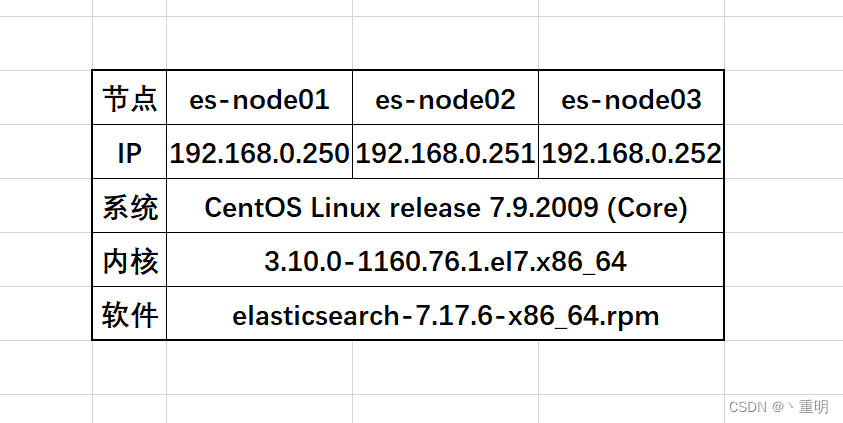
wget https://artifacts.elastic.co/downloads/elasticsearch/elasticsearch-7.17.6-x86_64.rpm
wget https://artifacts.elastic.co/downloads/elasticsearch/elasticsearch-7.17.6-x86_64.rpm.sha512
yum install perl-Digest-SHA -y
shasum -a 512 -c elasticsearch-7.17.6-x86_64.rpm.sha512
rpm --install elasticsearch-7.17.6-x86_64.rpm
systemctl daemon-reload
systemctl enable elasticsearch.service
systemctl start elasticsearch.service
systemctl stop elasticsearch.service
mkdir /path/to -p
echo "espasswd" > /path/to/my_pwd_file.tmp
chmod 600 /path/to/my_pwd_file.tmp
chown elasticsearch.elasticsearch /path/to/my_pwd_file.tmp
systemctl set-environment ES_KEYSTORE_PASSPHRASE_FILE=/path/to/my_pwd_file.tmp
es服务有三个比较重要的文件:
es配置文件:elasticsearch.yml
JVM配置:jvm.options
日志记录配置:log4j2.properties
cluster.name: my-es
node.name: es-node01
path.data: /var/lib/elasticsearch
path.logs: /var/log/elasticsearch
network.host: 0.0.0.0
discovery.seed_hosts: ["192.168.0.250", "192.168.0.251", "192.168.0.252"]
cluster.initial_master_nodes: ["192.168.0.250", "192.168.0.251", "192.168.0.252"]
-Xms2g
-Xmx2g
对了,提一句,安装es会默认携带openjdk,如果使用自定义jdk请更改指向路径。
vim /etc/security/limits.conf
root soft nofile 65535
root hard nofile 65535
* soft nofile 65535
* hard nofile 65535
sawpoff -a
# vim /etc/fstab 找到swap那行进行注释
sysctl -w vm.max_map_count=262144

vim /etc/sysctl.conf
vm.max_map_count = 262144
sysctl -p
vim /etc/security/limits.conf
* soft nproc 4096
* hard nproc 4096
配置目前就先配置这么多了,还有很多配置可以参考官网
systemctl start elasticsearch.service
netstat -utpln
tcp6       0      0 :::9200                 :::*                    LISTEN      12535/java
tcp6       0      0 :::9300                 :::*                    LISTEN      12535/java
es-node01:
curl 127.0.0.1:9200
{
  "name" : "es-node01",
  "cluster_name" : "my-es",
  "cluster_uuid" : "7_WxMzV4TjKE5xnyowvG3A",
  "version" : {
    "number" : "7.17.6",
    "build_flavor" : "default",
    "build_type" : "rpm",
    "build_hash" : "f65e9d338dc1d07b642e14a27f338990148ee5b6",
    "build_date" : "2022-08-23T11:08:48.893373482Z",
    "build_snapshot" : false,
    "lucene_version" : "8.11.1",
    "minimum_wire_compatibility_version" : "6.8.0",
    "minimum_index_compatibility_version" : "6.0.0-beta1"
  },
  "tagline" : "You Know, for Search"
}
es-node02:
curl 127.0.0.1:9200
{
  "name" : "es-node02",
  "cluster_name" : "my-es",
  "cluster_uuid" : "7_WxMzV4TjKE5xnyowvG3A",
  "version" : {
    "number" : "7.17.6",
    "build_flavor" : "default",
    "build_type" : "rpm",
    "build_hash" : "f65e9d338dc1d07b642e14a27f338990148ee5b6",
    "build_date" : "2022-08-23T11:08:48.893373482Z",
    "build_snapshot" : false,
    "lucene_version" : "8.11.1",
    "minimum_wire_compatibility_version" : "6.8.0",
    "minimum_index_compatibility_version" : "6.0.0-beta1"
  },
  "tagline" : "You Know, for Search"
}
es-node03:
curl 127.0.0.1:9200
{
  "name" : "es-node03",
  "cluster_name" : "my-es",
  "cluster_uuid" : "7_WxMzV4TjKE5xnyowvG3A",
  "version" : {
    "number" : "7.17.6",
    "build_flavor" : "default",
    "build_type" : "rpm",
    "build_hash" : "f65e9d338dc1d07b642e14a27f338990148ee5b6",
    "build_date" : "2022-08-23T11:08:48.893373482Z",
    "build_snapshot" : false,
    "lucene_version" : "8.11.1",
    "minimum_wire_compatibility_version" : "6.8.0",
    "minimum_index_compatibility_version" : "6.0.0-beta1"
  },
  "tagline" : "You Know, for Search"
}
curl http://192.168.0.250:9200/_cat/master
LnrA5H20Q8qtUeoxBAMrHQ 192.168.0.250 192.168.0.250 es-node01

curl http://192.168.0.250:9200/_cat/nodes
192.168.0.252 16 97 1 0.11 0.04 0.05 cdfhilmrstw - es-node03
192.168.0.250 18 96 2 0.03 0.05 0.09 cdfhilmrstw * es-node01
192.168.0.251 14 97 2 0.13 0.06 0.09 cdfhilmrstw - es-node02
因为是使用阿里云的内网部署的集群,所以在浏览器上看不到,可以部署kiana作为集群的前端页面来查看。
我是Google云的新手,我正在尝试对其进行首次部署。我的第一个部署是RubyonRails项目。我基本上是在关注thisguideinthegoogleclouddocumentation.唯一的区别是我使用的是我自己的项目,而不是他们提供的“helloworld”项目。这是我的app.yaml文件runtime:customvm:trueentrypoint:bundleexecrackup-p8080-Eproductionconfig.ruresources:cpu:0.5memory_gb:1.3disk_size_gb:10当我转到我的项目目录并运行gcloudprevie
我可以在Azure网站上部署RubyonRails吗? 最佳答案 还没有。目前仅支持.NET和PHP。 关于ruby-on-rails-RubyonRails可以部署在Azure网站上吗?,我们在StackOverflow上找到一个类似的问题: https://stackoverflow.com/questions/12964010/
前置步骤我们都操作完了,这篇开始介绍jenkins的集成。话不多说,看操作1、登录进入jenkins后会让你选择安装插件,选择第一个默认的就行。安装完成后设置账号密码,重新登录。2、配置JDK和Git都需要执行路径,所以需要先把执行路径找到,先进入服务器的docker容器,2.1JDK的路径root@69eef9ee86cf:/usr/bin#echo$JAVA_HOME/usr/local/openjdk-82.2Git的路径root@69eef9ee86cf:/#whichgit/usr/bin/git3、先配置JDK和Git。点击:ManageJenkins>>GlobalToolCon
深度学习部署:Windows安装pycocotools报错解决方法1.pycocotools库的简介2.pycocotools安装的坑3.解决办法更多Ai资讯:公主号AiCharm本系列是作者在跑一些深度学习实例时,遇到的各种各样的问题及解决办法,希望能够帮助到大家。ERROR:Commanderroredoutwithexitstatus1:'D:\Anaconda3\python.exe'-u-c'importsys,setuptools,tokenize;sys.argv[0]='"'"'C:\\Users\\46653\\AppData\\Local\\Temp\\pip-instal
Ocra无法处理需要“tk”的应用程序require'tk'puts'nope'用奥克拉http://github.com/larsch/ocra不起作用(如链接中的一个问题所述)问题:https://github.com/larsch/ocra/issues/29(Ocra是1.9的"new"rubyscript2exe,本质上它用于将rb脚本部署为可执行文件)唯一的问题似乎是缺少tcl的DLL文件我不认为这是一个问题据我所知,问题是缺少tk的DLL文件如果它们是已知的,则可以在执行ocra时将它们包括在内有没有办法知道tk工作所需的DLL依赖项? 最佳答
我有一个类unzipper.rb,它使用Rubyzip解压文件。在我的本地环境中,我可以成功解压缩文件,而无需使用require'zip'明确包含依赖项但是在Heroku上,我得到一个NameError(uninitializedconstantUnzipper::Zip)我只能通过使用明确的require来解决问题:为什么这在Heroku环境中是必需的,但在本地主机上却不是?我的印象是Rails自动需要所有gem。app/services/unzipper.rbrequire'zip'#OnlyrequiredforHeroku.Workslocallywithout!class
出于某种原因,heroku尝试要求dm-sqlite-adapter,即使它应该在这里使用Postgres。请注意,这发生在我打开任何URL时-而不是在gitpush本身期间。我构建了一个默认的Facebook应用程序。gem文件:source:gemcuttergem"foreman"gem"sinatra"gem"mogli"gem"json"gem"httparty"gem"thin"gem"data_mapper"gem"heroku"group:productiondogem"pg"gem"dm-postgres-adapter"endgroup:development,:t
不知何故,我似乎无法获得包含我的聚合的响应...使用curl它按预期工作:HBZUMB01$curl-XPOST"http://localhost:9200/contents/_search"-d'{"size":0,"aggs":{"sport_count":{"value_count":{"field":"dwid"}}}}'我收到回复:{"took":4,"timed_out":false,"_shards":{"total":5,"successful":5,"failed":0},"hits":{"total":90,"max_score":0.0,"hits":[]},"a
3月26日,映宇宙(HK:03700,即“映客”)发布截至2022年12月31日的2022年度业绩财务报告。财报显示,映宇宙2022年的总营收为63.19亿元,较2021年同期的91.76亿元下降31.1%。2022年,映宇宙的经营亏损为4698.7万元,2021年同期则为净利润4.57亿元;期内亏损(净亏损)为1.68亿元,2021年同期的净利润为4.33亿元;非国际财务报告准则经调整净利润为3.88亿元,2021年同期为4.82亿元,同比下降19.6%。 映宇宙在财报中表示,收入减少主要是由于行业竞争加剧,该集团对旗下产品采取更为谨慎的运营策略以应对市场变化。不过,映宇宙的毛利率则有所提升
1.回顾.TransportServicepublicclassTransportServiceextendsAbstractLifecycleComponentTransportService:方法:1publicfinalTextendsTransportResponse>voidsendRequest(finalTransport.Connectionconnection,finalStringaction,finalTransportRequestrequest,finalTransportRequestOptionsoptions,TransportResponseHandlerT>
