目录
2-1、spring-boot的pom.xml中添加组件【这里使用的是3.20.6.1版】
2-2、spring-boot的application.yml文件中配置
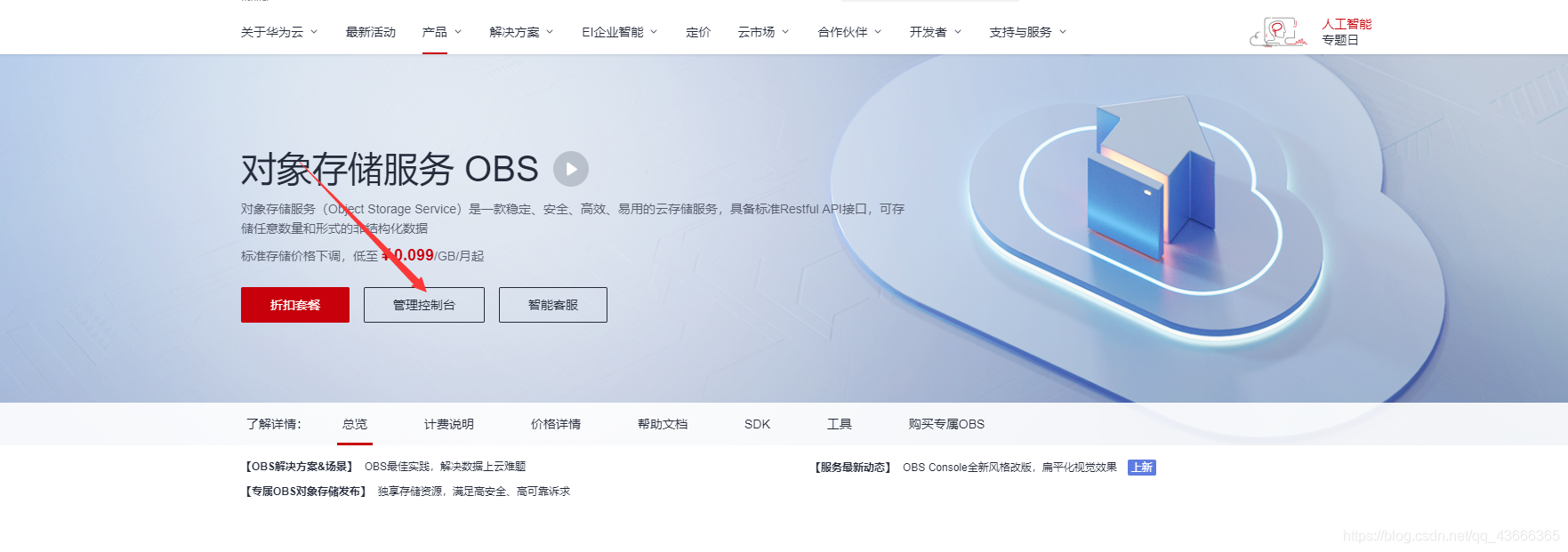
有些情况下,我们是需要存储到其他云服务器的【我们只需要购买服务即可】,比如项目中的一些图片或者文件,这里我们选用是华为云的OBS服务
https://www.huaweicloud.com/product/obs.html


 1-4、获取sk、ak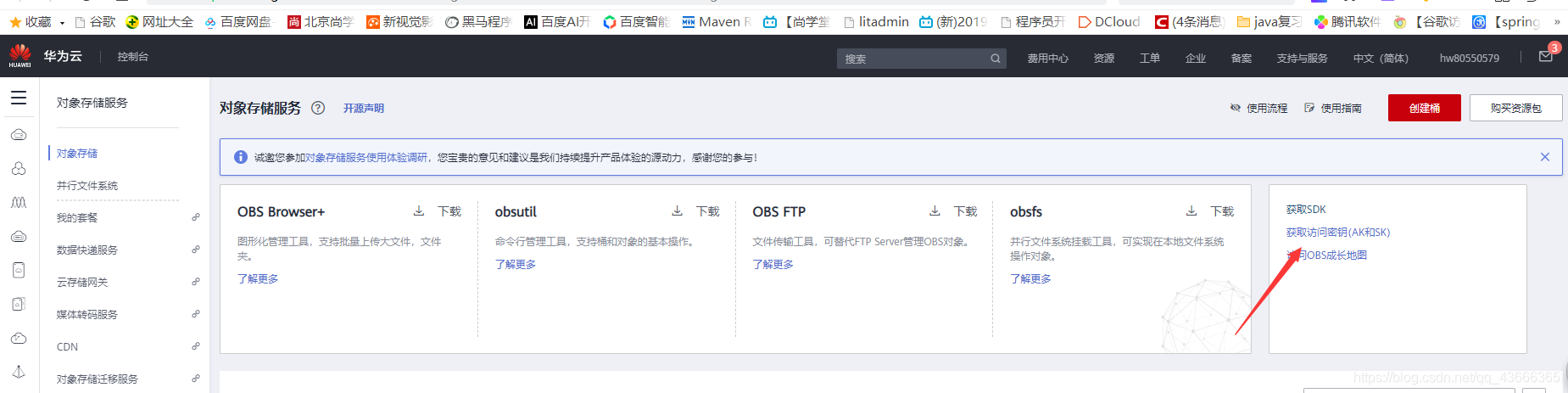
<dependency>
	<groupId>com.huaweicloud</groupId>
	<artifactId>esdk-obs-java</artifactId>
	<version>3.20.6.1</version>
</dependency>hwyun: # 华为云OBS配置信息
obs:
accessKey: D*****N
securityKey: h*******3
endPoint: o********m
bucketName: j**k创建对应的HweiOBSConfig类(参数)
package com.example.study.springboot.config;

import com.obs.services.ObsClient;
import com.obs.services.exception.ObsException;
import lombok.Data;
import lombok.extern.slf4j.Slf4j;
import org.springframework.beans.factory.annotation.Value;
import org.springframework.context.annotation.Configuration;

import java.text.SimpleDateFormat;
import java.util.Date;

/**
 * @ClassName: HweiOBSConfig
 * @Description: 华为云OBS配置类
 * @Author: wuhuiju
 * @Date: 2021-12-21 15:56
 * @Version: 1.0
 */
@Data
@Slf4j
@Configuration
public class HweiOBSConfig {
    /**
     * 访问密钥AK
     */
    @Value("${hwyun.obs.accessKey}")
    private String accessKey;

    /**
     * 访问密钥SK
     */
    @Value("${hwyun.obs.securityKey}")
    private String securityKey;

    /**
     * 终端节点
     */
    @Value("${hwyun.obs.endPoint}")
    private String endPoint;

    /**
     * 桶
     */
    @Value("${hwyun.obs.bucketName}")
    private String bucketName;

    /**
     * @Description 获取OBS客户端实例
     * @author wuhuiju
     * @date 2021/12/21 15:57
     * @return
     * @return: com.obs.services.ObsClient
     */
    public ObsClient getInstance() {
        return new ObsClient(accessKey, securityKey, endPoint);
    }


    /**
     * @Description 销毁OBS客户端实例
     * @author wuhuiju
     * @date 2021/12/21 17:32
     * @param: obsClient
     * @return
     */
    public void destroy(ObsClient obsClient){
        try {
            obsClient.close();
        } catch (ObsException e) {
            log.error("obs执行失败", e);
        } catch (Exception e) {
            log.error("执行失败", e);
        }
    }

    /**
     * @Description 微服务文件存放路径
     * @author wuhuiju
     * @date 2021/12/21 15:57
     * @return
     * @return: java.lang.String
     */
    public static String getObjectKey() {
        // 项目或者服务名称 + 日期存储方式
        return "Hwei" + "/" + new SimpleDateFormat("yyyy-MM-dd").format(new Date() )+ "/";
    }
}
package com.example.study.springboot.background.service;

import org.springframework.web.multipart.MultipartFile;

import java.io.InputStream;
import java.util.List;

/**
 * @Description 华为云OBS服务接口
 * @author wuhuiju
 * @date 2021/12/21 17:01
 */
public interface HweiYunOBSService {

    /**
     * @Description 删除文件
     * @author wuhuiju
     * @date 2021/12/21 17:02
     * @param: objectKey 文件名
     * @return: boolean 执行结果
     */
    boolean delete(String objectKey);

    /**
     * @Description 批量删除文件
     * @author wuhuiju
     * @date 2021/12/21 17:02
     * @param: objectKeys 文件名集合
     * @return: boolean 执行结果
     */
    boolean delete(List<String> objectKeys);

    /**
     * @Description 上传文件
     * @author wuhuiju
     * @date 2021/12/21 17:03
     * @param: uploadFile 上传文件
     * @param: objectKey 文件名称
     * @return: java.lang.String url访问路径
     */
    String fileUpload(MultipartFile uploadFile, String objectKey);

    /**
     * @Description 文件下载
     * @author wuhuiju
     * @date 2021/12/21 17:04
     * @param: objectKey
     * @return: java.io.InputStream
     */
    InputStream fileDownload(String objectKey);
}
package com.example.study.springboot.background.service.impl;

import com.example.study.springboot.background.service.HweiYunOBSService;
import com.example.study.springboot.config.HweiOBSConfig;
import com.obs.services.ObsClient;
import com.obs.services.exception.ObsException;
import com.obs.services.model.*;
import lombok.extern.slf4j.Slf4j;
import org.springframework.beans.factory.annotation.Autowired;
import org.springframework.stereotype.Service;
import org.springframework.web.multipart.MultipartFile;

import java.io.IOException;
import java.io.InputStream;
import java.util.List;

/**
 * @ClassName: HweiYunOBSServiceImpl
 * @Description: 华为云OBS服务业务层
 * @Author: wuhuiju
 * @Date: 2021-12-21 17:05
 * @Version: 1.0
 */
@Slf4j
@Service
public class HweiYunOBSServiceImpl implements HweiYunOBSService {

    @Autowired
    private HweiOBSConfig hweiOBSConfig;

    @Override
    public boolean delete(String objectKey) {
        ObsClient obsClient = null;
        try {
            // 创建ObsClient实例
            obsClient = hweiOBSConfig.getInstance();
            // obs删除
            obsClient.deleteObject(hweiOBSConfig.getBucketName(),objectKey);
        } catch (ObsException e) {
            log.error("obs删除保存失败", e);
        } finally {
            hweiOBSConfig.destroy(obsClient);
        }
        return true;
    }

    @Override
    public boolean delete(List<String> objectKeys) {
        ObsClient obsClient = null;
        try {
            obsClient = hweiOBSConfig.getInstance();
            DeleteObjectsRequest deleteObjectsRequest = new DeleteObjectsRequest(hweiOBSConfig.getBucketName());
            objectKeys.forEach(x -> deleteObjectsRequest.addKeyAndVersion(x));
            // 批量删除请求
            obsClient.deleteObjects(deleteObjectsRequest);
            return true;
        } catch (ObsException e) {
            log.error("obs删除保存失败", e);
        } finally {
            hweiOBSConfig.destroy(obsClient);
        }
        return false;
    }

    @Override
    public String fileUpload(MultipartFile uploadFile, String objectKey) {
        ObsClient obsClient = null;
        try {
            String bucketName = hweiOBSConfig.getBucketName();
            obsClient = hweiOBSConfig.getInstance();
            // 判断桶是否存在
            boolean exists = obsClient.headBucket(bucketName);
            if(!exists){
                // 若不存在,则创建桶
                HeaderResponse response = obsClient.createBucket(bucketName);
                log.info("创建桶成功" + response.getRequestId());
            }
            InputStream inputStream = uploadFile.getInputStream();
            long available = inputStream.available();
            PutObjectRequest request = new PutObjectRequest(bucketName,objectKey,inputStream);

            ObjectMetadata objectMetadata = new ObjectMetadata();
            objectMetadata.setContentLength(available);
            request.setMetadata(objectMetadata);
            // 设置对象访问权限为公共读
            request.setAcl(AccessControlList.REST_CANNED_PUBLIC_READ);
            PutObjectResult result = obsClient.putObject(request);

            // 读取该已上传对象的URL
            log.info("已上传对象的URL" + result.getObjectUrl());
            return result.getObjectUrl();
        } catch (ObsException e) {
            log.error("obs上传失败", e);
        } catch (IOException e) {
            log.error("上传失败", e);
        } finally {
            hweiOBSConfig.destroy(obsClient);
        }
        return null;
    }

    @Override
    public InputStream fileDownload(String objectKey) {
        ObsClient obsClient = null;
        try {
            String bucketName = hweiOBSConfig.getBucketName();
            obsClient = hweiOBSConfig.getInstance();
            ObsObject obsObject = obsClient.getObject(bucketName, objectKey);
            return obsObject.getObjectContent();
        } catch (ObsException e) {
            log.error("obs文件下载失败", e);
        } finally {
            hweiOBSConfig.destroy(obsClient);
        }
        return null;
    }
}
package com.example.study.springboot.background.controller;

import cn.hutool.core.io.IoUtil;
import cn.hutool.core.util.ArrayUtil;
import cn.hutool.core.util.StrUtil;
import com.example.study.springboot.background.service.HweiYunOBSService;
import com.example.study.springboot.common.api.ResponseVO;
import com.example.study.springboot.common.utils.FileUtil;
import com.obs.services.exception.ObsException;
import org.springframework.web.bind.annotation.*;
import org.springframework.web.multipart.MultipartFile;

import javax.annotation.Resource;
import javax.servlet.http.HttpServletRequest;
import javax.servlet.http.HttpServletResponse;
import java.io.BufferedOutputStream;
import java.io.IOException;
import java.io.InputStream;
import java.net.URLEncoder;
import java.util.List;

/**
 * @ClassName: ObsController
 * @Description: OBS服务器Controller
 * @Author: wuhuiju
 * @Date: 2021-12-21 15:20
 * @Version: 1.0
 */
@RestController
@RequestMapping({ "file" })// @RequestMapping("/file")
public class HweiYunOBSController {

    @Resource
    private HweiYunOBSService hweiYunOBSService;

    @RequestMapping(value = "upload", method = RequestMethod.POST)
    public ResponseVO save(@RequestParam(value = "file", required = false) MultipartFile file) {
        if (FileUtil.isEmpty(file)) {
            return ResponseVO.error("文件为空");
        }
        final String test = hweiYunOBSService.fileUpload(file, file.getOriginalFilename());
        return ResponseVO.ok("执行成功",test);
    }

    @RequestMapping(value = "delete/{fileName}", method = RequestMethod.POST)
    public ResponseVO delete(@PathVariable String fileName) {
        if (StrUtil.isEmpty(fileName)) {
            return ResponseVO.error("删除文件为空");
        }
        final boolean delete = hweiYunOBSService.delete(fileName);
        return delete?ResponseVO.ok():ResponseVO.error();
    }

    @RequestMapping(value = "deletes", method = RequestMethod.POST)
    //@RequestParam 获取List,数组则不需要
    public ResponseVO delete(@RequestParam("fileNames") List<String> fileNames) {
        if (ArrayUtil.isEmpty(fileNames)) {
            return ResponseVO.error("删除文件为空");
        }
        final boolean delete = hweiYunOBSService.delete(fileNames);
        return delete?ResponseVO.ok():ResponseVO.error();
    }


    @RequestMapping(value = "download/{fileName}", method = RequestMethod.POST)
    public ResponseVO download(HttpServletRequest request, HttpServletResponse response, @PathVariable String fileName) {
        if (StrUtil.isEmpty(fileName)) {
            return ResponseVO.error("下载文件为空");
        }
        try (InputStream inputStream = hweiYunOBSService.fileDownload(fileName);BufferedOutputStream outputStream = new BufferedOutputStream(response.getOutputStream())){
            if(inputStream == null) {
                return ResponseVO.error();
            }
            // 为防止 文件名出现乱码
            final String userAgent = request.getHeader("USER-AGENT");
            // IE浏览器
            if (StrUtil.contains(userAgent, "MSIE")) {
                fileName = URLEncoder.encode(fileName, "UTF-8");
            } else {
                // google,火狐浏览器
                if (StrUtil.contains(userAgent, "Mozilla")) {
                    fileName = new String(fileName.getBytes(), "ISO8859-1");
                } else {
                    // 其他浏览器
                    fileName = URLEncoder.encode(fileName, "UTF-8");
                }
            }
            response.setContentType("application/x-download");
            // 设置让浏览器弹出下载提示框,而不是直接在浏览器中打开
            response.addHeader("Content-Disposition", "attachment;filename=" + fileName);
            IoUtil.copy(inputStream, outputStream);
            return null;
        } catch (IOException | ObsException e) {
            return ResponseVO.error();
        }
    }
}

上传后可以预览:


(1条消息) springboot整合obs-华为云-鲲鹏技术-OBS-对象储存技术(上传文件/图片)_小龙coding的博客-CSDN博客_springboot整合obs
我正在尝试使用ruby和Savon来使用网络服务。测试服务为http://www.webservicex.net/WS/WSDetails.aspx?WSID=9&CATID=2require'rubygems'require'savon'client=Savon::Client.new"http://www.webservicex.net/stockquote.asmx?WSDL"client.get_quotedo|soap|soap.body={:symbol=>"AAPL"}end返回SOAP异常。检查soap信封,在我看来soap请求没有正确的命名空间。任何人都可以建议我
我想安装一个带有一些身份验证的私有(private)Rubygem服务器。我希望能够使用公共(public)Ubuntu服务器托管内部gem。我读到了http://docs.rubygems.org/read/chapter/18.但是那个没有身份验证-如我所见。然后我读到了https://github.com/cwninja/geminabox.但是当我使用基本身份验证(他们在他们的Wiki中有)时,它会提示从我的服务器获取源。所以。如何制作带有身份验证的私有(private)Rubygem服务器?这是不可能的吗?谢谢。编辑:Geminabox问题。我尝试“捆绑”以安装新的gem..
如何在buildr项目中使用Ruby?我在很多不同的项目中使用过Ruby、JRuby、Java和Clojure。我目前正在使用我的标准Ruby开发一个模拟应用程序,我想尝试使用Clojure后端(我确实喜欢功能代码)以及JRubygui和测试套件。我还可以看到在未来的不同项目中使用Scala作为后端。我想我要为我的项目尝试一下buildr(http://buildr.apache.org/),但我注意到buildr似乎没有设置为在项目中使用JRuby代码本身!这看起来有点傻,因为该工具旨在统一通用的JVM语言并且是在ruby中构建的。除了将输出的jar包含在一个独特的、仅限ruby
我在我的Rails项目中使用Pow和powifygem。现在我尝试升级我的ruby版本(从1.9.3到2.0.0,我使用RVM)当我切换ruby版本、安装所有gem依赖项时,我通过运行railss并访问localhost:3000确保该应用程序正常运行以前,我通过使用pow访问http://my_app.dev来浏览我的应用程序。升级后,由于错误Bundler::RubyVersionMismatch:YourRubyversionis1.9.3,butyourGemfilespecified2.0.0,此url不起作用我尝试过的:重新创建pow应用程序重启pow服务器更新战俘
我已经像这样安装了一个新的Rails项目:$railsnewsite它执行并到达:bundleinstall但是当它似乎尝试安装依赖项时我得到了这个错误Gem::Ext::BuildError:ERROR:Failedtobuildgemnativeextension./System/Library/Frameworks/Ruby.framework/Versions/2.0/usr/bin/rubyextconf.rbcheckingforlibkern/OSAtomic.h...yescreatingMakefilemake"DESTDIR="cleanmake"DESTDIR="
我正在使用Ruby2.1.1和Rails4.1.0.rc1。当执行railsc时,它被锁定了。使用Ctrl-C停止,我得到以下错误日志:~/.rvm/gems/ruby-2.1.1/gems/spring-1.1.2/lib/spring/client/run.rb:47:in`gets':Interruptfrom~/.rvm/gems/ruby-2.1.1/gems/spring-1.1.2/lib/spring/client/run.rb:47:in`verify_server_version'from~/.rvm/gems/ruby-2.1.1/gems/spring-1.1.
最近,当我启动我的Rails服务器时,我收到了一长串警告。虽然它不影响我的应用程序,但我想知道如何解决这些警告。我的估计是imagemagick以某种方式被调用了两次?当我在警告前后检查我的git日志时。我想知道如何解决这个问题。-bcrypt-ruby(3.1.2)-better_errors(1.0.1)+bcrypt(3.1.7)+bcrypt-ruby(3.1.5)-bcrypt(>=3.1.3)+better_errors(1.1.0)bcrypt和imagemagick有关系吗?/Users/rbchris/.rbenv/versions/2.0.0-p247/lib/ru
在Rails4.0.2中,我使用s3_direct_upload和aws-sdkgems直接为s3存储桶上传文件。在开发环境中它工作正常,但在生产环境中它会抛出如下错误,ActionView::Template::Error(noimplicitconversionofnilintoString)在View中,create_cv_url,:id=>"s3_uploader",:key=>"cv_uploads/{unique_id}/${filename}",:key_starts_with=>"cv_uploads/",:callback_param=>"cv[direct_uplo
我想在Ruby中创建一个用于开发目的的极其简单的Web服务器(不,不想使用现成的解决方案)。代码如下:#!/usr/bin/rubyrequire'socket'server=TCPServer.new('127.0.0.1',8080)whileconnection=server.acceptheaders=[]length=0whileline=connection.getsheaders想法是从命令行运行这个脚本,提供另一个脚本,它将在其标准输入上获取请求,并在其标准输出上返回完整的响应。到目前为止一切顺利,但事实证明这真的很脆弱,因为它在第二个请求上中断并出现错误:/usr/b
假设我有这个范围:("aaaaa".."zzzzz")如何在不事先/每次生成整个项目的情况下从范围中获取第N个项目? 最佳答案 一种快速简便的方法:("aaaaa".."zzzzz").first(42).last#==>"aaabp"如果出于某种原因你不得不一遍又一遍地这样做,或者如果你需要避免为前N个元素构建中间数组,你可以这样写:moduleEnumerabledefskip(n)returnto_enum:skip,nunlessblock_given?each_with_indexdo|item,index|yieldit
