如何使用Git 连接远程仓库呢?远程仓库->一般指的是代码托管平台。那就先来瞅瞅三个较熟悉的版本(代码)托管服务平台。
版本(代码)托管服务平台:
码云(gitee.com):是开源中国社区团队推出的基于Git的快速的、免费的、稳定的在线代码托管平台,不限制私有库和公有库数量.
Coding(coding.net): 是CODING 旗下的一站式开发平台,提供 git/svn 代码托管,免费支持私有库(限定)和公有库
github(github.com):是全球最大的开源社区,基于git的版本托管平台。私有库需要付费,访问速度慢。
前提准备:
1.git工具的下载和安装(一直next就行了)。 下载 >>>
2.github/码云/Coding上进行注册。 码云>>> coding>>> github>>>
前提准备好了就可以开始进行Git与远程仓库的连接,这里以github为例。
一、Git的配置
1.设置用户名和邮箱(--global 为全局参数,表明本地所有Git仓库都会使用这个配置)
git config --global user.name "yourname"

git config --global user.email "your_email@youremail.com"
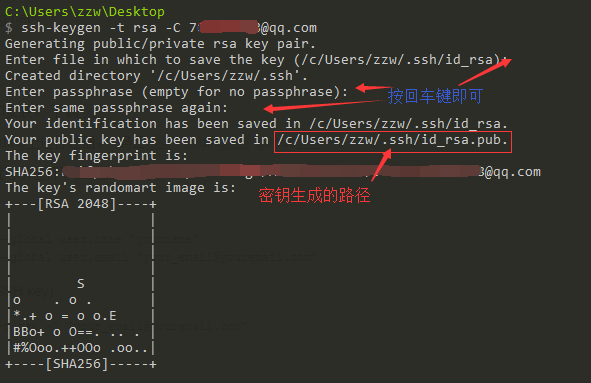
2.生成密钥(SSH key)
ssh-keygen -t rsa -C "your_email@youremail.com"
3.添加密钥(SSH key),并验证是否成功
添加密钥:将上一步骤生成的密钥即.ssh/id_rsa.pub中内容全部复制。在github的 Settings-->SSH and GPG keys-->New SSH key,key中粘贴复制的内容(Title自定义)。
验证:github输入第一条的命令,码云输入第二条
a.ssh -T git@github.com

b.ssh -T git@gitee.com
二、创建项目工程
1.远程仓库:在github中New repository 输入Repository name。[例如:TestDemo]
2.项目工程:在自己本地电脑上新建一个与github新项目工程同名的文件夹。[例如:TestDemo]
三、创建版本库
进入步骤二中的文件夹下,输入以下命令初始化仓库,若出现:Initialized empty Git repository in E:/** /**/.git/ 则表示创建成功[注意:此时会生成一个.git目录(隐藏目录)]
git init
四、连接远程仓库(下面两种方式都可以)
git remote add origin git@github.com:xxx.git

git remote add origin https:xxx.git
五、从远程仓库pull文件(若远程仓库没有文件,直接执行步骤六)
git pull origin master
六、将本地文件push到远程仓库(若没有文件则手动创建)
git status          查看工作目录的状态

git add <file>        将文件添加到暂存区

git commit -m "commnet"   提交更改,添加备注信息(此时将暂存区的信息提交到本地仓库)

git push origin master    将本地仓库的文件push到远程仓库(若 push 不成功,可加 -f 进行强推操作)
注: 至此已经完成了 远程与本地仓库的配置,若需要单独配置可见以下操作
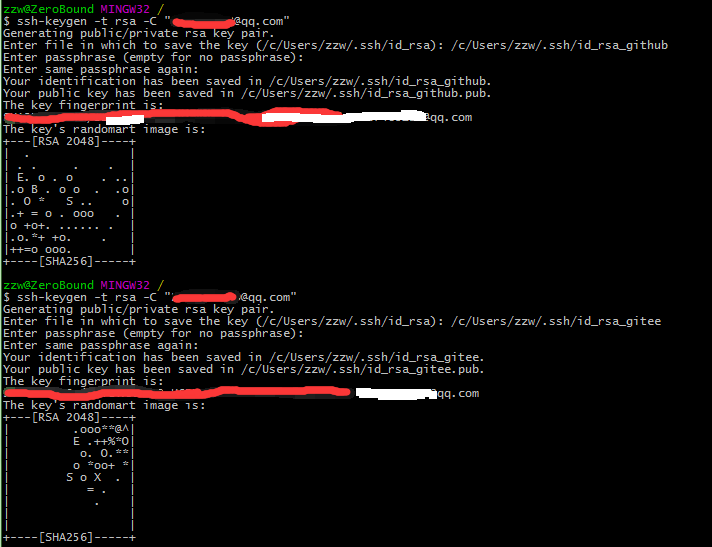
七、生成多个密钥(多个账户)配置不同的远程仓库【账号配置为局部变量】
a.添加新的ssh-key
如果报错:Could not open a connection to your authentication agent.无法连接到ssh agent;可执行ssh-agent bash命令后再执行ssh-add命令
ssh-add ./id_rsa_github
ssh-add ./id_rsa_gitee
b.配置config文件
在./ssh目录下若没有 config文件则创建
# 配置 github
Host github.com
HostName github.com
IdentityFile C:\\Users\\zzw\\.ssh\\id_rsa_github
PreferredAuthentications publickey
User ZeroBound
# 配置 gitee
Host gitee.com
HostName gitee.com
IdentityFile C:\\Users\\zzw\\.ssh\\id_rsa_gitee
PreferredAuthentications publickey
User zhzw
c.到github或码云上添加 密钥,之后验证是否成功
1.ssh -T git@github.com
2.ssh -T git@gitee.com
d.进入仓库目录配置用户名和邮箱
git config user.name "yourname"
git config user.email "your_email@youremail.com"
八、相关问题
Q1. git pull origin master 无法进行pull,出现如下提示:
git pull origin master
fatal: unable to access 'https://github.com/yourName/Demo.git': error setting certificate verify locations:
  CAfile: G:/Program Files/Git/mingw64/ssl/certs/ca-bundle.crt
  CApath: none
分析:ca-bundle.crt文件是证书文件。根据提示CApath:none 没有该文件,所以无法访问远程仓库
解决:修改为正确路径 或者 将证书验证设置false
git config --system http.sslcainfo E:/Program Files/Git/mingw64/ssl/certs/ca-bundle.crt

git config --system http.sslverify false
Q2.git pull origin master 出现如下提示:
fatal: refusing to merge unrelated histories
解决:如下操作即可解决
git pull origin master --allow-unrelated-histories
Q3.每次git push origin master 时都需要输入用户名和密码:
因为配置的时候使用的是https协议,所以每次都需要输入
git remote -v  查看远程连接

git remote rm origin  删除远程连接

git remote add origin git@github.com:xxx.git
Q4.git add . 时遇到 LF will be replaced by CRLF in public/Editor/src/less/text.less.
The file will have its original line endings in your working directory
解决:
git rm -r --cached .
git config core.autocrlf false
git add .
我正在使用Sequel构建一个愿望list系统。我有一个wishlists和itemstable和一个items_wishlists连接表(该名称是续集选择的名称)。items_wishlists表还有一个用于facebookid的额外列(因此我可以存储opengraph操作),这是一个NOTNULL列。我还有Wishlist和Item具有续集many_to_many关联的模型已建立。Wishlist类也有:selectmany_to_many关联的选项设置为select:[:items.*,:items_wishlists__facebook_action_id].有没有一种方法可以
我使用的是Firefox版本36.0.1和Selenium-Webdrivergem版本2.45.0。我能够创建Firefox实例,但无法使用脚本继续进行进一步的操作无法在60秒内获得稳定的Firefox连接(127.0.0.1:7055)错误。有人能帮帮我吗? 最佳答案 我遇到了同样的问题。降级到firefoxv33后一切正常。您可以找到旧版本here 关于ruby-无法在60秒内获得稳定的Firefox连接(127.0.0.1:7055),我们在StackOverflow上找到一个类
文章目录git常用命令(简介,详细参数往下看)Git提交代码步骤gitpullgitstatusgitaddgitcommitgitpushgit代码冲突合并问题方法一:放弃本地代码方法二:合并代码常用命令以及详细参数gitadd将文件添加到仓库:gitdiff比较文件异同gitlog查看历史记录gitreset代码回滚版本库相关操作远程仓库相关操作分支相关操作创建分支查看分支:gitbranch合并分支:gitmerge删除分支:gitbranch-ddev查看分支合并图:gitlog–graph–pretty=oneline–abbrev-commit撤消某次提交git用户名密码相关配置g
require"socket"server="irc.rizon.net"port="6667"nick="RubyIRCBot"channel="#0x40"s=TCPSocket.open(server,port)s.print("USERTesting",0)s.print("NICK#{nick}",0)s.print("JOIN#{channel}",0)这个IRC机器人没有连接到IRC服务器,我做错了什么? 最佳答案 失败并显示此消息::irc.shakeababy.net461*USER:Notenoughparame
考虑一下:现在这些情况:#output:http://domain.com/?foo=1&bar=2#output:http://domain.com/?foo=1&bar=2#output:http://domain.com/?foo=1&bar=2#output:http://domain.com/?foo=1&bar=2我需要用其他字符串输出URL。我如何保证&符号不会被转义?由于我无法控制的原因,我无法发送&。求助!把我的头发拉到这里:\编辑:为了澄清,我实际上有一个像这样的数组:@images=[{:id=>"fooid",:url=>"http://
我有一个super简单的脚本,它几乎包含了FayeWebSocketGitHub页面上用于处理关闭连接的内容:ws=Faye::WebSocket::Client.new(url,nil,:headers=>headers)ws.on:opendo|event|p[:open]#sendpingcommand#sendtestcommand#ws.send({command:'test'}.to_json)endws.on:messagedo|event|#hereistheentrypointfordatacomingfromtheserver.pJSON.parse(event.d
关于如何使用git设置类似Dropbox的服务,您有什么建议吗?您认为git是解决此问题的合适工具吗?我在考虑使用git+rush解决方案,你觉得怎么样? 最佳答案 检查这个开源项目:https://github.com/hbons/SparkleShare来自项目的自述文件:Howdoesitwork?SparkleSharecreatesaspecialfolderonyourcomputer.Youcanaddremotelyhostedfolders(or"projects")tothisfolder.Theseprojec
我编写了一个非常简单的“部署”脚本,作为我的裸git存储库中的post-updateHook运行。变量如下livedomain=~/mydomain.comstagingdomain=~/stage.mydomain.comgitrepolocation=~/git.mydomain.com/thisrepo.git(bare)core=~/git.mydomain.com/thisrepo.gitcore==addedremoteintoeachlive&stagegitslive和stage都初始化了gitrepos(非裸),我已经将我的裸仓库作为远程添加到它们中的每一个(名为co
我正在安装gitlabhq,并且在Gemfile中有对某些资源的“git://...”的引用。但是,我在公司防火墙后面,所以我必须使用http://。我可以手动编辑Gemfile,但我想知道是否有另一种方法告诉bundler使用http://作为git存储库? 最佳答案 您可以通过运行gitconfig--globalurl."https://".insteadOfgit://或通过将以下内容添加到~/.gitconfig:[url"https://"]insteadOf=git://
Activeadmingem已添加到我的rails项目中,但每次我尝试安装railsgactive_admin:install时,我都会收到类似的错误git://github.com/activeadmin/activeadmin.git(atmaster)isnotyetcheckedout.Runbundleinstallfirst.我肯定在运行“railsgactive_admin:install”之前运行了bundle。运行“bundleshow”后,我看到我已将“*activeadmin(1.0.0.pre3f916d6)”添加到我的项目中,但不断收到此错误消息。我的gem文
