另一篇:ffmpeg硬编解码 Inter QSV
常见的硬件编码包括Nvidia GPU与Intel QSV两种,还有一些嵌入式平台如树莓派,瑞芯微等。
首先理解一下概念,Nvidia中文名英伟达是一个厂商名字,GPU则是这个厂商生产的显卡里的一个个图像处理的逻辑单元,它主要是作图片处理,但有逻辑处理的能力,所以可以替cpu分担一些逻辑处理压力。
了解一下ffmpeg对Nvidia的GPU编码支持哪些参数,可以通过
ffmpeg -h encoder=h264_nvenc
可以看到编码的参数与x264相比有些类似,但少很多,不过关键的都在。
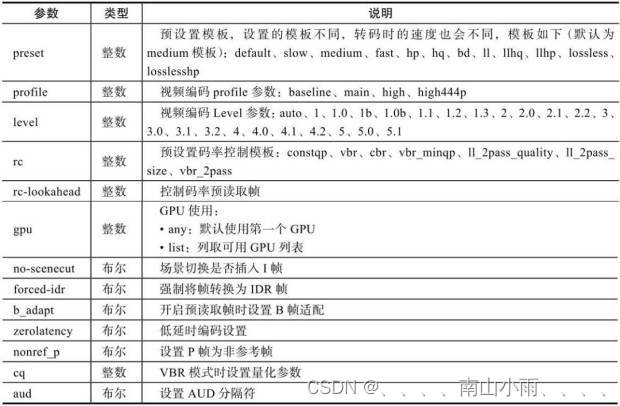 解码时ffmpeg对它的参数支持查看:
ffmpeg -h decoder=h264_cuvid
其中同时可以看到编码支持的像素格式包括:
Supported pixel formats: yuv420p nv12 p010le yuv444p p016le
yuv444p16le bgr0 rgb0 cuda
解码支持的像素格式很少:
Supported pixel formats: cuda nv12 p010le
举一个硬件编解码的例子:
ffmpeg -hwaccel cuvid -vcodec h264_cuvid -i input.mp4 -vf scale_npp=1920:1080 -vcodec h264_nvenc -acodec copy -f mp4 -y output.mp4
解码支持的参数:
Decoder h264_cuvid [Nvidia CUVID H264 decoder]:
    General capabilities: delay avoidprobe hardware
    Threading capabilities: none
    Supported hardware devices: cuda
    Supported pixel formats: cuda nv12 p010le p016le
h264_cuvid AVOptions:
  -deint             <int>        .D.V...... Set deinterlacing mode (from 0 to 2) (default weave)
     weave           0            .D.V...... Weave deinterlacing (do nothing)
     bob             1            .D.V...... Bob deinterlacing
     adaptive        2            .D.V...... Adaptive deinterlacing
  -gpu               <string>     .D.V...... GPU to be used for decoding
  -surfaces          <int>        .D.V...... Maximum surfaces to be used for decoding (from 0 to INT_MAX) (default 25)
  -drop_second_field <boolean>    .D.V...... Drop second field when deinterlacing (default false)
  -crop              <string>     .D.V...... Crop (top)x(bottom)x(left)x(right)
  -resize            <string>     .D.V...... Resize (width)x(height)
编码支持的参数:
Encoder h264_nvenc [NVIDIA NVENC H.264 encoder]:
    General capabilities: delay hardware
    Threading capabilities: none
    Supported hardware devices: cuda cuda
    Supported pixel formats: yuv420p nv12 p010le yuv444p p016le yuv444p16le bgr0 rgb0 cuda
h264_nvenc AVOptions:
  -preset            <int>        E..V...... Set the encoding preset (from 0 to 11) (default medium)
     default         0            E..V......
     slow            1            E..V...... hq 2 passes
     medium          2            E..V...... hq 1 pass
     fast            3            E..V...... hp 1 pass
     hp              4            E..V......
     hq              5            E..V......
     bd              6            E..V......
     ll              7            E..V...... low latency
     llhq            8            E..V...... low latency hq
     llhp            9            E..V...... low latency hp
     lossless        10           E..V......
     losslesshp      11           E..V......
  -profile           <int>        E..V...... Set the encoding profile (from 0 to 3) (default main)
     baseline        0            E..V......
     main            1            E..V......
     high            2            E..V......
     high444p        3            E..V......
  -level             <int>        E..V...... Set the encoding level restriction (from 0 to 51) (default auto)
     auto            0            E..V......
     1               10           E..V......
     1.0             10           E..V......
     1b              9            E..V......
     1.0b            9            E..V......
     1.1             11           E..V......
     1.2             12           E..V......
     1.3             13           E..V......
     2               20           E..V......
     2.0             20           E..V......
     2.1             21           E..V......
     2.2             22           E..V......
     3               30           E..V......
     3.0             30           E..V......
     3.1             31           E..V......
     3.2             32           E..V......
     4               40           E..V......
     4.0             40           E..V......
     4.1             41           E..V......
     4.2             42           E..V......
     5               50           E..V......
     5.0             50           E..V......
     5.1             51           E..V......
  -rc                <int>        E..V...... Override the preset rate-control (from -1 to INT_MAX) (default -1)
     constqp         0            E..V...... Constant QP mode
     vbr             1            E..V...... Variable bitrate mode
     cbr             2            E..V...... Constant bitrate mode
     vbr_minqp       8388612      E..V...... Variable bitrate mode with MinQP (deprecated)
     ll_2pass_quality 8388616      E..V...... Multi-pass optimized for image quality (deprecated)
     ll_2pass_size   8388624      E..V...... Multi-pass optimized for constant frame size (deprecated)
     vbr_2pass       8388640      E..V...... Multi-pass variable bitrate mode (deprecated)
     cbr_ld_hq       8            E..V...... Constant bitrate low delay high quality mode
     cbr_hq          16           E..V...... Constant bitrate high quality mode
     vbr_hq          32           E..V...... Variable bitrate high quality mode
  -rc-lookahead      <int>        E..V...... Number of frames to look ahead for rate-control (from 0 to INT_MAX) (default 0)
  -surfaces          <int>        E..V...... Number of concurrent surfaces (from 0 to 64) (default 0)
  -cbr               <boolean>    E..V...... Use cbr encoding mode (default false)
  -2pass             <boolean>    E..V...... Use 2pass encoding mode (default auto)
  -gpu               <int>        E..V...... Selects which NVENC capable GPU to use. First GPU is 0, second is 1, and so on. (from -2 to INT_MAX) (default any)
     any             -1           E..V...... Pick the first device available
     list            -2           E..V...... List the available devices
  -delay             <int>        E..V...... Delay frame output by the given amount of frames (from 0 to INT_MAX) (default INT_MAX)
  -no-scenecut       <boolean>    E..V...... When lookahead is enabled, set this to 1 to disable adaptive I-frame insertion at scene cuts (default false)
  -forced-idr        <boolean>    E..V...... If forcing keyframes, force them as IDR frames. (default false)
  -b_adapt           <boolean>    E..V...... When lookahead is enabled, set this to 0 to disable adaptive B-frame decision (default true)
  -spatial-aq        <boolean>    E..V...... set to 1 to enable Spatial AQ (default false)
  -spatial_aq        <boolean>    E..V...... set to 1 to enable Spatial AQ (default false)
  -temporal-aq       <boolean>    E..V...... set to 1 to enable Temporal AQ (default false)
  -temporal_aq       <boolean>    E..V...... set to 1 to enable Temporal AQ (default false)
  -zerolatency       <boolean>    E..V...... Set 1 to indicate zero latency operation (no reordering delay) (default false)
  -nonref_p          <boolean>    E..V...... Set this to 1 to enable automatic insertion of non-reference P-frames (default false)
  -strict_gop        <boolean>    E..V...... Set 1 to minimize GOP-to-GOP rate fluctuations (default false)
  -aq-strength       <int>        E..V...... When Spatial AQ is enabled, this field is used to specify AQ strength. AQ strength scale is from 1 (low) - 15 (aggressive) (from 1 to 15) (default 8)
  -cq                <float>      E..V...... Set target quality level (0 to 51, 0 means automatic) for constant quality mode in VBR rate control (from 0 to 51) (default 0)
  -aud               <boolean>    E..V...... Use access unit delimiters (default false)
  -bluray-compat     <boolean>    E..V...... Bluray compatibility workarounds (default false)
  -init_qpP          <int>        E..V...... Initial QP value for P frame (from -1 to 51) (default -1)
  -init_qpB          <int>        E..V...... Initial QP value for B frame (from -1 to 51) (default -1)
  -init_qpI          <int>        E..V...... Initial QP value for I frame (from -1 to 51) (default -1)
  -qp                <int>        E..V...... Constant quantization parameter rate control method (from -1 to 51) (default -1)
  -weighted_pred     <int>        E..V...... Set 1 to enable weighted prediction (from 0 to 1) (default 0)
  -coder             <int>        E..V...... Coder type (from -1 to 2) (default default)
     default         -1           E..V......
     auto            0            E..V......
     cabac           1            E..V......
     cavlc           2            E..V......
     ac              1            E..V......
     vlc             2            E..V......
  -b_ref_mode        <int>        E..V...... Use B frames as references (from 0 to 2) (default disabled)
     disabled        0            E..V...... B frames will not be used for reference
     each            1            E..V...... Each B frame will be used for reference
     middle          2            E..V...... Only (number of B frames)/2 will be used for reference
  -a53cc             <boolean>    E..V...... Use A53 Closed Captions (if available) (default true)
  -dpb_size          <int>        E..V...... Specifies the DPB size used for encoding (0 means automatic) (from 0 to INT_MAX) (default 0)


2022/8/4更新支持加入水印水印必须包含透明图像,并且水印图像大小要等于原图像的大小pythonconvert_image_to_video.py-f30-mwatermark.pngim_dirout.mkv2022/6/21更新让命令行参数更加易用新的命令行使用方法pythonconvert_image_to_video.py-f30im_dirout.mkvFFMPEG命令行转换一组JPG图像到视频时,是将这组图像视为MJPG流。我需要转换一组PNG图像到视频,FFMPEG就不认了。pyav内置了ffmpeg库,不需要系统带有ffmpeg工具因此我使用ffmpeg的python包装p
我正在尝试使用以下代码通过将ffmpeg实用程序作为子进程运行并获取其输出并解析它来确定视频分辨率:IO.popen'ffmpeg-i'+path_to_filedo|ffmpegIO|#myparsegoeshereend...但是ffmpeg输出仍然连接到标准输出并且ffmepgIO.readlines是空的。ffmpeg实用程序是否需要一些特殊处理?或者还有其他方法可以获得ffmpeg输出吗?我在WinXP和FedoraLinux下测试了这段代码-结果是一样的。 最佳答案 要跟进mouviciel的评论,您需要使用类似pope
我有一个使用postgresql的Rails4应用程序。我还有一个backbone.js应用程序,可将JSON推送到Rails4应用程序。这是我的Controller:defcreate@product=Product.new(ActiveSupport::JSON.decodeproduct_params)respond_todo|format|if@product.saveformat.json{renderaction:'show',status::created,location:@product}elseformat.json{renderjson:@product.erro
我运行的是OSX,对视频转换一无所知。但我有大约200个视频都是mp4格式,无法在Firefox中播放。我需要将它们转换为ogg才能使用html5视频标签。这些文件位于一个文件夹结构中,这使得一次一个地处理一个文件变得困难。我希望bash命令或Ruby命令遍历所有子文件夹并找到所有.mp4并转换它们。我找到了一份关于如何使用Google执行此操作的引用资料:http://athmasagar.wordpress.com/2011/05/12/a-bash-script-to-convert-mp4-files-to-oggogv/#!/bin/bashforfin$(ls*mp4|se
目录需求基于JavaCV跨平台执行ffmpeg命令[^1]坑一内存不足坑二多个ffmpeg进程并行导致IO负载大,进而导致ioerror?坑三使用Java操作ffmpeg时,有时会卡死坑四Process的waitFor死锁问题及解决办法需求给透明背景的视频自动叠加一张背景图片基于JavaCV跨平台执行ffmpeg命令1我测试发现的本需求的最小依赖:dependency>groupId>org.bytedecogroupId>artifactId>ffmpeg-platform-gplartifactId>version>5.0-1.5.7version>dependency>核心代码:Stri
我正在尝试序列化和反序列化哈希。当散列被反序列化时,键被去符号化;例如不是更多:一个,而是“一个”。从Rails控制台:>>h={:one=>1,:two=>"two"}{:one=>1,:two=>"two"}>>j=ActiveSupport::JSON.encode(h)"{\"one\":1,\"two\":\"two\"}">>h2=ActiveSupport::JSON.decode(j){"one"=>1,"two"=>"two"}>>h2[:one]nil>>h[:one]1我现在已经切换到使用Marshal.dump/load。但是,我想把它扔出去看看是否有办法将它保
基于ffmpeg的视频处理与MPEG的压缩试验ffmpeg介绍与基础知识对提取到的图像进行处理RGB并转化为YUV对YUV进行DCT变换对每个8*8的图像块进行进行量化操作ffmpeg介绍与基础知识ffmpeg是视频和图像处理的工具包,它的下载网址是https://ffmpeg.org/download.html。页面都是英文且下载正确的包的路径笔者找的时候还费点劲,这里记录一下也方便读者。选中这个Windows下的下午files,选择第一个这里有essential和full版本的,大家根据需要自行选择版本包下载下载好之后,在官网上下载ffmpeg的full包,一共300+MB解压,然后安装b
我正在上介绍性软件开发课,我的作业是创建一个带有两个参数的剪刀石头布程序(石头,纸)等,并返回获胜的arg。现在,如果我可以使用条件语句,我会快速解决这个问题,但作业说我们需要知道的一切都在前三个ruby教科书的章节,这些章节不包括条件!没有它们是否可以创建这个程序?或者他只是希望我们足智多谋并使用条件句?这是一个非常简单的条件分配......我在想我可能在这里遗漏了一些东西。编辑:我正在考虑那个chmod数字系统,并认为通过该加法系统可能有解决方案...... 最佳答案 这是一个只使用哈希的方法:RULES={:rock=>{:r
我正在尝试解码一些HTML实体,例如'<'成为'.我有一个旧gem(html_helpers),但它似乎已经被遗弃了两次。有什么建议吗?我需要在模型中使用它。 最佳答案 要对字符进行编码,可以使用CGI.escapeHTML:string=CGI.escapeHTML('test"escaping"')要解码它们,有CGI.unescapeHTML:CGI.unescapeHTML("test"unescaping"<characters>")当然,在此之前你需要包含CGI库:requi
我正在使用carrierwave将电影上传到amazons3,效果非常好。现在我想在上传时或上传后给电影加水印,我不知道,最好的方法是什么?我试过这个:movie_controller.rbAction上传视频movie=FFMPEG::Movie.new(@vid.video.url)puts"........................................"putsmovie.inspectif@vid.save只是为了查明视频是否是从stremio中捕获的。但后来我得到了找不到电影的错误,问题是它没有在amazons3存储桶中查找,它在我的本地服务器上查找Nosu
