原文网址:Spring Data Elasticsearch--使用/教程/实例_IT利刃出鞘的博客-CSDN博客
说明
spring-data-elasticsearch是比较好用的一个elasticsearch客户端,本文介绍如何使用它来操作ES。本文使用spring-boot-starter-data-elasticsearch,它内部会引入spring-data-elasticsearch。
Spring Data ElasticSearch有下边这几种方法操作ElasticSearch:
本文仅展示使用ElasticsearchRepository的操作。
官网
官网文档:https://docs.spring.io/spring-data/elasticsearch/docs/current/reference/html/
本文依赖版本
spring-data-elasticsearch:4.0的比较重大的修改:4.0对应支持ES版本为7.6.2,并且弃用了对TransportClient的使用(默认使用High Level REST Client)。
ES从7.x版本开始弃用了对TransportClient的使用,并将会在8.0版本开始完全删除TransportClient。
TransportClient:使用9300端口通过TCP与ES连接,不好用,且有高并发的问题。
High Level REST Client:使用9200端口通过HTTP与ES连接,很好用,性能高。
版本对应大全
Elasticsearch 对于版本的兼容性要求很高,大版本之间是不兼容的。
spring-data-elasticsearch与ES、SpringBoot的对应关系如下。截取自官网

详细的版本对应如下:
| Elasticsearch1(Spring Data Elasticsearch 1) | |||
|---|---|---|---|
| 序号 | Elasticsearch版本 | Spring Data Elasticsearch版本 | spring-boot-starter-data-elasticsearch版本 |
| 1 | 1.1.1 | 1.0.0.RELEASE | |
| 2 | 1.3.2 | 1.1.0.RELEASE | |
| 3 | 1.4.4 | 1.2.0.RELEASE | |
| 4 | 1.5.2 | 1.3.0.RELEASE/1.3.x | |
| 5 | 1.7.3 | 1.4.0.M1 | |
| Elasticsearch 2(Spring Data Elasticsearch 2)(Sring Boot 1) | |||
| 序号 | Elasticsearch版本 | Spring Data Elasticsearch版本 | spring-boot-starter-data-elasticsearch版本 |
| 1 | 2.2.0 | 2.0.0.RELEASE/2.0.x | |
| 2 | 2.4.0 | 2.0.4.RELEASE/2.1.x | 1.5.x |
| Elasticsearch 5(Spring Data Elasticsearch 3)(Sring Boot 2) | |||
| 序号 | Elasticsearch版本 | Spring Data Elasticsearch版本 | spring-boot-starter-data-elasticsearch版本 |
| 1 | 5.4.0 | 3.0.0.M4 | |
| 2 | 5.5.0 | 3.0.0.RC2/3.0.x | 2.0.x |
| Elasticsearch 6(Spring Data Elasticsearch 3)(Sring Boot 2) | |||
| 序号 | Elasticsearch版本 | Spring Data Elasticsearch版本 | spring-boot-starter-data-elasticsearch版本 |
| 1 | 6.2.2 | 3.1.1.RELEASE/3.1.3.RELEASE /3.1.x | 2.1.1.RELEASE/2.1.x |
| 2 | 6.8.12 | 3.2.x | 2.2.x |
| Elasticsearch 7(Spring Data Elasticsearch 3)(Sring Boot 2) | |||
| 序号 | Elasticsearch版本 | Spring Data Elasticsearch版本 | spring-boot-starter-data-elasticsearch版本 |
| 1 | 7.6.2 | 4.0.x | 2.3.x |
| 2 | 7.9.3 | 4.1.6/4.1.8/4.1.x | 2.4.4/2.4.5/2.4.x |
| 3 | 7.12.0 | 4.2.x | 2.5.x |
| 4 | 7.13.3 | 4.3.x | 2.5.x |
主要是这个依赖:
<dependency>
    <groupId>org.springframework.boot</groupId>
    <artifactId>spring-boot-starter-data-elasticsearch</artifactId>
</dependency>
下边贴出我的整个pom.xml
<?xml version="1.0" encoding="UTF-8"?>
<project xmlns="http://maven.apache.org/POM/4.0.0" xmlns:xsi="http://www.w3.org/2001/XMLSchema-instance"
         xsi:schemaLocation="http://maven.apache.org/POM/4.0.0 https://maven.apache.org/xsd/maven-4.0.0.xsd">
    <modelVersion>4.0.0</modelVersion>
    <parent>
        <groupId>org.springframework.boot</groupId>
        <artifactId>spring-boot-starter-parent</artifactId>
        <version>2.3.12.RELEASE</version>
        <relativePath/> <!-- lookup parent from repository -->
    </parent>
    <groupId>com.example</groupId>
    <artifactId>demo_spring-data-elasticsearch</artifactId>
    <version>0.0.1-SNAPSHOT</version>
    <name>demo_spring-data-elasticsearch</name>
    <description>demo_spring-data-elasticsearch</description>
    <properties>
        <java.version>1.8</java.version>
    </properties>
    <dependencies>
        <dependency>
            <groupId>org.springframework.boot</groupId>
            <artifactId>spring-boot-starter-web</artifactId>
        </dependency>

        <dependency>
            <groupId>org.projectlombok</groupId>
            <artifactId>lombok</artifactId>
            <optional>true</optional>
        </dependency>

        <dependency>
            <groupId>org.springframework.boot</groupId>
            <artifactId>spring-boot-starter-data-elasticsearch</artifactId>
        </dependency>

        <dependency>
            <groupId>org.springframework.boot</groupId>
            <artifactId>spring-boot-starter-test</artifactId>
            <scope>test</scope>
        </dependency>

        <dependency>
            <groupId>com.github.xiaoymin</groupId>
            <artifactId>knife4j-spring-boot-starter</artifactId>
            <version>3.0.3</version>
        </dependency>
    </dependencies>

    <build>
        <plugins>
            <plugin>
                <groupId>org.springframework.boot</groupId>
                <artifactId>spring-boot-maven-plugin</artifactId>
                <configuration>
                    <excludes>
                        <exclude>
                            <groupId>org.projectlombok</groupId>
                            <artifactId>lombok</artifactId>
                        </exclude>
                    </excludes>
                </configuration>
            </plugin>
        </plugins>
    </build>

</project>
配置(application.yml )
spring:
  elasticsearch:
    rest:
      uris: http://127.0.0.1:9200
      # username: xxx
      # password: yyy
      # connection-timeout: 1
      # read-timeout: 30

# 上边是客户端High Level REST Client的配置,推荐使用。

# 下边是reactive客户端的配置,非官方,不推荐。
#  data:
#    elasticsearch:
#      client:
#        reactive:
#          endpoints: 127.0.0.1:9200
#          username: xxx
#          password: yyy
#          connection-timeout: 1
#          socket-timeout: 30
#          use-ssl: false
索引结构
http://localhost:9200/
PUT blog
{
    "settings": {
        "number_of_shards": 5,
        "number_of_replicas": 1
    },
    "mappings": {
        "properties": {
            "id":{
                "type":"long"
            },
            "title": {
                "type": "text"
            },
            "content": {
                "type": "text"
            },
            "author":{
                "type": "text"
            },
            "category":{
                "type": "keyword"
            },
            "createTime": {
                "type": "date",
                "format":"yyyy-MM-dd HH:mm:ss.SSS||yyyy-MM-dd'T'HH:mm:ss.SSS||yyyy-MM-dd HH:mm:ss||epoch_millis"
            },
            "updateTime": {
                "type": "date",
                "format":"yyyy-MM-dd HH:mm:ss.SSS||yyyy-MM-dd'T'HH:mm:ss.SSS||yyyy-MM-dd HH:mm:ss||epoch_millis"
            },
            "status":{
                "type":"integer"
            },
            "serialNum": {
                "type": "keyword"
            }
        }
    }
}Entity
package com.example.demo.entity;

import com.fasterxml.jackson.annotation.JsonFormat;
import lombok.Data;
import org.springframework.data.annotation.Id;
import org.springframework.data.elasticsearch.annotations.DateFormat;
import org.springframework.data.elasticsearch.annotations.Document;
import org.springframework.data.elasticsearch.annotations.Field;
import org.springframework.data.elasticsearch.annotations.FieldType;

import java.util.Date;

@Data
@Document(indexName = "blog", shards = 1, replicas = 1)
public class Blog {
    //此项作为id,不会写到_source里边。
    @Id
    private Long blogId;

    @Field(type = FieldType.Text)
    private String title;

    @Field(type = FieldType.Text)
    private String content;

    @Field(type = FieldType.Text)
    private String author;

    //博客所属分类。
    @Field(type = FieldType.Keyword)
    private String category;

    //0: 未发布(草稿) 1:已发布 2:已删除
    @Field(type = FieldType.Integer)
    private int status;

    //序列号,用于给外部展示的id
    @Field(type = FieldType.Keyword)
    private String serialNum;

    @JsonFormat(pattern = "yyyy-MM-dd HH:mm:ss.SSS")
    @Field(type= FieldType.Date, format= DateFormat.custom, pattern="yyyy-MM-dd HH:mm:ss.SSS")
    private Date createTime;

    @JsonFormat(pattern = "yyyy-MM-dd HH:mm:ss.SSS")
    @Field(type=FieldType.Date, format=DateFormat.custom, pattern="yyyy-MM-dd HH:mm:ss.SSS")
    private Date updateTime;
}
Dao
package com.example.demo.dao;

import com.example.demo.entity.Blog;
import org.springframework.data.elasticsearch.repository.ElasticsearchRepository;

public interface BlogRepository extends ElasticsearchRepository<Blog, Long> {

}接口的继承

所有方法

代码
package com.example.demo.controller;

import com.example.demo.dao.BlogRepository;
import com.example.demo.entity.Blog;
import io.swagger.annotations.Api;
import io.swagger.annotations.ApiOperation;
import org.springframework.beans.factory.annotation.Autowired;
import org.springframework.web.bind.annotation.GetMapping;
import org.springframework.web.bind.annotation.PostMapping;
import org.springframework.web.bind.annotation.RequestMapping;
import org.springframework.web.bind.annotation.RestController;

import java.util.ArrayList;
import java.util.Date;
import java.util.List;

@Api(tags = "增删改查(文档)")
@RestController
@RequestMapping("crud")
public class CrudController {
    @Autowired
    private BlogRepository blogRepository;

    @ApiOperation("添加单个文档")
    @PostMapping("addDocument")
    public Blog addDocument() {
        Long id = 1L;
        Blog blog = new Blog();
        blog.setBlogId(id);
        blog.setTitle("Spring Data ElasticSearch学习教程" + id);
        blog.setContent("这是添加单个文档的实例" + id);
        blog.setAuthor("Tony");
        blog.setCategory("ElasticSearch");
        blog.setCreateTime(new Date());
        blog.setStatus(1);
        blog.setSerialNum(id.toString());

        return blogRepository.save(blog);
    }

    @ApiOperation("添加多个文档")
    @PostMapping("addDocuments")
    public Object addDocuments(Integer count) {
        List<Blog> blogs = new ArrayList<>();
        for (int i = 1; i <= count; i++) {
            Long id = (long)i;
            Blog blog = new Blog();
            blog.setBlogId(id);
            blog.setTitle("Spring Data ElasticSearch学习教程" + id);
            blog.setContent("这是添加单个文档的实例" + id);
            blog.setAuthor("Tony");
            blog.setCategory("ElasticSearch");
            blog.setCreateTime(new Date());
            blog.setStatus(1);
            blog.setSerialNum(id.toString());
            blogs.add(blog);
        }

        return blogRepository.saveAll(blogs);
    }

    /**
     * 跟新增是同一个方法。若id已存在,则修改。
     * 无法只修改某个字段,只能覆盖所有字段。若某个字段没有值,则会写入null。
     * @return 成功写入的数据
     */
    @ApiOperation("修改单个文档")
    @PostMapping("editDocument")
    public Blog editDocument() {
        Long id = 1L;
        Blog blog = new Blog();
        blog.setBlogId(id);
        blog.setTitle("Spring Data ElasticSearch学习教程" + id);
        blog.setContent("这是修改单个文档的实例" + id);
        // blog.setAuthor("Tony");
        // blog.setCategory("ElasticSearch");
        // blog.setCreateTime(new Date());
        // blog.setStatus(1);
        // blog.setSerialNum(id.toString());

        return blogRepository.save(blog);
    }

    @ApiOperation("查找单个文档")
    @GetMapping("findById")
    public Blog findById(Long id) {
        return blogRepository.findById(id).get();
    }

    @ApiOperation("删除单个文档")
    @PostMapping("deleteDocument")
    public String deleteDocument(Long id) {
        blogRepository.deleteById(id);
        return "success";
    }

    @ApiOperation("删除所有文档")
    @PostMapping("deleteDocumentAll")
    public String deleteDocumentAll() {
        blogRepository.deleteAll();
        return "success";
    }
}
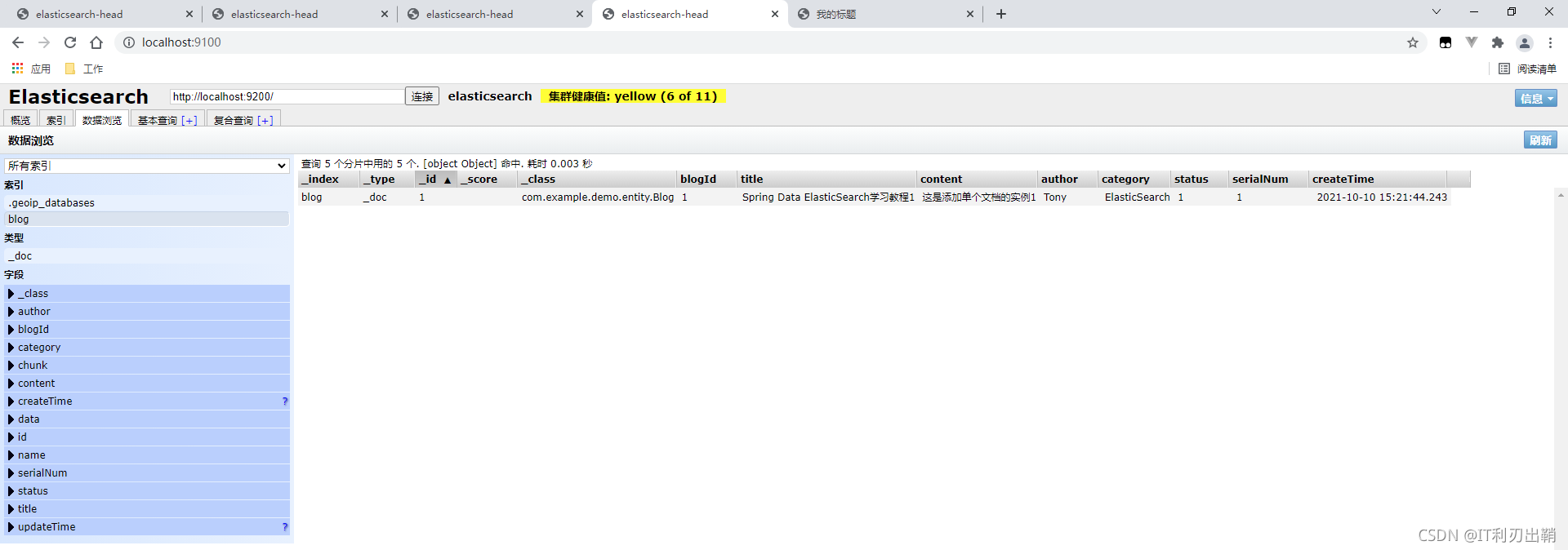
测试1:添加单个文档
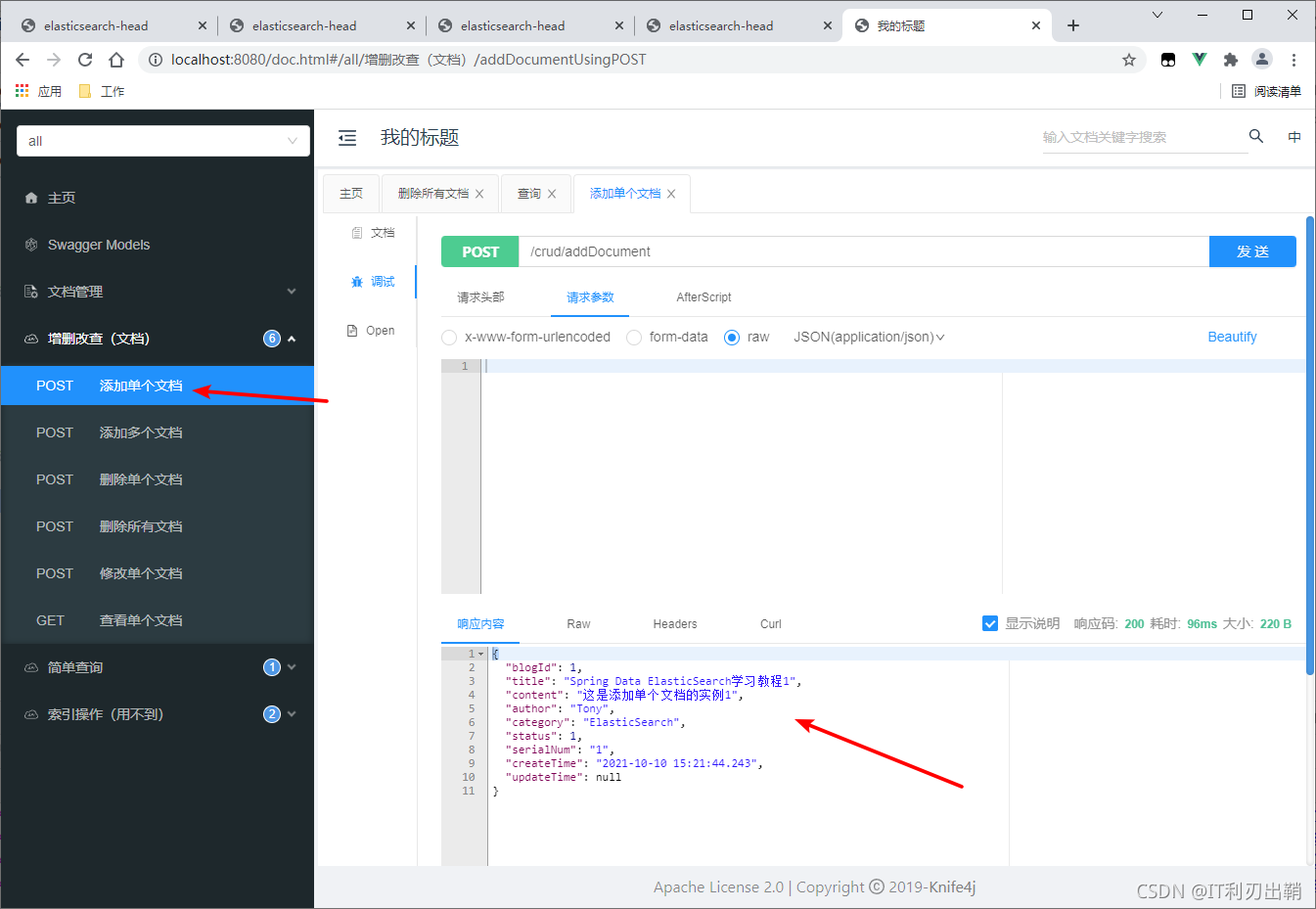
head结果
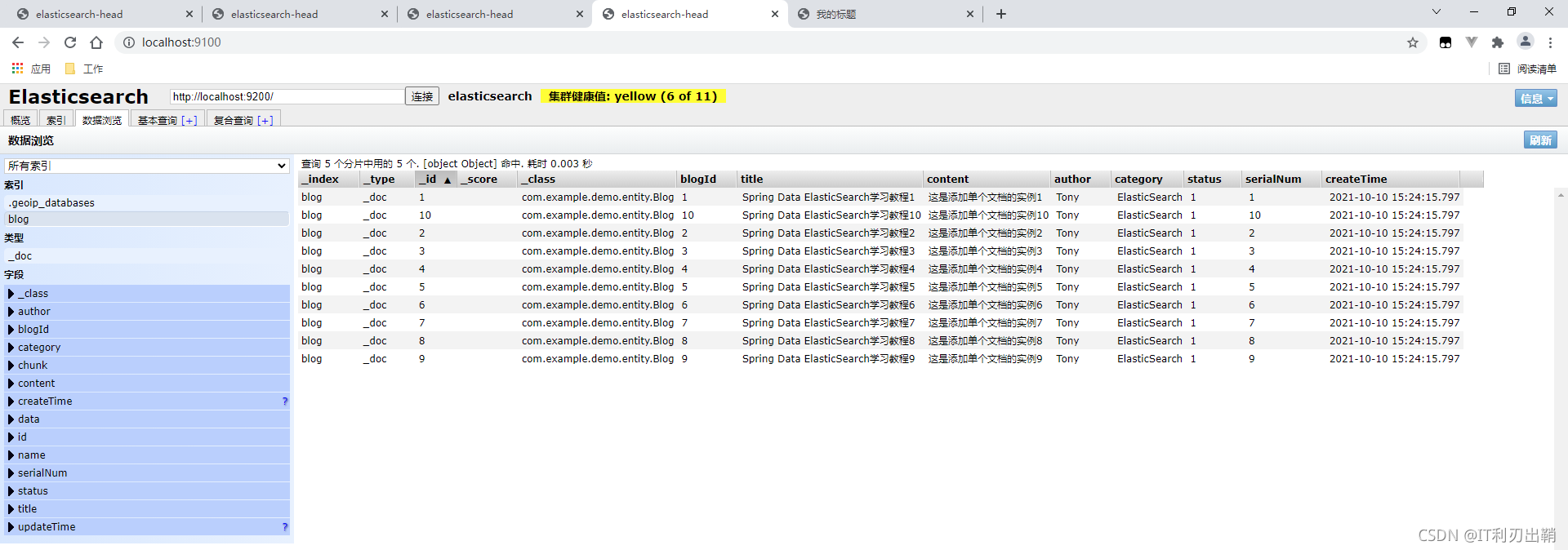
测试2:添加多个文档
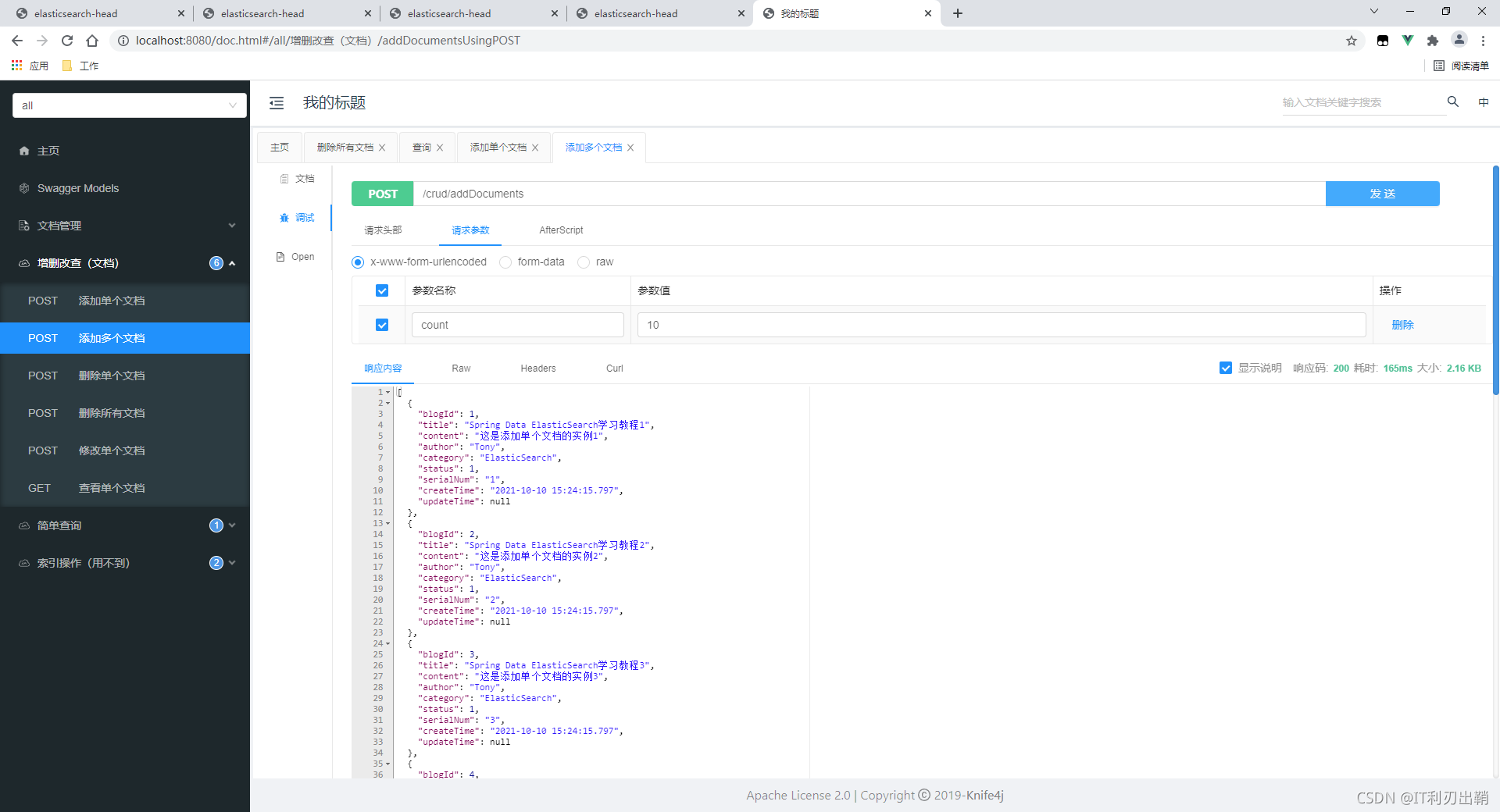
head结果
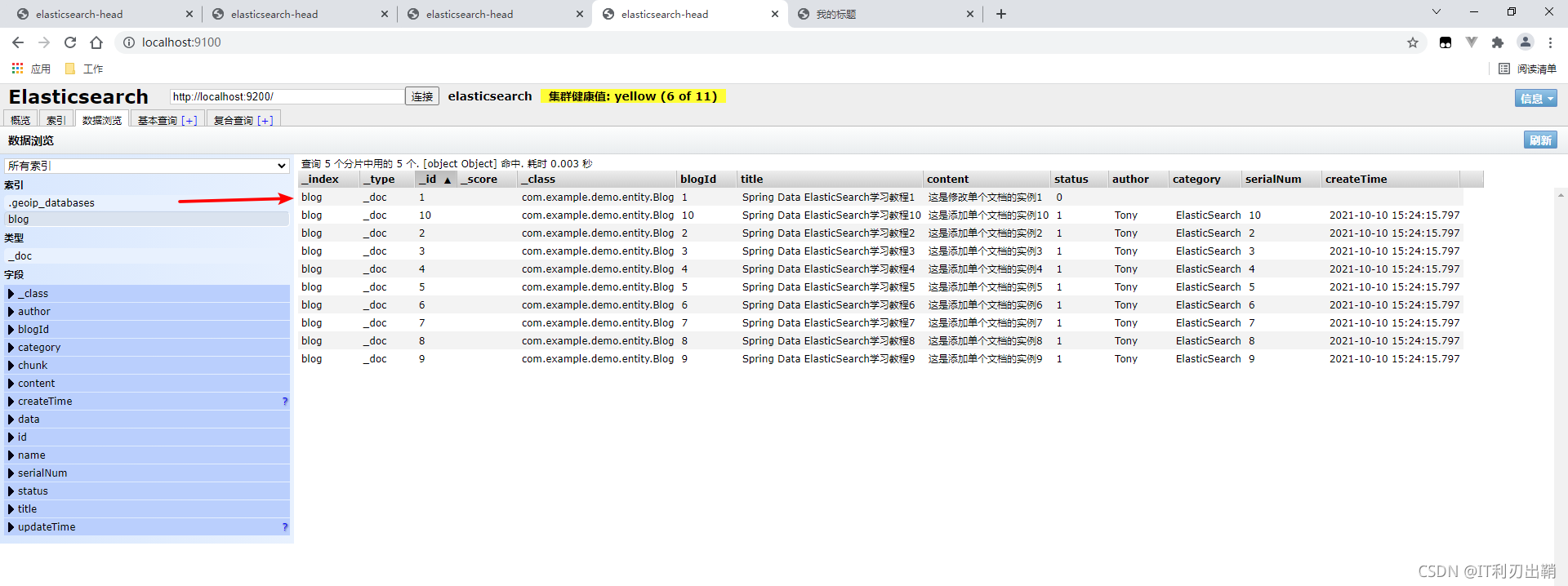
测试3:修改单个文档
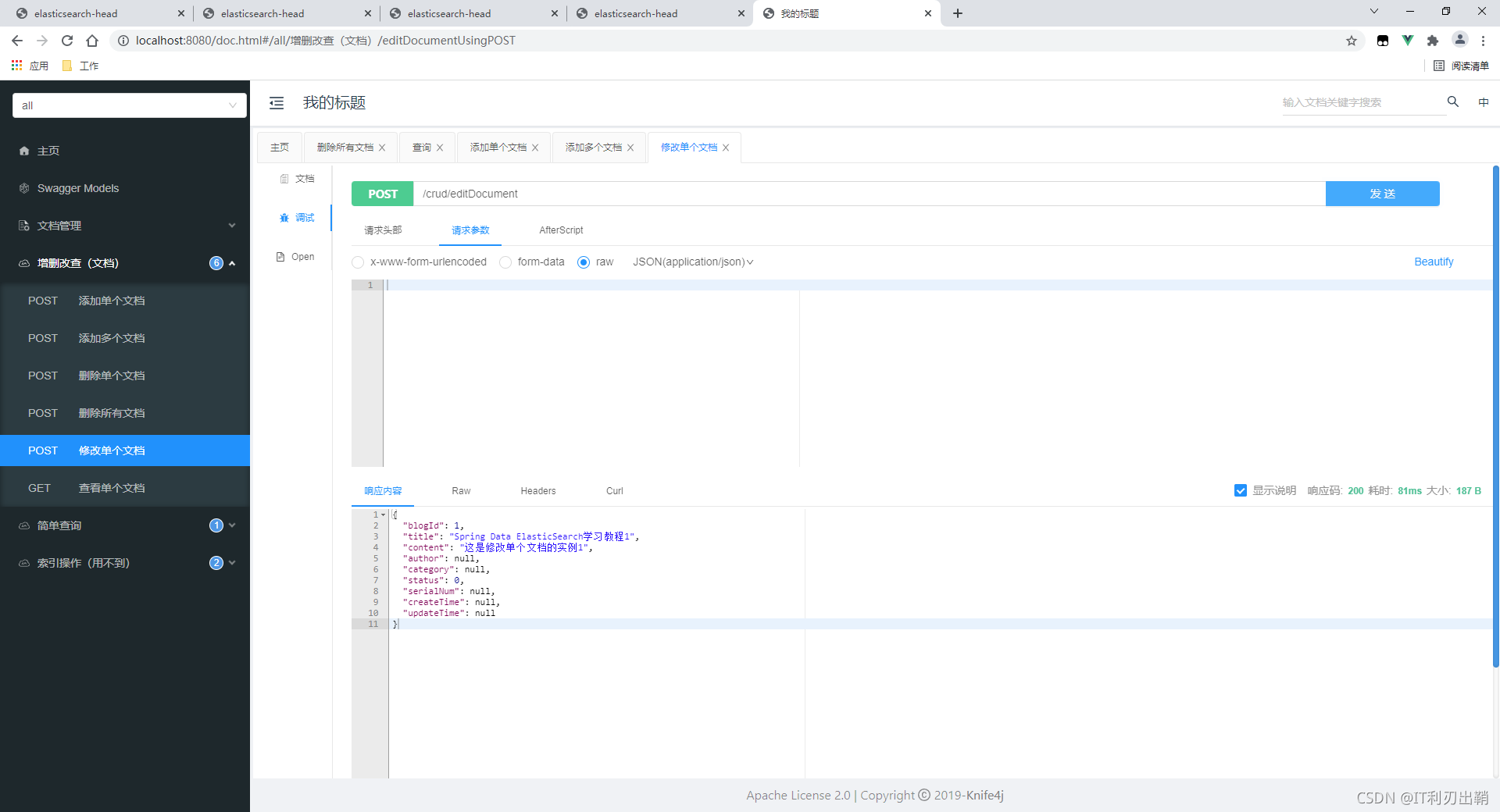
head结果
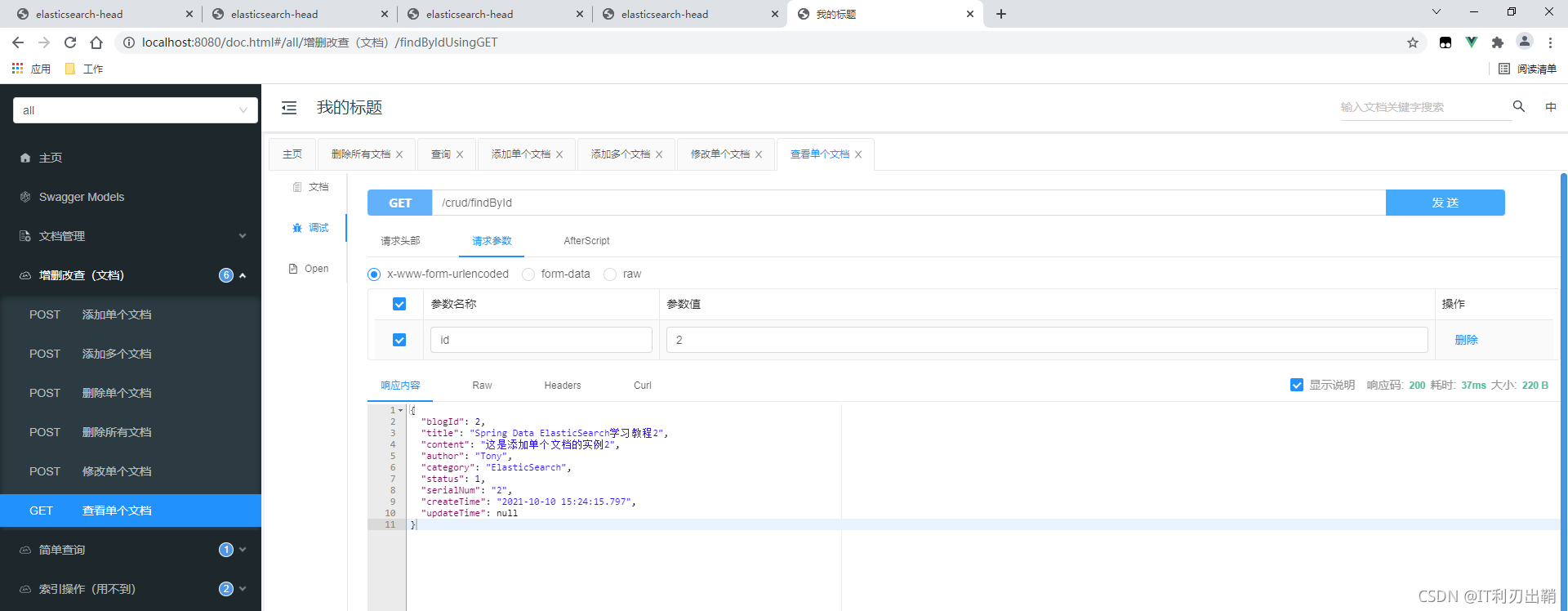
测试4:查找单个文档
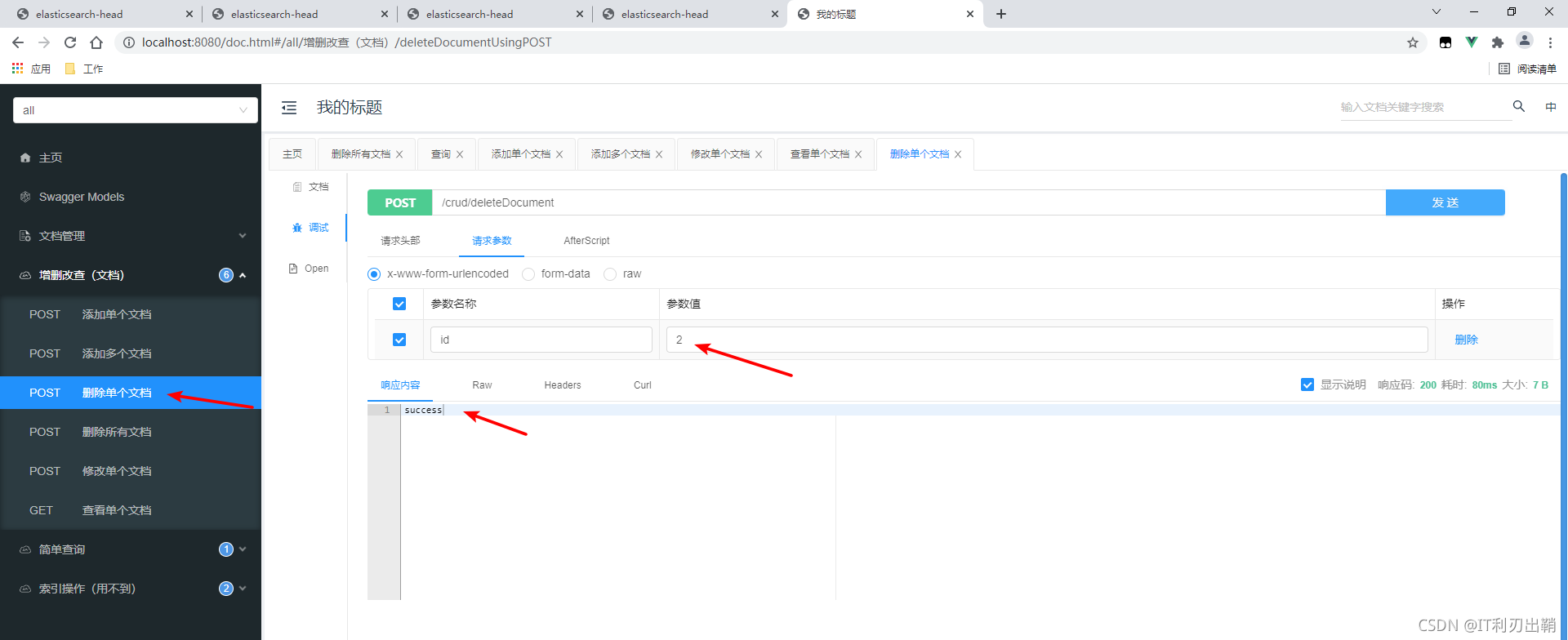
测试5:删除单个文档
head结果
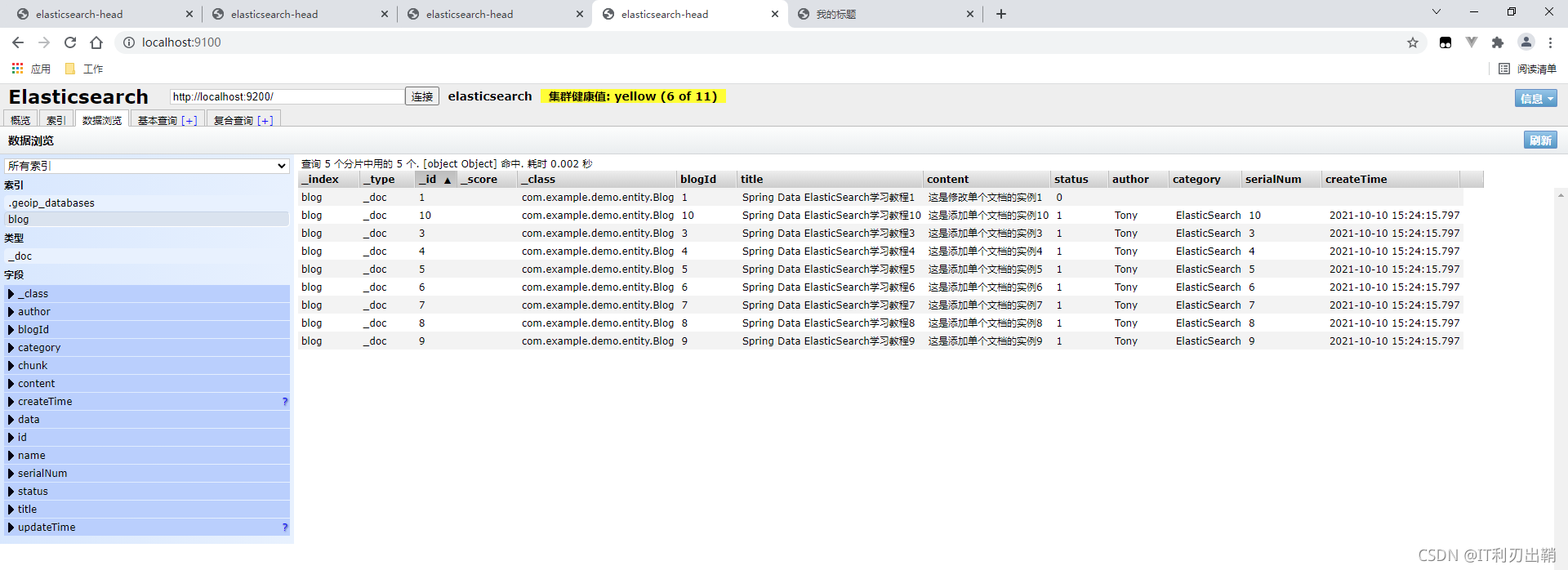
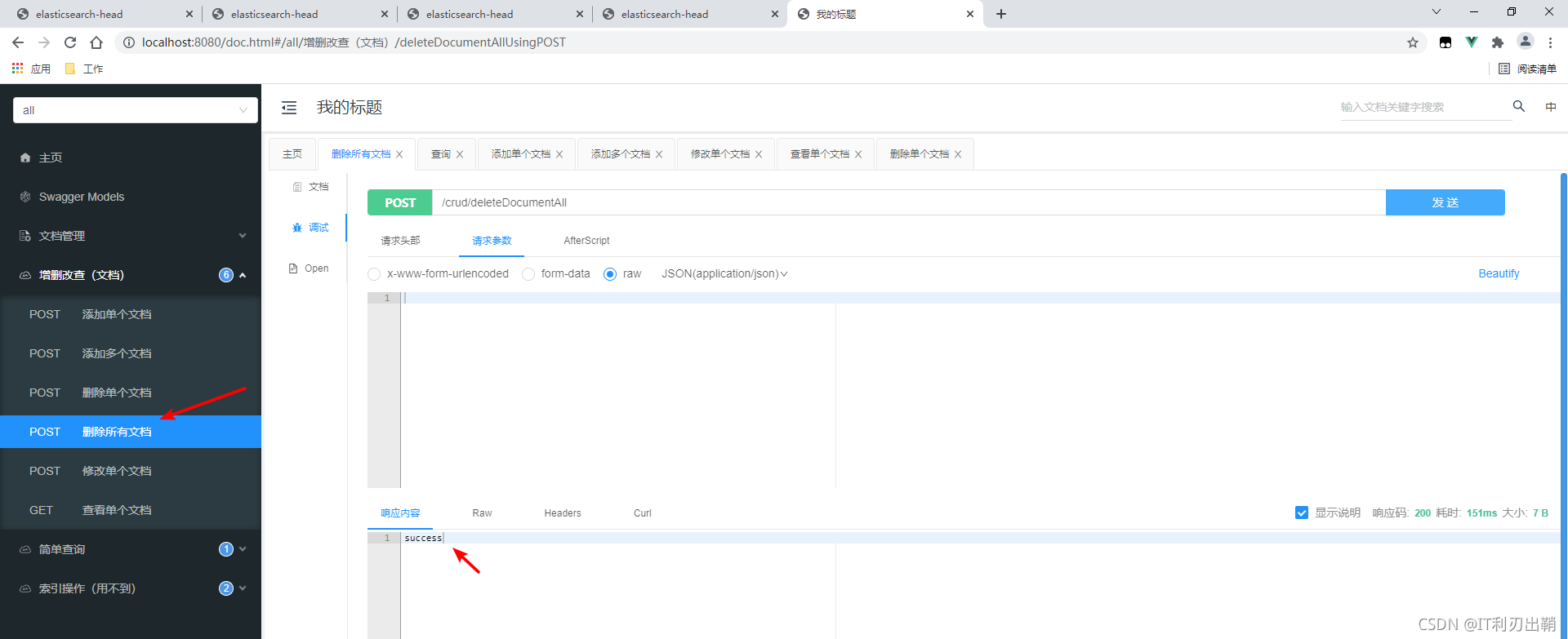
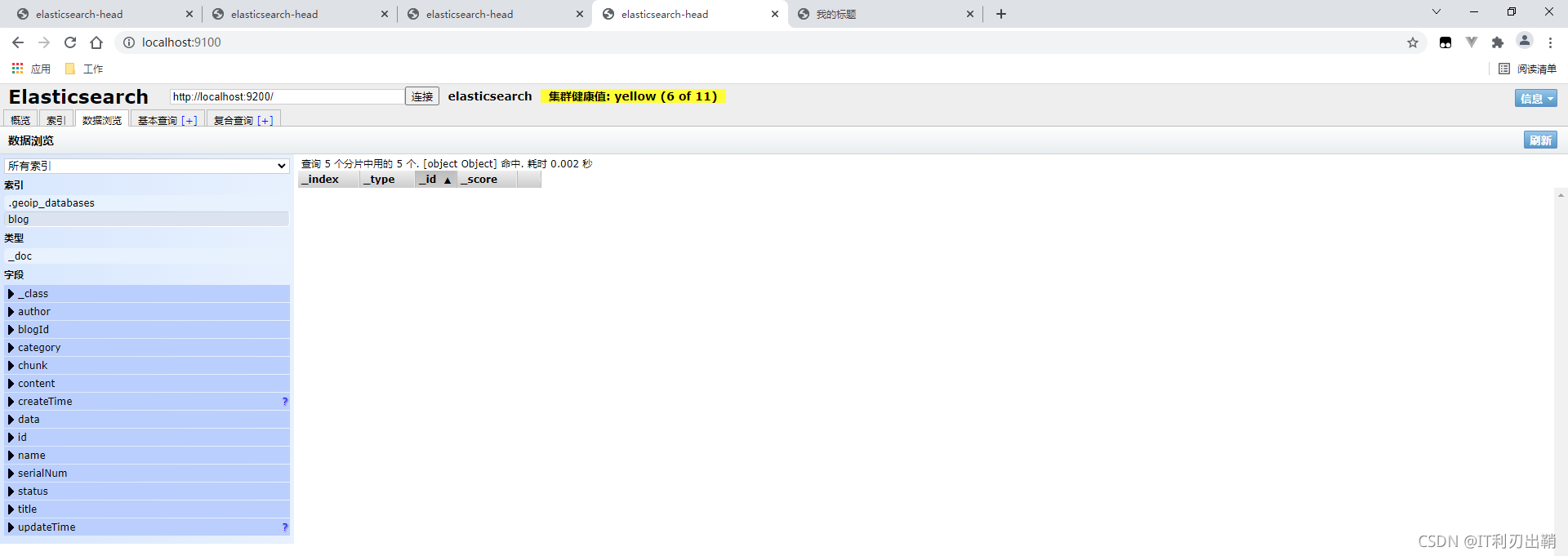
测试6:删除所有文档
head结果
跟Spring Data JPA类似,spring data elsaticsearch提供了自定义方法的查询方式:
在Repository接口中自定义方法,spring data根据方法名,自动生成实现类,方法名必须符合一定的规则,如下表所示(摘录自官网):
| Keyword | Sample | Elasticsearch Query String |
| And | findByNameAndPrice | { "query" : { "bool" : { "must" : [ { "query_string" : { "query" : "?", "fields" : [ "name" ] } }, { "query_string" : { "query" : "?", "fields" : [ "price" ] } } ] } }} |
| Or | findByNameOrPrice | { "query" : { "bool" : { "should" : [ { "query_string" : { "query" : "?", "fields" : [ "name" ] } }, { "query_string" : { "query" : "?", "fields" : [ "price" ] } } ] } }} |
| Is | findByName | { "query" : { "bool" : { "must" : [ { "query_string" : { "query" : "?", "fields" : [ "name" ] } } ] } }} |
| Not | findByNameNot | { "query" : { "bool" : { "must_not" : [ { "query_string" : { "query" : "?", "fields" : [ "name" ] } } ] } }} |
| Between | findByPriceBetween | { "query" : { "bool" : { "must" : [ {"range" : {"price" : {"from" : ?, "to" : ?, "include_lower" : true, "include_upper" : true } } } ] } }} |
| LessThan | findByPriceLessThan | { "query" : { "bool" : { "must" : [ {"range" : {"price" : {"from" : null, "to" : ?, "include_lower" : true, "include_upper" : false } } } ] } }} |
| LessThanEqual | findByPriceLessThanEqual | { "query" : { "bool" : { "must" : [ {"range" : {"price" : {"from" : null, "to" : ?, "include_lower" : true, "include_upper" : true } } } ] } }} |
| GreaterThan | findByPriceGreaterThan | { "query" : { "bool" : { "must" : [ {"range" : {"price" : {"from" : ?, "to" : null, "include_lower" : false, "include_upper" : true } } } ] } }} |
| GreaterThanEqual | findByPriceGreaterThan | { "query" : { "bool" : { "must" : [ {"range" : {"price" : {"from" : ?, "to" : null, "include_lower" : true, "include_upper" : true } } } ] } }} |
| Before | findByPriceBefore | { "query" : { "bool" : { "must" : [ {"range" : {"price" : {"from" : null, "to" : ?, "include_lower" : true, "include_upper" : true } } } ] } }} |
| After | findByPriceAfter | { "query" : { "bool" : { "must" : [ {"range" : {"price" : {"from" : ?, "to" : null, "include_lower" : true, "include_upper" : true } } } ] } }} |
| Like | findByNameLike | { "query" : { "bool" : { "must" : [ { "query_string" : { "query" : "?*", "fields" : [ "name" ] }, "analyze_wildcard": true } ] } }} |
| StartingWith | findByNameStartingWith | { "query" : { "bool" : { "must" : [ { "query_string" : { "query" : "?*", "fields" : [ "name" ] }, "analyze_wildcard": true } ] } }} |
| EndingWith | findByNameEndingWith | { "query" : { "bool" : { "must" : [ { "query_string" : { "query" : "*?", "fields" : [ "name" ] }, "analyze_wildcard": true } ] } }} |
| Contains/Containing | findByNameContaining | { "query" : { "bool" : { "must" : [ { "query_string" : { "query" : "*?*", "fields" : [ "name" ] }, "analyze_wildcard": true } ] } }} |
| In (when annotated as FieldType.Keyword) | findByNameIn(Collection<String>names) | { "query" : { "bool" : { "must" : [ {"bool" : {"must" : [ {"terms" : {"name" : ["?","?"]}} ] } } ] } }} |
| In | findByNameIn(Collection<String>names) | { "query": {"bool": {"must": [{"query_string":{"query": "\"?\" \"?\"", "fields": ["name"]}}]}}} |
| NotIn (when annotated as FieldType.Keyword) | findByNameNotIn(Collection<String>names) | { "query" : { "bool" : { "must" : [ {"bool" : {"must_not" : [ {"terms" : {"name" : ["?","?"]}} ] } } ] } }} |
| NotIn | findByNameNotIn(Collection<String>names) | {"query": {"bool": {"must": [{"query_string": {"query": "NOT(\"?\" \"?\")", "fields": ["name"]}}]}}} |
| Near | findByStoreNear | Not Supported Yet ! |
| True | findByAvailableTrue | { "query" : { "bool" : { "must" : [ { "query_string" : { "query" : "true", "fields" : [ "available" ] } } ] } }} |
| False | findByAvailableFalse | { "query" : { "bool" : { "must" : [ { "query_string" : { "query" : "false", "fields" : [ "available" ] } } ] } }} |
| OrderBy | findByAvailableTrueOrderByNameDesc | { "query" : { "bool" : { "must" : [ { "query_string" : { "query" : "true", "fields" : [ "available" ] } } ] } }, "sort":[{"name":{"order":"desc"}}] } |
插入数据
http://localhost:9200/
POST _bulk
{"index":{"_index":"blog","_id":1}}
{"blogId":1,"title":"Spring Data ElasticSearch学习教程1","content":"这是批量添加的文档1","author":"Tony","category":"ElasticSearch","status":1,"serialNum":"1","createTime":"2021-10-10 11:52:01.249","updateTime":null}
{"index":{"_index":"blog","_id":2}}
{"blogId":2,"title":"Spring Data ElasticSearch学习教程2","content":"这是批量添加的文档2","author":"Tony","category":"ElasticSearch","status":1,"serialNum":"2","createTime":"2021-10-10 11:52:02.249","updateTime":null}
{"index":{"_index":"blog","_id":3}}
{"blogId":3,"title":"Spring Data ElasticSearch学习教程3","content":"这是批量添加的文档3","author":"Tony","category":"ElasticSearch","status":1,"serialNum":"3","createTime":"2021-10-10 11:52:03.249","updateTime":null}
{"index":{"_index":"blog","_id":4}}
{"blogId":4,"title":"Spring Data ElasticSearch学习教程4","content":"这是批量添加的文档4","author":"Tony","category":"ElasticSearch","status":1,"serialNum":"4","createTime":"2021-10-10 11:52:04.249","updateTime":null}
{"index":{"_index":"blog","_id":5}}
{"blogId":5,"title":"Spring Data ElasticSearch学习教程5","content":"这是批量添加的文档5","author":"Tony","category":"ElasticSearch","status":1,"serialNum":"5","createTime":"2021-10-10 11:52:05.249","updateTime":null}
{"index":{"_index":"blog","_id":6}}
{"blogId":6,"title":"Java学习教程6","content":"这是批量添加的文档6","author":"Tony","category":"ElasticSearch","status":1,"serialNum":"6","createTime":"2021-10-10 11:52:06.249","updateTime":null}
{"index":{"_index":"blog","_id":7}}
{"blogId":7,"title":"Java学习教程7","content":"这是批量添加的文档7","author":"Pepper","category":"ElasticSearch","status":1,"serialNum":"7","createTime":"2021-10-10 11:52:07.249","updateTime":null}
{"index":{"_index":"blog","_id":8}}
{"blogId":8,"title":"Java学习教程8","content":"这是批量添加的文档8","author":"Pepper","category":"ElasticSearch","status":1,"serialNum":"8","createTime":"2021-10-10 11:52:08.249","updateTime":null}
{"index":{"_index":"blog","_id":9}}
{"blogId":9,"title":"Java学习教程9","content":"这是批量添加的文档9","author":"Pepper","category":"ElasticSearch","status":1,"serialNum":"9","createTime":"2021-10-10 11:52:09.249","updateTime":null}
{"index":{"_index":"blog","_id":10}}
{"blogId":10,"title":"Java学习教程10","content":"这是批量添加的文档10","author":"Pepper","category":"ElasticSearch","status":1,"serialNum":"10","createTime":"2021-10-10 11:52:10.249","updateTime":null}
Repository
package com.example.demo.dao;

import com.example.demo.entity.Blog;
import org.springframework.data.domain.Page;
import org.springframework.data.domain.Pageable;
import org.springframework.data.elasticsearch.repository.ElasticsearchRepository;

import java.util.List;

public interface BlogRepository extends ElasticsearchRepository<Blog, Long> {
    List<Blog> findByTitle(String title);

    List<Blog> findByTitleAndContent(String title, String content);

    Page<Blog> findByTitleAndContent(String title, String content, Pageable pageable);
}
Controller
package com.example.demo.controller;

import com.example.demo.dao.BlogRepository;
import com.example.demo.entity.Blog;
import io.swagger.annotations.Api;
import io.swagger.annotations.ApiOperation;
import org.springframework.beans.factory.annotation.Autowired;
import org.springframework.data.domain.Page;
import org.springframework.data.domain.PageRequest;
import org.springframework.web.bind.annotation.GetMapping;
import org.springframework.web.bind.annotation.RequestMapping;
import org.springframework.web.bind.annotation.RestController;

import java.util.List;

@Api(tags = "自定义方法查询")
@RestController
@RequestMapping("customMethod")
public class CustomMethodController {
    @Autowired
    private BlogRepository blogRepository;

    @ApiOperation("通过标题和内容查询")
    @GetMapping("findByTitleAndContent")
    public void findByTitleAndContent(String title, String content) {
        List<Blog> byTitleList = blogRepository.findByTitle(title);
        List<Blog> byTitleAndContentList = blogRepository
                .findByTitleAndContent(title, content);

        PageRequest page = PageRequest.of(0, 2);
        Page<Blog> byTitleAndContentPage = blogRepository.findByTitleAndContent(title, content, page);

        System.out.println("-----------------------------------------------");
        System.out.println("byTitleList:             " + byTitleList);
        System.out.println("byTitleAndContentList:   " + byTitleAndContentList);
        System.out.println("byTitleAndContentPage:   " + byTitleAndContentPage.getContent());
    }
}
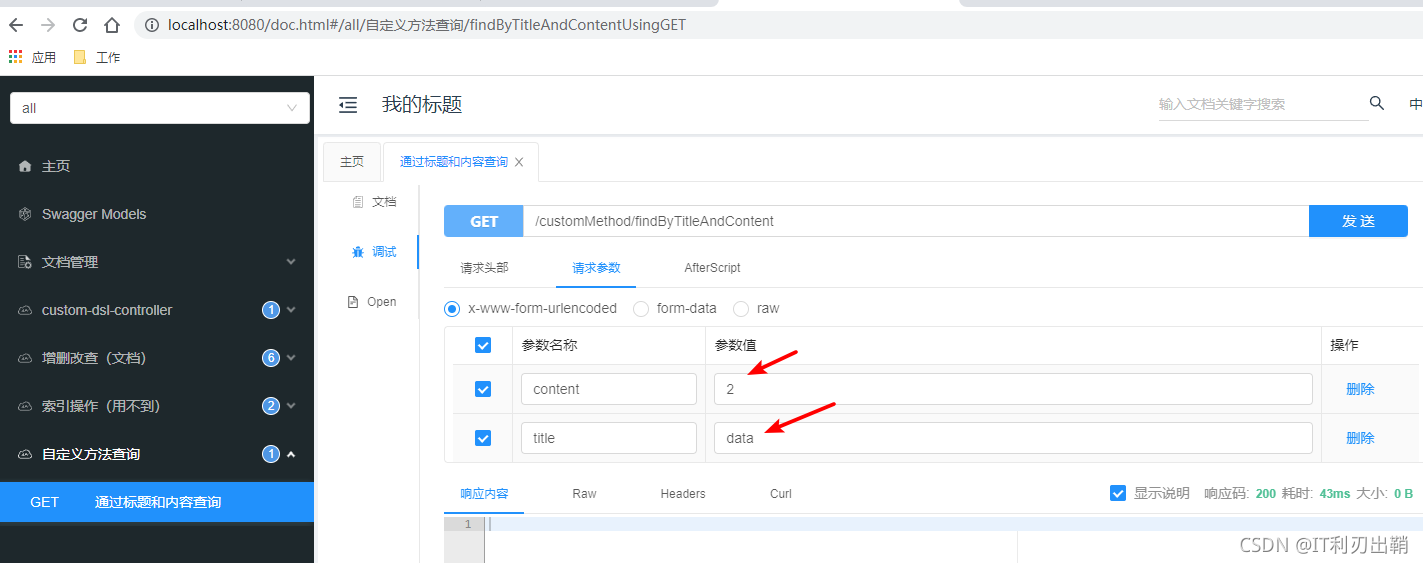
测试1:标题不为空,内容不为空
前端参数
后端结果:
-----------------------------------------------
byTitleList:             [Blog(blogId=3, title=Spring Data ElasticSearch学习教程3, content=这是批量添加的文档3, author=Tony, category=ElasticSearch, status=1, serialNum=3, createTime=Sun Oct 10 19:52:03 CST 2021, updateTime=null), Blog(blogId=5, title=Spring Data ElasticSearch学习教程5, content=这是批量添加的文档5, author=Tony, category=ElasticSearch, status=1, serialNum=5, createTime=Sun Oct 10 19:52:05 CST 2021, updateTime=null), Blog(blogId=4, title=Spring Data ElasticSearch学习教程4, content=这是批量添加的文档4, author=Tony, category=ElasticSearch, status=1, serialNum=4, createTime=Sun Oct 10 19:52:04 CST 2021, updateTime=null), Blog(blogId=2, title=Spring Data ElasticSearch学习教程2, content=这是批量添加的文档2, author=Tony, category=ElasticSearch, status=1, serialNum=2, createTime=Sun Oct 10 19:52:02 CST 2021, updateTime=null), Blog(blogId=1, title=Spring Data ElasticSearch学习教程1, content=这是批量添加的文档1, author=Tony, category=ElasticSearch, status=1, serialNum=1, createTime=Sun Oct 10 19:52:01 CST 2021, updateTime=null)]
byTitleAndContentList:   [Blog(blogId=2, title=Spring Data ElasticSearch学习教程2, content=这是批量添加的文档2, author=Tony, category=ElasticSearch, status=1, serialNum=2, createTime=Sun Oct 10 19:52:02 CST 2021, updateTime=null)]
byTitleAndContentPage:   [Blog(blogId=2, title=Spring Data ElasticSearch学习教程2, content=这是批量添加的文档2, author=Tony, category=ElasticSearch, status=1, serialNum=2, createTime=Sun Oct 10 19:52:02 CST 2021, updateTime=null)]
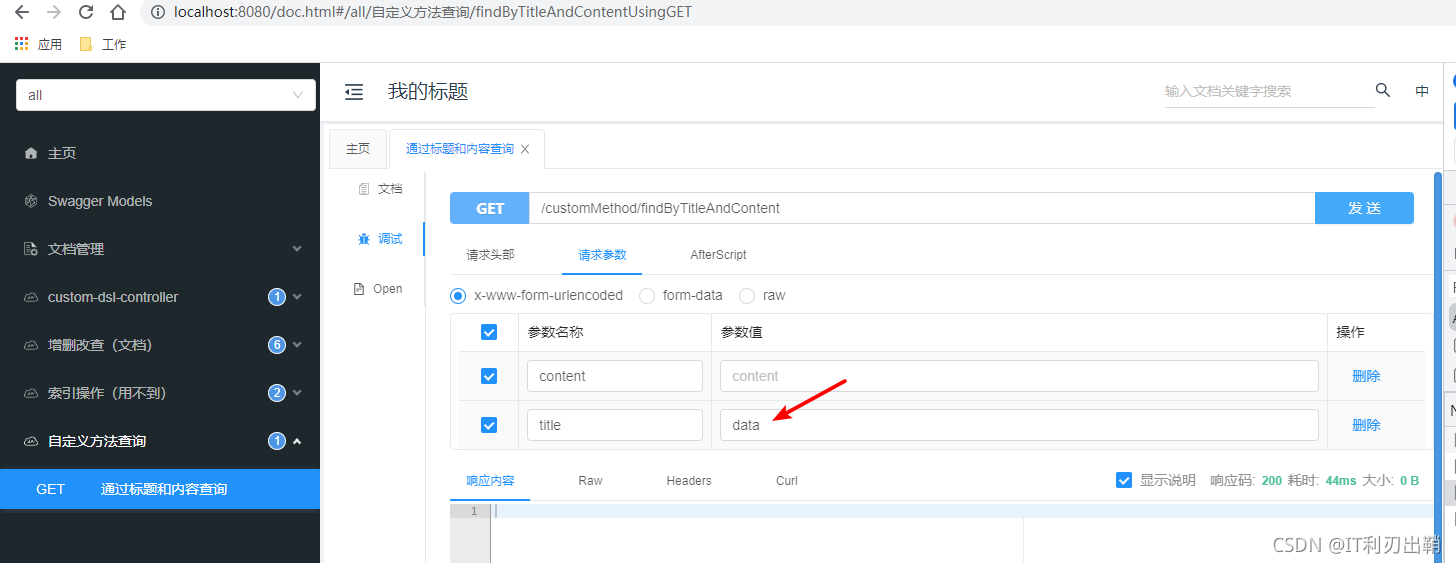
测试2:标题不为空,内容为空
前端参数:
后端结果:
-----------------------------------------------
byTitleList:             [Blog(blogId=3, title=Spring Data ElasticSearch学习教程3, content=这是批量添加的文档3, author=Tony, category=ElasticSearch, status=1, serialNum=3, createTime=Sun Oct 10 19:52:03 CST 2021, updateTime=null), Blog(blogId=5, title=Spring Data ElasticSearch学习教程5, content=这是批量添加的文档5, author=Tony, category=ElasticSearch, status=1, serialNum=5, createTime=Sun Oct 10 19:52:05 CST 2021, updateTime=null), Blog(blogId=4, title=Spring Data ElasticSearch学习教程4, content=这是批量添加的文档4, author=Tony, category=ElasticSearch, status=1, serialNum=4, createTime=Sun Oct 10 19:52:04 CST 2021, updateTime=null), Blog(blogId=2, title=Spring Data ElasticSearch学习教程2, content=这是批量添加的文档2, author=Tony, category=ElasticSearch, status=1, serialNum=2, createTime=Sun Oct 10 19:52:02 CST 2021, updateTime=null), Blog(blogId=1, title=Spring Data ElasticSearch学习教程1, content=这是批量添加的文档1, author=Tony, category=ElasticSearch, status=1, serialNum=1, createTime=Sun Oct 10 19:52:01 CST 2021, updateTime=null)]
byTitleAndContentList:   []
byTitleAndContentPage:   []
可以看到,参数只有title的查询才查到了数据,另外两个需要两个参数的查询都没查到数据。
也就是说,自定义方法无法进行动态查询,就算是条件为空,也会放到查询条件中。
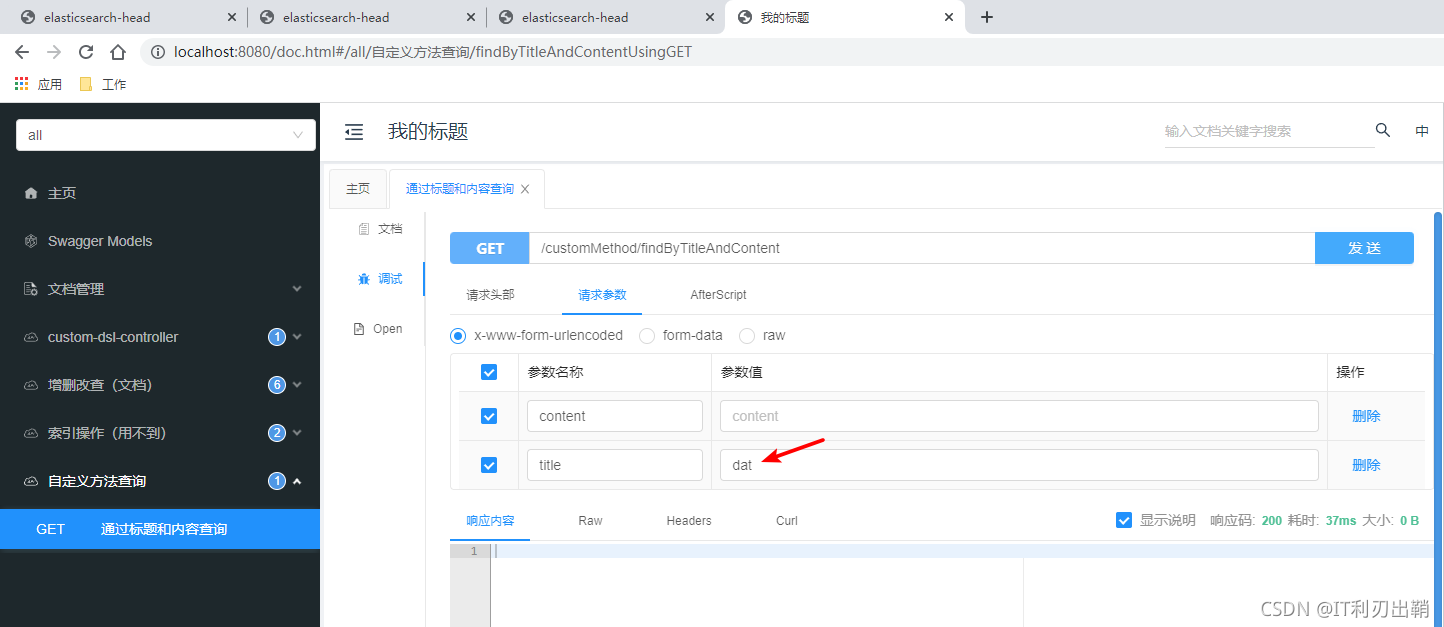
测试3:标题不为空,内容为空(但标题条件不是全单词)
前端参数
后端结果
-----------------------------------------------
byTitleList:             []
byTitleAndContentList:   []
byTitleAndContentPage:   []
原因: ElasticSearch是先将内容进行分词,然后再将这些分词创建索引的(即:可以通过分词搜到东西)。对于英文来说,单词就是最小的分词单位了,ES会通过空格、逗号等标点符号来把独立的单词作为分词。比如:“Data”,它就是一个单词,不会再对其进行拆分了,所以,搜整个单词才能搜到。
跟JPA一样,Spring Data ElasticSearch可以使用@Query自定义语句进行查询。
但Spring Data ElasticSearch不能通过冒号指定参数(比如:title),只能用问号加序号(比如?0)。
Repository
package com.example.demo.dao;

import com.example.demo.entity.Blog;
import org.springframework.data.domain.Page;
import org.springframework.data.domain.Pageable;
import org.springframework.data.elasticsearch.annotations.Query;
import org.springframework.data.elasticsearch.repository.ElasticsearchRepository;
import org.springframework.data.repository.query.Param;

import java.util.List;

public interface BlogRepository extends ElasticsearchRepository<Blog, Long> {
    // 这样写不行,查不到数据。原因待确定
    // @Query("{\"bool\":{\"must\":[{\"match\":{\"title\":\":titleParam\"}}," +
    //         "{\"match\":{\"content\":\":contentParam\"}}]}}")
    // List<Blog> findByTitleAndContentCustom(@Param("titleParam") String title, @Param("contentParam") String content);

    @Query("{\"bool\":{\"must\":[{\"match\":{\"title\":\"?0\"}}," +
                                "{\"match\":{\"content\":\"?1\"}}]}}")
    List<Blog> findByTitleAndContentCustom(@Param("title") String title, @Param("content") String content);

    @Query("{\"bool\":{\"must\":[{\"match\":{\"title\":\"?0\"}}," +
            "{\"match\":{\"content\":\"?1\"}}]}}")
    Page<Blog> findByTitleAndContentCustom(@Param("title") String title, @Param("content") String content,
                                     Pageable pageable);
}
Controller
package com.example.demo.controller;

import com.example.demo.dao.BlogRepository;
import com.example.demo.entity.Blog;
import io.swagger.annotations.Api;
import io.swagger.annotations.ApiOperation;
import io.swagger.annotations.License;
import org.elasticsearch.index.query.QueryBuilders;
import org.springframework.beans.factory.annotation.Autowired;
import org.springframework.data.domain.Page;
import org.springframework.data.domain.PageRequest;
import org.springframework.web.bind.annotation.GetMapping;
import org.springframework.web.bind.annotation.RequestMapping;
import org.springframework.web.bind.annotation.RestController;

import java.util.List;

@Api(tags = "自定义DSL查询")
@RestController
@RequestMapping("customDSL")
public class CustomDSLController {
    @Autowired
    private BlogRepository blogRepository;

    @ApiOperation("列表")
    @GetMapping("listByTitleAndContent")
    public List<Blog> listByTitleAndContent(String title, String content) {
        return blogRepository.findByTitleAndContentCustom(title, content);
    }

    @ApiOperation("分页")
    @GetMapping("pageByTitleAndContent")
    public Page<Blog> pageByTitleAndContent(String title, String content) {
        PageRequest pageRequest = PageRequest.of(0, 2);
        return blogRepository.findByTitleAndContentCustom(title, content, pageRequest);
    }
}
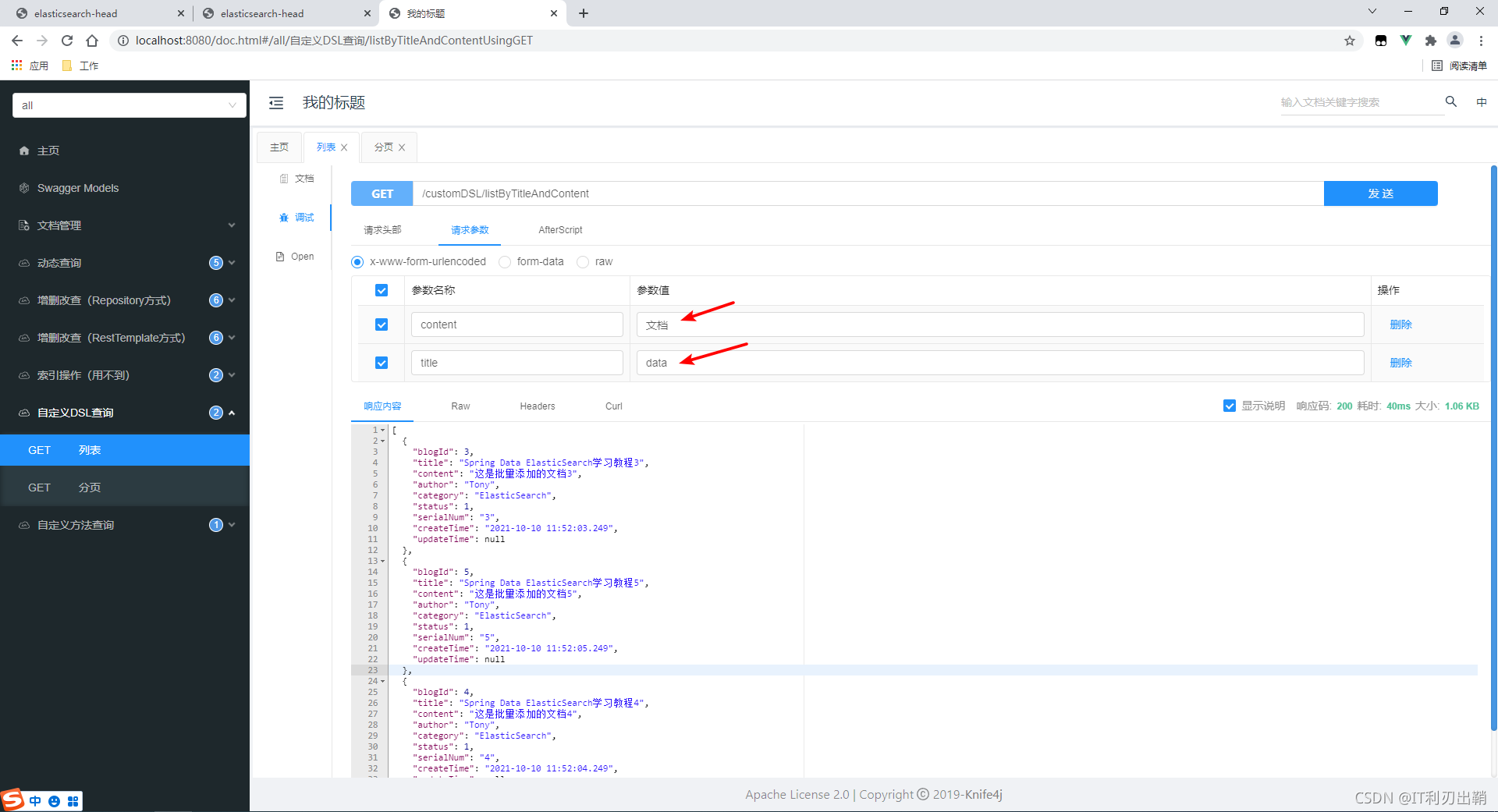
测试1:列表。标题不为空,内容不为空
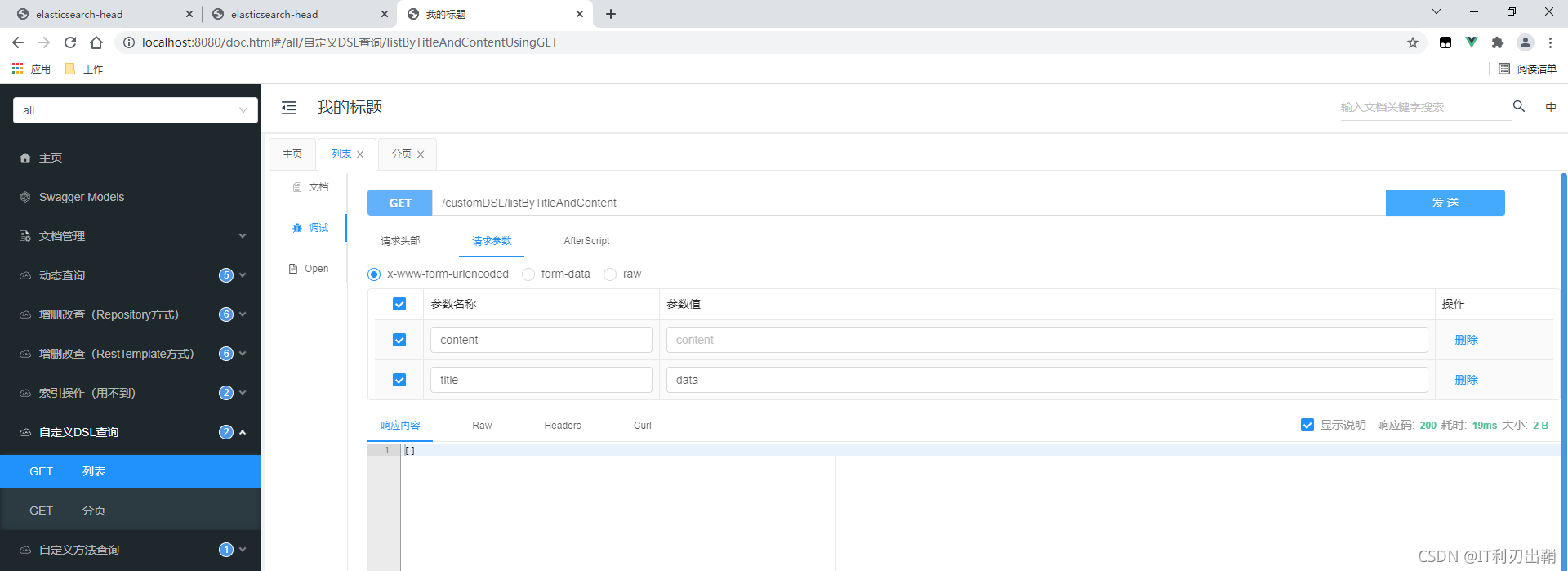
测试2:列表。标题不为空,内容为空
结果:查不到东西。所以自定义DSL不能动态查询。
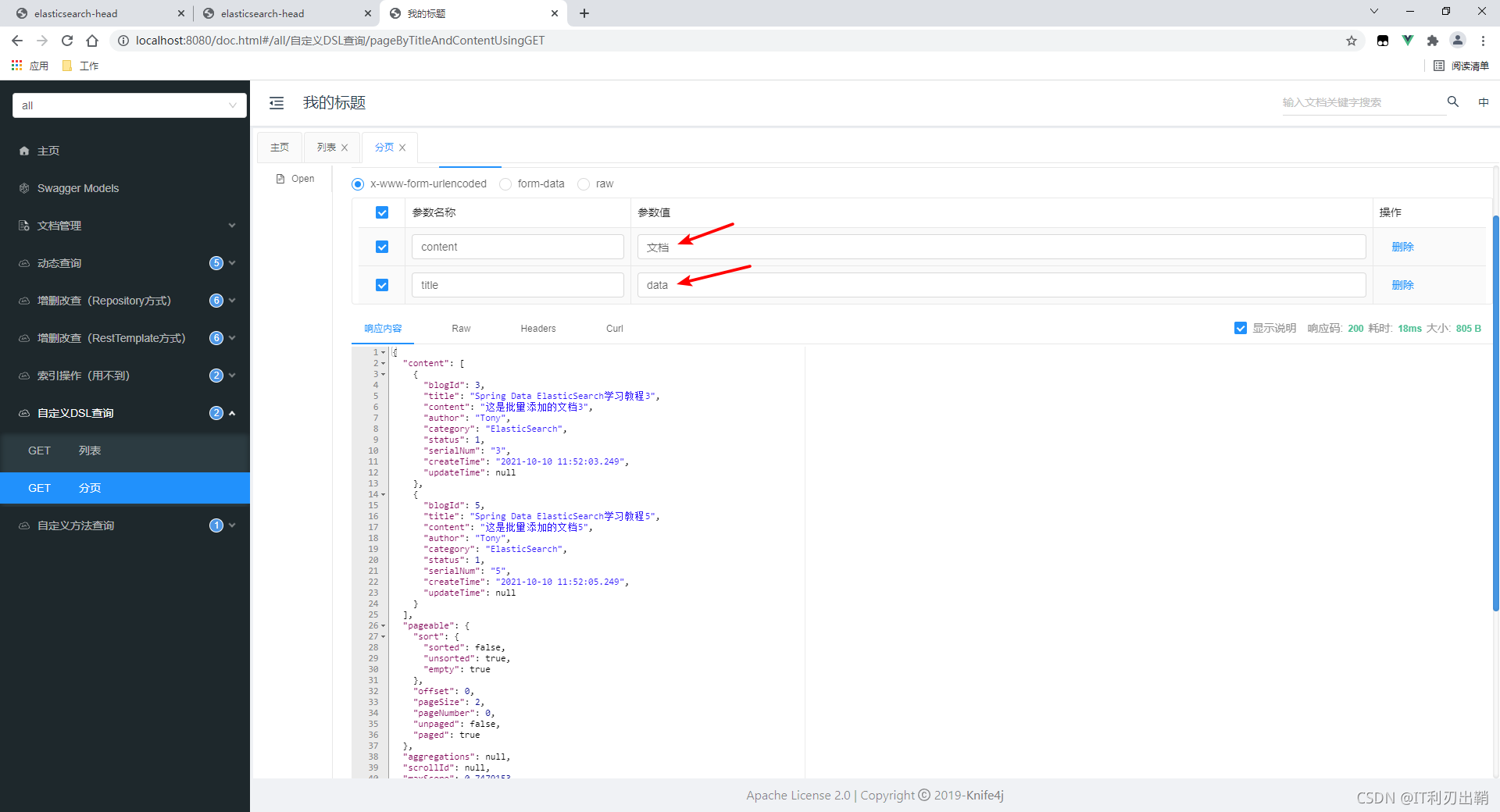
测试3:分页。标题不为空,内容不为空
Elasticsearch、Spring Data Elasticsearch、Spring Boot版本对照表_旭东怪的博客-CSDN博客
SpringBoot-starter-data整合Elasticsearch_程序员小强的博客-CSDN博客
Elasticsearch(五):Spring Data Elasticsearch 操作索引_Gooooa的博客-CSDN博客
我正在学习如何使用Nokogiri,根据这段代码我遇到了一些问题:require'rubygems'require'mechanize'post_agent=WWW::Mechanize.newpost_page=post_agent.get('http://www.vbulletin.org/forum/showthread.php?t=230708')puts"\nabsolutepathwithtbodygivesnil"putspost_page.parser.xpath('/html/body/div/div/div/div/div/table/tbody/tr/td/div
我有一个Ruby程序,它使用rubyzip压缩XML文件的目录树。gem。我的问题是文件开始变得很重,我想提高压缩级别,因为压缩时间不是问题。我在rubyzipdocumentation中找不到一种为创建的ZIP文件指定压缩级别的方法。有人知道如何更改此设置吗?是否有另一个允许指定压缩级别的Ruby库? 最佳答案 这是我通过查看rubyzip内部创建的代码。level=Zlib::BEST_COMPRESSIONZip::ZipOutputStream.open(zip_file)do|zip|Dir.glob("**/*")d
类classAprivatedeffooputs:fooendpublicdefbarputs:barendprivatedefzimputs:zimendprotecteddefdibputs:dibendendA的实例a=A.new测试a.foorescueputs:faila.barrescueputs:faila.zimrescueputs:faila.dibrescueputs:faila.gazrescueputs:fail测试输出failbarfailfailfail.发送测试[:foo,:bar,:zim,:dib,:gaz].each{|m|a.send(m)resc
很好奇,就使用rubyonrails自动化单元测试而言,你们正在做什么?您是否创建了一个脚本来在cron中运行rake作业并将结果邮寄给您?git中的预提交Hook?只是手动调用?我完全理解测试,但想知道在错误发生之前捕获错误的最佳实践是什么。让我们理所当然地认为测试本身是完美无缺的,并且可以正常工作。下一步是什么以确保他们在正确的时间将可能有害的结果传达给您? 最佳答案 不确定您到底想听什么,但是有几个级别的自动代码库控制:在处理某项功能时,您可以使用类似autotest的内容获得关于哪些有效,哪些无效的即时反馈。要确保您的提
假设我做了一个模块如下:m=Module.newdoclassCendend三个问题:除了对m的引用之外,还有什么方法可以访问C和m中的其他内容?我可以在创建匿名模块后为其命名吗(就像我输入“module...”一样)?如何在使用完匿名模块后将其删除,使其定义的常量不再存在? 最佳答案 三个答案:是的,使用ObjectSpace.此代码使c引用你的类(class)C不引用m:c=nilObjectSpace.each_object{|obj|c=objif(Class===objandobj.name=~/::C$/)}当然这取决于
我正在尝试使用ruby和Savon来使用网络服务。测试服务为http://www.webservicex.net/WS/WSDetails.aspx?WSID=9&CATID=2require'rubygems'require'savon'client=Savon::Client.new"http://www.webservicex.net/stockquote.asmx?WSDL"client.get_quotedo|soap|soap.body={:symbol=>"AAPL"}end返回SOAP异常。检查soap信封,在我看来soap请求没有正确的命名空间。任何人都可以建议我
关闭。这个问题是opinion-based.它目前不接受答案。想要改进这个问题?更新问题,以便editingthispost可以用事实和引用来回答它.关闭4年前。Improvethisquestion我想在固定时间创建一系列低音和高音调的哔哔声。例如:在150毫秒时发出高音调的蜂鸣声在151毫秒时发出低音调的蜂鸣声200毫秒时发出低音调的蜂鸣声250毫秒的高音调蜂鸣声有没有办法在Ruby或Python中做到这一点?我真的不在乎输出编码是什么(.wav、.mp3、.ogg等等),但我确实想创建一个输出文件。
我在我的项目目录中完成了compasscreate.和compassinitrails。几个问题:我已将我的.sass文件放在public/stylesheets中。这是放置它们的正确位置吗?当我运行compasswatch时,它不会自动编译这些.sass文件。我必须手动指定文件:compasswatchpublic/stylesheets/myfile.sass等。如何让它自动运行?文件ie.css、print.css和screen.css已放在stylesheets/compiled。如何在编译后不让它们重新出现的情况下删除它们?我自己编译的.sass文件编译成compiled/t
我想将html转换为纯文本。不过,我不想只删除标签,我想智能地保留尽可能多的格式。为插入换行符标签,检测段落并格式化它们等。输入非常简单,通常是格式良好的html(不是整个文档,只是一堆内容,通常没有anchor或图像)。我可以将几个正则表达式放在一起,让我达到80%,但我认为可能有一些现有的解决方案更智能。 最佳答案 首先,不要尝试为此使用正则表达式。很有可能你会想出一个脆弱/脆弱的解决方案,它会随着HTML的变化而崩溃,或者很难管理和维护。您可以使用Nokogiri快速解析HTML并提取文本:require'nokogiri'h
我想为Heroku构建一个Rails3应用程序。他们使用Postgres作为他们的数据库,所以我通过MacPorts安装了postgres9.0。现在我需要一个postgresgem并且共识是出于性能原因你想要pggem。但是我对我得到的错误感到非常困惑当我尝试在rvm下通过geminstall安装pg时。我已经非常明确地指定了所有postgres目录的位置可以找到但仍然无法完成安装:$envARCHFLAGS='-archx86_64'geminstallpg--\--with-pg-config=/opt/local/var/db/postgresql90/defaultdb/po
