Spring Cloud Alibaba
Spring Cloud Alibaba旨在为微服务开发提供一站式解决方案。本项目包含开发分布式应用和服务所需的组件,方便开发者使用Spring Cloud编程模型轻松开发分布式应用。
有了Spring Cloud Alibaba,你只需要添加一些注解和配置,你的应用就可以使用阿里巴巴的分布式解决方案,用阿里巴巴的中间件搭建一个属于你自己的分布式系统。
Spring Cloud Alibaba 的特点:
Spring Cloud Alibaba 也提供了丰富的例子。
如果您是 Maven Central 用户,请将我们的 BOM 添加到您的 pom.xml 部分。这将允许您忽略任何 Maven 依赖项的版本,而是将版本控制委托给 BOM。
<dependencyManagement>
    <dependencies>
        <dependency>
            <groupId>com.alibaba.cloud</groupId>
            <artifactId>spring-cloud-alibaba-dependencies</artifactId>
            <version>2021.0.4.0</version>
            <type>pom</type>
            <scope>import</scope>
        </dependency>
    </dependencies>
</dependencyManagement>
在以下部分中,假设您使用的是 Spring Cloud Alibaba BOM,并且依赖项片段将不包含版本。
Nacos 是一个易于使用的动态服务发现、配置和服务管理平台,用于构建云原生应用程序。
借助Spring Cloud Alibaba Nacos Discovery,您可以快速接入基于Spring Cloud编程模型的Nacos服务注册功能。
服务发现是微服务架构中的关键组件之一。在这样的架构中,手动为每个客户端配置服务列表可能是一项艰巨的任务,并且使动态扩展变得极其困难。Nacos Discovery 帮助您自动将服务注册到 Nacos 服务器,Nacos 服务器会跟踪服务并动态刷新服务列表。另外,Nacos Discovery会将服务实例的一些元数据,如主机、端口、健康检查URL、首页等注册到Nacos中。Nacos的下载和启动方法请参考Nacos官网。
请使用组 ID 为com.alibaba.cloud,工件 ID 为的启动器spring-cloud-starter-alibaba-nacos-discovery。
<dependency>
    <groupId>com.alibaba.cloud</groupId>
    <artifactId>spring-cloud-starter-alibaba-nacos-discovery</artifactId>
</dependency>
Nacos Discovery 与 Netflix Ribbon、RestTemplate 或 OpenFeign 集成,可用于服务到服务的调用。
Nacos的下载和启动方法请参考Nacos官网。
Nacos Server启动后,进入http://ip:8848查看控制台(默认账号/密码为nacos/nacos):
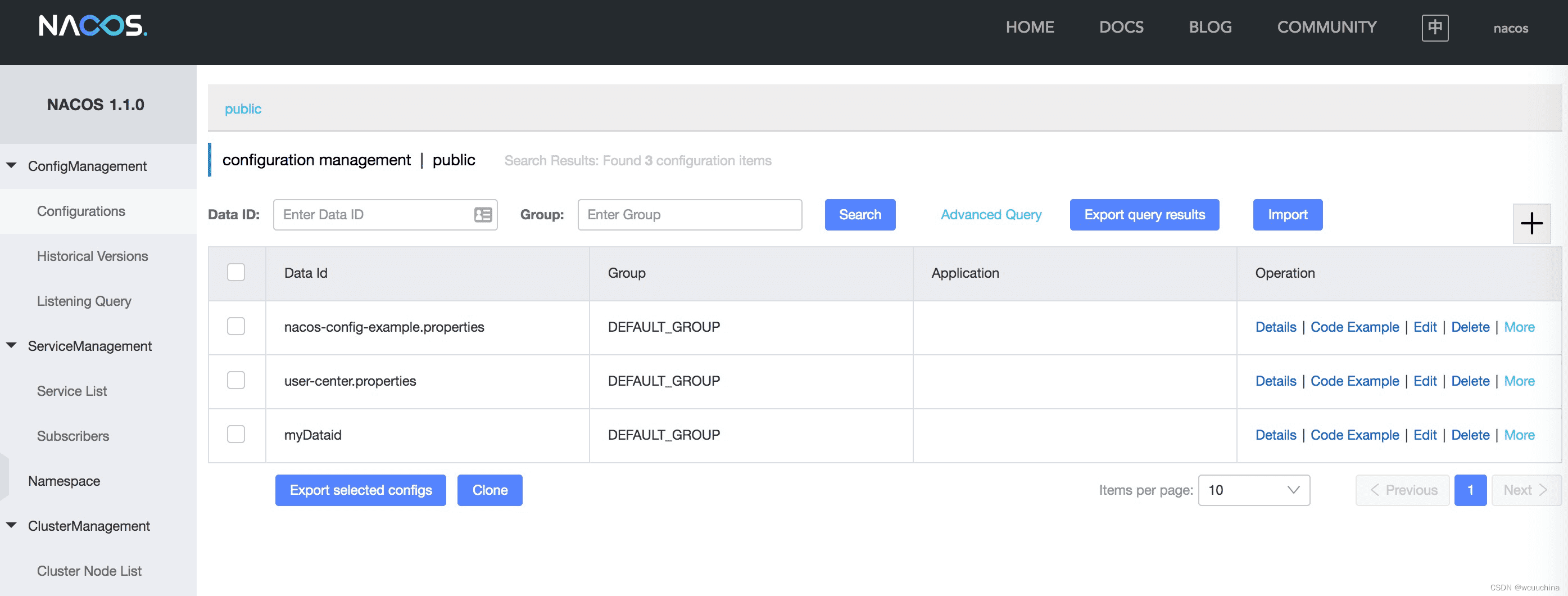
图 1. Nacos 仪表板
更多Nacos Server版本,您可以在发布页面下载最新版本。
以下示例说明了如何向 Nacos 注册服务。
<?xml version="1.0" encoding="UTF-8"?>
<project xmlns="http://maven.apache.org/POM/4.0.0" xmlns:xsi="http://www.w3.org/2001/XMLSchema-instance"
         xsi:schemaLocation="http://maven.apache.org/POM/4.0.0 http://maven.apache.org/xsd/maven-4.0.0.xsd">
    <modelVersion>4.0.0</modelVersion>

    <groupId>open.source.test</groupId>
    <artifactId>nacos-discovery-test</artifactId>
    <version>1.0-SNAPSHOT</version>
    <name>nacos-discovery-test</name>

    <parent>
        <groupId>org.springframework.boot</groupId>
        <artifactId>spring-boot-starter-parent</artifactId>
        <version>${spring.boot.version}</version>
        <relativePath/>
    </parent>

    <properties>
        <project.build.sourceEncoding>UTF-8</project.build.sourceEncoding>
        <project.reporting.outputEncoding>UTF-8</project.reporting.outputEncoding>
        <java.version>1.8</java.version>
    </properties>

    <dependencyManagement>
        <dependencies>
            <dependency>
                <groupId>org.springframework.cloud</groupId>
                <artifactId>spring-cloud-dependencies</artifactId>
                <version>${spring.cloud.version}</version>
                <type>pom</type>
                <scope>import</scope>
            </dependency>
            <dependency>
                <groupId>com.alibaba.cloud</groupId>
                <artifactId>spring-cloud-alibaba-dependencies</artifactId>
                <version>${spring.cloud.alibaba.version}</version>
                <type>pom</type>
                <scope>import</scope>
            </dependency>
        </dependencies>
    </dependencyManagement>

    <dependencies>
        <dependency>
            <groupId>org.springframework.boot</groupId>
            <artifactId>spring-boot-starter-web</artifactId>
        </dependency>

        <dependency>
            <groupId>org.springframework.boot</groupId>
            <artifactId>spring-boot-starter-actuator</artifactId>
        </dependency>

        <dependency>
            <groupId>com.alibaba.cloud</groupId>
            <artifactId>spring-cloud-starter-alibaba-nacos-discovery</artifactId>
        </dependency>
    </dependencies>

    <build>
        <plugins>
            <plugin>
                <groupId>org.springframework.boot</groupId>
                <artifactId>spring-boot-maven-plugin</artifactId>
            </plugin>
        </plugins>
    </build>
</project>
server.port=8081
spring.application.name=nacos-provider
spring.cloud.nacos.discovery.server-addr=127.0.0.1:8848
management.endpoints.web.exposure.include=*
如果不想使用 Nacos 进行服务注册和发现,可以设置spring.cloud.nacos.discovery为false.
@SpringBootApplication
@EnableDiscoveryClient
public class NacosProviderDemoApplication {

    public static void main(String[] args) {
        SpringApplication.run(NacosProviderDemoApplication.class, args);
    }

    @RestController
    public class EchoController {
        @GetMapping(value = "/echo/{string}")
        public String echo(@PathVariable String string) {
            return "Hello Nacos Discovery " + string;
        }
    }
}
现在就可以在Nacos控制台看到注册的服务了。
在启动提供者应用程序之前,请先启动 Nacos。有关详细信息,请参阅Naco 网站。
它可能不像启动提供者应用程序那么容易,因为消费者需要调用提供者的 RESTful 服务。在这个例子中,我们将使用最原始的方式,即显式结合 LoadBalanceClient 和 RestTemplate 来访问 RESTful 服务。pom.xml和application.properties的配置可以参考1.2节。以下是启动消费者应用程序的示例代码。
您还可以使用具有负载平衡的 RestTemplate 和 FeignClient 来访问该服务。
@SpringBootApplication
@EnableDiscoveryClient
public class NacosConsumerApp {

    @RestController
    public class NacosController{

        @Autowired
        private LoadBalancerClient loadBalancerClient;
        @Autowired
        private RestTemplate restTemplate;

        @Value("${spring.application.name}")
        private String appName;

        @GetMapping("/echo/app-name")
        public String echoAppName(){
            //Access through the combination of LoadBalanceClient and RestTemplate
            ServiceInstance serviceInstance = loadBalancerClient.choose("nacos-provider");
            String path = String.format("http://%s:%s/echo/%s",serviceInstance.getHost(),serviceInstance.getPort(),appName);
            System.out.println("request path:" +path);
            return restTemplate.getForObject(path,String.class);
        }

    }

    //Instantiate RestTemplate Instance
    @Bean
    public RestTemplate restTemplate(){

        return new RestTemplate();
    }

    public static void main(String[] args) {

        SpringApplication.run(NacosConsumerApp.class,args);
    }
}
在这个例子中,我们注入了一个 LoadBalancerClient 实例,并手动实例化了一个 RestTemplate。同时我们将 的配置值spring.application.name注入到应用中,这样在调用提供者的服务时就可以显示当前的应用名称。
请在启动消费者应用程序之前启动 Nacos。详情请参考Nacos官网。
接下来访问http://ip:port/echo/app-name消费者提供的接口。这里我们开启了8082端口,访问结果如下图:
地址:http://127.0.0.1:8082/echo/app-name
访问结果: Hello Nacos Discovery nacos-consumer
Nacos Discovery 内部提供了一个 Endpoint,对应的 endpoint id 为nacosdiscovery。
端点暴露的 json 包含两个属性:
{
  "subscribe": [
    {
      "jsonFromServer": "",
      "name": "nacos-provider",
      "clusters": "",
      "cacheMillis": 10000,
      "hosts": [
        {
          "instanceId": "30.5.124.156#8081#DEFAULT#nacos-provider",
          "ip": "30.5.124.156",
          "port": 8081,
          "weight": 1.0,
          "healthy": true,
          "enabled": true,
          "cluster": {
            "serviceName": null,
            "name": null,
            "healthChecker": {
              "type": "TCP"
            },
            "defaultPort": 80,
            "defaultCheckPort": 80,
            "useIPPort4Check": true,
            "metadata": {

            }
          },
          "service": null,
          "metadata": {

          }
        }
      ],
      "lastRefTime": 1541755293119,
      "checksum": "e5a699c9201f5328241c178e804657e11541755293119",
      "allIPs": false,
      "key": "nacos-provider",
      "valid": true
    }
  ],
  "NacosDiscoveryProperties": {
    "serverAddr": "127.0.0.1:8848",
    "endpoint": "",
    "namespace": "",
    "logName": "",
    "service": "nacos-provider",
    "weight": 1.0,
    "clusterName": "DEFAULT",
    "metadata": {

    },
    "registerEnabled": true,
    "ip": "30.5.124.201",
    "networkInterface": "",
    "port": 8082,
    "secure": false,
    "accessKey": "",
    "secretKey": ""
  }
}
pom.xml
<dependencies>
    <dependency>
        <groupId>org.springframework.cloud</groupId>
        <artifactId>spring-cloud-loadbalancer</artifactId>
    </dependency>
</dependencies>
应用程序.properties
spring.cloud.loadbalancer.ribbon.enabled=false
spring.cloud.loadbalancer.nacos.enabled=true
Nacos Discovery启动器的其他配置如下:
| Configuration | Key | Default Value | 描述 |
|---|---|---|---|
| Server address | spring.cloud.nacos.discovery.server-addr | Nacos Server监听的IP和端口 | |
| Service name | spring.cloud.nacos.discovery.service | ${spring.application.name} | 命名当前服务 |
| Weight | spring.cloud.nacos.discovery.weight | 1 | 取值范围:1~100,值越大,权重越大 |
| Network card name | spring.cloud.nacos.discovery.network-interface | 如果不指定IP地址,则注册的IP地址为网卡的IP地址。如果也没有指定,默认使用第一个网卡的IP地址。 | |
| Registered IP address | spring.cloud.nacos.discovery.ip | 最高优先级 | |
| Registered IP address Type | spring.cloud.nacos.discovery.ip-type | IPv4 | 可以配置IPv4和IPv6,如果同类型网卡有多个IP地址,想指定具体网段地址,可以使用spring.cloud.inetutils.preferred-networks配置过滤地址 |
| Registered port | spring.cloud.nacos.discovery.port | -1 | 默认情况下会自动检测。不需要配置。 |
| Namespace | spring.cloud.nacos.discovery.namespace | 一个典型的场景是隔离不同环境的服务注册,比如测试环境和生产环境的资源(配置、服务等)隔离 | |
| AccessKey | spring.cloud.nacos.discovery.access-key | Alibaba Cloud account accesskey | |
| SecretKey | spring.cloud.nacos.discovery.secret-key | Alibaba Cloud account secretkey | |
| Metadata | spring.cloud.nacos.discovery.metadata | 您可以以Map格式为您的服务定义一些元数据 | |
| Log file name | spring.cloud.nacos.discovery.log-name | ||
| Cluster Name | spring.cloud.nacos.discovery.cluster-name | DEFAULT | Nacos的集群名称 |
| Endpoint | spring.cloud.nacos.discovery.endpoint | 特定地区某项服务的域名。您可以使用此域名动态检索服务器地址 | |
| Integrate LoadBalancer or not | spring.cloud.loadbalancer.nacos.enabled | false | |
| Enable Nacos Watch | spring.cloud.nacos.discovery.watch.enabled | true | 设置为 false 以关闭监听 |
Nacos 是一个易于使用的动态服务发现、配置和服务管理平台,用于构建云原生应用程序。
使用Spring Cloud Alibaba Nacos Config,基于Spring Cloud的编程模型,快速接入Nacos的配置管理能力。
请使用组 ID 为com.alibaba.cloud,工件 ID 为的启动器spring-cloud-starter-alibaba-nacos-config。
<dependency>
    <groupId>com.alibaba.cloud</groupId>
    <artifactId>spring-cloud-starter-alibaba-nacos-config</artifactId>
</dependency>
Nacos Config 使用 DataId 和 GROUP 来确定一个配置。
下图是DataId使用myDataid,GROUP使用DEFAULT_GROUP,配置了一个Properties格式的配置项:
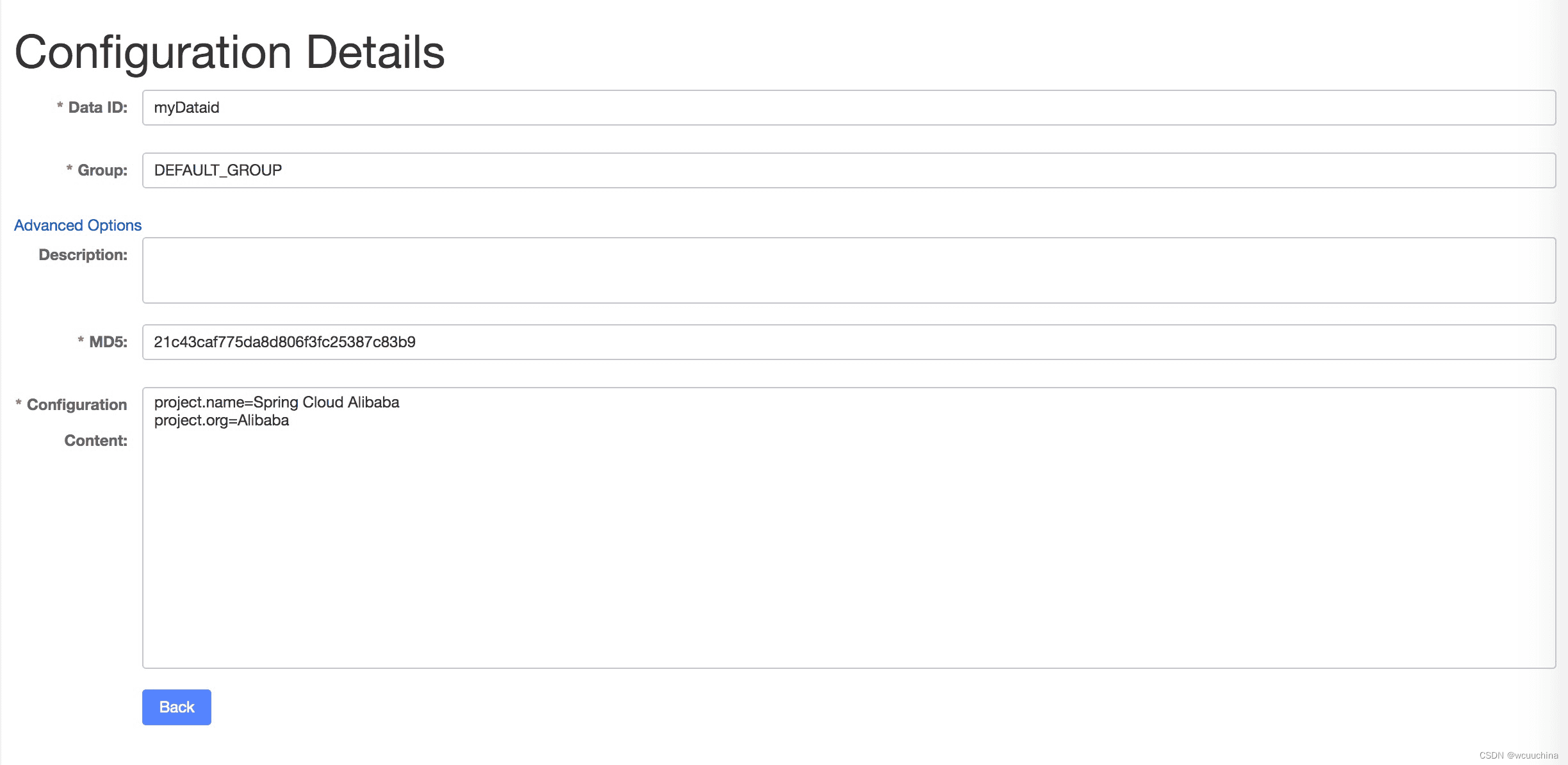
图 2. Nacos 配置项
具体的启动方法可以参考Spring Cloud Alibaba Nacos Discovery章节的“Nacos Server启动”部分。
Nacos Server启动后,添加配置方式:
Data ID:    nacos-config.properties

Group  :    DEFAULT_GROUP

Configuration format:    Properties

Configuration content:   user.name=nacos-config-properties
            user.age=90
DataId 的默认文件扩展名是属性。
在客户端上的使用
如果您想使用 Nacos 来管理您的应用程序的外部化配置,请使用组 ID 为com.alibaba.cloud,工件 ID 为的 starter spring-cloud-starter-alibaba-nacos-config。
<dependency>
    <groupId>com.alibaba.cloud</groupId>
    <artifactId>spring-cloud-starter-alibaba-nacos-config</artifactId>
</dependency>
现在我们可以创建一个标准的 Spring Boot 应用程序。
@SpringBootApplication
public class NacosConfigApplication {

    public static void main(String[] args) {
        ConfigurableApplicationContext applicationContext = SpringApplication.run(NacosConfigApplication.class, args);
        String userName = applicationContext.getEnvironment().getProperty("user.name");
        String userAge = applicationContext.getEnvironment().getProperty("user.age");
        System.err.println("user name :" +userName+"; age: "+userAge);
    }
}
请注意,当您获取文件中的配置时,将在文件之前加载。根据spring官方文档中提到的[bootstrap]( https://docs.spring.io/spring-cloud-config/docs/current/reference/html/#config-first-bootstrap ) 来解决这个问题,我们推荐您将以下依赖项添加到项目根文件中 spring-cloud-alibaba’s version is ``2021.1nacosbootstrap.yml application.ymlpom.xml
<dependency>
    <groupId>org.springframework.cloud</groupId>
    <artifactId>spring-cloud-starter-bootstrap</artifactId>
    <version>3.1.1</version>
</dependency>
在运行这个例子之前,我们需要在bootstrap.properties中配置Nacos服务器的地址。例如:
bootstrap.properties
# DataId By default, the `spring.application.name` configuration is combined with the file extension (the configuration format uses properties by default), and the GROUP is not configured to use DEFAULT_GROUP by default. Therefore, the Nacos Config configuration corresponding to the configuration file has a DataId of nacos-config.properties and a GROUP of DEFAULT_GROUP
spring.application.name=nacos-config
spring.cloud.nacos.config.server-addr=127.0.0.1:8848
如果使用域名访问Nacos,格式spring.cloud.nacos.config.server-addr应该是Domain name:port. 例如Nacos域名为abc.com.nacos,监听器端口为80,则配置为spring.cloud.nacos.config.server-addr=abc.com.nacos:80. 80端口不能省略。
运行此示例,您可以看到以下输出:
2018-11-02 14:24:51.638  INFO 32700 --- [main] c.a.demo.provider.NacosConfigApplication    : Started NacosConfigApplication in 14.645 seconds (JVM running for 15.139)
user name :nacos-config-properties; age: 90
2018-11-02 14:24:51.688  INFO 32700 --- [-127.0.0.1:8848] s.c.a.AnnotationConfigApplicationContext : Refreshing org.springframework.context.annotation.AnnotationConfigApplicationContext@a8c5e74: startup date [Fri Nov 02 14:24:51 CST 2018]; root of context hierarchy
Nacos Config 也支持 yaml 格式。您只需完成以下2个步骤。
1、在bootstrap.properties文件中,添加如下一行声明DataId的格式为yaml。如下:
bootstrap.properties
spring.cloud.nacos.config.file-extension=yaml
2、在Nacos控制台添加配置,DataId为yaml格式,如下图:
Data ID:        nacos-config.yaml

Group  :        DEFAULT_GROUP

Configuration format:        YAML

Configuration content:        user.name: nacos-config-yaml
                              user.age: 68
完成前两步后,重启测试程序,你会看到如下结果。
2018-11-02 14:59:00.484  INFO 32928 --- [main] c.a.demo.provider.NacosConfigApplication:Started NacosConfigApplication in 14.183 seconds (JVM running for 14.671)
user name :nacos-config-yaml; age: 68
2018-11-02 14:59:00.529  INFO 32928 --- [-127.0.0.1:8848] s.c.a.AnnotationConfigApplicationContext : Refreshing org.springframework.context.annotation.AnnotationConfigApplicationContext@265a478e: startup date [Fri Nov 02 14:59:00 CST 2018]; root of context hierarchy
Nacos Config 还支持动态配置更新。启动Spring Boot应用测试的代码如下:
@SpringBootApplication
public class NacosConfigApplication {

    public static void main(String[] args) {
        ConfigurableApplicationContext applicationContext = SpringApplication.run(NacosConfigApplication.class, args);
        while(true) {
            //When configurations are refreshed dynamically, they will be updated in the Enviroment, therefore here we retrieve configurations from Environment every other second.
            String userName = applicationContext.getEnvironment().getProperty("user.name");
            String userAge = applicationContext.getEnvironment().getProperty("user.age");
            System.err.println("user name :" + userName + "; age: " + userAge);
            TimeUnit.SECONDS.sleep(1);
        }
    }
}
更改 user.name 时,可以从应用程序中检索最新值,如下所示:
user name :nacos-config-yaml; age: 68
user name :nacos-config-yaml; age: 68
user name :nacos-config-yaml; age: 68
2018-11-02 15:04:25.069  INFO 32957 --- [-127.0.0.1:8848] o.s.boot.SpringApplication               : Started application in 0.144 seconds (JVM running for 71.752)
2018-11-02 15:04:25.070  INFO 32957 --- [-127.0.0.1:8848] s.c.a.AnnotationConfigApplicationContext : Closing org.springframework.context.annotation.AnnotationConfigApplicationContext@10c89124: startup date [Fri Nov 02 15:04:25 CST 2018]; parent: org.springframework.context.annotation.AnnotationConfigApplicationContext@6520af7
2018-11-02 15:04:25.071  INFO 32957 --- [-127.0.0.1:8848] s.c.a.AnnotationConfigApplicationContext : Closing org.springframework.context.annotation.AnnotationConfigApplicationContext@6520af7: startup date [Fri Nov 02 15:04:24 CST 2018]; root of context hierarchy
//Read the updated value from Enviroment
user name :nacos-config-yaml-update; age: 68
user name :nacos-config-yaml-update; age: 68
您可以使用此设置 spring.cloud.nacos.config.refresh.enabled=false 禁用自动刷新。
Nacos Config 加载配置时,DataId 为 的基础配置也会被加载${spring.application.name}. f i l e − e x t e n s i o n : p r o p e r t i e s , D a t a I d 为 {file-extension:properties},DataId 为 file−extension:properties,DataId为{spring.application.name}-${profile}. f i l e − e x t e n s i o n : p r o p e r t i e s 。如果需要在不同的环境使用不同的配置,可以使用 {file-extension:properties}。如果需要在不同的环境使用不同的配置,可以使用 file−extension:properties。如果需要在不同的环境使用不同的配置,可以使用{spring.profiles.active}Spring提供的配置。
spring.profiles.active=develop
在配置文件中指定时,${spring.profiles.active} 必须放在 bootstrap.properties 中。
在Nacos中添加一个基础配置,DataId为nacos-config-develop.yaml,如下图:
Data ID:        nacos-config-develop.yaml

Group  :        DEFAULT_GROUP

Configuration format:        YAML

Configuration content:        current.env: develop-env
运行以下 Spring Boot 应用程序测试代码:
@SpringBootApplication
public class NacosConfigApplication {

    public static void main(String[] args) {
        ConfigurableApplicationContext applicationContext = SpringApplication.run(NacosConfigApplication.class, args);
        while(true) {
            String userName = applicationContext.getEnvironment().getProperty("user.name");
            String userAge = applicationContext.getEnvironment().getProperty("user.age");
            //Get the current deployment environment
            String currentEnv = applicationContext.getEnvironment().getProperty("current.env");
            System.err.println("in "+currentEnv+" enviroment; "+"user name :" + userName + "; age: " + userAge);
            TimeUnit.SECONDS.sleep(1);
        }
    }
}
启动后,可以在控制台看到如下输出:
in develop-env enviroment; user name :nacos-config-yaml-update; age: 68
2018-11-02 15:34:25.013  INFO 33014 --- [ Thread-11] ConfigServletWebServerApplicationContext : Closing org.springframework.boot.web.servlet.context.AnnotationConfigServletWebServerApplicationContext@6f1c29b7: startup date [Fri Nov 02 15:33:57 CST 2018]; parent: org.springframework.context.annotation.AnnotationConfigApplicationContext@63355449
切换到生产环境,只需要更改参数即可${spring.profiles.active}。如下图:
spring.profiles.active=product
同时在生产环境的Nacos中添加DataId的基础配置。比如你可以在你的生产环境的Nacos中添加DataId为nacos-config-product.yaml的配置:
Data ID:        nacos-config-product.yaml

Group  :        DEFAULT_GROUP

Configuration format:        YAML

Configuration content:        current.env: product-env
启动测试程序,你会看到如下结果:
in product-env enviroment; user name :nacos-config-yaml-update; age: 68
2018-11-02 15:42:14.628  INFO 33024 --- [Thread-11] ConfigServletWebServerApplicationContext : Closing org.springframework.boot.web.servlet.context.AnnotationConfigServletWebServerApplicationContext@6aa8e115: startup date [Fri Nov 02 15:42:03 CST 2018]; parent: org.springframework.context.annotation.AnnotationConfigApplicationContext@19bb07ed
在这个例子中,我们使用 方法在配置文件中编码配置spring.profiles.active=<profilename>。在实际场景中,这个变量需要在不同的环境中有所不同。您可以使用-Dspring.profiles.active=<profile>参数指定配置,以便您可以轻松地在不同环境之间切换。
Nacos中命名空间的详细介绍,请参考Nacos概念
命名空间用于隔离不同租户的配置。不同命名空间中的组和数据 ID 可以相同。命名空间的典型场景是不同环境的配置隔离,例如开发/测试环境和生产环境(配置和服务等)的隔离。
如果没有指定命名空间,则使用 Nacos 的“公共”命名空间${spring.cloud.nacos.config.namespace}。您还可以通过以下方式指定自定义命名空间:
spring.cloud.nacos.config.namespace=b3404bc0-d7dc-4855-b519-570ed34b62d7
此配置必须位于 bootstrap.properties 文件中。的值spring.cloud.nacos.config.namespace是命名空间的id,id的值可以从Nacos控制台获取。添加配置时不要选择其他命名空间。否则无法正确检索配置。
{spring.cloud.nacos.config.group}没有定义配置时默认使用 DEFAULT_GROUP 。如果需要定义自己的组,可以在下面的属性中定义:
spring.cloud.nacos.config.group=DEVELOP_GROUP
这个配置必须在 bootstrap.properties 文件中,并且 Group 的值必须与 的值相同spring.cloud.nacos.config.group。
从Spring Cloud Alibaba Nacos Config开始,数据id可以自定义。这部分的详细设计可以参考Github issue。以下是一个完整的示例:
spring.application.name=opensource-service-provider
spring.cloud.nacos.config.server-addr=127.0.0.1:8848

# config external configuration
# 1. Data Id is in the default group of DEFAULT_GROUP, and dynamic refresh of configurations is not supported.
spring.cloud.nacos.config.ext-config[0].data-id=ext-config-common01.properties

# 2. Data Id is not in the default group, and dynamic refresh of configurations is not supported.
spring.cloud.nacos.config.ext-config[1].data-id=ext-config-common02.properties
spring.cloud.nacos.config.ext-config[1].group=GLOBALE_GROUP

# 3. Data Id is not in the default group and dynamic referesh of configurations is supported.
spring.cloud.nacos.config.ext-config[2].data-id=ext-config-common03.properties
spring.cloud.nacos.config.ext-config[2].group=REFRESH_GROUP
spring.cloud.nacos.config.ext-config[2].refresh=true
我们可以看到:
当同时配置多个Data Id时,优先级由.n中的n值定义spring.cloud.nacos.config.ext-config[n].data-id。值越大,优先级越高。的值spring.cloud.nacos.config.ext-config[n].data-id必须有一个文件扩展名,它可以是 properties 或 yaml/yml。中的设置spring.cloud.nacos.config.file-extension对自定义数据 ID 文件扩展名没有任何影响。为了更清晰的在多个应用之间共享data id,还可以使用如下方法:
spring.cloud.nacos.config.shared-dataids=bootstrap-common.properties,all-common.properties
spring.cloud.nacos.config.refreshable-dataids=bootstrap-common.properties
我们可以看到:
当spring.cloud.nacos.config.shared-dataids用于配置多个共享数据id时,我们约定共享配置之间的以下优先级:优先级是根据配置出现的顺序来决定的。后出现的优先级高于先出现的优先级。
使用spring.cloud.nacos.config.shared-dataids时,data Id 必须有文件扩展名,可以是 properties 或 yaml/yml。并且里面的配置spring.cloud.nacos.config.file-extension对自定义的Data Id文件扩展名没有任何影响。
指定支持动态刷新的data id时spring.cloud.nacos.config.refreshable-dataids,data id对应的值也要指定文件扩展名。
Nacos Config 内部提供了一个 Endpoint,对应的 endpoint id 为nacos-config.
端点暴露的 json 包含三个属性:
下面展示了一个服务实例是如何访问 Endpoint 的:
{
	"NacosConfigProperties": {
		"serverAddr": "127.0.0.1:8848",
		"encode": null,
		"group": "DEFAULT_GROUP",
		"prefix": null,
		"fileExtension": "properties",
		"timeout": 3000,
		"endpoint": null,
		"namespace": null,
		"accessKey": null,
		"secretKey": null,
		"contextPath": null,
		"clusterName": null,
		"name": null,
		"sharedDataids": "base-common.properties,common.properties",
		"refreshableDataids": "common.properties",
		"extConfig": null
	},
	"RefreshHistory": [{
		"timestamp": "2019-07-29 11:20:04",
		"dataId": "nacos-config-example.properties",
		"md5": "7d5d7f1051ff6571e2ec9f90887d9d91"
	}],
	"Sources": [{
		"lastSynced": "2019-07-29 11:19:04",
		"dataId": "common.properties"
	}, {
		"lastSynced": "2019-07-29 11:19:04",
		"dataId": "base-common.properties"
	}, {
		"lastSynced": "2019-07-29 11:19:04",
		"dataId": "nacos-config-example.properties"
	}]
}
设置 spring.cloud.nacos.config.enabled = false 以禁用 Spring Cloud Nacos Config AutoConfiguration。
Nacos Config启动器的其他配置如下:
| Configuration | Key | Default Value | Description |
|---|---|---|---|
| Server address | spring.cloud.nacos.config.server-addr | Nacos Server监听的IP和端口 | |
| Dataid from nacos config | spring.cloud.nacos.config.name | 先取前缀,再取名字,最后取spring.application.name | |
| Dataid from nacos config | spring.cloud.nacos.config.prefix | 先取前缀,再取名字,最后取spring.application.name | |
| Encode for nacos config content | spring.cloud.nacos.config.encode | 对 nacos 配置内容进行编码 | |
| GROUP for nacos config | spring.cloud.nacos.config.group | DEFAULT_GROUP | nacos 配置的 GROUP |
| The suffix of nacos config dataId, also the file extension of config content. | spring.cloud.nacos.config.fileExtension | properties | nacos config dataId的后缀,也是config内容的文件扩展名(现在支持properties或者yaml(yml)) |
| Timeout for get config from nacos | spring.cloud.nacos.config.timeout | 3000 | nacos获取配置超时 |
| Endpoint | spring.cloud.nacos.config.endpoint | 端口 | |
| Namespace | spring.cloud.nacos.config.namespace | 命名空间 | |
| AccessKey | spring.cloud.nacos.config.accessKey | Alibaba Cloud account accesskey | |
| SecretKey | spring.cloud.nacos.config.secretKey | Alibaba Cloud account secretkey | |
| The context path of Nacos Server | spring.cloud.nacos.config.contextPath | Nacos Server 上下文路径 | |
| Cluster name | spring.cloud.nacos.config.clusterName | 集群名称 | |
| Dataid for Shared Configuration | spring.cloud.nacos.config.sharedDataids | 共享配置的Dataid,以“,”分割 | |
| Dynamic refresh dataid for Shared Configuration | spring.cloud.nacos.config.refreshableDataids | Shared Configuration的动态刷新dataid,以“,”分割 | |
| custom dataid | spring.cloud.nacos.config.extConfig | 这是一个列表,由ConfigPOJO 建立。Config有 3 个属性,dataId,group和refresh |
随着微服务的流行,服务调用的稳定性变得越来越重要。Sentinel以“流量”为切入点,在流量控制、断路、负载保护等多个领域发力,为服务可靠性保驾护航。
哨兵具有以下特点:
如果你想在你的项目中使用 Sentinel,请使用组 ID 为com.alibaba.cloudartifact ID 为的 starter spring-cloud-starter-alibaba-sentinel。
<dependency>
    <groupId>com.alibaba.cloud</groupId>
    <artifactId>spring-cloud-starter-alibaba-sentinel</artifactId>
</dependency>
以下是如何使用 Sentinel 的简单示例:
@SpringBootApplication
public class Application {

    public static void main(String[] args) {
        SpringApplication.run(ServiceApplication.class, args);
    }

}

@RestController
public class TestController {

    @GetMapping(value = "/hello")
    @SentinelResource("hello")
    public String hello() {
        return "Hello Sentinel";
    }

}
@SentinelResource 注释用于标识资源是速率受限还是降级。在上面的示例中,注释的“hello”属性指的是资源名称。
@SentinelResource 还提供 、 和 等属性blockHandler来blockHandlerClass标识fallback速率限制或降级操作。有关详细信息,请参阅 Sentinel 注释支持。
Sentinel 注释支持
Sentinel注解支持
Sentinel 提供了 @SentinelResource 注解用于定义资源,并提供了 AspectJ 的扩展用于自动定义资源、处理 BlockException 等。使用 Sentinel Annotation AspectJ Extension 的时候需要引入以下依赖:
<dependency>
    <groupId>com.alibaba.csp</groupId>
    <artifactId>sentinel-annotation-aspectj</artifactId>
    <version>x.y.z</version>
</dependency>
@SentinelResource 注解
注意:注解方式埋点不支持 private 方法。
@SentinelResource 用于定义资源,并提供可选的异常处理和 fallback 配置项。 @SentinelResource 注解包含以下属性:
注:1.6.0 之前的版本 fallback 函数只针对降级异常(DegradeException)进行处理,不能针对业务异常进行处理。public class TestService {
// 原函数
@SentinelResource(value = "hello", blockHandler = "exceptionHandler", fallback = "helloFallback")
public String hello(long s) {
return String.format("Hello at %d", s);
}
// Fallback 函数,函数签名与原函数一致或加一个 Throwable 类型的参数.
public String helloFallback(long s) {
return String.format("Halooooo %d", s);
}
// Block 异常处理函数,参数最后多一个 BlockException,其余与原函数一致.
public String exceptionHandler(long s, BlockException ex) {
// Do some log here.
ex.printStackTrace();
return "Oops, error occurred at " + s;
}
// 这里单独演示 blockHandlerClass 的配置.
// 对应的 `handleException` 函数需要位于 `ExceptionUtil` 类中,并且必须为 public static 函数.
@SentinelResource(value = "test", blockHandler = "handleException", blockHandlerClass = {ExceptionUtil.class})
public void test() {
System.out.println("Test");
}
}
从 1.4.0 版本开始,注解方式定义资源支持自动统计业务异常,无需手动调用 Tracer.trace(ex) 来记录业务异常。Sentinel 1.4.0 以前的版本需要自行调用 Tracer.trace(ex) 来记录业务异常。
配置
Spring Cloud Alibaba
若您是通过 Spring Cloud Alibaba 接入的 Sentinel,则无需额外进行配置即可使用 @SentinelResource 注解。
Spring AOP
若您的应用使用了 Spring AOP(无论是 Spring Boot 还是传统 Spring 应用),您需要通过配置的方式将 SentinelResourceAspect 注册为一个 Spring Bean:
@Configuration
public class SentinelAspectConfiguration {

    @Bean
    public SentinelResourceAspect sentinelResourceAspect() {
        return new SentinelResourceAspect();
    }
}
我们提供了 Spring AOP 的示例,可以参见 sentinel-demo-annotation-spring-aop。
AspectJ
若您的应用直接使用了 AspectJ,那么您需要在 aop.xml 文件中引入对应的 Aspect:
<aspects>
    <aspect name="com.alibaba.csp.sentinel.annotation.aspectj.SentinelResourceAspect"/>
</aspects>
以上例子都是在WebServlet环境下使用的。Sentinel目前支持WebFlux,需要配合spring-boot-starter-webflux依赖触发sentinel starter中WebFlux相关的自动化配置。
@SpringBootApplication
public class Application {

    public static void main(String[] args) {
        SpringApplication.run(ServiceApplication.class, args);
    }

}

@RestController
public class TestController {

    @GetMapping("/mono")
    @SentinelResource("hello")
    public Mono<String> mono() {
	return Mono.just("simple string")
			.transform(new SentinelReactorTransformer<>("otherResourceName"));
    }

}
哨兵仪表板
Sentinel dashboard是一个轻量级的控制台,提供机器发现、单机资源监控、集群资源数据概览、规则管理等功能。要使用这些功能,您只需完成几个步骤。
注意:集群统计概览只支持500个以下的集群,有1-2秒左右的延迟。
要使用 Sentinel 仪表板,只需完成以下 3 个步骤。
获取仪表板
您可以从发布页面下载最新的仪表板 JAR 文件。
您还可以获得最新的源代码来构建您自己的 Sentinel 仪表盘:
启动仪表板
Sentinel dashboard 是一个标准的SpringBoot 应用程序,您可以在Spring Boot 模式下运行JAR 文件。
java -Dserver.port=8080 -Dcsp.sentinel.dashboard.server=localhost:8080 -Dproject.name=sentinel-dashboard -jar sentinel-dashboard.jar
如果与 8080 端口有冲突,可以使用-Dserver.port=new port定义新的端口。
application.yml
spring:
  cloud:
    sentinel:
      transport:
        port: 8719
        dashboard: localhost:8080
指定的端口号spring.cloud.sentinel.transport.port会在应用对应的服务器上启动一个HTTP Server,这个服务器会和Sentinel dashboard进行交互。例如,如果在 Sentinel 仪表板中添加了速率限制规则,则规则数据将被推送到 HTTP 服务器并由其接收,而 HTTP 服务器又将规则注册到 Sentinel。
有关 Sentinel 仪表板的更多信息,请参阅Sentinel 仪表板。
Sentinel 与OpenFeign组件兼容。要使用它,除了引入sentinel-starter依赖外,还要完成以下2个步骤:
<dependency>
    <groupId>org.springframework.cloud</groupId>
    <artifactId>spring-cloud-starter-openfeign</artifactId>
</dependency>
这是一个简单的用法FeignClient:
@FeignClient(name = "service-provider", fallback = EchoServiceFallback.class, configuration = FeignConfiguration.class)
public interface EchoService {
    @GetMapping(value = "/echo/{str}")
    String echo(@PathVariable("str") String str);
}

class FeignConfiguration {
    @Bean
    public EchoServiceFallback echoServiceFallback() {
        return new EchoServiceFallback();
    }
}

class EchoServiceFallback implements EchoService {
    @Override
    public String echo(@PathVariable("str") String str) {
        return "echo fallback";
    }
}
Feign对应接口中的资源名称策略为:httpmethod:protocol://requesturl。@FeignClientSentinel 支持注解 中的所有属性。
接口中echo方法对应的资源名称为.EchoServiceGET:http://service-provider/echo/{str}
Spring Cloud Alibaba Sentinel 支持RestTemplate使用 Sentinel 对服务调用进行保护。为此,您需要在构造bean@SentinelRestTemplate时添加注解。RestTemplate
@Bean
@SentinelRestTemplate(blockHandler = "handleException", blockHandlerClass = ExceptionUtil.class)
public RestTemplate restTemplate() {
    return new RestTemplate();
}
@SentinelRestTemplate注解的属性支持流控( blockHandler, blockHandlerClass)和熔断(fallback, fallbackClass)。
==
blockHandlerorfallback是 or 的blockHandlerClass静态方法fallbackClass。
method in 的参数和返回值与@SentinelRestTemplate相同
org.springframework.http.client.ClientHttpRequestInterceptor#interceptor,但多了一个参数BlockException,可以让 Sentinel 捕获异常。
上面的方法签名应该handleException是ExceptionUtil这样的:
public class ExceptionUtil {
    public static ClientHttpResponse handleException(HttpRequest request, byte[] body, ClientHttpRequestExecution execution, BlockException exception) {
        ...
    }
}
应用启动时会检查@SentinelRestTemplate流控或熔断方法对应的注解是否存在,如果不存在则抛出异常。
@SentinelRestTemplate注释的属性是可选的。
RestTemplate request block by sentinel当您使用RestTemplate被 Sentinel 阻止时,它将返回。您可以根据自己的逻辑覆盖它。我们提供SentinelClientHttpResponse处理响应。
Sentinel RestTemplate 提供了两种粒度的资源限速:
以 Http GEThttps://www.taobao.com/test为例。相应的资源名称有两个级别的粒度,GET:https://www.taobao.com和GET:https://www.taobao.com/test.
SentinelProperties提供datasource配置数据源的属性。
例如配置4个数据源:
spring.cloud.sentinel.datasource.ds1.file.file=classpath: degraderule.json
spring.cloud.sentinel.datasource.ds1.file.rule-type=flow

#spring.cloud.sentinel.datasource.ds1.file.file=classpath: flowrule.json
#spring.cloud.sentinel.datasource.ds1.file.data-type=custom
#spring.cloud.sentinel.datasource.ds1.file.converter-class=JsonFlowRuleListConverter
#spring.cloud.sentinel.datasource.ds1.file.rule-type=flow

spring.cloud.sentinel.datasource.ds2.nacos.server-addr=127.0.0.1:8848
spring.cloud.sentinel.datasource.ds2.nacos.data-id=sentinel
spring.cloud.sentinel.datasource.ds2.nacos.group-id=DEFAULT_GROUP
spring.cloud.sentinel.datasource.ds2.nacos.data-type=json
spring.cloud.sentinel.datasource.ds2.nacos.rule-type=degrade

spring.cloud.sentinel.datasource.ds3.zk.path = /Sentinel-Demo/SYSTEM-CODE-DEMO-FLOW
spring.cloud.sentinel.datasource.ds3.zk.server-addr = localhost:2181
spring.cloud.sentinel.datasource.ds3.zk.rule-type=authority

spring.cloud.sentinel.datasource.ds4.apollo.namespace-name = application
spring.cloud.sentinel.datasource.ds4.apollo.flow-rules-key = sentinel
spring.cloud.sentinel.datasource.ds4.apollo.default-flow-rule-value = test
spring.cloud.sentinel.datasource.ds4.apollo.rule-type=param-flow
此方法遵循 Spring Cloud Stream Binder 的配置。TreeMap内部用于存储,比较器为String.CASE_INSENSITIVE_ORDER.
d1, ds2, ds3, ds4 是 的名称ReadableDataSource,可以任意编码。, file, zk,指的是具体的数据来源nacos。apollo它们后面的配置分别是这些数据源的具体配置。
每个数据源都有 3 个公共配置项:data-type,converter-class和rule-type。
data-type指的是Converter。Spring Cloud Alibaba Sentinel默认提供了两个内嵌值:jsonand xml(不指定默认为json)。如果你不想使用嵌入式json或者xml Converter,你也可以填写custom表示你将自己定义Converter,然后配置converter-class。您需要为此配置指定类的完整路径。
rule-type指数据源中的规则类型( flow,degrade,authority,system, param-flow, gw-flow, gw-api-group)。
默认不支持 XML 格式。为了使其生效,您需要添加 jackson-dataformat-xml依赖项。
要了解有关动态数据源如何在 Sentinel 中工作的更多信息,请参阅动态规则扩展。
参考API网关流量控制
如果要在Spring Cloud Gateway中使用Sentinel Starter,需要添加spring-cloud-alibaba-sentinel-gateway依赖,添加spring-cloud-starter-gateway依赖让模块中的Spring Cloud Gateway AutoConfiguration类生效:
<dependency>
    <groupId>com.alibaba.cloud</groupId>
    <artifactId>spring-cloud-starter-alibaba-sentinel</artifactId>
</dependency>

<dependency>
    <groupId>com.alibaba.cloud</groupId>
    <artifactId>spring-cloud-alibaba-sentinel-gateway</artifactId>
</dependency>

<dependency>
    <groupId>org.springframework.cloud</groupId>
    <artifactId>spring-cloud-starter-gateway</artifactId>
</dependency>
要为所有断路器提供默认配置,请创建一个Customizer传递 SentinelCircuitBreakerFactoryor的 bean ReactiveSentinelCircuitBreakerFactory。该configureDefault方法可用于提供默认配置。
@Bean
public Customizer<SentinelCircuitBreakerFactory> defaultCustomizer() {
	return factory -> factory.configureDefault(id -> new SentinelConfigBuilder(id)
			.build());
}
您可以选择通过 提供默认的熔断规则SentinelConfigBuilder#rules(rules)。DegradeRuleManager.loadRules(rules)您还可以选择稍后使用Sentinel 的 API 或通过 Sentinel 仪表板在其他地方加载熔断规则 。
反应性例子
@Bean
public Customizer<ReactiveSentinelCircuitBreakerFactory> defaultCustomizer() {
	return factory -> factory.configureDefault(id -> new SentinelConfigBuilder(id)
			.build());
}
与提供默认配置类似,您可以创建一个Customizer通过 SentinelCircuitBreakerFactory.
@Bean
public Customizer<SentinelCircuitBreakerFactory> slowCustomizer() {
	String slowId = "slow";
	List<DegradeRule> rules = Collections.singletonList(
		new DegradeRule(slowId).setGrade(RuleConstant.DEGRADE_GRADE_RT)
			.setCount(100)
			.setTimeWindow(10)
		);
	return factory -> factory.configure(builder -> builder.rules(rules), slowId);
}
反应性例子
@Bean
public Customizer<ReactiveSentinelCircuitBreakerFactory> customizer() {
	List<DegradeRule> rules = Collections.singletonList(
		new DegradeRule().setGrade(RuleConstant.DEGRADE_GRADE_RT)
			.setCount(100)
			.setTimeWindow(10)
		);
	return factory -> factory.configure(builder -> builder.rules(rules), "foo", "bar");
}
Sentinel 在内部提供了一个 Endpoint,对应的端点 ID 为sentinel。
端点暴露的 json 包含多个属性:
下面展示了一个服务实例是如何访问 Endpoint 的:
{
	"blockPage": null,
	"appName": "sentinel-example",
	"consoleServer": "localhost:8080",
	"coldFactor": "3",
	"rules": {
		"flowRules": [{
			"resource": "GET:http://www.taobao.com",
			"limitApp": "default",
			"grade": 1,
			"count": 0.0,
			"strategy": 0,
			"refResource": null,
			"controlBehavior": 0,
			"warmUpPeriodSec": 10,
			"maxQueueingTimeMs": 500,
			"clusterMode": false,
			"clusterConfig": null
		}, {
			"resource": "/test",
			"limitApp": "default",
			"grade": 1,
			"count": 0.0,
			"strategy": 0,
			"refResource": null,
			"controlBehavior": 0,
			"warmUpPeriodSec": 10,
			"maxQueueingTimeMs": 500,
			"clusterMode": false,
			"clusterConfig": null
		}, {
			"resource": "/hello",
			"limitApp": "default",
			"grade": 1,
			"count": 1.0,
			"strategy": 0,
			"refResource": null,
			"controlBehavior": 0,
			"warmUpPeriodSec": 10,
			"maxQueueingTimeMs": 500,
			"clusterMode": false,
			"clusterConfig": null
		}]
	},
	"metricsFileCharset": "UTF-8",
	"filter": {
		"order": -2147483648,
		"urlPatterns": ["/*"],
		"enabled": true
	},
	"totalMetricsFileCount": 6,
	"datasource": {
		"ds1": {
			"file": {
				"dataType": "json",
				"ruleType": "FLOW",
				"converterClass": null,
				"file": "...",
				"charset": "utf-8",
				"recommendRefreshMs": 3000,
				"bufSize": 1048576
			},
			"nacos": null,
			"zk": null,
			"apollo": null,
			"redis": null
		}
	},
	"clientIp": "30.5.121.91",
	"clientPort": "8719",
	"logUsePid": false,
	"metricsFileSize": 52428800,
	"logDir": "...",
	"heartbeatIntervalMs": 10000
}
下表显示当 中有对应的bean类型时ApplicationContext,会进行一些动作:
| Existing Bean Type | Action | Function |
|---|---|---|
| UrlCleaner | WebCallbackManager.setUrlCleaner(urlCleaner) | 资源清理(resource(例如将/foo/:id的所有url分类到/foo/*资源)) |
| UrlBlockHandler | WebCallbackManager.setUrlBlockHandler(urlBlockHandler) | 自定义限速逻辑 |
| RequestOriginParser | WebCallbackManager.setRequestOriginParser(requestOriginParser) | 设置原点 |
下表是Spring Cloud Alibaba Sentinel的所有配置:
| Configuration | Description | Default Value |
|---|---|---|
| spring.application.name or project.name | 哨兵的项目名称 | |
| spring.cloud.sentinel.enabled | Sentinel自动配置是否生效 | true |
| spring.cloud.sentinel.eager | 是否提前触发Sentinel初始化 | false |
| spring.cloud.sentinel.transport.port | 应用程序与 Sentinel 仪表板交互的端口。使用此端口的 HTTP 服务器将在应用程序中启动 | 8719 |
| spring.cloud.sentinel.transport.dashboard | Sentinel仪表盘地址 | |
| spring.cloud.sentinel.transport.heartbeatIntervalMs | 应用程序和 Sentinel 仪表板之间的心跳间隔 | |
| spring.cloud.sentinel.transport.client-ip | 这个配置的客户端IP会注册到Sentinel Server端。 | |
| spring.cloud.sentinel.filter.order | Servlet 过滤器的加载顺序。过滤器将在 Starter 中构建 | Integer.MIN_VALUE |
| spring.cloud.sentinel.filter.url-patterns | 数据类型为数组。指Servlet Filter ULR模式的集合 | /* |
| spring.cloud.sentinel.filter.enabled | 启用实例 CommonFilter | true |
| spring.cloud.sentinel.metric.charset | 公制文件字符集 | UTF-8 |
| spring.cloud.sentinel.metric.fileSingleSize | Sentinel 指标单个文件大小 | |
| spring.cloud.sentinel.metric.fileTotalCount | Sentinel 指标总文件数 | |
| spring.cloud.sentinel.log.dir | Sentinel 日志文件的目录 | |
| spring.cloud.sentinel.log.switch-pid | 如果 Sentinel 日志文件名需要 PID | false |
| spring.cloud.sentinel.servlet.blockPage | 自定义重定向 URL。当速率受限时,请求将被重定向到预定义的 URL | |
| spring.cloud.sentinel.flow.coldFactor | 限流—冷启动 | 3个 |
| spring.cloud.sentinel.scg.fallback.mode | Spring Cloud Gateway 断路后的响应方式(选择redirect或response) | |
| spring.cloud.sentinel.scg.fallback.redirect | Spring Cloud Gateway响应方式为’redirect’方式对应的重定向URL | |
| spring.cloud.sentinel.scg.fallback.response-body | Spring Cloud Gateway响应方式为’response’模式对应的响应内容 | |
| spring.cloud.sentinel.scg.fallback.response-status | Spring Cloud Gateway响应模式为’response’模式对应的响应码 | 429 |
| spring.cloud.sentinel.scg.fallback.content-type | Spring Cloud Gateway 响应模式是’response’模式对应的content-type。 | application/json |
这些配置只会在 servlet 环境中生效。RestTemplate 和 Feign 不会对这些配置生效。
RocketMQ是一个开源的分布式消息系统。它基于高可用的分布式集群技术,提供低延迟、高稳定性的消息发布和订阅服务。RocketMQ广泛应用于各种行业,如异步通信解耦、企业解决方案、金融结算、电信、电子商务、物流、营销、社交媒体、即时通讯、移动应用、手游、视频、物联网、以及车联网。
它具有以下特点:
apache-rocketmq
├── LICENSE
├── NOTICE
├── README.md
├── benchmark
├── bin
├── conf
└── lib
nohup sh bin/mqnamesrv &
tail -f ~/logs/rocketmqlogs/namesrv.log
nohup sh bin/mqbroker -n localhost:9876 &
tail -f ~/logs/rocketmqlogs/broker.log
sh bin/tools.sh org.apache.rocketmq.example.quickstart.Producer
消息发送成功时的输出:SendResult [sendStatus=SEND_OK, msgId= …
Receive messages:
sh bin/tools.sh org.apache.rocketmq.example.quickstart.Consumer
消息接收成功时输出:ConsumeMessageThread_%d Receive New Messages: [MessageExt…
sh bin/mqshutdown broker
sh bin/mqshutdown namesrv
Spring Cloud Stream 是一个用于构建基于消息的架构的微服务框架。它可以帮助您基于 SpringBoot 创建生产就绪的单服务器 Spring 应用程序,并使用Spring Integration.
Spring Cloud Stream提供了消息中间件配置的统一抽象,提出了发布订阅、消费组、分区等概念。
Spring Cloud Stream中有两个概念:Binder和Binding
现在让我们使用 Spring Cloud Stream 编写一个简单的消息发送和接收代码:
MessageChannel messageChannel = new DirectChannel();

// Message subscription
((SubscribableChannel) messageChannel).subscribe(new MessageHandler() {
    @Override
    public void handleMessage(Message<? > message) throws MessagingException {
        System.out.println("receive msg: " + message.getPayload());
    }
});

// Message sending
messageChannel.send(MessageBuilder.withPayload("simple msg").build());
此代码中的所有消息类型均由 spring-messaging 模块提供。它屏蔽了消息中间件的底层实现。如果要更改消息中间件,只需要在配置文件中配置相关的消息中间件信息,修改binder依赖即可。
Spring Cloud Stream的下层也是在前面代码的基础上实现了各种代码抽象。
要使用 Spring Cloud Alibaba RocketMQ Binder,您只需将其添加到您的 Spring Cloud Stream 应用程序中,使用以下 Maven 坐标:
<dependency>
  <groupId>com.alibaba.cloud</groupId>
  <artifactId>spring-cloud-stream-binder-rocketmq</artifactId>
</dependency>
或者,您也可以使用 Spring Cloud Stream RocketMQ Starter:
<dependency>
    <groupId>com.alibaba.cloud</groupId>
    <artifactId>spring-cloud-starter-stream-rocketmq</artifactId>
</dependency>
这是Spring Cloud Stream RocketMQ Binder的实现架构:
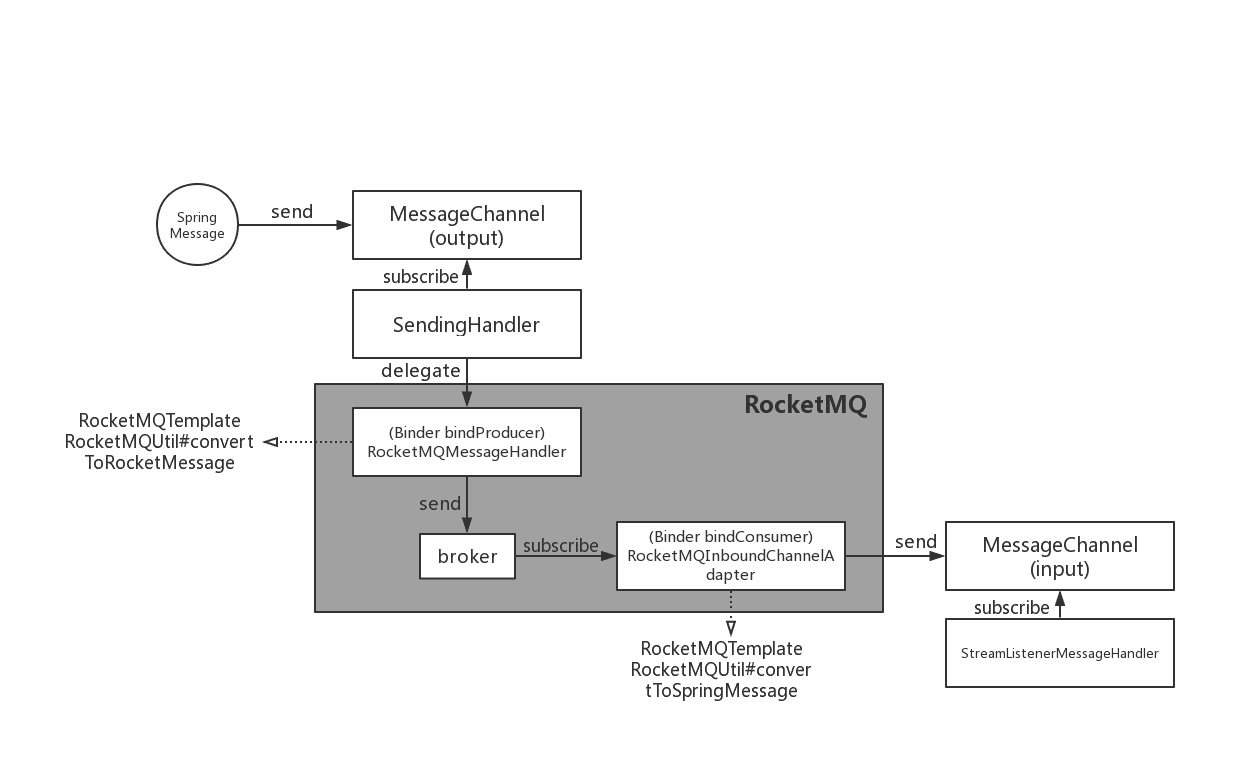
图 5. SCS RocketMQ 绑定器
RocketMQ Binder的实现依赖于RocketMQ-Spring框架。
RocketMQ Spring 框架是 RocketMQ 和 Spring Boot 的集成。它提供了三个主要功能:
RocketMQMessageChannelBinderRocketMQInboundChannelAdapter是 Binder 的标准实现,它将在RocketMQMessageHandler内部构建。
RocketMQMessageHandler将RocketMQTemplate基于 Binding 配置进行构建。RocketMQTemplate内部会将模块的org.springframework.messaging.Message消息类转换spring-messaging为RocketMQ的消息类org.apache.rocketmq.common .message.Message,然后发送出去。
RocketMQInboundChannelAdapter也会RocketMQListenerBindingContainer根据Binding配置进行构建,RocketMQListenerBindingContainer启动RocketMQConsumer接收消息。
RocketMQ Binder Application也可以用来配置rocketmq.**来触发RocketMQ Spring相关的AutoConfiguration
目前Binder支持设置相关的keyHeader来设置RocketMQ消息的属性。
例如 , , , , ,TAGS代表DELAYRocketMQTRANSACTIONAL_ARG消息KEYS对应的标签。WAIT_STORE_MSG_OKFLAG
MessageBuilder builder = MessageBuilder.withPayload(msg)
    .setHeader(RocketMQHeaders.TAGS, "binder")
    .setHeader(RocketMQHeaders.KEYS, "my-key")
    .setHeader(MessageConst.PROPERTY_DELAY_TIME_LEVEL, "1");
Message message = builder.build();
output().send(message);
或者使用 StreamBridge
MessageBuilder builder = MessageBuilder.withPayload(msg)
    .setHeader(RocketMQHeaders.TAGS, "binder")
    .setHeader(RocketMQHeaders.KEYS, "my-key")
    .setHeader(MessageConst.PROPERTY_DELAY_TIME_LEVEL, "1");
Message message = builder.build();
streamBridge.send("producer-out-0", message);
更多示例:[RocketMQ 示例](https://github.com/alibaba/spring-cloud-alibaba/tree/2021.x/spring-cloud-alibaba-examples/rocketmq-example)
spring.cloud.stream.rocketmq.binder.name-server
RocketMQ Server的名称服务器(旧版本使用namesrv-addr配置项)。
默认值:127.0.0.1:9876.
spring.cloud.stream.rocketmq.binder.access-key
阿里云账号的AccessKey。
默认值:空。
spring.cloud.stream.rocketmq.binder.secret-key
阿里云账号的SecretKey。
默认值:空。
spring.cloud.stream.rocketmq.binder.enable-msg-trace
为所有生产者和消费者启用消息跟踪功能。
默认值:true.
spring.cloud.stream.rocketmq.binder.customized-trace-topic
消息跟踪的跟踪主题。
默认值:RMQ_SYS_TRACE_TOPIC.
spring.cloud.stream.rocketmq.binder.access-channel
商业版rocketmq消息轨迹主题自适应,值为CLOUD
默认值:空。
以下属性仅适用于 RocketMQ 生产者,并且必须以spring.cloud.stream.rocketmq.bindings..consumer…
使能够
启用消费者绑定。
默认值:true.
标签
消费者订阅标签表达式,标签由||.
默认值:空。
数据库
消费者订阅sql表达式。
默认值:空。
广播
控制消息方式,如果你想让所有的订阅者都收到消息所有的消息,广播是个不错的选择。
默认值:false.
整齐的
同时或按顺序接收消息。
默认值:false.
delayLevelWhenNextConsume
并发消费的消息消费重试策略:
-1,不重试,直接放入DLQ0,broker控制重试频率>0,客户端控制重试频率暂停当前队列时间毫秒
消息消费重试有序消费的时间间隔。
默认值:1000.
以下属性仅适用于 RocketMQ 生产者,并且必须以spring.cloud.stream.rocketmq.bindings..producer…
使能够
启用生产者绑定。
默认值:true.
团体
生产者团体名称。
默认值:空。
最大消息大小
允许的最大消息大小(以字节为单位)。
默认值:8249344.
事务性的
发送交易消息。
默认值:false.
同步
以同步方式发送消息。
默认值:false.
vipChannelEnabled
Send message with vip channel.
Default: true.
sendMessageTimeout
Millis of send message timeout.
Default: 3000.
compressMessageBodyThreshold
Compress message body threshold, namely, message body larger than 4k will be compressed on default.
Default: 4096.
retryTimesWhenSendFailed
Maximum number of retry to perform internally before claiming sending failure in synchronous mode.
Default: 2.
retryTimesWhenSendAsyncFailed
Maximum number of retry to perform internally before claiming sending failure in asynchronous mode.
Default: 2.
retryNextServer
Indicate whether to retry another broker on sending failure internally.
Default: false.
ANS(Application Naming Service)是 EDAS 的一个组件。Spring Cloud 阿里云ANS提供了符合Spring Cloud规范的商业版服务注册和发现,让您可以在本地开发应用,在云端运行。
EDAS 目前支持直接部署 Nacos Discovery 应用
如果你想在你的项目中使用 ANS,请使用 starter,group ID 为com.alibaba.cloud,artifact ID 为spring-cloud-starter-alicloud-ans。
<dependency>
    <groupId>com.alibaba.cloud</groupId>
    <artifactId>spring-cloud-starter-alicloud-ans</artifactId>
</dependency>
当客户端引入Spring Cloud AliCloud ANS Starter时,服务的IP、端口号、权限等元数据会自动注册到注册中心。客户端会与服务器保持心跳,以证明自己有能力正常提供服务。
下面是一个简单的例子。
@SpringBootApplication
@EnableDiscoveryClient
@RestController
public class ProviderApplication {

    @RequestMapping("/")
    public String home() {
        return "Hello world";
    }

    public static void main(String[] args) {
        SpringApplication.run(ProviderApplication.class, args);
    }

}
由于服务会注册到注册中心,所以我们需要配置注册中心的地址。我们还需要在application.properties中添加如下地址。
# The application name will be used as the service name, therefore it is mandatory.
spring.application.name=ans-provider
server.port=18081
# The following is the IP and port number of the registration center.
spring.cloud.alicloud.ans.server-list=127.0.0.1
spring.cloud.alicloud.ans.server-port=8080
现在注册中心还没有启动,所以如果你的应用程序启动了,你会得到一个错误信息。因此,请在开始申请之前启动注册中心。
ANS 使用两种类型的注册中心。一个是免费的轻量级配置中心,一个是云端注册中心,通过EDAS提供。通常,您可以使用轻量级版本进行应用开发和本地测试,使用 EDAS 进行canary部署或生产。
轻量级配置中心的下载安装方法参见Configure轻量级配置中心。
您只需要执行步骤1(下载轻量级配置中心)和步骤2(启动轻量级配置中心)。如果您同时使用 ANS,则不需要步骤 3(配置主机)。
启动轻量级配置中心后,直接启动ProviderApplication,即可将服务注册到配置中心。轻量级配置中心默认端口为8080,因此打开http://127.0.0.1:8080,点击左侧的“服务”,即可看到注册的服务。
使用云端注册中心,让您免去繁琐的服务器维护工作,同时提供更好的稳定性。使用云端注册中心和轻量级配置中心在代码层面没有区别,只是在配置上有一些区别。
下面是使用云端注册中心的简单示例。
# The application name will be used the service name, and is therefore mandatory.
spring.application.name=ans-provider
# Configure your own port number
server.port=18081
# The following is the IP and port number of the configuration center. The default value is 127.0.0.1 and 8080, so the following lines can be omitted.
spring.cloud.alicloud.ans.server-mode=EDAS
spring.cloud.alicloud.access-key=Your Alibaba Cloud AK
spring.cloud.alicloud.secret-key=Your Alibaba Cloud SK
spring.cloud.alicloud.edas.namespace=cn-xxxxx
server-mode 的默认值为 LOCAL。如果要使用云端的注册中心,需要改成EDAS。
access-key和secret-key就是你阿里云账号的AK/SK。先注册一个阿里云账号,登录云控制台阿里云AK/SK 复制你的AccessKey ID和Access Key Secret。如果您还没有创建,请单击“创建 AccessKey”按钮。
命名空间是 EDAS 中的一个概念,用来隔离环境,比如测试环境和生产环境。要找到您的命名空间,请先单击以注册 EDAS。按量付费模式不会向您收费。然后登录EDAS 控制台,就可以看到你的命名空间,比如 cn-hangzhou。
EDAS 提供应用托管服务,会自动为托管的应用填写所有配置。
Spring Cloud AliCloud ACM是商业产品应用配置管理(ACM)在Spring Cloud客户端的一个实现,是免费的。
使用Spring Cloud AliCloud ACM基于Spring Cloud的编程模型快速接入ACM配置管理能力。
目前 EDAS 已经支持直接部署 Nacos Config 应用。
如果你想在你的项目中使用 ACM,请使用 starter,group ID 为com.alibaba.cloud,artifact ID 为spring-cloud-starter-alicloud-acm。
<dependency>
    <groupId>com.alibaba.cloud</groupId>
    <artifactId>spring-cloud-starter-alicloud-acm</artifactId>
</dependency>
客户端引入Spring Cloud Alibaba Cloud ACM Starter后,应用启动时会自动从配置管理服务器获取配置信息,并将配置注入到Spring Environment中。
下面是一个简单的例子。
@SpringBootApplication
public class ProviderApplication {

    public static void main(String[] args) {
        ConfigurableApplicationContext applicationContext = SpringApplication.run(ProviderApplication.class, args);
        String userName = applicationContext.getEnvironment().getProperty("user.name");
        String userAge = applicationContext.getEnvironment().getProperty("user.age");
        System.err.println("user name :" +userName+"; age: "+userAge);
    }
}
由于我们需要从配置服务器获取配置信息,因此我们需要配置服务器的地址。我们还需要在 bootstrap.properties 中添加以下信息。
# Required. The application name will be used as part of the keyword to get the configuration key from the server.
spring.application.name=acm-config
server.port=18081
# The following is the IP and port number of the configuration server.
spring.cloud.alicloud.acm.server-list=127.0.0.1
spring.cloud.alicloud.acm.server-port=8080
现在配置中心还没有启动,所以如果你的应用程序启动你会得到一个错误信息。因此,请在启动应用程序之前启动配置中心。
ACM 使用两种类型的配置中心。一个是轻量级配置中心,一个是阿里云上用的ACM。通常,您可以使用轻量级版本进行应用程序开发和本地测试,使用 ACM 进行金丝雀部署或生产。
使用轻量配置中心
轻量级配置中心的下载安装方法参见Configure轻量级配置中心。
您只需要执行步骤1(下载轻量级配置中心)和步骤2(启动轻量级配置中心)。
在阿里云上使用 ACM
在云端使用ACM,让您免去繁琐的服务器维护工作,同时提供更好的稳定性。在云端使用ACM和轻量级配置中心在代码层面没有区别,只是在配置上有一些区别。
以下是使用 ACM 的简单示例。您可以在ACM 控制台上查看配置详细信息
# The application name will be used as part of the keyword to obtain configuration key from the server, and is mandatory.
spring.application.name=acm-config
# Configure your own port number
server.port=18081
# The following is the IP and port number of the configuration center.
spring.cloud.alicloud.acm.server-mode=EDAS
spring.cloud.alicloud.access-key=Your Alibaba Cloud AK
spring.cloud.alicloud.secret-key=Your Alibaba Cloud SK
spring.cloud.alicloud.acm.endpoint=acm.aliyun.com
spring.cloud.alicloud.acm.namespace=Your ACM namespace(You can find the namespace on the ACM console)
EDAS 提供应用托管服务,会自动为托管的应用填写关于 ACM 的所有配置。
Group:      DEFAULT_GROOUP

DataId:     acm-config.properties

Content:    user.name=james
            user.age=18
dataId 的格式为{prefix}. {file-extension}. “prefix”默认从spring.application.name中获取,“file-extension”的值默认为“properties”。
启动下面的例子,可以看到控制台打印的值就是我们在轻量级配置中心配置的值。
user name :james; age: 18
spring-cloud-starter-alicloud-acm中dataId默认的文件扩展名为properties。除了属性之外,还支持 yaml。您可以使用 spring.cloud.alicloud.acm.file-extension 设置文件扩展名。只需将其设置为yaml或 yml 即可使用 yaml 格式。
修改文件扩展名后,需要在配置中心的DataID和内容中做相应的格式修改。
spring-cloud-starter-alicloud-acm 支持动态配置更新。Spring的RefreshEvent是在配置中心更新配置时发布的。所有带有@RefreshScope 和@ConfigurationProperties 注解的类都会自动刷新。
您可以通过此设置禁用自动刷新:spring.cloud.alicloud.acm.refresh.enabled=false
spring-cloud-starter-alicloud-acm加载配置时,配置DataId为{spring.application.name}。{file-extension} 将首先加载。如果spring.profiles.active中有内容,spring.profile的内容,配置dataid格式为{spring.application.name}-{profile}。{file-extension}也会依次加载,后者优先级更高。
spring.profiles.active 是配置元数据,也应该在bootstrap.properties 或bootstrap.yaml 中配置。例如,您可以在 bootstrap.properties 中添加以下内容。
spring.profiles.active={配置文件名称}
注意:也可以通过JVM参数配置粒度,比如-Dspring.profiles.active=develop或者–spring.profiles.active=develop,优先级更高。只需遵循 Spring Boot 的规范即可。
ACM 客户端从服务器获取配置的默认超时为 3000 毫秒。如果需要定义超时,设置配置spring.cloud.alicloud.acm.timeout,单位是毫秒。
{spring.cloud.alicloud.acm.group}没有定义配置时默认使用 DEFAULT_GROUP 。如果需要定义自己的组,可以使用下面的方法:
spring.cloud.alicloud.acm.group=DEVELOP_GROUP
这个配置必须放在bootstrap.properties文件中,并且Group的值必须和.的值一样spring.cloud.alicloud.acm.group。
ACM 提供了一种跨多个应用程序共享相同配置的解决方案。您可以通过spring.application.group在 Bootstrap 中添加配置来完成此操作。
spring.application.group=company.department.team
然后,你的应用在获取自己的配置之前,会依次从以下DataId获取配置:company:application.properties, company.department:application.properties, company.department.team:application.properties。之后,它还会从 {spring.application.group} 中检索配置:{spring.application.name}。{file-extension} 越靠后的优先级越高,应用本身的独特配置具有最高的优先级。
DataId默认后缀为properties,可以使用spring.cloud.alicloud.acm.file-extension更改。{spring.application.group}: {spring.application.name}. {file-extension}.
如果你配置spring.profiles.active了,那么{spring.application.group}: {spring.application.name}-{spring.profiles.active}. {file-extension}也支持的DataId格式,优先级高于{spring.application.group}: {spring.application.name}. {file-extension}
ACM的Actuator端点为/acm,config表示ACM元数据配置信息,runtime.sources对应从ACM服务器获取的配置信息和上次刷新时间,runtime.refreshHistory对应动态刷新历史。
OSS(Object Storage Service)是阿里云上的一款存储产品。Spring Cloud阿里云OSS提供符合Spring Cloud规范的商业化存储服务。我们提供简单易用的API,支持在Spring框架中集成Resource。
我们发布了 Spring Cloud Alibaba 版本 0.2.1。您需要先添加依赖管理 POM。
<dependencyManagement>
    <dependencies>
        <dependency>
            <groupId>com.alibaba.cloud</groupId>
            <artifactId>spring-cloud-alibaba-dependencies</artifactId>
            <version>0.2.2.BUILD-SNAPSHOT</version>
            <type>pom</type>
            <scope>import</scope>
        </dependency>
    </dependencies>
</dependencyManagement>
接下来需要介绍一下Spring Cloud阿里云OSS Starter。
<dependency>
    <groupId>com.alibaba.cloud</groupId>
    <artifactId>spring-cloud-starter-alicloud-oss</artifactId>
</dependency>
在开始使用Spring Cloud阿里云OSS之前,请在application.properties中添加如下配置。
spring.cloud.alicloud.access-key=Your Alibaba Cloud AK
spring.cloud.alicloud.secret-key=Your Alibaba Cloud SK
spring.cloud.alicloud.oss.endpoint=***.aliyuncs.com
access-key和secret-key就是你阿里云账号的AK/SK。如果没有,请先注册一个账号,登录阿里云AK/SK管理获取您的 AccessKey ID 和 Access Key Secret 。如果您还没有创建 AccessKey,请单击“创建 AccessKey”来创建一个。
有关端点信息,请参阅 OSS文档并获取您所在地区的端点。
Spring Cloud阿里云OSS的OSS API基于官方OSS SDK,包含上传、下载、查看文件的API。
这是一个使用 OSS API 的简单应用程序。
@SpringBootApplication
public class OssApplication {

    @Autowired
    private OSS ossClient;

    @RequestMapping("/")
    public String home() {
        ossClient.putObject("bucketName", "fileName", new FileInputStream("/your/local/file/path"));
        return "upload success";
    }

    public static void main(String[] args) throws URISyntaxException {
        SpringApplication.run(OssApplication.class, args);
    }

}
在上传文件之前,请先 注册一个阿里云账号。如果您已经有一个,请 注册 OSS。
登录OSS控制台,点击“新建Bucket”,按照提示创建一个Bucket。将先前代码的“bucketname”中的存储桶名称替换为您的新存储桶名称。“fileName”可以是任意名称,“/your/local/file/path”可以是任意本地文件路径。接下来你可以运行 curl http://127.0.0.1:port number/ 来上传你的文件,你会在OSS 控制台看到你的文件。
更多OSS API说明请参考OSS SDK文档。
Spring Cloud阿里云OSS集成了Spring框架的Resource,让您轻松使用OSS资源。
以下是如何使用资源的简单示例。
@SpringBootApplication
public class OssApplication {

    @Value("oss://bucketName/fileName")
    private Resource file;

    @GetMapping("/file")
    public String fileResource() {
        try {
            return "get file resource success. content: " + StreamUtils.copyToString(
                file.getInputStream(), Charset.forName(CharEncoding.UTF_8));
        } catch (Exception e) {
            return "get resource fail: " + e.getMessage();
        }
    }

    public static void main(String[] args) throws URISyntaxException {
        SpringApplication.run(OssApplication.class, args);
    }

}
上述示例的前提条件是您需要在OSS上有一个名为“bucketName”的bucket,并且在这个bucket中有一个名为“fileName”的文件。
除了AccessKeys,Spring Cloud阿里云OSS还支持STS认证。STS是一种带有临时安全令牌的认证方式,通常用于第三方临时访问其资源。
第三方临时访问资源,只需要完成以下配置即可。
spring.cloud.alicloud.oss.authorization-mode=STS
spring.cloud.alicloud.oss.endpoint=***.aliyuncs.com
spring.cloud.alicloud.oss.sts.access-key=Your authenticated AK
spring.cloud.alicloud.oss.sts.secret-key=Your authenticated SK
spring.cloud.alicloud.oss.sts.security-token=Your authenticated ST
其中spring.cloud.alicloud.oss.authorization-mode为枚举类型。这里填写STS表示使用STS认证。有关端点信息,请参阅OSS 文档并填写您所在地区的端点。
access-key、secret-key和security-token需要认证方下发。有关 STS 的更多信息,请参阅STS 文档。
Spring Cloud Alibaba Cloud OSS 除了基础配置外,还支持很多其他的配置,这些配置也包含在application.properties 文件中。
这里有些例子。
spring.cloud.alicloud.oss.authorization-mode=STS
spring.cloud.alicloud.oss.endpoint=***.aliyuncs.com
spring.cloud.alicloud.oss.sts.access-key=Your authenticated AK
spring.cloud.alicloud.oss.sts.secret-key=Your authenticated SK
spring.cloud.alicloud.oss.sts.security-token=Your authenticated ST

spring.cloud.alicloud.oss.config.connection-timeout=3000
spring.cloud.alicloud.oss.config.max-connections=1000
更多配置请参考OSSClient Configurations底部的表格。
大多数情况下, OSSClient Configurations 表中的参数需要用“-”连接参数名,且字母全部小写。例如,ConnectionTimeout 应该更改为 connection-timeout。
SchedulerX(分布式作业调度)是阿里云产品EDAS的一个组件。Spring Cloud Alibaba Cloud SchedulerX 提供了符合Spring Cloud规范的分布式作业调度。SchedulerX提供高精度秒级、高稳定性、高可用的定时作业调度服务,支持简单单机作业、简单多机作业、脚本作业、网格作业等多种作业类型。
如果你想在你的项目中使用 SchedulerX,请使用组 ID 为com.alibaba.cloudartifact ID 为的 starter spring-cloud-starter-alicloud-schedulerX。
<dependency>
    <groupId>com.alibaba.cloud</groupId>
    <artifactId>spring-cloud-starter-alicloud-schedulerX</artifactId>
</dependency>
客户端引入Spring Cloud Alibaba Cloud SchedulerX Starter后,只需要完成一些简单的配置,就可以自动初始化SchedulerX服务。
下面是一个简单的例子。
@SpringBootApplication
public class ScxApplication {

    public static void main(String[] args) {
        SpringApplication.run(ScxApplication.class, args);
    }

}
在application.properties文件中添加如下配置。
server.port=18033
# cn-test is the test region of SchedulerX
spring.cloud.alicloud.scx.group-id=***
spring.cloud.alicloud.edas.namespace=cn-test
在获取group-id之前,请先注册一个阿里云账号,然后注册EDAS和注册SchedulerX。
要获取组 ID,请参阅SchedulerX 文档。
创建群组时,请选择“测试”区域。
简单作业是最常用的作业类型。您只需要实现 ScxSimpleJobProcessor 接口。
以下是一个简单的单服务器作业示例。
public class SimpleTask implements ScxSimpleJobProcessor {

	@Override
	public ProcessResult process(ScxSimpleJobContext context) {
		System.out.println("-----------Hello world---------------");
		ProcessResult processResult = new ProcessResult(true);
		return processResult;
	}

}
进入SchedulerX Jobs页面,选择“Test”区域,点击右上角的“Create Job”创建一个Job,如下图。
Job Group: Test——***-*-*-****
Job process interface:SimpleTask
Type: Simple Single-Server Job
Quartz Cron Expression: Default Option——0 * * * * ?
Job Description: Empty
Custom Parameters: Empty
上面的作业是一个“简单的单服务器作业”,并指定了一个 Cron 表达式“0 * * * * ?” . 这意味着该作业将每分钟执行一次且仅执行一次。
有关更多作业类型,请参阅SchedulerX 文档。
前面的例子展示了如何在“Test”区域使用SchedulerX,主要用于本地测试。
在生产层面,除了上面提到的group-id和namespace,还需要完成一些其他的配置。请参阅以下示例:
server.port=18033
# cn-test is the test region of SchedulerX
spring.cloud.alicloud.scx.group-id=***
spring.cloud.alicloud.edas.namespace=***
# If your application runs on EDAS, you do not need to configure the following.
spring.cloud.alicloud.access-key=***
spring.cloud.alicloud.secret-key=***
# The following configurations are not mandatory. You can refer to the SchedulerX documentation for details.
spring.cloud.alicloud.scx.domain-name=***
group-id 的获取方式与前面的示例相同,您可以通过点击 EDAS 控制台左侧导航栏中的“命名空间”获取命名空间。
Group-id 必须在命名空间内创建。
access-key和secret-key就是你阿里云账号的AK/SK。如果您在 EDAS 上部署您的应用程序,则无需填写此信息。否则,请转到 安全信息以获取您的访问密钥。
域名不是强制性的。详情可参考 SchedulerX 文档。
SMS(Short Message Service)是覆盖全球的消息服务,阿里巴巴短信提供便捷、高效、智能的通讯能力,帮助商家快速联系客户。
Spring Cloud Alibaba Cloud SMS基于Spring Cloud Alibaba SMS,提供更易用的API,用于快速接入阿里云的短信服务。
如果你想在你的项目中使用 SMS,请使用组 ID 为com.alibaba.cloudartifact ID 为的 starter spring-cloud-starter-alicloud-sms。
<dependency>
    <groupId>com.alibaba.cloud</groupId>
    <artifactId>spring-cloud-starter-alicloud-sms</artifactId>
</dependency>
在开始使用Spring Cloud阿里云短信之前,请在application.properties中添加如下配置。
spring.cloud.alicloud.access-key=AK
spring.cloud.alicloud.secret-key=SK
access-key和secret-key就是你阿里云账号的AK/SK。如果没有,请先注册一个账号,登录阿里云AK/SK管理获取您的 AccessKey ID 和 Access Key Secret 。如果您还没有创建 AccessKey,请单击“创建 AccessKey”来创建一个。
Spring Cloud阿里云短信中的短信API基于阿里云短信SDK。具有单条短信发送、多条短信批量发送、短信查询、短信(短信回执消息和上行短信)类操作API。
下面是一个简单的例子,说明如何使用SMS api发送短信:
@SpringBootApplication
public class SmsApplication {

    @Autowired
    private ISmsService smsService;

    @RequestMapping("/batch-sms-send.do")
    public SendBatchSmsResponse batchsendCheckCode(
            @RequestParam(name = "code") String code) {

        SendSmsRequest request = new SendSmsRequest();
        // Required:the mobile number
        request.setPhoneNumbers("152******");
        // Required:SMS-SignName-could be found in sms console
        request.setSignName("******");
        // Required:Template-could be found in sms console
        request.setTemplateCode("******");
        // Required:The param of sms template.For exmaple, if the template is "Hello,your verification code is ${code}". The param should be like following value
        request.setTemplateParam("{\"code\":\"" + code + "\"}");
        SendSmsResponse sendSmsResponse ;
        try {
            sendSmsResponse = smsService.sendSmsRequest(request);
        }
        catch (ClientException e) {
            e.printStackTrace();
            sendSmsResponse = new SendSmsResponse();
        }
        return sendSmsResponse ;
    }

    public static void main(String[] args) throws URISyntaxException {
        SpringApplication.run(SmsApplication.class, args);
    }

}
在发送消息之前,请先注册一个阿里云账号。如果您已经有一个,请 打开短信服务。
关于SMS的更多信息,请参考SMS官方短信(SendSms)—JAVA]文档。
由于较早的SMS sdk版本问题,如果发送短信失败,请删除显式MethodType为POST的代码行。如果仍有问题,请尽快与我们联系。
为了降低学习成本,Spring Cloud阿里云短信包的API接口与官网提供的API和Example保持一致。
@RequestMapping("/batch-sms-send.do")
public SendBatchSmsResponse batchsendCheckCode(
        @RequestParam(name = "code") String code) {
    SendBatchSmsRequest request = new SendBatchSmsRequest();
    request.setMethod(MethodType.GET);
    request.setPhoneNumberJson("[\"177********\",\"130********\"]");
    request.setSignNameJson("[\"*******\",\"*******\"]");
    request.setTemplateCode("******");
    request.setTemplateParamJson(
            "[{\"code\":\"" + code + "\"},{\"code\":\"" + code + "\"}]");
    SendBatchSmsResponse sendSmsResponse ;
    try {
        sendSmsResponse = smsService
                .sendSmsBatchRequest(request);
        return sendSmsResponse;
    }
    catch (ClientException e) {
        e.printStackTrace();
        sendSmsResponse =  new SendBatchSmsResponse();
    }
    return sendSmsResponse ;
}
请求的MethodType设置为GET,和官网给出的例子有些区别。这是因为依赖的阿里云POP API版本不一致导致不兼容问题,设置为GET。
更多参数说明可以参考这里
@RequestMapping("/query.do")
public QuerySendDetailsResponse querySendDetailsResponse(
        @RequestParam(name = "tel") String telephone) {
    QuerySendDetailsRequest request = new QuerySendDetailsRequest();
    request.setPhoneNumber(telephone);
    request.setSendDate("20190103");
    request.setPageSize(10L);
    request.setCurrentPage(1L);
    try {
        QuerySendDetailsResponse response = smsService.querySendDetails(request);
        return response;
    }
    catch (ClientException e) {
        e.printStackTrace();
    }

    return new QuerySendDetailsResponse();
}
更多参数说明可以参考这里
spring.cloud.alicloud.sms.report-queue-name=Alicom-Queue-********-SmsReport
@Component
public class SmsReportMessageListener
		implements SmsReportMessageListener {

	@Override
	public boolean dealMessage(Message message) {
	    //do something
		System.err.println(this.getClass().getName() + "; " + message.toString());
		return true;
	}
}
更多Message的消息体格式可以参考这里。
spring.cloud.alicloud.sms.up-queue-name=Alicom-Queue-********-SmsUp
@Component
public class SmsUpMessageListener
		implements org.springframework.cloud.alicloud.sms.SmsUpMessageListener {

	@Override
	public boolean dealMessage(Message message) {
    	//do something
		System.err.println(this.getClass().getName() + "; " + message.toString());
		return true;
	}
}
更多Message的消息体格式可以参考这里。
matlab打开matlab,用最简单的imread方法读取一个图像clcclearimg_h=imread('hua.jpg');返回一个数组(矩阵),往往是a*b*cunit8类型解释一下这个三维数组的意思,行数、数和层数,unit8:指数据类型,无符号八位整形,可理解为0~2^8的数三个层数分别代表RGB三个通道图像rgb最常用的是24-位实现方法,即RGB每个通道有256色阶(2^8)。基于这样的24-位RGB模型的色彩空间可以表现256×256×256≈1670万色当imshow传入了一个二维数组,它将以灰度方式绘制;可以把图像拆分为rgb三层,可以以灰度的方式观察它figure(1
Ruby有一些不错的文档生成器,例如Yard、rDoc,甚至Glyph。问题是Sphinx可以做网站、PDF、epub、LaTex等。它在重组文本中完成所有这些事情。在Ruby世界中有替代方案吗?也许是程序的组合?如果我也能使用Markdown就更好了。 最佳答案 自1.0版以来,Sphinx有了“域”的概念,它是从Python和/或C以外的语言标记代码实体(如方法调用、对象、函数等)的方法。有一个rubydomain,所以你可以只使用Sphinx本身。您唯一会缺少的(我认为)是Sphinx使用autodoc从源代码自动创建文档
我怀念ipython的一件事是它有一个?为特定功能挖掘文档的运算符。我知道ruby有一个类似的命令行工具,但是我在irb中调用它非常不方便。ruby/irb有类似的东西吗? 最佳答案 Pry是IPython的Ruby版本,它支持?命令来查找有关方法的文档,但语法略有不同:pry(main)>?File.dirnameFrom:file.cinRubyCore(CMethod):Numberoflines:6visibility:publicsignature:dirname()Returnsallcomponentsofthef
我正在尝试使用nokogirigem提取页面上的所有url及其链接文本,并将链接文本和url存储在散列中。FooBar我想回去{"Foo"=>"#foo","Bar"=>"#bar"} 最佳答案 这是一个单行:Hash[doc.xpath('//a[@href]').map{|link|[link.text.strip,link["href"]]}]#=>{"Foo"=>"#foo","Bar"=>"#bar"}拆分一点可以说更具可读性:h={}doc.xpath('//a[@href]').eachdo|link|h[link.t
这是一些奇怪的例子:#!/usr/bin/rubyrequire'rubygems'require'open-uri'require'nokogiri'print"withoutread:",Nokogiri(open('http://weblog.rubyonrails.org/')).class,"\n"print"withread:",Nokogiri(open('http://weblog.rubyonrails.org/').read).class,"\n"运行此返回:withoutread:Nokogiri::XML::Documentwithread:Nokogiri::
目录H2数据库入门以及实际开发时的使用1.H2数据库的初识1.1H2数据库介绍1.2为什么要使用嵌入式数据库?1.3嵌入式数据库对比1.3.1性能对比1.4技术选型思考2.H2数据库实战2.1H2数据库下载搭建以及部署2.1.1H2数据库的下载2.1.2数据库启动2.1.2.1windows系统可以在bin目录下执行h2.bat2.1.2.2同理可以通过cmd直接使用命令进行启动:2.1.2.3启动后控制台页面:2.1.3spring整合H2数据库2.1.3.1引入依赖文件2.1.4数据库通过file模式实际保存数据的位置2.2H2数据库操作2.2.1Mysql兼容模式2.2.2Mysql模式
这是我的YAML文件“test.yml”:---alpha:100.0beta:200.0gama:300.0---3...第一个文档是一个散列。第二个文档是一个整数。我正在尝试将它们作为散列和整数加载到Ruby程序中。这是我目前的尝试:require'yaml'variables=YAML.load_file('test.yml')putsvariables.inspect 最佳答案 要访问单个文件中的多个YAML文档,请使用load_stream方法(正如“matt”在对其他答案之一的评论中提到的):YAML.load_stre
关闭。这个问题不符合StackOverflowguidelines.它目前不接受答案。我们不允许提问寻求书籍、工具、软件库等的推荐。您可以编辑问题,以便用事实和引用来回答。关闭4年前。Improvethisquestion我希望能够将模板化的YARD文档样式注释插入到我现有的Rails遗留应用程序中。目前它的评论很少。我想要具有指定参数的类header和方法header(通过从我假定的方法签名中提取)和返回值的占位符。在PHP代码中,我有一些工具可以检查代码并在适当的位置创建插入到代码中的文档header注释。在带有Ducktyping等的Ruby中,我确信诸如@params等类型之类
我必须使用AdobeInDesign来创建文档。我们基本上需要在整个文档中有几个变量(公司名称、项目名称等)需要填写。我想知道是否有一种方法可以采用现有模板,并使用我熟悉的语言(Ruby、Python等)以编程方式填充这些模板。我尝试使用文本编辑器打开AdobeInDesign文件-但是当我使用Notepad++进行修改然后在InDesign中打开文件时,它告诉我文件已损坏。如果您对以编程方式构建InDesign文档有任何见解或了解任何教程,我们将不胜感激。附言我尝试查看Adobe的ExtendScript,但没有找到太多适用于InDesign的文档。感谢您的帮助!
在下面的Ruby示例中,是否有一种模式可以让YAMLNOT静默忽略重复键“one”?irb(main):001:0>require'yaml'=>trueirb(main):002:0>str='{one:1,one:2}'=>"{one:1,one:2}"irb(main):003:0>YAML.load(str)=>{"one"=>2}谢谢! 最佳答案 使用Psych,您可以遍历AST树以查找重复键。我在我的测试套件中使用以下辅助方法来验证我的i18n翻译中没有重复键:defduplicate_keys(file_or_cont
