首先,请阅读文章《Kubernetes监控手册01-体系介绍》,回顾一下 Kubernetes 架构,Kube-Proxy 是在所有工作负载节点上的。
Kube-Proxy 默认暴露两个端口,10249用于暴露监控指标,在 /metrics 接口吐出 Prometheus 协议的监控数据:
[root@tt-fc-dev01.nj lib]# curl -s http://localhost:10249/metrics | head -n 10
# HELP apiserver_audit_event_total [ALPHA] Counter of audit events generated and sent to the audit backend.
# TYPE apiserver_audit_event_total counter
apiserver_audit_event_total 0
# HELP apiserver_audit_requests_rejected_total [ALPHA] Counter of apiserver requests rejected due to an error in audit logging backend.
# TYPE apiserver_audit_requests_rejected_total counter
apiserver_audit_requests_rejected_total 0
# HELP go_gc_duration_seconds A summary of the pause duration of garbage collection cycles.
# TYPE go_gc_duration_seconds summary
go_gc_duration_seconds{quantile="0"} 2.5307e-05
go_gc_duration_seconds{quantile="0.25"} 2.8884e-05
10256 端口作为健康检查的端口,使用 /healthz 接口做健康检查,请求之后返回两个时间信息:
[root@tt-fc-dev01.nj lib]# curl -s http://localhost:10256/healthz | jq .
{
  "lastUpdated": "2022-11-09 13:14:35.621317865 +0800 CST m=+4802354.950616250",
  "currentTime": "2022-11-09 13:14:35.621317865 +0800 CST m=+4802354.950616250"
}
所以,我们只要从 http://localhost:10249/metrics 采集监控数据即可。既然是 Prometheus 协议的数据,使用 Categraf 的 input.prometheus 来搞定即可。
配置文件在 conf/input.prometheus/prometheus.toml,把 Kube-Proxy 的地址配置进来即可:
interval = 15
[[instances]]
urls = [
     "http://localhost:10249/metrics"
]
labels = { job="kube-proxy" }
urls 字段配置 endpoint 列表,即所有提供 metrics 数据的接口,我们使用下面的命令做个测试:
[work@tt-fc-dev01.nj categraf]$ ./categraf --test --inputs prometheus | grep kubeproxy_sync_proxy_rules
2022/11/09 13:30:17 main.go:110: I! runner.binarydir: /home/work/go/src/categraf
2022/11/09 13:30:17 main.go:111: I! runner.hostname: tt-fc-dev01.nj
2022/11/09 13:30:17 main.go:112: I! runner.fd_limits: (soft=655360, hard=655360)
2022/11/09 13:30:17 main.go:113: I! runner.vm_limits: (soft=unlimited, hard=unlimited)
2022/11/09 13:30:17 config.go:33: I! tracing disabled
2022/11/09 13:30:17 provider.go:63: I! use input provider: [local]
2022/11/09 13:30:17 agent.go:87: I! agent starting
2022/11/09 13:30:17 metrics_agent.go:93: I! input: local.prometheus started
2022/11/09 13:30:17 prometheus_scrape.go:14: I! prometheus scraping disabled!
2022/11/09 13:30:17 agent.go:98: I! agent started
13:30:17 kubeproxy_sync_proxy_rules_endpoint_changes_pending agent_hostname=tt-fc-dev01.nj instance=http://localhost:10249/metrics 0
13:30:17 kubeproxy_sync_proxy_rules_duration_seconds_count agent_hostname=tt-fc-dev01.nj instance=http://localhost:10249/metrics 319786
13:30:17 kubeproxy_sync_proxy_rules_duration_seconds_sum agent_hostname=tt-fc-dev01.nj instance=http://localhost:10249/metrics 17652.749911909214
13:30:17 kubeproxy_sync_proxy_rules_duration_seconds_bucket agent_hostname=tt-fc-dev01.nj instance=http://localhost:10249/metrics le=+Inf 319786
13:30:17 kubeproxy_sync_proxy_rules_duration_seconds_bucket agent_hostname=tt-fc-dev01.nj instance=http://localhost:10249/metrics le=0.001 0
13:30:17 kubeproxy_sync_proxy_rules_duration_seconds_bucket agent_hostname=tt-fc-dev01.nj instance=http://localhost:10249/metrics le=0.002 0
13:30:17 kubeproxy_sync_proxy_rules_duration_seconds_bucket agent_hostname=tt-fc-dev01.nj instance=http://localhost:10249/metrics le=0.004 0
13:30:17 kubeproxy_sync_proxy_rules_duration_seconds_bucket agent_hostname=tt-fc-dev01.nj instance=http://localhost:10249/metrics le=0.008 0
13:30:17 kubeproxy_sync_proxy_rules_duration_seconds_bucket agent_hostname=tt-fc-dev01.nj instance=http://localhost:10249/metrics le=0.016 0
13:30:17 kubeproxy_sync_proxy_rules_duration_seconds_bucket agent_hostname=tt-fc-dev01.nj instance=http://localhost:10249/metrics le=0.032 0
13:30:17 kubeproxy_sync_proxy_rules_duration_seconds_bucket agent_hostname=tt-fc-dev01.nj instance=http://localhost:10249/metrics le=0.064 274815
13:30:17 kubeproxy_sync_proxy_rules_duration_seconds_bucket agent_hostname=tt-fc-dev01.nj instance=http://localhost:10249/metrics le=0.128 316616
13:30:17 kubeproxy_sync_proxy_rules_duration_seconds_bucket agent_hostname=tt-fc-dev01.nj instance=http://localhost:10249/metrics le=0.256 319525
13:30:17 kubeproxy_sync_proxy_rules_duration_seconds_bucket agent_hostname=tt-fc-dev01.nj instance=http://localhost:10249/metrics le=0.512 319776
13:30:17 kubeproxy_sync_proxy_rules_duration_seconds_bucket agent_hostname=tt-fc-dev01.nj instance=http://localhost:10249/metrics le=1.024 319784
13:30:17 kubeproxy_sync_proxy_rules_duration_seconds_bucket agent_hostname=tt-fc-dev01.nj instance=http://localhost:10249/metrics le=2.048 319784
13:30:17 kubeproxy_sync_proxy_rules_duration_seconds_bucket agent_hostname=tt-fc-dev01.nj instance=http://localhost:10249/metrics le=4.096 319784
13:30:17 kubeproxy_sync_proxy_rules_duration_seconds_bucket agent_hostname=tt-fc-dev01.nj instance=http://localhost:10249/metrics le=8.192 319784
13:30:17 kubeproxy_sync_proxy_rules_duration_seconds_bucket agent_hostname=tt-fc-dev01.nj instance=http://localhost:10249/metrics le=16.384 319786
13:30:17 kubeproxy_sync_proxy_rules_service_changes_pending agent_hostname=tt-fc-dev01.nj instance=http://localhost:10249/metrics 0
13:30:17 kubeproxy_sync_proxy_rules_last_queued_timestamp_seconds agent_hostname=tt-fc-dev01.nj instance=http://localhost:10249/metrics 1.6668536394083393e+09
13:30:17 kubeproxy_sync_proxy_rules_iptables_restore_failures_total agent_hostname=tt-fc-dev01.nj instance=http://localhost:10249/metrics 0
13:30:17 kubeproxy_sync_proxy_rules_endpoint_changes_total agent_hostname=tt-fc-dev01.nj instance=http://localhost:10249/metrics 219139
13:30:17 kubeproxy_sync_proxy_rules_last_timestamp_seconds agent_hostname=tt-fc-dev01.nj instance=http://localhost:10249/metrics 1.6679718066295934e+09
13:30:17 kubeproxy_sync_proxy_rules_service_changes_total agent_hostname=tt-fc-dev01.nj instance=http://localhost:10249/metrics 512372
Kube-Proxy 在 Kubernetes 架构中,负责从 APIServer 同步规则,然后修改 iptables 或 ipvs 配置,同步规则相关的指标就非常关键了,这里我就 grep 了这些指标作为样例。
通过 --test 看到输出了,就说明正常采集到数据了,你有几个工作负载节点,就分别去修改 Categraf 的配置即可。当然,这样做非常直观,只是略麻烦,如果未来扩容新的 Node 节点,也要去修改 Categraf 的采集配置,把 Kube-Proxy 这个 /metrics 地址给加上,如果你是用脚本批量跑的,倒是还可以,如果是手工部署就略麻烦。我们可以把 Categraf 采集器做成 Daemonset,这样就不用担心扩容的问题了,Daemonset 会被自动调度到所有 Node 节点。
Categraf 作为 Daemonset 运行,首先要创建一个 namespace,然后相关的 ConfigMap、Daemonset 等都归属这个 namespace。只是监控 Kube-Proxy 的话,Categraf 的配置就只需要主配置 config.toml 和 prometheus.toml,下面我们就实操演示一下。
[work@tt-fc-dev01.nj categraf]$ kubectl create namespace flashcat
namespace/flashcat created

[work@tt-fc-dev01.nj categraf]$ kubectl get ns | grep flashcat
flashcat                                 Active   29s
ConfigMap 是用于放置 config.toml 和 prometheus.toml 的内容,我把 yaml 文件也给你准备好了,请保存为 categraf-configmap-v1.yaml
---
kind: ConfigMap
metadata:
  name: categraf-config
apiVersion: v1
data:
  config.toml: |
    [global]
    hostname = "$HOSTNAME"
    interval = 15
    providers = ["local"]
    [writer_opt]
    batch = 2000
    chan_size = 10000
    [[writers]]
    url = "http://10.206.0.16:19000/prometheus/v1/write"
    timeout = 5000
    dial_timeout = 2500
    max_idle_conns_per_host = 100
---
kind: ConfigMap
metadata:
  name: categraf-input-prometheus
apiVersion: v1
data:
  prometheus.toml: |
    [[instances]]
    urls = ["http://127.0.0.1:10249/metrics"]
    labels = { job="kube-proxy" }
上面的 10.206.0.16:19000 只是举个例子,请改成你自己的 n9e-server 的地址。当然,如果不想把监控数据推给 Nightingale 也OK,写成其他的时序库(支持 remote write 协议的接口)也可以。hostname = "$HOSTNAME" 这个配置用了 $ 符号,后面创建 Daemonset 的时候会把 HOSTNAME 这个环境变量注入,让 Categraf 自动拿到。
下面我们把 ConfigMap 创建出来:
[work@tt-fc-dev01.nj yamls]$ kubectl apply -f categraf-configmap-v1.yaml -n flashcat
configmap/categraf-config created
configmap/categraf-input-prometheus created

[work@tt-fc-dev01.nj yamls]$ kubectl get configmap -n flashcat
NAME                        DATA   AGE
categraf-config             1      19s
categraf-input-prometheus   1      19s
kube-root-ca.crt            1      22m
配置文件准备好了,开始创建 Daemonset,注意把 HOSTNAME 环境变量注入进去,yaml 文件如下,你可以保存为 categraf-daemonset-v1.yaml:
apiVersion: apps/v1
kind: DaemonSet
metadata:
  labels:
    app: categraf-daemonset
  name: categraf-daemonset
spec:
  selector:
    matchLabels:
      app: categraf-daemonset
  template:
    metadata:
      labels:
        app: categraf-daemonset
    spec:
      containers:
      - env:
        - name: TZ
          value: Asia/Shanghai
        - name: HOSTNAME
          valueFrom:
            fieldRef:
              apiVersion: v1
              fieldPath: spec.nodeName
        - name: HOSTIP
          valueFrom:
            fieldRef:
              apiVersion: v1
              fieldPath: status.hostIP
        image: flashcatcloud/categraf:v0.2.18
        imagePullPolicy: IfNotPresent
        name: categraf
        volumeMounts:
        - mountPath: /etc/categraf/conf
          name: categraf-config
        - mountPath: /etc/categraf/conf/input.prometheus
          name: categraf-input-prometheus
      hostNetwork: true
      restartPolicy: Always
      tolerations:
      - effect: NoSchedule
        operator: Exists
      volumes:
      - configMap:
          name: categraf-config
        name: categraf-config
      - configMap:
          name: categraf-input-prometheus
        name: categraf-input-prometheus
apply 一下这个 Daemonset 文件:
[work@tt-fc-dev01.nj yamls]$ kubectl apply -f categraf-daemonset-v1.yaml -n flashcat
daemonset.apps/categraf-daemonset created

[work@tt-fc-dev01.nj yamls]$ kubectl get ds -o wide -n flashcat
NAME                 DESIRED   CURRENT   READY   UP-TO-DATE   AVAILABLE   NODE SELECTOR   AGE     CONTAINERS   IMAGES                           SELECTOR
categraf-daemonset   6         6         6       6            6           <none>          2m20s   categraf     flashcatcloud/categraf:v0.2.17   app=categraf-daemonset

[work@tt-fc-dev01.nj yamls]$ kubectl get pods -o wide -n flashcat
NAME                       READY   STATUS    RESTARTS   AGE     IP            NODE          NOMINATED NODE   READINESS GATES
categraf-daemonset-4qlt9   1/1     Running   0          2m10s   10.206.0.7    10.206.0.7    <none>           <none>
categraf-daemonset-s9bk2   1/1     Running   0          2m10s   10.206.0.11   10.206.0.11   <none>           <none>
categraf-daemonset-w77lt   1/1     Running   0          2m10s   10.206.16.3   10.206.16.3   <none>           <none>
categraf-daemonset-xgwf5   1/1     Running   0          2m10s   10.206.0.16   10.206.0.16   <none>           <none>
categraf-daemonset-z9rk5   1/1     Running   0          2m10s   10.206.16.8   10.206.16.8   <none>           <none>
categraf-daemonset-zdp8v   1/1     Running   0          2m10s   10.206.0.17   10.206.0.17   <none>           <none>
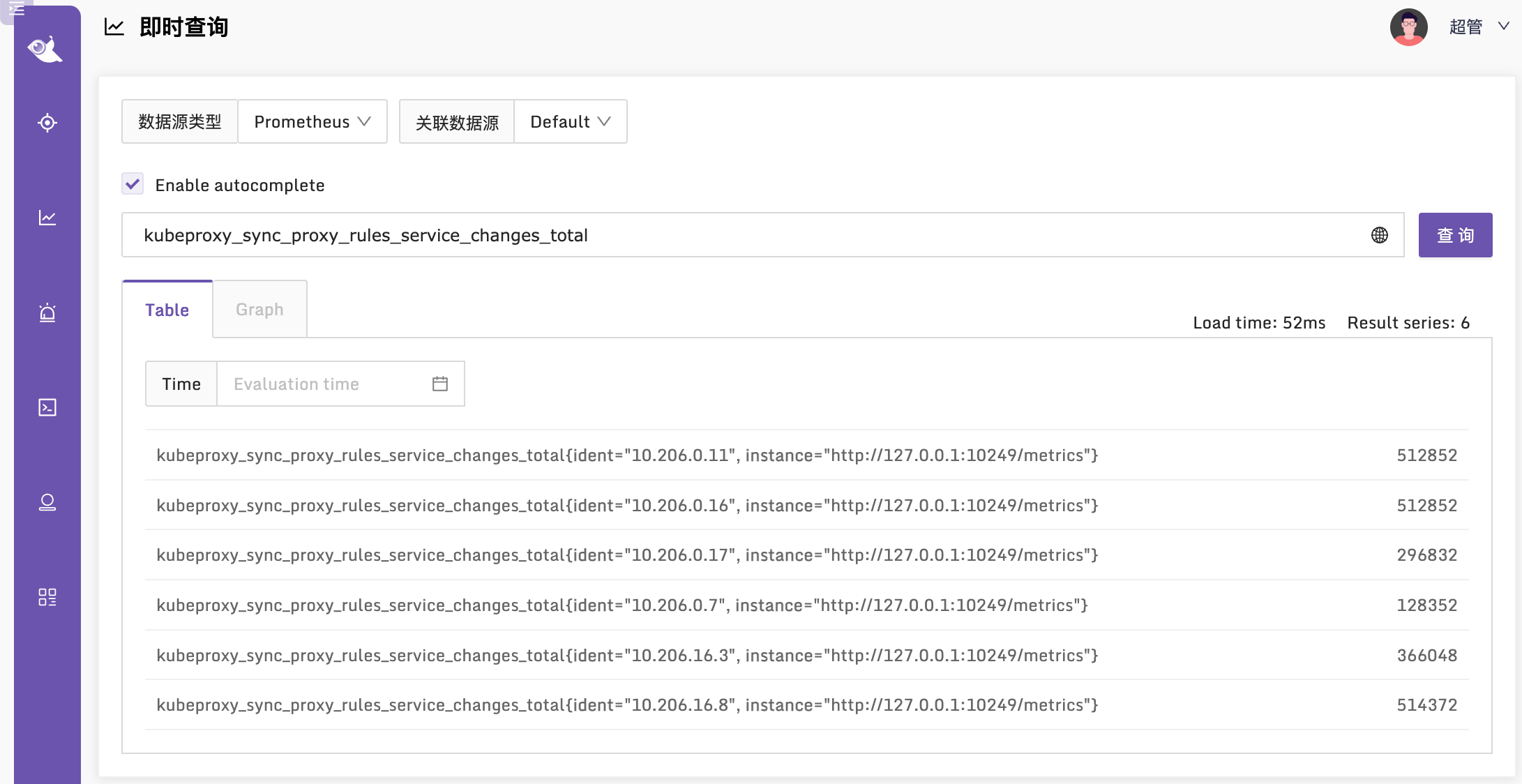
看起来一切正常,我们去 Nightingale 查一下相关监控指标,看看有了没有:
Kube-Proxy 的指标,孔飞老师之前整理过,我也给挪到这个章节,供大家参考:
# HELP go_gc_duration_seconds A summary of the pause duration of garbage collection cycles.
# TYPE go_gc_duration_seconds summary
gc时间

# HELP go_goroutines Number of goroutines that currently exist.
# TYPE go_goroutines gauge
goroutine数量

# HELP go_threads Number of OS threads created.
# TYPE go_threads gauge
线程数量

# HELP kubeproxy_network_programming_duration_seconds [ALPHA] In Cluster Network Programming Latency in seconds
# TYPE kubeproxy_network_programming_duration_seconds histogram
service或者pod发生变化到kube-proxy规则同步完成时间指标含义较复杂,参照https://github.com/kubernetes/community/blob/master/sig-scalability/slos/network_programming_latency.md

# HELP kubeproxy_sync_proxy_rules_duration_seconds [ALPHA] SyncProxyRules latency in seconds
# TYPE kubeproxy_sync_proxy_rules_duration_seconds histogram
规则同步耗时

# HELP kubeproxy_sync_proxy_rules_endpoint_changes_pending [ALPHA] Pending proxy rules Endpoint changes
# TYPE kubeproxy_sync_proxy_rules_endpoint_changes_pending gauge
endpoint 发生变化后规则同步pending的次数

# HELP kubeproxy_sync_proxy_rules_endpoint_changes_total [ALPHA] Cumulative proxy rules Endpoint changes
# TYPE kubeproxy_sync_proxy_rules_endpoint_changes_total counter
endpoint 发生变化后规则同步的总次数

# HELP kubeproxy_sync_proxy_rules_iptables_restore_failures_total [ALPHA] Cumulative proxy iptables restore failures
# TYPE kubeproxy_sync_proxy_rules_iptables_restore_failures_total counter
本机上 iptables restore 失败的总次数

# HELP kubeproxy_sync_proxy_rules_last_queued_timestamp_seconds [ALPHA] The last time a sync of proxy rules was queued
# TYPE kubeproxy_sync_proxy_rules_last_queued_timestamp_seconds gauge
最近一次规则同步的请求时间戳,如果比下一个指标 kubeproxy_sync_proxy_rules_last_timestamp_seconds 大很多,那说明同步 hung 住了

# HELP kubeproxy_sync_proxy_rules_last_timestamp_seconds [ALPHA] The last time proxy rules were successfully synced
# TYPE kubeproxy_sync_proxy_rules_last_timestamp_seconds gauge
最近一次规则同步的完成时间戳

# HELP kubeproxy_sync_proxy_rules_service_changes_pending [ALPHA] Pending proxy rules Service changes
# TYPE kubeproxy_sync_proxy_rules_service_changes_pending gauge
service变化引起的规则同步pending数量

# HELP kubeproxy_sync_proxy_rules_service_changes_total [ALPHA] Cumulative proxy rules Service changes
# TYPE kubeproxy_sync_proxy_rules_service_changes_total counter
service变化引起的规则同步总数

# HELP process_cpu_seconds_total Total user and system CPU time spent in seconds.
# TYPE process_cpu_seconds_total counter
利用这个指标统计cpu使用率

# HELP process_max_fds Maximum number of open file descriptors.
# TYPE process_max_fds gauge
进程可以打开的最大fd数

# HELP process_open_fds Number of open file descriptors.
# TYPE process_open_fds gauge
进程当前打开的fd数

# HELP process_resident_memory_bytes Resident memory size in bytes.
# TYPE process_resident_memory_bytes gauge
统计内存使用大小

# HELP process_start_time_seconds Start time of the process since unix epoch in seconds.
# TYPE process_start_time_seconds gauge
进程启动时间戳

# HELP rest_client_request_duration_seconds [ALPHA] Request latency in seconds. Broken down by verb and URL.
# TYPE rest_client_request_duration_seconds histogram
请求 apiserver 的耗时(按照url和verb统计)

# HELP rest_client_requests_total [ALPHA] Number of HTTP requests, partitioned by status code, method, and host.
# TYPE rest_client_requests_total counter
请求 apiserver 的总数(按照code method host统计)
由于上面给出的监控方案是通过 Daemonset,所以各个 Kube-Proxy 的监控数据,是通过 ident 标签来区分的,并非是通过 instance 标签来区分,从 Grafana 官网找到一个分享,地址在 这里,改造之后的大盘在 这里 导入夜莺即可使用。
本文作者秦晓辉,快猫星云合伙人,文章内容是快猫技术团队共同沉淀的结晶,作者做了编辑整理,我们会持续输出监控、稳定性保障相关的技术文章,文章可转载,转载请注明出处,尊重技术人员的成果。
这篇文章是继上一篇文章“Observability:从零开始创建Java微服务并监控它(一)”的续篇。在上一篇文章中,我们讲述了如何创建一个Javaweb应用,并使用Filebeat来收集应用所生成的日志。在今天的文章中,我来详述如何收集应用的指标,使用APM来监控应用并监督web服务的在线情况。源码可以在地址 https://github.com/liu-xiao-guo/java_observability 进行下载。摄入指标指标被视为可以随时更改的时间点值。当前请求的数量可以改变任何毫秒。你可能有1000个请求的峰值,然后一切都回到一个请求。这也意味着这些指标可能不准确,你还想提取最小/
需求:要创建虚拟机,就需要给他提供一个虚拟的磁盘,我们就在/opt目录下创建一个10G大小的raw格式的虚拟磁盘CentOS-7-x86_64.raw命令格式:qemu-imgcreate-f磁盘格式磁盘名称磁盘大小qemu-imgcreate-f磁盘格式-o?1.创建磁盘qemu-imgcreate-fraw/opt/CentOS-7-x86_64.raw10G执行效果#ls/opt/CentOS-7-x86_64.raw2.安装虚拟机使用virt-install命令,基于我们提供的系统镜像和虚拟磁盘来创建一个虚拟机,另外在创建虚拟机之前,提前打开vnc客户端,在创建虚拟机的时候,通过vnc
我试图在Ubuntu14.04中使用Curl安装RVM。我运行了以下命令:\curl-sSLhttps://get.rvm.io|bash-sstable出现如下错误:curl:(7)Failedtoconnecttoget.rvm.ioport80:Networkisunreachable非常感谢解决此问题的任何帮助。谢谢 最佳答案 在执行curl之前尝试这个:echoipv4>>~/.curlrc 关于ruby-在Ubuntu14.04中使用Curl安装RVM时出错,我们在Stack
安装Rails时,一切都很好,但后来,我写道:rails-v和输出:/home/toshiba/.rvm/rubies/ruby-2.2.1/lib/ruby/site_ruby/2.2.0/rubygems/core_ext/kernel_require.rb:54:in`require':cannotloadsuchfile--rails/cli(LoadError)from/home/toshiba/.rvm/rubies/ruby-2.2.1/lib/ruby/site_ruby/2.2.0/rubygems/core_ext/kernel_require.rb:54:in`r
提供3种Ubuntu系统安装微信的方法,在Ubuntu20.04上验证都ok。1.WineHQ7.0安装微信:ubuntu20.04安装最新版微信--可以支持微信最新版,但是适配的不是特别好;比如WeChartOCR.exe报错。2.原生微信安装:linux系统下的微信安装(ubuntu20.04)--微信适配的最好,反应最快,但是微信版本只到2.1.1,版本太老,很多功能都没有。3.深度deepin-wine6安装微信:ubuntu20.04+系统deepin-wine6安装新版微信--综合比较好,当前个人使用此种方法1个月,微信版本3.4;没什么大问题,尚可。一、WineHQ7.0安装微信
这个问题在这里已经有了答案:Unabletoinstallgem-Failedtobuildgemnativeextension-cannotloadsuchfile--mkmf(LoadError)(17个答案)关闭9年前。嘿,我正在尝试在一台新的ubuntu机器上安装rails。我安装了ruby和rvm,但出现“无法构建gemnative扩展”错误。这是什么意思?$sudogeminstallrails-v3.2.9(没有sudo表示我没有权限)然后它会输出很多“获取”命令,最终会出现这个错误:Buildingnativeextensions.Thiscouldtakeawhi
这是什么。我首先做了:rvmgetstablervminstallruby-2.2.2没有交易。它向我展示了以下内容:$rvminstallruby-2.2.2Searchingforbinaryrubies,thismighttakesometime.Nobinaryrubiesavailablefor:ubuntu/14.04/i386/ruby-2.2.2.Continuingwithcompilation.Pleaseread'rvmhelpmount'togetmoreinformationonbinaryrubies.Checkingrequirementsforubunt
是否可以在我的服务器上运行任何工具来监控多个Rails应用程序?我需要监控每个应用程序收到的请求数、每个应用程序使用了多少内存、使用了多少CPU以及其他类似的统计信息。我需要查看每个单独的Rails应用程序的统计信息。 最佳答案 我建议你试试NewRelicRPM.免费版:RPMLiteisthemostwidelyusedsolutionforbasicwebapplicationmonitoring.RPMLiteprovidesapplicationmonitoringforunlimitedJava,RubyorJRubya
我正在ubuntu14.04和ruby2.2.4上安装passenger+nginx。passenger-install-nginx-module有bundler错误$passenger-install-nginx-module/home/ubuntu/.rvm/gems/ruby-2.2.4/gems/bundler-1.13.1/lib/bundler/rubygems_ext.rb:45:in`full_gem_path':uninitializedconstantBundler::Plugin::API::Source(NameError)from/home/ubuntu/.r
从ubuntu16.04升级到ubuntu18.04后,从rails项目的根目录运行railsconsole时收到以下错误。只有控制台似乎受到影响,我可以毫无问题地启动puma服务器。RunningviaSpringpreloaderinprocess23887/home/user/.rvm/gems/ruby-2.4.1/gems/activesupport-5.1.6/lib/active_support/dependencies.rb:292:in`require':libreadline.so.6:cannotopensharedobjectfile:Nosuchfileord
