文章目录
🔥 这两年开始毕业设计和毕业答辩的要求和难度不断提升,传统的毕设题目缺少创新和亮点,往往达不到毕业答辩的要求,这两年不断有学弟学妹告诉学长自己做的项目系统达不到老师的要求。
为了大家能够顺利以及最少的精力通过毕设,学长分享优质毕业设计项目,今天要分享的是
🚩 深度学习花卉识别 - python 机器视觉 opencv
🥇学长这里给一个题目综合评分(每项满分5分)
🧿 选题指导, 项目分享:
在我国有着成千上万种花卉, 但如何能方便快捷的识别辨识出这些花卉的种类成为了植物学领域的重要研究课题。 我国的花卉研究历史悠久, 是世界上研究较早的国家之一。 花卉是我国重要的物产资源, 除美化了环境, 调养身心外, 它还具有药用价值, 并且在医学领域为保障人们的健康起着重要作用。
花卉识别是植物学领域的一个重要课题, 多年来已经形成一定体系化分类系统,但需要植物学家耗费大量的精力人工分析。 这种方法要求我们首先去了解花卉的生长环境, 近而去研究花卉的整体形态特征。 在观察植株形态特征时尤其是重点观察花卉的花蕊特征、 花卉的纹理颜色和形状及其相关信息等。 然后在和现有的样本进行比对, 最终确定花卉的所属类别。
花卉种类识别功能实现的主要途径是利用计算机对样本进行分类。 通过对样本的精准分类达到得出图像识别结果的目的。 经典的花卉识别设计如下图 所示, 这几个过程相互关联而又有明显区别。
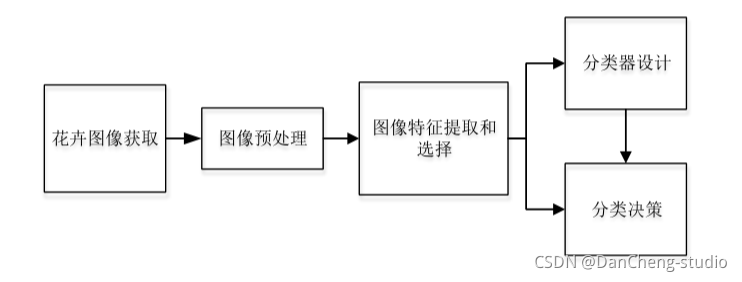
预处理是对处于最低抽象级别的图像进行操作的通用名称, 输入和输出均为强度图像。 为了使实验结果更精准, 需要对图像数据进行预处理, 比如, 根据需要增强图像质量、 将图像裁剪成大小一致的形状、 避免不必要的失真等等。
要想获取花卉图像中的最具代表性的隐含信息, 就必须对花卉图像数据集进行相应的变换。
特征提取旨在通过从现有特征中创建新特征(然后丢弃原始特征) 来减少数据集中的特征数量。 然后, 这些新的简化功能集应该能够汇总原始功能集中包含的大多数信息。 这样, 可以从原始集合的组合中创建原始特征的摘要版本。 对所获取的信息实现从测量空间到特征空间的转换。
构建完整系统的适当分类器组件的任务是使用特征提取器提供的特征向量将对象分配给类别。 由于完美的分类性能通常是不可能实现的, 因此一般的任务是确定每种可能类别的概率。 输入数据的特征向量表示所提供的抽象使得能够开发出在尽可能大程度上与领域无关的分类理论。
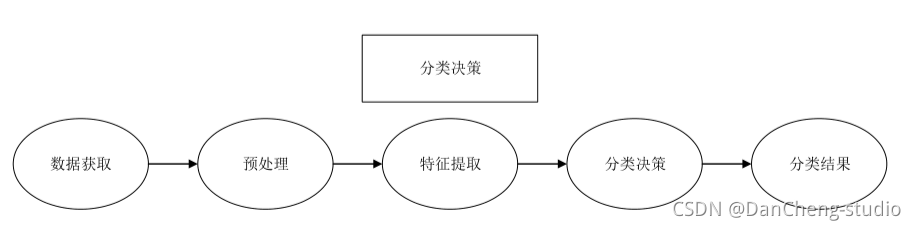
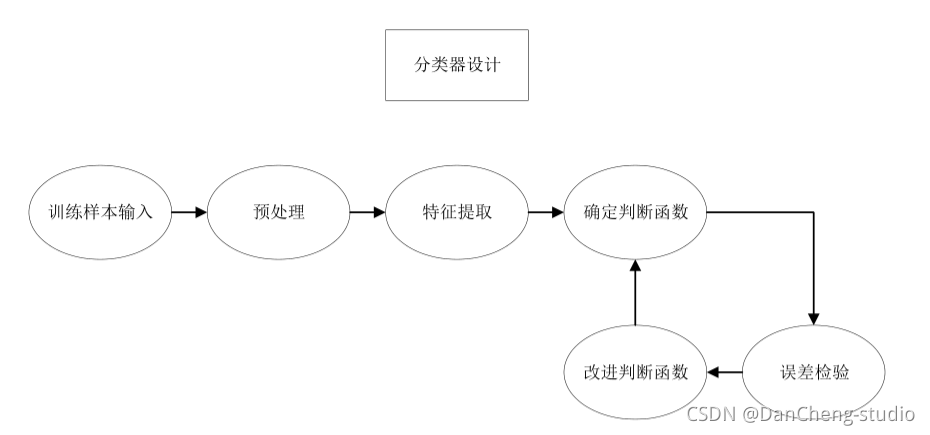
在设计阶段, 决策功能必须重复多次, 直到错误达到特定条件为止。 分类决策是在分类器设计阶段基于预处理、 特征提取与选择及判决函数建立的模型, 对接收到的样本数据进行归类, 然后输出分类结果。
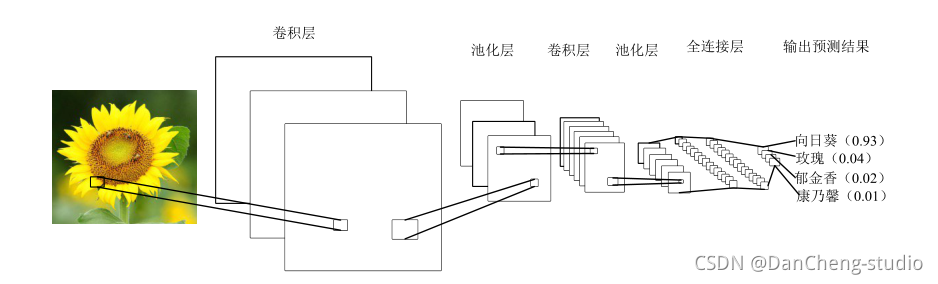
卷积神经网络是受到生物学启发的深度学习经典的多层前馈神经网络结构。 是一种在图像分类中广泛使用的机器学习算法。
CNN 的灵感来自我们人类实际看到并识别物体的方式。 这是基于一种方法,即我们眼睛中的神经元细胞只接收到整个对象的一小部分,而这些小块(称为接受场) 被组合在一起以形成整个对象。与其他的人工视觉算法不一样的是 CNN 可以处理特定任务的多个阶段的不变特征。 卷积神经网络使用的并不像经典的人工神经网络那样的全连接层, 而是通过采取局部连接和权值共享的方法, 来使训练的参数量减少, 降低模型的训练复杂度。
CNN 在图像分类和其他识别任务方面已经使传统技术的识别效果得到显著的改善。 由于在过去的几年中卷积网络的快速发展, 对象分类和目标检测能力取得喜人的成绩。
典型的 CNN 含有多个卷积层和池化层, 并具有全连接层以产生任务的最终结果。 在图像分类中, 最后一层的每个单元表示分类概率。
花卉图像的获取除了通过用拍摄设备手工收集或是通过网络下载已经整理好的现有数据集, 还可以通过网络爬虫技术收集整理自己的数据集。

以roses种类的训练数据为例,文件夹内部均为该种类花的图像文件
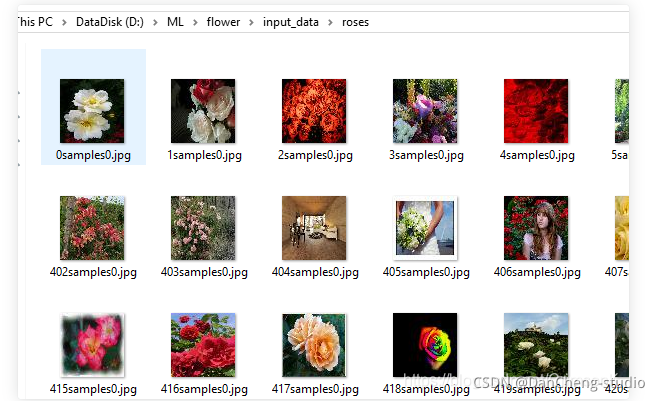
示例代码主要由四个模块组成:
项目模块执行顺序
运行train.py开始训练。
训练完成后- 运行test.py,查看实际测试结果
input_data.py——图像特征提取模块,模块生成四种花的品类图片路径及对应标签的List
import os
import math
import numpy as np
import tensorflow as tf
import matplotlib.pyplot as plt

# -----------------生成图片路径和标签的List------------------------------------
train_dir = 'D:/ML/flower/input_data'

roses = []
label_roses = []
tulips = []
label_tulips = []
dandelion = []
label_dandelion = []
sunflowers = []
label_sunflowers = []
定义函数get_files,获取图片列表及标签列表
# step1:获取所有的图片路径名,存放到
# 对应的列表中,同时贴上标签,存放到label列表中。
def get_files(file_dir, ratio):
    for file in os.listdir(file_dir + '/roses'):
        roses.append(file_dir + '/roses' + '/' + file)
        label_roses.append(0)
    for file in os.listdir(file_dir + '/tulips'):
        tulips.append(file_dir + '/tulips' + '/' + file)
        label_tulips.append(1)
    for file in os.listdir(file_dir + '/dandelion'):
        dandelion.append(file_dir + '/dandelion' + '/' + file)
        label_dandelion.append(2)
    for file in os.listdir(file_dir + '/sunflowers'):
        sunflowers.append(file_dir + '/sunflowers' + '/' + file)
        label_sunflowers.append(3)
        # step2:对生成的图片路径和标签List做打乱处理
    image_list = np.hstack((roses, tulips, dandelion, sunflowers))
    label_list = np.hstack((label_roses, label_tulips, label_dandelion, label_sunflowers))

    # 利用shuffle打乱顺序
    temp = np.array([image_list, label_list])
    temp = temp.transpose()
    np.random.shuffle(temp)


    # 将所有的img和lab转换成list
    all_image_list = list(temp[:, 0])
    all_label_list = list(temp[:, 1])
        # 将所得List分为两部分,一部分用来训练tra,一部分用来测试val
    # ratio是测试集的比例
    n_sample = len(all_label_list)
    n_val = int(math.ceil(n_sample * ratio))  # 测试样本数
    n_train = n_sample - n_val  # 训练样本数

    tra_images = all_image_list[0:n_train]
    tra_labels = all_label_list[0:n_train]
    tra_labels = [int(float(i)) for i in tra_labels]
    val_images = all_image_list[n_train:-1]
    val_labels = all_label_list[n_train:-1]
    val_labels = [int(float(i)) for i in val_labels]

    return tra_images, tra_labels, val_images, val_labels
定义函数get_batch,生成训练批次数据
# --------------------生成Batch----------------------------------------------

# step1:将上面生成的List传入get_batch() ,转换类型,产生一个输入队列queue,因为img和lab
# 是分开的,所以使用tf.train.slice_input_producer(),然后用tf.read_file()从队列中读取图像
#   image_W, image_H, :设置好固定的图像高度和宽度
#   设置batch_size:每个batch要放多少张图片
#   capacity:一个队列最大多少
定义函数get_batch,生成训练批次数据
def get_batch(image, label, image_W, image_H, batch_size, capacity):
    # 转换类型
    image = tf.cast(image, tf.string)
    label = tf.cast(label, tf.int32)

    # make an input queue
    input_queue = tf.train.slice_input_producer([image, label])

    label = input_queue[1]
    image_contents = tf.read_file(input_queue[0])  # read img from a queue

    # step2:将图像解码,不同类型的图像不能混在一起,要么只用jpeg,要么只用png等。
    image = tf.image.decode_jpeg(image_contents, channels=3)
        # step3:数据预处理,对图像进行旋转、缩放、裁剪、归一化等操作,让计算出的模型更健壮。
    image = tf.image.resize_image_with_crop_or_pad(image, image_W, image_H)
    image = tf.image.per_image_standardization(image)

    # step4:生成batch
    # image_batch: 4D tensor [batch_size, width, height, 3],dtype=tf.float32
    # label_batch: 1D tensor [batch_size], dtype=tf.int32
    image_batch, label_batch = tf.train.batch([image, label],
                                              batch_size=batch_size,
                                              num_threads=32,
                                              capacity=capacity)
    # 重新排列label,行数为[batch_size]
    label_batch = tf.reshape(label_batch, [batch_size])
    image_batch = tf.cast(image_batch, tf.float32)
    return image_batch, label_batch
model.py——CN模型构建
import tensorflow as tf

#定义函数infence,定义CNN网络结构
#卷积神经网络,卷积加池化*2,全连接*2,softmax分类
#卷积层1
def inference(images, batch_size, n_classes):
    with tf.variable_scope('conv1') as scope:
        weights = tf.Variable(tf.truncated_normal(shape=[3,3,3,64],stddev=1.0,dtype=tf.float32),
                             name = 'weights',dtype=tf.float32)
        biases = tf.Variable(tf.constant(value=0.1, dtype=tf.float32, shape=[64]),
                             name='biases', dtype=tf.float32)
        conv = tf.nn.conv2d(images, weights, strides=[1, 1, 1, 1], padding='SAME')
        pre_activation = tf.nn.bias_add(conv, biases)
        conv1 = tf.nn.relu(pre_activation, name=scope.name)

    # 池化层1
    # 3x3最大池化,步长strides为2,池化后执行lrn()操作,局部响应归一化,对训练有利。


    with tf.variable_scope('pooling1_lrn') as scope:
        pool1 = tf.nn.max_pool(conv1, ksize=[1, 3, 3, 1], strides=[1, 2, 2, 1], padding='SAME', name='pooling1')
        norm1 = tf.nn.lrn(pool1, depth_radius=4, bias=1.0, alpha=0.001 / 9.0, beta=0.75, name='norm1')

    # 卷积层2
    # 16个3x3的卷积核(16通道),padding=’SAME’,表示padding后卷积的图与原图尺寸一致,激活函数relu()
    with tf.variable_scope('conv2') as scope:
        weights = tf.Variable(tf.truncated_normal(shape=[3, 3, 64, 16], stddev=0.1, dtype=tf.float32),
                              name='weights', dtype=tf.float32)

        biases = tf.Variable(tf.constant(value=0.1, dtype=tf.float32, shape=[16]),
                             name='biases', dtype=tf.float32)

        conv = tf.nn.conv2d(norm1, weights, strides=[1, 1, 1, 1], padding='SAME')
        pre_activation = tf.nn.bias_add(conv, biases)
        conv2 = tf.nn.relu(pre_activation, name='conv2')

    # 池化层2
    # 3x3最大池化,步长strides为2,池化后执行lrn()操作,
    # pool2 and norm2
    with tf.variable_scope('pooling2_lrn') as scope:
        norm2 = tf.nn.lrn(conv2, depth_radius=4, bias=1.0, alpha=0.001 / 9.0, beta=0.75, name='norm2')
        pool2 = tf.nn.max_pool(norm2, ksize=[1, 3, 3, 1], strides=[1, 1, 1, 1], padding='SAME', name='pooling2')

    # 全连接层3
    # 128个神经元,将之前pool层的输出reshape成一行,激活函数relu()
    with tf.variable_scope('local3') as scope:
        reshape = tf.reshape(pool2, shape=[batch_size, -1])
        dim = reshape.get_shape()[1].value
        weights = tf.Variable(tf.truncated_normal(shape=[dim, 128], stddev=0.005, dtype=tf.float32),
                              name='weights', dtype=tf.float32)

        biases = tf.Variable(tf.constant(value=0.1, dtype=tf.float32, shape=[128]),
                             name='biases', dtype=tf.float32)

        local3 = tf.nn.relu(tf.matmul(reshape, weights) + biases, name=scope.name)

    # 全连接层4
    # 128个神经元,激活函数relu()
    with tf.variable_scope('local4') as scope:
        weights = tf.Variable(tf.truncated_normal(shape=[128, 128], stddev=0.005, dtype=tf.float32),
                              name='weights', dtype=tf.float32)

        biases = tf.Variable(tf.constant(value=0.1, dtype=tf.float32, shape=[128]),
                             name='biases', dtype=tf.float32)

        local4 = tf.nn.relu(tf.matmul(local3, weights) + biases, name='local4')

    # dropout层
    #    with tf.variable_scope('dropout') as scope:
    #        drop_out = tf.nn.dropout(local4, 0.8)

    # Softmax回归层
    # 将前面的FC层输出,做一个线性回归,计算出每一类的得分
    with tf.variable_scope('softmax_linear') as scope:
        weights = tf.Variable(tf.truncated_normal(shape=[128, n_classes], stddev=0.005, dtype=tf.float32),
                              name='softmax_linear', dtype=tf.float32)

        biases = tf.Variable(tf.constant(value=0.1, dtype=tf.float32, shape=[n_classes]),
                             name='biases', dtype=tf.float32)

        softmax_linear = tf.add(tf.matmul(local4, weights), biases, name='softmax_linear')

    return softmax_linear


# -----------------------------------------------------------------------------
# loss计算
# 传入参数:logits,网络计算输出值。labels,真实值,在这里是0或者1
# 返回参数:loss,损失值
def losses(logits, labels):
    with tf.variable_scope('loss') as scope:
        cross_entropy = tf.nn.sparse_softmax_cross_entropy_with_logits(logits=logits, labels=labels,
                                                                       name='xentropy_per_example')
        loss = tf.reduce_mean(cross_entropy, name='loss')
        tf.summary.scalar(scope.name + '/loss', loss)
    return loss


# --------------------------------------------------------------------------
# loss损失值优化
# 输入参数:loss。learning_rate,学习速率。
# 返回参数:train_op,训练op,这个参数要输入sess.run中让模型去训练。
def trainning(loss, learning_rate):
    with tf.name_scope('optimizer'):
        optimizer = tf.train.AdamOptimizer(learning_rate=learning_rate)
        global_step = tf.Variable(0, name='global_step', trainable=False)
        train_op = optimizer.minimize(loss, global_step=global_step)
    return train_op


# -----------------------------------------------------------------------
# 评价/准确率计算
# 输入参数:logits,网络计算值。labels,标签,也就是真实值,在这里是0或者1。
# 返回参数:accuracy,当前step的平均准确率,也就是在这些batch中多少张图片被正确分类了。
def evaluation(logits, labels):
    with tf.variable_scope('accuracy') as scope:
        correct = tf.nn.in_top_k(logits, labels, 1)
        correct = tf.cast(correct, tf.float16)
        accuracy = tf.reduce_mean(correct)
        tf.summary.scalar(scope.name + '/accuracy', accuracy)
    return accuracy
train.py——利用D:/ML/flower/input_data/路径下的训练数据,对CNN模型进行训练
import input_data
import model

# 变量声明
N_CLASSES = 4  # 四种花类型
IMG_W = 64  # resize图像,太大的话训练时间久
IMG_H = 64
BATCH_SIZE = 20
CAPACITY = 200
MAX_STEP = 2000  # 一般大于10K
learning_rate = 0.0001  # 一般小于0.0001

# 获取批次batch
train_dir = 'F:/input_data'  # 训练样本的读入路径
logs_train_dir = 'F:/save'  # logs存储路径

# train, train_label = input_data.get_files(train_dir)
train, train_label, val, val_label = input_data.get_files(train_dir, 0.3)
# 训练数据及标签
train_batch, train_label_batch = input_data.get_batch(train, train_label, IMG_W, IMG_H, BATCH_SIZE, CAPACITY)
# 测试数据及标签
val_batch, val_label_batch = input_data.get_batch(val, val_label, IMG_W, IMG_H, BATCH_SIZE, CAPACITY)

# 训练操作定义
train_logits = model.inference(train_batch, BATCH_SIZE, N_CLASSES)
train_loss = model.losses(train_logits, train_label_batch)
train_op = model.trainning(train_loss, learning_rate)
train_acc = model.evaluation(train_logits, train_label_batch)

# 测试操作定义
test_logits = model.inference(val_batch, BATCH_SIZE, N_CLASSES)
test_loss = model.losses(test_logits, val_label_batch)
test_acc = model.evaluation(test_logits, val_label_batch)

# 这个是log汇总记录
summary_op = tf.summary.merge_all()

# 产生一个会话
sess = tf.Session()
# 产生一个writer来写log文件
train_writer = tf.summary.FileWriter(logs_train_dir, sess.graph)
# val_writer = tf.summary.FileWriter(logs_test_dir, sess.graph)
# 产生一个saver来存储训练好的模型
saver = tf.train.Saver()
# 所有节点初始化
sess.run(tf.global_variables_initializer())
# 队列监控
coord = tf.train.Coordinator()
threads = tf.train.start_queue_runners(sess=sess, coord=coord)

# 进行batch的训练
try:
    # 执行MAX_STEP步的训练,一步一个batch
    for step in np.arange(MAX_STEP):
        if coord.should_stop():
            break
        _, tra_loss, tra_acc = sess.run([train_op, train_loss, train_acc])

        # 每隔50步打印一次当前的loss以及acc,同时记录log,写入writer
        if step % 10 == 0:
            print('Step %d, train loss = %.2f, train accuracy = %.2f%%' % (step, tra_loss, tra_acc * 100.0))
            summary_str = sess.run(summary_op)
            train_writer.add_summary(summary_str, step)
        # 每隔100步,保存一次训练好的模型
        if (step + 1) == MAX_STEP:
            checkpoint_path = os.path.join(logs_train_dir, 'model.ckpt')
            saver.save(sess, checkpoint_path, global_step=step)

except tf.errors.OutOfRangeError:
    print('Done training -- epoch limit reached')

finally:
    coord.request_stop()
test.py——利用D:/ML/flower/flower_photos/roses路径下的测试数据,查看识别效果
import matplotlib.pyplot as plt
import model
from input_data import get_files

# 获取一张图片
def get_one_image(train):
    # 输入参数:train,训练图片的路径
    # 返回参数:image,从训练图片中随机抽取一张图片
    n = len(train)
    ind = np.random.randint(0, n)
    img_dir = train[ind]  # 随机选择测试的图片

    img = Image.open(img_dir)
    plt.imshow(img)
    plt.show()
    image = np.array(img)
    return image


# 测试图片
def evaluate_one_image(image_array):
    with tf.Graph().as_default():
        BATCH_SIZE = 1
        N_CLASSES = 4

        image = tf.cast(image_array, tf.float32)
        image = tf.image.per_image_standardization(image)
        image = tf.reshape(image, [1, 64, 64, 3])

        logit = model.inference(image, BATCH_SIZE, N_CLASSES)

        logit = tf.nn.softmax(logit)

        x = tf.placeholder(tf.float32, shape=[64, 64, 3])

        # you need to change the directories to yours.
        logs_train_dir = 'F:/save/'

        saver = tf.train.Saver()

        with tf.Session() as sess:

            print("Reading checkpoints...")
            ckpt = tf.train.get_checkpoint_state(logs_train_dir)
            if ckpt and ckpt.model_checkpoint_path:
                global_step = ckpt.model_checkpoint_path.split('/')[-1].split('-')[-1]
                saver.restore(sess, ckpt.model_checkpoint_path)
                print('Loading success, global_step is %s' % global_step)
            else:
                print('No checkpoint file found')

            prediction = sess.run(logit, feed_dict={x: image_array})
            max_index = np.argmax(prediction)
            if max_index == 0:
                result = ('这是玫瑰花的可能性为: %.6f' % prediction[:, 0])
            elif max_index == 1:
                result = ('这是郁金香的可能性为: %.6f' % prediction[:, 1])
            elif max_index == 2:
                result = ('这是蒲公英的可能性为: %.6f' % prediction[:, 2])
            else:
                result = ('这是这是向日葵的可能性为: %.6f' % prediction[:, 3])
            return result


# ------------------------------------------------------------------------

if __name__ == '__main__':
    img = Image.open('F:/input_data/dandelion/1451samples2.jpg')
    plt.imshow(img)
    plt.show()
    imag = img.resize([64, 64])
    image = np.array(imag)
    print(evaluate_one_image(image))
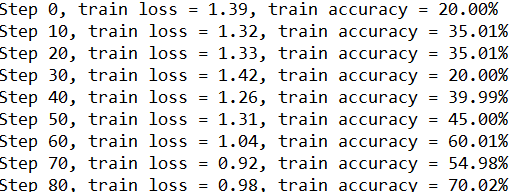
执行train模块,结果如下:
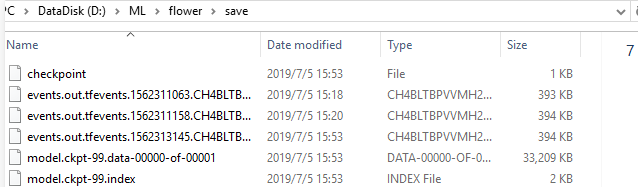
同时,训练结束后,在电脑指定的训练模型存储路径可看到保存的训练好的模型数据。
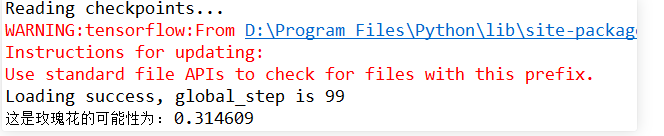
执行test模块,结果如下:
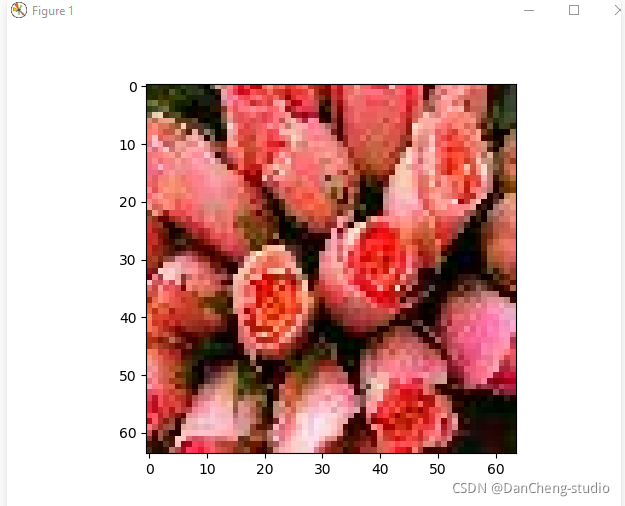
关闭显示的测试图片后,console查看测试结果如下:
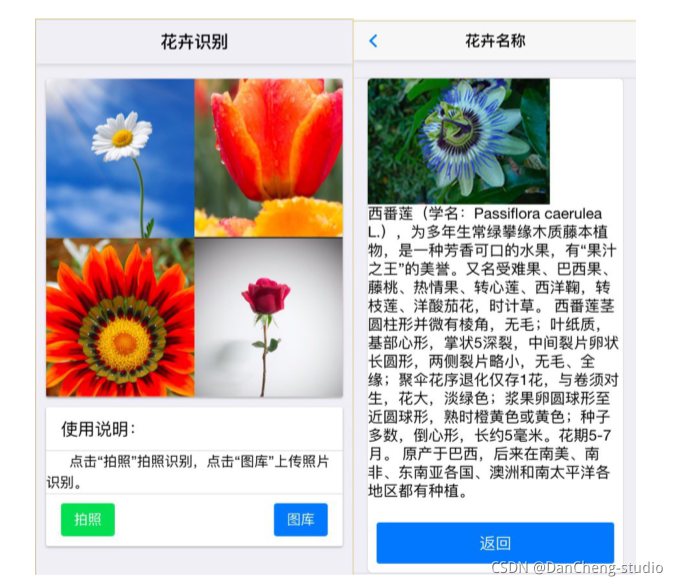
做一个GUI交互界面
关闭。这个问题是opinion-based.它目前不接受答案。想要改进这个问题?更新问题,以便editingthispost可以用事实和引用来回答它.关闭4年前。Improvethisquestion我想在固定时间创建一系列低音和高音调的哔哔声。例如:在150毫秒时发出高音调的蜂鸣声在151毫秒时发出低音调的蜂鸣声200毫秒时发出低音调的蜂鸣声250毫秒的高音调蜂鸣声有没有办法在Ruby或Python中做到这一点?我真的不在乎输出编码是什么(.wav、.mp3、.ogg等等),但我确实想创建一个输出文件。
这似乎非常适得其反,因为太多的gem会在window上破裂。我一直在处理很多mysql和ruby-mysqlgem问题(gem本身发生段错误,一个名为UnixSocket的类显然在Windows机器上不能正常工作,等等)。我只是在浪费时间吗?我应该转向不同的脚本语言吗? 最佳答案 我在Windows上使用Ruby的经验很少,但是当我开始使用Ruby时,我是在Windows上,我的总体印象是它不是Windows原生系统。因此,在主要使用Windows多年之后,开始使用Ruby促使我切换回原来的系统Unix,这次是Linux。Rub
这个问题在这里已经有了答案:关闭10年前。PossibleDuplicate:Pythonconditionalassignmentoperator对于这样一个简单的问题表示歉意,但是谷歌搜索||=并不是很有帮助;)Python中是否有与Ruby和Perl中的||=语句等效的语句?例如:foo="hey"foo||="what"#assignfooifit'sundefined#fooisstill"hey"bar||="yeah"#baris"yeah"另外,类似这样的东西的通用术语是什么?条件分配是我的第一个猜测,但Wikipediapage跟我想的不太一样。
什么是ruby的rack或python的Java的wsgi?还有一个路由库。 最佳答案 来自Python标准PEP333:Bycontrast,althoughJavahasjustasmanywebapplicationframeworksavailable,Java's"servlet"APImakesitpossibleforapplicationswrittenwithanyJavawebapplicationframeworktoruninanywebserverthatsupportstheservletAPI.ht
导读语言模型给我们的生产生活带来了极大便利,但同时不少人也利用他们从事作弊工作。如何规避这些难辨真伪的文字所产生的负面影响也成为一大难题。在3月9日智源Live第33期活动「DetectGPT:判断文本是否为机器生成的工具」中,主讲人Eric为我们讲解了DetectGPT工作背后的思路——一种基于概率曲率检测的用于检测模型生成文本的工具,它可以帮助我们更好地分辨文章的来源和可信度,对保护信息真实、防止欺诈等方面具有重要意义。本次报告主要围绕其功能,实现和效果等展开。(文末点击“阅读原文”,查看活动回放。)Ericmitchell斯坦福大学计算机系四年级博士生,由ChelseaFinn和Chri
华为OD机试题本篇题目:明明的随机数题目输入描述输出描述:示例1输入输出说明代码编写思路最近更新的博客华为od2023|什么是华为od,od薪资待遇,od机试题清单华为OD机试真题大全,用Python解华为机试题|机试宝典【华为OD机试】全流程解析+经验分享,题型分享,防作弊指南华为o
之前在培训新生的时候,windows环境下配置opencv环境一直教的都是网上主流的vsstudio配置属性表,但是这个似乎对新生来说难度略高(虽然个人觉得完全是他们自己的问题),加之暑假之后对cmake实在是爱不释手,且这样配置确实十分简单(其实都不需要配置),故斗胆妄言vscode下配置CV之法。其实极为简单,图比较多所以很长。如果你看此文还配不好,你应该思考一下是不是自己的问题。闲话少说,直接开始。0.CMkae简介有的人到大二了都不知道cmake是什么,我不说是谁。CMake是一个开源免费并且跨平台的构建工具,可以用简单的语句来描述所有平台的编译过程。它能够根据当前所在平台输出对应的m
之前说过10之后的版本没有3dScan了,所以还是9.8的版本或者之前更早的版本。 3d物体扫描需要先下载扫描的APK进行扫面。首先要在手机上装一个扫描程序,扫描现实中的三维物体,然后上传高通官网,在下载成UnityPackage类型让Unity能够使用这个扫描程序可以从高通官网上进行下载,是一个安卓程序。点到Tools往下滑,找到VuforiaObjectScanner下载后解压数据线连接手机,将apk文件拷入手机安装然后刚才解压文件中的Media文件夹打开,两个PDF图打印第一张A4-ObjectScanningTarget.pdf,主要是用来辅助扫描的。好了,接下来就是扫描三维物体。将瓶
我想解析一个已经存在的.mid文件,改变它的乐器,例如从“acousticgrandpiano”到“violin”,然后将它保存回去或作为另一个.mid文件。根据我在文档中看到的内容,该乐器通过program_change或patch_change指令进行了更改,但我找不到任何在已经存在的MIDI文件中执行此操作的库.他们似乎都只支持从头开始创建的MIDI文件。 最佳答案 MIDIpackage会为您完成此操作,但具体方法取决于midi文件的原始内容。一个MIDI文件由一个或多个音轨组成,每个音轨是十六个channel中任何一个上的
本文主要介绍在使用Selenium进行自动化测试或者任务时,对于使用了iframe的页面,如何定位iframe中的元素文章目录场景描述解决方案具体代码场景描述当我们在使用Selenium进行自动化测试的时候,可能会遇到一些界面或者窗体是使用HTML的iframe标签进行承载的。对于iframe中的标签,如果直接查找是无法找到的,会抛出没有找到元素的异常。比如近在咫尺的例子就是,CSDN的登录窗体就是使用的iframe,大家可以尝试通过F12开发者模式查看到的tag_name,class_name,id或者xpath来定位中的页面元素,会抛出NoSuchElementException异常。解决
