
小时候我们有个熟悉的游戏叫小蜜蜂。本文中引用的图片资源均来自与Github。
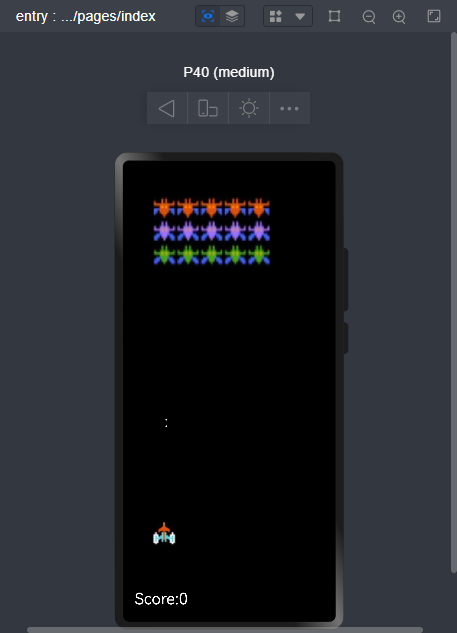
《#跟着小白一起学鸿蒙#[六]如何编写一个hap应用》里我们介绍了简单的Hap应用的开发以及基础控件的介绍,这里我们就不赘述Hap项目的建立过程,以下就是基础的Hap的page文件:index.ets。
build() {
    Row() {
      Column() {
        Canvas(this.context)
          .width('100%')
          .height('100%')
          .onClick((ev: ClickEvent) => {
            console.info("click!!")
            this.doClick()
          })
          .onReady(() =>{
            this.context.imageSmoothingEnabled = false
            this.drawall()
          })
      }
      .width('100%')
    }
    .height('100%')
    .backgroundColor("#000000")
  }
build是基础页面的构造函数,用于界面的元素构造,其他的页面的生命周期函数如下:
declare class CustomComponent {
  /**
   * Customize the pop-up content constructor.
   * @since 7
   */
  build(): void;

  /**
   * aboutToAppear Method
   * @since 7
   */
  aboutToAppear?(): void;

  /**
   * aboutToDisappear Method
   * @since 7
   */
  aboutToDisappear?(): void;

  /**
   * onPageShow Method
   * @since 7
   */
  onPageShow?(): void;

  /**
   * onPageHide Method
   * @since 7
   */
  onPageHide?(): void;

  /**
   * onBackPress Method
   * @since 7
   */
  onBackPress?(): void;
}canvas是画布组件用于自定义绘制图形,具体的API页面如下:
https://developer.harmonyos.com/cn/docs/documentation/doc-references/ts-components-canvas-canvas-0000001333641081
页面显示前会调用aboutToAppear()函数,此函数为页面生命周期函数。
canvas组件初始化完毕后会调用onReady()函数,函数内部实现小游戏的初始页面的绘制。
drawall() {
    this.context.clearRect(0,0,this.context.width,this.context.height)
    this.drawFj();
    this.drawEn();
    this.drawBullet();
    this.drawScore();
}drawFj() {
this.context.drawImage( this.fjImg, this.fjStartX, this.fjslotY,this.birdH,this.birdW)
}drawEn() {
for (let line=0; line < this.enemylist.length; line++) {
for (let row=0; row < this.enemylist[line].length; row++) {
if (this.enemylist[line][row] == 1) {
if (line == 0) {
this.context.drawImage( this.en1Img, this.en1slotX+row*this.birdW,this.en1slotY-line*this.birdH,this.birdH,this.birdW);
} else if (line == 1) {
this.context.drawImage( this.en2Img, this.en1slotX+row*this.birdW,this.en1slotY-line*this.birdH,this.birdH,this.birdW);
} else if (line == 2) {
this.context.drawImage( this.en3Img, this.en1slotX+row*this.birdW,this.en1slotY-line*this.birdH,this.birdH,this.birdW);
}
}
}
}
}不同行的害虫长相不同,分值不同。
简单的小游戏主体游戏逻辑为:点击鼠标移动飞机,飞机发射子弹,命中害虫,计算分数:
doClick() {
if (this.en1slotX <= 50) {
this.en1slotX += this.birdW
} else {
this.en1slotX -= this.birdW
}
console.log("doclick----")
this.moveFj();
}@Entry
@Component
struct Index {
@State message: string = 'Hello World'
private settings: RenderingContextSettings = new RenderingContextSettings(true);
private context: CanvasRenderingContext2D = new CanvasRenderingContext2D(this.settings);
private blockType: number = 0
private blockSize: number = 30
private en1Img:ImageBitmap = new ImageBitmap("common/images/mf1.png")
private en2Img:ImageBitmap = new ImageBitmap("common/images/mf2.png")
private en3Img:ImageBitmap = new ImageBitmap("common/images/mf3.png")
private fjImg:ImageBitmap = new ImageBitmap("common/images/fj.png")
private startX = 30;
private startY = 100;
private enStartY = 140;
private fjStartX = 50;
private fjStartY = 610;
private fjslotX = 50;
private fjslotY = this.fjStartY;
private en1slotX = 50;
private en1slotY = this.enStartY;
private en2slotX = 50;
private en2slotY = this.enStartY;
private bulletX = 65;
private bulletY = 550;
private birdH = 40;
private birdW = 40;
private score = 0;
private fjDirection = 1;
private enemylist = [
[1,1,1,1,1],
[1,1,1,1,1],
[1,1,1,1,1],
]
moveFj() {
this.fjStartX = this.fjStartX + this.fjDirection * this.birdW
if (this.fjStartX >= 210) {
this.fjDirection = -1
} else if (this.fjStartX <= 50) {
this.fjDirection = 1
}
}
drawFj() {
    this.context.drawImage( this.fjImg, this.fjStartX, this.fjslotY,this.birdH,this.birdW)
  }
drawEn() {
    for (let line=0; line < this.enemylist.length; line++) {
      for (let row=0; row < this.enemylist[line].length; row++) {
        if (this.enemylist[line][row] == 1) {
          if (line == 0) {
            this.context.drawImage( this.en1Img, this.en1slotX+row*this.birdW,this.en1slotY-line*this.birdH,this.birdH,this.birdW);
          } else if (line == 1) {
            this.context.drawImage( this.en2Img, this.en1slotX+row*this.birdW,this.en1slotY-line*this.birdH,this.birdH,this.birdW);
          } else if (line == 2) {
            this.context.drawImage( this.en3Img, this.en1slotX+row*this.birdW,this.en1slotY-line*this.birdH,this.birdH,this.birdW);
          }
        }
      }
    }
  }
drawBullet() {
let isfind = false
this.context.fillStyle = 'rgb(250,250,250)'
this.context.font = '80px sans-serif'
this.bulletX = this.fjStartX + 20
this.context.fillText(":", this.fjStartX+20, this.bulletY)
for (let line=0; line < this.enemylist.length; line++) {
if (Math.abs(this.bulletY - (this.en1slotY-line*this.birdH)) <= this.birdH) {
console.log("find line: "+line)
for (let row = 0; row < this.enemylist[line].length; row++) {
let matchsize = Math.abs(this.bulletX - (this.en1slotX+row*this.birdW))
// console.log("find szie: "+matchsize.toString()+" row:"+row.toString()+" line:"+line.toString()+" bulletX:"+this.bulletX.toString()+" bulletY:"+
// this.bulletY.toString()+" en1slotX"+this.en1slotX.toString()+" en1slotY"+this.en1slotY.toString())
if (matchsize <= this.birdW) {
if (this.enemylist[line][row] == 1) {
console.log("row:"+row.toString()+" line:"+line.toString()+" bulletX:"+this.bulletX.toString()+" bulletY:"+
this.bulletY.toString()+" en1slotX"+this.en1slotX.toString()+" en1slotY"+this.en1slotY.toString());
this.enemylist[line][row] = 0
isfind = true
switch (line) {
case 0:
this.score += 1;
break;
case 1:
this.score += 2;
break;
case 2:
this.score += 3;
break;
default:
break;
}
//console.log("score: "+this.score.toString())
break
}
}
}
if (isfind) {
break;
}
}
}
if (this.bulletY <= 100 || isfind == true) {
this.bulletY = 550
} else {
this.bulletY -= 50;
}
}
drawScore() {
this.context.fillStyle = 'rgb(250,250,250)'
this.context.font = '80px sans-serif'
this.context.fillText("Score:"+this.score.toString(), 20, 750)
// this.context.fillText(":", 65, 550)
}
drawall() {
this.context.clearRect(0,0,this.context.width,this.context.height)
this.drawFj();
this.drawEn();
this.drawBullet();
this.drawScore();
}
async sleep(ms: number) {
var that = this;
return new Promise((r) => {
setInterval(() => {
if (that.en1slotX <= 50) {
that.en1slotX += that.birdW
} else {
that.en1slotX -= that.birdW
}
console.log(that.en1slotX.toString())
that.drawall()
}, ms)
})
}
doClick() {
    if (this.en1slotX <= 50) {
      this.en1slotX += this.birdW
    } else {
      this.en1slotX -= this.birdW
    }
    console.log("doclick----")
    this.moveFj();
  }
aboutToAppear() {
this.sleep(1000)
}
build() {
Row() {
Column() {
Canvas(this.context)
.width('100%')
.height('100%')
.onClick((ev: ClickEvent) => {
console.info("click!!")
this.doClick()
})
.onReady(() =>{
this.context.imageSmoothingEnabled = false
this.drawall()
})
}
.width('100%')
}
.height('100%')
.backgroundColor("#000000")
}
}遗留问题:
见附件:
https://ost.51cto.com/resource/2670。
本文主要介绍了小游戏的开发,画布功能的使用。
我在我的项目目录中完成了compasscreate.和compassinitrails。几个问题:我已将我的.sass文件放在public/stylesheets中。这是放置它们的正确位置吗?当我运行compasswatch时,它不会自动编译这些.sass文件。我必须手动指定文件:compasswatchpublic/stylesheets/myfile.sass等。如何让它自动运行?文件ie.css、print.css和screen.css已放在stylesheets/compiled。如何在编译后不让它们重新出现的情况下删除它们?我自己编译的.sass文件编译成compiled/t
如果我使用ruby版本2.5.1和Rails版本2.3.18会怎样?我有基于rails2.3.18和ruby1.9.2p320构建的rails应用程序,我只想升级ruby的版本,而不是rails,这可能吗?我必须面对哪些挑战? 最佳答案 GitHub维护apublicfork它有针对旧Rails版本的分支,有各种变化,它们一直在运行。有一段时间,他们在较新的Ruby版本上运行较旧的Rails版本,而不是最初支持的版本,因此您可能会发现一些关于需要向后移植的有用提示。不过,他们现在已经有几年没有使用2.3了,所以充其量只能让更
在应用开发中,有时候我们需要获取系统的设备信息,用于数据上报和行为分析。那在鸿蒙系统中,我们应该怎么去获取设备的系统信息呢,比如说获取手机的系统版本号、手机的制造商、手机型号等数据。1、获取方式这里分为两种情况,一种是设备信息的获取,一种是系统信息的获取。1.1、获取设备信息获取设备信息,鸿蒙的SDK包为我们提供了DeviceInfo类,通过该类的一些静态方法,可以获取设备信息,DeviceInfo类的包路径为:ohos.system.DeviceInfo.具体的方法如下:ModifierandTypeMethodDescriptionstatic StringgetAbiList()Obt
我已经找到了几个使用datamapper的示例,并且能够让它们正常工作。不过,所有这些示例都是针对sqlite数据库的。我正在尝试将数据映射器与postgresql一起使用。我将datamapper中的调用从sqlite3更改为postgres,并且我已经安装了dm-postgres-adapter。但它仍然不起作用。我还需要做什么? 最佳答案 与SQLite不同,PostgreSQL不将数据库存储在单个文件中。在你拥有createdyourdatabase之后,尝试这样的事情:DataMapper.setup:default,{:
我经常将预配置的lambda插入可枚举的方法中,例如“map”、“select”等。但是“注入(inject)”的行为似乎有所不同。例如与mult4=lambda{|item|item*4}然后(5..10).map&mult4给我[20,24,28,32,36,40]但是,如果我制作一个2参数lambda用于像这样的注入(inject),multL=lambda{|product,n|product*n}我想说(5..10).inject(2)&multL因为“inject”有一个可选的单个初始值参数,但这给了我......irb(main):027:0>(5..10).inject
我需要使用ActiveMerchant库在我们的一个Rails应用程序中设置支付解决方案。尽管这个问题非常主观,但人们对主要网关(BrainTree、Authorize.net等)的体验如何?它必须:处理定期付款。有能力记入个人帐户。能够取消付款。有办法存储用户的付款详细信息(例如Authotize.netsCIM)。干杯 最佳答案 ActiveMerchant很棒,但在过去一年左右的时间里,我在使用它时发现了一些问题。首先,虽然某些网关可能会得到“支持”——但并非所有功能都包含在内。查看功能矩阵以确保完全支持您选择的网关-http
我有一个Rails应用程序,我正在尝试使用acts_as_list插件设置可排序列表。数据库中的位置字段正在更新,但是在呈现页面时,不考虑顺序。我想我是在寻求帮助。这是我的模型...classQuestionMembership:question_membershipsendclassQuestion:question_membershipsacts_as_listend还有给我列表的草率View代码...>true)%>拖放用于重新排序。数据库中QuestionMembership对象的位置值更新,页面实际上正确显示重新排序。问题是在页面重新加载时,它默认返回到它感觉的任何顺序。我认
我想获取一个数组并将其作为订单列表。目前我正在尝试以这种方式进行:r=["a","b","c"]r.each_with_index{|w,index|puts"#{index+1}.#{w}"}.map.to_a#1.a#2.b#3.c#=>["a","b","c"]输出应该是["1.a","2.b","3.c"]。如何让正确的输出成为r数组的新值? 最佳答案 a.to_enum.with_index(1).map{|element,index|"#{index}.#{element}"}或a.map.with_index(1){|
我将restclient用于多部分表单,以将数据发送到restfulweb服务(它是Panda视频编码服务)。不过,诀窍在于我传递给restclient(Technoweenie分支)的文件来自用户提交的我自己的表单。那么,让我们来看看这个。用户将文件发布到我的Rails应用程序。在我的Controller中,它从params[:file]接收文件。然后我想使用RestClient将params[:file]传递给Panda。我在Panda服务器上遇到的错误如下。我注意到堆栈跟踪中的文件参数也在一个字符串中(我假设Panda将其转换为字符串以获得更好的堆栈跟踪)。~Startedreq
我有一个用Rails3编写的站点。我的帖子模型有一个名为“内容”的文本列。在帖子面板中,html表单使用tinymce将“content”列设置为textarea字段。在首页,因为使用了tinymce,post.html.erb的代码需要用这样的原始方法来实现。.好的,现在如果我关闭浏览器javascript,这个文本区域可以在没有tinymce的情况下输入,也许用户会输入任何xss,比如alert('xss');.我的前台会显示那个警告框。我尝试sanitize(@post.content)在posts_controller中,但sanitize方法将相互过滤tinymce样式。例如
