有时候遇到请求url中有很多参数。
accounts和pwd请到http://shop-xo.hctestedu.com/注册。
import requests

# 请求体
data = {
    "accounts": "xx",
    "pwd": "xxx",
    "type": "username"
}

# 只有php项目需要application和application_client_type
# 写法一, 在请求Url中带上所有参数,application和application_client_type,用&隔开
response = requests.post(url="http://shop-xo.hctestedu.com/index.php?"
                                "s=api/user/login"
                                "&application=app"
                                "&applicaiton_client_type=weixin", json=data)

# 输出响应结果
print(response.text)
执行结果:
{"msg":"登录成功","code":0,"data":{"id":"7073","username":"xx","nickname":"","mobile":"","email":"","avatar":"http:\/\/shop-xo.hctestedu.com\/static\/index\/default\/images\/default-user-avatar.jpg","alipay_openid":"","weixin_openid":"","weixin_unionid":"","weixin_web_openid":"","baidu_openid":"","toutiao_openid":"","qq_openid":"","qq_unionid":"","integral":"189","locking_integral":"0","referrer":"0","add_time":"1646195490","add_time_text":"2022-03-02 12:31:30","mobile_security":"","email_security":"","user_name_view":"xx","is_mandatory_bind_mobile":0,"token":"xxxxxx"}}
使用不定长参数 params,将url中需要的参数单独封装。
import requests

# 请求体
data = {
    "accounts": "xx",
    "pwd": "xxx",
    "type": "username"
}

# 使用不定长参数params
param_data = {
    "application": "app",
    "application_client_type": "weixin"
}
# 写法2:使用不定长参数params
response = requests.post(url="http://shop-xo.hctestedu.com/index.php?"
                             "s=api/user/login", params=param_data, json=data)

# 输出响应结果
print(response.text)
执行结果:
{"msg":"登录成功","code":0,"data":{"id":"22299","username":"xx","nickname":"","mobile":"","email":"","avatar":"http:\/\/shop-xo.hctestedu.com\/static\/index\/default\/images\/default-user-avatar.jpg","alipay_openid":"","weixin_openid":"","weixin_unionid":"","weixin_web_openid":"","baidu_openid":"","toutiao_openid":"","qq_openid":"","qq_unionid":"","integral":"0","locking_integral":"0","referrer":"0","add_time":"1678005098","add_time_text":"2023-03-05 16:31:38","mobile_security":"","email_security":"","user_name_view":"xx","is_mandatory_bind_mobile":0,"token":"xxxxx"}}
用type()查看response.text的类型,是str
import requests

# 请求体
data = {
    "accounts": "xx",
    "pwd": "xxx",
    "type": "username"
}

# 使用不定长参数params
param_data = {
    "application": "app",
    "application_client_type": "weixin"
}
# 写法2:使用不定长参数params
response = requests.post(url="http://shop-xo.hctestedu.com/index.php?"
                             "s=api/user/login", params=param_data, json=data)

# 输出响应结果
print(response.text)
print(type(response.text))
执行结果:
{"msg":"登录成功","code":0,"data":{"id":"22299","username":"xx","nickname":"","mobile":"","email":"","avatar":"http:\/\/shop-xo.hctestedu.com\/static\/index\/default\/images\/default-user-avatar.jpg","alipay_openid":"","weixin_openid":"","weixin_unionid":"","weixin_web_openid":"","baidu_openid":"","toutiao_openid":"","qq_openid":"","qq_unionid":"","integral":"0","locking_integral":"0","referrer":"0","add_time":"1678005098","add_time_text":"2023-03-05 16:31:38","mobile_security":"","email_security":"","user_name_view":"xx","is_mandatory_bind_mobile":0,"token":"xxxxx"}}
<class 'str'>
用type()查看response.json()的类型,是dict
import requests

# 请求体
data = {
    "accounts": "xx",
    "pwd": "xxx",
    "type": "username"
}

# 使用不定长参数params
param_data = {
    "application": "app",
    "application_client_type": "weixin"
}
# 写法2:使用不定长参数params
response = requests.post(url="http://shop-xo.hctestedu.com/index.php?"
                             "s=api/user/login", params=param_data, json=data)

# 输出响应结果
print(response.json())
print(type(response.json()))
执行结果:
{"msg":"登录成功","code":0,"data":{"id":"22299","username":"xx","nickname":"","mobile":"","email":"","avatar":"http:\/\/shop-xo.hctestedu.com\/static\/index\/default\/images\/default-user-avatar.jpg","alipay_openid":"","weixin_openid":"","weixin_unionid":"","weixin_web_openid":"","baidu_openid":"","toutiao_openid":"","qq_openid":"","qq_unionid":"","integral":"0","locking_integral":"0","referrer":"0","add_time":"1678005098","add_time_text":"2023-03-05 16:31:38","mobile_security":"","email_security":"","user_name_view":"xx","is_mandatory_bind_mobile":0,"token":"xxxxx"}}
<class 'dict'>
print(response.status_code)
执行结果:
200
更多状态码:
状态代码有三位数字组成,第一个数字定义了响应的类别,共分五种类别:
1xx:指示信息--表示请求已接收,继续处理
2xx:成功--表示请求已被成功接收、理解、接受
3xx:重定向--要完成请求必须进行更进一步的操作
4xx:客户端错误--请求有语法错误或请求无法实现
5xx:服务器端错误--服务器未能实现合法的请求

常见状态码:
200 OK	//客户端请求成功
400 Bad Request	//客户端请求有语法错误,不能被服务器所理解
401 Unauthorized	//请求未经授权,这个状态代码必须和WWW-Authenticate报头域一起使用
403 Forbidden	//服务器收到请求,但是拒绝提供服务
404 Not Found	//请求资源不存在,eg:输入了错误的URL
500 Internal Server Error	//服务器发生不可预期的错误
503 Server Unavailable	//服务器当前不能处理客户端的请求,一段时间后可能恢复正常
print(response.cookies)
执行结果:
<RequestsCookieJar[<Cookie PHPSESSID=92ppj01t00t4v142rd8fsmos7k for shop-xo.hctestedu.com/>]>
print(response.headers)
执行结果:
{'Server': 'nginx', 'Date': 'Sun, 05 Mar 2023 10:04:02 GMT', 'Content-Type': 'application/json; charset=utf-8', 'Transfer-Encoding': 'chunked', 'Connection': 'keep-alive', 'Set-Cookie': 'PHPSESSID=ul9qsgallg17d5am81q08pfhj0; path=/; HttpOnly', 'Expires': 'Thu, 19 Nov 1981 08:52:00 GMT', 'Cache-Control': 'no-store, no-cache, must-revalidate', 'Pragma': 'no-cache'}
content,没有经过编译的,以字节的形式展示。而上述提到的text是编译过的。自动找到请求头中的编码格式,进行解析。
print(response.content)
print(type(response.content))
执行结果:
b'{"msg":"\xe7\x99\xbb\xe5\xbd\x95\xe6\x88\x90\xe5\x8a\x9f","code":0,"data":{"id":"22299","username":"xxxxx","nickname":"","mobile":"","email":"","avatar":"http:\\/\\/shop-xo.hctestedu.com\\/static\\/index\\/default\\/images\\/default-user-avatar.jpg","alipay_openid":"","weixin_openid":"","weixin_unionid":"","weixin_web_openid":"","baidu_openid":"","toutiao_openid":"","qq_openid":"","qq_unionid":"","integral":"0","locking_integral":"0","referrer":"0","add_time":"1678005098","add_time_text":"2023-03-05 16:31:38","mobile_security":"","email_security":"","user_name_view":"xxxxx","is_mandatory_bind_mobile":0,"token":"d653d78ac417f65e1cd38c6f3e220341"}}'
<class 'bytes'>
content还支持手动的编码,例如使用utf-8编码,编码后的是str类型,json本质是一种字符串类型
resp = response.content.decode("utf-8")
print(resp)
print(type(resp))
执行结果:
{"msg":"登录成功","code":0,"data":{"id":"22299","username":"xxxxx","nickname":"","mobile":"","email":"","avatar":"http:\/\/shop-xo.hctestedu.com\/static\/index\/default\/images\/default-user-avatar.jpg","alipay_openid":"","weixin_openid":"","weixin_unionid":"","weixin_web_openid":"","baidu_openid":"","toutiao_openid":"","qq_openid":"","qq_unionid":"","integral":"0","locking_integral":"0","referrer":"0","add_time":"1678005098","add_time_text":"2023-03-05 16:31:38","mobile_security":"","email_security":"","user_name_view":"xxxxx","is_mandatory_bind_mobile":0,"token":"d653d78ac417f65e1cd38c6f3e220341"}}
<class 'str'>
print(response.raw)
print(type(response.raw))
执行结果:
<urllib3.response.HTTPResponse object at 0x0000023317D8D880>
<class 'urllib3.response.HTTPResponse'>
响应数据如下:
{
    "msg": "登录成功",
    "code": 0,
    "data": {
        "id": "22299",
        "username": "Summer",
        "nickname": "",
        "mobile": "",
        "email": "",
        "avatar": "http:\/\/shop-xo.hctestedu.com\/static\/index\/default\/images\/default-user-avatar.jpg",
        "alipay_openid": "",
        "weixin_openid": "",
        "weixin_unionid": "",
        "weixin_web_openid": "",
        "baidu_openid": "",
        "toutiao_openid": "",
        "qq_openid": "",
        "qq_unionid": "",
        "integral": "0",
        "locking_integral": "0",
        "referrer": "0",
        "add_time": "1678005098",
        "add_time_text": "2023-03-05 16:31:38",
        "mobile_security": "",
        "email_security": "",
        "user_name_view": "chengcheng",
        "is_mandatory_bind_mobile": 0,
        "token": "d653d78ac417f65e1cd38c6f3e220341"
    }
}
通常我们获取响应数据后,是需要进行结果验证的。例如,我想从登录接口的响应中拿到token,供后面的接口请求鉴权使用。
上面已经讲到,可以使用response.json()方法拿到一个字典。既然是字典,就可以用处理字典的方式来获取某个字段的值。
resp = response.json()
token = resp["data"]["token"]
print(token )
执行结果:
d653d78ac417f65e1cd38c6f3e220341
字典解析的缺点:如果接口数据异常,响应体缺少某个字段,就会发生keyerror,导致程序异常。
resp = response.json()
token = resp["data"]["token1"]
print(token )
执行结果:
Traceback (most recent call last):
  File "E:\Coding\python-workspace\Interface_test\first_requests.py", line 128, in <module>
    token = resp["data"]["token1"]
KeyError: 'token1'
上面的响应body结构比较简单,如果我们要解析特别复杂的响应体,通过字典方式就很复杂。这个时候更推荐jsonpath。需要引入jsonpath库。
import jsonpath

resp = response.json()  # 将返回值转换成字典格式
token = jsonpath.jsonpath(resp, '$..token')  # token的jsonpath表达式:$..token
print(token)
执行结果:
['d653d78ac417f65e1cd38c6f3e220341']
通过结果来看,获取到的token是只有一个元素的列表。我们要想拿到token通过下标访问。
修改上述代码:
import jsonpath

resp = response.json()  # 将返回值转换成字典格式
token = jsonpath.jsonpath(resp, '$..token')  # token的jsonpath表达式:$..token
print(token[0])
执行结果:
d653d78ac417f65e1cd38c6f3e220341
Jsonpath表达式解析的优点:如果响应体缺少某个字段,通过Jsonpath表达式解析不到结果,就会返回False,永远不会发生异常。我们可根据返回结果进行后续处理。
import jsonpath

resp = response.json()  # 将返回值转换成字典格式
# 使用错误的jsonpath表达式
token = jsonpath.jsonpath(resp, '$..token1')  # token的jsonpath表达式:$..token1
if isinstance(token, List):
    print(f'可以解析到token,值为:{token[0]}')
else:
    print(f'解析不到token,结果为:{token}')

# 使用正确的jsonpath表达式
token = jsonpath.jsonpath(resp, '$..token')  # token的jsonpath表达式:$..token
if isinstance(token, List):
    print(f'可以解析到token,值为:{token[0]}')
else:
    print(f'解析不到token,结果为:{token}')
执行结果:
解析不到token,结果为:False
可以解析到token,值为:d653d78ac417f65e1cd38c6f3e220341
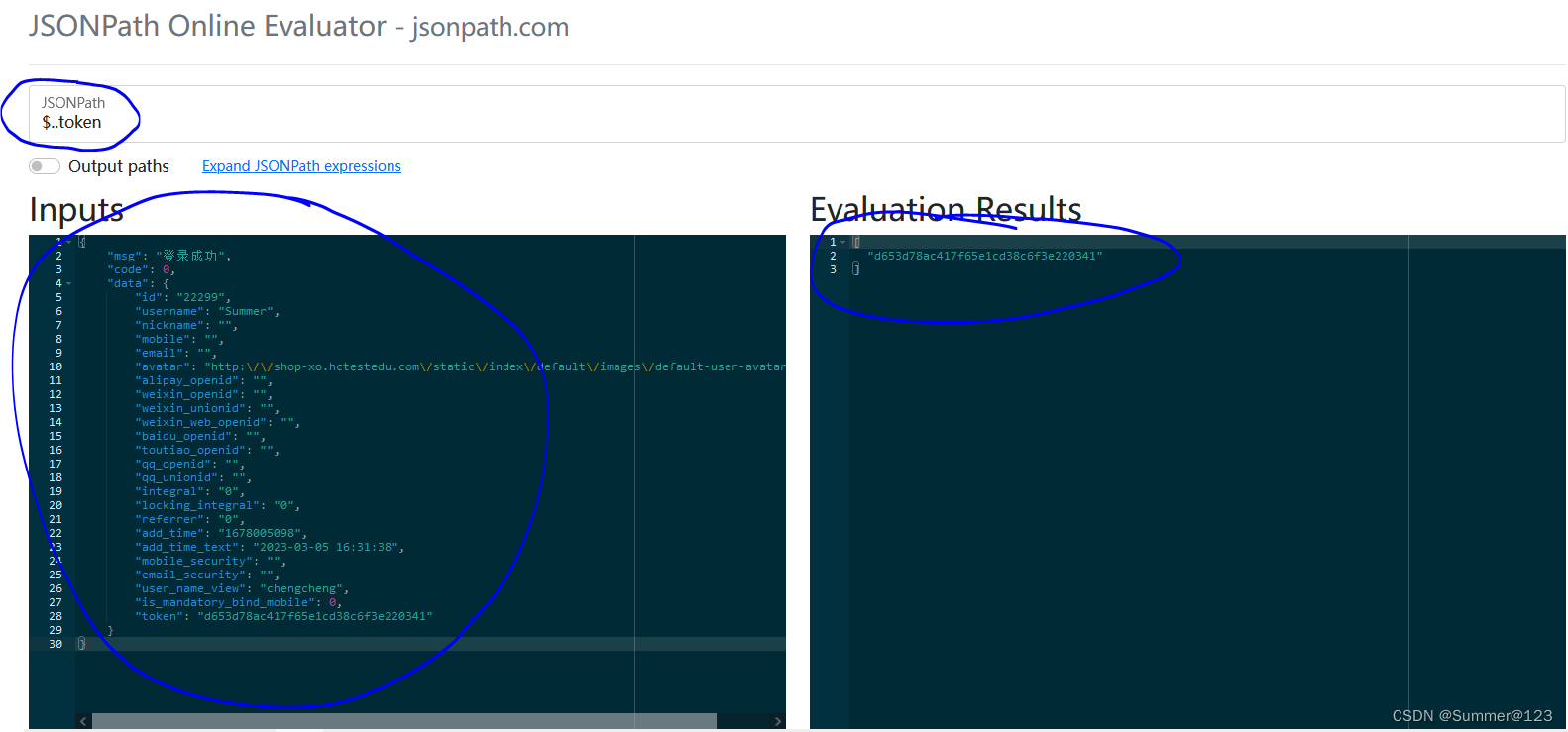
jsonpath在线校验工具:http://jsonpath.com/
将response粘贴在Inputs区域,在JSONPath区域输入表达式,在Evaluation Results区域查看是否解析到期望的值。当解析不到值时,返回的是空列表(No match)
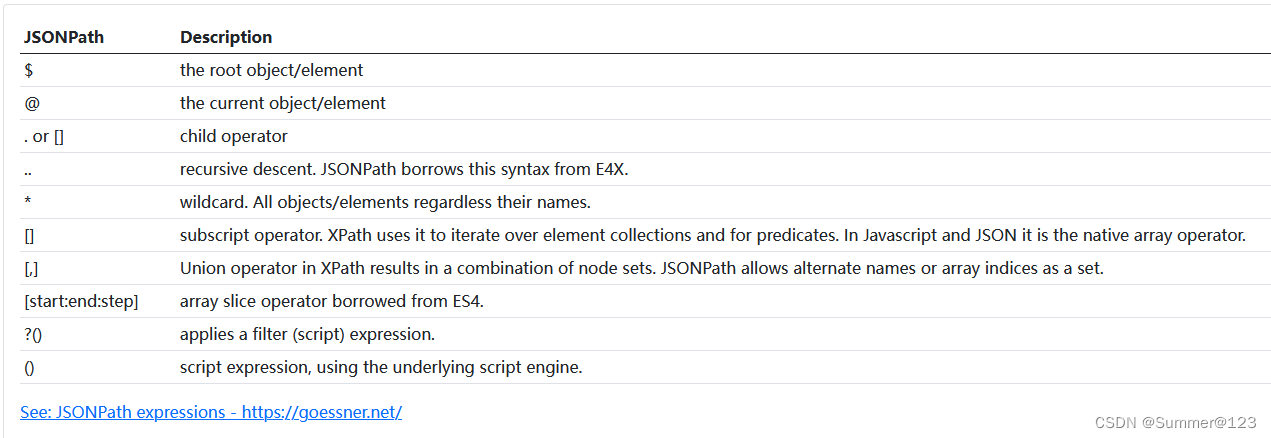
 jsonpath表达式语法
print(f'请求url:{response.request.url}')
print(f'请求方法:{response.request.method}')
print(f'请求Header:{response.request.headers}')
print(f'请求路径:{response.request.path_url}')
执行结果:
请求url:http://shop-xo.hctestedu.com/index.php?s=api/user/login&application=app&application_client_type=weixin
请求方法:POST
请求Header:{'User-Agent': 'python-requests/2.28.1', 'Accept-Encoding': 'gzip, deflate', 'Accept': '*/*', 'Connection': 'keep-alive', 'Content-Length': '69', 'Content-Type': 'application/json'}
请求路径:/index.php?s=api/user/login&application=app&application_client_type=weixin
接口电商项目后台代码(PHP)中,json=data以及data=data这2种参数类型都可以接收。在实际项目应用中,常见的报文格式是application/json。因此最常使用的是json=data
请求头默认为:Content-Type=application/json
url = 'http://shop-xo.hctestedu.com/index.php?s=api/user/login'
res = requests.post(url=url, json=data, params=param_data)
# 查看请求中的请求头信息,Content-Type=application/json
print(res.request.headers)
print(res.text)
执行结果:
{'User-Agent': 'python-requests/2.28.1', 'Accept-Encoding': 'gzip, deflate', 'Accept': '*/*', 'Connection': 'keep-alive', 'Content-Length': '69', 'Content-Type': 'application/json'}
{"msg":"登录成功","code":0,"data":{"id":"22299","username":"xxxxx","nickname":"","mobile":"","email":"","avatar":"http:\/\/shop-xo.hctestedu.com\/static\/index\/default\/images\/default-user-avatar.jpg","alipay_openid":"","weixin_openid":"","weixin_unionid":"","weixin_web_openid":"","baidu_openid":"","toutiao_openid":"","qq_openid":"","qq_unionid":"","integral":"0","locking_integral":"0","referrer":"0","add_time":"1678005098","add_time_text":"2023-03-05 16:31:38","mobile_security":"","email_security":"","user_name_view":"xxxxx","is_mandatory_bind_mobile":0,"token":"d653d78ac417f65e1cd38c6f3e220341"}}
请求头默认为:application/x-www-form-urlencoded
url = 'http://shop-xo.hctestedu.com/index.php?s=api/user/login'
res = requests.post(url=url, data=data, params=param_data)
# 查看请求中的请求头信息,Content-Type=application/x-www-form-urlencoded
print(res.request.headers)
print(res.text)
执行结果:
{'User-Agent': 'python-requests/2.28.1', 'Accept-Encoding': 'gzip, deflate', 'Accept': '*/*', 'Connection': 'keep-alive', 'Content-Length': '50', 'Content-Type': 'application/x-www-form-urlencoded'}
{"msg":"登录成功","code":0,"data":{"id":"22299","username":"xxxxx","nickname":"","mobile":"","email":"","avatar":"http:\/\/shop-xo.hctestedu.com\/static\/index\/default\/images\/default-user-avatar.jpg","alipay_openid":"","weixin_openid":"","weixin_unionid":"","weixin_web_openid":"","baidu_openid":"","toutiao_openid":"","qq_openid":"","qq_unionid":"","integral":"0","locking_integral":"0","referrer":"0","add_time":"1678005098","add_time_text":"2023-03-05 16:31:38","mobile_security":"","email_security":"","user_name_view":"xxxxx","is_mandatory_bind_mobile":0,"token":"d653d78ac417f65e1cd38c6f3e220341"}}
如果是java项目,spring会将请求实体的内容自动转换为Bean,但前提是请求的Content-Type必须设置为application/json
在请求头中定义发送报文的格式
headers = {
    'Content-Type': 'application/json'
    # 'Content-Type': 'application/x-www-form-urlencoded'
}
url = 'http://shop-xo.hctestedu.com/index.php?s=api/user/login'
res = requests.post(url=url, params=param_data, json=data, headers=headers)

print(res.request.headers)
执行结果:
{'User-Agent': 'python-requests/2.28.1', 'Accept-Encoding': 'gzip, deflate', 'Accept': '*/*', 'Connection': 'keep-alive', 'Content-Type': 'application/json', 'Content-Length': '50'}
headers = {
    # 'Content-Type': 'application/json'
    'Content-Type': 'application/x-www-form-urlencoded'
}
url = 'http://shop-xo.hctestedu.com/index.php?s=api/user/login'
res = requests.post(url=url, params=param_data, data=data, headers=headers)

print(res.request.headers)
执行结果:
{'User-Agent': 'python-requests/2.28.1', 'Accept-Encoding': 'gzip, deflate', 'Accept': '*/*', 'Connection': 'keep-alive', 'Content-Type': 'application/x-www-form-urlencoded', 'Content-Length': '69'}
使用json.dumps()可以将字典转换成Json
test = {
    "msg": "登录成功",
    "code": 0,
    "data": {
        "id": "22299",
        "username": "Summer",
        "nickname": "",
        "mobile": "",
        "email": "",
        "avatar": "http:\/\/shop-xo.hctestedu.com\/static\/index\/default\/images\/default-user-avatar.jpg",
        "alipay_openid": "",
        "weixin_openid": "",
        "weixin_unionid": "",
        "weixin_web_openid": "",
        "baidu_openid": "",
        "toutiao_openid": "",
        "qq_openid": "",
        "qq_unionid": "",
        "integral": "0",
        "locking_integral": "0",
        "referrer": "0",
        "add_time": "1678005098",
        "add_time_text": "2023-03-05 16:31:38",
        "mobile_security": "",
        "email_security": "",
        "user_name_view": "chengcheng",
        "is_mandatory_bind_mobile": 0,
        "token": "d653d78ac417f65e1cd38c6f3e220341"
    }
}

print(type(test))
print(json.dumps(test))
print(type(json.dumps(test)))
执行结果:
<class 'dict'>
{"msg": "\u767b\u5f55\u6210\u529f", "code": 0, "data": {"id": "22299", "username": "Summer", "nickname": "", "mobile": "", "email": "", "avatar": "http:\\/\\/shop-xo.hctestedu.com\\/static\\/index\\/default\\/images\\/default-user-avatar.jpg", "alipay_openid": "", "weixin_openid": "", "weixin_unionid": "", "weixin_web_openid": "", "baidu_openid": "", "toutiao_openid": "", "qq_openid": "", "qq_unionid": "", "integral": "0", "locking_integral": "0", "referrer": "0", "add_time": "1678005098", "add_time_text": "2023-03-05 16:31:38", "mobile_security": "", "email_security": "", "user_name_view": "chengcheng", "is_mandatory_bind_mobile": 0, "token": "d653d78ac417f65e1cd38c6f3e220341"}}
<class 'str'>
使用json.loads()可以将Json转换成字典
print(json.loads(json.dumps(test)))
print(type(json.loads(json.dumps(test))))
执行结果:
{'msg': '登录成功', 'code': 0, 'data': {'id': '22299', 'username': 'Summer', 'nickname': '', 'mobile': '', 'email': '', 'avatar': 'http:\\/\\/shop-xo.hctestedu.com\\/static\\/index\\/default\\/images\\/default-user-avatar.jpg', 'alipay_openid': '', 'weixin_openid': '', 'weixin_unionid': '', 'weixin_web_openid': '', 'baidu_openid': '', 'toutiao_openid': '', 'qq_openid': '', 'qq_unionid': '', 'integral': '0', 'locking_integral': '0', 'referrer': '0', 'add_time': '1678005098', 'add_time_text': '2023-03-05 16:31:38', 'mobile_security': '', 'email_security': '', 'user_name_view': 'chengcheng', 'is_mandatory_bind_mobile': 0, 'token': 'd653d78ac417f65e1cd38c6f3e220341'}}
<class 'dict'>
方法一:参数是data,值:将字典data转换成json
url = 'http://shop-xo.hctestedu.com/index.php?s=api/user/login'
headers = {
    'Content-Type': 'application/json'
}
res = requests.post(url=url, data=json.dumps(data), headers=headers)
print(res.text)
方法二:参数是json,值:字典data
url = 'http://shop-xo.hctestedu.com/index.php?s=api/user/login'
res = requests.post(url=url, json=data)
print(res.text)

print(res.json())
print(type(res.json()))
assert "登录成功" == res.json()['msg']
url = 'http://shop-xo.hctestedu.com/index.php?s=api/user/login'
res = requests.post(url=url, json=data)
print(res.text)
# 获取接口响应时间,单位秒
print(r.elapsed.total_seconds())
执行结果:
{"msg":"登录成功","code":0,"data":{"body_html":""}}
0.078264
同一个用例中有多个接口调用,一个接口调用失败如何防止程序终止?
用于判断接口请求的状态码是否为200,如果是,则返回none,如果不是则返回异常。
调用接口时结合try…except进行使用。
# 模拟接口404,使用不存在的request url: login1
url = 'http://shop-xo.hctestedu.com/index.php?s=api/user/login1'
res = requests.post(url=url, json=data)

try:
    assert 200 == res.status_code
except:
    # 异常处理1:直接跳过,可继续执行后面代码
    # pass
    # 异常处理2:打印详细异常信息
    print(res.status_code)
    res.raise_for_status()
else:
    print(res.text)
执行结果:
404
Traceback (most recent call last):
  File "E:\Coding\python-workspace\Interface_test\first_requests.py", line 220, in <module>
    assert 200 == res.status_code
AssertionError

During handling of the above exception, another exception occurred:

Traceback (most recent call last):
  File "E:\Coding\python-workspace\Interface_test\first_requests.py", line 226, in <module>
    res.raise_for_status()
  File "D:\Developer\Python\Python310\lib\site-packages\requests\models.py", line 1021, in raise_for_status
    raise HTTPError(http_error_msg, response=self)
requests.exceptions.HTTPError: 404 Client Error: Not Found for url: http://shop-xo.hctestedu.com/index.php?s=api/user/login1
url = 'http://shop-xo.hctestedu.com/index.php?s=api/user/login'

try:
    res = requests.post(url=url, json=data, timeout=0.01)  # timeout,单位秒
except (TimeoutError, ReadTimeout, ConnectTimeout):
    # ConnectTimeout:指的是建立连接所用的时间,适用于网络状况正常的情况下,两端连接所用的时间。
    # ReadTimeout:指的是建立连接后从服务器读取到可用资源所用的时间。
    print("发生错误,请稍后重试")
else:
    # 获取接口响应时间,单位秒
    print(res.elapsed.total_seconds())
    print(res.text)
执行结果:
发生错误,请稍后重试
当把timeout改成0.1,执行结果:
0.07419
{"msg":"登录成功","code":0,"data":{"body_html":""}}
我有一个字符串input="maybe(thisis|thatwas)some((nice|ugly)(day|night)|(strange(weather|time)))"Ruby中解析该字符串的最佳方法是什么?我的意思是脚本应该能够像这样构建句子:maybethisissomeuglynightmaybethatwassomenicenightmaybethiswassomestrangetime等等,你明白了......我应该一个字符一个字符地读取字符串并构建一个带有堆栈的状态机来存储括号值以供以后计算,还是有更好的方法?也许为此目的准备了一个开箱即用的库?
关闭。这个问题是opinion-based.它目前不接受答案。想要改进这个问题?更新问题,以便editingthispost可以用事实和引用来回答它.关闭4年前。Improvethisquestion我想在固定时间创建一系列低音和高音调的哔哔声。例如:在150毫秒时发出高音调的蜂鸣声在151毫秒时发出低音调的蜂鸣声200毫秒时发出低音调的蜂鸣声250毫秒的高音调蜂鸣声有没有办法在Ruby或Python中做到这一点?我真的不在乎输出编码是什么(.wav、.mp3、.ogg等等),但我确实想创建一个输出文件。
我主要使用Ruby来执行此操作,但到目前为止我的攻击计划如下:使用gemsrdf、rdf-rdfa和rdf-microdata或mida来解析给定任何URI的数据。我认为最好映射到像schema.org这样的统一模式,例如使用这个yaml文件,它试图描述数据词汇表和opengraph到schema.org之间的转换:#SchemaXtoschema.orgconversion#data-vocabularyDV:name:namestreet-address:streetAddressregion:addressRegionlocality:addressLocalityphoto:i
我正在使用ruby1.9解析以下带有MacRoman字符的csv文件#encoding:ISO-8859-1#csv_parse.csvName,main-dialogue"Marceu","Giveittohimóhe,hiswife."我做了以下解析。require'csv'input_string=File.read("../csv_parse.rb").force_encoding("ISO-8859-1").encode("UTF-8")#=>"Name,main-dialogue\r\n\"Marceu\",\"Giveittohim\x97he,hiswife.\"\
是的,我知道最好使用webmock,但我想知道如何在RSpec中模拟此方法:defmethod_to_testurl=URI.parseurireq=Net::HTTP::Post.newurl.pathres=Net::HTTP.start(url.host,url.port)do|http|http.requestreq,foo:1endresend这是RSpec:let(:uri){'http://example.com'}specify'HTTPcall'dohttp=mock:httpNet::HTTP.stub!(:start).and_yieldhttphttp.shou
我知道您通常应该在Rails中使用新建/创建和编辑/更新之间的链接,但我有一个情况需要其他东西。无论如何我可以实现同样的连接吗?我有一个模型表单,我希望它发布数据(类似于新View如何发布到创建操作)。这是我的表格prohibitedthisjobfrombeingsaved: 最佳答案 使用:url选项。=form_for@job,:url=>company_path,:html=>{:method=>:post/:put} 关于ruby-on-rails-rails:Howtomak
在我的Controller中,我通过以下方式在我的index方法中支持HTML和JSON:respond_todo|format|format.htmlformat.json{renderjson:@user}end在浏览器中拉起它时,它会自然地以HTML呈现。但是,当我对/user资源进行内容类型为application/json的curl调用时(因为它是索引方法),我仍然将HTML作为响应。如何获取JSON作为响应?我还需要说明什么? 最佳答案 您应该将.json附加到请求的url,提供的格式在routes.rb的路径中定义。这
我是Google云的新手,我正在尝试对其进行首次部署。我的第一个部署是RubyonRails项目。我基本上是在关注thisguideinthegoogleclouddocumentation.唯一的区别是我使用的是我自己的项目,而不是他们提供的“helloworld”项目。这是我的app.yaml文件runtime:customvm:trueentrypoint:bundleexecrackup-p8080-Eproductionconfig.ruresources:cpu:0.5memory_gb:1.3disk_size_gb:10当我转到我的项目目录并运行gcloudprevie
我正在阅读SandiMetz的POODR,并且遇到了一个我不太了解的编码原则。这是代码:classBicycleattr_reader:size,:chain,:tire_sizedefinitialize(args={})@size=args[:size]||1@chain=args[:chain]||2@tire_size=args[:tire_size]||3post_initialize(args)endendclassMountainBike此代码将为其各自的属性输出1,2,3,4,5。我不明白的是查找方法。当一辆山地自行车被实例化时,因为它没有自己的initialize方法
rails中是否有任何规定允许站点的所有AJAXPOST请求在没有authenticity_token的情况下通过?我有一个调用Controller方法的JqueryPOSTajax调用,但我没有在其中放置任何真实性代码,但调用成功。我的ApplicationController确实有'request_forgery_protection'并且我已经改变了config.action_controller.consider_all_requests_local在我的environments/development.rb中为false我还搜索了我的代码以确保我没有重载ajaxSend来发送
