【大数据实时数据同步】超级详细的生产环境OGG(GoldenGate)12.2实时异构同步Oracle数据部署方案(上)
【大数据实时数据同步】超级详细的生产环境OGG(GoldenGate)12.2实时异构同步Oracle数据部署方案(中)
【大数据实时数据同步】超级详细的生产环境OGG(GoldenGate)12.2实时异构同步Oracle数据部署方案(下)
文章目录
博主所在单位目前使用Oracle GoldenGate将各个业务生产库汇聚到一起做数仓实时ODS平台,源端库可能涉及Oracle、Mysql、达梦、Guassdb库。
之前写过一系列关于GoldenGate异构同步Mysql、Kafka、Kylin、Flink做实时计算的场景文章。但是突然发现,卧槽最最最应该第一个做的Oracle->Oracle的实时异构同步文档竟然没写!
来弥补一下这个空白!!!
好了,扯远了,回归技术!
下面是我给大家的生产环境下,如何部署GoldenGate12C及异构实时同步数据的解决方案。本文主要介绍如何实现实时异构的进行Oracle->Oracle的数据同步,这种数据同步适用于灾备、升级、实时ODS等场景使用。我这里给大家了三个GoldenGate部署方式,看大家喜欢用哪种吧!!
注意:本部署方案分为三章节,三章节的重点分别是:
在源库执行,根据提示输入ogg管理账户:ogg
[oracle@source ogg12]$ cd $GGHOME
[oracle@source ogg12]$ sqlplus / as sysdba
执行如下脚本:
SQL>  @marker_setup.sql

Marker setup script

You will be prompted for the name of a schema for the Oracle GoldenGate database objects.
NOTE: The schema must be created prior to running this script.
NOTE: Stop all DDL replication before starting this installation.

Enter Oracle GoldenGate schema name:OGG


Marker setup table script complete, running verification script...
Please enter the name of a schema for the GoldenGate database objects:
Setting schema name to OGG

MARKER TABLE
-------------------------------
OK

MARKER SEQUENCE
-------------------------------
OK

Script complete.
该脚本创建了进行DDL抽取所需要的触发器和包。
主要提示:执行此脚本时,所有发出DDL的会话都必须关闭并重新连接,否则可能会发生错误6508(找不到被调用的程序单元)并且DDL操作可能会失败。这是因为一个已知的Oracle bug#2747350。
未关闭的DDL会话会以列表的形式显示出来。
该脚本删除并且重建DDL同步所需要的角色,它授权管理账户对DDL对象上的DML权限
根据提示执行如下授权操作:
Grant GGS_GGSUSER_ROLE to ogg;
改脚本创建DDL触发器,以捕获DDL操作,用于向marker和history表插入DDL信息
验证ddl安装
如下即正常安装ddl支持
SQL> @marker_status.sql
Please enter the name of a schema for the GoldenGate database objects:
OGG
Setting schema name to OGG

MARKER TABLE
-------------------------------
OK

MARKER SEQUENCE
-------------------------------
OK
需求:将源端scott用户下的emp,dept 表通过ogg同步到目的端 ,逻辑同生产ODS
MGR进程配置(源端和目的端都做下面操作,添加的参数也一样):
GGSCI (source) 6> info all

Program     Status      Group       Lag at Chkpt  Time Since Chkpt

MANAGER     RUNNING
GGSCI (source) 7> edit params mgr
--加入下面内容
PORT 7809
DYNAMICPORTLIST 7810-7860
AUTORESTART ER *, RETRIES 3, WAITMINUTES 5
PURGEOLDEXTRACTS ./dirdat/*, USECHECKPOINTS, MINKEEPDAYS 30
lagreporthours 1
laginfominutes 30
lagcriticalminutes 60
--保存退出后,重启管理进程,让配置生效:
GGSCI (source) 8> stop mgr
Manager process is required by other GGS processes.
Are you sure you want to stop it (y/n)?y

Sending STOP request to MANAGER ...
Request processed.
Manager stopped.

GGSCI (source) 9> start mgr
Manager started.
GGSCI (source) 10> info all

Program     Status      Group       Lag at Chkpt  Time Since Chkpt

MANAGER     RUNNING
GGSCI (source) 12> edit params e_sc
--加入如下内容:
extract e_sc
userid ogg,password ogg
setenv(NLS_LANG=AMERICAN_AMERICA.AL32UTF8)
setenv(ORACLE_SID="orcl")
reportcount every 30 minutes,rate
numfiles 5000
discardfile ./dirrpt/e_sc.dsc,append,megabytes 1000
warnlongtrans 2h,checkinterval 30m
exttrail ./dirdat/sc
dboptions allowunusedcolumn
tranlogoptions archivedlogonly
tranlogoptions altarchivelogdest primary /u01/arch
ddl include mapped
ddloptions addtrandata,report
notcpsourcetimer
nocompressupdates
fetchoptions USEROWID
NOCOMPRESSDELETES
----------scott.EMP
table SCOTT.EMP,tokens(
TKN-CSN = @GETENV('TRANSACTION', 'CSN'),
TKN-COMMIT-TS = @GETENV ('GGHEADER', 'COMMITTIMESTAMP'),
TKN-OP-TYPE = @GETENV ('GGHEADER', 'OPTYPE')
);
----------SCOTT.DEPT
table SCOTT.DEPT,tokens(
TKN-CSN = @GETENV('TRANSACTION', 'CSN'),
TKN-COMMIT-TS = @GETENV ('GGHEADER', 'COMMITTIMESTAMP'),
TKN-OP-TYPE = @GETENV ('GGHEADER', 'OPTYPE')
);
GGSCI (source) 13>edit params d_sc
--加入如下内容:
extract d_sc
rmthost 192.168.1.10,mgrport 7809,compress
userid ogg,password ogg
PASSTHRU
numfiles 5000
rmttrail ./dirdat/sc
dynamicresolution
table scott.*;
GGSCI (source) 16> add extract e_sc,tranlog,begin now
EXTRACT added.

GGSCI (source) 17> add exttrail ./dirdat/sc,extract e_sc,megabytes 500
EXTTRAIL added.
add extract d_sc,exttrailsource ./dirdat/sc
add rmttrail ./dirdat/sc,extract d_sc,megabytes 500
GGSCI (source) 40> dblogin userid ogg,password ogg
Successfully logged into database.

GGSCI (source as ogg@orcl) 41> add trandata SCOTT.EMP

Logging of supplemental redo data enabled for table SCOTT.EMP.
TRANDATA for scheduling columns has been added on table 'SCOTT.EMP'.
TRANDATA for instantiation CSN has been added on table 'SCOTT.EMP'.
GGSCI (source as ogg@orcl) 42>

GGSCI (source as ogg@orcl) 42> add trandata SCOTT.DEPT

Logging of supplemental redo data enabled for table SCOTT.DEPT.
TRANDATA for scheduling columns has been added on table 'SCOTT.DEPT'.
TRANDATA for instantiation CSN has been added on table 'SCOTT.DEPT'.
GGSCI (source as ogg@orcl) 43> info trandata SCOTT.EMP

Logging of supplemental redo log data is enabled for table SCOTT.EMP.

Columns supplementally logged for table SCOTT.EMP: EMPNO.

Prepared CSN for table SCOTT.EMP: 1108355
GGSCI (source) 38> start er *

Sending START request to MANAGER ...
EXTRACT D_SC starting

Sending START request to MANAGER ...
EXTRACT E_SC starting


GGSCI (source) 39> info all

Program     Status      Group       Lag at Chkpt  Time Since Chkpt

MANAGER     RUNNING
EXTRACT     RUNNING     D_SC        00:00:00      00:00:04
EXTRACT     RUNNING     E_SC        00:00:00      00:00:04
GGSCI (ogg) 1> edit params mgr
---加入下面配置
replicat r_sc
setenv(NLS_LANG=AMERICAN_AMERICA.UTF8)
userid ogg,password ogg
reportcount every 30 minutes,rate
reperror default,abend
numfiles 20000
checkpointsecs 40
assumetargetdefs
discardfile ./dirrpt/r_sc.dsc,append,megabytes 1000
allownoopupdates
ddl &
include mapped &
exclude objname scott.*_audit &
exclude optype create &
        objtype 'table' &
exclude optype drop &
        objtype 'table' &
exclude objtype 'index' &
        objname scott.*_his &
exclude instr 'constraint' &
--exclude instr 'null' &
exclude instr 'trigger' &
exclude instr 'rename to' &
exclude instr 'grant' &
exclude instr 'revoke' &
exclude instr 'analyze'
ddloptions report
allowduptargetmap
----------EMP
getinserts
getupdates
getdeletes
noupdatedeletes
map SCOTT.EMP,target SCOTT.EMP,keycols(EMPNO),colmap(
usedefaults,
etltime=@DATENOW()
);
ignoreinserts
ignoreupdates
getdeletes
INSERTDELETES
map SCOTT.EMP,target SCOTT.EMP_HIS,keycols(EMPNO),colmap(
usedefaults,
etltime=@DATENOW()
);
NOINSERTDELETES
updatedeletes
getinserts
getupdates
getdeletes
map SCOTT.EMP,target SCOTT.EMP_AUDIT,keycols(EMPNO),colmap(
EMPNO=@if(@strfind(@token('tkn-op-type'),'PK UPDATE')>0,before.EMPNO,EMPNO),
csn=@token('tkn-csn'),
optime=@token('tkn-commit-ts'),
optype=@if(@strfind(@token('tkn-op-type'),'PK UPDATE')>0,'DELETE',@token('tkn-op-type')),
inserttime=@eval(@strfind(@token('tkn-op-type'),'INSERT')>0,@token('tkn-commit-ts')),
curdate=@DATENOW()
);
ignoreinserts
getupdates
ignoredeletes
map SCOTT.EMP,target SCOTT.EMP_AUDIT,keycols(EMPNO),colmap(
usedefaults,
csn=@token('tkn-csn'),
optime=@token('tkn-commit-ts'),
optype=@case(@token('tkn-op-type'),'PK UPDATE','INSERT'),
inserttime=@token('tkn-commit-ts'),
curdate=@DATENOW()
),filter(@strfind(@token('tkn-op-type'),'PK UPDATE') >0),insertallrecords;
----------DEPT
getinserts
getupdates
getdeletes
noupdatedeletes
map SCOTT.DEPT,target SCOTT.DEPT,keycols(DEPTNO),colmap(
usedefaults,
etltime=@DATENOW()
);
ignoreinserts
ignoreupdates
getdeletes
INSERTDELETES
map SCOTT.DEPT,target SCOTT.DEPT_HIS,keycols(DEPTNO),colmap(
usedefaults,
etltime=@DATENOW()
);
NOINSERTDELETES
updatedeletes
getinserts
getupdates
getdeletes
map SCOTT.DEPT,target SCOTT.DEPT_AUDIT,keycols(DEPTNO),colmap(
DEPTNO=@if(@strfind(@token('tkn-op-type'),'PK UPDATE')>0,before.DEPTNO,DEPTNO),
csn=@token('tkn-csn'),
optime=@token('tkn-commit-ts'),
optype=@if(@strfind(@token('tkn-op-type'),'PK UPDATE')>0,'DELETE',@token('tkn-op-type')),
inserttime=@eval(@strfind(@token('tkn-op-type'),'INSERT')>0,@token('tkn-commit-ts')),
curdate=@DATENOW()
);
ignoreinserts
getupdates
ignoredeletes
map SCOTT.DEPT,target SCOTT.DEPT_AUDIT,keycols(DEPTNO),colmap(
usedefaults,
csn=@token('tkn-csn'),
optime=@token('tkn-commit-ts'),
optype=@case(@token('tkn-op-type'),'PK UPDATE','INSERT'),
inserttime=@token('tkn-commit-ts'),
curdate=@DATENOW()
),filter(@strfind(@token('tkn-op-type'),'PK UPDATE') >0),insertallrecords;
GGSCI (ogg) 8> dblogin userid ogg,password ogg
Successfully logged into database.

GGSCI (ogg as ogg@ogg) 9> ADD CHECKPOINTTABLE ogg.ckpt
Successfully created checkpoint table ogg.ckpt.

GGSCI (ogg as ogg@ogg) 10> add replicat r_sc,exttrail ./dirdat/sc checkpointtable ogg.ckpt
[oracle@source ogg12]$ mkdir /u01/exp--创建目录
[oracle@source ogg12]$ sqlplus / as sysdba

SQL*Plus: Release 11.2.0.4.0 Production on Thu Sep 20 18:34:35 2018

Copyright (c) 1982, 2013, Oracle.  All rights reserved.

Connected to:
Oracle Database 11g Enterprise Edition Release 11.2.0.4.0 - 64bit Production
With the Partitioning, OLAP, Data Mining and Real Application Testing options

SQL> create directory expdir as '/u01/exp';

Directory created.

SQL> grant read,write on directory  expdir to scott;

Grant succeeded.

SQL> grant dba to scott;--这个权限是为了测试方便所以给的dba权限。生产慎用

Grant succeeded.
SQL> set num 50
SQL> select current_scn from v$database;---查询当前scn

				       CURRENT_SCN
--------------------------------------------------
					   1108836
SQL> exit
Disconnected from Oracle Database 11g Enterprise Edition Release 11.2.0.4.0 - 64bit Production
With the Partitioning, OLAP, Data Mining and Real Application Testing options

[oracle@source ~]$ expdp \' / as sysdba\' directory=EXPDIR dumpfile=expdp_20180920.dmp logfile=expdp_20180920.log tables=SCOTT.EMP,SCOTT.DEPT exclude=ref_constraint flashback_scn=1108836

Export: Release 11.2.0.4.0 - Production on Thu Sep 20 18:45:47 2018

Copyright (c) 1982, 2011, Oracle and/or its affiliates.  All rights reserved.

Connected to: Oracle Database 11g Enterprise Edition Release 11.2.0.4.0 - 64bit Production
With the Partitioning, OLAP, Data Mining and Real Application Testing options
FLASHBACK automatically enabled to preserve database integrity.
Starting "SYS"."SYS_EXPORT_TABLE_01":  "/******** AS SYSDBA" directory=EXPDIR dumpfile=expdp_20180920.dmp logfile=expdp_20180920.log tables=SCOTT.EMP,SCOTT.DEPT exclude=ref_constraint flash
back_scn=1108836 Estimate in progress using BLOCKS method...
Processing object type TABLE_EXPORT/TABLE/TABLE_DATA
Total estimation using BLOCKS method: 128 KB
Processing object type TABLE_EXPORT/TABLE/PROCACT_INSTANCE
Processing object type TABLE_EXPORT/TABLE/TABLE
Processing object type TABLE_EXPORT/TABLE/INDEX/INDEX
Processing object type TABLE_EXPORT/TABLE/CONSTRAINT/CONSTRAINT
Processing object type TABLE_EXPORT/TABLE/INDEX/STATISTICS/INDEX_STATISTICS
Processing object type TABLE_EXPORT/TABLE/STATISTICS/TABLE_STATISTICS
. . exported "SCOTT"."DEPT"                              5.929 KB       4 rows
. . exported "SCOTT"."EMP"                               8.562 KB      14 rows
Master table "SYS"."SYS_EXPORT_TABLE_01" successfully loaded/unloaded
******************************************************************************
Dump file set for SYS.SYS_EXPORT_TABLE_01 is:
  /u01/exp/expdp_20180920.dmp
Job "SYS"."SYS_EXPORT_TABLE_01" successfully completed at Thu Sep 20 18:46:21 2018 elapsed 0 00:00:24
[oracle@ogg ~]$ mkdir /u01/imp
[oracle@ogg ~]$ sqlplus / as sysdba

SQL*Plus: Release 11.2.0.4.0 Production on Thu Sep 20 18:34:24 2018

Copyright (c) 1982, 2013, Oracle.  All rights reserved.


Connected to:
Oracle Database 11g Enterprise Edition Release 11.2.0.4.0 - 64bit Production
With the Partitioning, OLAP, Data Mining and Real Application Testing options

SQL> create directory expdir as '/u01/exp';

Directory created.

SQL> create directory impdir as '/u01/imp';

Directory created.

SQL> grant read,write on directory  impdir to scott;

Grant succeeded.
[oracle@source ~]$ scp /u01/exp/expdp_20180920.* 192.168.1.10:/u01/imp/
oracle@192.168.1.10's password:
expdp_20180920.dmp                                                                                                                                         100%  168KB 168.0KB/s   00:00
expdp_20180920.log
impdp \' / as sysdba\' directory=IMPDIR dumpfile=expdp_20180920.dmp logfile=expdp_20180920.log
create table SCOTT.EMP_AUDIT
(
  EMPNO   NUMBER(4),
  CSN        NUMBER,
  OPTIME     TIMESTAMP(6),
  OPTYPE     VARCHAR2(20),
  INSERTTIME TIMESTAMP(6),
  CURDATE    TIMESTAMP(6)
);
create table SCOTT.DEPT_AUDIT
(
  DEPTNO   NUMBER(2),
  CSN        NUMBER,
  OPTIME     TIMESTAMP(6),
  OPTYPE     VARCHAR2(20),
  INSERTTIME TIMESTAMP(6),
  CURDATE    TIMESTAMP(6)
);
insert into SCOTT.EMP_AUDIT select EMPNO,1108836,sysdate,'INITIAL',sysdate,'' from SCOTT.EMP;
insert into SCOTT.DEPT_AUDIT select DEPTNO,1108836,sysdate,'INITIAL',sysdate,'' from SCOTT.DEPT;
commit;
---目标表
alter table  scott.emp add etltime timestamp;
alter table  scott.dept add etltime timestamp;
---HIS表
alter table  scott.emp_HIS add etltime timestamp;
alter table  scott.dept_HIS add etltime timestamp;
----目标表
update scott.emp set etltime=sysdate;
update scott.dept set etltime=sysdate;
commit;
CREATE INDEX scott.emp_idx  ON scott.emp_audit(empno);
CREATE INDEX scott.dept_idx  ON scott.dept_audit(deptno);
start replicat r_sc aftercsn 1108836
[oracle@source ~]$ sqlplus scott/tiger

SQL*Plus: Release 11.2.0.4.0 Production on Thu Sep 20 19:11:57 2018

Copyright (c) 1982, 2013, Oracle.  All rights reserved.


Connected to:
Oracle Database 11g Enterprise Edition Release 11.2.0.4.0 - 64bit Production
With the Partitioning, OLAP, Data Mining and Real Application Testing options

SQL> alter table dept add test number;

Table altered.

SQL> insert into dept values(50,'a','a','1');

1 row created.

SQL> alter table dept drop column test;

Table altered.

SQL> alter system switch logfile;

System altered.

SQL> alter system switch logfile;
alter system switch logfile;

System altered.
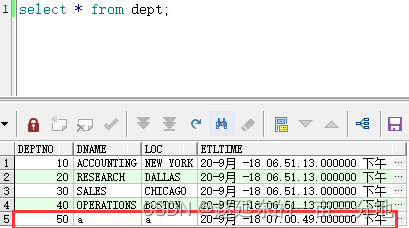
看一下日志,DDL也正常应用了:
2018-09-20 19:00:49  INFO    OGG-06510  Using the following key columns for target table SCOTT.DEPT_AUDIT: DEPTNO.


2018-09-20 19:00:49  INFO    OGG-03010  Performing implicit conversion of column data from character set UTF-8 to zhs16gbk.

2018-09-20 19:00:49  INFO    OGG-00482  DDL found, operation [alter table dept drop column test  (size 34)].

2018-09-20 19:00:49  INFO    OGG-00489  DDL is of mapped scope, after mapping new operation [alter table "SCOTT"."DEPT" drop column test  (size 44)].

2018-09-20 19:00:49  INFO    OGG-00487  DDL operation included [include mapped], optype [ALTER], objtype [TABLE], objowner [SCOTT], objname [DEPT].

2018-09-20 19:00:49  INFO    OGG-01407  Setting current schema for DDL operation to [SCOTT].

2018-09-20 19:00:49  INFO    OGG-00484  Executing DDL operation.

2018-09-20 19:00:50  INFO    OGG-00483  DDL operation successful.

2018-09-20 19:00:50  INFO    OGG-01408  Restoring current schema for DDL operation to [OGG].

2018-09-20 19:00:50  INFO    OGG-00489  DDL is of mapped scope, after mapping new operation [alter table "SCOTT"."DEPT_HIS" drop column test  /* GOLDENGATE_DDL_REPLICATION */ (size 81)].

2018-09-20 19:00:50  INFO    OGG-00487  DDL operation included [include mapped], optype [ALTER], objtype [TABLE], objowner [SCOTT], objname [DEPT_HIS].

2018-09-20 19:00:50  INFO    OGG-01407  Setting current schema for DDL operation to [SCOTT].

2018-09-20 19:00:50  INFO    OGG-00484  Executing DDL operation.

2018-09-20 19:00:50  INFO    OGG-00483  DDL operation successful.

2018-09-20 19:00:50  INFO    OGG-01408  Restoring current schema for DDL operation to [OGG].

2018-09-20 19:00:50  INFO    OGG-00489  DDL is of mapped scope, after mapping new operation [alter table "SCOTT"."DEPT_AUDIT" drop column test  /* GOLDENGATE_DDL_REPLICATION */ (size 83)].

2018-09-20 19:00:50  INFO    OGG-00488  DDL operation excluded [exclude objname scott.*_audit], optype [ALTER], objtype [TABLE], objowner [SCOTT], objname [DEPT_AUDIT].
我用了三个章节介绍完了生产环境下如何实时异构同步Oracle->Oracle,且其中包括了如何初始化以及增量应该从哪个时间点开始才能够保证数据不重复、不丢失,如果有用到的各位可以作为参考!!!
我已经在Sinatra上创建了应用程序,它代表了一个简单的API。我想在生产和开发上进行部署。我想在部署时选择,是开发还是生产,一些方法的逻辑应该改变,这取决于部署类型。是否有任何想法,如何完成以及解决此问题的一些示例。例子:我有代码get'/api/test'doreturn"Itisdev"end但是在部署到生产环境之后我想在运行/api/test之后看到ItisPROD如何实现? 最佳答案 根据SinatraDocumentation:EnvironmentscanbesetthroughtheRACK_ENVenvironm
我是Google云的新手,我正在尝试对其进行首次部署。我的第一个部署是RubyonRails项目。我基本上是在关注thisguideinthegoogleclouddocumentation.唯一的区别是我使用的是我自己的项目,而不是他们提供的“helloworld”项目。这是我的app.yaml文件runtime:customvm:trueentrypoint:bundleexecrackup-p8080-Eproductionconfig.ruresources:cpu:0.5memory_gb:1.3disk_size_gb:10当我转到我的项目目录并运行gcloudprevie
我正在玩HTML5视频并且在ERB中有以下片段:mp4视频从在我的开发环境中运行的服务器很好地流式传输到chrome。然而firefox显示带有海报图像的视频播放器,但带有一个大X。问题似乎是mongrel不确定ogv扩展的mime类型,并且只返回text/plain,如curl所示:$curl-Ihttp://0.0.0.0:3000/pr6.ogvHTTP/1.1200OKConnection:closeDate:Mon,19Apr201012:33:50GMTLast-Modified:Sun,18Apr201012:46:07GMTContent-Type:text/plain
您如何在Rails中的实时服务器上进行有效调试,无论是在测试版/生产服务器上?我试过直接在服务器上修改文件,然后重启应用,但是修改好像没有生效,或者需要很长时间(缓存?)我也试过在本地做“脚本/服务器生产”,但是那很慢另一种选择是编码和部署,但效率很低。有人对他们如何有效地做到这一点有任何见解吗? 最佳答案 我会回答你的问题,即使我不同意这种热修补服务器代码的方式:)首先,你真的确定你已经重启了服务器吗?您可以通过跟踪日志文件来检查它。您更改的代码显示的View可能会被缓存。缓存页面位于tmp/cache文件夹下。您可以尝试手动删除
我可以在Azure网站上部署RubyonRails吗? 最佳答案 还没有。目前仅支持.NET和PHP。 关于ruby-on-rails-RubyonRails可以部署在Azure网站上吗?,我们在StackOverflow上找到一个类似的问题: https://stackoverflow.com/questions/12964010/
之前在培训新生的时候,windows环境下配置opencv环境一直教的都是网上主流的vsstudio配置属性表,但是这个似乎对新生来说难度略高(虽然个人觉得完全是他们自己的问题),加之暑假之后对cmake实在是爱不释手,且这样配置确实十分简单(其实都不需要配置),故斗胆妄言vscode下配置CV之法。其实极为简单,图比较多所以很长。如果你看此文还配不好,你应该思考一下是不是自己的问题。闲话少说,直接开始。0.CMkae简介有的人到大二了都不知道cmake是什么,我不说是谁。CMake是一个开源免费并且跨平台的构建工具,可以用简单的语句来描述所有平台的编译过程。它能够根据当前所在平台输出对应的m
文章目录一、概述简介原理模块二、配置Mysql使用版本环境要求1.操作系统2.mysql要求三、配置canal-server离线下载在线下载上传解压修改配置单机配置集群配置分库分表配置1.修改全局配置2.实例配置垂直分库水平分库3.修改group-instance.xml4.启动监听四、配置canal-adapter1修改启动配置2配置映射文件3启动ES数据同步查询所有订阅同步数据同步开关启动4.验证五、配置canal-admin一、概述简介canal是Alibaba旗下的一款开源项目,Java开发。基于数据库增量日志解析,提供增量数据订阅&消费。Git地址:https://github.co
前置步骤我们都操作完了,这篇开始介绍jenkins的集成。话不多说,看操作1、登录进入jenkins后会让你选择安装插件,选择第一个默认的就行。安装完成后设置账号密码,重新登录。2、配置JDK和Git都需要执行路径,所以需要先把执行路径找到,先进入服务器的docker容器,2.1JDK的路径root@69eef9ee86cf:/usr/bin#echo$JAVA_HOME/usr/local/openjdk-82.2Git的路径root@69eef9ee86cf:/#whichgit/usr/bin/git3、先配置JDK和Git。点击:ManageJenkins>>GlobalToolCon
深度学习部署:Windows安装pycocotools报错解决方法1.pycocotools库的简介2.pycocotools安装的坑3.解决办法更多Ai资讯:公主号AiCharm本系列是作者在跑一些深度学习实例时,遇到的各种各样的问题及解决办法,希望能够帮助到大家。ERROR:Commanderroredoutwithexitstatus1:'D:\Anaconda3\python.exe'-u-c'importsys,setuptools,tokenize;sys.argv[0]='"'"'C:\\Users\\46653\\AppData\\Local\\Temp\\pip-instal
在VMware16.2.4安装Ubuntu一、安装VMware1.打开VMwareWorkstationPro官网,点击即可进入。2.进入后向下滑动找到Workstation16ProforWindows,点击立即下载。3.下载完成,文件大小615MB,如下图:4.鼠标右击,以管理员身份运行。5.点击下一步6.勾选条款,点击下一步7.先勾选,再点击下一步8.去掉勾选,点击下一步9.点击下一步10.点击安装11.点击许可证12.在百度上搜索VM16许可证,复制填入,然后点击输入即可,亲测有效。13.点击完成14.重启系统,点击是15.双击VMwareWorkstationPro图标,进入虚拟机主
