
质数是只能被 1 和它自己整除的数。质数有各种各样的实际应用,但是没有算法可以预测它们;我们必须一次计算一个。然而,我们知道有无限多的质数有待发现。
这个程序通过强力计算找到质数。它的代码类似于项目 24,“因子寻找器。”(另一种描述质数的方式是,一和数本身是它唯一的因子。)你可以从en.wikipedia.org/wiki/Prime_number那里找到更多关于质数的信息。
当您运行primenumbers.py时,输出将如下所示:
Prime Numbers, by Al Sweigart email@protected
`--snip--`
Enter a number to start searching for primes from:
(Try 0 or 1000000000000 (12 zeros) or another number.)
> 0
Press Ctrl-C at any time to quit. Press Enter to begin...
2, 3, 5, 7, 11, 13, 17, 19, 23, 29, 31, 37, 41, 43, 47, 53, 59, 61, 67, 71, 73, 79, 83, 89, 97, 101, 103, 107, 109, 113, 127, 131, 137, 139, 149, 151, 157, 163, 167, 173, 179, 181, 191, 193, 197, 199, 211, 223, 227, 229, 233, 239, 241, 251, 257, 263, 269, 271, 277, 281, 283, 293, 307, 311, 313, 317, 331, 337, 347, 349, 353, 359, 367, 373, 379, 383, 389, 397, 401, 409, 419, 421, 431, 433, 439, 443, 449, 457, 461, 463, 467, 479, 487, 491, 499, 503, 509, 521, 523, 541, 547, 557, 563, 569, 571, 577, 587, 593, 599, 601, 607, 613, 617, 619, 631, 641, 643, 647, `--snip--`
isPrime()函数接受一个整数,如果它是质数,则返回True。否则,它返回False。如果你想了解这个项目,项目 24 是值得研究的。isPrime()函数本质上是寻找给定数字中的任何因子,如果找到任何因子,就返回False。
这个程序中的算法可以快速找到大质数。一万亿这个数字只有 10 位数。但是要找到像古戈尔一样大的质数(一个 1 后面跟着 100 个 0),你需要使用一种高级算法,比如 Rabin-Miller 素性测试。我的书《Python 密码破解指南》第 22 章有这个算法的 Python 实现。
"""Prime Numbers, by Al Sweigart email@protected
Calculates prime numbers, which are numbers that are only evenly
divisible by one and themselves. They are used in a variety of practical
applications.
More info at: https://en.wikipedia.org/wiki/Prime_number
This code is available at https://nostarch.com/big-book-small-python-programming
Tags: tiny, math, scrolling"""

import math, sys

def main():
    print('Prime Numbers, by Al Sweigart email@protected')
    print('Prime numbers are numbers that are only evenly divisible by')
    print('one and themselves. They are used in a variety of practical')
    print('applications, but cannot be predicted. They must be')
    print('calculated one at a time.')
    print()
    while True:
        print('Enter a number to start searching for primes from:')
        print('(Try 0 or 1000000000000 (12 zeros) or another number.)')
        response = input('> ')
        if response.isdecimal():
            num = int(response)
            break

    input('Press Ctrl-C at any time to quit. Press Enter to begin...')

    while True:
        # Print out any prime numbers:
        if isPrime(num):
            print(str(num) + ', ', end='', flush=True)
        num = num + 1  # Go to the next number.


def isPrime(number):
    """Returns True if number is prime, otherwise returns False."""
    # Handle special cases:
    if number < 2:
        return False
    elif number == 2:
        return True

    # Try to evenly divide number by all numbers from 2 up to number's
    # square root.
    for i in range(2, int(math.sqrt(number)) + 1):
        if number % i == 0:
            return False
    return True


# If this program was run (instead of imported), run the game:
if __name__ == '__main__':
    try:
        main()
    except KeyboardInterrupt:
        sys.exit()  # When Ctrl-C is pressed, end the program.
试着找出下列问题的答案。尝试对代码进行一些修改,然后重新运行程序,看看这些修改有什么影响。
response.isdecimal()改为response,并输入一个非数字作为开始搜索质数的数字,会出现什么错误?number < 2改成number > 2会怎么样?number % 1 == 0改成number % i != 0会怎么样?
一个进度条是一个视觉元素,显示任务已经完成了多少。进度条通常与下载文件或软件安装一起使用。这个项目创建了一个getProgressBar()函数,它根据传递给它的参数返回一个进度条字符串。它模拟了一个下载文件,但是你可以在你自己的项目中重复使用进度条。
当您运行progressbar.py时,输出将如下所示:
Progress Bar Simulation, by Al Sweigart
[█████████                               ] 24.6% 1007/4098
进度条依赖于在终端窗口中运行的程序可以执行的某种技巧。正如'\n'和'\t'分别是换行符和制表符的转义符一样,'\b'是退格字符的转义符。如果您“打印”一个退格字符,文本光标将向左移动,并擦除先前打印的字符。这只适用于文本光标所在的当前行。如果运行代码print('Hello\b\b\b\b\bHowdy'),Python 将打印文本"Hello",将文本光标向后移动五格,然后打印文本Howdy。Howdy文本将覆盖Hello,让它看起来像是你直接打印了Hello。
我们可以使用这种技术,通过打印一个版本的进度条,将文本光标移回起点,然后打印一个更新的进度条,在一行中创建一个动画进度条。这种效果可以生成任何文本动画,而不需要像bext这样的模块,尽管它将被限制在终端窗口中占据一行。
一旦创建了这个程序,就可以通过运行import progressbar并打印从progressbar.getProgressBar()返回的字符串,在其他 Python 程序中显示进度条。
"""Progress Bar Simulation, by Al Sweigart email@protected
A sample progress bar animation that can be used in other programs.
This code is available at https://nostarch.com/big-book-small-python-programming
Tags: tiny, module"""

import random, time

BAR = chr(9608) # Character 9608 is '█'

def main():
    # Simulate a download:
    print('Progress Bar Simulation, by Al Sweigart')
    bytesDownloaded = 0
    downloadSize = 4096
    while bytesDownloaded < downloadSize:
        # "Download" a random amount of "bytes":
        bytesDownloaded += random.randint(0, 100)

        # Get the progress bar string for this amount of progress:
        barStr = getProgressBar(bytesDownloaded, downloadSize)

        # Don't print a newline at the end, and immediately flush the
        # printed string to the screen:
        print(barStr, end='', flush=True)

        time.sleep(0.2)  # Pause for a little bit:

        # Print backspaces to move the text cursor to the line's start:
        print('\b' * len(barStr), end='', flush=True)


def getProgressBar(progress, total, barWidth=40):
    """Returns a string that represents a progress bar that has barWidth
    bars and has progressed progress amount out of a total amount."""

    progressBar = ''  # The progress bar will be a string value.
    progressBar += '['  # Create the left end of the progress bar.

    # Make sure that the amount of progress is between 0 and total:
    if progress > total:
        progress = total
    if progress < 0:
        progress = 0

    # Calculate the number of "bars" to display:
    numberOfBars = int((progress / total) * barWidth)

    progressBar += BAR * numberOfBars  # Add the progress bar.
    progressBar += ' ' * (barWidth - numberOfBars)  # Add empty space.
    progressBar += ']'  # Add the right end of the progress bar.

    # Calculate the percentage complete:
    percentComplete = round(progress / total * 100, 1)
    progressBar += ' ' + str(percentComplete) + '%'  # Add percentage.

    # Add the numbers:
    progressBar += ' ' + str(progress) + '/' + str(total)

    return progressBar  # Return the progress bar string.


# If the program is run (instead of imported), run the game:
if __name__ == '__main__':
    main()
在输入源代码并运行几次之后,尝试对其进行实验性的修改。你也可以自己想办法做到以下几点:
|、/、-和\之间交替,以产生旋转效果。试着找出下列问题的答案。尝试对代码进行一些修改,然后重新运行程序,看看这些修改有什么影响。
print('\b' * len(barStr), end='', flush=True)会发生什么?round(progress / total * 100, 1)改成round(progress / total * 100)会怎么样?
彩虹是一个简单的程序,显示了一个彩色的彩虹在屏幕上来回移动。该程序利用了这样一个事实,即当新的文本行出现时,现有的文本会向上滚动,使其看起来像是在移动。这个项目对初学者来说很好,它类似于项目 15“深坑”
图 58-1 显示了运行rainbow.py时的输出。
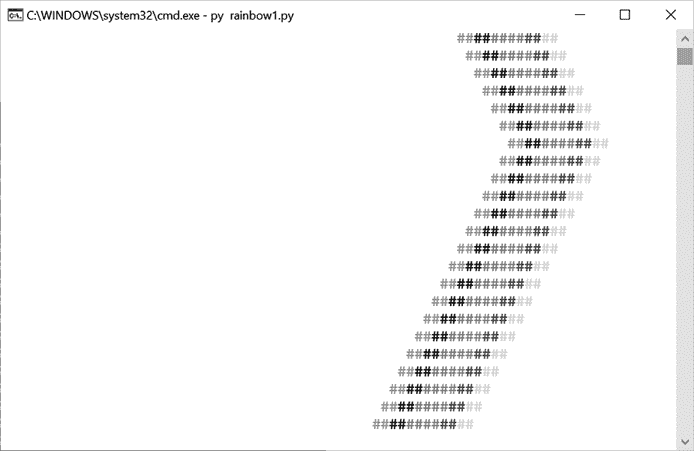
:彩虹的锯齿形输出,在屏幕上是彩色的
这个程序连续打印相同的彩虹图案。改变的是打印在它左边的空格字符的数量。增加这个数字会使彩虹向右移动,减少这个数字会使彩虹向左移动。indent变量跟踪空格的数量。将indentIncreasing变量设置为True表示indent应该增加,直到到达60,此时变为False。代码的其余部分减少了空格的数量。一旦到达0,它又变回True,重复彩虹的之字形。
"""Rainbow, by Al Sweigart email@protected
Shows a simple rainbow animation. Press Ctrl-C to stop.
This code is available at https://nostarch.com/big-book-small-python-programming
Tags: tiny, artistic, bext, beginner, scrolling"""

import time, sys

try:
   import bext
except ImportError:
    print('This program requires the bext module, which you')
    print('can install by following the instructions at')
    print('https://pypi.org/project/Bext/')
    sys.exit()

print('Rainbow, by Al Sweigart email@protected')
print('Press Ctrl-C to stop.')
time.sleep(3)

indent = 0  # How many spaces to indent.
indentIncreasing = True  # Whether the indentation is increasing or not.

try:
    while True:  # Main program loop.
        print(' ' * indent, end='')
        bext.fg('red')
        print('##', end='')
        bext.fg('yellow')
        print('##', end='')
        bext.fg('green')
        print('##', end='')
        bext.fg('blue')
        print('##', end='')
        bext.fg('cyan')
        print('##', end='')
        bext.fg('purple')
        print('##')

        if indentIncreasing:
            # Increase the number of spaces:
            indent = indent + 1
            if indent == 60:  # (!) Change this to 10 or 30.
                # Change direction:
                indentIncreasing = False
        else:
            # Decrease the number of spaces:
            indent = indent - 1
            if indent == 0:
                # Change direction:
                indentIncreasing = True

        time.sleep(0.02)  # Add a slight pause.
except KeyboardInterrupt:
    sys.exit()  # When Ctrl-C is pressed, end the program.
试着找出下列问题的答案。尝试对代码进行一些修改,然后重新运行程序,看看这些修改有什么影响。
False改成True会怎么样?bext.fg()调用的参数都改为'random',会发生什么?
在这个版本的双人手游中,玩家面对电脑。你可以选择石头、布或剪刀。石头打败剪刀,剪刀打败布,布打败石头。这个程序增加了一些短暂的停顿来制造悬念。
这个游戏的一个变种,见项目 60,“石头剪刀布(必胜版本)。”
当您运行rockpaperscissors.py时,输出将如下所示:
Rock, Paper, Scissors, by Al Sweigart email@protected
- Rock beats scissors.
- Paper beats rocks.
- Scissors beats paper.

0 Wins, 0 Losses, 0 Ties
Enter your move: (R)ock (P)aper (S)cissors or (Q)uit
> r
ROCK versus...
1...
2...
3...
SCISSORS
You win!
1 Wins, 0 Losses, 0 Ties
Enter your move: (R)ock (P)aper (S)cissors or (Q)uit
`--snip--`
石头剪刀布的游戏逻辑相当简单,我们在这里用if - elif语句实现它。为了增加一点悬念,第 45 至 51 行在揭示对手的移动之前倒计时,在计数之间有短暂的停顿。这给了玩家一段时间,让他们对游戏的结果感到兴奋。如果没有这种停顿,结果会在玩家开始移动时立即出现——有点虎头蛇尾。为玩家改善用户体验并不需要很多代码。
"""Rock, Paper, Scissors, by Al Sweigart email@protected
The classic hand game of luck.
This code is available at https://nostarch.com/big-book-small-python-programming
Tags: short, game"""

import random, time, sys

print('''Rock, Paper, Scissors, by Al Sweigart email@protected
- Rock beats scissors.
- Paper beats rocks.
- Scissors beats paper.
''')

# These variables keep track of the number of wins, losses, and ties.
wins = 0
losses = 0
ties = 0

while True:  # Main game loop.
    while True:  # Keep asking until player enters R, P, S, or Q.
        print('{} Wins, {} Losses, {} Ties'.format(wins, losses, ties))
        print('Enter your move: (R)ock (P)aper (S)cissors or (Q)uit')
        playerMove = input('> ').upper()
        if playerMove == 'Q':
            print('Thanks for playing!')
            sys.exit()

        if playerMove == 'R' or playerMove == 'P' or playerMove == 'S':
            break
        else:
            print('Type one of R, P, S, or Q.')

    # Display what the player chose:
    if playerMove == 'R':
        print('ROCK versus...')
        playerMove = 'ROCK'
    elif playerMove == 'P':
        print('PAPER versus...')
        playerMove = 'PAPER'
    elif playerMove == 'S':
        print('SCISSORS versus...')
        playerMove = 'SCISSORS'

    # Count to three with dramatic pauses:
    time.sleep(0.5)
    print('1...')
    time.sleep(0.25)
    print('2...')
    time.sleep(0.25)
    print('3...')
    time.sleep(0.25)

    # Display what the computer chose:
    randomNumber = random.randint(1, 3)
    if randomNumber == 1:
        computerMove = 'ROCK'
    elif randomNumber == 2:
        computerMove = 'PAPER'
    elif randomNumber == 3:
        computerMove = 'SCISSORS'
    print(computerMove)
    time.sleep(0.5)

    # Display and record the win/loss/tie:
    if playerMove == computerMove:
        print('It\'s a tie!')
        ties = ties + 1
    elif playerMove == 'ROCK' and computerMove == 'SCISSORS':
        print('You win!')
        wins = wins + 1
    elif playerMove == 'PAPER' and computerMove == 'ROCK':
        print('You win!')
        wins = wins + 1
    elif playerMove == 'SCISSORS' and computerMove == 'PAPER':
        print('You win!')
        wins = wins + 1
    elif playerMove == 'ROCK' and computerMove == 'PAPER':
        print('You lose!')
        losses = losses + 1
    elif playerMove == 'PAPER' and computerMove == 'SCISSORS':
        print('You lose!')
        losses = losses + 1
    elif playerMove == 'SCISSORS' and computerMove == 'ROCK':
        print('You lose!')
        losses = losses + 1
在输入源代码并运行几次之后,尝试对其进行实验性的修改。你也可以自己想办法做到以下几点:
试着找出下列问题的答案。尝试对代码进行一些修改,然后重新运行程序,看看这些修改有什么影响。
random.randint(1, 3)改为random.randint(1, 300),会得到什么错误?playerMove == computerMove改成True会怎么样?
石头剪刀布的变体与项目 59“石头剪刀布”相同,只是玩家总是赢。选择计算机招式的代码被设置为总是选择失败的招式。你可以把这个游戏提供给你的朋友,他们赢的时候可能会很兴奋。。。一开始。看看他们需要多长时间才能意识到游戏被操纵对他们有利。
当您运行rockppapersscissorsalwayswin.py时,输出将如下所示:
Rock, Paper, Scissors, by Al Sweigart email@protected
- Rock beats scissors.
- Paper beats rocks.
- Scissors beats paper.

0 Wins, 0 Losses, 0 Ties
Enter your move: (R)ock (P)aper (S)cissors or (Q)uit
> p
PAPER versus...
1...
2...
3...
ROCK
You win!
1 Wins, 0 Losses, 0 Ties
Enter your move: (R)ock (P)aper (S)cissors or (Q)uit
> s
SCISSORS versus...
1...
2...
3...
PAPER
You win!
2 Wins, 0 Losses, 0 Ties
`--snip--`
SCISSORS versus...
1...
2...
3...
PAPER
You win!
413 Wins, 0 Losses, 0 Ties
Enter your move: (R)ock (P)aper (S)cissors or (Q)uit
`--snip--`
你可能会注意到这个版本的程序比项目 59 要短。这是有意义的:当你不必为计算机随机生成一步棋并计算游戏的结果时,你可以从原始代码中删除相当多的代码。也没有变量来跟踪损失和平局的数量,因为无论如何这些都是零。
"""Rock,Paper, Scissors (Always Win version)
By Al Sweigart email@protected
The classic hand game of luck, except you always win.
This code is available at https://nostarch.com/big-book-small-python-programming
Tags: tiny, game, humor"""

import time, sys

print('''Rock, Paper, Scissors, by Al Sweigart email@protected
- Rock beats scissors.
- Paper beats rocks.
- Scissors beats paper.
''')

# These variables keep track of the number of wins.
wins = 0

while True:  # Main game loop.
    while True:  # Keep asking until player enters R, P, S, or Q.
        print('{} Wins, 0 Losses, 0 Ties'.format(wins))
        print('Enter your move: (R)ock (P)aper (S)cissors or (Q)uit')
        playerMove = input('> ').upper()
        if playerMove == 'Q':
            print('Thanks for playing!')
            sys.exit()

        if playerMove == 'R' or playerMove == 'P' or playerMove == 'S':
            break
        else:
            print('Type one of R, P, S, or Q.')

    # Display what the player chose:
    if playerMove == 'R':
        print('ROCK versus...')
    elif playerMove == 'P':
        print('PAPER versus...')
    elif playerMove == 'S':
        print('SCISSORS versus...')

    # Count to three with dramatic pauses:
    time.sleep(0.5)
    print('1...')
    time.sleep(0.25)
    print('2...')
    time.sleep(0.25)
    print('3...')
    time.sleep(0.25)

    # Display what the computer chose:
    if playerMove == 'R':
        print('SCISSORS')
    elif playerMove == 'P':
        print('ROCK')
    elif playerMove == 'S':
        print('PAPER')

    time.sleep(0.5)

    print('You win!')
    wins = wins + 1
在输入源代码并运行几次之后,尝试对其进行实验性的修改。你也可以自己想办法做到以下几点:
试着找出下列问题的答案。尝试对代码进行一些修改,然后重新运行程序,看看这些修改有什么影响。
input('> ').upper()改成input('> ')会怎么样?关闭。这个问题是opinion-based.它目前不接受答案。想要改进这个问题?更新问题,以便editingthispost可以用事实和引用来回答它.关闭4年前。Improvethisquestion我想在固定时间创建一系列低音和高音调的哔哔声。例如:在150毫秒时发出高音调的蜂鸣声在151毫秒时发出低音调的蜂鸣声200毫秒时发出低音调的蜂鸣声250毫秒的高音调蜂鸣声有没有办法在Ruby或Python中做到这一点?我真的不在乎输出编码是什么(.wav、.mp3、.ogg等等),但我确实想创建一个输出文件。
如何在buildr项目中使用Ruby?我在很多不同的项目中使用过Ruby、JRuby、Java和Clojure。我目前正在使用我的标准Ruby开发一个模拟应用程序,我想尝试使用Clojure后端(我确实喜欢功能代码)以及JRubygui和测试套件。我还可以看到在未来的不同项目中使用Scala作为后端。我想我要为我的项目尝试一下buildr(http://buildr.apache.org/),但我注意到buildr似乎没有设置为在项目中使用JRuby代码本身!这看起来有点傻,因为该工具旨在统一通用的JVM语言并且是在ruby中构建的。除了将输出的jar包含在一个独特的、仅限ruby
我在我的Rails项目中使用Pow和powifygem。现在我尝试升级我的ruby版本(从1.9.3到2.0.0,我使用RVM)当我切换ruby版本、安装所有gem依赖项时,我通过运行railss并访问localhost:3000确保该应用程序正常运行以前,我通过使用pow访问http://my_app.dev来浏览我的应用程序。升级后,由于错误Bundler::RubyVersionMismatch:YourRubyversionis1.9.3,butyourGemfilespecified2.0.0,此url不起作用我尝试过的:重新创建pow应用程序重启pow服务器更新战俘
我已经像这样安装了一个新的Rails项目:$railsnewsite它执行并到达:bundleinstall但是当它似乎尝试安装依赖项时我得到了这个错误Gem::Ext::BuildError:ERROR:Failedtobuildgemnativeextension./System/Library/Frameworks/Ruby.framework/Versions/2.0/usr/bin/rubyextconf.rbcheckingforlibkern/OSAtomic.h...yescreatingMakefilemake"DESTDIR="cleanmake"DESTDIR="
我使用的是Firefox版本36.0.1和Selenium-Webdrivergem版本2.45.0。我能够创建Firefox实例,但无法使用脚本继续进行进一步的操作无法在60秒内获得稳定的Firefox连接(127.0.0.1:7055)错误。有人能帮帮我吗? 最佳答案 我遇到了同样的问题。降级到firefoxv33后一切正常。您可以找到旧版本here 关于ruby-无法在60秒内获得稳定的Firefox连接(127.0.0.1:7055),我们在StackOverflow上找到一个类
假设我有这个范围:("aaaaa".."zzzzz")如何在不事先/每次生成整个项目的情况下从范围中获取第N个项目? 最佳答案 一种快速简便的方法:("aaaaa".."zzzzz").first(42).last#==>"aaabp"如果出于某种原因你不得不一遍又一遍地这样做,或者如果你需要避免为前N个元素构建中间数组,你可以这样写:moduleEnumerabledefskip(n)returnto_enum:skip,nunlessblock_given?each_with_indexdo|item,index|yieldit
这个问题在这里已经有了答案:关闭10年前。PossibleDuplicate:Pythonconditionalassignmentoperator对于这样一个简单的问题表示歉意,但是谷歌搜索||=并不是很有帮助;)Python中是否有与Ruby和Perl中的||=语句等效的语句?例如:foo="hey"foo||="what"#assignfooifit'sundefined#fooisstill"hey"bar||="yeah"#baris"yeah"另外,类似这样的东西的通用术语是什么?条件分配是我的第一个猜测,但Wikipediapage跟我想的不太一样。
什么是ruby的rack或python的Java的wsgi?还有一个路由库。 最佳答案 来自Python标准PEP333:Bycontrast,althoughJavahasjustasmanywebapplicationframeworksavailable,Java's"servlet"APImakesitpossibleforapplicationswrittenwithanyJavawebapplicationframeworktoruninanywebserverthatsupportstheservletAPI.ht
华为OD机试题本篇题目:明明的随机数题目输入描述输出描述:示例1输入输出说明代码编写思路最近更新的博客华为od2023|什么是华为od,od薪资待遇,od机试题清单华为OD机试真题大全,用Python解华为机试题|机试宝典【华为OD机试】全流程解析+经验分享,题型分享,防作弊指南华为o
嗨~大家好,这里是可莉!今天给大家带来的是7个C语言的经典基础代码~那一起往下看下去把【程序一】打印100到200之间的素数#includeintmain(){ inti; for(i=100;i 【程序二】输出乘法口诀表#includeintmain(){inti;for(i=1;i 【程序三】判断1000年---2000年之间的闰年#includeintmain(){intyear;for(year=1000;year 【程序四】给定两个整形变量的值,将两个值的内容进行交换。这里提供两种方法来进行交换,第一种为创建临时变量来进行交换,第二种是不创建临时变量而直接进行交换。1.创建临时变量来
