文章目录
按键,在flutter 中,有很多已经内置的button,合理的利用可以快速的开发,
但是ElevatedButton中,有一个Buttonstyle,配合起来可以创建自己需要的按钮样式,但是其实个人感觉运用起来有些复杂。
在一个app 中,肯定会出现按键widget的,这个也是运用很多的情况。
| 参数 | 说明 |
|---|---|
| super.key | key |
| required super.onPressed | 点击函数 |
| super.onLongPress | 长按的处理 |
| super.onHover | 鼠标悬停的时候处理的时间 |
| super.onFocusChange | 焦点改变 |
| super.style | buttonstyle |
| super.focusNode | – |
| super.autofocus = false, | – |
| super.clipBehavior = Clip.none | 抗锯齿功能 |
| super.statesController | 可以监听和控制按钮的状态改变,然后做处理 |
| required super.child | widget |
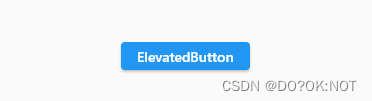
代码如下(示例):
 ElevatedButton(
   onPressed: () {},
   child: const Text('ElevatedButton'),
鼠标悬停在按钮上面就改变颜色
      ElevatedButton(
              onPressed: () {
                debugPrint("I AM CLICK HERE");
              },
              onLongPress: () {
                debugPrint('I AM LONGPRESS');
              },
              //按钮的状态控制器,少用到
              // statesController: ,
              //抗锯齿功能
              clipBehavior: Clip.antiAlias,
              //焦点处理,使用不多
              focusNode: FocusNode(),
              //鼠标悬停的处理,一般在win 和mac的软件的时候处理
              onHover: (inhover) {
                if (inhover) {
                  _color = Colors.green;
                } else {
                  _color = Colors.red;
                }
                setState(() {});
              },
              child: Text(
                'ElevatedButton',
                style: TextStyle(color: _color),
              ),
            )

| 参数 | 说明 |
|---|---|
| this.textStyle | 文本样式 |
| this.backgroundColor | 背景颜色 |
| this.foregroundColor | |
| this.overlayColor | |
| this.shadowColor | |
| this.surfaceTintColor | |
| this.elevation | |
| this.padding | |
| this.minimumSize | |
| this.fixedSize | |
| this.maximumSize | |
| this.side | |
| this.shape | |
| this.mouseCursor | |
| this.visualDensity | |
| this.tapTargetSize | |
| this.animationDuration | |
| this.enableFeedback | |
| this.alignment | |
| this.splashFactory |
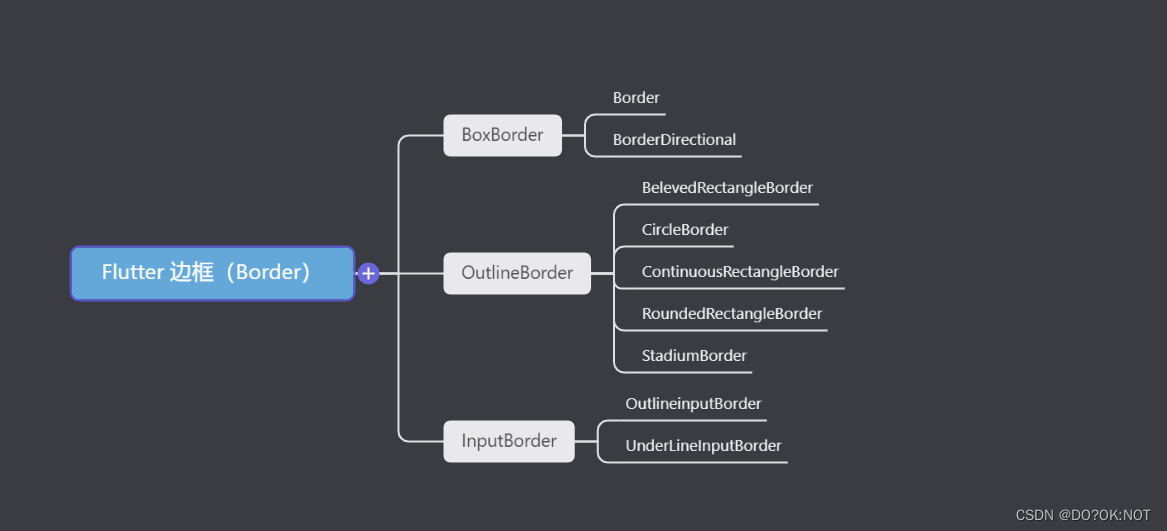
【Flutter】shape 属性 ShapeBorder,形状
    ElevatedButton(
              onPressed: () {
                debugPrint("I AM CLICK HERE");
              },
              onLongPress: () {
                debugPrint('I AM LONGPRESS');
              },
              //按钮的状态控制器,少用到
              // statesController: ,
              //抗锯齿功能
              clipBehavior: Clip.antiAlias,

              //焦点处理,使用不多
              focusNode: FocusNode(),
              style: ButtonStyle(
                  //背景颜色
                  backgroundColor: MaterialStateProperty.all(Colors.indigo),
                  //字体颜色
                  foregroundColor: MaterialStateProperty.all(Colors.white),
                  // 鼠标悬停的时候背景颜色
                  overlayColor: MaterialStateProperty.all(Colors.red),
                  //影音的颜色
                  shadowColor: MaterialStateProperty.all(Colors.yellow),
                  //表面颜色
                  surfaceTintColor: MaterialStateProperty.all(Colors.pink),
                  // 阴影值
                  elevation: MaterialStateProperty.all(10),
                  //内边距,文本同按钮边框的距离
                  // padding: MaterialStateProperty.all(const EdgeInsets.all(5)),
                  //最小值,尺寸不能再小于这个了
                  // minimumSize: MaterialStateProperty.all(const Size(10, 10)),
                  //边框的颜色和厚度
                  side: MaterialStateProperty.all(
                      const BorderSide(color: Colors.pink, width: 1.0)),
                  //形状
                  shape: MaterialStateProperty.all(
                    const BeveledRectangleBorder(
                        borderRadius: BorderRadius.all(Radius.circular(15)),
                        side: BorderSide(color: Colors.green, width: 1)),
                  ),
                  //鼠标的样式,当悬停的时候,鼠标要显示为什么样的样式,比如下面的鼠标就会显示为等待加载的样式
                  mouseCursor:
                      MaterialStateProperty.all(SystemMouseCursors.wait),
                  //视觉密度,就是按钮的紧凑性
                  visualDensity: VisualDensity.compact,
                  //触控区域,少用
                  tapTargetSize: MaterialTapTargetSize.padded,
                  //shap,eleation 改变的动画时间
                  animationDuration: const Duration(seconds: 1),
                  //检测到的手势是否应提供声学和/或触觉反馈。例如,在Android上,当启用反馈时,轻敲会产生咔哒声,长按会产生短暂的振动。
                  enableFeedback: true,
                  //child的位置,
                  alignment: Alignment.center,
                  //水波纹
                  splashFactory: InkRipple.splashFactory,
                  //字体样式
                  textStyle: MaterialStateProperty.all(
                      const TextStyle(fontWeight: FontWeight.bold))),

              child: const Text(
                'ElevatedButton',
              ),
            )

带图标的按键:buttonstyle 同上面的说明是一样的;
isSelected: isSelect,//需要在themedata 里面设置useMaterial3: true
         IconButton(
              icon: const Icon(Icons.arrow_drop_down),
              isSelected: isSelect,//需要在themedata 里面设置useMaterial3: true
              selectedIcon: const Icon(Icons.arrow_drop_up),
              onPressed: () {
                isSelect = !isSelect;
                setState(() {});
              },
            ),
            IconButton(
                onPressed: () {
                  print("Pressed");

                  setState(() {});
                },

                // splashRadius: 0.2,
                splashColor: Colors.red,
                focusColor: Colors.indigo,
                hoverColor: Colors.yellow,
                highlightColor: Colors.purple,
                disabledColor: Colors.teal,
                // mouseCursor: SystemMouseCursors.allScroll,
                //尺寸限制
                // constraints:BoxConstraints() ,
                tooltip: 'this is a iconbutton',
                isSelected: true,
                selectedIcon: Icon(Icons.favorite),
                icon: Icon(Icons.adb_sharp))

     ElevatedButton(
                onPressed: () {},
                style: ButtonStyle(
                    backgroundColor: MaterialStateProperty.all(Colors.teal),
                    shadowColor: MaterialStateProperty.all(Colors.yellowAccent),
                    elevation: MaterialStateProperty.all(10)),
                child: const Text(
                  '开始',
                  style: TextStyle(color: Colors.white),
                )),
            ElevatedButton(
                onPressed: () {},
                clipBehavior: Clip.antiAlias,
                style: ButtonStyle(
                    shape: MaterialStateProperty.all(const CircleBorder(
                        side: BorderSide(width: 1, color: Colors.pink))),
                    padding:
                        MaterialStateProperty.all(const EdgeInsets.all(10)),
                    overlayColor: MaterialStateProperty.all(Colors.white),
                    foregroundColor: MaterialStateProperty.all(Colors.black),
                    backgroundColor:
                        MaterialStateProperty.all(Colors.indigoAccent),
                    shadowColor: MaterialStateProperty.all(Colors.blueAccent),
                    elevation: MaterialStateProperty.all(10)),
                child: const Text(
                  '登陆',
                )),

            ElevatedButton(
                onPressed: () {},
                style: ButtonStyle(
                    minimumSize: MaterialStateProperty.all(
                        Size(MediaQuery.of(context).size.width, 40)),
                    foregroundColor: MaterialStateProperty.all(Colors.black),
                    backgroundColor: MaterialStateProperty.all(Colors.purple),
                    shadowColor: MaterialStateProperty.all(Colors.blueAccent),
                    elevation: MaterialStateProperty.all(10)),
                child: const Text(
                  '登陆',
                )),
            ElevatedButton(
                onPressed: () {},
                style: ButtonStyle(
                    shape: MaterialStateProperty.all(
                        const BeveledRectangleBorder(
                            borderRadius: BorderRadius.all(Radius.circular(15)),
                            side: BorderSide(color: Colors.green, width: 1))),
                    minimumSize: MaterialStateProperty.all(
                        Size(MediaQuery.of(context).size.width, 40)),
                    foregroundColor: MaterialStateProperty.all(Colors.black),
                    backgroundColor: MaterialStateProperty.all(Colors.pink),
                    shadowColor: MaterialStateProperty.all(Colors.blueAccent),
                    elevation: MaterialStateProperty.all(10)),
                child: const Text(
                  '登陆',
                )),

欢迎关注,留言,咨询,交流!
我正在使用的第三方API的文档状态:"[O]urAPIonlyacceptspaddedBase64encodedstrings."什么是“填充的Base64编码字符串”以及如何在Ruby中生成它们。下面的代码是我第一次尝试创建转换为Base64的JSON格式数据。xa=Base64.encode64(a.to_json) 最佳答案 他们说的padding其实就是Base64本身的一部分。它是末尾的“=”和“==”。Base64将3个字节的数据包编码为4个编码字符。所以如果你的输入数据有长度n和n%3=1=>"=="末尾用于填充n%
在应用开发中,有时候我们需要获取系统的设备信息,用于数据上报和行为分析。那在鸿蒙系统中,我们应该怎么去获取设备的系统信息呢,比如说获取手机的系统版本号、手机的制造商、手机型号等数据。1、获取方式这里分为两种情况,一种是设备信息的获取,一种是系统信息的获取。1.1、获取设备信息获取设备信息,鸿蒙的SDK包为我们提供了DeviceInfo类,通过该类的一些静态方法,可以获取设备信息,DeviceInfo类的包路径为:ohos.system.DeviceInfo.具体的方法如下:ModifierandTypeMethodDescriptionstatic StringgetAbiList()Obt
作为新的阿里云用户,您可以50免费试用多种优惠,价值高达1,700美元(或8,500美元)。这将让您了解和体验阿里云平台上提供的一系列产品和服务。如果您以个人身份注册免费试用,您将获得价值1,700美元的优惠。但是,如果您是注册公司,您可以选择企业免费试用,提交基本信息通过企业实名注册验证,即可开始价值$8,500的免费试用!本教程介绍了如何设置您的帐户并使用您的免费试用版。关于免费试用在我们开始此试用之前,您还必须遵守以下条款和条件才能访问您的免费试用:只有在一年内创建的账户才有资格获得阿里云免费试用。通过此免费试用优惠,用户可以免费试用免费试用活动页面上列出的每种产品一次。如果您有多个帐
我在我的rails应用程序中安装了来自github.com的acts_as_versioned插件,但有一段代码我不完全理解,我希望有人能帮我解决这个问题class_eval我知道block内的方法(或任何它是什么)被定义为类内的实例方法,但我在插件的任何地方都找不到定义为常量的CLASS_METHODS,而且我也不确定是什么here,并且有问题的代码从lib/acts_as_versioned.rb的第199行开始。如果有人愿意告诉我这里的内幕,我将不胜感激。谢谢-C 最佳答案 这是一个异端。http://en.wikipedia
我的ruby脚本从命令行参数获取某些输入。它检查是否缺少任何命令行参数,然后提示用户输入。但是我无法使用gets从用户那里获得输入。示例代码:test.rbname=""ARGV.eachdo|a|ifa.include?('-n')name=aputs"Argument:#{a}"endendifname==""puts"entername:"name=getsputsnameend运行脚本:rubytest.rbraghav-k错误结果:test.rb:6:in`gets':Nosuchfileordirectory-raghav-k(Errno::ENOENT)fromtes
按照目前的情况,这个问题不适合我们的问答形式。我们希望答案得到事实、引用或专业知识的支持,但这个问题可能会引发辩论、争论、投票或扩展讨论。如果您觉得这个问题可以改进并可能重新打开,visitthehelpcenter指导。关闭9年前。我最近开始学习Ruby,这是我的第一门编程语言。我对语法感到满意,并且我已经完成了许多只教授相同基础知识的教程。我已经写了一些小程序(包括我自己的数组排序方法,在有人告诉我谷歌“冒泡排序”之前我认为它非常聪明),但我觉得我需要尝试更大更难的东西来理解更多关于Ruby.关于如何执行此操作的任何想法?
我在Ruby中遇到了一个关于Dir[]和File.join()的简单程序,blobs_dir='/path/to/dir'Dir[File.join(blobs_dir,"**","*")].eachdo|file|FileUtils.rm_rf(file)ifFile.symlink?(file)我有两个困惑:首先,File.join(@blobs_dir,"**","*")中的第二个和第三个参数是什么意思?其次,Dir[]在Ruby中有什么用?我只知道它等价于Dir.glob(),但是,我对Dir.glob()确实不是很清楚。 最佳答案
1.回顾.TransportServicepublicclassTransportServiceextendsAbstractLifecycleComponentTransportService:方法:1publicfinalTextendsTransportResponse>voidsendRequest(finalTransport.Connectionconnection,finalStringaction,finalTransportRequestrequest,finalTransportRequestOptionsoptions,TransportResponseHandlerT>
目录一.大致如下常见问题:(1)找不到程序所依赖的Qt库version`Qt_5'notfound(requiredby(2)CouldnotLoadtheQtplatformplugin"xcb"in""eventhoughitwasfound(3)打包到在不同的linux系统下,或者打包到高版本的相同系统下,运行程序时,直接提示段错误即segmentationfault,或者Illegalinstruction(coredumped)非法指令(4)ldd应用程序或者库,查看运行所依赖的库时,直接报段错误二.问题逐个分析,得出解决方法:(1)找不到程序所依赖的Qt库version`Qt_5'
我是Ruby的新手,但过去两周我一直在对Chef测试进行大量研究。该测试使用ChefSpec和Fauxhai,但它看起来不是很“像ruby”,我希望社区能给我一些编码风格的建议。有没有更好的方法来编写这样的嵌套循环?Recipe/foo/recipes/default.rbpackage"foo"doaction:installendRecipe/foo/spec/default_spec.rbrequire'chefspec'describe'foo::default'doplatforms={"debian"=>['6.0.5'],"ubuntu"=>['12.04','10.04
