[root@mysql]# cat docker_start_Mysql_WinJay.sh
docker rm -f MySQL8.0_DB
docker container run -d \
    --volume /etc/localtime:/etc/localtime:ro \
    --volume `pwd`/data:/var/lib/mysql \
    --volume `pwd`/conf:/etc/mysql/conf.d \
    --user root \
    --name MySQL8.0_DB \
    --restart always \
    -p 3306:3306 \
    -e MYSQL_ROOT_PASSWORD=Qwe!1@2#3 \
    mysql \
    --character-set-server=utf8mb4 \
    --collation-server=utf8mb4_unicode_ci \
    --explicit_defaults_for_timestamp=true \
    --lower_case_table_names=1 \
    --max_allowed_packet=128M \
    --default-authentication-plugin=mysql_native_password

# 二进制安装的是修改my.cnf文件,在/etc/my.cnf下,具体根据自己系统查找;
# 如果跟我一样是Docker版的MySQL,需要修改对应容器内的/etc/mysql/conf.d/docker.cnf这个文件;
# 由于我已经将‘--volume `pwd`/conf:/etc/mysql/conf.d’持久化出来了,所以在宿主机上直接编辑修改
# 注:配置后只可单点登录,远程无法连接。

vim conf/docker.cnf
skip_grant_tables,完成后如下:[root@mysql]# cat conf/docker.cnf
[mysqld]
skip-host-cache
skip-name-resolve
sql_mode=STRICT_TRANS_TABLES,NO_ZERO_IN_DATE,NO_ZERO_DATE,ERROR_FOR_DIVISION_BY_ZERO,NO_ENGINE_SUBSTITUT
skip_grant_tables
[root@StorageClass mysql]# ./docker_start_Mysql_WinJay.sh
MySQL8.0_DB
62c539c2b129d122e7b29366358213e8f1b06ec935a1a3fabbd8151853538960

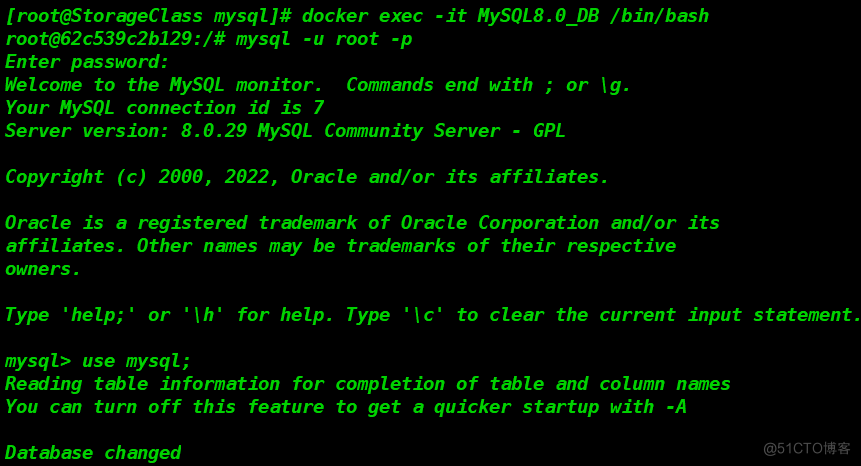
[root@StorageClass mysql]# docker exec -it MySQL8.0_DB /bin/bash
root@305636cc3283:/# mysql -u root -p
Enter password: 		#此处可以直接回车即可进入;跳过mysql权限验证
Welcome to the MySQL monitor.  Commands end with ; or \g.
Your MySQL connection id is 23
Server version: 8.0.29 MySQL Community Server - GPL

Copyright (c) 2000, 2022, Oracle and/or its affiliates.

Oracle is a registered trademark of Oracle Corporation and/or its
affiliates. Other names may be trademarks of their respective
owners.

Type 'help;' or '\h' for help. Type '\c' to clear the current input statement.

mysql> use mysql;
Reading table information for completion of table and column names
You can turn off this feature to get a quicker startup with -A

Database changed
mysql> ALTER USER 'root'@'localhost' IDENTIFIED BY '123456';
	# 由于权限认证没有重新加载,执行修改密码语句后会报错。
ERROR 1290 (HY000): The MySQL server is running with the --skip-grant-tables option so it cannot execute this statement
mysql> flush privileges;	#重新加载权限
Query OK, 0 rows affected (0.03 sec)


mysql> ALTER USER 'root'@'localhost' IDENTIFIED BY '123456';
	# 再次修改root账户密码
Query OK, 0 rows affected (0.02 sec)

mysql> flush privileges;
Query OK, 0 rows affected (0.01 sec)

mysql>
mysql> exit # 重置完成,退出MySQL
Bye
root@62c539c2b129:/# exit # 重置完成,退出容器
exit
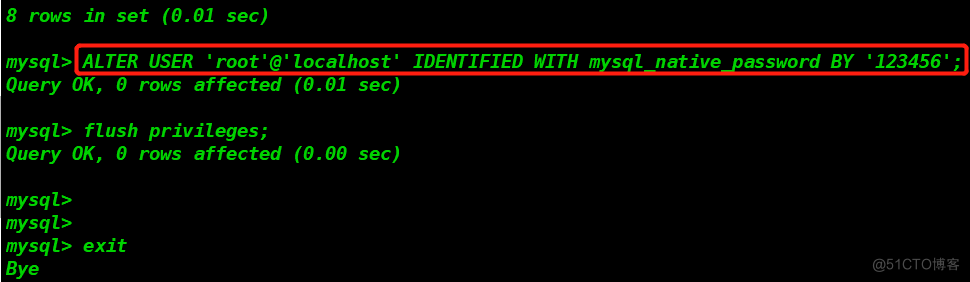
ALTER USER 'root'@'localhost' IDENTIFIED WITH mysql_native_password BY '123456';

# 将root的密码修改为:123456
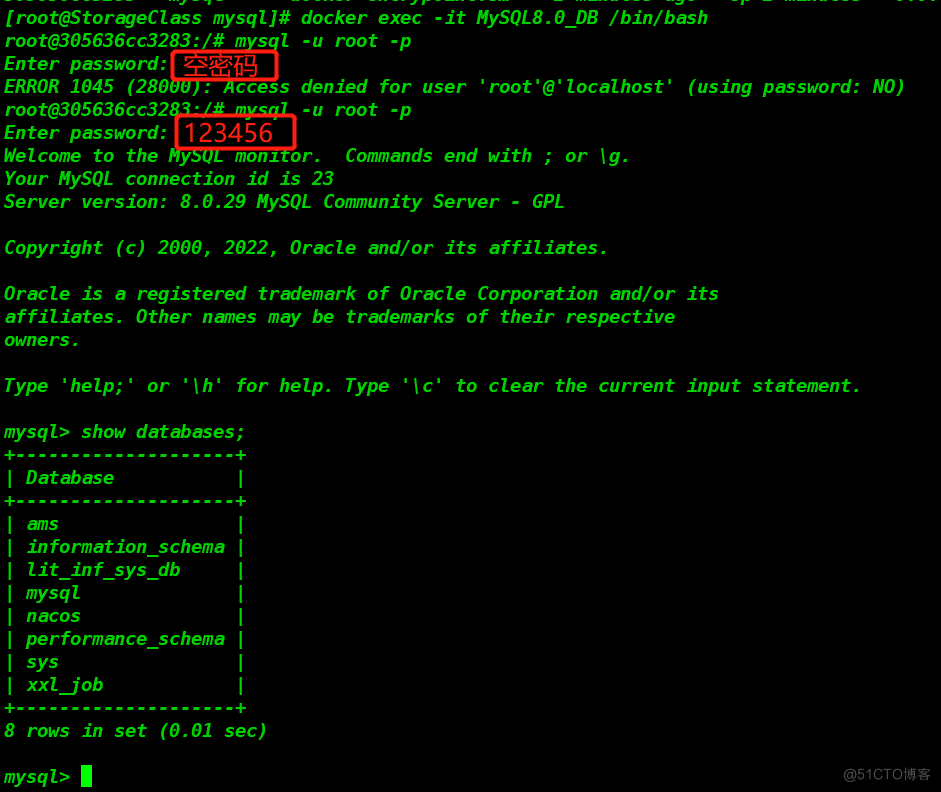
skip_grant_tables字段注释或删除掉,然后再次重启容器。[root@StorageClass mysql]# ./docker_start_Mysql_WinJay.sh
MySQL8.0_DB
305636cc3283a45d8b6791cd0fd23e0701b93f68b33f447ef40d5ffd044929d9

[root@StorageClass mysql]# docker exec -it MySQL8.0_DB /bin/bash
root@305636cc3283:/# mysql -u root -p
Enter password: 		# 此处仍然使用空密码登录测试,下面给出报错。
ERROR 1045 (28000): Access denied for user 'root'@'localhost' (using password: NO)
root@305636cc3283:/# mysql -u root -p
Enter password: 		# 此处使用修改的密码'123456'登录测试成功
Welcome to the MySQL monitor.  Commands end with ; or \g.
Your MySQL connection id is 23
Server version: 8.0.29 MySQL Community Server - GPL

Copyright (c) 2000, 2022, Oracle and/or its affiliates.

Oracle is a registered trademark of Oracle Corporation and/or its
affiliates. Other names may be trademarks of their respective
owners.

Type 'help;' or '\h' for help. Type '\c' to clear the current input statement.

mysql> show databases;
+--------------------+
| Database           |
+--------------------+
| ams                |
| information_schema |
| lit_inf_sys_db     |
| mysql              |
| nacos              |
| performance_schema |
| sys                |
| xxl_job            |
+--------------------+
8 rows in set (0.01 sec)

mysql>
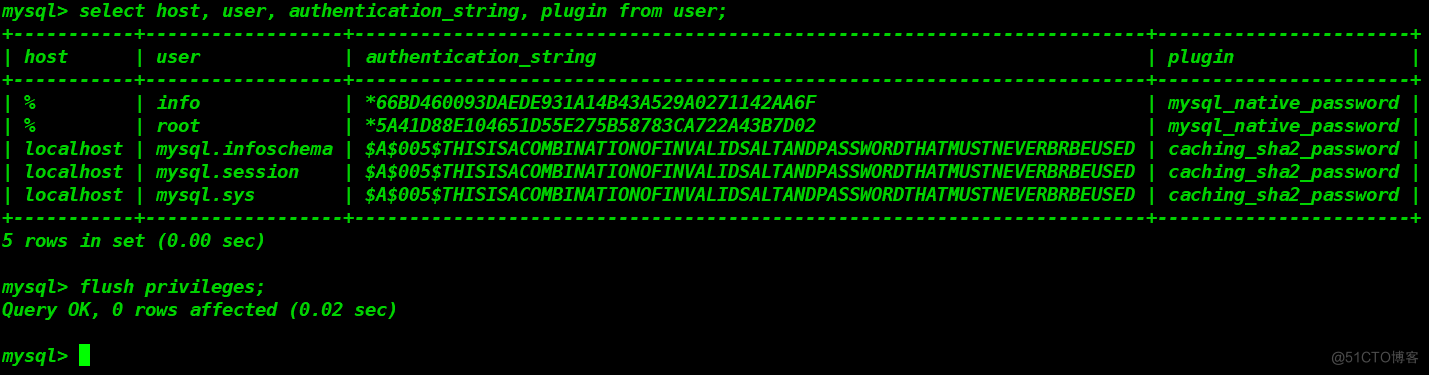
mysql> select host, user, authentication_string, plugin from user;

mysql> DELETE FROM mysql.user WHERE User='root' AND Host NOT IN ('localhost', '127.0.0.1', '::1');
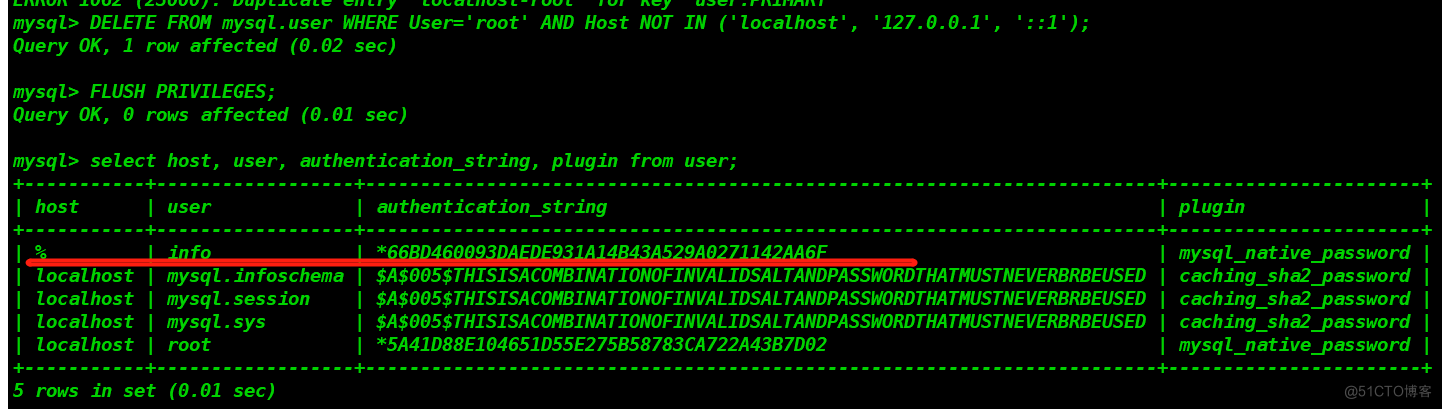
mysql> update user set host = '%' where user = 'root';

Query OK, 1 row affected (0.01 sec)
Rows matched: 1  Changed: 1  Warnings: 0

GRANT ALL PRIVILEGES ON *.* TO 'root'@'%' IDENTIFIED BY 'Qwe!1@2#3' WITH GRANT OPTION;
select id,uid,job_num,account_name,card_no,bank_name from f_bank_account;

update f_bank_account set card_no=8888888888888888;


select id,username,email,id_card_no,phone,real_name from user;
#  更新多个字段,使用','号分隔,并非使用and语句。
update user set email='test@mail.com',id_card_no=110108888888888888,phone=18888888888;
我正在学习如何使用Nokogiri,根据这段代码我遇到了一些问题:require'rubygems'require'mechanize'post_agent=WWW::Mechanize.newpost_page=post_agent.get('http://www.vbulletin.org/forum/showthread.php?t=230708')puts"\nabsolutepathwithtbodygivesnil"putspost_page.parser.xpath('/html/body/div/div/div/div/div/table/tbody/tr/td/div
总的来说,我对ruby还比较陌生,我正在为我正在创建的对象编写一些rspec测试用例。许多测试用例都非常基础,我只是想确保正确填充和返回值。我想知道是否有办法使用循环结构来执行此操作。不必为我要测试的每个方法都设置一个assertEquals。例如:describeitem,"TestingtheItem"doit"willhaveanullvaluetostart"doitem=Item.new#HereIcoulddotheitem.name.shouldbe_nil#thenIcoulddoitem.category.shouldbe_nilendend但我想要一些方法来使用
类classAprivatedeffooputs:fooendpublicdefbarputs:barendprivatedefzimputs:zimendprotecteddefdibputs:dibendendA的实例a=A.new测试a.foorescueputs:faila.barrescueputs:faila.zimrescueputs:faila.dibrescueputs:faila.gazrescueputs:fail测试输出failbarfailfailfail.发送测试[:foo,:bar,:zim,:dib,:gaz].each{|m|a.send(m)resc
我正在尝试设置一个puppet节点,但rubygems似乎不正常。如果我通过它自己的二进制文件(/usr/lib/ruby/gems/1.8/gems/facter-1.5.8/bin/facter)在cli上运行facter,它工作正常,但如果我通过由rubygems(/usr/bin/facter)安装的二进制文件,它抛出:/usr/lib/ruby/1.8/facter/uptime.rb:11:undefinedmethod`get_uptime'forFacter::Util::Uptime:Module(NoMethodError)from/usr/lib/ruby
我想了解Ruby方法methods()是如何工作的。我尝试使用“ruby方法”在Google上搜索,但这不是我需要的。我也看过ruby-doc.org,但我没有找到这种方法。你能详细解释一下它是如何工作的或者给我一个链接吗?更新我用methods()方法做了实验,得到了这样的结果:'labrat'代码classFirstdeffirst_instance_mymethodenddefself.first_class_mymethodendendclassSecond使用类#returnsavailablemethodslistforclassandancestorsputsSeco
我在我的项目中添加了一个系统来重置用户密码并通过电子邮件将密码发送给他,以防他忘记密码。昨天它运行良好(当我实现它时)。当我今天尝试启动服务器时,出现以下错误。=>BootingWEBrick=>Rails3.2.1applicationstartingindevelopmentonhttp://0.0.0.0:3000=>Callwith-dtodetach=>Ctrl-CtoshutdownserverExiting/Users/vinayshenoy/.rvm/gems/ruby-1.9.3-p0/gems/actionmailer-3.2.1/lib/action_mailer
设置:狂欢ruby1.9.2高线(1.6.13)描述:我已经相当习惯在其他一些项目中使用highline,但已经有几个月没有使用它了。现在,在Ruby1.9.2上全新安装时,它似乎不允许在同一行回答提示。所以以前我会看到类似的东西:require"highline/import"ask"Whatisyourfavoritecolor?"并得到:Whatisyourfavoritecolor?|现在我看到类似的东西:Whatisyourfavoritecolor?|竖线(|)符号是我的终端光标。知道为什么会发生这种变化吗? 最佳答案
我已经从我的命令行中获得了一切,所以我可以运行rubymyfile并且它可以正常工作。但是当我尝试从sublime中运行它时,我得到了undefinedmethod`require_relative'formain:Object有人知道我的sublime设置中缺少什么吗?我正在使用OSX并安装了rvm。 最佳答案 或者,您可以只使用“require”,它应该可以正常工作。我认为“require_relative”仅适用于ruby1.9+ 关于ruby-主要:Objectwhenrun
我有一个具有一些属性的模型:attr1、attr2和attr3。我需要在不执行回调和验证的情况下更新此属性。我找到了update_column方法,但我想同时更新三个属性。我需要这样的东西:update_columns({attr1:val1,attr2:val2,attr3:val3})代替update_column(attr1,val1)update_column(attr2,val2)update_column(attr3,val3) 最佳答案 您可以使用update_columns(attr1:val1,attr2:val2
我不确定传递给方法的对象的类型是否正确。我可能会将一个字符串传递给一个只能处理整数的函数。某种运行时保证怎么样?我看不到比以下更好的选择:defsomeFixNumMangler(input)raise"wrongtype:integerrequired"unlessinput.class==FixNumother_stuffend有更好的选择吗? 最佳答案 使用Kernel#Integer在使用之前转换输入的方法。当无法以任何合理的方式将输入转换为整数时,它将引发ArgumentError。defmy_method(number)
