自己开发app之心知天气APP程序代码粘贴即可用。完整代码附最后。
第一步:去知心天气注册开发者账号查看自己的token。注册好登录进去--控制台---免费版--秘钥。这里的秘钥就是自己的token。(有兴趣的可以看开发文档,这里就不多介绍了)

第二步,下载素材包。点击文档-跳转至v3文档--开始使用--天气现象代码说明。点击超链接下载img素材包。
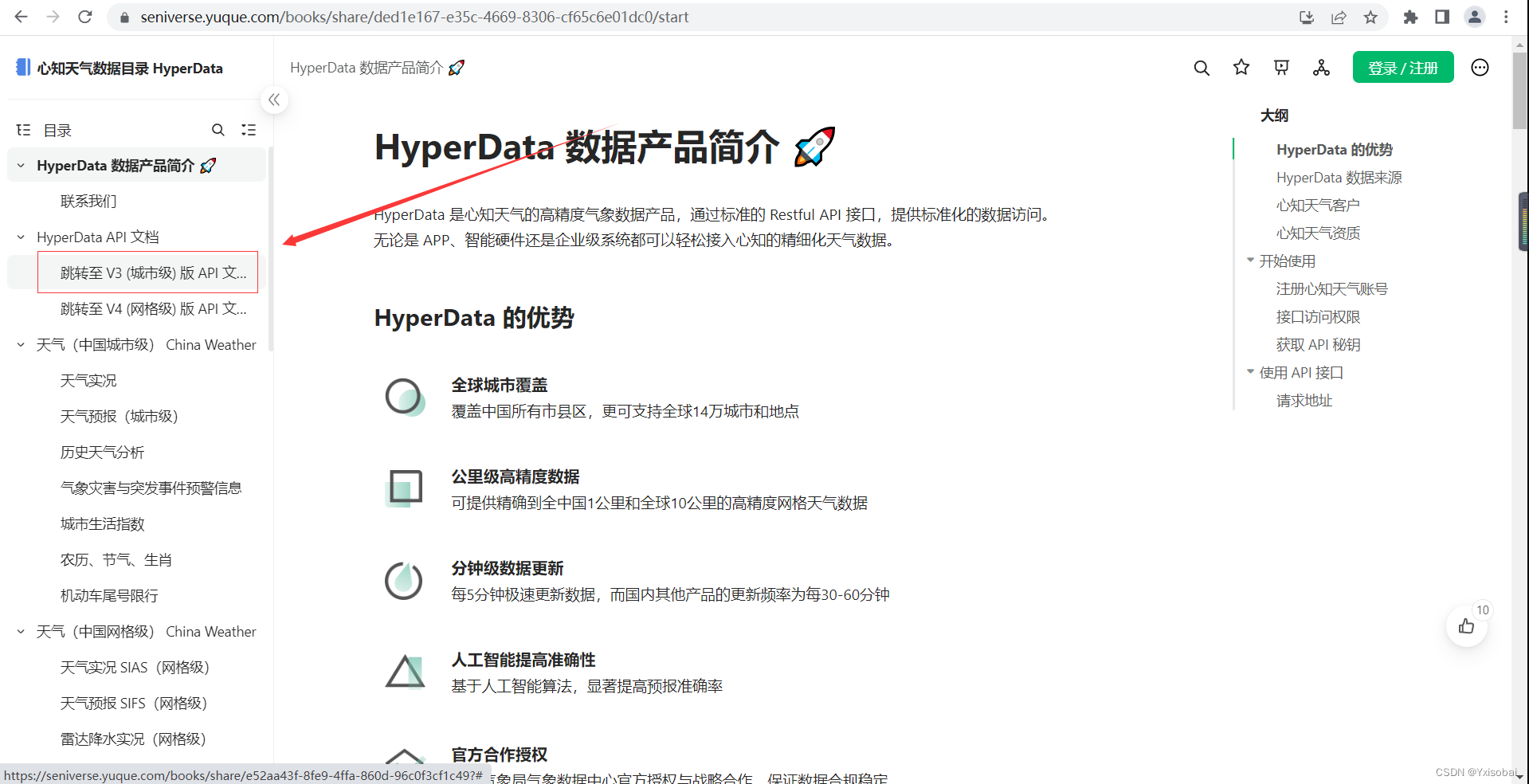
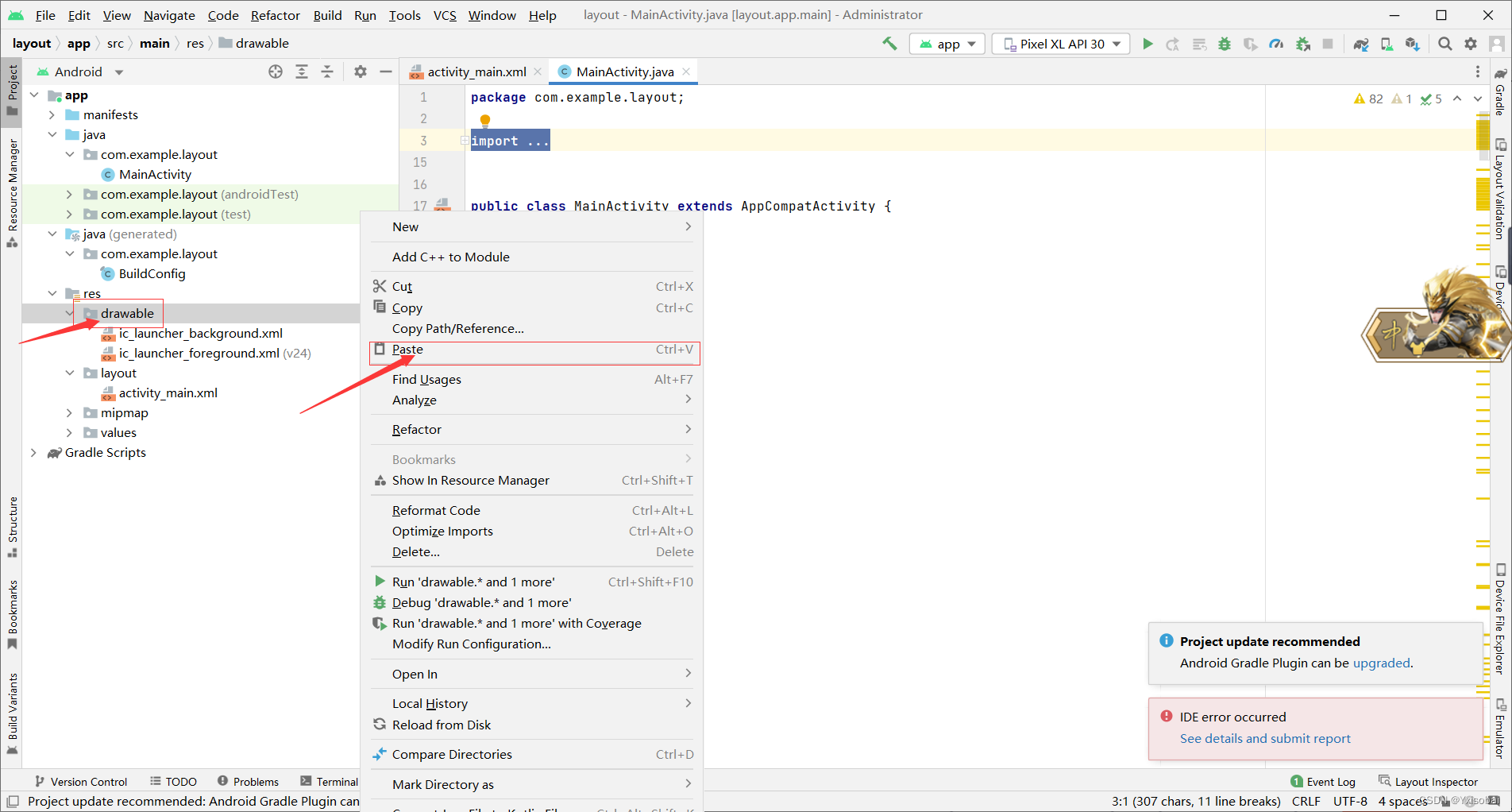
下载好的素材包需要更改一下名称,如果直接导入安卓项目里会报错。名称以字母开头如1.jpg就改成a1.jpg。改完名称后,全选复制到安卓项目里的。右击drawable,选择粘贴。如图所示:
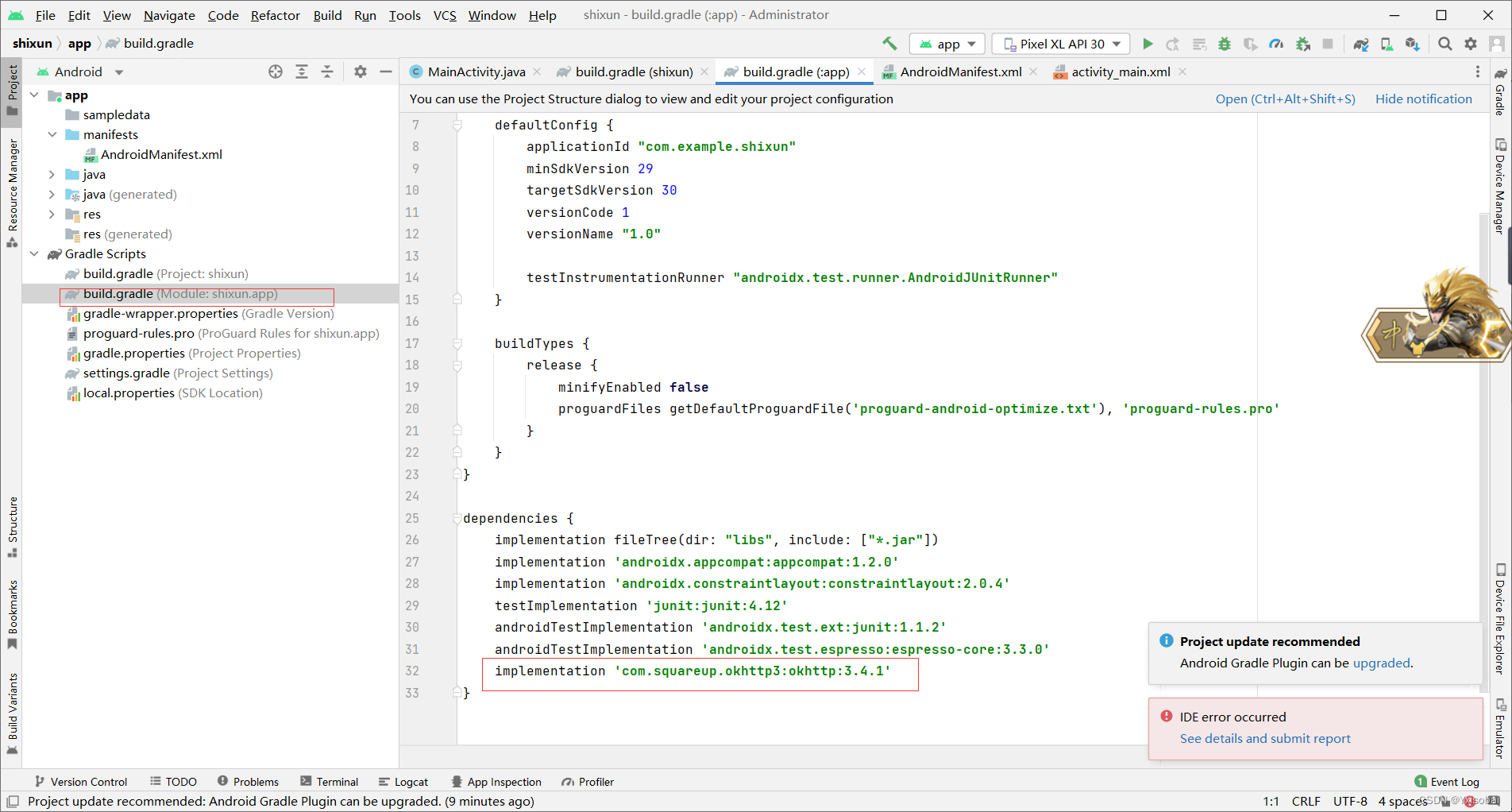
给Android虚拟机申请网络权限如图所示:
网路权限:<uses-permission android:name="android.permission.INTERNET"/>
 添加第三方依赖okhttp:
implementation 'com.squareup.okhttp3:okhttp:3.4.1'
接下来就是上代码了(只讲关键代码,其余不懂的可以私信问我也可以百度):
  private int[] image={R.drawable.a0,R.drawable.a1,R.drawable.a2,R.drawable.a3,R.drawable.a4,R.drawable.a5,R.drawable.a6,R.drawable.a7,R.drawable.a8,R.drawable.a9,R.drawable.a10,R.drawable.a11,R.drawable.a12,R.drawable.a13,R.drawable.a14,R.drawable.a15,R.drawable.a16,R.drawable.a17,R.drawable.a18,R.drawable.a19,R.drawable.a20,
         R.drawable.a21,R.drawable.a22,R.drawable.a23,R.drawable.a24,R.drawable.a25,R.drawable.a26,R.drawable.a27,R.drawable.a28,R.drawable.a29,R.drawable.a30,R.drawable.a31,R.drawable.a32,
            R.drawable.a33, R.drawable.a34, R.drawable.a35, R.drawable.a36, R.drawable.a37, R.drawable.a38, R.drawable.a99};
将刚刚导入的img文件做成int[]数组,这样做的好处是便于访问img资源,将天气图标显示到activity上,当然也有其他办法可以百度。
根据文档得知请求的URL是: "https://api.seniverse.com/v3/weather/now.json?key=(这里是你的token)"+所查询要的地区+"&language=zh-Hans&unit=c"请求方法是get。因为考虑到网络原因,避免系统因为网络延迟卡死,故在这里开了一个线程。
new Thread(new Runnable() {
            @Override
            public void run() {
                OkHttpClient okHttpClient = new OkHttpClient();
                Request request = new Request.Builder().url(
                        "https://api.seniverse.com/v3/weather/now.json?key=SVfFen6tRMSdvu0D4&location="+
                                ed1.getText().toString()+"&language=zh-Hans&unit=c"
).build(); Response response = okHttpClient.newCall(request).execute();
String responsestr = response.body().string();
JSONObject object = new JSONObject(responsestr);
JSONArray resultsarry = object.getJSONArray("results");
JSONObject now = resultsarry.getJSONObject(0).getJSONObject("now");
JSONObject location =resultsarry.getJSONObject(0).getJSONObject("location");
weatherText = now.getString("text");
weatherCode = now.getString("code");
weatherTemperature = now.getString("temperature");
diqu=location.getString("name");因为Android在线程里不能更新ui界面,否则会闪退。需要更新ui就用到了安卓的消息处理机制,通过handleMessage来更新ul界面。通过bundle将解析的数据传送给myhandle,实现UI更新。
  Bundle bundle = new Bundle();
                    bundle.putString("text", weatherText);
                    bundle.putString("code", weatherCode);
                    bundle.putString("temperature", weatherTemperature);
                    bundle.putString("loc",diqu);
                    Message msg = Message.obtain();
                    msg.what = 1;
                    msg.obj = bundle;
                    myHandler.sendMessage(msg);
 MyHandler myHandler = new  MyHandler(){
        @Override
        public void handleMessage(@NonNull Message msg) {
            super.handleMessage(msg);
            if(msg.what==1){
                Bundle bundle =(Bundle)msg.obj;
                tv2.setText(bundle.getString("text"));
                tv3.setText(bundle.getString("temperature")+"℃");
                tv1.setText("当前地区:"+bundle.getString("loc"));
                iv1.setImageResource(image[Integer.valueOf(bundle.getString("code")).
                            intValue()]);
            }
        }
    };
package com.example.shixun;
import androidx.annotation.NonNull;
import androidx.appcompat.app.AppCompatActivity;
import android.os.Bundle;
import android.os.Handler;
import android.os.Message;
import android.util.Log;
import android.view.View;
import android.widget.Button;
import android.widget.EditText;
import android.widget.ImageView;
import android.widget.TextView;
import android.widget.Toast;
import org.json.JSONArray;
import org.json.JSONException;
import org.json.JSONObject;
import java.io.IOException;
import java.util.HashMap;
import java.util.Map;
import okhttp3.MediaType;
import okhttp3.OkHttpClient;
import okhttp3.Request;
import okhttp3.RequestBody;
import okhttp3.Response;
import okio.BufferedSink;
import static android.widget.Toast.LENGTH_LONG;
public class MainActivity extends AppCompatActivity {
    private TextView tv1,tv2,tv3;
    private Button b1;
    private ImageView iv1;
    private EditText ed1;
    private  String weatherText,weatherCode,weatherTemperature,diqu;
    private int[] image={R.drawable.a0,R.drawable.a1,R.drawable.a2,R.drawable.a3,R.drawable.a4,R.drawable.a5,R.drawable.a6,R.drawable.a7,R.drawable.a8,R.drawable.a9,R.drawable.a10,R.drawable.a11,R.drawable.a12,R.drawable.a13,R.drawable.a14,R.drawable.a15,R.drawable.a16,R.drawable.a17,R.drawable.a18,R.drawable.a19,R.drawable.a20,
            R.drawable.a21,R.drawable.a22,R.drawable.a23,R.drawable.a24,R.drawable.a25,R.drawable.a26,R.drawable.a27,R.drawable.a28,R.drawable.a29,R.drawable.a30,R.drawable.a31,R.drawable.a32,
            R.drawable.a33, R.drawable.a34, R.drawable.a35, R.drawable.a36, R.drawable.a37, R.drawable.a38, R.drawable.a99};
    public  class MyHandler extends Handler{
        public MyHandler(){
        }
    }
    MyHandler myHandler = new  MyHandler(){
        @Override
        public void handleMessage(@NonNull Message msg) {
            super.handleMessage(msg);
            if(msg.what==1){
                Bundle bundle =(Bundle)msg.obj;
                tv2.setText(bundle.getString("text"));
                tv3.setText(bundle.getString("temperature")+"℃");
                tv1.setText("当前地区:"+bundle.getString("loc"));
                iv1.setImageResource(image[Integer.valueOf(bundle.getString("code")).
                            intValue()]);
            }
        }
    };
    @Override
    protected void onCreate(Bundle savedInstanceState) {
        super.onCreate(savedInstanceState);
        setContentView(R.layout.activity_main);
        tv1=(TextView)this.findViewById(R.id.tv1);
        tv2=(TextView)this.findViewById(R.id.tv2);
        tv3=(TextView)this.findViewById(R.id.tv3);
        b1=(Button) this.findViewById(R.id.b1);
        iv1= (ImageView) this.findViewById(R.id.iv1);
 ed1=(EditText) this.findViewById(R.id.ed1);
ed1.setText("无锡");
       // sendHttpRequest();
b1.setOnClickListener(new View.OnClickListener() {
    @Override
    public void onClick(View v) {
        sendHttpRequest();
        Toast.makeText(MainActivity.this,"11",Toast.LENGTH_LONG).show();
    }
});
    }
    public void sendHttpRequest() {
        new Thread(new Runnable() {
            @Override
            public void run() {
                OkHttpClient okHttpClient = new OkHttpClient();
                Request request = new Request.Builder().url(
                        "https://api.seniverse.com/v3/weather/now.json?key=SVfFen6tRMSdvu0D4&location="+
                                ed1.getText().toString()+"&language=zh-Hans&unit=c"
                ).build();
                try {
                    Response response = okHttpClient.newCall(request).execute();                    String responsestr = response.body().string();
                    JSONObject object = new JSONObject(responsestr);
                    JSONArray resultsarry = object.getJSONArray("results");
                    Log.d("JYPC", resultsarry+"sac");
                    JSONObject now = resultsarry.getJSONObject(0).getJSONObject("now");
                    JSONObject location =resultsarry.getJSONObject(0).getJSONObject("location");
                    weatherText = now.getString("text");
                    weatherCode = now.getString("code");
                    weatherTemperature = now.getString("temperature");
                    diqu=location.getString("name");
                    Bundle bundle = new Bundle();
                    bundle.putString("text", weatherText);
                    bundle.putString("code", weatherCode);
                    bundle.putString("temperature", weatherTemperature);
                    bundle.putString("loc",diqu);
                    Log.d("JYPC", diqu+"sac");
                    Message msg = Message.obtain();
                    msg.what = 1;
                    msg.obj = bundle;
                    myHandler.sendMessage(msg);
                } catch (IOException | JSONException e) {
                    e.printStackTrace();
                }
            }

        }).start();
    }

}
<?xml version="1.0" encoding="utf-8"?>
<androidx.constraintlayout.widget.ConstraintLayout xmlns:android="http://schemas.android.com/apk/res/android"
    xmlns:app="http://schemas.android.com/apk/res-auto"
    xmlns:tools="http://schemas.android.com/tools"
    android:layout_width="match_parent"
    android:layout_height="wrap_content"
    tools:context=".MainActivity">

    <LinearLayout
        android:layout_width="match_parent"
        android:layout_height="match_parent"
        android:orientation="vertical"
        app:layout_constraintBottom_toBottomOf="parent"
        tools:layout_editor_absoluteX="6dp"
        tools:ignore="MissingConstraints">

        <TextView
            android:id="@+id/tv1"
            android:layout_width="match_parent"
            android:textSize="30dp"
            android:textColor="#000000"
            android:layout_height="52dp"
            android:layout_gravity="center_vertical"
            android:text="实况" />

        <LinearLayout
            android:layout_width="match_parent"
            android:layout_height="72dp"
            android:orientation="horizontal">

            <EditText
                android:id="@+id/ed1"
                android:layout_width="match_parent"
                android:layout_height="match_parent"
                android:layout_weight="1"
                android:textSize="30dp"
                android:textColor="#000000"
                android:text="" />

            <Button
                android:id="@+id/b1"
                android:layout_width="match_parent"
                android:layout_height="wrap_content"
                android:layout_weight="2"
                android:textSize="20dp"
                android:textColor="#2f4f4f"
                android:text="查询" />
        </LinearLayout>

        <TextView
            android:id="@+id/tv2"
            android:layout_width="wrap_content"
            android:layout_height="50dp"
            android:layout_marginLeft="150dp"
            android:textSize="30dp"
            android:textColor="#000000"
            android:gravity="center"
            android:text="天气状况"></TextView>

        <ImageView
            android:id="@+id/iv1"
            android:layout_width="match_parent"
            android:layout_height="381dp">

        </ImageView>

        <TextView
            android:id="@+id/tv3"
            android:layout_width="100dp"
            android:layout_height="50dp"
            android:layout_marginLeft="150dp"
            android:textSize="30dp"
            android:textColor="#000000"
            android:gravity="center"
            android:text="温度"></TextView>


    </LinearLayout>


</androidx.constraintlayout.widget.ConstraintLayout>
我正在编写一个包含C扩展的gem。通常当我写一个gem时,我会遵循TDD的过程,我会写一个失败的规范,然后处理代码直到它通过,等等......在“ext/mygem/mygem.c”中我的C扩展和在gemspec的“扩展”中配置的有效extconf.rb,如何运行我的规范并仍然加载我的C扩展?当我更改C代码时,我需要采取哪些步骤来重新编译代码?这可能是个愚蠢的问题,但是从我的gem的开发源代码树中输入“bundleinstall”不会构建任何native扩展。当我手动运行rubyext/mygem/extconf.rb时,我确实得到了一个Makefile(在整个项目的根目录中),然后当
我收到这个错误:RuntimeError(自动加载常量Apps时检测到循环依赖当我使用多线程时。下面是我的代码。为什么会这样?我尝试多线程的原因是因为我正在编写一个HTML抓取应用程序。对Nokogiri::HTML(open())的调用是一个同步阻塞调用,需要1秒才能返回,我有100,000多个页面要访问,所以我试图运行多个线程来解决这个问题。有更好的方法吗?classToolsController0)app.website=array.join(',')putsapp.websiteelseapp.website="NONE"endapp.saveapps=Apps.order("
我有一个用户工厂。我希望默认情况下确认用户。但是鉴于unconfirmed特征,我不希望它们被确认。虽然我有一个基于实现细节而不是抽象的工作实现,但我想知道如何正确地做到这一点。factory:userdoafter(:create)do|user,evaluator|#unwantedimplementationdetailshereunlessFactoryGirl.factories[:user].defined_traits.map(&:name).include?(:unconfirmed)user.confirm!endendtrait:unconfirmeddoenden
我已经在Sinatra上创建了应用程序,它代表了一个简单的API。我想在生产和开发上进行部署。我想在部署时选择,是开发还是生产,一些方法的逻辑应该改变,这取决于部署类型。是否有任何想法,如何完成以及解决此问题的一些示例。例子:我有代码get'/api/test'doreturn"Itisdev"end但是在部署到生产环境之后我想在运行/api/test之后看到ItisPROD如何实现? 最佳答案 根据SinatraDocumentation:EnvironmentscanbesetthroughtheRACK_ENVenvironm
我是Google云的新手,我正在尝试对其进行首次部署。我的第一个部署是RubyonRails项目。我基本上是在关注thisguideinthegoogleclouddocumentation.唯一的区别是我使用的是我自己的项目,而不是他们提供的“helloworld”项目。这是我的app.yaml文件runtime:customvm:trueentrypoint:bundleexecrackup-p8080-Eproductionconfig.ruresources:cpu:0.5memory_gb:1.3disk_size_gb:10当我转到我的项目目录并运行gcloudprevie
我有用于控制用户任务的Rails5API项目,我有以下错误,但并非总是针对相同的Controller和路由。ActionController::RoutingError:uninitializedconstantApi::V1::ApiController我向您描述了一些我的项目,以更详细地解释错误。应用结构路线scopemodule:'api'donamespace:v1do#=>Loginroutesscopemodule:'login'domatch'login',to:'sessions#login',as:'login',via::postend#=>Teamroutessc
我们的git存储库中目前有一个Gemfile。但是,有一个gem我只在我的环境中本地使用(我的团队不使用它)。为了使用它,我必须将它添加到我们的Gemfile中,但每次我checkout到我们的master/dev主分支时,由于与跟踪的gemfile冲突,我必须删除它。我想要的是类似Gemfile.local的东西,它将继承从Gemfile导入的gems,但也允许在那里导入新的gems以供使用只有我的机器。此文件将在.gitignore中被忽略。这可能吗? 最佳答案 设置BUNDLE_GEMFILE环境变量:BUNDLE_GEMFI
当我在我的Rails应用程序根目录中运行rakedoc:app时,API文档是使用/doc/README_FOR_APP作为主页生成的。我想向该文件添加.rdoc扩展名,以便它在GitHub上正确呈现。更好的是,我想将它移动到应用程序根目录(/README.rdoc)。有没有办法通过修改包含的rake/rdoctask任务在我的Rakefile中执行此操作?是否有某个地方可以查找可以修改的主页文件的名称?还是我必须编写一个新的Rake任务?额外的问题:Rails应用程序的两个单独文件/README和/doc/README_FOR_APP背后的逻辑是什么?为什么不只有一个?
这似乎非常适得其反,因为太多的gem会在window上破裂。我一直在处理很多mysql和ruby-mysqlgem问题(gem本身发生段错误,一个名为UnixSocket的类显然在Windows机器上不能正常工作,等等)。我只是在浪费时间吗?我应该转向不同的脚本语言吗? 最佳答案 我在Windows上使用Ruby的经验很少,但是当我开始使用Ruby时,我是在Windows上,我的总体印象是它不是Windows原生系统。因此,在主要使用Windows多年之后,开始使用Ruby促使我切换回原来的系统Unix,这次是Linux。Rub
我正在玩HTML5视频并且在ERB中有以下片段:mp4视频从在我的开发环境中运行的服务器很好地流式传输到chrome。然而firefox显示带有海报图像的视频播放器,但带有一个大X。问题似乎是mongrel不确定ogv扩展的mime类型,并且只返回text/plain,如curl所示:$curl-Ihttp://0.0.0.0:3000/pr6.ogvHTTP/1.1200OKConnection:closeDate:Mon,19Apr201012:33:50GMTLast-Modified:Sun,18Apr201012:46:07GMTContent-Type:text/plain
