原文出处:http://www.cnblogs.com/zlslch/p/6419948.html
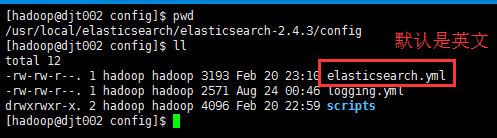
此elasticsearch-.yml配置文件,是在$ES_HOME/config/下
elasticsearch-.yml(中文配置详解)
# ======================== Elasticsearch Configuration =========================
# NOTE: Elasticsearch comes with reasonable defaults for most settings.
# Before you set out to tweak and tune the configuration, make sure you
# understand what are you trying to accomplish and the consequences.
# The primary way of configuring a node is via this file. This template lists
# the most important settings you may want to configure for a production cluster.
# Please see the documentation for further information on configuration options:
# http://www.elastic.co/guide/en/elasticsearch/reference/current/setup-configuration.html
# ---------------------------------- Cluster -----------------------------------
# Use a descriptive name for your cluster:
# 集群名称,默认是elasticsearch
# cluster.name: my-application
# ------------------------------------ Node ------------------------------------
# Use a descriptive name for the node:
# 节点名称,默认从elasticsearch-2.4.3/lib/elasticsearch-2.4.3.jar!config/names.txt中随机选择一个名称
# node.name: node-1
# Add custom attributes to the node:
# node.rack: r1
# ----------------------------------- Paths ------------------------------------
# Path to directory where to store the data (separate multiple locations by comma):
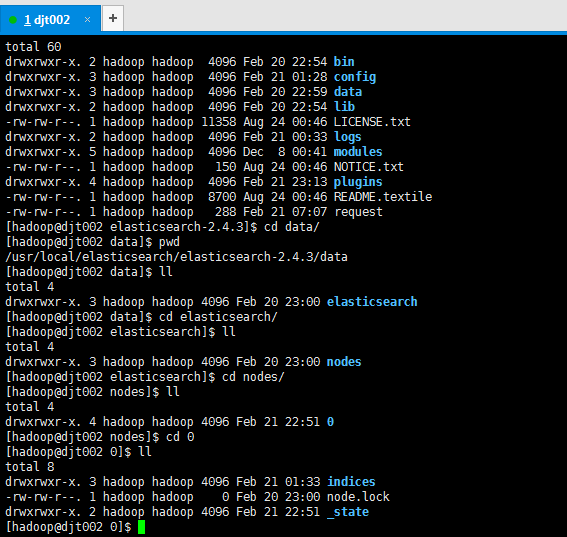
# 可以指定es的数据存储目录,默认存储在es_home/data目录下
# path.data: /path/to/data
# Path to log files:
# 可以指定es的日志存储目录,默认存储在es_home/logs目录下
# path.logs: /path/to/logs
# ----------------------------------- Memory -----------------------------------
# Lock the memory on startup:
# bootstrap.memory_lock: true
# 确保ES_HEAP_SIZE参数设置为系统可用内存的一半左右
# Make sure that the `ES_HEAP_SIZE` environment variable is set to about half the memory
# available on the system and that the owner of the process is allowed to use this limit.
# 当系统进行内存交换的时候,es的性能很差
# Elasticsearch performs poorly when the system is swapping the memory.
# ---------------------------------- Network -----------------------------------
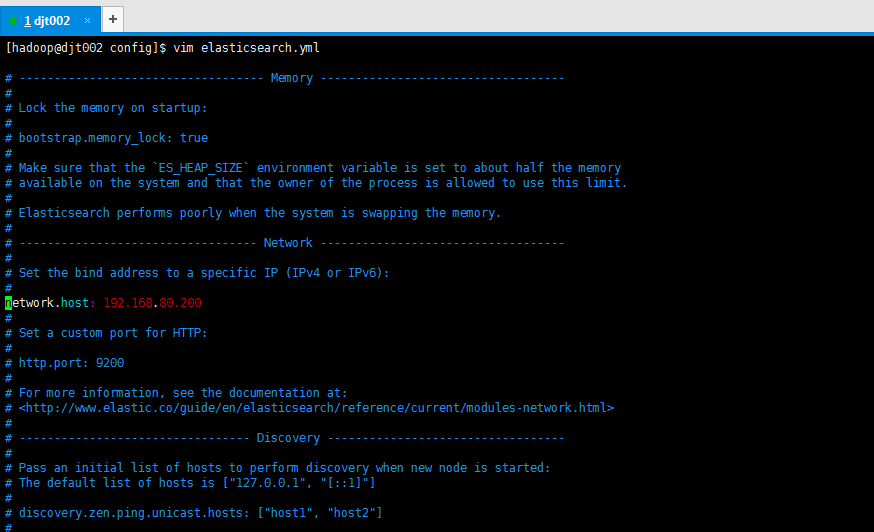
# 为es设置ip绑定,默认是127.0.0.1,也就是默认只能通过127.0.0.1 或者localhost才能访问
# es1.x版本默认绑定的是0.0.0.0 所以不需要配置,但是es2.x版本默认绑定的是127.0.0.1,需要配置
# Set the bind address to a specific IP (IPv4 or IPv6):
# network.host: 192.168.0.1
# 为es设置自定义端口,默认是9200
# 注意:在同一个服务器中启动多个es节点的话,默认监听的端口号会自动加1:例如:9200,9201,9202…
# Set a custom port for HTTP:
# http.port: 9200
# For more information, see the documentation at:
# http://www.elastic.co/guide/en/elasticsearch/reference/current/modules-network.html
# --------------------------------- Discovery ----------------------------------
# 当启动新节点时,通过这个ip列表进行节点发现,组建集群
# 默认节点列表:
# 127.0.0.1,表示ipv4的回环地址。
# [::1],表示ipv6的回环地址
# 在es1.x中默认使用的是组播(multicast)协议,默认会自动发现同一网段的es节点组建集群,
# 在es2.x中默认使用的是单播(unicast)协议,想要组建集群的话就需要在这指定要发现的节点信息了。
# 注意:如果是发现其他服务器中的es服务,可以不指定端口[默认9300],如果是发现同一个服务器中的es服务,就需要指定端口了。
# Pass an initial list of hosts to perform discovery when new node is started:
# The default list of hosts is [“127.0.0.1”, “[::1]”]
# discovery.zen.ping.unicast.hosts: [“host1”, “host2”]
# 通过配置这个参数来防止集群脑裂现象 (集群总节点数量/2)+1
# Prevent the “split brain” by configuring the majority of nodes (total number of nodes / 2 + 1):
# discovery.zen.minimum_master_nodes: 3
# For more information, see the documentation at:
# http://www.elastic.co/guide/en/elasticsearch/reference/current/modules-discovery.html
# ---------------------------------- Gateway -----------------------------------
# Block initial recovery after a full cluster restart until N nodes are started:
# 一个集群中的N个节点启动后,才允许进行数据恢复处理,默认是1
# gateway.recover_after_nodes: 3
# For more information, see the documentation at:
# http://www.elastic.co/guide/en/elasticsearch/reference/current/modules-gateway.html
# ---------------------------------- Various -----------------------------------
# 在一台服务器上禁止启动多个es服务
# Disable starting multiple nodes on a single system:
# node.max_local_storage_nodes: 1
# 设置是否可以通过正则或者_all删除或者关闭索引库,默认true表示必须需要显式指定索引库名称
# 生产环境建议设置为true,删除索引库的时候必须显式指定,否则可能会误删索引库中的索引库。
# Require explicit names when deleting indices:
# action.destructive_requires_name: true
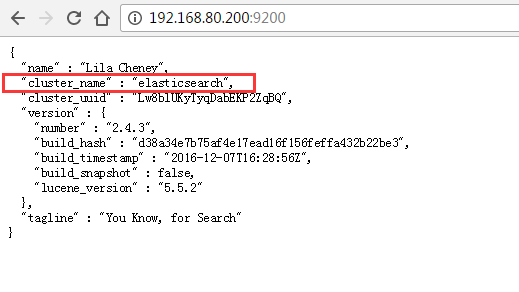
集群名称,默认是elasticsearch
输入,http://192.168.80.200:9200/
默认存储在es_home/data目录下
total 60
drwxrwxr-x. 2 hadoop hadoop 4096 Feb 20 22:54 bin
drwxrwxr-x. 3 hadoop hadoop 4096 Feb 21 01:28 config
drwxrwxr-x. 3 hadoop hadoop 4096 Feb 20 22:59 data
drwxrwxr-x. 2 hadoop hadoop 4096 Feb 20 22:54 lib
-rw-rw-r–. 1 hadoop hadoop 11358 Aug 24 00:46 LICENSE.txt
drwxrwxr-x. 2 hadoop hadoop 4096 Feb 21 00:33 logs
drwxrwxr-x. 5 hadoop hadoop 4096 Dec 8 00:41 modules
-rw-rw-r–. 1 hadoop hadoop 150 Aug 24 00:46 NOTICE.txt
drwxrwxr-x. 4 hadoop hadoop 4096 Feb 21 23:13 plugins
-rw-rw-r–. 1 hadoop hadoop 8700 Aug 24 00:46 README.textile
-rw-rw-r–. 1 hadoop hadoop 288 Feb 21 07:07 request
[hadoop@djt002 elasticsearch-2.4.3]$ cd data/
[hadoop@djt002 data]$ pwd
/usr/local/elasticsearch/elasticsearch-2.4.3/data
[hadoop@djt002 data]$ ll
total 4
drwxrwxr-x. 3 hadoop hadoop 4096 Feb 20 23:00 elasticsearch
[hadoop@djt002 data]$ cd elasticsearch/
[hadoop@djt002 elasticsearch]$ ll
total 4
drwxrwxr-x. 3 hadoop hadoop 4096 Feb 20 23:00 nodes
[hadoop@djt002 elasticsearch]$ cd nodes/
[hadoop@djt002 nodes]$ ll
total 4
drwxrwxr-x. 4 hadoop hadoop 4096 Feb 21 22:51 0
[hadoop@djt002 nodes]$ cd 0
[hadoop@djt002 0]$ ll
total 8
drwxrwxr-x. 3 hadoop hadoop 4096 Feb 21 01:33 indices
-rw-rw-r–. 1 hadoop hadoop 0 Feb 20 23:00 node.lock
drwxrwxr-x. 2 hadoop hadoop 4096 Feb 21 22:51 _state
[hadoop@djt002 0]$
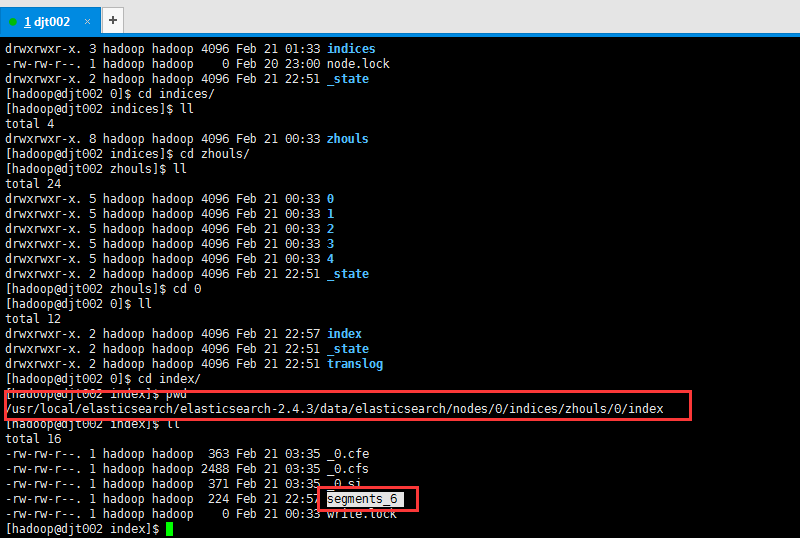
索引片段,里面存放着具体的数据
如,segments_6,是在/usr/local/elasticsearch/elasticsearch-2.4.3/data/elasticsearch/nodes/0/indices/zhouls/0/index
drwxrwxr-x. 3 hadoop hadoop 4096 Feb 21 01:33 indices
-rw-rw-r–. 1 hadoop hadoop 0 Feb 20 23:00 node.lock
drwxrwxr-x. 2 hadoop hadoop 4096 Feb 21 22:51 _state
[hadoop@djt002 0]$ cd indices/
[hadoop@djt002 indices]$ ll
total 4
drwxrwxr-x. 8 hadoop hadoop 4096 Feb 21 00:33 zhouls
[hadoop@djt002 indices]$ cd zhouls/
[hadoop@djt002 zhouls]$ ll
total 24
drwxrwxr-x. 5 hadoop hadoop 4096 Feb 21 00:33 0
drwxrwxr-x. 5 hadoop hadoop 4096 Feb 21 00:33 1
drwxrwxr-x. 5 hadoop hadoop 4096 Feb 21 00:33 2
drwxrwxr-x. 5 hadoop hadoop 4096 Feb 21 00:33 3
drwxrwxr-x. 5 hadoop hadoop 4096 Feb 21 00:33 4
drwxrwxr-x. 2 hadoop hadoop 4096 Feb 21 22:51 _state
[hadoop@djt002 zhouls]$ cd 0
[hadoop@djt002 0]$ ll
total 12
drwxrwxr-x. 2 hadoop hadoop 4096 Feb 21 22:57 index
drwxrwxr-x. 2 hadoop hadoop 4096 Feb 21 22:51 _state
drwxrwxr-x. 2 hadoop hadoop 4096 Feb 21 22:51 translog
[hadoop@djt002 0]$ cd index/
[hadoop@djt002 index]$ pwd
/usr/local/elasticsearch/elasticsearch-2.4.3/data/elasticsearch/nodes/0/indices/zhouls/0/index
[hadoop@djt002 index]$ ll
total 16
-rw-rw-r–. 1 hadoop hadoop 363 Feb 21 03:35 _0.cfe
-rw-rw-r–. 1 hadoop hadoop 2488 Feb 21 03:35 _0.cfs
-rw-rw-r–. 1 hadoop hadoop 371 Feb 21 03:35 _0.si
-rw-rw-r–. 1 hadoop hadoop 224 Feb 21 22:57 segments_6
-rw-rw-r–. 1 hadoop hadoop 0 Feb 21 00:33 write.lock
[hadoop@djt002 index]$
总结
1、es已经为大多数参数设置合理的默认值
2、这个配置文件中列出来了针对生产环境下的一些重要配置
3、注意:这个文件是yaml格式的文件
(1):属性顶格写,不能有空格
(2):缩进一定不能使用tab制表符
(3):属性和值之间的:后面需要有空格
network.host: 192.168.80.200
4、es的1.*版本比2.*版本,这个配置文件多了很多属性,为什么2.*版本没了呢,因为,es很多地方做了默认配置。
。
我有一个在Linux服务器上运行的ruby脚本。它不使用rails或任何东西。它基本上是一个命令行ruby脚本,可以像这样传递参数:./ruby_script.rbarg1arg2如何将参数抽象到配置文件(例如yaml文件或其他文件)中?您能否举例说明如何做到这一点?提前谢谢你。 最佳答案 首先,您可以运行一个写入YAML配置文件的独立脚本:require"yaml"File.write("path_to_yaml_file",[arg1,arg2].to_yaml)然后,在您的应用中阅读它:require"yaml"arg
我已经在Sinatra上创建了应用程序,它代表了一个简单的API。我想在生产和开发上进行部署。我想在部署时选择,是开发还是生产,一些方法的逻辑应该改变,这取决于部署类型。是否有任何想法,如何完成以及解决此问题的一些示例。例子:我有代码get'/api/test'doreturn"Itisdev"end但是在部署到生产环境之后我想在运行/api/test之后看到ItisPROD如何实现? 最佳答案 根据SinatraDocumentation:EnvironmentscanbesetthroughtheRACK_ENVenvironm
英文版英文链接关注公众号在“亚特兰蒂斯的回声”中踏上一段难忘的冒险之旅,深入未知的海洋深处。足智多谋的考古学家AriaSeaborne偶然发现了一件古代神器,揭示了一张通往失落之城亚特兰蒂斯的隐藏地图。在她神秘的导师内森·兰登教授的指导和勇敢的冒险家亚历克斯·默瑟的帮助下,阿丽亚开始了一段危险的旅程,以揭开这座传说中城市的真相。他们的冒险之旅带领他们穿越险恶的大海、神秘的岛屿和充满陷阱和谜语的致命迷宫。随着Aria潜在的魔法能力的觉醒,她被睿智勇敢的QueenNeria的幻象所指引,她让她为即将到来的挑战做好准备。三人组揭开亚特兰蒂斯令人惊叹的隐藏文明,并了解到邪恶的巫师马拉卡勋爵试图利用其古
之前在培训新生的时候,windows环境下配置opencv环境一直教的都是网上主流的vsstudio配置属性表,但是这个似乎对新生来说难度略高(虽然个人觉得完全是他们自己的问题),加之暑假之后对cmake实在是爱不释手,且这样配置确实十分简单(其实都不需要配置),故斗胆妄言vscode下配置CV之法。其实极为简单,图比较多所以很长。如果你看此文还配不好,你应该思考一下是不是自己的问题。闲话少说,直接开始。0.CMkae简介有的人到大二了都不知道cmake是什么,我不说是谁。CMake是一个开源免费并且跨平台的构建工具,可以用简单的语句来描述所有平台的编译过程。它能够根据当前所在平台输出对应的m
注意:本文主要掌握DCN自研无线产品的基本配置方法和注意事项,能够进行一般的项目实施、调试与运维AP基本配置命令AP登录用户名和密码均为:adminAP默认IP地址为:192.168.1.10AP默认情况下DHCP开启AP静态地址配置:setmanagementstatic-ip192.168.10.1AP开启/关闭DHCP功能:setmanagementdhcp-statusup/downAP设置默认网关:setstatic-ip-routegeteway192.168.10.254查看AP基本信息:getsystemgetmanagementgetmanaged-apgetrouteAP配
1.1.1 YARN的介绍 为克服Hadoop1.0中HDFS和MapReduce存在的各种问题⽽提出的,针对Hadoop1.0中的MapReduce在扩展性和多框架⽀持⽅⾯的不⾜,提出了全新的资源管理框架YARN. ApacheYARN(YetanotherResourceNegotiator的缩写)是Hadoop集群的资源管理系统,负责为计算程序提供服务器计算资源,相当于⼀个分布式的操作系统平台,⽽MapReduce等计算程序则相当于运⾏于操作系统之上的应⽤程序。 YARN被引⼊Hadoop2,最初是为了改善MapReduce的实现,但是因为具有⾜够的通⽤性,同样可以⽀持其他的分布式计算模
我是ruby的新手,正在配置IRB。我喜欢pretty-print(需要'pp'),但总是输入pp来漂亮地打印它似乎很麻烦。我想做的是默认情况下让它漂亮地打印出来,所以如果我有一个var,比如说,'myvar',然后键入myvar,它会自动调用pretty_inspect而不是常规检查。我从哪里开始?理想情况下,我将能够向我的.irbrc文件添加一个自动调用的方法。有什么想法吗?谢谢! 最佳答案 irb中默认pretty-print对象正是hirb被迫去做。Theseposts解释hirb如何将几乎所有内容转换为ascii表。虽
我想在IRB中浏览文件系统并让提示更改以反射(reflect)当前工作目录,但我不知道如何在每个命令后进行提示更新。最终,我想在日常工作中更多地使用IRB,让bash溜走。我在我的.irbrc中试过这个:require'fileutils'includeFileUtilsIRB.conf[:PROMPT][:CUSTOM]={:PROMPT_N=>"\e[1m:\e[m",:PROMPT_I=>"\e[1m#{pwd}>\e[m",:PROMPT_S=>"FOO",:PROMPT_C=>"\e[1m#{pwd}>\e[m",:RETURN=>""}IRB.conf[:PROMPT_MO
我正在使用Ruby/Mechanize编写一个“自动填写表格”应用程序。它几乎可以工作。我可以使用精彩CharlesWeb代理以查看服务器和我的Firefox浏览器之间的交换。现在我想使用Charles查看服务器和我的应用程序之间的交换。Charles在端口8888上代理。假设服务器位于https://my.host.com。.一件不起作用的事情是:@agent||=Mechanize.newdo|agent|agent.set_proxy("my.host.com",8888)end这会导致Net::HTTP::Persistent::Error:...lib/net/http/pe
如果特定语言环境中缺少翻译,如何配置i18n以使用en语言环境翻译?当前已插入翻译缺失消息。我正在使用RoR3.1。 最佳答案 找到相似的question这里是答案:#application.rb#railswillfallbacktoconfig.i18n.default_localetranslationconfig.i18n.fallbacks=true#railswillfallbacktoen,nomatterwhatissetasconfig.i18n.default_localeconfig.i18n.fallback
