helm repo add hbase https://itboy87.github.io/bigdata-charts/

# hbase version 2.4.13
helm pull hbase/hbase --version 0.1.7docker pull ghcr.io/fleeksoft/hbase/hbase-base:2.4.13.2
# tag
docker tag ghcr.io/fleeksoft/hbase/hbase-base:2.4.13.2 myharbor.com/bigdata/hbase-base:2.4.13.2
# push
docker push myharbor.com/bigdata/hbase-base:2.4.13.2image:
repository: myharbor.com/bigdata/hbase-base
tag: 2.4.13.2
pullPolicy: IfNotPresent
...
conf:
hadoopUserName: admin
hbaseSite:
hbase.rootdir: "hdfs://hadoop-hadoop-hdfs-nn.hadoop:9000/hbase"
hbase.zookeeper.quorum: "zookeeper.zookeeper:2181"
...
hbase:
master:
replicas: 2
regionServer:
replicas: 2
# 禁用内部的hadoop
hadoop:
enabled: false
# 禁用内部的zookeeper
zookeeper:
enabled: falseif [ {{ .Values.hadoop.enabled }} = true ];then
NAMENODE_URL={{- printf "http://%s-hadoop-hdfs-nn:9870/index.html" .Release.Name }}
else
hadoop_url={{ index .Values.conf.hbaseSite "hbase.rootdir" }}
hadoop_url=`echo $hadoop_url|awk -F '/' '{print $3}'|awk -F':' '{print $1}'`
NAMENODE_URL=http://${hadoop_url}:9870/index.html
fi# 先检查语法
helm lint ./hbase
# 开始安装
helm install hbase ./hbase -n hbase --create-namespaceNAME: hbase
LAST DEPLOYED: Sat Nov 5 15:44:14 2022
NAMESPACE: hbase
STATUS: deployed
REVISION: 1
TEST SUITE: None
NOTES:
1. You can get an HBASE Shell by running this command:
kubectl exec -n hbase -it hbase-hbase-master-0 -- hbase shell
2. Inspect hbase master service ports with:
kubectl exec -n hbase describe service hbase-hbase-master
3. Create a port-forward to the hbase manager UI:
kubectl port-forward -n hbase svc/hbase-hbase-master 16010:16010
Then open the ui in your browser:
open http://localhost:16010
4. Create a port-forward to the hbase thrift manager UI:
kubectl port-forward -n hbase svc/hbase-hbase-master 9095:9095
Then open the ui in your browser:
open http://localhost:9095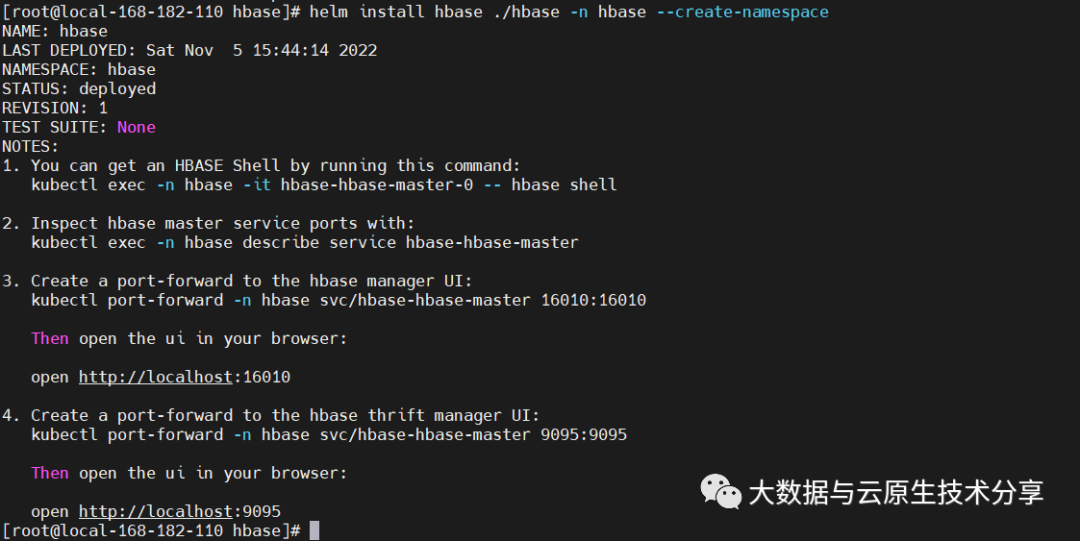 HDFS
HDFS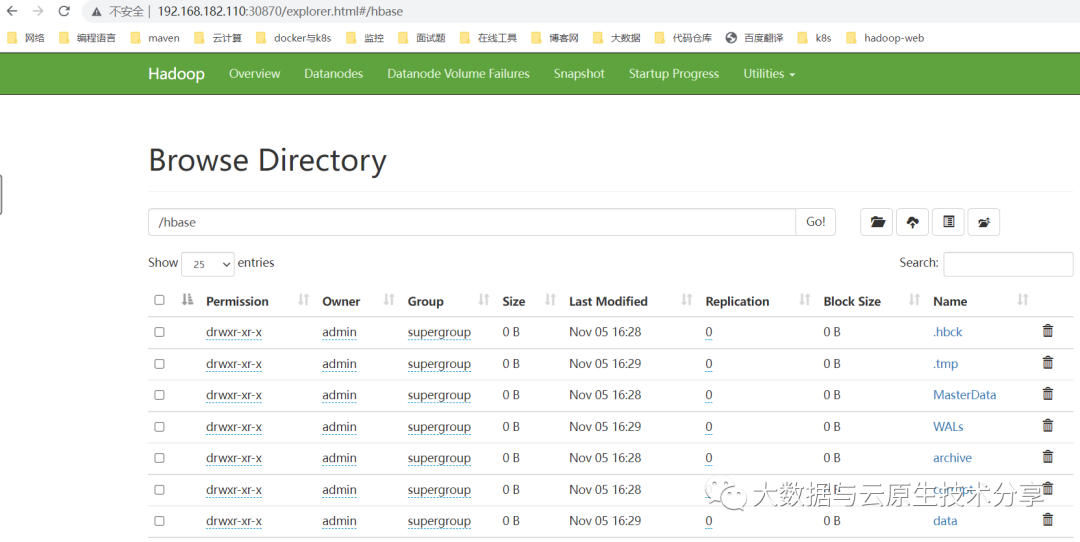 查看
查看kubectl get pods,svc -n hbase -owide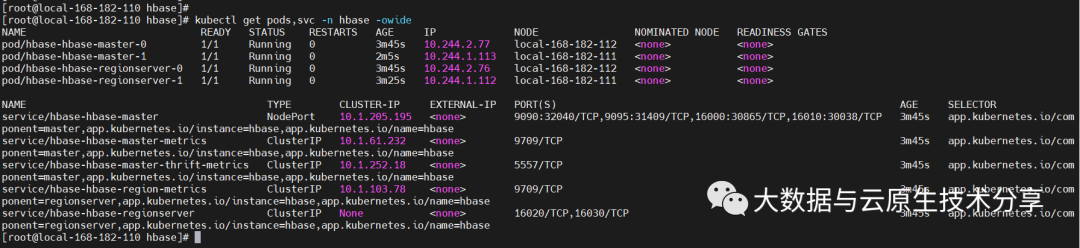
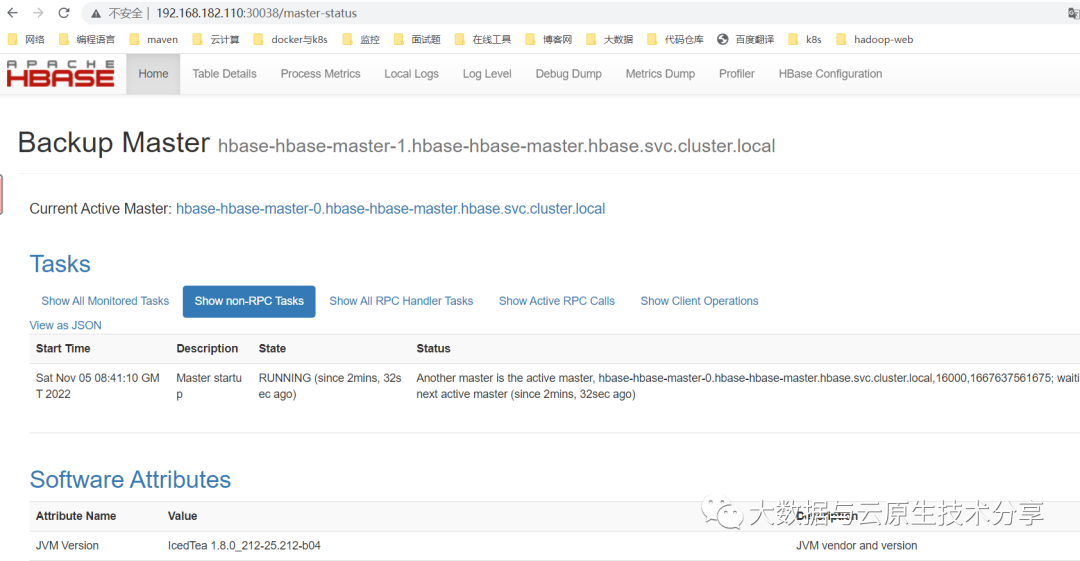
kubectl delete pod hbase-hbase-master-0 -n hbase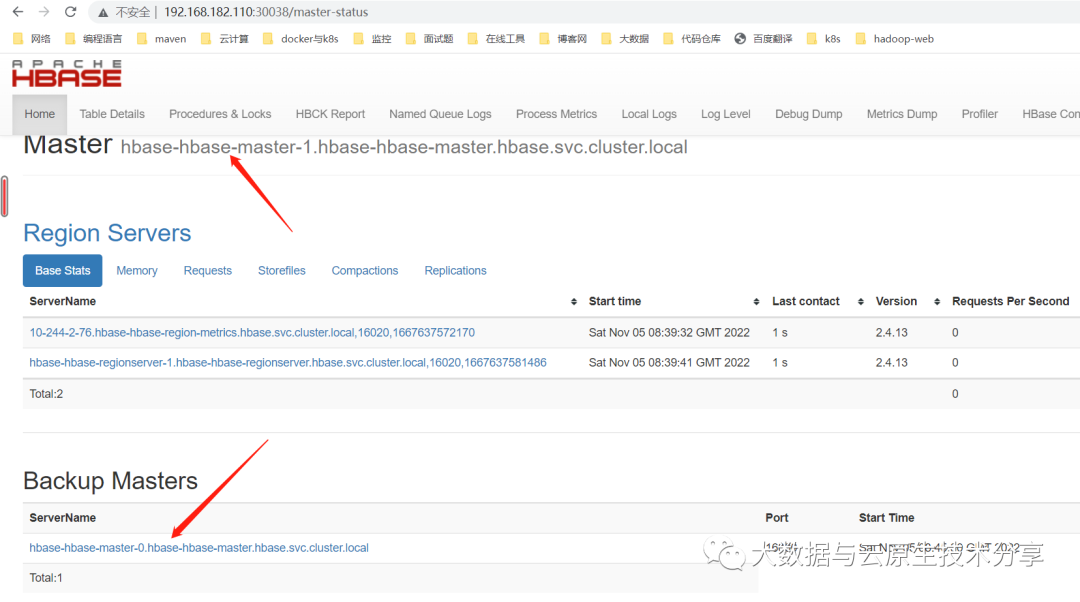
helm uninstall hbase -n hbase
# delete ns
kubectl delete ns hbase --forcehelm repo add hbase https://itboy87.github.io/bigdata-charts/
# hbase version 2.4.13
helm pull hbase/hbase --version 0.1.7FROM myharbor.com/bigdata/hbase-base:2.4.13.2
RUN mkdir -p /opt/apache
ENV HADOOP_VERSION=3.3.2
ADD hadoop-${HADOOP_VERSION}.tar.gz /opt/apache
ENV HADOOP_HOME=/opt/apache/hadoop
RUN ln -s /opt/apache/hadoop-${HADOOP_VERSION} $HADOOP_HOME
ENV HADOOP_CONF_DIR=${HADOOP_HOME}/et/hadoop
ENV PATH=${HADOOP_HOME}/bin:$PATHdocker build -t myharbor.com/bigdata/hbase-hdfs-ha:2.4.13.2 . --no-cache
### 参数解释
# -t:指定镜像名称
# . :当前目录Dockerfile
# -f:指定Dockerfile路径
# --no-cache:不缓存
# 推送到harbor
docker push myharbor.com/bigdata/hbase-hdfs-ha:2.4.13.2image:
repository: myharbor.com/bigdata/hbase-hdfs-ha
tag: 2.4.13.2
pullPolicy: IfNotPresent
...
conf:
hadoopUserName: admin
hbaseSite:
hbase.rootdir: "hdfs://myhdfs/hbase"
hbase.zookeeper.quorum: "zookeeper.zookeeper:2181"if [ {{ .Values.hadoop.enabled }} = true ];then
NAMENODE_URL={{- printf "http://%s-hadoop-hdfs-nn:9870/index.html" .Release.Name }}
else
NAMENODE_URL=http://hadoop-ha-hadoop-hdfs-nn-1.hadoop-ha:9870:9870/index.html
fi# 先检查语法
helm lint ./hbase-hdfs-ha
# 开始安装
helm install hbase-hdfs-ha ./hbase-hdfs-ha -n hbase-hdfs-ha --create-namespaceNAME: hbase-hdfs-ha
LAST DEPLOYED: Sat Nov 5 17:23:20 2022
NAMESPACE: hbase-hdfs-ha
STATUS: deployed
REVISION: 1
TEST SUITE: None
NOTES:
1. You can get an HBASE Shell by running this command:
kubectl exec -n hbase-hdfs-ha -it hbase-hdfs-ha-hbase-master-0 -- hbase shell
2. Inspect hbase master service ports with:
kubectl exec -n hbase-hdfs-ha describe service hbase-hdfs-ha-hbase-master
3. Create a port-forward to the hbase manager UI:
kubectl port-forward -n hbase-hdfs-ha svc/hbase-hdfs-ha-hbase-master 16010:16010
Then open the ui in your browser:
open http://localhost:16010
4. Create a port-forward to the hbase thrift manager UI:
kubectl port-forward -n hbase-hdfs-ha svc/hbase-hdfs-ha-hbase-master 9095:9095
Then open the ui in your browser:
open http://localhost:9095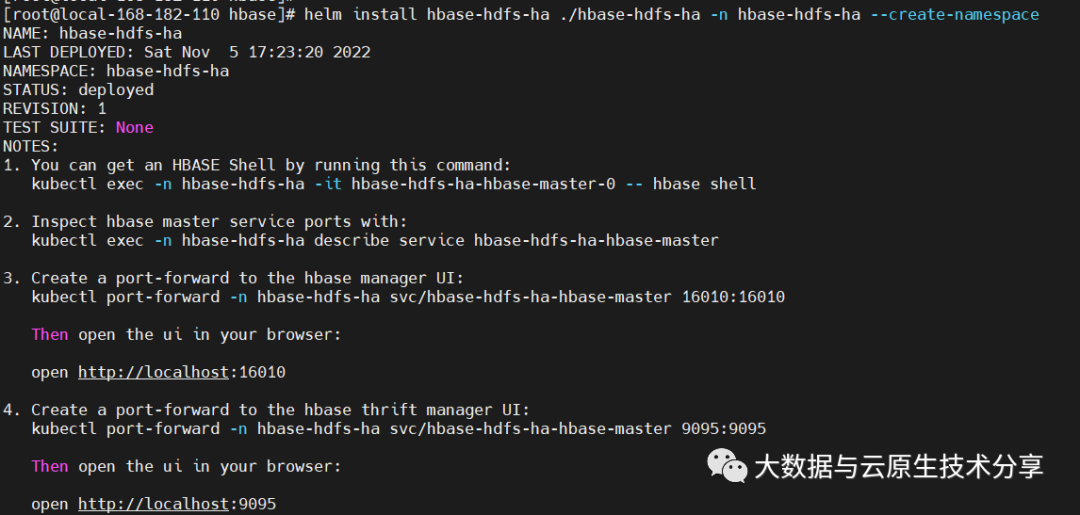 HDFS
HDFS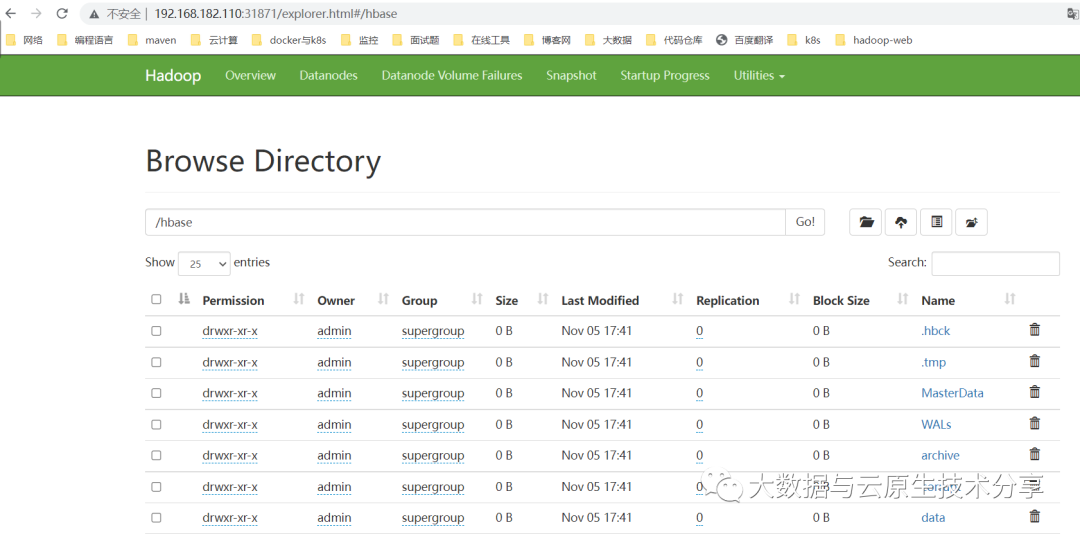 查看
查看kubectl get pods,svc -n hbase-hdfs-ha
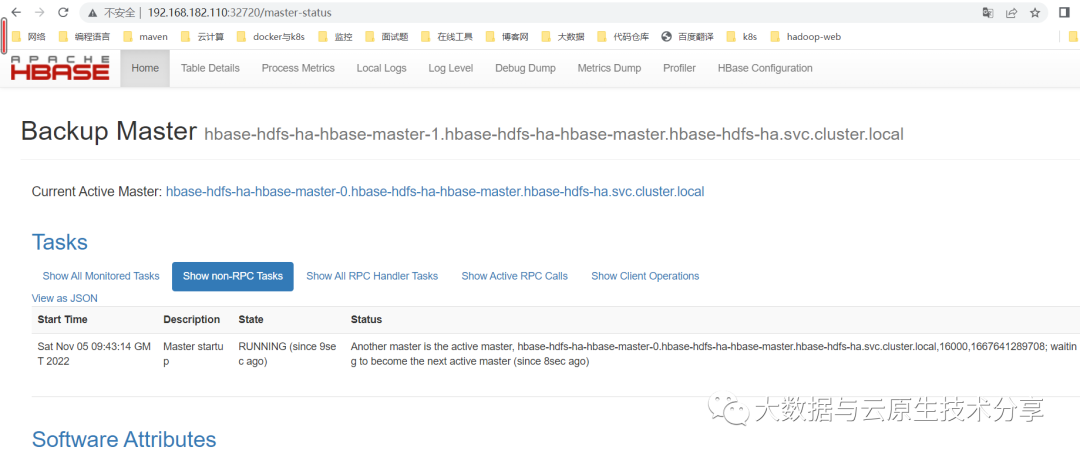
kubectl delete pod hbase-hbase-master-0 -n hbase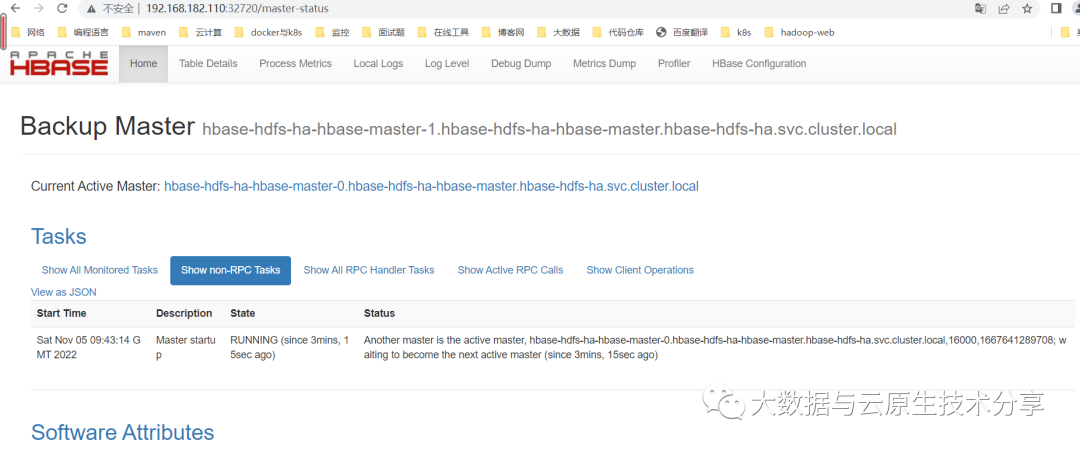
helm uninstall hbase-hdfs-ha -n hbase-hdfs-ha
# delete ns
kubectl delete ns hbase-hdfs-ha --force我是Google云的新手,我正在尝试对其进行首次部署。我的第一个部署是RubyonRails项目。我基本上是在关注thisguideinthegoogleclouddocumentation.唯一的区别是我使用的是我自己的项目,而不是他们提供的“helloworld”项目。这是我的app.yaml文件runtime:customvm:trueentrypoint:bundleexecrackup-p8080-Eproductionconfig.ruresources:cpu:0.5memory_gb:1.3disk_size_gb:10当我转到我的项目目录并运行gcloudprevie
无论您是想搭建桌面端、WEB端或者移动端APP应用,HOOPSPlatform组件都可以为您提供弹性的3D集成架构,同时,由工业领域3D技术专家组成的HOOPS技术团队也能为您提供技术支持服务。如果您的客户期望有一种在多个平台(桌面/WEB/APP,而且某些客户端是“瘦”客户端)快速、方便地将数据接入到3D应用系统的解决方案,并且当访问数据时,在各个平台上的性能和用户体验保持一致,HOOPSPlatform将帮助您完成。利用HOOPSPlatform,您可以开发在任何环境下的3D基础应用架构。HOOPSPlatform可以帮您打造3D创新型产品,HOOPSSDK包含的技术有:快速且准确的CAD
我可以在Azure网站上部署RubyonRails吗? 最佳答案 还没有。目前仅支持.NET和PHP。 关于ruby-on-rails-RubyonRails可以部署在Azure网站上吗?,我们在StackOverflow上找到一个类似的问题: https://stackoverflow.com/questions/12964010/
前置步骤我们都操作完了,这篇开始介绍jenkins的集成。话不多说,看操作1、登录进入jenkins后会让你选择安装插件,选择第一个默认的就行。安装完成后设置账号密码,重新登录。2、配置JDK和Git都需要执行路径,所以需要先把执行路径找到,先进入服务器的docker容器,2.1JDK的路径root@69eef9ee86cf:/usr/bin#echo$JAVA_HOME/usr/local/openjdk-82.2Git的路径root@69eef9ee86cf:/#whichgit/usr/bin/git3、先配置JDK和Git。点击:ManageJenkins>>GlobalToolCon
深度学习部署:Windows安装pycocotools报错解决方法1.pycocotools库的简介2.pycocotools安装的坑3.解决办法更多Ai资讯:公主号AiCharm本系列是作者在跑一些深度学习实例时,遇到的各种各样的问题及解决办法,希望能够帮助到大家。ERROR:Commanderroredoutwithexitstatus1:'D:\Anaconda3\python.exe'-u-c'importsys,setuptools,tokenize;sys.argv[0]='"'"'C:\\Users\\46653\\AppData\\Local\\Temp\\pip-instal
@作者:SYFStrive @博客首页:HomePage📜:微信小程序📌:个人社区(欢迎大佬们加入)👉:社区链接🔗📌:觉得文章不错可以点点关注👉:专栏连接🔗💃:感谢支持,学累了可以先看小段由小胖给大家带来的街舞👉微信小程序(🔥)目录自定义组件-behaviors 1、什么是behaviors 2、behaviors的工作方式 3、创建behavior 4、导入并使用behavior 5、behavior中所有可用的节点 6、同名字段的覆盖和组合规则总结最后自定义组件-behaviors 1、什么是behaviorsbehaviors是小程序中,用于实现
我有一个使用SeleniumWebdriver和Nokogiri的Ruby应用程序。我想选择一个类,然后对于那个类对应的每个div,我想根据div的内容执行一个Action。例如,我正在解析以下页面:https://www.google.com/webhp?sourceid=chrome-instant&ion=1&espv=2&ie=UTF-8#q=puppies这是一个搜索结果页面,我正在寻找描述中包含“Adoption”一词的第一个结果。因此机器人应该寻找带有className:"result"的div,对于每个检查它的.descriptiondiv是否包含单词“adoption
我正在我的Rails项目中安装Grape以构建RESTfulAPI。现在一些端点的操作需要身份验证,而另一些则不需要身份验证。例如,我有users端点,看起来像这样:moduleBackendmoduleV1classUsers现在如您所见,除了password/forget之外的所有操作都需要用户登录/验证。创建一个新的端点也没有意义,比如passwords并且只是删除password/forget从逻辑上讲,这个端点应该与用户资源。问题是Grapebefore过滤器没有像except,only这样的选项,我可以在其中说对某些操作应用过滤器。您通常如何干净利落地处理这种情况?
在我做的一些网络开发中,我有多个操作开始,比如对外部API的GET请求,我希望它们同时开始,因为一个不依赖另一个的结果。我希望事情能够在后台运行。我找到了concurrent-rubylibrary这似乎运作良好。通过将其混合到您创建的类中,该类的方法具有在后台线程上运行的异步版本。这导致我编写如下代码,其中FirstAsyncWorker和SecondAsyncWorker是我编写的类,我在其中混合了Concurrent::Async模块,并编写了一个名为“work”的方法来发送HTTP请求:defindexop1_result=FirstAsyncWorker.new.async.
Ocra无法处理需要“tk”的应用程序require'tk'puts'nope'用奥克拉http://github.com/larsch/ocra不起作用(如链接中的一个问题所述)问题:https://github.com/larsch/ocra/issues/29(Ocra是1.9的"new"rubyscript2exe,本质上它用于将rb脚本部署为可执行文件)唯一的问题似乎是缺少tcl的DLL文件我不认为这是一个问题据我所知,问题是缺少tk的DLL文件如果它们是已知的,则可以在执行ocra时将它们包括在内有没有办法知道tk工作所需的DLL依赖项? 最佳答
