-首先看下效果图
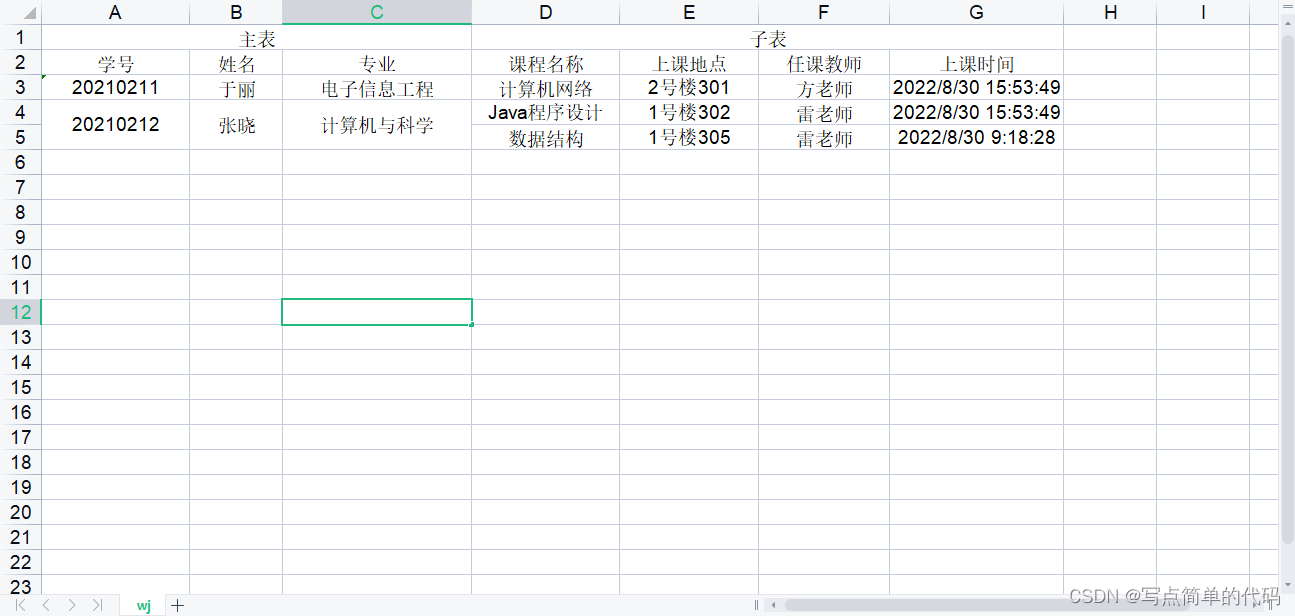
左边为主表数据,右边为子表数据,可以根据自己的需求进行修改,下面来看下代码。
		<!--poi-->
		<dependency>
			<groupId>org.apache.poi</groupId>
			<artifactId>poi-ooxml</artifactId>
			<version>4.1.0</version>
		</dependency>
先构造数据,根据表格,主子表是有相关联的,所以将主子表数据存入一个map集合中,主表的值作为map的key,value对应子表的list集合,可参考下面代码:
        String[] masterHead = {"学号","姓名","专业"};
        String[] childHead = {"课程名称","上课地点","任课教师","上课时间"};
        List<String[]> childList = new ArrayList<>();
        childList.add(new String[]{"Java程序设计","1号楼302","雷老师","2022/8/30 15:53:49"});
        childList.add(new String[]{"数据结构","1号楼305","雷老师","2022/8/30 9:18:28"});
        List<String[]> childList1 = new ArrayList<>();
        childList1.add(new String[]{"计算机网络","2号楼301","方老师","2022/8/30 15:53:49"});
        List<Map<String,List<String[]>>> masterList = new ArrayList<>();
        Map<String,List<String[]>> map = new HashMap();
        map.put("20210211-张晓-计算机与科学",childList);
        map.put("20210212-于丽-电子信息工程",childList1);
        masterList.add(map);
然后创建一个Excel工作薄对象
 		//创建Excel工作薄对象
        HSSFWorkbook workbook=new HSSFWorkbook();
        //创建Excel工作表对象
        HSSFSheet sheet = workbook.createSheet("wj");
        //设置单元格居中
        HSSFCellStyle cellStyle = workbook.createCellStyle();
        cellStyle.setAlignment(HorizontalAlignment.CENTER);
然后根据需求一行行来给工作表格填充数据,首先是复杂表头,第一行是主表和子表,主表和子表的是合并列,根据主子表头的长度来确定,合并的列数;第二行是表头,根据主子表头的数组来填充。
		//创建行的单元格,从0开始
        HSSFRow row = sheet.createRow(0);

        //创建统计单元格
        HSSFCell masterCell=row.createCell(0);
        //赋值
        masterCell.setCellValue("主表");
        masterCell.setCellStyle(cellStyle);
        //合并列
        CellRangeAddress region=new CellRangeAddress(0, 0, 0, masterHead.length-1);
        sheet.addMergedRegion(region);

        //创建详情单元格  从统计单元格的后一格开始创建
        HSSFCell childCell = row.createCell(masterHead.length);
        //赋值
        childCell.setCellValue("子表");
        childCell.setCellStyle(cellStyle);
        //合并列
        region=new CellRangeAddress(0, 0, masterHead.length, masterHead.length+childHead.length-1);
        sheet.addMergedRegion(region);

        //表头 从1开始
        HSSFRow titleRow = sheet.createRow(1);
        //主表头
        for (int i = 0; i < masterHead.length ; i++) {
            HSSFCell msCell = titleRow.createCell(i);
            msCell.setCellStyle(cellStyle);
            msCell.setCellValue(masterHead[i]);
        }
        //子表头
        for (int i = 0; i < childHead.length; i++) {
            HSSFCell chcell = titleRow.createCell(masterHead.length+i);
            chcell.setCellStyle(cellStyle);
            chcell.setCellValue(childHead[i]);
        }
这样就将第一行和第二行的表头填充上了,然后再填充对应的数据,先填充的是主表,主表的值我是用“-”来进行分隔的,所以用字符串进行切割成数组,然后拿到主表数据和对应的子表数据,工作簿的前2行都是表头,所以填充数据是从第三行开始,所以行下标为2,然后从第三行开始创建行,填充主表的数据,填充时要判断下子表的list的大小,大于一才需要进行合并,填充完主表后再填充子表,子表不需要合并,就一行行填充,代码如下:
        //填充数据
        int lastRowIndex = 2; //记录最后行位置
        for (Map<String,List<String[]>> m : masterList){
            for (String key : m.keySet()){
                String[] ms = key.split("-");
                List<String[]> chlist = m.get(key);
                HSSFRow valueRow = sheet.createRow(lastRowIndex);
                for (int i = 0; i < ms.length ; i++) {
                    HSSFCell mscell = valueRow.createCell(i);
                    mscell.setCellStyle(cellStyle);
                    mscell.setCellValue(ms[i]);
                    if (chlist.size()>1){ //子表数量大于1才进行 行合并
                        region=new CellRangeAddress(lastRowIndex, lastRowIndex+chlist.size()-1, i, i);
                        sheet.addMergedRegion(region);
                    }
                }
                for (int i = 0; i < chlist.size(); i++) {
                    String[] chstrs = chlist.get(i);
                    HSSFRow chRow;
                    if (i == 0){ //避免重复创建 覆盖主表数据
                        chRow = valueRow;
                    }else {
                        chRow  = sheet.createRow(lastRowIndex);
                    }
                    lastRowIndex++;
                    for (int j = 0; j < chstrs.length; j++) {
                        HSSFCell chcell = chRow.createCell(ms.length+j);
                        chcell.setCellStyle(cellStyle);
                        chcell.setCellValue(chstrs[j]);
                    }
                }
            }
        }
其中最重要的一句代码就是:
new CellRangeAddress(int firstRow, int lastRow, int firstCol, int lastCol)
这句代码就是合并单元格,参数1:起始行 参数2:终止行 参数3:起始列 参数4:终止列
import org.apache.poi.hssf.usermodel.*;
import org.apache.poi.ss.usermodel.HorizontalAlignment;
import org.apache.poi.ss.util.CellRangeAddress;

import javax.servlet.http.HttpServletResponse;
import java.io.OutputStream;
import java.net.URLEncoder;
import java.util.*;

/**
 * @author huao
 * @Date 2022/8/31 13:50
 * @description:
 */
public class PoiExcel {

    public static void excelport(HttpServletResponse response) throws Exception {

        //数据来源 通过参数传入
        String[] masterHead = {"学号","姓名","专业"};
        String[] childHead = {"课程名称","上课地点","任课教师","上课时间"};
        List<String[]> childList = new ArrayList<>();
        childList.add(new String[]{"Java程序设计","1号楼302","雷老师","2022/8/30 15:53:49"});
        childList.add(new String[]{"数据结构","1号楼305","雷老师","2022/8/30 9:18:28"});
        List<String[]> childList1 = new ArrayList<>();
        childList1.add(new String[]{"计算机网络","2号楼301","方老师","2022/8/30 15:53:49"});
        List<Map<String,List<String[]>>> masterList = new ArrayList<>();
        Map<String,List<String[]>> map = new HashMap();
        map.put("20210211-张晓-计算机与科学",childList);
        map.put("20210212-于丽-电子信息工程",childList1);
        masterList.add(map);

        //创建Excel工作薄对象
        HSSFWorkbook workbook=new HSSFWorkbook();
        //创建Excel工作表对象
        HSSFSheet sheet = workbook.createSheet("wj");
        //设置单元格居中
        HSSFCellStyle cellStyle = workbook.createCellStyle();
        cellStyle.setAlignment(HorizontalAlignment.CENTER);

        //创建行的单元格,从0开始
        HSSFRow row = sheet.createRow(0);

        //创建统计单元格
        HSSFCell masterCell=row.createCell(0);
        //赋值
        masterCell.setCellValue("主表");
        masterCell.setCellStyle(cellStyle);
        //合并列
        CellRangeAddress region=new CellRangeAddress(0, 0, 0, masterHead.length-1);
        sheet.addMergedRegion(region);

        //创建详情单元格  从统计单元格的后一格开始创建
        HSSFCell childCell = row.createCell(masterHead.length);
        //赋值
        childCell.setCellValue("子表");
        childCell.setCellStyle(cellStyle);
        //合并列
        region=new CellRangeAddress(0, 0, masterHead.length, masterHead.length+childHead.length-1);
        sheet.addMergedRegion(region);

        //表头 从1开始
        HSSFRow titleRow = sheet.createRow(1);
        //主表头
        for (int i = 0; i < masterHead.length ; i++) {
            HSSFCell msCell = titleRow.createCell(i);
            msCell.setCellStyle(cellStyle);
            msCell.setCellValue(masterHead[i]);
        }
        //子表头
        for (int i = 0; i < childHead.length; i++) {
            HSSFCell chcell = titleRow.createCell(masterHead.length+i);
            chcell.setCellStyle(cellStyle);
            chcell.setCellValue(childHead[i]);
        }

        //填充数据
        int lastRowIndex = 2; //记录最后行位置
        for (Map<String,List<String[]>> m : masterList){
            for (String key : m.keySet()){
                String[] ms = key.split("-");
                List<String[]> chlist = m.get(key);
                HSSFRow valueRow = sheet.createRow(lastRowIndex);
                for (int i = 0; i < ms.length ; i++) {
                    HSSFCell mscell = valueRow.createCell(i);
                    mscell.setCellStyle(cellStyle);
                    mscell.setCellValue(ms[i]);
                    if (chlist.size()>1){ //子表数量大于1才进行 行合并
                        region=new CellRangeAddress(lastRowIndex, lastRowIndex+chlist.size()-1, i, i);
                        sheet.addMergedRegion(region);
                    }
                }
                for (int i = 0; i < chlist.size(); i++) {
                    String[] chstrs = chlist.get(i);
                    HSSFRow chRow;
                    if (i == 0){ //避免重复创建 覆盖主表数据
                        chRow = valueRow;
                    }else {
                        chRow  = sheet.createRow(lastRowIndex);
                    }
                    lastRowIndex++;
                    for (int j = 0; j < chstrs.length; j++) {
                        HSSFCell chcell = chRow.createCell(ms.length+j);
                        chcell.setCellStyle(cellStyle);
                        chcell.setCellValue(chstrs[j]);
                    }
                }
            }
        }

        String fileName = URLEncoder.encode("POIExcel下载测试","UTF-8");
        response.setContentType("application/octet-stream;charset=UTF-8");
        response.setHeader("Content-Disposition","attachment;filename="+fileName+".xls");
        OutputStream os = response.getOutputStream();
        workbook.write(os);
        os.flush();
        os.close();
        workbook.close();
    }
}
然后controller层的代码:
import com.example.demo.utils.PoiExcel;
import org.springframework.web.bind.annotation.RequestMapping;
import org.springframework.web.bind.annotation.RestController;

import javax.servlet.http.HttpServletResponse;

/**
 * @author huao
 * @Date 2022/8/31 13:56
 * @description:
 */
@RestController
@RequestMapping("/demo")
public class DemoWeb {

    @RequestMapping("/download")
    public void download(HttpServletResponse response) throws Exception {
        PoiExcel.excelport(response);
    }
}
导入依赖后代码复制过去可直接使用。
写作原因:看着网上很多动态合并单元格的例子,但是都看不懂,可能是我太菜了,所以自己撸了一个,这个代码量算是很少了吧,如果有什么不清楚的欢迎评论区留言或者私信我。
我真的很习惯使用Ruby编写以下代码:my_hash={}my_hash['test']=1Java中对应的数据结构是什么? 最佳答案 HashMapmap=newHashMap();map.put("test",1);我假设? 关于java-等价于Java中的RubyHash,我们在StackOverflow上找到一个类似的问题: https://stackoverflow.com/questions/22737685/
我有一个这样的哈希数组:[{:foo=>2,:date=>Sat,01Sep2014},{:foo2=>2,:date=>Sat,02Sep2014},{:foo3=>3,:date=>Sat,01Sep2014},{:foo4=>4,:date=>Sat,03Sep2014},{:foo5=>5,:date=>Sat,02Sep2014}]如果:date相同,我想合并哈希值。我对上面数组的期望是:[{:foo=>2,:foo3=>3,:date=>Sat,01Sep2014},{:foo2=>2,:foo5=>5:date=>Sat,02Sep2014},{:foo4=>4,:dat
我正在尝试使用boilerpipe来自JRuby。我看过guide从JRuby调用Java,并成功地将它与另一个Java包一起使用,但无法弄清楚为什么同样的东西不能用于boilerpipe。我正在尝试基本上从JRuby中执行与此Java等效的操作:URLurl=newURL("http://www.example.com/some-location/index.html");Stringtext=ArticleExtractor.INSTANCE.getText(url);在JRuby中试过这个:require'java'url=java.net.URL.new("http://www
我只想对我一直在思考的这个问题有其他意见,例如我有classuser_controller和classuserclassUserattr_accessor:name,:usernameendclassUserController//dosomethingaboutanythingaboutusersend问题是我的User类中是否应该有逻辑user=User.newuser.do_something(user1)oritshouldbeuser_controller=UserController.newuser_controller.do_something(user1,user2)我
我正在尝试用Prawn生成PDF。在我的PDF模板中,我有带单元格的表格。在其中一个单元格中,我有一个电子邮件地址:cell_email=pdf.make_cell(:content=>booking.user_email,:border_width=>0)我想让电子邮件链接到“mailto”链接。我知道我可以这样链接:pdf.formatted_text([{:text=>booking.user_email,:link=>"mailto:#{booking.user_email}"}])但是将这两行组合起来(将格式化文本作为内容)不起作用:cell_email=pdf.make_c
什么是ruby的rack或python的Java的wsgi?还有一个路由库。 最佳答案 来自Python标准PEP333:Bycontrast,althoughJavahasjustasmanywebapplicationframeworksavailable,Java's"servlet"APImakesitpossibleforapplicationswrittenwithanyJavawebapplicationframeworktoruninanywebserverthatsupportstheservletAPI.ht
导读:随着叮咚买菜业务的发展,不同的业务场景对数据分析提出了不同的需求,他们希望引入一款实时OLAP数据库,构建一个灵活的多维实时查询和分析的平台,统一数据的接入和查询方案,解决各业务线对数据高效实时查询和精细化运营的需求。经过调研选型,最终引入ApacheDoris作为最终的OLAP分析引擎,Doris作为核心的OLAP引擎支持复杂地分析操作、提供多维的数据视图,在叮咚买菜数十个业务场景中广泛应用。作者|叮咚买菜资深数据工程师韩青叮咚买菜创立于2017年5月,是一家专注美好食物的创业公司。叮咚买菜专注吃的事业,为满足更多人“想吃什么”而努力,通过美好食材的供应、美好滋味的开发以及美食品牌的孵
这篇文章是继上一篇文章“Observability:从零开始创建Java微服务并监控它(一)”的续篇。在上一篇文章中,我们讲述了如何创建一个Javaweb应用,并使用Filebeat来收集应用所生成的日志。在今天的文章中,我来详述如何收集应用的指标,使用APM来监控应用并监督web服务的在线情况。源码可以在地址 https://github.com/liu-xiao-guo/java_observability 进行下载。摄入指标指标被视为可以随时更改的时间点值。当前请求的数量可以改变任何毫秒。你可能有1000个请求的峰值,然后一切都回到一个请求。这也意味着这些指标可能不准确,你还想提取最小/
HashMap中为什么引入红黑树,而不是AVL树呢1.概述开始学习这个知识点之前我们需要知道,在JDK1.8以及之前,针对HashMap有什么不同。JDK1.7的时候,HashMap的底层实现是数组+链表JDK1.8的时候,HashMap的底层实现是数组+链表+红黑树我们要思考一个问题,为什么要从链表转为红黑树呢。首先先让我们了解下链表有什么不好???2.链表上述的截图其实就是链表的结构,我们来看下链表的增删改查的时间复杂度增:因为链表不是线性结构,所以每次添加的时候,只需要移动一个节点,所以可以理解为复杂度是N(1)删:算法时间复杂度跟增保持一致查:既然是非线性结构,所以查询某一个节点的时候
C#实现简易绘图工具一.引言实验目的:通过制作窗体应用程序(C#画图软件),熟悉基本的窗体设计过程以及控件设计,事件处理等,熟悉使用C#的winform窗体进行绘图的基本步骤,对于面向对象编程有更加深刻的体会.Tutorial任务设计一个具有基本功能的画图软件**·包括简单的新建文件,保存,重新绘图等功能**·实现一些基本图形的绘制,包括铅笔和基本形状等,学习橡皮工具的创建**·设计一个合理舒适的UI界面**注明:你可能需要先了解一些关于winform窗体应用程序绘图的基本知识,以及关于GDI+类和结构的知识二.实验环境Windows系统下的visualstudio2017C#窗体应用程序三.
