目录
visionpro中可以结合C#脚本进行检测,这可以更简洁全面的去实现复杂的检测功能,当然结果C#软件二次开发更加全面,不过有时外面还是直接在工具块里面添加脚本更方便些。
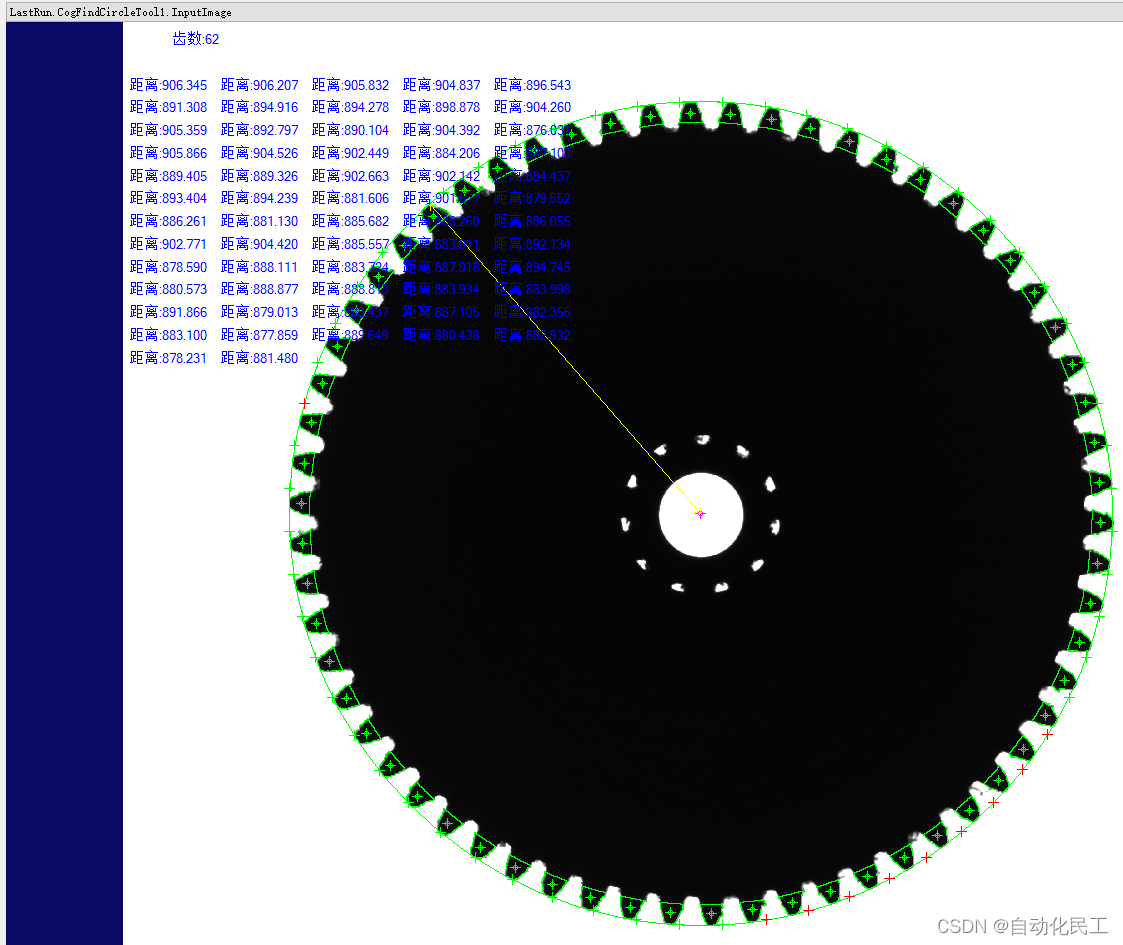
检测齿数及齿端到中心的距离。

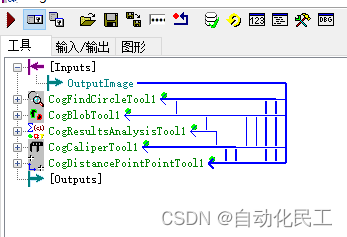
1.CogFindCircleTool是一个找圆工具,主要是找到齿轮外径及圆心。
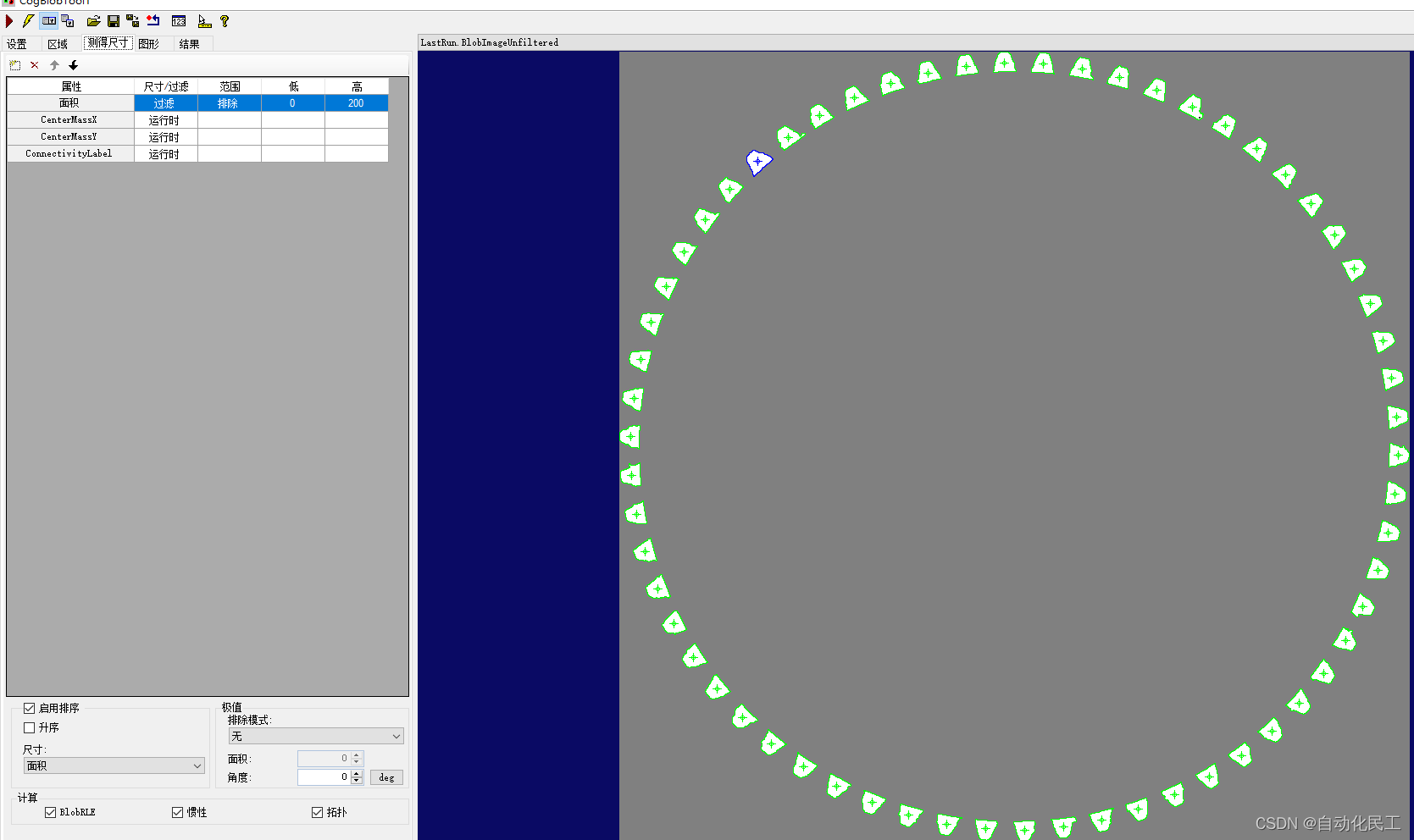
2.CogBlobTool是一般二值化分析工具,主要是找到每个齿的位置,角度。
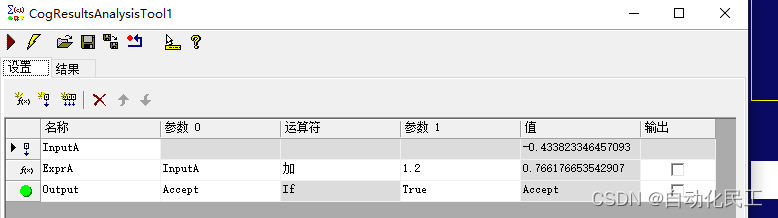
3.CogResultsAnalysisTool,结果处理工具,主要是给卡尺工具算出角度。
4.CogCaliperTool,卡尺工具,用于找齿顶边。
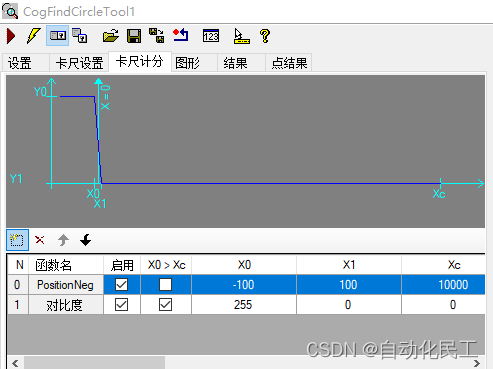
5.CogDistancePointPointTool,测量点到点工具,用于测量距离。在找圆时,卡尺可以大一点,然后卡尺计分添加一个PositionNeg的算法,找最外面位置,否则圆会小一点。
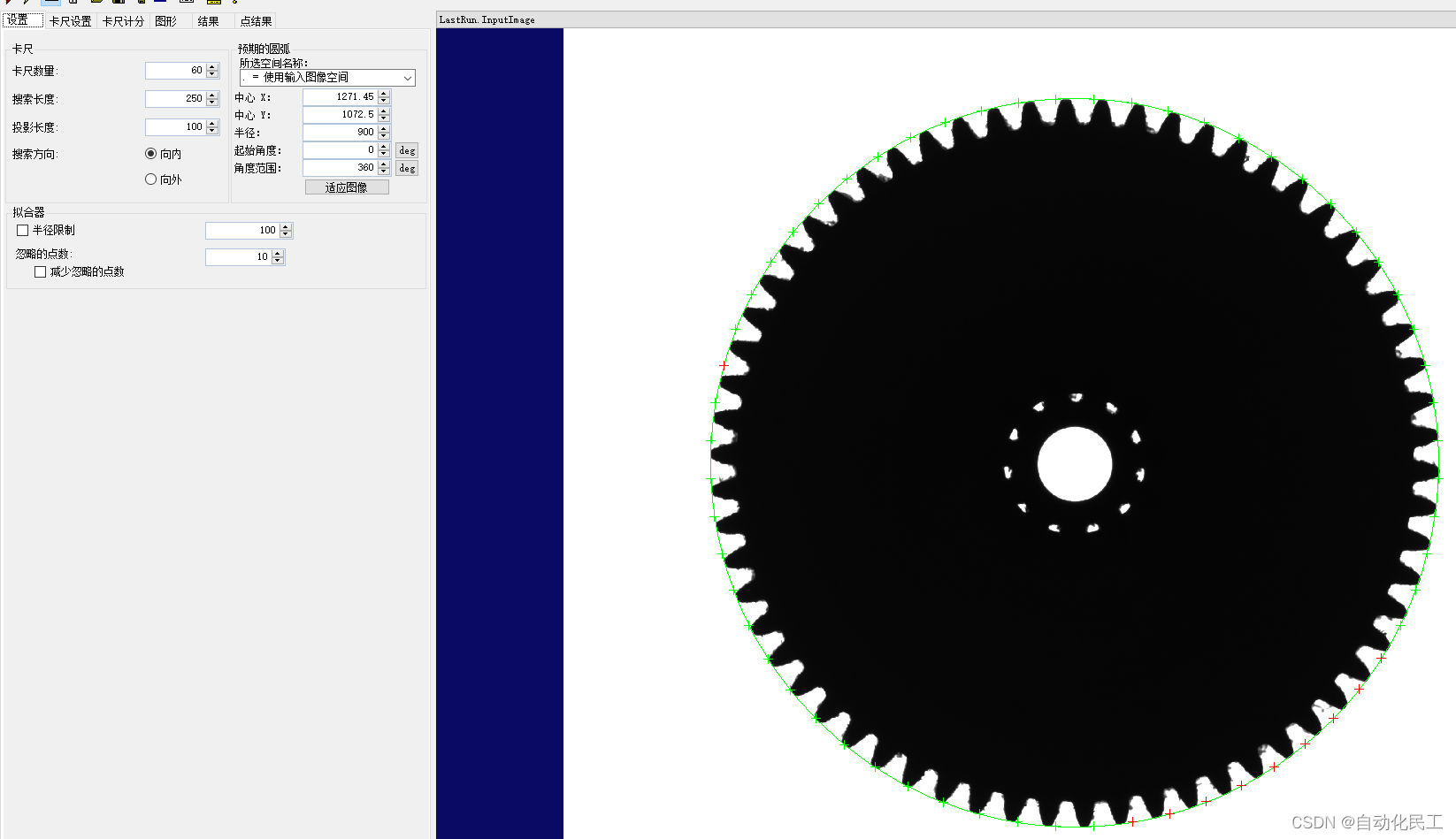
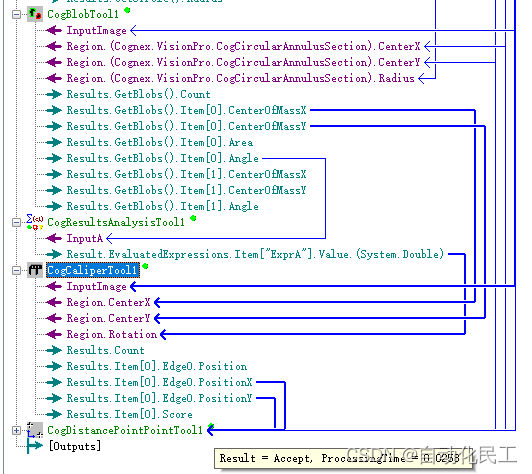
在找圆工具中可以得到圆心,半径,把他们输出出来给到bolb工具的区域对应参数。
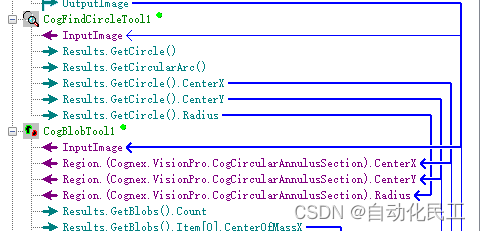
然后再修改工具里面的径向缩放,角度范围参数。

然后,通过面积管控排除一些毛刺,去除影响。
结果处理blob得到的对应区域的角度。使卡尺角度摆正。
通过blob给卡尺位置角度。
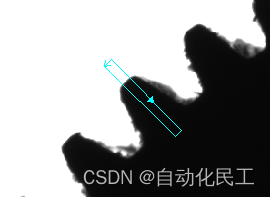
6.测量距离测量圆心到齿顶距离
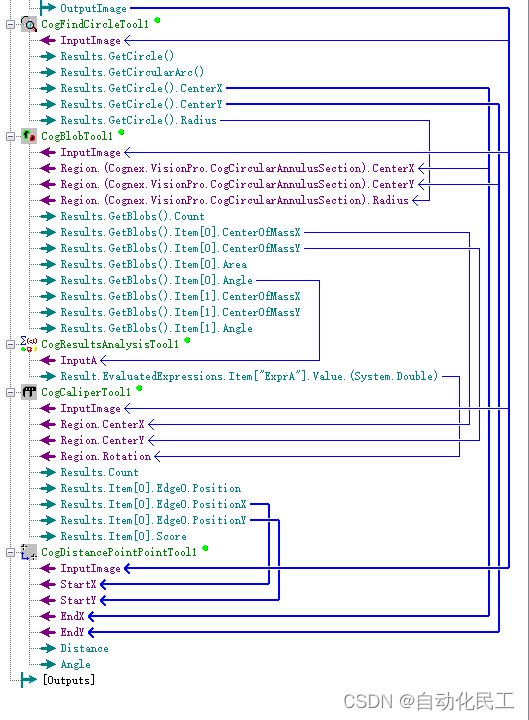

脚本采用复杂脚本,简单脚本功能限制。
#region namespace imports
using System;
using System.Collections;
using System.Drawing;
using System.IO;
using System.Windows.Forms;
using Cognex.VisionPro;
using Cognex.VisionPro.ToolBlock;
using Cognex.VisionPro3D;
using Cognex.VisionPro.Caliper;
using Cognex.VisionPro.Blob;
using Cognex.VisionPro.ResultsAnalysis;
using Cognex.VisionPro.Dimensioning;
#endregion

public class CogToolBlockAdvancedScript : CogToolBlockAdvancedScriptBase
{
  #region Private Member Variables
  //声明
  private Cognex.VisionPro.ToolBlock.CogToolBlock mToolBlock;
  private Cognex.VisionPro.Blob.CogBlobTool mCogBlob;
  private Cognex.VisionPro.Caliper.CogCaliperTool mCogCaliper;
  private Cognex.VisionPro.Caliper.CogFindCircleTool mCogFindCircle;
  private CogGraphicCollection labels;
  private CogGraphicLabel myLabel;
  #endregion

  /// <summary>
  /// Called when the parent tool is run.
  /// Add code here to customize or replace the normal run behavior.
  /// </summary>
  /// <param name="message">Sets the Message in the tool's RunStatus.</param>
  /// <param name="result">Sets the Result in the tool's RunStatus</param>
  /// <returns>True if the tool should run normally,
  ///          False if GroupRun customizes run behavior</returns>
  public override bool GroupRun(ref string message, ref CogToolResultConstants result)
  {
    // To let the execution stop in this script when a debugger is attached, uncomment the following lines.
    // #if DEBUG
    // if (System.Diagnostics.Debugger.IsAttached) System.Diagnostics.Debugger.Break();
    // #endif


    // Run each tool using the RunTool function
    foreach(ICogTool tool in mToolBlock.Tools)
      mToolBlock.RunTool(tool, ref message, ref result);
    //初始化
    mCogBlob = mToolBlock.Tools["CogBlobTool1"] as CogBlobTool;
    mCogCaliper = mToolBlock.Tools["CogCaliperTool1"] as CogCaliperTool;
    mCogFindCircle = mToolBlock.Tools["CogFindCircleTool1"] as CogFindCircleTool;
    mCogFindCircle.Run();
    mCogBlob.Run();
    int x = 0;
    int y = 0;
    //循环
    for (int i = 0; i < mCogBlob.Results.GetBlobs().Count; i++)
    {
      //卡尺
      mCogCaliper.Region.CenterX = mCogBlob.Results.GetBlobs()[i].CenterOfMassX;
      mCogCaliper.Region.CenterY = mCogBlob.Results.GetBlobs()[i].CenterOfMassY;
      mCogCaliper.Region.Rotation = mCogBlob.Results.GetBlobs()[i].Angle+1.2;
      mCogCaliper.Run();
      //测量
      CogDistancePointPointTool mCogDistancePointPoint = new CogDistancePointPointTool();
      mCogDistancePointPoint.InputImage = mToolBlock.Inputs[0].Value as CogImage8Grey;
      mCogDistancePointPoint.StartX = mCogCaliper.Results[0].Edge0.PositionX;
      mCogDistancePointPoint.StartY = mCogCaliper.Results[0].Edge0.PositionY;
      mCogDistancePointPoint.EndX = mCogFindCircle.Results.GetCircle().CenterX;
      mCogDistancePointPoint.EndY = mCogFindCircle.Results.GetCircle().CenterY;
      mCogDistancePointPoint.Run();
      //显示保存
      myLabel = new CogGraphicLabel();
      x = (i % 5) * 200+100;
      y = (i / 5) * 50 + 150;
      myLabel.SetXYText(x, y, "距离:" + mCogDistancePointPoint.Distance.ToString("f3"));
      myLabel.SelectedSpaceName = "@";
      myLabel.Font = new Font("微软黑体", 10);
      myLabel.Color = Cognex.VisionPro.CogColorConstants.Blue;
      labels.Add(myLabel);
    }

    return true;
  }

  #region When the Current Run Record is Created
  /// <summary>
  /// Called when the current record may have changed and is being reconstructed
  /// </summary>
  /// <param name="currentRecord">
  /// The new currentRecord is available to be initialized or customized.</param>
  public override void ModifyCurrentRunRecord(Cognex.VisionPro.ICogRecord currentRecord)
  {
  }
  #endregion

  #region When the Last Run Record is Created
  /// <summary>
  /// Called when the last run record may have changed and is being reconstructed
  /// </summary>
  /// <param name="lastRecord">
  /// The new last run record is available to be initialized or customized.</param>
  public override void ModifyLastRunRecord(Cognex.VisionPro.ICogRecord lastRecord)
  {
    //显示
    foreach (ICogGraphic graphic in labels)
    {
      mToolBlock.AddGraphicToRunRecord(graphic, lastRecord, "CogFindCircleTool1.InputImage", "script");
    }
    labels.Clear();
    CogGraphicLabel label = new CogGraphicLabel();
    label.SetXYText(160, 50, "齿数:" + mCogBlob.Results.GetBlobs().Count.ToString());
    label.SelectedSpaceName = "@";
    label.Font = new Font("微软黑体", 10);
    label.Color = Cognex.VisionPro.CogColorConstants.Blue;
    mToolBlock.AddGraphicToRunRecord(label, lastRecord, "CogFindCircleTool1.InputImage", "script");

  }
  #endregion

  #region When the Script is Initialized
  /// <summary>
  /// Perform any initialization required by your script here
  /// </summary>
  /// <param name="host">The host tool</param>
  public override void Initialize(Cognex.VisionPro.ToolGroup.CogToolGroup host)
  {
    // DO NOT REMOVE - Call the base class implementation first - DO NOT REMOVE
    base.Initialize(host);
    //实例化
    this.mCogBlob = new CogBlobTool();
    this.mCogCaliper = new CogCaliperTool();
    this.mCogFindCircle = new CogFindCircleTool();
    this.labels = new CogGraphicCollection();
    // Store a local copy of the script host
    this.mToolBlock = ((Cognex.VisionPro.ToolBlock.CogToolBlock)(host));
  }
  #endregion

}
对于要编辑很多工具的测量,采取脚本循环可以节省大量的时间,主要思路是找出每个节点,以及结果处理。
运行结果:
我在开发的Rails3网站的一些搜索功能上遇到了一个小问题。我有一个简单的Post模型,如下所示:classPost我正在使用acts_as_taggable_on来更轻松地向我的帖子添加标签。当我有一个标记为“rails”的帖子并执行以下操作时,一切正常:@posts=Post.tagged_with("rails")问题是,我还想搜索帖子的标题。当我有一篇标题为“Helloworld”并标记为“rails”的帖子时,我希望能够通过搜索“hello”或“rails”来找到这篇帖子。因此,我希望标题列的LIKE语句与acts_as_taggable_on提供的tagged_with方法
我脑子里浮现出一些关于一种新编程语言的想法,所以我想我会尝试实现它。一位friend建议我尝试使用Treetop(Rubygem)来创建一个解析器。Treetop的文档很少,我以前从未做过这种事情。我的解析器表现得好像有一个无限循环,但没有堆栈跟踪;事实证明很难追踪到。有人可以指出入门级解析/AST指南的方向吗?我真的需要一些列出规则、常见用法等的东西来使用像Treetop这样的工具。我的语法分析器在GitHub上,以防有人希望帮助我改进它。class{initialize=lambda(name){receiver.name=name}greet=lambda{IO.puts("He
我有多个ActiveRecord子类Item的实例数组,我需要根据最早的事件循环打印。在这种情况下,我需要打印付款和维护日期,如下所示:ItemAmaintenancerequiredin5daysItemBpaymentrequiredin6daysItemApaymentrequiredin7daysItemBmaintenancerequiredin8days我目前有两个查询,用于查找maintenance和payment项目(非排他性查询),并输出如下内容:paymentrequiredin...maintenancerequiredin...有什么方法可以改善上述(丑陋的)代
我正在寻找执行以下操作的正确语法(在Perl、Shell或Ruby中):#variabletoaccessthedatalinesappendedasafileEND_OF_SCRIPT_MARKERrawdatastartshereanditcontinues. 最佳答案 Perl用__DATA__做这个:#!/usr/bin/perlusestrict;usewarnings;while(){print;}__DATA__Texttoprintgoeshere 关于ruby-如何将脚
我有一个在Linux服务器上运行的ruby脚本。它不使用rails或任何东西。它基本上是一个命令行ruby脚本,可以像这样传递参数:./ruby_script.rbarg1arg2如何将参数抽象到配置文件(例如yaml文件或其他文件)中?您能否举例说明如何做到这一点?提前谢谢你。 最佳答案 首先,您可以运行一个写入YAML配置文件的独立脚本:require"yaml"File.write("path_to_yaml_file",[arg1,arg2].to_yaml)然后,在您的应用中阅读它:require"yaml"arg
我收到这个错误:RuntimeError(自动加载常量Apps时检测到循环依赖当我使用多线程时。下面是我的代码。为什么会这样?我尝试多线程的原因是因为我正在编写一个HTML抓取应用程序。对Nokogiri::HTML(open())的调用是一个同步阻塞调用,需要1秒才能返回,我有100,000多个页面要访问,所以我试图运行多个线程来解决这个问题。有更好的方法吗?classToolsController0)app.website=array.join(',')putsapp.websiteelseapp.website="NONE"endapp.saveapps=Apps.order("
如何在ruby中调用C#dll? 最佳答案 我能想到几种可能性:为您的DLL编写(或找人编写)一个COM包装器,如果它还没有,则使用Ruby的WIN32OLE库来调用它;看看RubyCLR,其中一位作者是JohnLam,他继续在Microsoft从事IronRuby方面的工作。(估计不会再维护了,可能不支持.Net2.0以上的版本);正如其他地方已经提到的,看看使用IronRuby,如果这是您的技术选择。有一个主题是here.请注意,最后一篇文章实际上来自JohnLam(看起来像是2009年3月),他似乎很自在地断言RubyCL
我正在尝试在Ruby中复制Convert.ToBase64String()行为。这是我的C#代码:varsha1=newSHA1CryptoServiceProvider();varpasswordBytes=Encoding.UTF8.GetBytes("password");varpasswordHash=sha1.ComputeHash(passwordBytes);returnConvert.ToBase64String(passwordHash);//returns"W6ph5Mm5Pz8GgiULbPgzG37mj9g="当我在Ruby中尝试同样的事情时,我得到了相同sha
C#实现简易绘图工具一.引言实验目的:通过制作窗体应用程序(C#画图软件),熟悉基本的窗体设计过程以及控件设计,事件处理等,熟悉使用C#的winform窗体进行绘图的基本步骤,对于面向对象编程有更加深刻的体会.Tutorial任务设计一个具有基本功能的画图软件**·包括简单的新建文件,保存,重新绘图等功能**·实现一些基本图形的绘制,包括铅笔和基本形状等,学习橡皮工具的创建**·设计一个合理舒适的UI界面**注明:你可能需要先了解一些关于winform窗体应用程序绘图的基本知识,以及关于GDI+类和结构的知识二.实验环境Windows系统下的visualstudio2017C#窗体应用程序三.
本文主要介绍在使用Selenium进行自动化测试或者任务时,对于使用了iframe的页面,如何定位iframe中的元素文章目录场景描述解决方案具体代码场景描述当我们在使用Selenium进行自动化测试的时候,可能会遇到一些界面或者窗体是使用HTML的iframe标签进行承载的。对于iframe中的标签,如果直接查找是无法找到的,会抛出没有找到元素的异常。比如近在咫尺的例子就是,CSDN的登录窗体就是使用的iframe,大家可以尝试通过F12开发者模式查看到的tag_name,class_name,id或者xpath来定位中的页面元素,会抛出NoSuchElementException异常。解决
