目录
部署vue element-ui admin报错(vue2)
针对近期群友安装部署element-ui admin遇到的问题,写个博客,愿对你们有帮助:
没测,懒得测试了,下面的“2.2、完整版”你能部署得好,这就绝无问题。
一切不能部署成功的根源,首先平台文件夹访问权限、三方依赖的“翻墙”科学上网、webpack的版本,因为它们在其中起关键因素:
.staging包的依赖分析
win10及其以上操作系统(及macOS10以后的版本、linux桌面版18以后的版本)使用“idealTree”会跳过“.staging”,win10以下操作系统不强制预测试:
npm首先会在你的项目文件夹下创建本机的“临时的稳定版的的分析存储库”文件夹:.staging
npm会分析所有的开发依赖及依赖,将其“依赖树”及其对应的版本,进行分析,结合和你当前的“操作系统版本”、“node版本”、“npm版本”、“webpack版本”,在.staging文件夹下:
分析是否过时弃用:警告信息(warn)可以忽略;但此外的,就会报异常;
# 分析树映射结果:
npm source-map-resolve
# 解析所有包的URL
npm resolve-url# 产生node_modules及其子路径,每个子路径均为一个模块(有界面或无界面的组件)的解压包
# fetch各包并解压
# npm install结束
以下文件夹的访问权限
# 以下几个系统路径均为“隐藏路径”,需要将它们显示出来,你才可以用“肉眼”看到:
# 清除npm缓存并赋予该文件夹的访问权限(主要是:1、操作系统everyone或普通user用户具有写入权限;2、杀软白名单):
# C:\Users\Administrator\AppData\Roaming\npm-cache
# 赋予该文件夹的访问权限: C:\Users\Administrator\AppData\Roaming\npm
# 赋予该文件夹的访问权限: C:\Users\Administrator\AppData\Local\Temp
# 赋予该文件夹的访问权限(安装过程若对此有提示,则加入): C:\Users\Administrator\AppData\Local\tmp

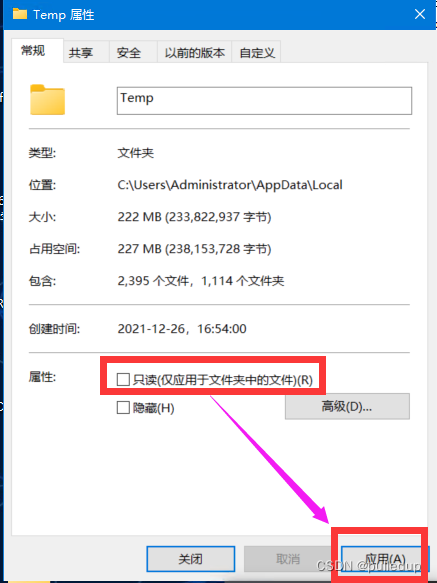
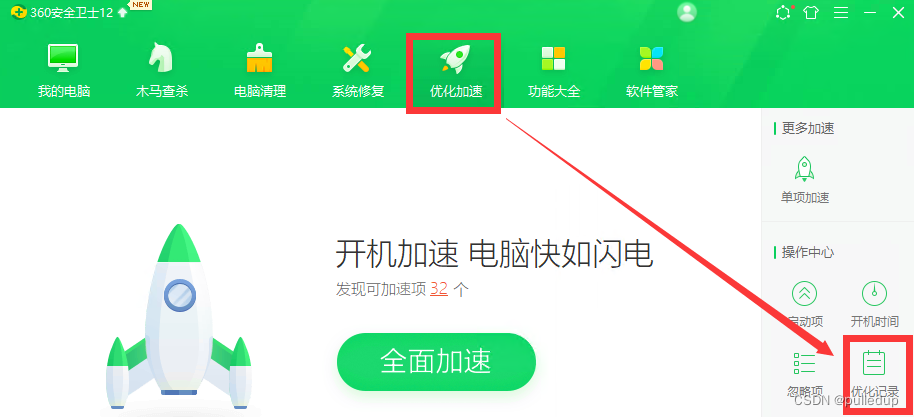
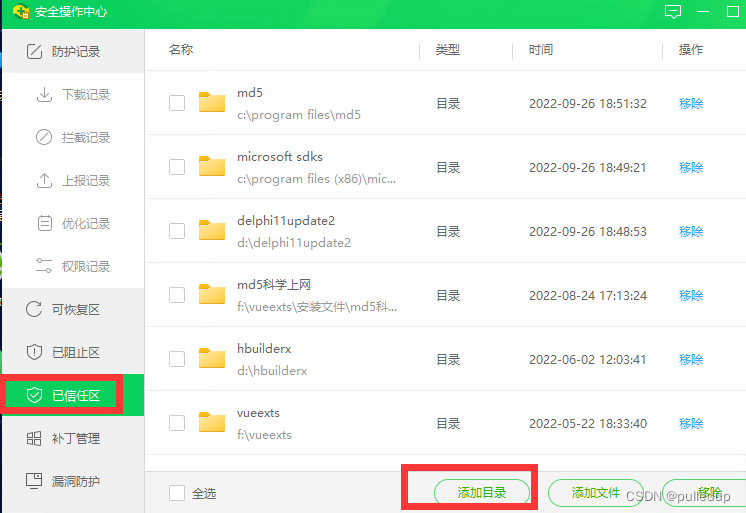
其它几个路径,雷同。略......。
重启电脑,并右键以“管理员身份”打开vscode,进入你的工程文件夹。
请先确保之前电脑中webpack的全局安装
# 推荐全局安装版本:webpack@4.46.0
配置以“https”方式下载
首先确保你能上网并访问github.com上的存储库。git方式若失败,请先运行:
git config --global url."https://github.com/".insteadOf git://github.com
清楚之前的本地局部安装及npm的缓存
npm clean-install (即删除项目文件夹下的node_modules)
删除npm的缓存 (即删除文件夹C:\Users\Administrator\AppData\Roaming\npm-cache下的内容)
“fetch”下载依赖的包
npm install
这会涉及“科学上网”,否则许多境外库,你下载不了。
特别需要注意的是,并非“淘宝库”不一定可用,其不可用(报错)时:
npm config set registry https://registry.npmjs.org/
若遇下载类的错误,翻墙多换几种线路
比如:德国线路等。
本文VIP短链: http://t.csdn.cn/LDa8F
3.1、磁盘占用:
字节大小285m ; 磁盘簇 占用空间:42.1G。
3.2、win10以下环境
node -v : v13.14.0 [win7的顶格版本]、npm -v : 6.14.4 [建议最低版本] :
PS L:\Vue3Test\MyVue3Proj1\全阶班\vue-element-admin> npm uninstall -g html-webpack-plugin
up to date in 0.173s
PS L:\Vue3Test\MyVue3Proj1\全阶班\vue-element-admin> npm i -g html-webpack-plugin@4.0.0

npm WARN html-webpack-plugin@4.0.0 requires a peer of webpack@^4.0.0 but none is installed. You must install peer dependencies yourself.

+ html-webpack-plugin@4.0.0
added 81 packages from 73 contributors in 22.056s
PS L:\Vue3Test\MyVue3Proj1\全阶班\vue-element-admin> git config --global url."https://github.com/".insteadOf git://github.com
PS L:\Vue3Test\MyVue3Proj1\全阶班\vue-element-admin> npm config set registry https://registry.npmjs.org/
PS L:\Vue3Test\MyVue3Proj1\全阶班\vue-element-admin> npm install
npm WARN deprecated babel-eslint@10.1.0: babel-eslint is now @babel/eslint-parser. This package will no longer receive updates.
npm WARN deprecated chokidar@2.1.5: Chokidar 2 does not receive security updates since 2019. Upgrade to chokidar 3 with 15x fewer dependencies
npm WARN deprecated svgo@1.2.0: This SVGO version is no longer supported. Upgrade to v2.x.x.
npm WARN deprecated eslint-loader@2.2.1: This loader has been deprecated. Please use eslint-webpack-plugin
npm WARN deprecated html-webpack-plugin@3.2.0: 3.x is no longer supported
npm WARN deprecated fsevents@1.2.13: fsevents 1 will break on node v14+ and could be using insecure binaries. Upgrade to fsevents 2.
npm WARN deprecated stable@0.1.8: Modern JS already guarantees Array#sort() is a stable sort, so this library is deprecated. See the compatibility table on MDN: https://developer.mozilla.org/en-US/docs/Web/JavaScript/Reference/Global_Objects/Array/sort#browser_compatibility
npm WARN deprecated nomnom@1.8.1: Package no longer supported. Contact support@npmjs.com for more info.
npm WARN deprecated highlight.js@9.18.5: Support has ended for 9.x series. Upgrade to @latest
npm WARN deprecated @hapi/joi@15.1.1: Switch to 'npm install joi'
npm WARN deprecated request@2.88.2: request has been deprecated, see https://github.com/request/request/issues/3142
npm WARN deprecated chokidar@2.1.8: Chokidar 2 does not receive security updates since 2019. Upgrade to chokidar 3 with 15x fewer dependencies
npm WARN deprecated core-js@2.6.12: core-js@<3.23.3 is no longer maintained and not recommended for usage due to the number of issues. Because of the V8 engine whims, feature detection in old core-js versions could cause a slowdown up to 100x even if nothing is polyfilled. Some versions have web compatibility issues. Please, upgrade your dependencies to the actual version of core-js.
npm WARN deprecated @hapi/address@2.1.4: Moved to 'npm install @sideway/address'
npm WARN deprecated @hapi/bourne@1.3.2: This version has been deprecated and is no longer supported or maintained
npm WARN deprecated @hapi/hoek@8.5.1: This version has been deprecated and is no longer supported or maintained
npm WARN deprecated @hapi/topo@3.1.6: This version has been deprecated and is no longer supported or maintained
npm WARN deprecated har-validator@5.1.5: this library is no longer supported
npm WARN deprecated uuid@3.4.0: Please upgrade  to version 7 or higher.  Older versions may use Math.random() in certain circumstances, which is known to be problematic.  See https://v8.dev/blog/math-random for details.
npm WARN deprecated request-promise-native@1.0.9: request-promise-native has been deprecated because it extends the now deprecated request package, see https://github.com/request/request/issues/3142
npm WARN deprecated querystring@0.2.0: The querystring API is considered Legacy. new code should use the URLSearchParams API instead.
npm WARN deprecated source-map-resolve@0.5.3: See https://github.com/lydell/source-map-resolve#deprecated
npm WARN deprecated sane@4.1.0: some dependency vulnerabilities fixed, support for node < 10 dropped, and newer ECMAScript syntax/features added
npm WARN deprecated urix@0.1.0: Please see https://github.com/lydell/urix#deprecated
npm WARN deprecated svgo@1.3.2: This SVGO version is no longer supported. Upgrade to v2.x.x.
npm WARN deprecated resolve-url@0.2.1: https://github.com/lydell/resolve-url#deprecated
npm WARN deprecated source-map-url@0.4.1: See https://github.com/lydell/source-map-url#deprecated
npm WARN deprecated left-pad@1.3.0: use String.prototype.padStart()
npm ERR! Error while executing:
npm ERR! L:\Program Files\Git\cmd\git.EXE ls-remote -h -t git://github.com/adobe-webplatform/eve.git
npm ERR!
npm ERR! fatal: unable to access 'https://github.com//adobe-webplatform/eve.git/': Failed to connect to github.com port 443 after 21065 ms: Timed out
npm ERR!
npm ERR! exited with error code: 128

npm ERR! A complete log of this run can be found in:
npm ERR!     C:\Users\Administrator\AppData\Roaming\npm-cache\_logs\2022-10-05T08_16_08_943Z-debug.log
PS L:\Vue3Test\MyVue3Proj1\全阶班\vue-element-admin> git config --global url."https://github.com/".insteadOf git://github.com
PS L:\Vue3Test\MyVue3Proj1\全阶班\vue-element-admin> npm clean-install
npm WARN prepare removing existing node_modules/ before installation
npm ERR! cipm can only install packages with an existing package-lock.json or npm-shrinkwrap.json with lockfileVersion >= 1. Run an install with npm@5 or later to generate it, then try again.

npm ERR! A complete log of this run can be found in:
npm ERR!     C:\Users\Administrator\AppData\Roaming\npm-cache\_logs\2022-10-05T08_17_01_674Z-debug.log
PS L:\Vue3Test\MyVue3Proj1\全阶班\vue-element-admin> npm install
npm WARN deprecated babel-eslint@10.1.0: babel-eslint is now @babel/eslint-parser. This package will no longer receive updates.
npm WARN deprecated chokidar@2.1.5: Chokidar 2 does not receive security updates since 2019. Upgrade to chokidar 3 with 15x fewer dependencies
npm WARN deprecated svgo@1.2.0: This SVGO version is no longer supported. Upgrade to v2.x.x.
npm WARN deprecated eslint-loader@2.2.1: This loader has been deprecated. Please use eslint-webpack-plugin
npm WARN deprecated fsevents@1.2.13: fsevents 1 will break on node v14+ and could be using insecure binaries. Upgrade to fsevents 2.
npm WARN deprecated html-webpack-plugin@3.2.0: 3.x is no longer supported
npm WARN deprecated stable@0.1.8: Modern JS already guarantees Array#sort() is a stable sort, so this library is deprecated. See the compatibility table on MDN: https://developer.mozilla.org/en-US/docs/Web/JavaScript/Reference/Global_Objects/Array/sort#browser_compatibility
npm WARN deprecated highlight.js@9.18.5: Support has ended for 9.x series. Upgrade to @latest
npm WARN deprecated nomnom@1.8.1: Package no longer supported. Contact support@npmjs.com for more info.
npm WARN deprecated @hapi/joi@15.1.1: Switch to 'npm install joi'
npm WARN deprecated request@2.88.2: request has been deprecated, see https://github.com/request/request/issues/3142
npm WARN deprecated core-js@2.6.12: core-js@<3.23.3 is no longer maintained and not recommended for usage due to the number of issues. Because of the V8 engine whims, feature detection in old core-js versions could cause a slowdown up to 100x even if nothing is polyfilled. Some versions have web compatibility issues. Please, upgrade your dependencies to the actual version of core-js.
npm WARN deprecated chokidar@2.1.8: Chokidar 2 does not receive security updates since 2019. Upgrade to chokidar 3 with 15x fewer dependencies
npm WARN deprecated @hapi/topo@3.1.6: This version has been deprecated and is no longer supported or maintained
npm WARN deprecated @hapi/address@2.1.4: Moved to 'npm install @sideway/address'
npm WARN deprecated @hapi/bourne@1.3.2: This version has been deprecated and is no longer supported or maintained
npm WARN deprecated @hapi/hoek@8.5.1: This version has been deprecated and is no longer supported or maintained
npm WARN deprecated har-validator@5.1.5: this library is no longer supported
npm WARN deprecated uuid@3.4.0: Please upgrade  to version 7 or higher.  Older versions may use Math.random() in certain circumstances, which is known to be problematic.  See https://v8.dev/blog/math-random for details.
npm WARN deprecated source-map-resolve@0.5.3: See https://github.com/lydell/source-map-resolve#deprecated
npm WARN deprecated querystring@0.2.0: The querystring API is considered Legacy. new code should use the URLSearchParams API instead.
npm WARN deprecated request-promise-native@1.0.9: request-promise-native has been deprecated because it extends the now deprecated request package, see https://github.com/request/request/issues/3142
npm WARN deprecated resolve-url@0.2.1: https://github.com/lydell/resolve-url#deprecated
npm WARN deprecated source-map-url@0.4.1: See https://github.com/lydell/source-map-url#deprecated
npm WARN deprecated urix@0.1.0: Please see https://github.com/lydell/urix#deprecated
npm WARN deprecated svgo@1.3.2: This SVGO version is no longer supported. Upgrade to v2.x.x.
npm WARN deprecated sane@4.1.0: some dependency vulnerabilities fixed, support for node < 10 dropped, and newer ECMAScript syntax/features added
npm WARN deprecated left-pad@1.3.0: use String.prototype.padStart()

> deasync@0.1.28 install L:\Vue3Test\MyVue3Proj1\全阶班\vue-element-admin\node_modules\deasync
> node ./build.js

`win32-x64-node-13` exists; testing
Binary is fine; exiting

> yorkie@2.0.0 install L:\Vue3Test\MyVue3Proj1\全阶班\vue-element-admin\node_modules\yorkie
> node bin/install.js

setting up Git hooks
done


> husky@1.3.1 install L:\Vue3Test\MyVue3Proj1\全阶班\vue-element-admin\node_modules\husky
> node husky install

husky > setting up git hooks
husky > done

> core-js@2.6.12 postinstall L:\Vue3Test\MyVue3Proj1\全阶班\vue-element-admin\node_modules\babel-runtime\node_modules\core-js
> node -e "try{require('./postinstall')}catch(e){}"

Thank you for using core-js ( https://github.com/zloirock/core-js ) for polyfilling JavaScript standard library!

The project needs your help! Please consider supporting of core-js on Open Collective or Patreon:
> https://opencollective.com/core-js
> https://www.patreon.com/zloirock

Also, the author of core-js ( https://github.com/zloirock ) is looking for a good job -)


> core-js@3.25.5 postinstall L:\Vue3Test\MyVue3Proj1\全阶班\vue-element-admin\node_modules\core-js
> node -e "try{require('./postinstall')}catch(e){}"

Thank you for using core-js ( https://github.com/zloirock/core-js ) for polyfilling JavaScript standard library!

The project needs your help! Please consider supporting of core-js:
> https://opencollective.com/core-js
> https://patreon.com/zloirock
> bitcoin: bc1qlea7544qtsmj2rayg0lthvza9fau63ux0fstcz

Also, the author of core-js ( https://github.com/zloirock ) is looking for a good job -)


> ejs@2.7.4 postinstall L:\Vue3Test\MyVue3Proj1\全阶班\vue-element-admin\node_modules\ejs
> node ./postinstall.js

Thank you for installing EJS: built with the Jake JavaScript build tool (https://jakejs.com/)


> highlight.js@9.18.5 postinstall L:\Vue3Test\MyVue3Proj1\全阶班\vue-element-admin\node_modules\highlight.js
> node deprecated.js

-*-*-*-*-*-*-*-*-*-*-*-*-*-*-*-*-*-*-*-*-*-*-*-*-*-*-*-*-*-*-*-*-*-*

  Verion 9 of Highlight.js has reached EOL.  It will no longer
  be supported or receive security updates in the future.
  Please upgrade to version 10 or encourage your indirect
  dependencies to do so.

  For more info:

  https://github.com/highlightjs/highlight.js/issues/2877
  https://github.com/highlightjs/highlight.js/blob/master/VERSION_10_UPGRADE.md

-*-*-*-*-*-*-*-*-*-*-*-*-*-*-*-*-*-*-*-*-*-*-*-*-*-*-*-*-*-*-*-*-*-*

> core-js@2.6.12 postinstall L:\Vue3Test\MyVue3Proj1\全阶班\vue-element-admin\node_modules\node-plop\node_modules\core-js
> node -e "try{require('./postinstall')}catch(e){}"

npm notice created a lockfile as package-lock.json. You should commit this file.
npm WARN notsup Unsupported engine for postcss@8.4.17: wanted: {"node":"^10 || ^12 || >=14"} (current: {"node":"13.14.0","npm":"6.14.4"})
npm WARN notsup Not compatible with your version of node/npm: postcss@8.4.17
npm WARN notsup Unsupported engine for @achrinza/node-ipc@9.2.2: wanted: {"node":"8 || 10 || 12 || 14 || 16 || 17"} (current: {"node":"13.14.0","npm":"6.14.4"})
npm WARN notsup Not compatible with your version of node/npm: @achrinza/node-ipc@9.2.2
npm WARN optional SKIPPING OPTIONAL DEPENDENCY: fsevents@~2.3.2 (node_modules\watchpack\node_modules\chokidar\node_modules\fsevents):
npm WARN notsup SKIPPING OPTIONAL DEPENDENCY: Unsupported platform for fsevents@2.3.2: wanted {"os":"darwin","arch":"any"} (current: {"os":"win32","arch":"x64"})
npm WARN optional SKIPPING OPTIONAL DEPENDENCY: fsevents@^1.2.7 (node_modules\watchpack-chokidar2\node_modules\chokidar\node_modules\fsevents):
npm WARN notsup SKIPPING OPTIONAL DEPENDENCY: Unsupported platform for fsevents@1.2.13: wanted {"os":"darwin","arch":"any"} (current: {"os":"win32","arch":"x64"})
npm WARN optional SKIPPING OPTIONAL DEPENDENCY: fsevents@^1.2.7 (node_modules\jest-haste-map\node_modules\fsevents):
npm WARN notsup SKIPPING OPTIONAL DEPENDENCY: Unsupported platform for fsevents@1.2.13: wanted {"os":"darwin","arch":"any"} (current: {"os":"win32","arch":"x64"})
npm WARN notsup Unsupported engine for nopt@6.0.0: wanted: {"node":"^12.13.0 || ^14.15.0 || >=16.0.0"} (current: {"node":"13.14.0","npm":"6.14.4"})
npm WARN notsup Not compatible with your version of node/npm: nopt@6.0.0
npm WARN optional SKIPPING OPTIONAL DEPENDENCY: fsevents@^1.2.7 (node_modules\webpack-dev-server\node_modules\chokidar\node_modules\fsevents):
npm WARN notsup SKIPPING OPTIONAL DEPENDENCY: Unsupported platform for fsevents@1.2.13: wanted {"os":"darwin","arch":"any"} (current: {"os":"win32","arch":"x64"})
npm WARN optional SKIPPING OPTIONAL DEPENDENCY: fsevents@^1.2.7 (node_modules\chokidar\node_modules\fsevents):
npm WARN notsup SKIPPING OPTIONAL DEPENDENCY: Unsupported platform for fsevents@1.2.13: wanted {"os":"darwin","arch":"any"} (current: {"os":"win32","arch":"x64"})

added 2142 packages from 2077 contributors and audited 2150 packages in 1751.216s

107 packages are looking for funding
  run `npm fund` for details

found 50 vulnerabilities (5 low, 23 moderate, 18 high, 4 critical)
  run `npm audit fix` to fix them, or `npm audit` for details
PS L:\Vue3Test\MyVue3Proj1\全阶班\vue-element-admin>
node -v : v16.15.0、npm -v : 8.10.0 :
PS F:\VueExts\front-study\a60days\vue-element-admin> npm install
npm WARN skipping integrity check for git dependency ssh://git@github.com/sohee-lee7/Squire.git
npm WARN deprecated stable@0.1.8: Modern JS already guarantees Array#sort() is a stable sort, so
this library is deprecated. See the compatibility table on MDN: https://developer.mozilla.org/en-US/docs/Web/JavaScript/Reference/Global_Objects/Array/sort#browser_compatibility
npm WARN deprecated source-map-url@0.4.1: See https://github.com/lydell/source-map-url#deprecated
npm WARN deprecated @hapi/bourne@1.3.2: This version has been deprecated and is no longer supported or maintained
npm WARN deprecated @hapi/topo@3.1.6: This version has been deprecated and is no longer supported or maintained
npm WARN deprecated eslint-loader@2.2.1: This loader has been deprecated. Please use eslint-webpack-plugin
npm WARN deprecated urix@0.1.0: Please see https://github.com/lydell/urix#deprecated
npm WARN deprecated har-validator@5.1.5: this library is no longer supported
npm WARN deprecated request-promise-native@1.0.9: request-promise-native has been deprecated because it extends the now deprecated request package, see https://github.com/request/request/issues/3142
npm WARN deprecated source-map-resolve@0.5.3: See https://github.com/lydell/source-map-resolve#deprecated
npm WARN deprecated chokidar@2.1.8: Chokidar 2 does not receive security updates since 2019. Upgrade to chokidar 3 with 15x fewer dependencies
npm WARN deprecated chokidar@2.1.8: Chokidar 2 does not receive security updates since 2019. Upgrade to chokidar 3 with 15x fewer dependencies
npm WARN deprecated resolve-url@0.2.1: https://github.com/lydell/resolve-url#deprecated
npm WARN deprecated html-webpack-plugin@3.2.0: 3.x is no longer supported
npm WARN deprecated left-pad@1.3.0: use String.prototype.padStart()
npm WARN deprecated @hapi/address@2.1.4: Moved to 'npm install @sideway/address'
npm WARN deprecated querystring@0.2.0: The querystring API is considered Legacy. new code should
use the URLSearchParams API instead.
npm WARN deprecated sane@4.1.0: some dependency vulnerabilities fixed, support for node < 10 dropped, and newer ECMAScript syntax/features added
npm WARN deprecated chokidar@2.1.5: Chokidar 2 does not receive security updates since 2019. Upgrade to chokidar 3 with 15x fewer dependencies
npm WARN deprecated babel-eslint@10.1.0: babel-eslint is now @babel/eslint-parser. This package will no longer receive updates.
npm WARN deprecated nomnom@1.8.1: Package no longer supported. Contact support@npmjs.com for more info.
npm WARN deprecated uuid@3.4.0: Please upgrade  to version 7 or higher.  Older versions may use Math.random() in certain circumstances, which is known to be problematic.  See https://v8.dev/blog/math-random for details.
npm WARN deprecated request@2.88.2: request has been deprecated, see https://github.com/request/request/issues/3142
npm WARN deprecated @hapi/hoek@8.5.1: This version has been deprecated and is no longer supported or maintained
npm WARN deprecated @hapi/joi@15.1.1: Switch to 'npm install joi'
npm WARN deprecated axios@0.18.1: Critical security vulnerability fixed in v0.21.1. For more information, see https://github.com/axios/axios/pull/3410
npm WARN deprecated svgo@1.2.0: This SVGO version is no longer supported. Upgrade to v2.x.x.
npm WARN deprecated highlight.js@9.18.5: Support has ended for 9.x series. Upgrade to @latest
npm WARN deprecated core-js@2.6.12: core-js@<3.23.3 is no longer maintained and not recommended for usage due to the number of issues. Because of the V8 engine whims, feature detection in old core-js versions could cause a slowdown up to 100x even if nothing is polyfilled. Some versions have web compatibility issues. Please, upgrade your dependencies to the actual version of core-js.
npm WARN deprecated core-js@2.6.12: core-js@<3.23.3 is no longer maintained and not recommended for usage due to the number of issues. Because of the V8 engine whims, feature detection in old core-js versions could cause a slowdown up to 100x even if nothing is polyfilled. Some versions have web compatibility issues. Please, upgrade your dependencies to the actual version of core-js.
npm WARN deprecated core-js@3.6.5: core-js@<3.23.3 is no longer maintained and not recommended for usage due to the number of issues. Because of the V8 engine whims, feature detection in old core-js versions could cause a slowdown up to 100x even if nothing is polyfilled. Some versions have web compatibility issues. Please, upgrade your dependencies to the actual version of core-js.

added 2001 packages, and audited 2002 packages in 5m

104 packages are looking for funding
  run `npm fund` for details

74 vulnerabilities (5 low, 29 moderate, 26 high, 14 critical)

To address issues that do not require attention, run:
  npm audit fix

To address all issues possible (including breaking changes), run:
  npm audit fix --force

Some issues need review, and may require choosing
a different dependency.

Run `npm audit` for details.
PS F:\VueExts\front-study\a60days\vue-element-admin>

喜欢的,就收藏并点个赞,鼓励我继续技术的原创写作及经验分享:
vscode用户配置文件等的存取_pulledup的博客-CSDN博客_vscode配置文件在哪
关于vscode插件查询、备份与恢复_pulledup的博客-CSDN博客_vscode插件备份
推荐一款最流行的流程图及图表工具draw.io,老掉牙的工具已无人再用_pulledup的博客-CSDN博客_drawio 图库
vue serve及其与vue-cli-service serve之间的关系_pulledup的博客-CSDN博客
原生CLI指令构建npm run减少硬盘node_modules的开销_pulledup的博客-CSDN博客
我是Google云的新手,我正在尝试对其进行首次部署。我的第一个部署是RubyonRails项目。我基本上是在关注thisguideinthegoogleclouddocumentation.唯一的区别是我使用的是我自己的项目,而不是他们提供的“helloworld”项目。这是我的app.yaml文件runtime:customvm:trueentrypoint:bundleexecrackup-p8080-Eproductionconfig.ruresources:cpu:0.5memory_gb:1.3disk_size_gb:10当我转到我的项目目录并运行gcloudprevie
我可以在Azure网站上部署RubyonRails吗? 最佳答案 还没有。目前仅支持.NET和PHP。 关于ruby-on-rails-RubyonRails可以部署在Azure网站上吗?,我们在StackOverflow上找到一个类似的问题: https://stackoverflow.com/questions/12964010/
前置步骤我们都操作完了,这篇开始介绍jenkins的集成。话不多说,看操作1、登录进入jenkins后会让你选择安装插件,选择第一个默认的就行。安装完成后设置账号密码,重新登录。2、配置JDK和Git都需要执行路径,所以需要先把执行路径找到,先进入服务器的docker容器,2.1JDK的路径root@69eef9ee86cf:/usr/bin#echo$JAVA_HOME/usr/local/openjdk-82.2Git的路径root@69eef9ee86cf:/#whichgit/usr/bin/git3、先配置JDK和Git。点击:ManageJenkins>>GlobalToolCon
深度学习部署:Windows安装pycocotools报错解决方法1.pycocotools库的简介2.pycocotools安装的坑3.解决办法更多Ai资讯:公主号AiCharm本系列是作者在跑一些深度学习实例时,遇到的各种各样的问题及解决办法,希望能够帮助到大家。ERROR:Commanderroredoutwithexitstatus1:'D:\Anaconda3\python.exe'-u-c'importsys,setuptools,tokenize;sys.argv[0]='"'"'C:\\Users\\46653\\AppData\\Local\\Temp\\pip-instal
项目介绍随着我国经济迅速发展,人们对手机的需求越来越大,各种手机软件也都在被广泛应用,但是对于手机进行数据信息管理,对于手机的各种软件也是备受用户的喜爱小学生兴趣延时班预约小程序的设计与开发被用户普遍使用,为方便用户能够可以随时进行小学生兴趣延时班预约小程序的设计与开发的数据信息管理,特开发了小程序的设计与开发的管理系统。小学生兴趣延时班预约小程序的设计与开发的开发利用现有的成熟技术参考,以源代码为模板,分析功能调整与小学生兴趣延时班预约小程序的设计与开发的实际需求相结合,讨论了小学生兴趣延时班预约小程序的设计与开发的使用。开发环境开发说明:前端使用微信微信小程序开发工具:后端使用ssm:VU
Ocra无法处理需要“tk”的应用程序require'tk'puts'nope'用奥克拉http://github.com/larsch/ocra不起作用(如链接中的一个问题所述)问题:https://github.com/larsch/ocra/issues/29(Ocra是1.9的"new"rubyscript2exe,本质上它用于将rb脚本部署为可执行文件)唯一的问题似乎是缺少tcl的DLL文件我不认为这是一个问题据我所知,问题是缺少tk的DLL文件如果它们是已知的,则可以在执行ocra时将它们包括在内有没有办法知道tk工作所需的DLL依赖项? 最佳答
我有一个类unzipper.rb,它使用Rubyzip解压文件。在我的本地环境中,我可以成功解压缩文件,而无需使用require'zip'明确包含依赖项但是在Heroku上,我得到一个NameError(uninitializedconstantUnzipper::Zip)我只能通过使用明确的require来解决问题:为什么这在Heroku环境中是必需的,但在本地主机上却不是?我的印象是Rails自动需要所有gem。app/services/unzipper.rbrequire'zip'#OnlyrequiredforHeroku.Workslocallywithout!class
出于某种原因,heroku尝试要求dm-sqlite-adapter,即使它应该在这里使用Postgres。请注意,这发生在我打开任何URL时-而不是在gitpush本身期间。我构建了一个默认的Facebook应用程序。gem文件:source:gemcuttergem"foreman"gem"sinatra"gem"mogli"gem"json"gem"httparty"gem"thin"gem"data_mapper"gem"heroku"group:productiondogem"pg"gem"dm-postgres-adapter"endgroup:development,:t
参考文章搭建文章gitte源码在线体验可以注册两个号来测试演示图:一.整体介绍 介绍SignalR一种通讯模型Hub(中心模型,或者叫集线器模型),调用这个模型写好的方法,去发送消息。 内容有: ①:Hub模型的方法介绍 ②:服务器端代码介绍 ③:前端vue3安装并调用后端方法 ④:聊天室样例整体流程:1、进入网站->调用连接SignalR的方法2、与好友发送消息->调用SignalR的自定义方法 前端通过,signalR内置方法.invoke() 去请求接口3、监听接受方法(渲染消息)通过new signalR.HubConnectionBuilder().on
如何使用Capistrano将Rails应用程序部署到无法访问外部网络或存储库的生产或暂存服务器?我已经设法完成部署的一半,并意识到Capistrano没有在我的本地机器上下载gitrepo,但它首先连接到远程服务器并尝试在那里下载Git存储库。我希望有一个类似Javaee的构建系统,其中创建可交付成果并将该可交付成果发送到服务器。就像您构建.ear文件并将其部署到您想要的任何服务器上一样。显然在RoR中,你被迫(据我所知)在该服务器上构建应用程序,在那里创建一个gem存储库,在那里克隆最新的分支等等。有什么方法可以将准备运行的包发送到远程服务器吗? 最佳答
