
<dependency>
    <groupId>org.springframework.boot</groupId>
    <artifactId>spring-boot-starter-data-elasticsearch</artifactId>
</dependency>


<dependency>
    <groupId>com.alibaba</groupId>
    <artifactId>fastjson</artifactId>
    <version>2.0.7.graal</version>
</dependency>
初始化配置bean,扔到ioc容器内
host链接–>builder–>RestHighLevelClient
@Configuration
public class ElasticSearchConfig {

    @Value("${spring.elasticsearch.uris}")
    private String httpPath;

    @Bean
    RestHighLevelClient restHighLevelClient(){

        HttpHost host = HttpHost.create(httpPath);//创建httpHost
        RestClientBuilder builder = RestClient.builder(host);//根据host建立此属性的服务器
        RestHighLevelClient client = new RestHighLevelClient(builder);//创建服务器对象
        return client;
    }

}
@Autowired
@Qualifier("restHighLevelClient")//避免按名称找不到
private RestHighLevelClient restHighLevelClient;
/**
 *测试
 **/
//创建索引 client.indices().create()
@Test
void TestCreateIndex() throws IOException {
    CreateIndexRequest request = new CreateIndexRequest("user");
    CreateIndexResponse createIndexResponse = restHighLevelClient.indices().create(request, RequestOptions.DEFAULT);
    System.out.println(createIndexResponse);
}

//删除索引 client.indices().delete()
@Test
void TestDeleteIndex() throws IOException {
    DeleteIndexRequest request = new DeleteIndexRequest("user2");
    //delete
    AcknowledgedResponse delete = restHighLevelClient.indices().delete(request,RequestOptions.DEFAULT);
    System.out.println(delete);
}
//添加文档 client.index()
@Test
void TestAddDocument() throws IOException {
    User user = new User();
    user.setUsername("zhangsan");
    user.setAge(20);

    //创建请求
    IndexRequest request = new IndexRequest("user");
    //规则:put /indexName/_doc/1
    request.id("2");
    request.timeout(TimeValue.timeValueSeconds(1));
    request.timeout("5s");

    //数据放入请求
    request.source(JSON.toJSONString(user), XContentType.JSON);
    //向客户端发送请求,获取响应结果
    IndexResponse indexResponse = restHighLevelClient.index(request, RequestOptions.DEFAULT);//这里用的index
    System.out.println(indexResponse.toString());

    //命令返回的状态
    System.out.println(indexResponse.status());
}


//获取文档,判断是否存在 get /index/doc/1
@Test
void TestIfExist() throws IOException {
    GetRequest getRequest = new GetRequest("user","2");
    //请求发送出去,得到响应
    GetResponse getResponse = restHighLevelClient.get(getRequest, RequestOptions.DEFAULT);
    System.out.println(getResponse.getSourceAsString());//要看的是响应内的资源
    System.out.println(getResponse);
}
//更新文档的信息 updateRequest.doc(实体的json)   client.update(请求)
@Test
void TestUpdateDocument() throws IOException {
    UpdateRequest updateRequest = new UpdateRequest("user","2");
    updateRequest.timeout("5s");
    User user = new User();
    user.setUsername("蟹老板");
    user.setAge(40);
    updateRequest.doc(JSON.toJSONString(user),XContentType.JSON);
    UpdateResponse updateResponse = restHighLevelClient.update(updateRequest, RequestOptions.DEFAULT);//发送请求
    System.out.println(updateResponse.status());
}

//删除文档信息
@Test
void TestDeleteDocumentInfo() throws IOException {
    DeleteRequest request = new DeleteRequest("user","2");
    request.timeout("5s");
    //发送请求
    DeleteResponse deleteResponse = restHighLevelClient.delete(request, RequestOptions.DEFAULT);
    System.out.println(deleteResponse);
}

//批量插入数据
@Test
void TestBulkRequest() throws IOException {
    BulkRequest bulkRequest = new BulkRequest();//存放一堆请求
    bulkRequest.timeout("10s");
    List<User> list = new ArrayList<>();
    list.add(new User("zysheep1", 1));
    list.add(new User("zysheep2", 2));
    list.add(new User("zysheep3", 3));
    list.add(new User("zysheep4", 5));
    list.add(new User("zysheep5", 6));
    list.add(new User("zysheep7", 7));

    for(int i=0;i<list.size();i++){
        bulkRequest.add(new IndexRequest("user").id(""+(i+1)).source(JSON.toJSONString(list.get(i)),XContentType.JSON));
    }

    //发送
    BulkResponse bulkResponse = restHighLevelClient.bulk(bulkRequest, RequestOptions.DEFAULT);
    System.out.println(bulkResponse);
}

//查询
/**
 * 查询
 * SearchRequest 搜索请求
 * SearchSourceBuilder 条件构造
 * HighlightBuilder 构建高亮
 * TermQueryBuilder 精确查询
 * MatchAllQueryBuilder匹配所有
 * QueryBuilder 对应我们刚才看到的命令!
 * 查询条件,我们可以使用 QueryBuilders 工具来实现
 * QueryBuilders.termQuery 精确
 * QueryBuilders.matchAllQuery() 匹配所有
 */
@Test
void TestSearch() throws IOException {
    SearchRequest searchRequest = new SearchRequest("user");
    //构建搜索条件,这里且设置高亮
    SearchSourceBuilder searchSourceBuilder = new SearchSourceBuilder();
    searchSourceBuilder.highlighter();//高亮
    //精确查询
    TermQueryBuilder termQueryBuilder = QueryBuilders.termQuery("username","zysheep1");

    searchSourceBuilder.query(termQueryBuilder);
    searchSourceBuilder.timeout(new TimeValue(60, TimeUnit.SECONDS));

    searchRequest.source(searchSourceBuilder);

    SearchResponse searchResponse = restHighLevelClient.search(searchRequest, RequestOptions.DEFAULT);

    System.out.println(searchResponse.getHits());
    for(SearchHit hit : searchResponse.getHits().getHits()){
        System.out.println(hit.getSourceAsMap());
    }

}
<dependencies>
    <!-- jsoup解析页面 -->
    <!-- 解析网页 爬视频可 研究tiko -->
    <dependency>
        <groupId>org.jsoup</groupId>
        <artifactId>jsoup</artifactId>
        <version>1.10.2</version>
    </dependency>
    <!-- fastjson -->
    <dependency>
        <groupId>com.alibaba</groupId>
        <artifactId>fastjson</artifactId>
        <version>1.2.70</version>
    </dependency>
    <!-- ElasticSearch -->
    <dependency>
        <groupId>org.springframework.boot</groupId>
        <artifactId>spring-boot-starter-data-elasticsearch</artifactId>
    </dependency>
    <!-- thymeleaf -->
    <dependency>
        <groupId>org.springframework.boot</groupId>
        <artifactId>spring-boot-starter-thymeleaf</artifactId>
    </dependency>
    <!-- web -->
    <dependency>
        <groupId>org.springframework.boot</groupId>
        <artifactId>spring-boot-starter-web</artifactId>
    </dependency>
    <!-- devtools热部署 -->
    <dependency>
        <groupId>org.springframework.boot</groupId>
        <artifactId>spring-boot-devtools</artifactId>
        <scope>runtime</scope>
        <optional>true</optional>
    </dependency>
    <!--  -->
    <dependency>
        <groupId>org.springframework.boot</groupId>
        <artifactId>spring-boot-configuration-processor</artifactId>
        <optional>true</optional>
    </dependency>
    <!-- lombok 需要安装插件 -->
    <dependency>
        <groupId>org.projectlombok</groupId>
        <artifactId>lombok</artifactId>
        <optional>true</optional>
    </dependency>
    <!-- test -->
    <dependency>
        <groupId>org.springframework.boot</groupId>
        <artifactId>spring-boot-starter-test</artifactId>
        <scope>test</scope>
    </dependency>
</dependencies>
链接:https://pan.baidu.com/s/1M5uWdYsCZyzIAOcgcRkA_A
提取码:qk8p
复制这段内容后打开百度网盘手机App,操作更方便哦
server:
  port: 80

spring:
  elasticsearch:
    uris: http://localhost:9200

#关闭thymeleaf缓存
  thymeleaf:
    cache: false
@Controller
public class IndexController {
    @GetMapping("/index")
    public String index(){
        return "/index";
    }
}
如果说是无法解析MVC视图的就导入一下下面这个依赖
        <dependency>
            <groupId>org.thymeleaf</groupId>
            <artifactId>thymeleaf-spring5</artifactId>
        </dependency>
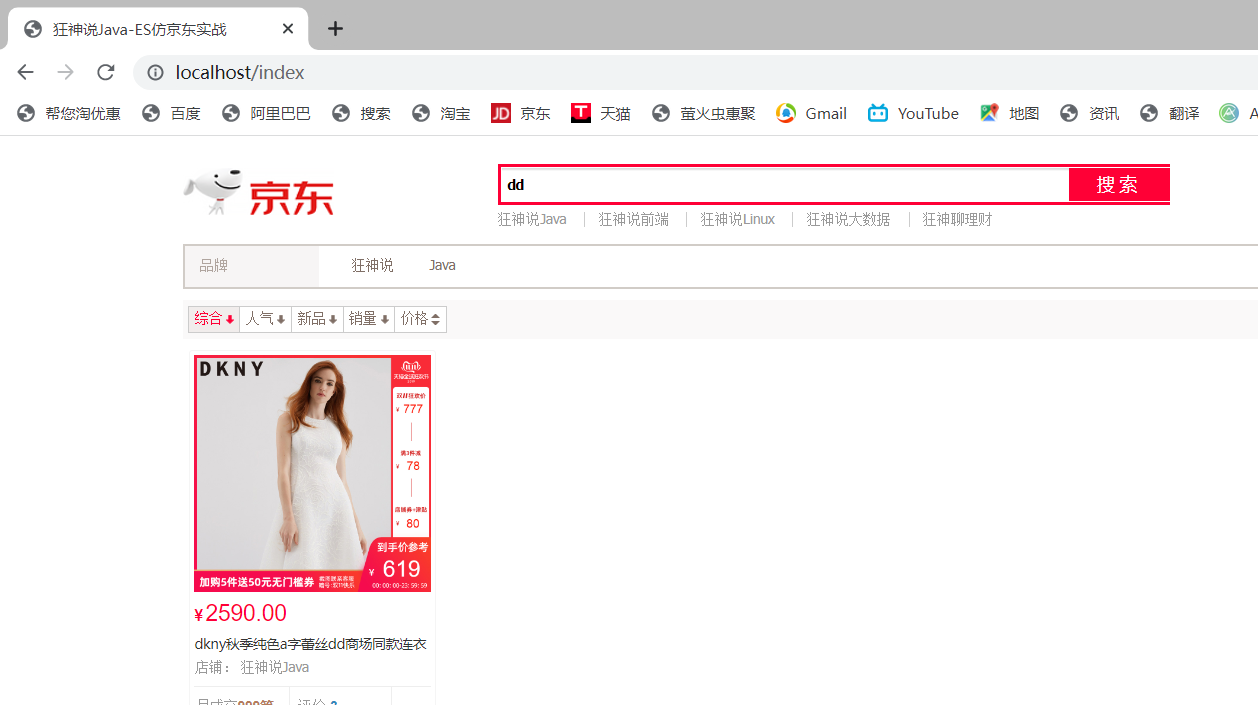
测试结果:
@Component
public class HtmlParseUtil {

    public static List<Content> parseJD (String keywords) throws Exception {
        //获取请求

        String url = "https://search.jd.com/Search?keyword="+keywords;
        //解析网页
        Document document = Jsoup.parse(new URL(url),30000);

        Element element = document.getElementById("J_goodsList");
        //获取所有的li元素
        Elements elements = element.getElementsByTag("li");
        //System.out.println(elements.html());

        List<Content> goodsList = new ArrayList<>();
        //获取所有的li元素
        for(Element el:elements){
            //关于图片:所有的图片都是延迟加载的
            String img = el.getElementsByTag("img").eq(0).attr("data-lazy-img");
            String price = el.getElementsByClass("p-price").eq(0).text();
            String title = el.getElementsByClass("p-name").eq(0).text();

            Content content = new Content();
            content.setTitle(title);
            content.setImg(img);
            content.setPrice(price);

            goodsList.add(content);
        }
        return goodsList;
    }
    //测试获取
    public static void main(String[] args) throws Exception {
        new HtmlParseUtil().parseJD("代码").forEach(System.out::println);
    }


}

elasticsearchConfig类---->restHighLevelClient放入ioc
@Configuration
public class ElasticSearchConfig {

    @Value("${spring.elasticsearch.uris}")
    private String httpPath;

    @Bean
    RestHighLevelClient restHighLevelClient(){

        HttpHost host = HttpHost.create(httpPath);//创建httpHost
        RestClientBuilder builder = RestClient.builder(host);//根据host建立此属性的服务器
        RestHighLevelClient client = new RestHighLevelClient(builder);//创建服务器对象
        return client;
    }

}
@Service
public class ContentService {
    @Autowired
    private RestHighLevelClient restHighLevelClient;

    //1.解析数据放入es
    public Boolean parseContent(String keywords) throws Exception {
        //获取数据
        List<Content> contents = HtmlParseUtil.parseJD(keywords);
        //将内容放入es
        BulkRequest bulkRequest = new BulkRequest();
        bulkRequest.timeout("2m");
        for(int i=0;i<contents.size();i++){
            bulkRequest.add(
                    new IndexRequest("jd_goods")
                            .id(""+(i+1))
                            .source(JSON.toJSONString(contents.get(i)), XContentType.JSON)
            );
        }
        BulkResponse bulk = restHighLevelClient.bulk(bulkRequest, RequestOptions.DEFAULT);

        restHighLevelClient.close();
        return !bulk.hasFailures();
    }
}
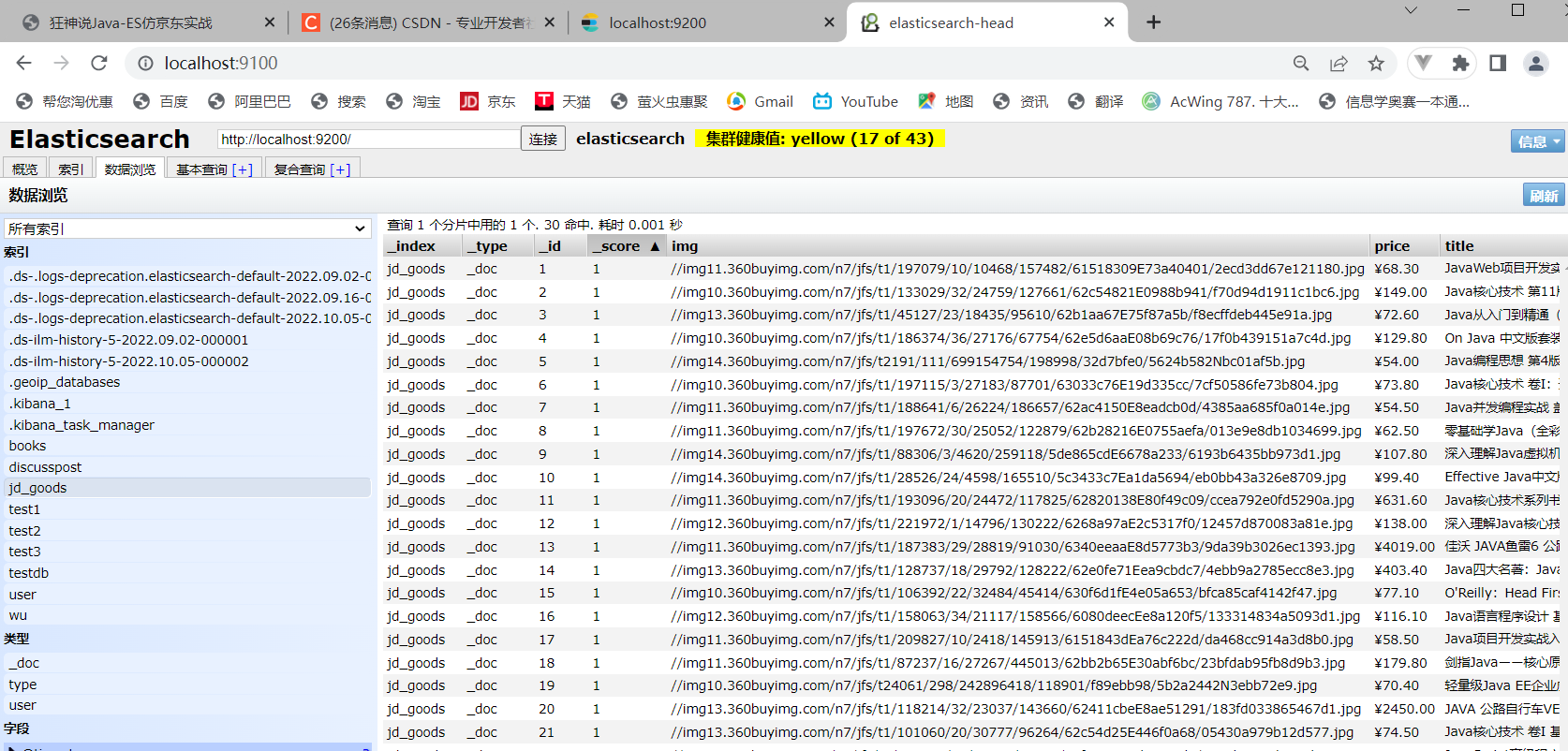
基本查询的步骤:
1.QueryBuilders.termQuery("title",keyWord) 然后形成精准查询termQueryBuilder
2.将精准查询ilder
3.将搜索资源放入搜索请求searchRequest
4.将请求给Client然后执行请求即可
//获取这些数据实现搜索功能
public List<Map<String,Object>> searchPage(String keyWord,int pageNo,int pageSize) throws IOException {
    if(pageNo<=1){
        pageNo=1;
    }
    //建立查询请求和请求资源
    SearchRequest searchRequest = new SearchRequest("jd_goods");
    SearchSourceBuilder searchSourceBuilder = new SearchSourceBuilder();

    //分页功能
    searchSourceBuilder.from(pageNo);
    searchSourceBuilder.size(pageSize);

    //精准查询
    TermQueryBuilder termQueryBuilder = QueryBuilders.termQuery("title",keyWord);

    //精准查询放入资源,且进行设置时限
    searchSourceBuilder.query(termQueryBuilder);
    searchSourceBuilder.timeout(new TimeValue(60, TimeUnit.SECONDS));

    //资源放入查询请求
    searchRequest.source(searchSourceBuilder);

    //交给客户端
    SearchResponse searchResponse = restHighLevelClient.search(searchRequest, RequestOptions.DEFAULT);

    //解析结果
    ArrayList<Map<String, Object>> list = new ArrayList<>();
    for (SearchHit documentFields : searchResponse.getHits().getHits()) {
        list.add(documentFields.getSourceAsMap());
    }
    return list;
}
@Controller
public class IndexController {

    @Autowired
    private ContentService contentService;

    @GetMapping("/index")
    public String index(){
        return "/index";
    }

    @ResponseBody
    @GetMapping("/parse/{keyword}") //感觉关键词去京东官网爬取数据然后保存到ES
    public Boolean parse(@PathVariable("keyword") String keyword) throws Exception {
        return contentService.parseContent(keyword);
    }

    @ResponseBody
    @GetMapping("/search/{keyword}/{pageNo}/{pageSize}")
    public List<Map<String,Object>> search(
            @PathVariable("keyword") String keyword,
            @PathVariable("pageNo") int pageNo,
            @PathVariable("pageSize") int pageSize) throws IOException {
        return contentService.searchPage(keyword, pageNo, pageSize);
    }

}
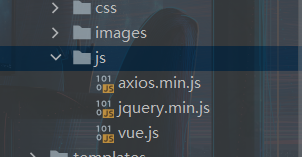
✒️导入Vue和axios : 创建个文档然后node.js即可
npm init
npm install vue
npm install axios
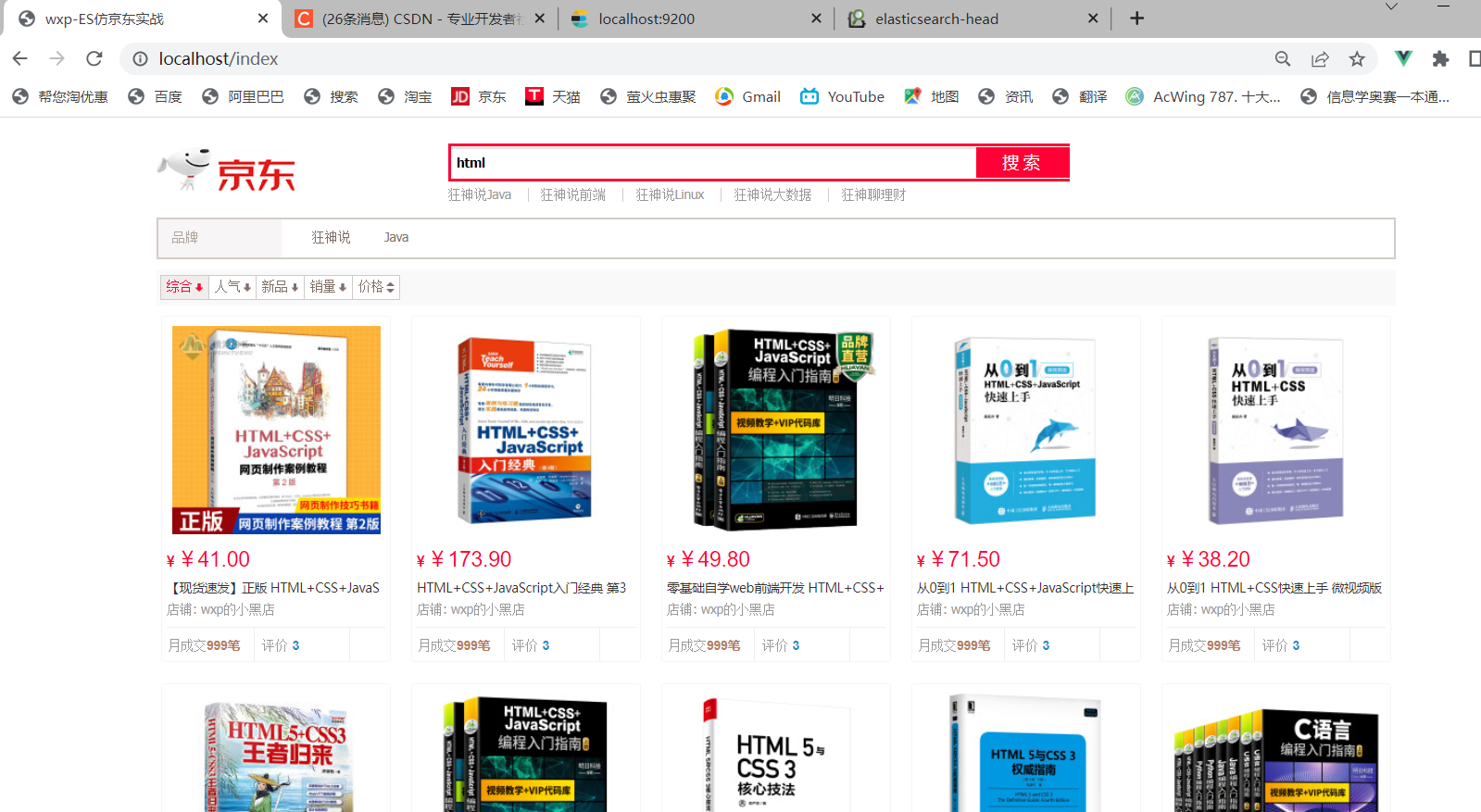
部分html
<!--搜索 : 1.对input的v-model绑定 2.对点击事件的绑定-->
<div id="mallSearch" class="mall-search">
    <form name="searchTop" class="mallSearch-form clearfix">
        <fieldset>
            <legend>天猫搜索</legend>
            <div class="mallSearch-input clearfix">
                <div class="s-combobox" id="s-combobox-685">
                    <div class="s-combobox-input-wrap" >
                        <input v-model="keywords" type="text" autocomplete="off" value="dd" id="mq"
                               class="s-combobox-input" aria-haspopup="true">
                    </div>
                </div>
                <button type="submit" id="searchbtn" @click.prevent="searchKey">搜索</button>
            </div>
        </fieldset>
    </form>
    <ul class="relKeyTop">
        <li><a>狂神说Java</a></li>
        <li><a>狂神说前端</a></li>
        <li><a>狂神说Linux</a></li>
        <li><a>狂神说大数据</a></li>
        <li><a>狂神聊理财</a></li>
    </ul>
</div>
<!-- 商品详情 -->
<div class="view grid-nosku">

    <div class="product" v-for="result in results">
        <div class="product-iWrap">
            <!--商品封面-->
            <div class="productImg-wrap">
                <a class="productImg">
                    <img :src="result.img">
                </a>
            </div>
            <!--价格-->
            <p class="productPrice">
                <em><b>¥</b>{{result.price}}</em>
            </p>
            <!--标题-->
            <p class="productTitle">
                <a>{{result.title}}<</a>
            </p>
            <!-- 店铺名 -->
            <div class="productShop">
                <span>店铺: wxp的小黑店 </span>
            </div>
            <!-- 成交信息 -->
            <p class="productStatus">
                <span>月成交<em>999笔</em></span>
                <span>评价 <a>3</a></span>
            </p>
        </div>
    </div>
</div>
<script th:src="@{/js/axios.min.js}"></script>
<script th:src="@{/js/vue.js}"></script>
<script>
    new Vue({
        el:'#app',
        data:{
            keyword:'',//关键词
            results:[]//搜索的结果
        },
        methods:{
            searchKey(){
                var keyword = this.keyword;
                //对接后端接口
                axios.get('search/' + keyword + "/1/10").then(resp=>{
                    this.results = resp.data;
            })
            }
        }
    })
</script>
ElasticSearch 官方提供了 3 个 Client,具体如下:
TransportClient 位于 Elasticsearch 包下,是 Elasticsearch 官方早期支持的 ElasticSearch Client,但是在 ElasticSearch 7.x 版本中已经标注为 Deprecated,并且将在 8.0 版本中移除,所以建议不使用 TransportClient 作为 ElasticSearch Client。
RestHighLevelClient 是 TransportClient 的直接替代者,也是 ElasticSearch 官方推荐和默认的 Client(松哥注:该客户端在最新版本中已经废弃)。
除了 ElasticSearch 官方提供的 Client,spring-data-elasticsearch 还支持响应式的客户端 ReactiveElasticsearchClient。ReactiveElasticsearchClient 是基于 WebClient 技术实现的 ElasticSearch Client,依赖于 Spring 的响应式栈。响应式栈在本书中不会涉及。
client.transport.TransportClient
TransportClient 位于 Elasticsearch 包下,是 Elasticsearch 官方早期支持的 ElasticSearch Client,但是在 ElasticSearch 7.x 版本中已经标注为 Deprecated,并且将在 8.0 版本中移除,所以建议不使用 TransportClient 作为 ElasticSearch Client。
RestHighLevelClient 是 TransportClient 的直接替代者,也是 ElasticSearch 官方推荐和默认的 Client(松哥注:该客户端在最新版本中已经废弃)。
除了 ElasticSearch 官方提供的 Client,spring-data-elasticsearch 还支持响应式的客户端 ReactiveElasticsearchClient。ReactiveElasticsearchClient 是基于 WebClient 技术实现的 ElasticSearch Client,依赖于 Spring 的响应式栈。响应式栈在本书中不会涉及。
我正在学习如何使用Nokogiri,根据这段代码我遇到了一些问题:require'rubygems'require'mechanize'post_agent=WWW::Mechanize.newpost_page=post_agent.get('http://www.vbulletin.org/forum/showthread.php?t=230708')puts"\nabsolutepathwithtbodygivesnil"putspost_page.parser.xpath('/html/body/div/div/div/div/div/table/tbody/tr/td/div
我有一个Ruby程序,它使用rubyzip压缩XML文件的目录树。gem。我的问题是文件开始变得很重,我想提高压缩级别,因为压缩时间不是问题。我在rubyzipdocumentation中找不到一种为创建的ZIP文件指定压缩级别的方法。有人知道如何更改此设置吗?是否有另一个允许指定压缩级别的Ruby库? 最佳答案 这是我通过查看rubyzip内部创建的代码。level=Zlib::BEST_COMPRESSIONZip::ZipOutputStream.open(zip_file)do|zip|Dir.glob("**/*")d
类classAprivatedeffooputs:fooendpublicdefbarputs:barendprivatedefzimputs:zimendprotecteddefdibputs:dibendendA的实例a=A.new测试a.foorescueputs:faila.barrescueputs:faila.zimrescueputs:faila.dibrescueputs:faila.gazrescueputs:fail测试输出failbarfailfailfail.发送测试[:foo,:bar,:zim,:dib,:gaz].each{|m|a.send(m)resc
很好奇,就使用rubyonrails自动化单元测试而言,你们正在做什么?您是否创建了一个脚本来在cron中运行rake作业并将结果邮寄给您?git中的预提交Hook?只是手动调用?我完全理解测试,但想知道在错误发生之前捕获错误的最佳实践是什么。让我们理所当然地认为测试本身是完美无缺的,并且可以正常工作。下一步是什么以确保他们在正确的时间将可能有害的结果传达给您? 最佳答案 不确定您到底想听什么,但是有几个级别的自动代码库控制:在处理某项功能时,您可以使用类似autotest的内容获得关于哪些有效,哪些无效的即时反馈。要确保您的提
假设我做了一个模块如下:m=Module.newdoclassCendend三个问题:除了对m的引用之外,还有什么方法可以访问C和m中的其他内容?我可以在创建匿名模块后为其命名吗(就像我输入“module...”一样)?如何在使用完匿名模块后将其删除,使其定义的常量不再存在? 最佳答案 三个答案:是的,使用ObjectSpace.此代码使c引用你的类(class)C不引用m:c=nilObjectSpace.each_object{|obj|c=objif(Class===objandobj.name=~/::C$/)}当然这取决于
我正在尝试使用ruby和Savon来使用网络服务。测试服务为http://www.webservicex.net/WS/WSDetails.aspx?WSID=9&CATID=2require'rubygems'require'savon'client=Savon::Client.new"http://www.webservicex.net/stockquote.asmx?WSDL"client.get_quotedo|soap|soap.body={:symbol=>"AAPL"}end返回SOAP异常。检查soap信封,在我看来soap请求没有正确的命名空间。任何人都可以建议我
关闭。这个问题是opinion-based.它目前不接受答案。想要改进这个问题?更新问题,以便editingthispost可以用事实和引用来回答它.关闭4年前。Improvethisquestion我想在固定时间创建一系列低音和高音调的哔哔声。例如:在150毫秒时发出高音调的蜂鸣声在151毫秒时发出低音调的蜂鸣声200毫秒时发出低音调的蜂鸣声250毫秒的高音调蜂鸣声有没有办法在Ruby或Python中做到这一点?我真的不在乎输出编码是什么(.wav、.mp3、.ogg等等),但我确实想创建一个输出文件。
我在我的项目目录中完成了compasscreate.和compassinitrails。几个问题:我已将我的.sass文件放在public/stylesheets中。这是放置它们的正确位置吗?当我运行compasswatch时,它不会自动编译这些.sass文件。我必须手动指定文件:compasswatchpublic/stylesheets/myfile.sass等。如何让它自动运行?文件ie.css、print.css和screen.css已放在stylesheets/compiled。如何在编译后不让它们重新出现的情况下删除它们?我自己编译的.sass文件编译成compiled/t
我想将html转换为纯文本。不过,我不想只删除标签,我想智能地保留尽可能多的格式。为插入换行符标签,检测段落并格式化它们等。输入非常简单,通常是格式良好的html(不是整个文档,只是一堆内容,通常没有anchor或图像)。我可以将几个正则表达式放在一起,让我达到80%,但我认为可能有一些现有的解决方案更智能。 最佳答案 首先,不要尝试为此使用正则表达式。很有可能你会想出一个脆弱/脆弱的解决方案,它会随着HTML的变化而崩溃,或者很难管理和维护。您可以使用Nokogiri快速解析HTML并提取文本:require'nokogiri'h
我想为Heroku构建一个Rails3应用程序。他们使用Postgres作为他们的数据库,所以我通过MacPorts安装了postgres9.0。现在我需要一个postgresgem并且共识是出于性能原因你想要pggem。但是我对我得到的错误感到非常困惑当我尝试在rvm下通过geminstall安装pg时。我已经非常明确地指定了所有postgres目录的位置可以找到但仍然无法完成安装:$envARCHFLAGS='-archx86_64'geminstallpg--\--with-pg-config=/opt/local/var/db/postgresql90/defaultdb/po
