文章目录
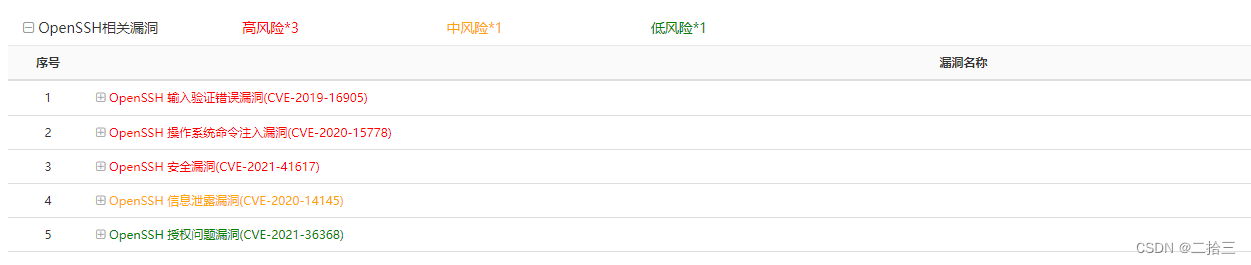
服务器漏洞,需要升级openssh版本到9.0。
openssl版本openssl版本# 查看`openssl`版本
[root@localhost opt]# openssl version
因为我这里已经升级过了,所以显示最新版

[root@localhost opt]# wget https://www.openssl.org/source/old/1.1.1/openssl-1.1.1p.tar.gz
[root@localhost opt]# tar -zxvf openssl-1.1.1p.tar.gz
如果在执行wget后指令提示command not found,是因为目标机上没有安装wget指令,需进行wget指令安装;
yum -y install wget
[root@localhost opt]#  cd openssl-1.1.1p/
# 编译
[root@localhost openssl-1.1.1p]# ./config --prefix=/usr/local/openssl
[root@localhost openssl-1.1.1p]# make && make install
[root@localhost openssl-1.1.1p]# mv /usr/bin/openssl /usr/bin/openssl.bak
[root@localhost openssl-1.1.1p]# ln -sf /usr/local/openssl/bin/openssl /usr/bin/openssl
[root@localhost openssl-1.1.1p]# echo "/usr/local/openssl/lib" >> /etc/ld.so.conf
# 设置生效
[root@localhost openssl-1.1.1p]# ldconfig -v
[root@localhost openssl-1.1.1p]# openssl version
# 下载SSh压缩包
[root@localhost opt]# wget https://cdn.openbsd.org/pub/OpenBSD/OpenSSH/portable/openssh-9.0p1.tar.gz
# 建议opt目录下
[root@localhost opt]# ls
openssh-9.0p1.tar.gz  rh
# 解压压缩包
[root@localhost opt]# tar -zxvf openssh-9.0p1.tar.gz

ssh相关文件# 卸载openssh服务
[root@localhost opt]# yum remove openssh –y
若出现下列/var/run/yum.pid 已被锁定,PID 为 11283 的另一个程序正在运行。 相关错误,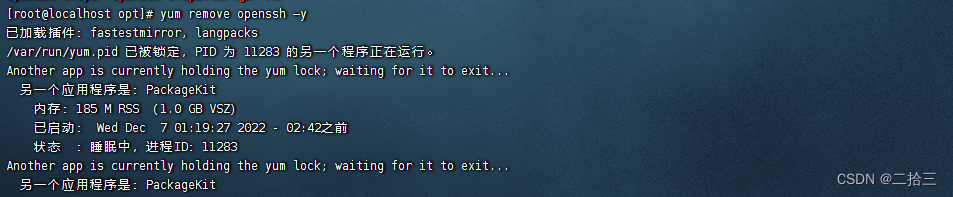
执行 rm -f /var/run/yum.pid 后重新卸载openssh服务

# 手动删除原有ssh相关文件
[root@localhost opt]# rm -rf /etc/ssh/*
[root@localhost opt]# ls
openssh-9.0p1  openssh-9.0p1.tar.gz  rh
[root@localhost opt]# cd openssh-9.0p1/
# 安装编译
[root@localhost openssh-9.0p1]# ./configure --prefix=/usr/ --sysconfdir=/etc/ssh  --with-openssl-includes=/usr/local/ssl/include --with-ssl-dir=/usr/local/ssl   --with-zlib   --with-md5-passwords   --with-pam && make && make install
安装过程中,可能出现如下错误:
若提示configure: error: *** zlib.h missing - please install first or check config.log ***,执行yum -y install zlib zlib-devel后重新进行安装编译
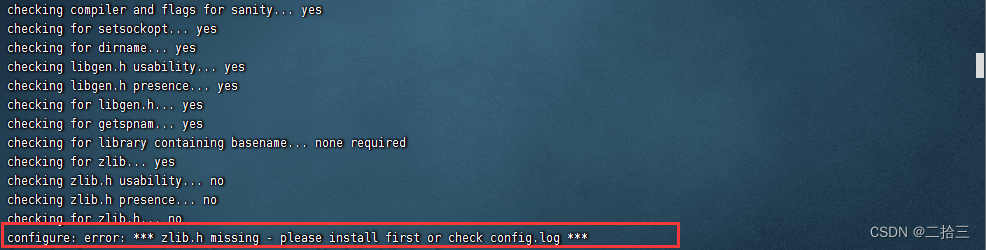 若提示
若提示configure: error: *** working libcrypto not found, check config.log,执行yum install -y openssl-devel后重新进行安装编译
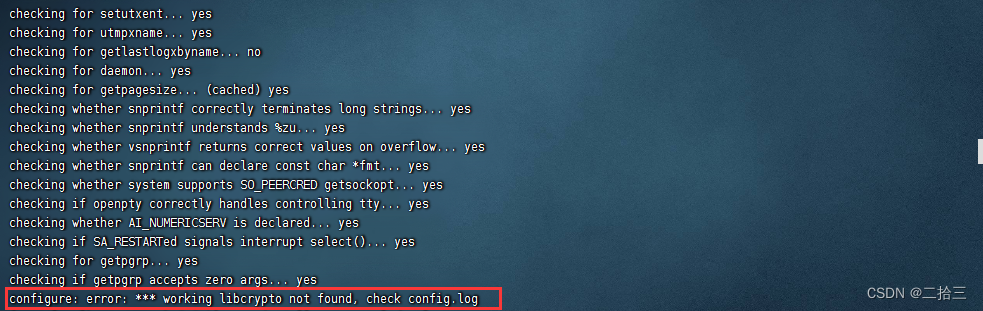
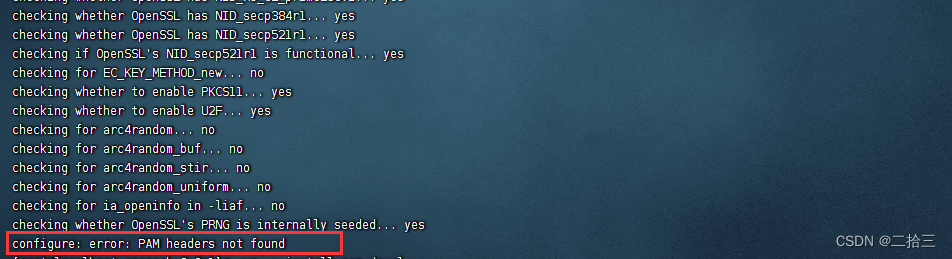
若提示configure: error: PAM headers not found,执行yum -y install pam-devel后重新进行安装编译
 Openssh安装完成图示:
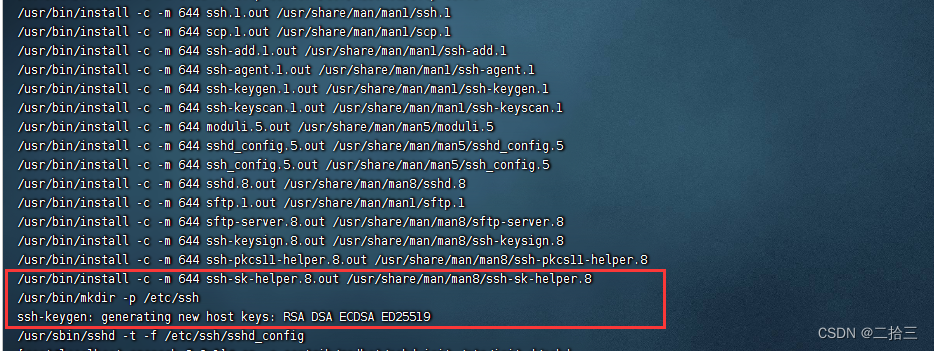
Openssh安装完成后在 /opt/openssh-9.0p1目录下执行如下命令:
[root@localhost openssh-9.0p1]# cp -a contrib/redhat/sshd.init /etc/init.d/sshd
[root@localhost openssh-9.0p1]# cp -a contrib/redhat/sshd.pam /etc/pam.d/sshd.pam
[root@localhost openssh-9.0p1]# chmod +x /etc/init.d/sshd
[root@localhost openssh-9.0p1]# chkconfig --add sshd
[root@localhost openssh-9.0p1]# chkconfig sshd on
[root@localhost openssh-9.0p1]# service sshd restart
[root@localhost openssh-9.0p1]# ssh -V
OpenSSH_9.0p1, OpenSSL 1.0.2k-fips  26 Jan 2017
我正在使用的第三方API的文档状态:"[O]urAPIonlyacceptspaddedBase64encodedstrings."什么是“填充的Base64编码字符串”以及如何在Ruby中生成它们。下面的代码是我第一次尝试创建转换为Base64的JSON格式数据。xa=Base64.encode64(a.to_json) 最佳答案 他们说的padding其实就是Base64本身的一部分。它是末尾的“=”和“==”。Base64将3个字节的数据包编码为4个编码字符。所以如果你的输入数据有长度n和n%3=1=>"=="末尾用于填充n%
尝试通过RVM将RubyGems升级到版本1.8.10并出现此错误:$rvmrubygemslatestRemovingoldRubygemsfiles...Installingrubygems-1.8.10forruby-1.9.2-p180...ERROR:Errorrunning'GEM_PATH="/Users/foo/.rvm/gems/ruby-1.9.2-p180:/Users/foo/.rvm/gems/ruby-1.9.2-p180@global:/Users/foo/.rvm/gems/ruby-1.9.2-p180:/Users/foo/.rvm/gems/rub
我在我的Rails项目中使用Pow和powifygem。现在我尝试升级我的ruby版本(从1.9.3到2.0.0,我使用RVM)当我切换ruby版本、安装所有gem依赖项时,我通过运行railss并访问localhost:3000确保该应用程序正常运行以前,我通过使用pow访问http://my_app.dev来浏览我的应用程序。升级后,由于错误Bundler::RubyVersionMismatch:YourRubyversionis1.9.3,butyourGemfilespecified2.0.0,此url不起作用我尝试过的:重新创建pow应用程序重启pow服务器更新战俘
我实际上是在尝试使用RVM在我的OSX10.7.5上更新ruby,并在输入以下命令后:rvminstallruby我得到了以下回复:Searchingforbinaryrubies,thismighttakesometime.Checkingrequirementsforosx.Installingrequirementsforosx.Updatingsystem.......Errorrunning'requirements_osx_brew_update_systemruby-2.0.0-p247',pleaseread/Users/username/.rvm/log/138121
我正在尝试修改当前依赖于定义为activeresource的gem:s.add_dependency"activeresource","~>3.0"为了让gem与Rails4一起工作,我需要扩展依赖关系以与activeresource的版本3或4一起工作。我不想简单地添加以下内容,因为它可能会在以后引起问题:s.add_dependency"activeresource",">=3.0"有没有办法指定可接受版本的列表?~>3.0还是~>4.0? 最佳答案 根据thedocumentation,如果你想要3到4之间的所有版本,你可以这
如果我使用ruby版本2.5.1和Rails版本2.3.18会怎样?我有基于rails2.3.18和ruby1.9.2p320构建的rails应用程序,我只想升级ruby的版本,而不是rails,这可能吗?我必须面对哪些挑战? 最佳答案 GitHub维护apublicfork它有针对旧Rails版本的分支,有各种变化,它们一直在运行。有一段时间,他们在较新的Ruby版本上运行较旧的Rails版本,而不是最初支持的版本,因此您可能会发现一些关于需要向后移植的有用提示。不过,他们现在已经有几年没有使用2.3了,所以充其量只能让更
我安装了ruby版本管理器,并将RVM安装的ruby实现设置为默认值,这样'哪个ruby'显示'~/.rvm/ruby-1.8.6-p383/bin/ruby'但是当我在emacs中打开inf-ruby缓冲区时,它使用安装在/usr/bin中的ruby。有没有办法让emacs像shell一样尊重ruby的路径?谢谢! 最佳答案 我创建了一个emacs扩展来将rvm集成到emacs中。如果您有兴趣,可以在这里获取:http://github.com/senny/rvm.el
我最近决定从我的系统中卸载RVM。在thispage提出的一些论点说服我:实际上,我的决定是,我根本不想担心Ruby的多个版本。我只想使用1.9.2-p290版本而不用担心其他任何事情。但是,当我在我的Mac上运行ruby--version时,它告诉我我的版本是1.8.7。我四处寻找如何简单地从我的Mac上卸载这个Ruby,但奇怪的是我没有找到任何东西。似乎唯一想卸载Ruby的人运行linux,而使用Mac的每个人都推荐RVM。如何从我的Mac上卸载Ruby1.8.7?我想升级到1.9.2-p290版本,并且我希望我的系统上只有一个版本。 最佳答案
有人知道在发布新版本的Ruby和Rails时收到电子邮件的方法吗?他们有邮件列表,RubyonRails有一个推特,但我不想听到那些随之而来的喧嚣,我只想知道什么时候发布新版本,尤其是那些有安全修复的版本。 最佳答案 从therailsblog获取提要.http://weblog.rubyonrails.org/feed/atom.xml 关于ruby-on-rails-如何在发布新的Ruby或Rails版本时收到通知?,我们在StackOverflow上找到一个类似的问题:
在应用开发中,有时候我们需要获取系统的设备信息,用于数据上报和行为分析。那在鸿蒙系统中,我们应该怎么去获取设备的系统信息呢,比如说获取手机的系统版本号、手机的制造商、手机型号等数据。1、获取方式这里分为两种情况,一种是设备信息的获取,一种是系统信息的获取。1.1、获取设备信息获取设备信息,鸿蒙的SDK包为我们提供了DeviceInfo类,通过该类的一些静态方法,可以获取设备信息,DeviceInfo类的包路径为:ohos.system.DeviceInfo.具体的方法如下:ModifierandTypeMethodDescriptionstatic StringgetAbiList()Obt
