
python使用中多线程、多进程、多协程使用是比较常见的。那么如果在多线程等的使用,我们这个时候我们想从外部强制杀掉该线程请问如何操作?下面我就分享一下我的执行看法:
作者:良知犹存
转载授权以及围观:欢迎关注微信公众号:羽林君
或者添加作者个人微信:become_me
在python多线程等的使用中,我们需要在外部强制终止线程,这个时候又没有unix的pthread kill的函数,多进程这个时候大家觉得可以使用kill -9 直接强制杀掉就可以了,从逻辑上这么做没问题,但是不太优雅。其中我总结了一下不仅是使用多线程,以及多协程、多进程在python的实现对比。
此外也可以参考stackoverlow的文章,如何优雅的关闭一个线程,里面有很多的讨论,大家可以阅读一下
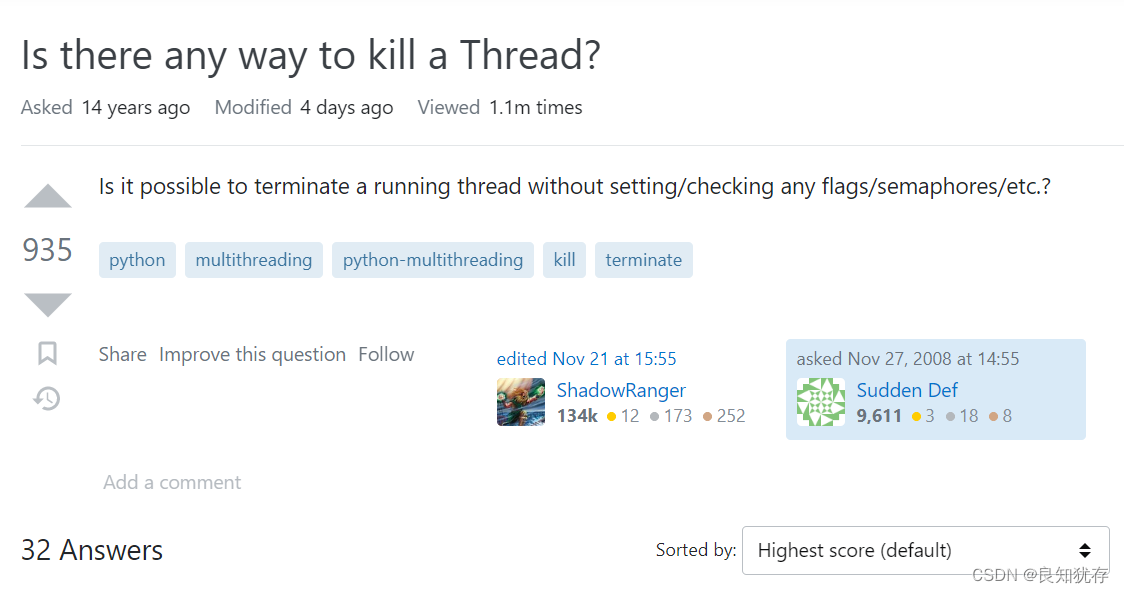
下面是网址:https://stackoverflow.com/questions/323972/is-there-any-way-to-kill-a-thread
开始进入正题:
首先线程中进行退出的话,我们经常会使用一种方式:子线程执行的循环条件设置一个条件,当我们需要退出子线程的时候,将该条件置位,这个时候子线程会主动退出,但是当子线程处于阻塞情况下,没有在循环中判断条件,并且阻塞时间不定的情况下,我们回收该线程也变得遥遥无期。这个时候就需要下面的几种方式出马了:
如果你设置一个线程为守护线程,就表示你在说这个线程是不重要的,在进程退出的时候,不用等待这个线程退出。
如果你的主线程在退出的时候,不用等待那些子线程完成,那就设置这些线程的daemon属性。即,在线程开始(thread.start())之前,调用setDeamon()函数,设定线程的daemon标志。(thread.setDaemon(True))就表示这个线程“不重要”。
如果你想等待子线程完成再退出,那就什么都不用做。,或者显示地调用thread.setDaemon(False),设置daemon的值为false。新的子线程会继承父线程的daemon标志。整个Python会在所有的非守护线程退出后才会结束,即进程中没有非守护线程存在的时候才结束。
也就是子线程为非deamon线程,主线程不立刻退出
import threading
import time
import gc
import datetime

def circle():
    print("begin")
    try:
        while True:
            current_time = datetime.datetime.now()
            print(str(current_time) + ' circle.................')
            time.sleep(3)
    except Exception as e:
        print('error:',e)
    finally:
        print('end')


if __name__ == "__main__":
   t = threading.Thread(target=circle)
   t.setDaemon(True)
   t.start()
   time.sleep(1)
   # stop_thread(t)
   # print('stoped threading Thread')
   current_time = datetime.datetime.now()
   print(str(current_time) + ' stoped after')
   gc.collect()
   while True:
      time.sleep(1)
      current_time = datetime.datetime.now()
      print(str(current_time) + ' end circle')
是否是主线程进行控制?
守护线程需要主线程退出才能完成子线程退出,下面是代码,再封装一层进行验证是否需要主线程退出
def Daemon_thread():
   circle_thread= threading.Thread(target=circle)
#    circle_thread.daemon = True
   circle_thread.setDaemon(True)
   circle_thread.start()
   while running:
        print('running:',running)
        time.sleep(1)
   print('end..........')


if __name__ == "__main__":
    t = threading.Thread(target=Daemon_thread)
    t.start()
    time.sleep(3)
    running = False
    print('stop running:',running)
    print('stoped 3')
    gc.collect()
    while True:
        time.sleep(3)
        print('stoped circle')
替换main函数执行,发现打印了 stoped 3这个标志后circle线程还在继续执行。
结论:处理信号靠的就是主线程,只有保证他活着,信号才能正确处理。
虽然使用PyThreadState_SetAsyncExc大部分情况下可以满足我们直接退出线程的操作;但是PyThreadState_SetAsyncExc方法只是为线程退出执行“计划”。它不会杀死线程,尤其是当它正在执行外部 C 库时。尝试sleep(100)用你的方法杀死一个。它将在 100 秒后被“杀死”。while flag:它与->flag = False方法一样有效。
所以子线程有例如sleep等阻塞函数时候,在休眠过程中,子线程无法响应,会被主线程捕获,导致无法取消子线程。就是实际上当线程休眠时候,直接使用async_raise 这个函数杀掉线程并不可以,因为如果线程在 Python 解释器之外忙,它就不会捕获中断
示例代码:
import ctypes
import inspect
import threading
import time
import gc
import datetime

def async_raise(tid, exctype):
   """raises the exception, performs cleanup if needed"""
   tid = ctypes.c_long(tid)
   if not inspect.isclass(exctype):
      exctype = type(exctype)
   res = ctypes.pythonapi.PyThreadState_SetAsyncExc(tid, ctypes.py_object(exctype))
   if res == 0:
      raise ValueError("invalid thread id")
   elif res != 1:
      # """if it returns a number greater than one, you're in trouble,
      # and you should call it again with exc=NULL to revert the effect"""
      ctypes.pythonapi.PyThreadState_SetAsyncExc(tid, None)
      raise SystemError("PyThreadState_SetAsyncExc failed")

def stop_thread(thread):
   async_raise(thread.ident, SystemExit)

def circle():
    print("begin")
    try:
        while True:
            current_time = datetime.datetime.now()
            print(str(current_time) + ' circle.................')
            time.sleep(3)
    except Exception as e:
        print('error:',e)
    finally:
        print('end')

if __name__ == "__main__":
   t = threading.Thread(target=circle)
   t.start()
   time.sleep(1)
   stop_thread(t)
   print('stoped threading Thread')
   current_time = datetime.datetime.now()
   print(str(current_time) + ' stoped after')
   gc.collect()
   while True:
      time.sleep(1)
      current_time = datetime.datetime.now()
      print(str(current_time) + ' end circle')
这个是最接近与 unix中pthread kill操作,网上看到一些使用,但是自己验证时候没有找到这个库里面的使用,
这是在python官方的signal解释文档里面的描述,看到是3.3 新版功能,我自己本身是python3.10,没有pthread_kill,可能是后续版本又做了去除。
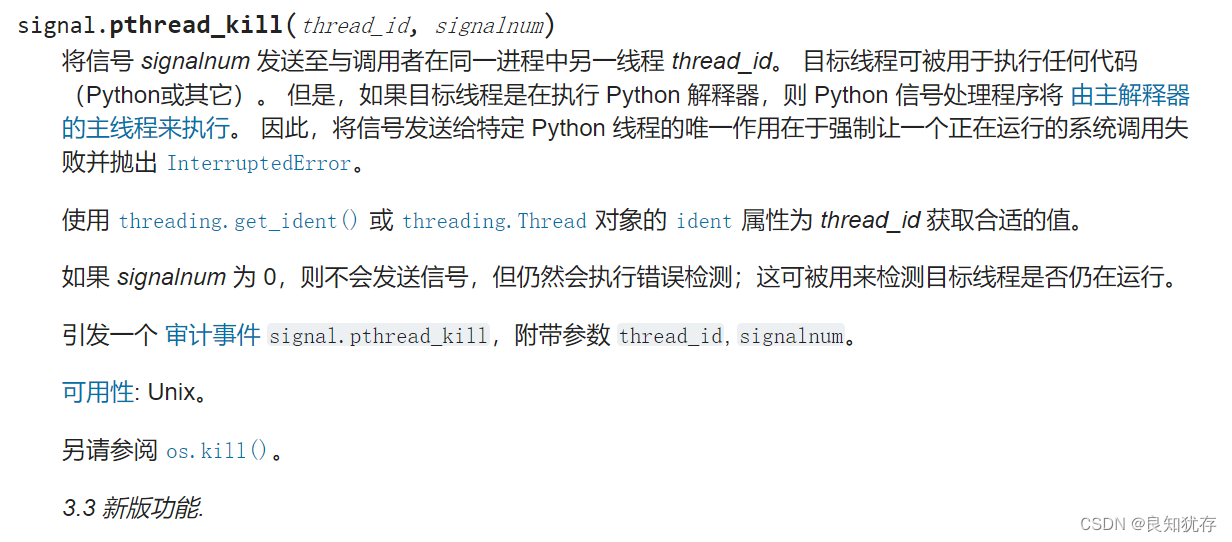
这是网上看到的一些示例代码,但是没法执行,如果有人知道使用可以进行交流。
from signal import pthread_kill, SIGTSTP
from threading import Thread
from itertools import count
from time import sleep

def target():
    for num in count():
        print(num)
        sleep(1)

thread = Thread(target=target)
thread.start()
sleep(5)
signal.pthread_kill(thread.ident, SIGTSTP)
multiprocessing 是一个支持使用与 threading 模块类似的 API 来产生进程的包。 multiprocessing 包同时提供了本地和远程并发操作,通过使用子进程而非线程有效地绕过了 全局解释器锁。 因此,multiprocessing 模块允许程序员充分利用给定机器上的多个处理器。
其中使用了multiprocess这些库,我们可以调用它内部的函数terminate帮我们释放。例如t.terminate(),这样就可以强制让子进程退出了。
不过使用了多进程数据的交互方式比较繁琐,得使用共享内存、pipe或者消息队列这些进行子进程和父进程的数据交互。
示例代码如下:
import time
import gc
import datetime
import multiprocessing

def circle():
    print("begin")
    try:
        while True:
            current_time = datetime.datetime.now()
            print(str(current_time) + ' circle.................')
            time.sleep(3)
    except Exception as e:
        print('error:',e)
    finally:
        print('end')


if __name__ == "__main__":
    t = multiprocessing.Process(target=circle, args=())
    t.start()
    # Terminate the process
    current_time = datetime.datetime.now()
    print(str(current_time) + ' stoped before')
    time.sleep(1)
    t.terminate()  # sends a SIGTERM
    current_time = datetime.datetime.now()
    print(str(current_time) + ' stoped after')
    gc.collect()
    while True:
        time.sleep(3)
        current_time = datetime.datetime.now()
        print(str(current_time) + ' end circle')
协程(coroutine)也叫微线程,是实现多任务的另一种方式,是比线程更小的执行单元,一般运行在单进程和单线程上。因为它自带CPU的上下文,它可以通过简单的事件循环切换任务,比进程和线程的切换效率更高,这是因为进程和线程的切换由操作系统进行。
Python实现协程的主要借助于两个库:asyncio(asyncio 是从Python3.4引入的标准库,直接内置了对协程异步IO的支持。asyncio 的编程模型本质是一个消息循环,我们一般先定义一个协程函数(或任务), 从 asyncio 模块中获取事件循环loop,然后把需要执行的协程任务(或任务列表)扔到 loop中执行,就实现了异步IO)和gevent(Gevent 是一个第三方库,可以轻松通过gevent实现并发同步或异步编程,在gevent中用到的主要模式是Greenlet, 它是以C扩展模块形式接入Python的轻量级协程。)。
由于asyncio已经成为python的标准库了无需pip安装即可使用,这意味着asyncio作为Python原生的协程实现方式会更加流行。本文仅会介绍asyncio模块的退出使用。
使用协程取消,有两个重要部分:第一,替换旧的休眠函数为多协程的休眠函数;第二取消使用cancel()函数。
其中cancel() 返回值为 True 表示 cancel 成功。
示例代码如下:创建一个coroutine,然后调用run_until_complete()来初始化并启动服务器来调用main函数,判断协程是否执行完成,因为设置的num协程是一个死循环,所以一直没有执行完,如果没有执行完直接使用 cancel()取消掉该协程,最后执行成功。
import asyncio
import time


async def num(n):
    try:
        i = 0
        while True:
            print(f'i={i} Hello')
            i=i+1
            # time.sleep(10)
            await asyncio.sleep(n*0.1)
        return n
    except asyncio.CancelledError:
        print(f"数字{n}被取消")
        raise


async def main():
    # tasks = [num(i) for i in range(10)]
    tasks = [num(10)]
    complete, pending = await asyncio.wait(tasks, timeout=0.5)
    for i in complete:
        print("当前数字",i.result())
    if pending:
        print("取消未完成的任务")
        for p in pending:
            p.cancel()


if __name__ == '__main__':
    loop = asyncio.get_event_loop()
    try:
        loop.run_until_complete(main())
    finally:
        loop.close()
这就是我自己的一些python 强制关闭线程、协程、进程的使用分享。如果大家有更好的想法和需求,也欢迎大家加我好友交流分享哈。
在思考如何强制关掉一个子线程或者子进程亦或者协程时候看了好多文章,python相关的很多信息,方便大家更细节的查看,我把链接放置在下方:
作者:良知犹存,白天努力工作,晚上原创公号号主。公众号内容除了技术还有些人生感悟,一个认真输出内容的职场老司机,也是一个技术之外丰富生活的人,摄影、音乐 and 篮球。关注我,与我一起同行。
‧‧‧‧‧‧‧‧‧‧‧‧‧‧‧‧ END ‧‧‧‧‧‧‧‧‧‧‧‧‧‧‧‧
推荐阅读
【3】CPU中的程序是怎么运行起来的 必读
本公众号全部原创干货已整理成一个目录,回复[ 资源 ]即可获得。
我正在学习如何使用Nokogiri,根据这段代码我遇到了一些问题:require'rubygems'require'mechanize'post_agent=WWW::Mechanize.newpost_page=post_agent.get('http://www.vbulletin.org/forum/showthread.php?t=230708')puts"\nabsolutepathwithtbodygivesnil"putspost_page.parser.xpath('/html/body/div/div/div/div/div/table/tbody/tr/td/div
总的来说,我对ruby还比较陌生,我正在为我正在创建的对象编写一些rspec测试用例。许多测试用例都非常基础,我只是想确保正确填充和返回值。我想知道是否有办法使用循环结构来执行此操作。不必为我要测试的每个方法都设置一个assertEquals。例如:describeitem,"TestingtheItem"doit"willhaveanullvaluetostart"doitem=Item.new#HereIcoulddotheitem.name.shouldbe_nil#thenIcoulddoitem.category.shouldbe_nilendend但我想要一些方法来使用
类classAprivatedeffooputs:fooendpublicdefbarputs:barendprivatedefzimputs:zimendprotecteddefdibputs:dibendendA的实例a=A.new测试a.foorescueputs:faila.barrescueputs:faila.zimrescueputs:faila.dibrescueputs:faila.gazrescueputs:fail测试输出failbarfailfailfail.发送测试[:foo,:bar,:zim,:dib,:gaz].each{|m|a.send(m)resc
我正在尝试设置一个puppet节点,但rubygems似乎不正常。如果我通过它自己的二进制文件(/usr/lib/ruby/gems/1.8/gems/facter-1.5.8/bin/facter)在cli上运行facter,它工作正常,但如果我通过由rubygems(/usr/bin/facter)安装的二进制文件,它抛出:/usr/lib/ruby/1.8/facter/uptime.rb:11:undefinedmethod`get_uptime'forFacter::Util::Uptime:Module(NoMethodError)from/usr/lib/ruby
关闭。这个问题是opinion-based.它目前不接受答案。想要改进这个问题?更新问题,以便editingthispost可以用事实和引用来回答它.关闭4年前。Improvethisquestion我想在固定时间创建一系列低音和高音调的哔哔声。例如:在150毫秒时发出高音调的蜂鸣声在151毫秒时发出低音调的蜂鸣声200毫秒时发出低音调的蜂鸣声250毫秒的高音调蜂鸣声有没有办法在Ruby或Python中做到这一点?我真的不在乎输出编码是什么(.wav、.mp3、.ogg等等),但我确实想创建一个输出文件。
我想了解Ruby方法methods()是如何工作的。我尝试使用“ruby方法”在Google上搜索,但这不是我需要的。我也看过ruby-doc.org,但我没有找到这种方法。你能详细解释一下它是如何工作的或者给我一个链接吗?更新我用methods()方法做了实验,得到了这样的结果:'labrat'代码classFirstdeffirst_instance_mymethodenddefself.first_class_mymethodendendclassSecond使用类#returnsavailablemethodslistforclassandancestorsputsSeco
我在我的项目中添加了一个系统来重置用户密码并通过电子邮件将密码发送给他,以防他忘记密码。昨天它运行良好(当我实现它时)。当我今天尝试启动服务器时,出现以下错误。=>BootingWEBrick=>Rails3.2.1applicationstartingindevelopmentonhttp://0.0.0.0:3000=>Callwith-dtodetach=>Ctrl-CtoshutdownserverExiting/Users/vinayshenoy/.rvm/gems/ruby-1.9.3-p0/gems/actionmailer-3.2.1/lib/action_mailer
设置:狂欢ruby1.9.2高线(1.6.13)描述:我已经相当习惯在其他一些项目中使用highline,但已经有几个月没有使用它了。现在,在Ruby1.9.2上全新安装时,它似乎不允许在同一行回答提示。所以以前我会看到类似的东西:require"highline/import"ask"Whatisyourfavoritecolor?"并得到:Whatisyourfavoritecolor?|现在我看到类似的东西:Whatisyourfavoritecolor?|竖线(|)符号是我的终端光标。知道为什么会发生这种变化吗? 最佳答案
在MRIRuby中我可以这样做:deftransferinternal_server=self.init_serverpid=forkdointernal_server.runend#Maketheserverprocessrunindependently.Process.detach(pid)internal_client=self.init_client#Dootherstuffwithconnectingtointernal_server...internal_client.post('somedata')ensure#KillserverProcess.kill('KILL',
我已经从我的命令行中获得了一切,所以我可以运行rubymyfile并且它可以正常工作。但是当我尝试从sublime中运行它时,我得到了undefinedmethod`require_relative'formain:Object有人知道我的sublime设置中缺少什么吗?我正在使用OSX并安装了rvm。 最佳答案 或者,您可以只使用“require”,它应该可以正常工作。我认为“require_relative”仅适用于ruby1.9+ 关于ruby-主要:Objectwhenrun
