 本文将展示如何使用三种不同级别的方法处理这些缺失值:
import pandas as pd
df = pd.read_csv('Wine_Quality.csv')df.isnull().sum()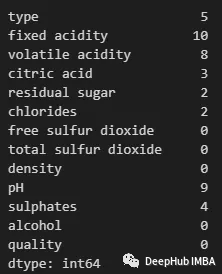 可以使用以下方法查看任何特性中包含缺失值的行:
df_filtered = df[df.isnull().any(axis=1)]
df_filtered.head() 现在我们可以开始处理这些缺失的值了。
df_droprows = df.dropna()
df_droprows.isnull().sum()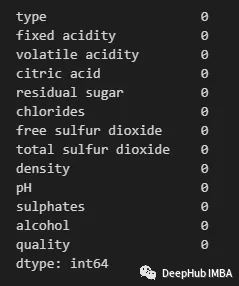 使用以下方法删除列或特性:
df_dropcols = df.drop(columns=['type', 'fixed acidity', 'citric acid', 'volatile acidity', 'residual sugar', 'chlorides', 'pH', 'sulphates'])
df_dropcols.isnull().sum()print("Shape when dropping rows: ", df_droprows.shape)
print("Shape when dropping features: ", df_dropcols.shape) 这两种方法都最直接的方法,而且都会导致丢失有价值的数据——所以一般情况下不建议使用。
df = df.fillna(df.mean())df[df.index==86] 如果要用中值,可以使用:
df = df.fillna(df.median())
df[df.index==86] 可以看到这里中值和平均值还是有区别的。
df['type'].value_counts()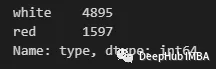 可以看到有一个“白色”数量最多。因此可以用下面的方式进行填充:
df['type'] = df['type'].fillna(df['type'].mode())df_numeric = df.drop(columns='type')
imputer_median = SimpleImputer(strategy='median')
imputer_median.fit(df_numeric)
df_imputed_median = pd.DataFrame(imputer_median.transform(df_numeric), columns=df_numeric.columns)
df_imputed_median.head()import pandas as pd
from sklearn.linear_model import LinearRegression
# Read data
df = pd.read_csv('Wine_Quality.csv')
# Make sub dataframe with only numeric features
df = df.drop(columns='type')
# Separate the columns with missing values
missing_cols = df.columns[df.isna().any()].tolist()
non_missing_cols = list(set(df.columns) - set(missing_cols))
print(missing_cols)
# loop over each column with missing values
for col in missing_cols:
# Create a copy of the dataframe without missing values in the current column
df_temp = df.dropna(subset=[col] + non_missing_cols)
# Split the dataframe into features (X) and target variable (y)
X = df_temp[non_missing_cols]
y = df_temp[col]
# Create and fit a linear regression model
lr = LinearRegression()
lr.fit(X, y)
# Impute missing values in the current column using the fitted model
df.loc[df[col].isna(), col] = lr.predict(df.loc[df[col].isna(), non_missing_cols]) 回归插补的优点:
import pandas as pd
from sklearn.impute import KNNImputer
# Read data
df = pd.read_csv('Wine_Quality.csv')
# Make sub dataframe with only numeric features
df = df.drop(columns='type')
# create a KNN imputer object
imputer = KNNImputer(n_neighbors=5)
# impute missing values using KNN
df = pd.DataFrame(imputer.fit_transform(df), columns=df.columns) 这里我们就要介绍一个包fancyimpute,它包含了各种插补方法:
pip install fancyimpute# Import the necessary libraries
import numpy as np
import pandas as pd
from fancyimpute import KNN
# Load the dataset
df = pd.read_csv('Wine_Quality.csv')
# Drop non-numeric features
df = df.drop(columns='type')
# Get list of columns with missing values
missing_cols = df.columns[df.isna().any()].tolist()
# Create an instance of the KNN imputer
imputer = KNN()
# Fit and transform the imputer to the dataset
imputed_array = imputer.fit_transform(df[missing_cols])
# Replace the missing values in the original dataset
df[missing_cols] = imputed_array
# View the imputed dataset
dfimport numpy as np
import pandas as pd
from fancyimpute import IterativeImputer
# Read data
df = pd.read_csv('Wine_Quality.csv')
# Convert type column to category (so that miceforest can handle as a categorical attribute rather than string)
df= df.drop(columns='type')
# Get list of columns with missing values
missing_cols = df.columns[df.isna().any()].tolist()
# Create an instance of the MICE algorithm
imputer = IterativeImputer()
# Fit the imputer to the dataset
imputed_array = imputer.fit_transform(df[missing_cols])
# Replace the missing values in the original dataset
df[missing_cols] = imputed_array
# View the imputed dataset
dfpip install miceforest
#或
conda install -c conda-forge miceforestimport pandas as pd
import miceforest as mf
# Read data
df = pd.read_csv('Wine_Quality.csv')
# Convert type column to category (so that miceforest can handle as a categorical attribute rather than string)
df['type'] = df['type'].astype('category')
# Create an instance of the MICE algorithm
imputer = mf.ImputationKernel(data=df,
save_all_iterations=True,
random_state=42)
# Fit the imputer to the dataset. Set number of iterations to 3
imputer.mice(3, verbose=True)
# Generate the imputed dataset
imputed_df = imputer.complete_data()
# View the imputed dataset
imputed_df我正在学习如何使用Nokogiri,根据这段代码我遇到了一些问题:require'rubygems'require'mechanize'post_agent=WWW::Mechanize.newpost_page=post_agent.get('http://www.vbulletin.org/forum/showthread.php?t=230708')puts"\nabsolutepathwithtbodygivesnil"putspost_page.parser.xpath('/html/body/div/div/div/div/div/table/tbody/tr/td/div
总的来说,我对ruby还比较陌生,我正在为我正在创建的对象编写一些rspec测试用例。许多测试用例都非常基础,我只是想确保正确填充和返回值。我想知道是否有办法使用循环结构来执行此操作。不必为我要测试的每个方法都设置一个assertEquals。例如:describeitem,"TestingtheItem"doit"willhaveanullvaluetostart"doitem=Item.new#HereIcoulddotheitem.name.shouldbe_nil#thenIcoulddoitem.category.shouldbe_nilendend但我想要一些方法来使用
类classAprivatedeffooputs:fooendpublicdefbarputs:barendprivatedefzimputs:zimendprotecteddefdibputs:dibendendA的实例a=A.new测试a.foorescueputs:faila.barrescueputs:faila.zimrescueputs:faila.dibrescueputs:faila.gazrescueputs:fail测试输出failbarfailfailfail.发送测试[:foo,:bar,:zim,:dib,:gaz].each{|m|a.send(m)resc
我正在尝试设置一个puppet节点,但rubygems似乎不正常。如果我通过它自己的二进制文件(/usr/lib/ruby/gems/1.8/gems/facter-1.5.8/bin/facter)在cli上运行facter,它工作正常,但如果我通过由rubygems(/usr/bin/facter)安装的二进制文件,它抛出:/usr/lib/ruby/1.8/facter/uptime.rb:11:undefinedmethod`get_uptime'forFacter::Util::Uptime:Module(NoMethodError)from/usr/lib/ruby
我想了解Ruby方法methods()是如何工作的。我尝试使用“ruby方法”在Google上搜索,但这不是我需要的。我也看过ruby-doc.org,但我没有找到这种方法。你能详细解释一下它是如何工作的或者给我一个链接吗?更新我用methods()方法做了实验,得到了这样的结果:'labrat'代码classFirstdeffirst_instance_mymethodenddefself.first_class_mymethodendendclassSecond使用类#returnsavailablemethodslistforclassandancestorsputsSeco
Rackup通过Rack的默认处理程序成功运行任何Rack应用程序。例如:classRackAppdefcall(environment)['200',{'Content-Type'=>'text/html'},["Helloworld"]]endendrunRackApp.new但是当最后一行更改为使用Rack的内置CGI处理程序时,rackup给出“NoMethodErrorat/undefinedmethod`call'fornil:NilClass”:Rack::Handler::CGI.runRackApp.newRack的其他内置处理程序也提出了同样的反对意见。例如Rack
我在我的项目中添加了一个系统来重置用户密码并通过电子邮件将密码发送给他,以防他忘记密码。昨天它运行良好(当我实现它时)。当我今天尝试启动服务器时,出现以下错误。=>BootingWEBrick=>Rails3.2.1applicationstartingindevelopmentonhttp://0.0.0.0:3000=>Callwith-dtodetach=>Ctrl-CtoshutdownserverExiting/Users/vinayshenoy/.rvm/gems/ruby-1.9.3-p0/gems/actionmailer-3.2.1/lib/action_mailer
设置:狂欢ruby1.9.2高线(1.6.13)描述:我已经相当习惯在其他一些项目中使用highline,但已经有几个月没有使用它了。现在,在Ruby1.9.2上全新安装时,它似乎不允许在同一行回答提示。所以以前我会看到类似的东西:require"highline/import"ask"Whatisyourfavoritecolor?"并得到:Whatisyourfavoritecolor?|现在我看到类似的东西:Whatisyourfavoritecolor?|竖线(|)符号是我的终端光标。知道为什么会发生这种变化吗? 最佳答案
我已经从我的命令行中获得了一切,所以我可以运行rubymyfile并且它可以正常工作。但是当我尝试从sublime中运行它时,我得到了undefinedmethod`require_relative'formain:Object有人知道我的sublime设置中缺少什么吗?我正在使用OSX并安装了rvm。 最佳答案 或者,您可以只使用“require”,它应该可以正常工作。我认为“require_relative”仅适用于ruby1.9+ 关于ruby-主要:Objectwhenrun
我有一个具有一些属性的模型:attr1、attr2和attr3。我需要在不执行回调和验证的情况下更新此属性。我找到了update_column方法,但我想同时更新三个属性。我需要这样的东西:update_columns({attr1:val1,attr2:val2,attr3:val3})代替update_column(attr1,val1)update_column(attr2,val2)update_column(attr3,val3) 最佳答案 您可以使用update_columns(attr1:val1,attr2:val2
