Odoo的一个强大方面是它的模块化。模块专用于业务需求,但模块也可以相互交互。这对于扩展现有模块的功能非常有用。例如,在我们的房地产场景中,我们希望在常规用户视图中直接显示销售人员的财产列表。
在介绍特定的Odoo模块继承之前,让我们看看如何更改标准CRUD(创建、检索,更新或删除)方法的行为
目标:
不能删除状态不为New、Canceled的房产
预期效果动画地址:https://www.odoo.com/documentation/14.0/zh_CN/_images/unlink.gif
房产收到报价时,房产状态应该改成‘Offer Received’
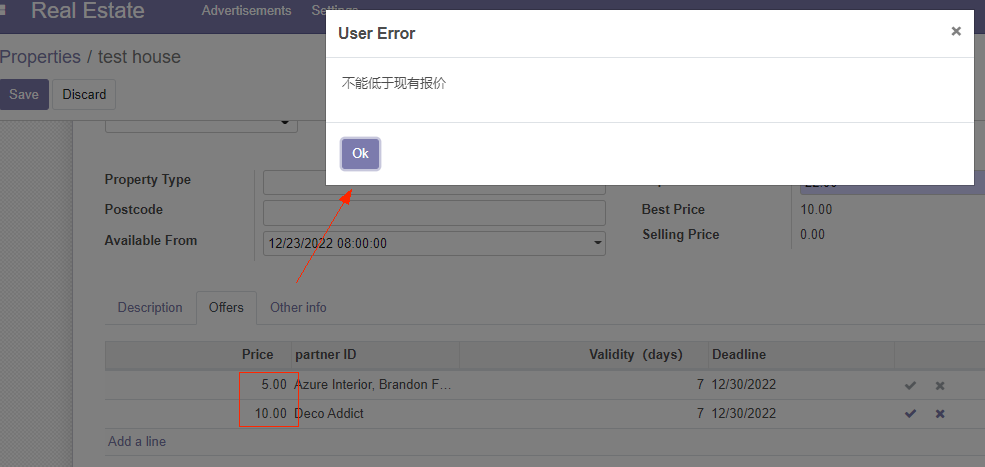
不能以低于现有报价的价格创建报价
预期效果动画地址:https://www.odoo.com/documentation/14.0/zh_CN/_images/create.gif
在我们的房地产模块中,我们从不需要开发任何特定的东西来执行标准的CRUD操作。Odoo框架提供了实现这些操作的必要工具。事实上,多亏经典的Python继承,我们的模型中已经包含了这样的操作:
from odoo import fields, models

class TestModel(models.Model):
    _name = "test.model"
    _description = "Test Model"

    ...
我们的 TestModel 类继承与Model,该Model类提供了 create(), read(), write() 和unlink()方法。
这些方法(和其它在Model中定义的任何方法)可被扩展以添加指定业务逻辑:
from odoo import fields, models

class TestModel(models.Model):
    _name = "test.model"
    _description = "Test Model"

    ...

    @api.model
    def create(self, vals):
        # Do some business logic, modify vals...
        ...
        # Then call super to execute the parent method
        return super().create(vals)
model()装饰器对于create() 方法来说是必需的,因为结果集self的内容和创建(creation)的上下文无关,但该装饰器对于其它CRUD方法来说不是必需的。
Python 3中, super() 等价于 super(TestModel, self)。当你需要使用一条被修改后的结果集调用父方法时,可能需要使用后者。
危险提示
- 总是调用
super()以避免中断流非常重要。只有少数非常特殊的情况才无需调用它。- 总是返回和父方法一致的数据。例如父方法返回一个
dict(),你重写父方法时也要返回一个dict()
练习--添加业务逻辑到CRUD方法
New,Canceled,则不让删除提示:重写unlink() ,并记住self可以是一个包含多条记录的结果集。
提示: 可在vals中获取property_id 字段,但是它是一个int型。要实例化一个estate.property 对象,请使用self.env[model_name].browse(value) (示例)
    @api.model
    def create(self, vals):
        self.env['gamification.badge'].browse(vals['badge_id']).check_granting()
        return super(BadgeUser, self).create(vals)
修改odoo14\custom\estate\views\estate_property_views.xml 去掉estate_property_view_tree 中<tree>元素的editable="top"属性(说明:为了方便执行报价创建操作)
修改odoo14\custom\estate\models\estate_property.py
    @api.constrains('selling_price', 'expected_price')
    def _check_selling_price(self):
        # if record.selling_price < self.expected_price * 0.9:
        #     raise ValidationError("selling price can`t not lower then 90 percent of expected price")
        pass
说明:为了方便实践操作,暂且不做售价校验
最末尾新增以下代码
    def unlink(self):
        for record in self:
            if record.state not in ['New', 'Canceled']:
                raise UserError('can`t delete property which status is New or Canceled')
        return super().unlink()
修改odoo14\custom\estate\models\estate_property_offer.py,导入UserError
from odoo.exceptions import UserError
最末尾添加一下代码
    @api.model
    def create(self, vals):
        property = self.env['estate.property'].browse(vals['property_id'])

        if vals.get('price') < property.best_price:
            raise  UserError('不能低于现有报价')
        property.state = 'Offer Received'
        return super().create(vals)
重启服务,刷新浏览器验证
删除非New、Canceled状态的房产,提示如下:


引用: 查看主题相关文档继承和扩展
我们希望在“Settings/Users & Companies/Users”表单视图中直接显示与销售人员关联的房产列表。为此,我们需要向res.users模型添加一个字段,并调整其视图以显示它。
Odoo提供了两种继承机制来以模块化的方式扩展现有模型。
第一继承机制允许模块通过以下方式修改在另一个模块中定义的模型的行为:
向模型添加字段
覆盖模型中字段的定义
给模型添加约束
给模型添加方法
重写模型中的现有方法
第二种继承机制(委托)允许将模型的每个记录链接到父模型的记录,并提供对该父记录的字段的透明访问。

odoo中,第一种机制最常用。在我们的例子中,我们希望向现有模型添加一个字段,这意味着我们将使用第一种机制。例如:
from odoo import fields, models

class InheritedModel(models.Model):
    _inherit = "inherited.model"

    new_field = fields.Char(string="New Field")
这里可以找到将两个字段添加到模型中的示例
class AccountMoveLine(models.Model):
    _inherit = 'account.move.line'

    vehicle_id = fields.Many2one('fleet.vehicle', string='Vehicle')
    need_vehicle = fields.Boolean(compute='_compute_need_vehicle',
        help="Technical field to decide whether the vehicle_id field is editable")

    def _compute_need_vehicle(self):
        self.need_vehicle = False
按照惯例,每个继承的模型都在其自己的Python文件中定义。在我们的示例中为“models/inherited_model.py”。
res.users:| Field | Type |
|---|---|
| property_ids | One2many inverse of salesman_id to estate.property |
domain到该字段,这样以便仅显示可获取房产。新增odoo14\custom\estate\models\estate_res_user.py
#!/usr/bin/env python
# -*- coding:utf-8 -*-

from odoo import models, fields

class EstateResUser(models.Model):
    _inherit = 'res.users'

    property_ids = fields.One2many('estate.property', 'salesman_id', domain="[('salesman_id', '=', active_id)]")
修改odoo14\custom\estate\models\__init__.py
#!/usr/bin/env python
# -*- coding:utf-8 -*-

from . import estate_property_type
from . import estate_property_tag
from . import estate_property_offer
from . import estate_property
from . import estate_res_user # 本次新增
参考: 主题关联文档可查看Inheritance.
目标: 在用户表单视图中显示与销售人员关联的avaliable房产列表其用户表单视图
Odoo提供了视图继承,其中子“扩展”视图应用于根视图之上,而不是就地修改现有视图(通过重写它们)。这些扩展既可以添加内容,也可以从父视图中删除内容。
扩展视图使用inherit_id字段引用其父视图。它的arch字段包含多个xpath元素,用于选择和更改父视图的内容,而不是单个视图:
<record id="inherited_model_view_form" model="ir.ui.view">
    <field name="name">inherited.model.form.inherit.test</field>
    <field name="model">inherited.model</field>
    <field name="inherit_id" ref="inherited.inherited_model_view_form"/>
    <field name="arch" type="xml">
        <!-- find field description and add the field
             new_field after it -->
        <xpath expr="//field[@name='description']" position="after">
          <field name="new_field"/>
        </xpath>
    </field>
</record>
expr
一个用于选择父视图中单个元素的XPath表达式。如果不匹配任何元素或者匹配多个元素,则抛出错误
position
应用于匹配元素的操作:
inside
将xpath的主体附加到匹配元素的末尾(个人理解,添加为匹配元素的子元素)
replace
将匹配元素替换为xpath的主体,将新主体中出现的任何$0节点替换为原始元素
before
在匹配元素之前插入xpath的主体作为同级元素
after
在匹配的元素之后插入xpaths的主体,作为同级元素
attributes
使用xpath主体中的特定属性元素更改匹配元素的属性
当匹配单个元素时,可以直接在要查找的元素上设置position属性。以下两种继承都有相同的结果
<xpath expr="//field[@name='description']" position="after">
    <field name="idea_ids" />
</xpath>

<field name="description" position="after">
    <field name="idea_ids" />
</field>
在这里可以找到视图继承扩展的示例
<?xml version='1.0' encoding='utf-8'?>
<odoo>
    <record id="view_move_form" model="ir.ui.view">
        <field name="name">account.move.form</field>
        <field name="model">account.move</field>
        <field name="inherit_id" ref="account.view_move_form"/>
        <field name="arch" type="xml">
            <xpath expr="//field[@name='line_ids']//field[@name='account_id']" position="after">
                <field name='need_vehicle' invisible='1'/>
                <field name='vehicle_id' attrs="{'required': [('need_vehicle', '=', True), ('parent.move_type', '=', 'in_invoice')], 'column_invisible': [('parent.move_type', '!=', 'in_invoice')]}" optional='hidden'/>
            </xpath>
            <xpath expr="//field[@name='invoice_line_ids']//field[@name='account_id']" position="after">
                <field name='need_vehicle' invisible='1'/>
                <field name='vehicle_id' attrs="{'required': [('need_vehicle', '=', True), ('parent.move_type', '=', 'in_invoice')], 'column_invisible': [('parent.move_type', '!=', 'in_invoice')]}" optional='hidden'/>
            </xpath>
        </field>
    </record>
</odoo>
添加property_ids字段到 base.view_users_form 中新建的notebook页
提示: 可以在 这里找到继承用户视图的示例。
<?xml version="1.0" encoding="utf-8"?>
<odoo>
<data>

    <record id="res_users_view_form" model="ir.ui.view">
        <field name="name">res.users.view.form.inherit.gamification</field>
        <field name="model">res.users</field>
        <field name="inherit_id" ref="base.view_users_form"/>
        <field name="arch" type="xml">
            <group name="messaging" position="inside">
                <field name="karma"/>
            </group>
        </field>
    </record>

</data>
</odoo>
新增odoo14\custom\estate\views\estate_res_users_views.xml
<?xml version="1.0" encoding="utf-8"?>
<odoo>
<data>
    <record id="estate_res_users_view_form" model="ir.ui.view">
        <field name="name">estate.res.users.view.form</field>
        <field name="model">res.users</field>
        <field name="inherit_id" ref="base.view_users_form"/>
        <field name="arch" type="xml">
            <xpath expr="//page[@name='references']" position="after">
                <page string="Real Estate Properties" name="RealEstateProperties">
                    <field name='property_ids'/>
                </page>
            </xpath>
        </field>
    </record>
</data>
</odoo>
修改odoo14\custom\estate\__manifest__.py
#!/usr/bin/env python
# -*- coding:utf-8 -*-
{
    'name': 'estate',
    'depends': ['base'],
    'data':['security/ir.model.access.csv',
            'views/estate_property_views.xml',
            'views/estate_property_type_views.xml',
            'views/estate_property_tag_views.xml',
            'views/estate_property_offer_views.xml',
            'views/estate_menus.xml',
            'views/estate_res_users_views.xml' # 本次新增
            ]
}
重启服务,验证效果

关闭。这个问题是opinion-based.它目前不接受答案。想要改进这个问题?更新问题,以便editingthispost可以用事实和引用来回答它.关闭4年前。Improvethisquestion我想在固定时间创建一系列低音和高音调的哔哔声。例如:在150毫秒时发出高音调的蜂鸣声在151毫秒时发出低音调的蜂鸣声200毫秒时发出低音调的蜂鸣声250毫秒的高音调蜂鸣声有没有办法在Ruby或Python中做到这一点?我真的不在乎输出编码是什么(.wav、.mp3、.ogg等等),但我确实想创建一个输出文件。
我正在编写一个包含C扩展的gem。通常当我写一个gem时,我会遵循TDD的过程,我会写一个失败的规范,然后处理代码直到它通过,等等......在“ext/mygem/mygem.c”中我的C扩展和在gemspec的“扩展”中配置的有效extconf.rb,如何运行我的规范并仍然加载我的C扩展?当我更改C代码时,我需要采取哪些步骤来重新编译代码?这可能是个愚蠢的问题,但是从我的gem的开发源代码树中输入“bundleinstall”不会构建任何native扩展。当我手动运行rubyext/mygem/extconf.rb时,我确实得到了一个Makefile(在整个项目的根目录中),然后当
这里是Ruby新手。完成一些练习后碰壁了。练习:计算一系列成绩的字母等级创建一个方法get_grade来接受测试分数数组。数组中的每个分数应介于0和100之间,其中100是最大分数。计算平均分并将字母等级作为字符串返回,即“A”、“B”、“C”、“D”、“E”或“F”。我一直返回错误:avg.rb:1:syntaxerror,unexpectedtLBRACK,expecting')'defget_grade([100,90,80])^avg.rb:1:syntaxerror,unexpected')',expecting$end这是我目前所拥有的。我想坚持使用下面的方法或.join,
我已经在Sinatra上创建了应用程序,它代表了一个简单的API。我想在生产和开发上进行部署。我想在部署时选择,是开发还是生产,一些方法的逻辑应该改变,这取决于部署类型。是否有任何想法,如何完成以及解决此问题的一些示例。例子:我有代码get'/api/test'doreturn"Itisdev"end但是在部署到生产环境之后我想在运行/api/test之后看到ItisPROD如何实现? 最佳答案 根据SinatraDocumentation:EnvironmentscanbesetthroughtheRACK_ENVenvironm
我们的git存储库中目前有一个Gemfile。但是,有一个gem我只在我的环境中本地使用(我的团队不使用它)。为了使用它,我必须将它添加到我们的Gemfile中,但每次我checkout到我们的master/dev主分支时,由于与跟踪的gemfile冲突,我必须删除它。我想要的是类似Gemfile.local的东西,它将继承从Gemfile导入的gems,但也允许在那里导入新的gems以供使用只有我的机器。此文件将在.gitignore中被忽略。这可能吗? 最佳答案 设置BUNDLE_GEMFILE环境变量:BUNDLE_GEMFI
这似乎非常适得其反,因为太多的gem会在window上破裂。我一直在处理很多mysql和ruby-mysqlgem问题(gem本身发生段错误,一个名为UnixSocket的类显然在Windows机器上不能正常工作,等等)。我只是在浪费时间吗?我应该转向不同的脚本语言吗? 最佳答案 我在Windows上使用Ruby的经验很少,但是当我开始使用Ruby时,我是在Windows上,我的总体印象是它不是Windows原生系统。因此,在主要使用Windows多年之后,开始使用Ruby促使我切换回原来的系统Unix,这次是Linux。Rub
我正在玩HTML5视频并且在ERB中有以下片段:mp4视频从在我的开发环境中运行的服务器很好地流式传输到chrome。然而firefox显示带有海报图像的视频播放器,但带有一个大X。问题似乎是mongrel不确定ogv扩展的mime类型,并且只返回text/plain,如curl所示:$curl-Ihttp://0.0.0.0:3000/pr6.ogvHTTP/1.1200OKConnection:closeDate:Mon,19Apr201012:33:50GMTLast-Modified:Sun,18Apr201012:46:07GMTContent-Type:text/plain
无论您是想搭建桌面端、WEB端或者移动端APP应用,HOOPSPlatform组件都可以为您提供弹性的3D集成架构,同时,由工业领域3D技术专家组成的HOOPS技术团队也能为您提供技术支持服务。如果您的客户期望有一种在多个平台(桌面/WEB/APP,而且某些客户端是“瘦”客户端)快速、方便地将数据接入到3D应用系统的解决方案,并且当访问数据时,在各个平台上的性能和用户体验保持一致,HOOPSPlatform将帮助您完成。利用HOOPSPlatform,您可以开发在任何环境下的3D基础应用架构。HOOPSPlatform可以帮您打造3D创新型产品,HOOPSSDK包含的技术有:快速且准确的CAD
在应用开发中,有时候我们需要获取系统的设备信息,用于数据上报和行为分析。那在鸿蒙系统中,我们应该怎么去获取设备的系统信息呢,比如说获取手机的系统版本号、手机的制造商、手机型号等数据。1、获取方式这里分为两种情况,一种是设备信息的获取,一种是系统信息的获取。1.1、获取设备信息获取设备信息,鸿蒙的SDK包为我们提供了DeviceInfo类,通过该类的一些静态方法,可以获取设备信息,DeviceInfo类的包路径为:ohos.system.DeviceInfo.具体的方法如下:ModifierandTypeMethodDescriptionstatic StringgetAbiList()Obt
1.postman介绍Postman一款非常流行的API调试工具。其实,开发人员用的更多。因为测试人员做接口测试会有更多选择,例如Jmeter、soapUI等。不过,对于开发过程中去调试接口,Postman确实足够的简单方便,而且功能强大。2.下载安装官网地址:https://www.postman.com/下载完成后双击安装吧,安装过程极其简单,无需任何操作3.使用教程这里以百度为例,工具使用简单,填写URL地址即可发送请求,在下方查看响应结果和响应状态码常用方法都有支持请求方法:getpostputdeleteGet、Post、Put与Delete的作用get:请求方法一般是用于数据查询,



