Vue Router 是Vue.js的官方路由。与Vue.js核心深度集成,让用Vue.js构建单页应用(SPA)变得更加简单。

对于开发和维护管理后台类的前端项目,页面结构和组合可能非常复杂,所以正确的理解和使用Vue Router就显得尤为重要。
1、在安装好Vue Router依赖后,在App.vue中引入router-view,它是渲染的容器
<div id="app">
  <router-view></router-view>
</div>2、创建路由router/index.js
const routes = [
  	{ path: '/', component: Home},
    { path: '/login', name: 'login', component: Login},
]
const  router = createRouter({
  history: createWebHistory(),
  routes: routes,
})
export default router3、在main.js中使用路由
import router from "./router";
const app = createApp(App)

app.use(router)

app.mount('#app')然后就可以在任意组件中使用this.$router形式访问它,并且以 this.$route 的形式访问当前路由:
// Home.vue
export default {
  computed: {
    username() {
      // 我们很快就会看到 `params` 是什么
      return this.$route.params.username
    },
  },
  methods: {
    goToDashboard() {
      if (isAuthenticated) {
        this.$router.push('/dashboard')
      } else {
        this.$router.push('/login')
      }
    },
  },
}一些应用程序的 UI 由多层嵌套的组件组成。在这种情况下,URL 的片段通常对应于特定的嵌套组件结构,例如:
/user/johnny/profile                     /user/johnny/posts
+------------------+                  +-----------------+
| User             |                  | User            |
| +--------------+ |                  | +-------------+ |
| | Profile      | |  +------------>  | | Posts       | |
| |              | |                  | |             | |
| +--------------+ |                  | +-------------+ |
+------------------+ +-----------------+在上层app节点的顶层router-view下,又包含的组件自己嵌套的router-view,例如以上的user模版:
const User = {
  template: `
    <div class="user">
      <h2>User {{ $route.params.id }}</h2>
      <router-view></router-view>
    </div>
  `,
}要将组件渲染到这个嵌套的router-view中,我们需要在路由中配置 children:
const routes = [
  {
    path: '/user/:id',
    component: User,
    children: [
      {
        // 当 /user/:id/profile 匹配成功
        // UserProfile 将被渲染到 User 的 <router-view> 内部
        path: 'profile',
        component: UserProfile,
      },
      {
        // 当 /user/:id/posts 匹配成功
        // UserPosts 将被渲染到 User 的 <router-view> 内部
        path: 'posts',
        component: UserPosts,
      },
    ],
  },
]
下面我们从源码的角度看下页面是如何加载并显示到页面上的
上面基础的使用方法可以看出,主要包含三个步骤:
createRouter,并在app中use使用这个路由router-view标签push,跳转页面从routers声明的数组结构可以看出,声明的路由path会被注册成路由表指向component声明的组件,并在push方法调用时,从路由表查出对应组件并加载。下面看下源码是如何实现这一过程的,Vue Router源码分析版本为4.1.5

首先看下createRouter方法实现:
/**
 * Creates a Router instance that can be used by a Vue app.
 *
 * @param options - {@link RouterOptions}
 */
export function createRouter(options: RouterOptions): Router {
  const matcher = createRouterMatcher(options.routes, options)
  // ...

  function addRoute(
    parentOrRoute: RouteRecordName | RouteRecordRaw,
    route?: RouteRecordRaw
  ) {
    // ...
  }

  function getRoutes() {
    return matcher.getRoutes().map(routeMatcher => routeMatcher.record)
  }

  function hasRoute(name: RouteRecordName): boolean {
    return !!matcher.getRecordMatcher(name)
  }

  function push(to: RouteLocationRaw) {
    return pushWithRedirect(to)
  }

  function replace(to: RouteLocationRaw) {
    return push(assign(locationAsObject(to), { replace: true }))
  }
  // ...


  const router: Router = {
    currentRoute,
    listening: true,

    addRoute,
    removeRoute,
    hasRoute,
    getRoutes,
    resolve,
    options,

    push,
    replace,
    go,
    back: () => go(-1),
    forward: () => go(1),

    beforeEach: beforeGuards.add,
    beforeResolve: beforeResolveGuards.add,
    afterEach: afterGuards.add,

    onError: errorHandlers.add,
    isReady,

    // 在app全局安装router
    install(app: App) {
      const router = this
      // 全局注册组件RouterLink、RouterView
      app.component('RouterLink', RouterLink)
      app.component('RouterView', RouterView)
    	// 全局声明router实例,this.$router访问
      app.config.globalProperties.$router = router
      // 全局注册this.$route 访问当前路由currentRoute
      Object.defineProperty(app.config.globalProperties, '$route', {
        enumerable: true,
        get: () => unref(currentRoute),
      })

      // this initial navigation is only necessary on client, on server it doesn't
      // make sense because it will create an extra unnecessary navigation and could
      // lead to problems
      if (
        isBrowser &&
        // used for the initial navigation client side to avoid pushing
        // multiple times when the router is used in multiple apps
        !started &&
        currentRoute.value === START_LOCATION_NORMALIZED
      ) {
        // see above
        // 浏览器情况下,push一个初始页面,不指定url默认首页‘/’
        started = true
        push(routerHistory.location).catch(err => {
          if (__DEV__) warn('Unexpected error when starting the router:', err)
        })
      }
    	// ...
      app.provide(routerKey, router)
      app.provide(routeLocationKey, reactive(reactiveRoute))
      // 全局注入当前路由currentRoute
      app.provide(routerViewLocationKey, currentRoute)
    	// ...
    },
  }

  return router
}createRouter方法返回了当前路由实例,内部初始化了一些路由的常用方法,和在组件中打印this.$router结构是一样的,那install方法是在哪里调用的呢?在安装时调用了app.use(router),看下use方法,在runtime-core.cjs.prod.js下:
use(plugin, ...options) {
                if (installedPlugins.has(plugin)) ;
                else if (plugin && shared.isFunction(plugin.install)) {
                    installedPlugins.add(plugin);
                    // 如果是插件,调用插件的install方法,并把当前app传入
                    plugin.install(app, ...options);
                }
                else if (shared.isFunction(plugin)) {
                    installedPlugins.add(plugin);
                    plugin(app, ...options);
                }
                else ;
                return app;
},至此已经完成了全局的router创建安装,并可以在代码中使用router-view,this.$router和实例的一些方法了,那么页面上是如何展示被加载的component呢?需要看下渲染组件router-view的内部实现
install方法注册了RouterView组件,实现在RouterView.ts:
/**
 * Component to display the current route the user is at.
 */
export const RouterView = RouterViewImpl as unknown as {
  // ...
}
复制代码RouterViewImpl实现:
export const RouterViewImpl = /*#__PURE__*/ defineComponent({
  name: 'RouterView',

	// ...

  setup(props, { attrs, slots }) {
    __DEV__ && warnDeprecatedUsage()
  	// 拿到之前注册的currentRoute
    const injectedRoute = inject(routerViewLocationKey)!
    // 当前要显示的route,监听route值变化时会刷新
    const routeToDisplay = computed<RouteLocationNormalizedLoaded>(
      () => props.route || injectedRoute.value
    )
    // 获取当前router-view深度层级,在嵌套路由时使用
    const injectedDepth = inject(viewDepthKey, 0)
    // 在当前router-view深度下去匹配要显示的路由matched
    // matched 是个数组,在resolve方法被赋值,如果有匹配到则在当前router-view渲染
    const depth = computed<number>(() => {
      let initialDepth = unref(injectedDepth)
      const { matched } = routeToDisplay.value
      let matchedRoute: RouteLocationMatched | undefined
      while (
        (matchedRoute = matched[initialDepth]) &&
        !matchedRoute.components
      ) {
        initialDepth++
      }
      return initialDepth
    })
    const matchedRouteRef = computed<RouteLocationMatched | undefined>(
      () => routeToDisplay.value.matched[depth.value]
    )

    provide(
      viewDepthKey,
      computed(() => depth.value + 1)
    )
    provide(matchedRouteKey, matchedRouteRef)
    provide(routerViewLocationKey, routeToDisplay)

    const viewRef = ref<ComponentPublicInstance>()

    // watch at the same time the component instance, the route record we are
    // rendering, and the name
    // 监听匹配路由变化时,刷新
    watch(
      () => [viewRef.value, matchedRouteRef.value, props.name] as const,
      ([instance, to, name], [oldInstance, from, oldName]) => {
        // ...
      },
      { flush: 'post' }
    )

    return () => {
      const route = routeToDisplay.value
      // we need the value at the time we render because when we unmount, we
      // navigated to a different location so the value is different
      const currentName = props.name
      const matchedRoute = matchedRouteRef.value
      const ViewComponent =
        matchedRoute && matchedRoute.components![currentName]
      if (!ViewComponent) {
        return normalizeSlot(slots.default, { Component: ViewComponent, route })
      }
    	// ...
    	// 关键:h函数,渲染路由中获得的组件
      const component = h(
        ViewComponent,
        assign({}, routeProps, attrs, {
          onVnodeUnmounted,
          ref: viewRef,
        })
      )

      return (
        // pass the vnode to the slot as a prop.
        // h and <component :is="..."> both accept vnodes
        normalizeSlot(slots.default, { Component: component, route }) ||
        component
      )
    }
  },
})实现嵌套路由的核心是使用深度depth控制,初始router-view深度为0,内部嵌套深度依次加1,比如对如下嵌套关系:
const routes = [
    {
        path: '/',
        component: Home,
        children: [
            {
                path: 'product',
                component: ProductManage
            },
        ]
    },
    { path: '/login', name: 'login', component: Login }
]它们在resolve中被解析成的routeToDisplay.value依次为:
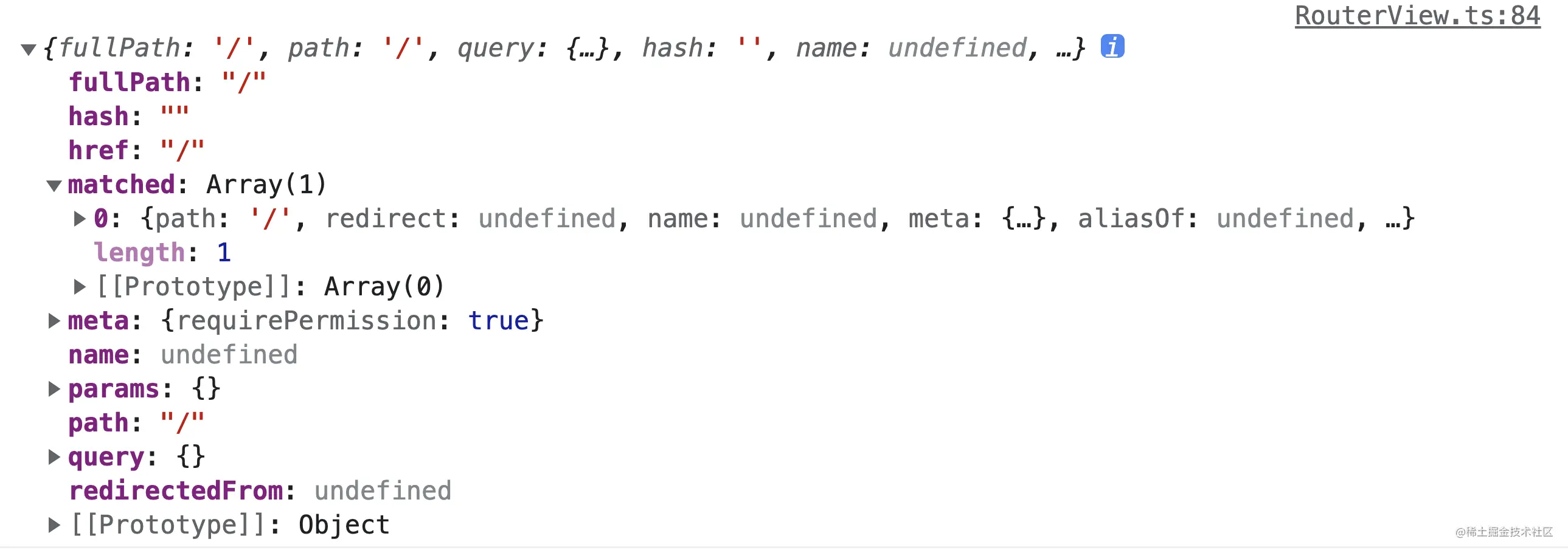
matched是个数组,在push的resolve时,把当前路径path拆分解析成对应routes数组中可以匹配的对象,然后初始值的router-view,就取深度为0的值,深度1的router-view就取到mactched[1]的'/product'对应的route,分别渲染
分析跳转流程之前,先看下路由注册的解析逻辑,在createRouter方法中调用了createRouterMatcher方法,该方法创建了一个路由匹配器,内部封装了路由注册和跳转的具体实现,外部创建的router是对matcher的包了一层提供API,并屏蔽实现细节。看下实现:
/**
 * Creates a Router Matcher.
 *
 * @internal
 * @param routes - array of initial routes
 * @param globalOptions - global route options
 */
export function createRouterMatcher(
  routes: Readonly<RouteRecordRaw[]>,
  globalOptions: PathParserOptions
): RouterMatcher {
  // normalized ordered array of matchers
  // 匹配器的两个容器,匹配器Array和命名路由Map
  const matchers: RouteRecordMatcher[] = []
  const matcherMap = new Map<RouteRecordName, RouteRecordMatcher>()

  function getRecordMatcher(name: RouteRecordName) {
    return matcherMap.get(name)
  }

  function addRoute(
    record: RouteRecordRaw,
    parent?: RouteRecordMatcher,
    originalRecord?: RouteRecordMatcher
  ) {
    // ...

    // 如果记录中声明'alias'别名,把别名当作path,插入一条新的记录
    if ('alias' in record) {
      const aliases =
        typeof record.alias === 'string' ? [record.alias] : record.alias!
      for (const alias of aliases) {
        normalizedRecords.push(
          assign({}, mainNormalizedRecord, {
            // this allows us to hold a copy of the `components` option
            // so that async components cache is hold on the original record
            components: originalRecord
              ? originalRecord.record.components
              : mainNormalizedRecord.components,
            path: alias,
            // we might be the child of an alias
            aliasOf: originalRecord
              ? originalRecord.record
              : mainNormalizedRecord,
            // the aliases are always of the same kind as the original since they
            // are defined on the same record
          }) as typeof mainNormalizedRecord
        )
      }
    }

    let matcher: RouteRecordMatcher
    let originalMatcher: RouteRecordMatcher | undefined

    for (const normalizedRecord of normalizedRecords) {
      // ...
      // create the object beforehand, so it can be passed to children
      // 遍历记录,生成一个matcher
      matcher = createRouteRecordMatcher(normalizedRecord, parent, options)

     	// ...
      // 添加到容器
      insertMatcher(matcher)
    }

    return originalMatcher
      ? () => {
          // since other matchers are aliases, they should be removed by the original matcher
          removeRoute(originalMatcher!)
        }
      : noop
  }

  function removeRoute(matcherRef: RouteRecordName | RouteRecordMatcher) {
  	// 删除路由元素
    if (isRouteName(matcherRef)) {
      const matcher = matcherMap.get(matcherRef)
      if (matcher) {
        matcherMap.delete(matcherRef)
        matchers.splice(matchers.indexOf(matcher), 1)
        matcher.children.forEach(removeRoute)
        matcher.alias.forEach(removeRoute)
      }
    } else {
      const index = matchers.indexOf(matcherRef)
      if (index > -1) {
        matchers.splice(index, 1)
        if (matcherRef.record.name) matcherMap.delete(matcherRef.record.name)
        matcherRef.children.forEach(removeRoute)
        matcherRef.alias.forEach(removeRoute)
      }
    }
  }

  function getRoutes() {
    return matchers
  }

  function insertMatcher(matcher: RouteRecordMatcher) {
    let i = 0
    while (
      i < matchers.length &&
      comparePathParserScore(matcher, matchers[i]) >= 0 &&
      // Adding children with empty path should still appear before the parent
      // https://github.com/vuejs/router/issues/1124
      (matcher.record.path !== matchers[i].record.path ||
        !isRecordChildOf(matcher, matchers[i]))
    )
      i++
  	// 将matcher添加到数组末尾
    matchers.splice(i, 0, matcher)
    // only add the original record to the name map
    // 命名路由添加到路由Map
    if (matcher.record.name && !isAliasRecord(matcher))
      matcherMap.set(matcher.record.name, matcher)
  }

  function resolve(
    location: Readonly<MatcherLocationRaw>,
    currentLocation: Readonly<MatcherLocation>
  ): MatcherLocation {
    let matcher: RouteRecordMatcher | undefined
    let params: PathParams = {}
    let path: MatcherLocation['path']
    let name: MatcherLocation['name']

    if ('name' in location && location.name) {
      // 命名路由解析出path
      matcher = matcherMap.get(location.name)
      // ...
      // throws if cannot be stringified
      path = matcher.stringify(params)
    } else if ('path' in location) {
      // no need to resolve the path with the matcher as it was provided
      // this also allows the user to control the encoding
      path = location.path
      //...

      matcher = matchers.find(m => m.re.test(path))
      // matcher should have a value after the loop

      if (matcher) {
        // we know the matcher works because we tested the regexp
        params = matcher.parse(path)!
        name = matcher.record.name
      }
      // push相对路径
    } else {
      // match by name or path of current route
      matcher = currentLocation.name
        ? matcherMap.get(currentLocation.name)
        : matchers.find(m => m.re.test(currentLocation.path))
      if (!matcher)
        throw createRouterError<MatcherError>(ErrorTypes.MATCHER_NOT_FOUND, {
          location,
          currentLocation,
        })
      name = matcher.record.name
      // since we are navigating to the same location, we don't need to pick the
      // params like when `name` is provided
      params = assign({}, currentLocation.params, location.params)
      path = matcher.stringify(params)
    }

    const matched: MatcherLocation['matched'] = []
    let parentMatcher: RouteRecordMatcher | undefined = matcher
    while (parentMatcher) {
      // reversed order so parents are at the beginning
    	// 和当前path匹配的记录,插入到数组头部,让父级先匹配
      matched.unshift(parentMatcher.record)
      parentMatcher = parentMatcher.parent
    }

    return {
      name,
      path,
      params,
      matched,
      meta: mergeMetaFields(matched),
    }
  }

  // 添加初始路由
  routes.forEach(route => addRoute(route))

  return { addRoute, resolve, removeRoute, getRoutes, getRecordMatcher }
}总结一下,createRouterMatcher方法,为每一个routres执行了addRoute方法,调用了insertMatcher,将生成的matchers插入到容器中,后边在调用的时候,通过resolve方法,将记录匹配到到Matcher.record记录保存到MatcherLocation的matched数组中,后续router-view会根据depth从数组取应该要渲染的元素。 push方法执行流程:
function push(to: RouteLocationRaw) {
    return pushWithRedirect(to)
  }

// ...


  function pushWithRedirect(
    to: RouteLocationRaw | RouteLocation,
    redirectedFrom?: RouteLocation
  ): Promise<NavigationFailure | void | undefined> {
    // 解析出目标location
    const targetLocation: RouteLocation = (pendingLocation = resolve(to))

    const from = currentRoute.value
    const data: HistoryState | undefined = (to as RouteLocationOptions).state
    const force: boolean | undefined = (to as RouteLocationOptions).force
    // to could be a string where `replace` is a function
    const replace = (to as RouteLocationOptions).replace === true

    const shouldRedirect = handleRedirectRecord(targetLocation)

    // 重定向逻辑
    if (shouldRedirect)
      return pushWithRedirect(
        assign(locationAsObject(shouldRedirect), {
          state:
            typeof shouldRedirect === 'object'
              ? assign({}, data, shouldRedirect.state)
              : data,
          force,
          replace,
        }),
        // keep original redirectedFrom if it exists
        redirectedFrom || targetLocation
      )

    // if it was a redirect we already called `pushWithRedirect` above
    const toLocation = targetLocation as RouteLocationNormalized
  	// ...

    return (failure ? Promise.resolve(failure) : navigate(toLocation, from))
      .catch((error: NavigationFailure | NavigationRedirectError) =>
        // ...
      )
      .then((failure: NavigationFailure | NavigationRedirectError | void) => {
        if (failure) {
          // ...
        } else {
          // if we fail we don't finalize the navigation
          failure = finalizeNavigation(
            toLocation as RouteLocationNormalizedLoaded,
            from,
            true,
            replace,
            data
          )
        }
        triggerAfterEach(
          toLocation as RouteLocationNormalizedLoaded,
          from,
          failure
        )
        return failure
      })
}在没有失败情况下调用finalizeNavigation做最终跳转,看下实现:
/**
   * - Cleans up any navigation guards
   * - Changes the url if necessary
   * - Calls the scrollBehavior
   */
  function finalizeNavigation(
    toLocation: RouteLocationNormalizedLoaded,
    from: RouteLocationNormalizedLoaded,
    isPush: boolean,
    replace?: boolean,
    data?: HistoryState
  ): NavigationFailure | void {
    // a more recent navigation took place
    const error = checkCanceledNavigation(toLocation, from)
    if (error) return error

    // only consider as push if it's not the first navigation
    const isFirstNavigation = from === START_LOCATION_NORMALIZED
    const state = !isBrowser ? {} : history.state

    // change URL only if the user did a push/replace and if it's not the initial navigation because
    // it's just reflecting the url
    // 如果是push保存历史到routerHistory
    if (isPush) {
      // on the initial navigation, we want to reuse the scroll position from
      // history state if it exists
      if (replace || isFirstNavigation)
        routerHistory.replace(
          toLocation.fullPath,
          assign(
            {
              scroll: isFirstNavigation && state && state.scroll,
            },
            data
          )
        )
      else routerHistory.push(toLocation.fullPath, data)
    }

    // accept current navigation
    // 给当前路由赋值,会触发监听的router-view刷新
    currentRoute.value = toLocation
    handleScroll(toLocation, from, isPush, isFirstNavigation)

    markAsReady()
  }
currentRoute.value = toLocation执行完后,会触发router-view中routeToDisplay值变化,重新计算matchedRouteRef获得新的ViewComponent,完成页面刷新。 上面还有两点,router的resolve会调用到matcher的resolve,填充刚刚说过的matched数组,navigate方法会执行导航上的守卫,这两步就不看了,感兴趣同学可以自己查阅《住院证明图片》,至此主要的流程已经分析完了。
我正在学习如何使用Nokogiri,根据这段代码我遇到了一些问题:require'rubygems'require'mechanize'post_agent=WWW::Mechanize.newpost_page=post_agent.get('http://www.vbulletin.org/forum/showthread.php?t=230708')puts"\nabsolutepathwithtbodygivesnil"putspost_page.parser.xpath('/html/body/div/div/div/div/div/table/tbody/tr/td/div
我有一个Ruby程序,它使用rubyzip压缩XML文件的目录树。gem。我的问题是文件开始变得很重,我想提高压缩级别,因为压缩时间不是问题。我在rubyzipdocumentation中找不到一种为创建的ZIP文件指定压缩级别的方法。有人知道如何更改此设置吗?是否有另一个允许指定压缩级别的Ruby库? 最佳答案 这是我通过查看rubyzip内部创建的代码。level=Zlib::BEST_COMPRESSIONZip::ZipOutputStream.open(zip_file)do|zip|Dir.glob("**/*")d
类classAprivatedeffooputs:fooendpublicdefbarputs:barendprivatedefzimputs:zimendprotecteddefdibputs:dibendendA的实例a=A.new测试a.foorescueputs:faila.barrescueputs:faila.zimrescueputs:faila.dibrescueputs:faila.gazrescueputs:fail测试输出failbarfailfailfail.发送测试[:foo,:bar,:zim,:dib,:gaz].each{|m|a.send(m)resc
很好奇,就使用rubyonrails自动化单元测试而言,你们正在做什么?您是否创建了一个脚本来在cron中运行rake作业并将结果邮寄给您?git中的预提交Hook?只是手动调用?我完全理解测试,但想知道在错误发生之前捕获错误的最佳实践是什么。让我们理所当然地认为测试本身是完美无缺的,并且可以正常工作。下一步是什么以确保他们在正确的时间将可能有害的结果传达给您? 最佳答案 不确定您到底想听什么,但是有几个级别的自动代码库控制:在处理某项功能时,您可以使用类似autotest的内容获得关于哪些有效,哪些无效的即时反馈。要确保您的提
假设我做了一个模块如下:m=Module.newdoclassCendend三个问题:除了对m的引用之外,还有什么方法可以访问C和m中的其他内容?我可以在创建匿名模块后为其命名吗(就像我输入“module...”一样)?如何在使用完匿名模块后将其删除,使其定义的常量不再存在? 最佳答案 三个答案:是的,使用ObjectSpace.此代码使c引用你的类(class)C不引用m:c=nilObjectSpace.each_object{|obj|c=objif(Class===objandobj.name=~/::C$/)}当然这取决于
我正在尝试使用ruby和Savon来使用网络服务。测试服务为http://www.webservicex.net/WS/WSDetails.aspx?WSID=9&CATID=2require'rubygems'require'savon'client=Savon::Client.new"http://www.webservicex.net/stockquote.asmx?WSDL"client.get_quotedo|soap|soap.body={:symbol=>"AAPL"}end返回SOAP异常。检查soap信封,在我看来soap请求没有正确的命名空间。任何人都可以建议我
关闭。这个问题是opinion-based.它目前不接受答案。想要改进这个问题?更新问题,以便editingthispost可以用事实和引用来回答它.关闭4年前。Improvethisquestion我想在固定时间创建一系列低音和高音调的哔哔声。例如:在150毫秒时发出高音调的蜂鸣声在151毫秒时发出低音调的蜂鸣声200毫秒时发出低音调的蜂鸣声250毫秒的高音调蜂鸣声有没有办法在Ruby或Python中做到这一点?我真的不在乎输出编码是什么(.wav、.mp3、.ogg等等),但我确实想创建一个输出文件。
我在我的项目目录中完成了compasscreate.和compassinitrails。几个问题:我已将我的.sass文件放在public/stylesheets中。这是放置它们的正确位置吗?当我运行compasswatch时,它不会自动编译这些.sass文件。我必须手动指定文件:compasswatchpublic/stylesheets/myfile.sass等。如何让它自动运行?文件ie.css、print.css和screen.css已放在stylesheets/compiled。如何在编译后不让它们重新出现的情况下删除它们?我自己编译的.sass文件编译成compiled/t
我想将html转换为纯文本。不过,我不想只删除标签,我想智能地保留尽可能多的格式。为插入换行符标签,检测段落并格式化它们等。输入非常简单,通常是格式良好的html(不是整个文档,只是一堆内容,通常没有anchor或图像)。我可以将几个正则表达式放在一起,让我达到80%,但我认为可能有一些现有的解决方案更智能。 最佳答案 首先,不要尝试为此使用正则表达式。很有可能你会想出一个脆弱/脆弱的解决方案,它会随着HTML的变化而崩溃,或者很难管理和维护。您可以使用Nokogiri快速解析HTML并提取文本:require'nokogiri'h
我想为Heroku构建一个Rails3应用程序。他们使用Postgres作为他们的数据库,所以我通过MacPorts安装了postgres9.0。现在我需要一个postgresgem并且共识是出于性能原因你想要pggem。但是我对我得到的错误感到非常困惑当我尝试在rvm下通过geminstall安装pg时。我已经非常明确地指定了所有postgres目录的位置可以找到但仍然无法完成安装:$envARCHFLAGS='-archx86_64'geminstallpg--\--with-pg-config=/opt/local/var/db/postgresql90/defaultdb/po
