背景:家里打印机HP M132a不支持无线打印,每次打印都要开笔记本连接打印机太繁琐,尤其是手机里的资料还要先发到笔记本再进行打印,如何将打印机变为无线或共享出去,翻看网上资料,发现可以将打印机插入路由器的usb口再进行一系列的设置,但自家路由器没有usb口,这个方案不可行,后来看到可以将玩客云刷机后连接打印机,将打印机共享出去,拼多多玩客云大概价格50包邮,在承受范围内,开搞。
准备工作:玩客云1台,电脑1台(最好是台式机),十字螺丝刀,镊子一把,双公头USB线1根(如果电脑带type-c口,也可以使用USB转type-c的线,比如手机数据线)。
建议版本2.1.6.8,自行百度下载或去恩山论坛下载。
https://github.com/hzyitc/armbian-onecloud/releases,下载带burn.img的,我下载的是Armbian_23.02.0-trunk_Onecloud_bullseye_edge_6.1.0.burn.img。
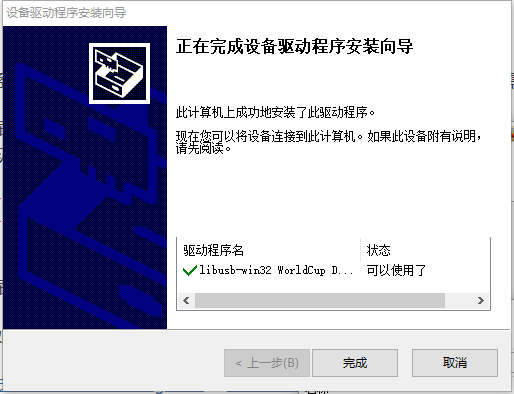
中间会弹出libusb-win32安装窗,点击完成,安装成功后重启,打开usb_burn_tool,点击文件——>导入烧录包,选择上一步的.img文件,右侧擦除flash、擦除bootloader默认是勾选状态不用动他,点击开始。
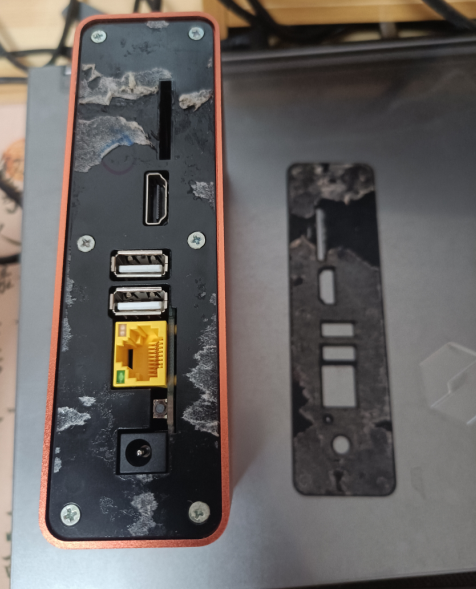
如果玩客云不是原版系统,那就不需要拆机了,在刷机时长按reset键就可以,如果是原版没有刷过的,必须拆机短接。拆机时用翘板(我只有一字螺丝刀)插入SD孔位往上翘,如果撬不动那就插入后左右滑动将双面胶破坏掉,最终将上面薄薄的板子取下来,然后拧掉6颗螺丝就可以将主板拿出来了。
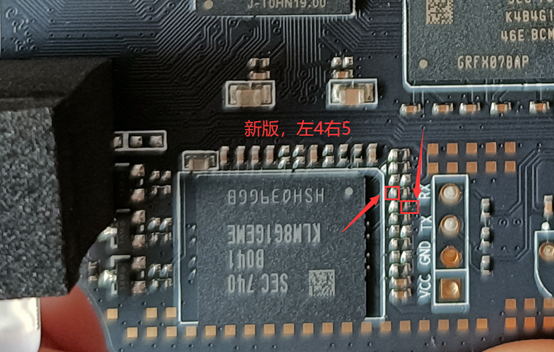
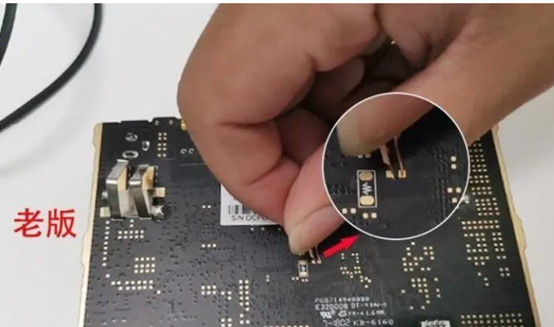
分两个版本,不用担心短接错,新版没有老板的2个短接点,我的是V1.3按照新版短接正面的左4右5针脚,老板短接中间的2个,见下图,短接可以使用金属镊子或回形针、金属线缆等各种工具。
将双公头usb线连接电脑与玩客云靠近HDMI的usb口,然后在保持短接的状态下给玩客云通电,等看到USB Burning Tool有进度后松开短接工具,进度到100% 烧录成功后,先点击停止再拔USB线。
提示:1)建议使用台式机,我最开始是使用的我的机械革命笔记本,短接状态玩客云加电后笔记本立马断电,连续试了2次都这样,使用台式机就没问题。2)对于不好操作的人,可以使用智能插座比如小米智能插座,先倒计时1分钟或定时到1分钟后,快到1分钟时短接,到时间后插座自动加电。
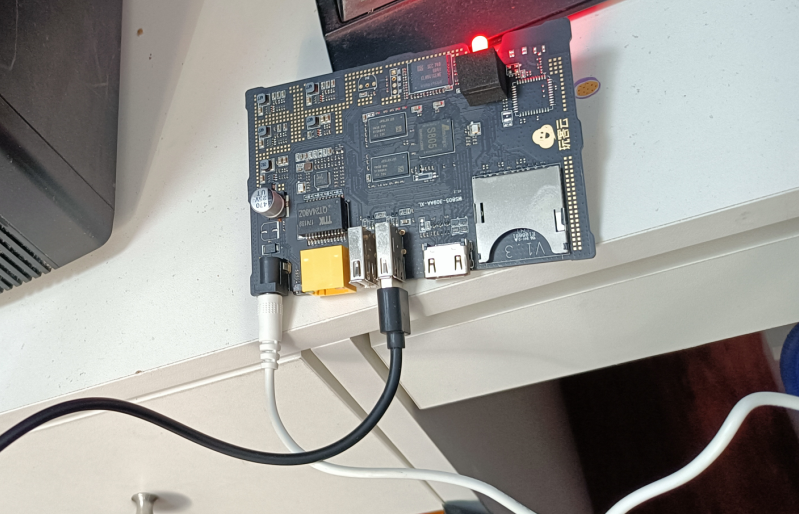
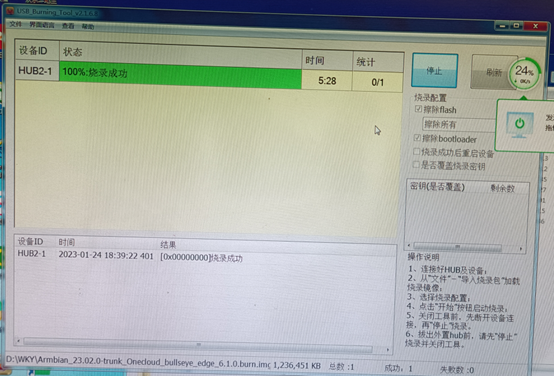
大多数参考https://zhuanlan.zhihu.com/p/551470592及http://www.8fe.com/jiaocheng/5810.html
玩客云加电,连接网线、显示器、键盘,开机过程中就会提示你键盘布局、时区、设置IP地址(要与路由器同一网段,建议使用路由器不分配的IP,比如路由器分配192.168.1.100-200,那么设置1.20)、输入root密码、创建新用户。看其他帖子有默认是192.168.1.110,root,1234的,也有自动获取后IP后,用户名root,密码1234的,我直接接显示器按照开机流程一步步设置,没测试过其他方法。
附:设置IP方法,可以使用armbian-config图形化设置,也可以下面方法设置:
nano /etc/network/interfaces然后添加下面字段,然后Ctrl+O回车,然后Ctrl+X,然后systemctl restart network重启网络,ping 192.168.1.1,ping www.qq.com都能通那就没问题了。
auto eth0
allow-hotplug eth0
iface eth0 inet static
address 192.168.1.20
netmask 255.255.255.0
gateway 192.168.1.1
dns-nameservers192.168.1.1nano /etc/apt/sources.list删光后复制下面这些,Ctrl+O回车,Ctrl+X,再执行apt update。
deb https://mirrors.ustc.edu.cn/debian stretch main contrib non-free
#deb-src http://httpredir.debian.org/debian stretch main contrib non-free

deb https://mirrors.ustc.edu.cn/debian stretch-updates main contrib non-free
#deb-src http://httpredir.debian.org/debian stretch-updates main contrib non-free

deb https://mirrors.ustc.edu.cn/debian stretch-backports main contrib non-free
#deb-src http://httpredir.debian.org/debian stretch-backports main contrib non-free

deb https://mirrors.ustc.edu.cn/debian-security/ stretch/updates main contrib non-free
#deb-src http://security.debian.org/ stretch/updates main contrib non-free

#163镜像站

deb http://mirrors.163.com/debian/ buster main non-free contrib
deb http://mirrors.163.com/debian/ buster-updates main non-free contrib
deb http://mirrors.163.com/debian/ buster-backports main non-free contrib
deb http://mirrors.163.com/debian-security/ buster/updates main non-free contrib

deb-src http://mirrors.163.com/debian/ buster main non-free contrib
deb-src http://mirrors.163.com/debian/ buster-updates main non-free contrib
deb-src http://mirrors.163.com/debian/ buster-backports main non-free contrib
deb-src http://mirrors.163.com/debian-security/ buster/updates main non-free contrib
#华为云镜像站

deb https://mirrors.huaweicloud.com/debian/ buster main contrib non-free
deb https://mirrors.huaweicloud.com/debian/ buster-updates main contrib non-free
deb https://mirrors.huaweicloud.com/debian/ buster-backports main contrib non-free
deb https://mirrors.huaweicloud.com/debian-security/ buster/updates main contrib non-free

deb-src https://mirrors.huaweicloud.com/debian/ buster main contrib non-free
deb-src https://mirrors.huaweicloud.com/debian/ buster-updates main contrib non-free
deb-src https://mirrors.huaweicloud.com/debian/ buster-backports main contrib non-free
#腾讯云镜像站

deb http://mirrors.cloud.tencent.com/debian/ buster main non-free contrib
deb http://mirrors.cloud.tencent.com/debian-security buster/updates main
deb http://mirrors.cloud.tencent.com/debian/ buster-updates main non-free contrib
deb http://mirrors.cloud.tencent.com/debian/ buster-backports main non-free contrib

deb-src http://mirrors.cloud.tencent.com/debian-security buster/updates main
deb-src http://mirrors.cloud.tencent.com/debian/ buster main non-free contrib
deb-src http://mirrors.cloud.tencent.com/debian/ buster-updates main non-free contrib
deb-src http://mirrors.cloud.tencent.com/debian/ buster-backports main non-free contrib
#中科大镜像站

deb https://mirrors.ustc.edu.cn/debian/ buster main contrib non-free
deb https://mirrors.ustc.edu.cn/debian/ buster-updates main contrib non-free
deb https://mirrors.ustc.edu.cn/debian/ buster-backports main contrib non-free
deb https://mirrors.ustc.edu.cn/debian-security/ buster/updates main contrib non-free

deb-src https://mirrors.ustc.edu.cn/debian/ buster main contrib non-free
deb-src https://mirrors.ustc.edu.cn/debian/ buster-updates main contrib non-free
deb-src https://mirrors.ustc.edu.cn/debian/ buster-backports main contrib non-free
deb-src https://mirrors.ustc.edu.cn/debian-security/ buster/updates main contrib non-free
#阿里云镜像站

deb http://mirrors.aliyun.com/debian/ buster main non-free contrib
deb http://mirrors.aliyun.com/debian-security buster/updates main
deb http://mirrors.aliyun.com/debian/ buster-updates main non-free contrib
deb http://mirrors.aliyun.com/debian/ buster-backports main non-free contrib

deb-src http://mirrors.aliyun.com/debian-security buster/updates main
deb-src http://mirrors.aliyun.com/debian/ buster main non-free contrib
deb-src http://mirrors.aliyun.com/debian/ buster-updates main non-free contrib
deb-src http://mirrors.aliyun.com/debian/ buster-backports main non-free contrib
#清华大学镜像站

deb https://mirrors.tuna.tsinghua.edu.cn/debian/ buster main contrib non-free
deb https://mirrors.tuna.tsinghua.edu.cn/debian/ buster-updates main contrib non-free
deb https://mirrors.tuna.tsinghua.edu.cn/debian/ buster-backports main contrib non-free
deb https://mirrors.tuna.tsinghua.edu.cn/debian-security/ buster/updates main contrib non-free

deb-src https://mirrors.tuna.tsinghua.edu.cn/debian/ buster main contrib non-free
deb-src https://mirrors.tuna.tsinghua.edu.cn/debian/ buster-updates main contrib non-free
deb-src https://mirrors.tuna.tsinghua.edu.cn/debian/ buster-backports main contrib non-free
deb-src https://mirrors.tuna.tsinghua.edu.cn/debian-security/ buster/updates main contrib non-free
#兰州大学镜像站

deb http://mirror.lzu.edu.cn/debian stable main contrib non-free
deb http://mirror.lzu.edu.cn/debian stable-updates main contrib non-free
deb http://mirror.lzu.edu.cn/debian/ buster-backports main contrib non-free
deb http://mirror.lzu.edu.cn/debian-security/ buster/updates main contrib non-free

deb-src http://mirror.lzu.edu.cn/debian stable main contrib non-free
deb-src http://mirror.lzu.edu.cn/debian stable-updates main contrib non-free
deb-src http://mirror.lzu.edu.cn/debian/ buster-backports main contrib non-free
deb-src http://mirror.lzu.edu.cn/debian-security/ buster/updates main contrib non-free
#上海交大镜像站

deb https://mirror.sjtu.edu.cn/debian/ buster main contrib non-free
deb https://mirror.sjtu.edu.cn/debian/ buster-updates main contrib non-free
deb https://mirror.sjtu.edu.cn/debian/ buster-backports main contrib non-free
deb https://mirror.sjtu.edu.cn/debian-security/ buster/updates main contrib non-free

deb-src https://mirror.sjtu.edu.cn/debian/ buster-updates main contrib non-free
deb-src https://mirror.sjtu.edu.cn/debian/ buster-backports main contrib non-free
deb-src https://mirror.sjtu.edu.cn/debian/ buster main contrib non-free
deb-src https://mirror.sjtu.edu.cn/debian-security/ buster/updates main contrib non-freeapt-get install cups –y
nano /etc/cpus/cupsd.conf将【localhost:631】改成【0.0.0.0:631】,将【Browsing off】改成【Browsing on】,同时在三个</Location>上面添加【Allow all】,(中括号不用写入)如下图:
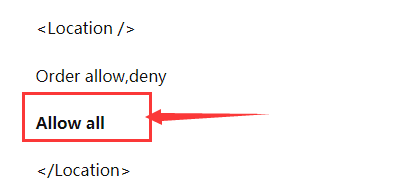
然后systemctl restart cups重启打印服务。
#爱普生打印机用下面这一行命令
apt install printer-driver-escpr
@惠普打印机用下面这一行命令
apt install hplip
#兄弟打印机用下面这一行命令
apt install printer-driver-brlaser
#重启打印服务
systemctl restart cups同网段笔记本电脑浏览器输入http://玩客云IP:631,比如http://192.168.1.20:631,点击administration,输入账号密码,然后add printer,选择打印机型号后点击Continue,勾选Share This Printer,点击Continue。建议打印机共享名不要设置的太长,比如改为M132。
点击导航栏【Printers】进入打印机详细页面,选择【Print Test Page】打印测试页,如果能正常打印,玩客云与打印机连接正常,Cups服务正常。
执行
apt install avahi-daemon –y
systemctl restart cups
systemctl restart avahi-daemon
尝试手机、笔记本是否能自动发现打印机。
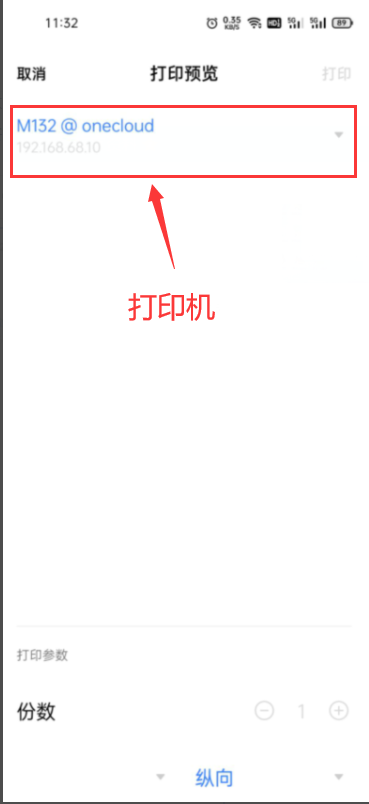
安卓手机选中要打印的图片、文件,选择共享——>打印,会自动搜索打印机;电脑通过控制面板添加打印机——自动搜索。
若无效,再执行
apt -y install avahi-daemon avahi-discover libnss-mdn
systemctl restart avahi-daemon
再设置开机自启服务:
systemctl enable cups
systemctl enable avahi-daemon
我当时装完后2个服务的状态默认是开机自启的,通过systemctl status cups或avahi-daemon可以查看运行状态。
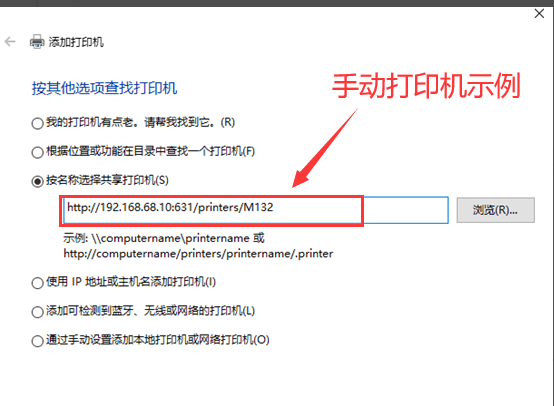
笔记本、手机跟玩客云使用同一个路由器,然后自动查找打印机,找到后打印即可,如果找不到,尝试笔记本手动添加打印机,若依然无法添加,排查网络、Cups服务、配置及自动发现服务。
我正在编写一个gem,我必须在其中fork两个启动两个webrick服务器的进程。我想通过基类的类方法启动这个服务器,因为应该只有这两个服务器在运行,而不是多个。在运行时,我想调用这两个服务器上的一些方法来更改变量。我的问题是,我无法通过基类的类方法访问fork的实例变量。此外,我不能在我的基类中使用线程,因为在幕后我正在使用另一个不是线程安全的库。所以我必须将每个服务器派生到它自己的进程。我用类变量试过了,比如@@server。但是当我试图通过基类访问这个变量时,它是nil。我读到在Ruby中不可能在分支之间共享类变量,对吗?那么,还有其他解决办法吗?我考虑过使用单例,但我不确定这是
我是一个Rails初学者,但我想从我的RailsView(html.haml文件)中查看Ruby变量的内容。我试图在ruby中打印出变量(认为它会在终端中出现),但没有得到任何结果。有什么建议吗?我知道Rails调试器,但更喜欢使用inspect来打印我的变量。 最佳答案 您可以在View中使用puts方法将信息输出到服务器控制台。您应该能够在View中的任何位置使用Haml执行以下操作:-puts@my_variable.inspect 关于ruby-on-rails-如何在我的R
1.postman介绍Postman一款非常流行的API调试工具。其实,开发人员用的更多。因为测试人员做接口测试会有更多选择,例如Jmeter、soapUI等。不过,对于开发过程中去调试接口,Postman确实足够的简单方便,而且功能强大。2.下载安装官网地址:https://www.postman.com/下载完成后双击安装吧,安装过程极其简单,无需任何操作3.使用教程这里以百度为例,工具使用简单,填写URL地址即可发送请求,在下方查看响应结果和响应状态码常用方法都有支持请求方法:getpostputdeleteGet、Post、Put与Delete的作用get:请求方法一般是用于数据查询,
在VMware16.2.4安装Ubuntu一、安装VMware1.打开VMwareWorkstationPro官网,点击即可进入。2.进入后向下滑动找到Workstation16ProforWindows,点击立即下载。3.下载完成,文件大小615MB,如下图:4.鼠标右击,以管理员身份运行。5.点击下一步6.勾选条款,点击下一步7.先勾选,再点击下一步8.去掉勾选,点击下一步9.点击下一步10.点击安装11.点击许可证12.在百度上搜索VM16许可证,复制填入,然后点击输入即可,亲测有效。13.点击完成14.重启系统,点击是15.双击VMwareWorkstationPro图标,进入虚拟机主
@作者:SYFStrive @博客首页:HomePage📜:微信小程序📌:个人社区(欢迎大佬们加入)👉:社区链接🔗📌:觉得文章不错可以点点关注👉:专栏连接🔗💃:感谢支持,学累了可以先看小段由小胖给大家带来的街舞👉微信小程序(🔥)目录自定义组件-behaviors 1、什么是behaviors 2、behaviors的工作方式 3、创建behavior 4、导入并使用behavior 5、behavior中所有可用的节点 6、同名字段的覆盖和组合规则总结最后自定义组件-behaviors 1、什么是behaviorsbehaviors是小程序中,用于实现
1.1.1 YARN的介绍 为克服Hadoop1.0中HDFS和MapReduce存在的各种问题⽽提出的,针对Hadoop1.0中的MapReduce在扩展性和多框架⽀持⽅⾯的不⾜,提出了全新的资源管理框架YARN. ApacheYARN(YetanotherResourceNegotiator的缩写)是Hadoop集群的资源管理系统,负责为计算程序提供服务器计算资源,相当于⼀个分布式的操作系统平台,⽽MapReduce等计算程序则相当于运⾏于操作系统之上的应⽤程序。 YARN被引⼊Hadoop2,最初是为了改善MapReduce的实现,但是因为具有⾜够的通⽤性,同样可以⽀持其他的分布式计算模
classPacketdefinitialize(name,age,number,array)@name=name@age=age@number=number@neighbors=arrayendendp1=Packet.new("n1",5,2,[1,2,3,4])putsp1.name我有上面的代码,但是每当我执行puts语句时,我都会收到nameisnotamethod的错误。我不知道任何其他方式来打印p1的名称。如何打印姓名? 最佳答案 这里的问题是,虽然您拥有实例变量,但您并未使它们可访问。attr_reader:vari
在许多ruby类之间共享记录器实例的最佳(正确)方法是什么?现在我只是将记录器创建为全局$logger=Logger.new变量,但我觉得有更好的方法可以在不使用全局变量的情况下执行此操作。如果我有以下内容:moduleFooclassAclassBclassC...classZend在所有类之间共享记录器实例的最佳方式是什么?我是以某种方式在Foo模块中声明/创建记录器还是只是使用全局$logger没问题? 最佳答案 在模块中添加常量:moduleFooLogger=Logger.newclassAclassBclassC..
我正在使用mechanize登录网站,然后检索页面。我遇到了一些问题,我怀疑这是由于cookie中的某些值造成的。当Mechanize登录网站时,我假设它存储了cookie。如何通过Mechanize打印出存储在cookie中的所有数据? 最佳答案 代理有一个cookie方法。agent=Mechanize.newpage=agent.get("http://www.google.com/")agent.cookiesagent.cookies.to_scookie返回一个Mechanize::Cookiesobject
有没有办法快速将表格格式的ruby哈希打印到文件中?如:keyAkeyBkeyC...1232343451253474456...其中散列的值是不同大小的数组。还是使用双循环是唯一的方法?谢谢 最佳答案 试试我写的这个gem(在表中打印散列、ruby对象、ActiveRecord对象):http://github.com/arches/table_print 关于ruby-如何以表格格式快速打印Ruby哈希值?,我们在StackOverflow上找到一个类似的问题:
