第一种方式:使用yum进行安装
第二种方式:yum安装mariadb
yum install -y mariadb*
配置mysql的yum源:
[root@lnh ~]# wget http://dev.mysql.com/get/mysql57-community-release-el7-11.noarch.rpm
--2022-07-25 17:03:13--  http://dev.mysql.com/get/mysql57-community-release-el7-11.noarch.rpm
Resolving dev.mysql.com (dev.mysql.com)... 184.29.181.90, 2600:1402:b800:1194::2e31, 2600:1402:b800:118f::2e31
Connecting to dev.mysql.com (dev.mysql.com)|184.29.181.90|:80... connected.
HTTP request sent, awaiting response... 301 Moved Permanently
Location: https://dev.mysql.com/get/mysql57-community-release-el7-11.noarch.rpm [following]
--2022-07-25 17:03:13--  https://dev.mysql.com/get/mysql57-community-release-el7-11.noarch.rpm
Connecting to dev.mysql.com (dev.mysql.com)|184.29.181.90|:443... connected.
HTTP request sent, awaiting response... 302 Moved Temporarily
Location: https://repo.mysql.com//mysql57-community-release-el7-11.noarch.rpm [following]
--2022-07-25 17:03:14--  https://repo.mysql.com//mysql57-community-release-el7-11.noarch.rpm
Resolving repo.mysql.com (repo.mysql.com)... 184.30.152.230
Connecting to repo.mysql.com (repo.mysql.com)|184.30.152.230|:443... connected.
HTTP request sent, awaiting response... 200 OK
Length: 25680 (25K) [application/x-redhat-package-manager]
Saving to: ‘mysql57-community-release-el7-11.noarch.rpm’

mysql57-community- 100%[================>]  25.08K   125KB/s    in 0.2s

2022-07-25 17:03:15 (125 KB/s) - ‘mysql57-community-release-el7-11.noarch.rpm’ saved [25680/25680]
[root@lnh ~]# rpm -Uvh  mysql57-community-release-el7-11.noarch.rpm
warning: mysql57-community-release-el7-11.noarch.rpm: Header V3 DSA/SHA1 Signature, key ID 5072e1f5: NOKEY
Verifying...                          ################################# [100%]
Preparing...                          ################################# [100%]
Updating / installing...
   1:mysql57-community-release-el7-11 ################################# [100%]
[root@lnh ~]# rpm -Uvh  mysql57-community-release-el7-11.noarch.rpm
warning: mysql57-community-release-el7-11.noarch.rpm: Header V3 DSA/SHA1 Signature, key ID 5072e1f5: NOKEY
Verifying...                          ################################# [100%]
Preparing...                          ################################# [100%]
Updating / installing...
   1:mysql57-community-release-el7-11 ################################# [100%]
[root@lnh ~]# dnf module disable mysql    //禁用mysql
MySQL Connectors Community                   47 kB/s |  49 kB     00:01
MySQL Tools Community                       257 kB/s | 651 kB     00:02
MySQL 5.7 Community Server                  817 kB/s | 2.6 MB     00:03
Dependencies resolved.
============================================================================
 Package          Architecture    Version            Repository        Size
============================================================================
Disabling modules:
 mysql

Transaction Summary
============================================================================

Is this ok [y/N]: y
Complete!
[root@lnh ~]# dnf -y install mysql-community-server mysql-community-client mysql-community-common mysql-community-devel --nogpgcheck   //不验证合法性进行下载
[root@lnh ~]# systemctl enable --now mysqld   //设置开机自启
[root@lnh ~]# systemctl status mysqld.service //查看状态
● mysqld.service - MySQL Server
   Loaded: loaded (/usr/lib/systemd/system/mysqld.service; enabled; vendor >
   Active: active (running) since Mon 2022-07-25 17:36:19 CST; 12s ago
     Docs: man:mysqld(8)
           http://dev.mysql.com/doc/refman/en/using-systemd.html
  Process: 67864 ExecStart=/usr/sbin/mysqld --daemonize --pid-file=/var/run>
  Process: 67814 ExecStartPre=/usr/bin/mysqld_pre_systemd (code=exited, sta>
 Main PID: 67866 (mysqld)
    Tasks: 27 (limit: 12221)
   Memory: 310.2M
   CGroup: /system.slice/mysqld.service
           └─67866 /usr/sbin/mysqld --daemonize --pid-file=/var/run/mysqld/>

Jul 25 17:36:17 lnh systemd[1]: Starting MySQL Server...
Jul 25 17:36:19 lnh systemd[1]: Started MySQL Server.
[root@lnh ~]# ss -antl   //查看3306端口是否出现
State   Recv-Q  Send-Q   Local Address:Port     Peer Address:Port  Process
LISTEN  0       128            0.0.0.0:22            0.0.0.0:*
LISTEN  0       128                  *:80                  *:*
LISTEN  0       128               [::]:22               [::]:*
LISTEN  0       80                   *:3306                *:*
[root@lnh ~]# grep "password" /var/log/mysqld.log
2022-07-25T09:36:17.891633Z 1 [Note] A temporary password is generated for root@localhost: eNGwhYkrz3_(
//在日志文件中找出临时密码
[root@lnh ~]# mysql -uroot -p   //使用临时密码登录
Enter password:
Welcome to the MySQL monitor.  Commands end with ; or \g.
Your MySQL connection id is 5
Server version: 5.7.38

Copyright (c) 2000, 2022, Oracle and/or its affiliates.

Oracle is a registered trademark of Oracle Corporation and/or its
affiliates. Other names may be trademarks of their respective
owners.

Type 'help;' or '\h' for help. Type '\c' to clear the current input statement.
//修改mysql登录密码
mysql> set global validate_password_policy=0;
Query OK, 0 rows affected (0.00 sec)

mysql> set global validate_password_length=1;
Query OK, 0 rows affected (0.00 sec)
mysql> ALTER USER 'root'@'localhost' IDENTIFIED BY 'xbz123';
Query OK, 0 rows affected (0.00 sec)

mysql> quit
Bye
[root@lnh ~]# mysql -uroot -pxbz123    //验证密码修改成功
mysql: [Warning] Using a password on the command line interface can be insecure.
Welcome to the MySQL monitor.  Commands end with ; or \g.
Your MySQL connection id is 6
Server version: 5.7.38 MySQL Community Server (GPL)

Copyright (c) 2000, 2022, Oracle and/or its affiliates.

Oracle is a registered trademark of Oracle Corporation and/or its
affiliates. Other names may be trademarks of their respective
owners.

Type 'help;' or '\h' for help. Type '\c' to clear the current input statement.

mysql>
[root@lnh ~]# rpm -qa |grep mysql
mysql-community-client-5.7.38-1.el7.x86_64
mysql57-community-release-el7-11.noarch
mysql-community-common-5.7.38-1.el7.x86_64
mysql-community-server-5.7.38-1.el7.x86_64
mysql-community-devel-5.7.38-1.el7.x86_64
mysql-community-libs-5.7.38-1.el7.x86_64
[root@lnh ~]# rpm -e mysql57-community-release-el7-11.noarch
//卸载这个包防止其更新
[root@lnh ~]# mysql_secure_installation

Securing the MySQL server deployment.

Enter password for user root:    //之前的密码
The 'validate_password' plugin is installed on the server.
The subsequent steps will run with the existing configuration
of the plugin.
Using existing password for root.

Estimated strength of the password: 50
Change the password for root ? ((Press y|Y for Yes, any other key for No) : y

New password:    //新密码

Re-enter new password:     //再次输入

Estimated strength of the password: 50
Do you wish to continue with the password provided?(Press y|Y for Yes, any other key for No) : y
By default, a MySQL installation has an anonymous user,
allowing anyone to log into MySQL without having to have
a user account created for them. This is intended only for
testing, and to make the installation go a bit smoother.
You should remove them before moving into a production
environment.

Remove anonymous users? (Press y|Y for Yes, any other key for No) : y
Success.


Normally, root should only be allowed to connect from
'localhost'. This ensures that someone cannot guess at
the root password from the network.

Disallow root login remotely? (Press y|Y for Yes, any other key for No) : n
//不让ssh远程连接数据库
 ... skipping.
By default, MySQL comes with a database named 'test' that
anyone can access. This is also intended only for testing,
and should be removed before moving into a production
environment.


Remove test database and access to it? (Press y|Y for Yes, any other key for No) : y
 - Dropping test database...
Success.

 - Removing privileges on test database...
Success.

Reloading the privilege tables will ensure that all changes
made so far will take effect immediately.

Reload privilege tables now? (Press y|Y for Yes, any other key for No) : y
Success.

All done!
[root@lnh ~]# mysql -V
mysql  Ver 14.14 Distrib 5.7.38, for Linux (x86_64) using  EditLine wrapper
//查看当前版本
[root@lnh ~]# mysql -uroot -pxbz123 -h127.0.0.1
//-h 指定服务器主机,默认为localhost,推荐使用ip地址
//直接在命令行输入密码登录
mysql: [Warning] Using a password on the command line interface can be insecure.
Welcome to the MySQL monitor.  Commands end with ; or \g.
Your MySQL connection id is 10
Server version: 5.7.38 MySQL Community Server (GPL)

Copyright (c) 2000, 2022, Oracle and/or its affiliates.

Oracle is a registered trademark of Oracle Corporation and/or its
affiliates. Other names may be trademarks of their respective
owners.

Type 'help;' or '\h' for help. Type '\c' to clear the current input statement.

mysql> quit
Bye
[root@lnh ~]# mysql -uroot -p  -h127.0.0.1
Enter password:
Welcome to the MySQL monitor.  Commands end with ; or \g.
Your MySQL connection id is 11
Server version: 5.7.38 MySQL Community Server (GPL)

Copyright (c) 2000, 2022, Oracle and/or its affiliates.

Oracle is a registered trademark of Oracle Corporation and/or its
affiliates. Other names may be trademarks of their respective
owners.

Type 'help;' or '\h' for help. Type '\c' to clear the current input statement.

mysql>
//注意,不推荐直接在命令行里直接用-pPASSWORD的方式登录,而是使用-p选项,然后交互式输入密码
[root@lnh ~]# mysql -uroot -p  -h127.0.0.1 -e 'SHOW DATABASES;'
Enter password:
+--------------------+
| Database           |
+--------------------+
| information_schema |
| mysql              |
| performance_schema |
| sys                |
+--------------------+
//不登录mysql查看有哪些数据库
mysql> create database tushanbu;
Query OK, 1 row affected (0.00 sec)
//创建数据库
mysql> show databases;
+--------------------+
| Database           |
+--------------------+
| information_schema |
| mysql              |
| performance_schema |
| sys                |
| tushanbu           |
+--------------------+
5 rows in set (0.00 sec)
//查看数据库
mysql> drop database tushanbu
    -> ;
Query OK, 0 rows affected (0.01 sec)
//删除数据库
mysql> show databases;
+--------------------+
| Database           |
+--------------------+
| information_schema |
| mysql              |
| performance_schema |
| sys                |
+--------------------+
4 rows in set (0.00 sec)
//查看数据库
mysql> create database tushanbu;
Query OK, 1 row affected (0.00 sec)
//创建数据库
mysql> use tushanbu;  //进入数据库
Database changed
mysql> create table tsb(id int not null,name varchar(100) not null,age int);
Query OK, 0 rows affected (0.02 sec)
//创建表
mysql> desc tsb;  //查看结构
+-------+--------------+------+-----+---------+-------+
| Field | Type         | Null | Key | Default | Extra |
+-------+--------------+------+-----+---------+-------+
| id    | int(11)      | NO   |     | NULL    |       |
| name  | varchar(100) | NO   |     | NULL    |       |
| age   | int(11)      | YES  |     | NULL    |       |
+-------+--------------+------+-----+---------+-------+
3 rows in set (0.01 sec)
mysql> show tables;
+--------------------+
| Tables_in_tushanbu |
+--------------------+
| tsb                |
+--------------------+
1 row in set (0.00 sec)
//查看表
mysql> drop table tsb;
Query OK, 0 rows affected (0.01 sec)
//删除表
mysql> show tables;
Empty set (0.00 sec)
//查看
mysql> create user 'lnh'@'127.0.0.1'  identified by 'xbz123';
Query OK, 0 rows affected (0.01 sec)
//创建数据库用户lnh
mysql> quit
Bye
[root@lnh ~]# mysql -ulnh -pxbz123 -h127.0.0.1 //使用新创建的用户和密码登录
mysql: [Warning] Using a password on the command line interface can be insecure.
Welcome to the MySQL monitor.  Commands end with ; or \g.
Your MySQL connection id is 15
Server version: 5.7.38 MySQL Community Server (GPL)

Copyright (c) 2000, 2022, Oracle and/or its affiliates.

Oracle is a registered trademark of Oracle Corporation and/or its
affiliates. Other names may be trademarks of their respective
owners.

Type 'help;' or '\h' for help. Type '\c' to clear the current input statement.

mysql>
[root@lnh ~]# mysql -uroot -p
Enter password:
Welcome to the MySQL monitor.  Commands end with ; or \g.
Your MySQL connection id is 16
Server version: 5.7.38 MySQL Community Server (GPL)

Copyright (c) 2000, 2022, Oracle and/or its affiliates.

Oracle is a registered trademark of Oracle Corporation and/or its
affiliates. Other names may be trademarks of their respective
owners.

Type 'help;' or '\h' for help. Type '\c' to clear the current input statement.

mysql> drop user 'lnh'@'127.0.0.1';   //删除数据库用户
Query OK, 0 rows affected (0.00 sec)

mysql> quit
Bye
[root@lnh ~]#  mysql -ulnh -pxbz123 -h127.0.0.1
mysql: [Warning] Using a password on the command line interface can be insecure.
ERROR 1045 (28000): Access denied for user 'lnh'@'localhost' (using password: YES
//已经删除
[root@lnh ~]# mysql -uroot -p
Enter password:
Welcome to the MySQL monitor.  Commands end with ; or \g.
Your MySQL connection id is 18
Server version: 5.7.38 MySQL Community Server (GPL)

Copyright (c) 2000, 2022, Oracle and/or its affiliates.

Oracle is a registered trademark of Oracle Corporation and/or its
affiliates. Other names may be trademarks of their respective
owners.

Type 'help;' or '\h' for help. Type '\c' to clear the current input statement.

mysql> show character set;    //查看支持的所有字符集
+----------+---------------------------------+---------------------+--------+
| Charset  | Description                     | Default collation   | Maxlen |
+----------+---------------------------------+---------------------+--------+
| big5     | Big5 Traditional Chinese        | big5_chinese_ci     |      2 |
| dec8     | DEC West European               | dec8_swedish_ci     |      1 |
| cp850    | DOS West European               | cp850_general_ci    |      1 |
| hp8      | HP West European                | hp8_english_ci      |      1 |
| koi8r    | KOI8-R Relcom Russian           | koi8r_general_ci    |      1 |
| latin1   | cp1252 West European            | latin1_swedish_ci   |      1 |
| latin2   | ISO 8859-2 Central European     | latin2_general_ci   |      1 |
| swe7     | 7bit Swedish                    | swe7_swedish_ci     |      1 |
| ascii    | US ASCII                        | ascii_general_ci    |      1 |
| ujis     | EUC-JP Japanese                 | ujis_japanese_ci    |      3 |
| sjis     | Shift-JIS Japanese              | sjis_japanese_ci    |      2 |
| hebrew   | ISO 8859-8 Hebrew               | hebrew_general_ci   |      1 |
| tis620   | TIS620 Thai                     | tis620_thai_ci      |      1 |
...
mysql> show engines;     //查看当前数据库支持的所有存储引擎
+--------------------+---------+----------------------------------------------------------------+--------------+------+------------+
| Engine             | Support | Comment                                                        | Transactions | XA   | Savepoints |
+--------------------+---------+----------------------------------------------------------------+--------------+------+------------+
| InnoDB             | DEFAULT | Supports transactions, row-level locking, and foreign keys     | YES          | YES  | YES        |
| MRG_MYISAM         | YES     | Collection of identical MyISAM tables                          | NO           | NO   | NO         |
| MEMORY             | YES     | Hash based, stored in memory, useful for temporary tables      | NO           | NO   | NO         |
| BLACKHOLE          | YES     | /dev/null storage engine (anything you write to it disappears) | NO           | NO   | NO         |
| MyISAM             | YES     | MyISAM storage engine                                          | NO           | NO   | NO         |
| CSV                | YES     | CSV storage engine                                             | NO           | NO   | NO         |
| ARCHIVE            | YES     | Archive storage engine                                         | NO           | NO   | NO         |
| PERFORMANCE_SCHEMA | YES     | Performance Schema                                             | NO           | NO   | NO         |
| FEDERATED          | NO      | Federated MySQL storage engine                                 | NULL         | NULL | NULL       |
+--------------------+---------+----------------------------------------------------------------+--------------+------+------------+
9 rows in set (0.00 sec)
mysql> show databases;   //查看数据库的信息
+--------------------+
| Database           |
+--------------------+
| information_schema |
| mysql              |
| performance_schema |
| sys                |
| tushanbu           |
+--------------------+
5 rows in set (0.00 sec)
mysql> show tables from tushanbu;  //不进去其数据库查看表
+--------------------+
| Tables_in_tushanbu |
+--------------------+
| tsb                |
+--------------------+
1 row in set (0.00 sec)
mysql> desc tushanbu.tsb;   //不进入数据库查看数据库表的结构
+-------+--------------+------+-----+---------+-------+
| Field | Type         | Null | Key | Default | Extra |
+-------+--------------+------+-----+---------+-------+
| id    | int(11)      | NO   |     | NULL    |       |
| name  | varchar(100) | NO   |     | NULL    |       |
| age   | int(11)      | YES  |     | NULL    |       |
+-------+--------------+------+-----+---------+-------+
3 rows in set (0.00 sec)
mysql> show create table tushanbu.tsb;  //创建某表的创建命令
+-------+---------------------------------------------------------------------------------------------------------------------------------------------------+
| Table | Create Table                                                                                                                                      |
+-------+---------------------------------------------------------------------------------------------------------------------------------------------------+
| tsb   | CREATE TABLE `tsb` (
  `id` int(11) NOT NULL,
  `name` varchar(100) NOT NULL,
  `age` int(11) DEFAULT NULL
) ENGINE=InnoDB DEFAULT CHARSET=latin1 |
+-------+---------------------------------------------------------------------------------------------------------------------------------------------------+
1 row in set (0.00 sec)
mysql> use tushanbu;
mysql> show table status like 'tsb'\G
*************************** 1. row ***************************
           Name: tsb
         Engine: InnoDB
        Version: 10
     Row_format: Dynamic
           Rows: 0
 Avg_row_length: 0
    Data_length: 16384
Max_data_length: 0
   Index_length: 0
      Data_free: 0
 Auto_increment: NULL
    Create_time: 2022-07-25 22:12:10
    Update_time: NULL
     Check_time: NULL
      Collation: latin1_swedish_ci
       Checksum: NULL
 Create_options:
        Comment:
1 row in set (0.00 sec)
//进入数据库查看表的状态
mysql> help create table;
Name: 'CREATE TABLE'
Description:
Syntax:
CREATE [TEMPORARY] TABLE [IF NOT EXISTS] tbl_name
    (create_definition,...)
    [table_options]
    [partition_options]

CREATE [TEMPORARY] TABLE [IF NOT EXISTS] tbl_name
    [(create_definition,...)]
    [table_options]
    [partition_options]
    [IGNORE | REPLACE]
    [AS] query_expression

CREATE [TEMPORARY] TABLE [IF NOT EXISTS] tbl_name
    { LIKE old_tbl_name | (LIKE old_tbl_name) }

create_definition: {
    col_name column_definition
  | {INDEX | KEY} [index_name] [index_type] (key_part,...)
      [index_option] ...
  | {FULLTEXT | SPATIAL} [INDEX | KEY] [index_name] (key_part,...)
      [index_option] ...
  | [CONSTRAINT [symbol]] PRIMARY KEY
      [index_type] (key_part,...)
//获取创建表的帮助
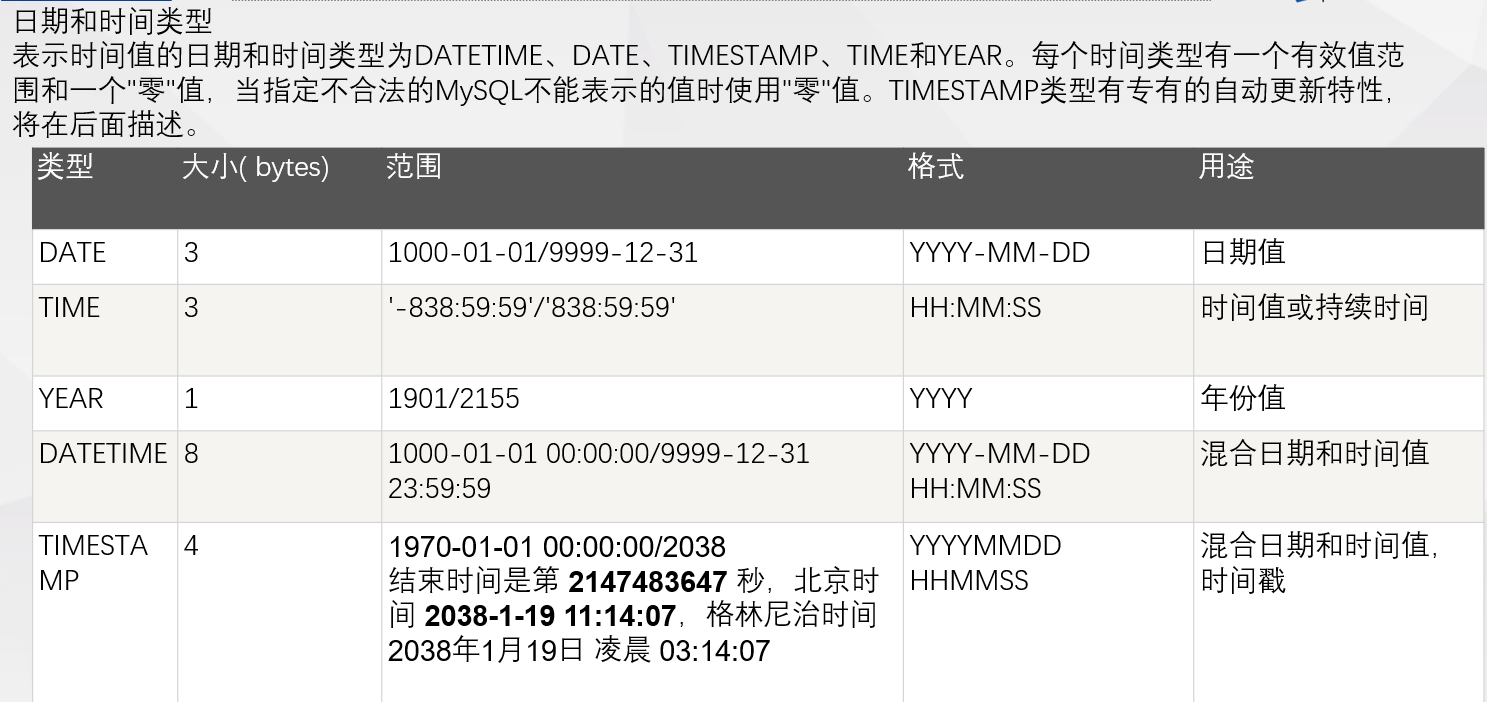
      MySQL中定义数据字段的类型对数据库的优化是非常重要的。MySQL支持多种类型,大致可以分为三类:数值、日期/时间和字符串(字符)类型。

数值类型
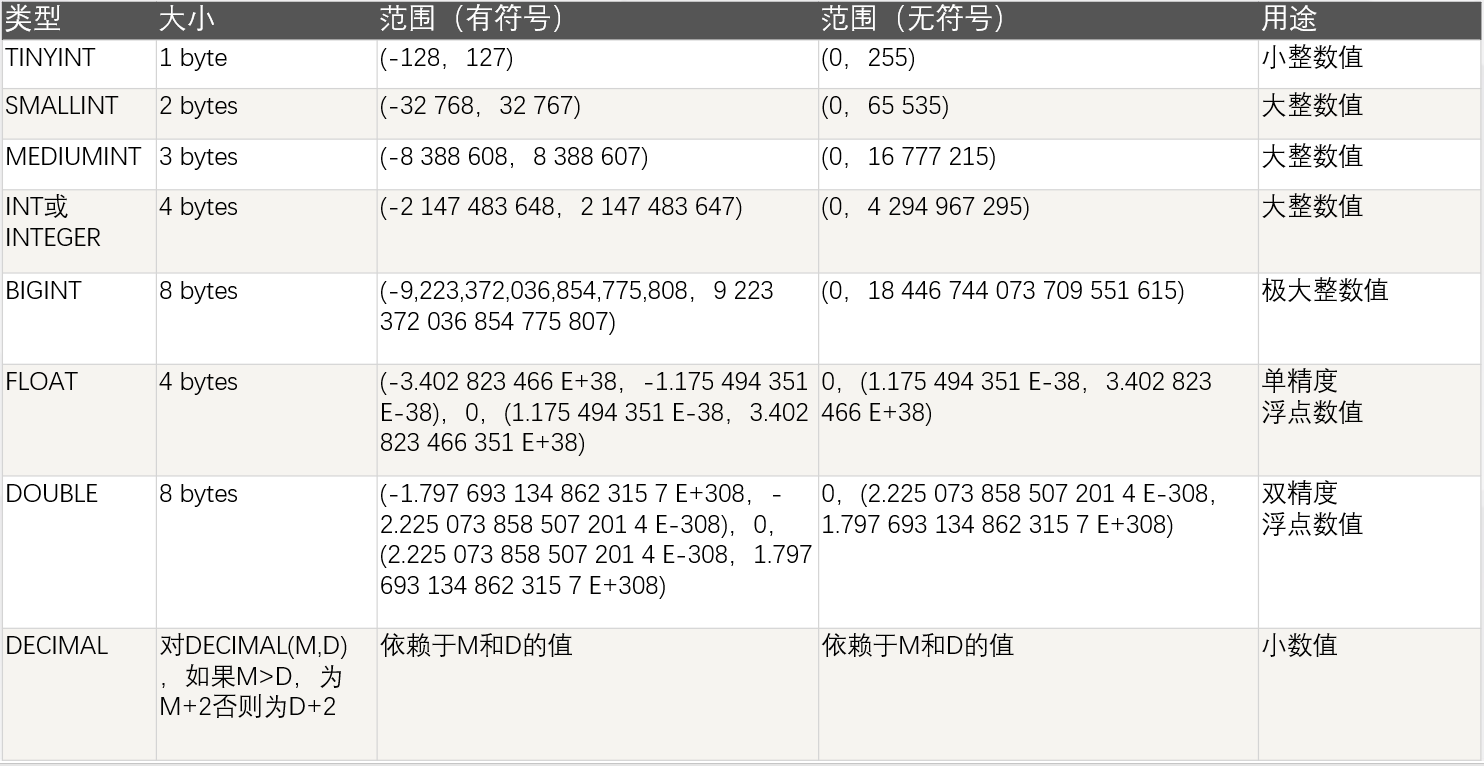
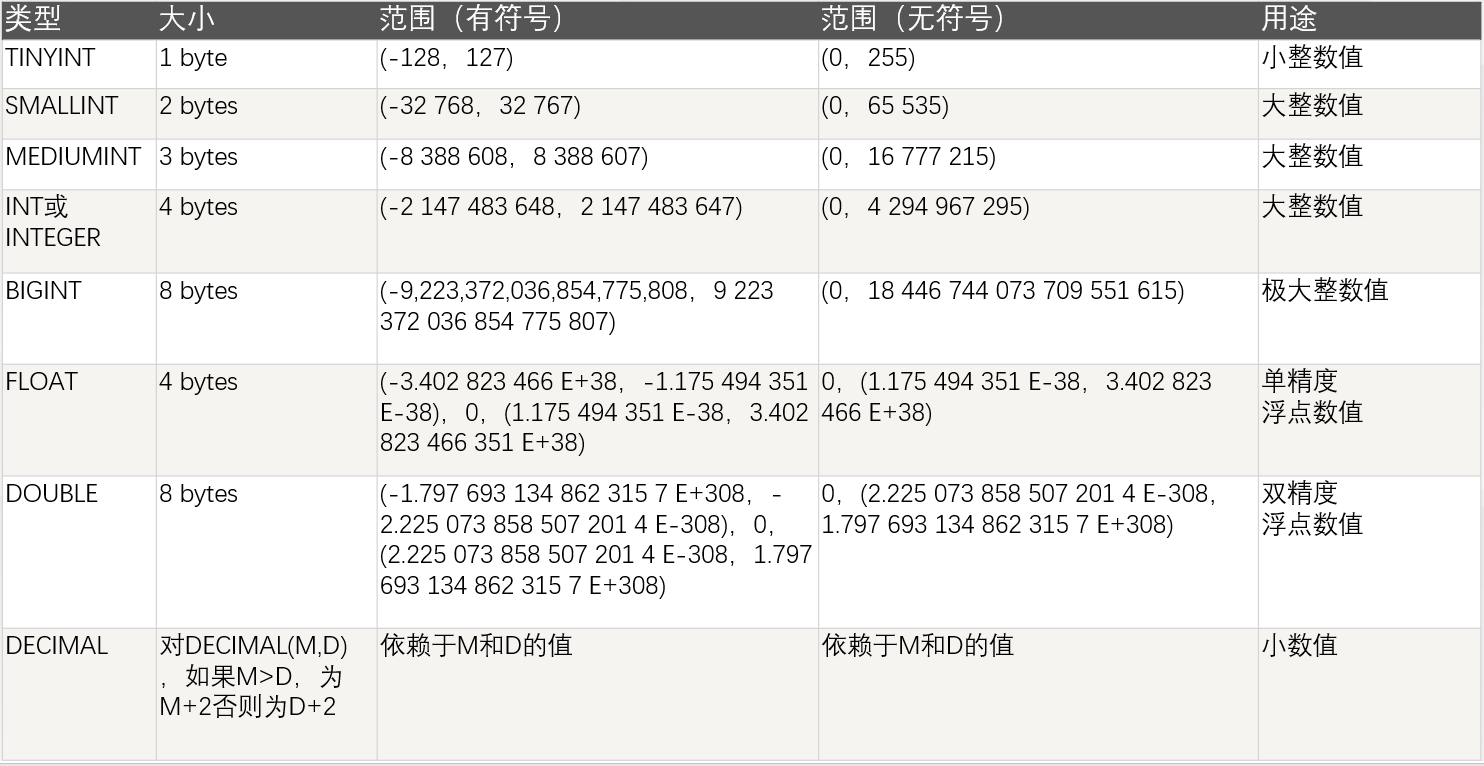
      MySQL支持所有标准SQL数值数据类型。这些类型包括严格数值数据类型(INTEGER、SMALLINT、DECIMAL和NUMERIC),以及近似数值数据类型(FLOAT、REAL和DOUBLE PRECISION)。

      关键字INT是INTEGER的同义词,关键字DEC是DECIMAL的同义词。BIT数据类型保存位字段值,并且支持MyISAM、MEMORY、InnoDB和BDB表。作为SQL标准的扩展,MySQL也支持整数类型TINYINT、MEDIUMINT和BIGINT。下面的表显示了需要的每个整数类型的存储和范围
注意:char(n) 和 varchar(n) 中括号中 n 代表字符的个数,并不代表字节个数,比如 CHAR(30) 就可以存储 30 个字符。

CHAR 和 VARCHAR 类型类似,但它们保存和检索的方式不同。它们的最大长度和是否尾部空格被保留等方面也不同。在存储或检索过程中不进行大小写转换。

BINARY 和 VARBINARY 类似于 CHAR 和 VARCHAR,不同的是它们包含二进制字符串而不要非二进制字符串。也就是说,它们包含字节字符串而不是字符字符串。这说明它们没有字符集,并且排序和比较基于列值字节的数值值。

BLOB 是一个二进制大对象,可以容纳可变数量的数据。有 4 种 BLOB 类型:TINYBLOB、BLOB、MEDIUMBLOB 和 LONGBLOB。它们区别在于可容纳存储范围不同。

有 4 种 TEXT 类型:TINYTEXT、TEXT、MEDIUMTEXT 和 LONGTEXT。对应的这 4 种 BLOB 类型,可存储的最大长度不同,可根据实际情况选择。
文章目录一、概述简介原理模块二、配置Mysql使用版本环境要求1.操作系统2.mysql要求三、配置canal-server离线下载在线下载上传解压修改配置单机配置集群配置分库分表配置1.修改全局配置2.实例配置垂直分库水平分库3.修改group-instance.xml4.启动监听四、配置canal-adapter1修改启动配置2配置映射文件3启动ES数据同步查询所有订阅同步数据同步开关启动4.验证五、配置canal-admin一、概述简介canal是Alibaba旗下的一款开源项目,Java开发。基于数据库增量日志解析,提供增量数据订阅&消费。Git地址:https://github.co
1.postman介绍Postman一款非常流行的API调试工具。其实,开发人员用的更多。因为测试人员做接口测试会有更多选择,例如Jmeter、soapUI等。不过,对于开发过程中去调试接口,Postman确实足够的简单方便,而且功能强大。2.下载安装官网地址:https://www.postman.com/下载完成后双击安装吧,安装过程极其简单,无需任何操作3.使用教程这里以百度为例,工具使用简单,填写URL地址即可发送请求,在下方查看响应结果和响应状态码常用方法都有支持请求方法:getpostputdeleteGet、Post、Put与Delete的作用get:请求方法一般是用于数据查询,
Ⅰ软件测试基础一、软件测试基础理论1、软件测试的必要性所有的产品或者服务上线都需要测试2、测试的发展过程3、什么是软件测试找bug,发现缺陷4、测试的定义使用人工或自动的手段来运行或者测试某个系统的过程。目的在于检测它是否满足规定的需求。弄清预期结果和实际结果的差别。5、测试的目的以最小的人力、物力和时间找出软件中潜在的错误和缺陷6、测试的原则28原则:20%的主要功能要重点测(eg:支付宝的支付功能,其他功能都是次要的)80%的错误存在于20%的代码中7、测试标准8、测试的基本要求功能测试性能测试安全性测试兼容性测试易用性测试外观界面测试可靠性测试二、质量模型衡量一个优秀软件的维度①功能性功
ES一、简介1、ElasticStackES技术栈:ElasticSearch:存数据+搜索;QL;Kibana:Web可视化平台,分析。LogStash:日志收集,Log4j:产生日志;log.info(xxx)。。。。使用场景:metrics:指标监控…2、基本概念Index(索引)动词:保存(插入)名词:类似MySQL数据库,给数据Type(类型)已废弃,以前类似MySQL的表现在用索引对数据分类Document(文档)真正要保存的一个JSON数据{name:"tcx"}二、入门实战{"name":"DESKTOP-1TSVGKG","cluster_name":"elasticsear
我看到其他人也遇到过类似的问题,但没有一个解决方案对我有用。0.3.14gem与其他gem文件一起存在。我已经完全按照此处指示完成了所有操作:https://github.com/brianmario/mysql2.我仍然得到以下信息。我不知道为什么安装程序指示它找不到include目录,因为我已经检查过它存在。thread.h文件存在,但不在ruby目录中。相反,它在这里:C:\RailsInstaller\DevKit\lib\perl5\5.8\msys\CORE\我正在运行Windows7并尝试在Aptana3中构建我的Rails项目。我的Ruby是1.9.3。$gemin
我已经开始使用mysql2gem。我试图弄清楚一些基本的事情——其中之一是如何明确地执行事务(对于批处理操作,比如多个INSERT/UPDATE查询)。在旧的ruby-mysql中,这是我的方法:client=Mysql.real_connect(...)inserts=["INSERTINTO...","UPDATE..WHEREid=..",#etc]client.autocommit(false)inserts.eachdo|ins|beginclient.query(ins)rescue#handleerrorsorabortentirelyendendclient.commi
(本文是网络的宏观的概念铺垫)目录计算机网络背景网络发展认识"协议"网络协议初识协议分层OSI七层模型TCP/IP五层(或四层)模型报头以太网碰撞路由器IP地址和MAC地址IP地址与MAC地址总结IP地址MAC地址计算机网络背景网络发展 是最开始先有的计算机,计算机后来因为多项技术的水平升高,逐渐的计算机变的小型化、高效化。后来因为计算机其本身的计算能力比较的快速:独立模式:计算机之间相互独立。 如:有三个人,每个人做的不同的事物,但是是需要协作的完成。 而这三个人所做的事是需要进行协作的,然而刚开始因为每一台计算机之间都是互相独立的。所以前面的人处理完了就需要将数据
我正在尝试绕过rails配置这个极其复杂的迷宫。到目前为止,我设法在ubuntu上设置了rvm(出于某种原因,ruby在ubuntu存储库中已经过时了)。我设法建立了一个Rails项目。我希望我的测试项目使用mysql而不是mysqlite。当我尝试“rakedb:migrate”时,出现错误:“!!!缺少mysql2gem。将其添加到您的Gemfile:gem'mysql2'”当我尝试“geminstallmysql”时,出现错误,告诉我需要为安装命令提供参数。但是,参数列表很大,我不知道该选择哪些。如何通过在ubuntu上运行的rvm和mysql获取rails3?谢谢。
文章目录概念索引相关操作创建索引更新副本查看索引删除索引索引的打开与关闭收缩索引索引别名查询索引别名文档相关操作新建文档查询文档更新文档删除文档映射相关操作查询文档映射创建静态映射创建索引并添加映射概念es中有三个概念要清楚,分别为索引、映射和文档(不用死记硬背,大概有个印象就可以)索引可理解为MySQL数据库;映射可理解为MySQL的表结构;文档可理解为MySQL表中的每行数据静态映射和动态映射上面已经介绍了,映射可理解为MySQL的表结构,在MySQL中,向表中插入数据是需要先创建表结构的;但在es中不必这样,可以直接插入文档,es可以根据插入的文档(数据),动态的创建映射(表结构),这就
目录1、yum安装mysql修改密码(1)在mysql里面修改(2)第二种方式,利用mysqladmin修改密码2、没有密码,登录mysql修改密码3、mysql的安全设置1、yum安装mysql在CentOS中默认安装有MariaDB(MySQL的一个分支),安装完成之后可以直接覆盖MariaDB。rpm-qa|grepmariadb查询是否安装了mariadbrpm-e--nodepsmariadb-libs-5.5.60-1.el7_5.x86_64卸载mariadwgethttp://dev.mysql.com/get/mysql57-community-release-el7-11.
