使用OpenZeppelin升级插件部署的合约具备可升级的特性:可以升级以修改其代码,同时保留其地址,状态和余额。 可以迭代地向项目中添加新功能,或修复在线上版本中可能发现的任何错误。
创建一个新的npm项目
mkdir mycontract && cd mycontract
npm init -y
安装并初始化Truffle
npm i --save-dev truffle
npx truffle init
安装Truffle升级插件
npm i --save-dev @openzeppelin/truffle-upgrades注意,可升级合约使用initialize函数而不是构造函数来初始化状态。
Box.sol
// contracts/Box.sol
// SPDX-License-Identifier: MIT
pragma solidity ^0.7.0;

contract Box {
    uint256 private value;

    // Emitted when the stored value changes
    event ValueChanged(uint256 newValue);

    // Stores a new value in the contract
    function store(uint256 newValue) public {
        value = newValue;
        emit ValueChanged(newValue);
    }

    // Reads the last stored value
    function retrieve() public view returns (uint256) {
        return value;
    }
}我们将使用Truffle迁移来部署Box合约。Truffle升级插件提供了一个 deployProxy功能来部署可升级合约。它将部署我们实现的合约,ProxyAdmin会作为项目代理和代理管理员,并调用初始化函数。
在migrations目录中创建以下2_deploy_contracts.js脚本。
在本文中,我们还没有initialize函数,因此将使用store 函数来初始化状态。
2_deploy_contracts.js
// migrations/2_deploy_box.js
const Box = artifacts.require('Box');

const { deployProxy } = require('@openzeppelin/truffle-upgrades');

module.exports = async function (deployer) {
  await deployProxy(Box, [42], { deployer, initializer: 'store' });
};
使用Rinkeby网络运行truffle migration进行部署。 我们可以看到3 个合约:Box.sol、ProxyAdmin 和 代理合约TransparentUpgradeableProxy。
truffle migrate --network rinkeby...
2_deploy_contracts.js
===============Deploying 'Box'
---------------
> transaction hash: 0x1e5a61c2d4560d6ffe5cc60d7badbfef6d5e420708eebff6dc580bb3f9f9f3e1
> Blocks: 1 Seconds: 14
> contract address: 0x7f7dc11961fCD81f53e9F45D9DfBb745832c0657
...Deploying 'ProxyAdmin'
----------------------
> transaction hash: 0x298b429391c5a98701bf79df00f4f5526c61570f3091b3d6693e3a4f12a88409
> Blocks: 1 Seconds: 14
> contract address: 0x7Bd40e62aEe2c5e232152351f57068038761E20F
...Deploying 'TransparentUpgradeableProxy'
---------------------------------------
> transaction hash: 0x7a0043dbe9a35ab9eab8cf0eac1856418cd0c359e330448df016150d293e6716
> Blocks: 2 Seconds: 26
> contract address: 0xc2ea7DE43F194bB397761a30a05CEDcF28835F24
...
发布验证合约
truffle run verify Box --network rinkeby我们可以使用Truffle控制台(truffle console)与我们的合约进行交互。
注意: Box.deployed() 是我们的代理合约的地址。
truffle console --network rinkebytruffle(rinkeby)> box = await Box.deployed()
truffle(rinkeby)> box.address
'0xc2ea7DE43F194bB397761a30a05CEDcF28835F24'
truffle(rinkeby)> (await box.retrieve()).toString()
'42'
当前代理的管理员(可以执行升级)是ProxyAdmin合约。 只有ProxyAdmin的所有者可以升级代理。 警告:ProxyAdmin 所有权转移时请确保转到我们控制的地址上。
在migrations目录中创建以下3_transfer_ownership.js脚本。
3_transfer_ownership.js
// migrations/3_transfer_ownership.js
const { admin } = require('@openzeppelin/truffle-upgrades');

module.exports = async function (deployer, network) {
  // 使用你的 钱包 地址
  const admin = '0x1c14600daeca8852BA559CC8EdB1C383B8825906';

  // Don't change ProxyAdmin ownership for our test network
  if (network !== 'test') {
    // The owner of the ProxyAdmin can upgrade our contracts
    await admin.transferProxyAdminOwnership(admin);
  }
};
在Rinkeby网络上运行迁移
truffle migrate --network rinkeby...
3_transfer_ownership.js
=======================> Saving migration to chain.
-------------------------------------
...
一段时间后,我们决定要向合约添加功能。 在本文中,我们将添加一个increment函数。
注意:我们无法更改之前合约实现的存储布局,有关技术限制的更多详细信息,请参阅升级。
使用以下Solidity代码在你的contracts目录中创建新的实现BoxV2.sol 。
BoxV2.sol
// contracts/BoxV2.sol
// SPDX-License-Identifier: MIT
pragma solidity ^0.7.0;

contract BoxV2 {
    uint256 private value;

    // Emitted when the stored value changes
    event ValueChanged(uint256 newValue);

    // Stores a new value in the contract
    function store(uint256 newValue) public {
        value = newValue;
        emit ValueChanged(newValue);
    }

    // Reads the last stored value
    function retrieve() public view returns (uint256) {
        return value;
    }

    // Increments the stored value by 1
    function increment() public {
        value = value + 1;
        emit ValueChanged(value);
    }
}一旦测试了新的实现,就可以准备升级。 这将验证并部署新合约。 注意:我们仅是准备升级。
在migrations目录中创建以下4_prepare_upgrade_boxv2.js脚本。
4_prepare_upgrade_boxv2.js
// migrations/4_prepare_upgrade_boxv2.js
const Box = artifacts.require('Box');
const BoxV2 = artifacts.require('BoxV2');

const { prepareUpgrade } = require('@openzeppelin/truffle-upgrades');

module.exports = async function (deployer) {
  const box = await Box.deployed();
  await prepareUpgrade(box.address, BoxV2, { deployer });
};
在Rinkeby网络上运行迁移,以部署新的合约实现
truffle migrate --network rinkeby...
4_prepare_upgrade_boxv2.js
==========================Deploying 'BoxV2'
-----------------
> transaction hash: 0x078c4c4454bb15e3791bc80396975e6e8fc8efb76c6f54c321cdaa01f5b960a7
> Blocks: 1 Seconds: 17
> contract address: 0xEc784bE1CC7F5deA6976f61f578b328E856FB72c
...
部署后地址
进入truffle控制台
truffle console --network rinkebytruffle(rinkeby)> box = await Box.deployed()
truffle(rinkeby)> boxV2 = await BoxV2.deployed()
truffle(rinkeby)> box.address
'0xF325bB49f91445F97241Ec5C286f90215a7E3BC6'
truffle(rinkeby)> boxV2.address
'0xEc784bE1CC7F5deA6976f61f578b328E856FB72c'
执行ProxyAdmin合约的upgrade方法
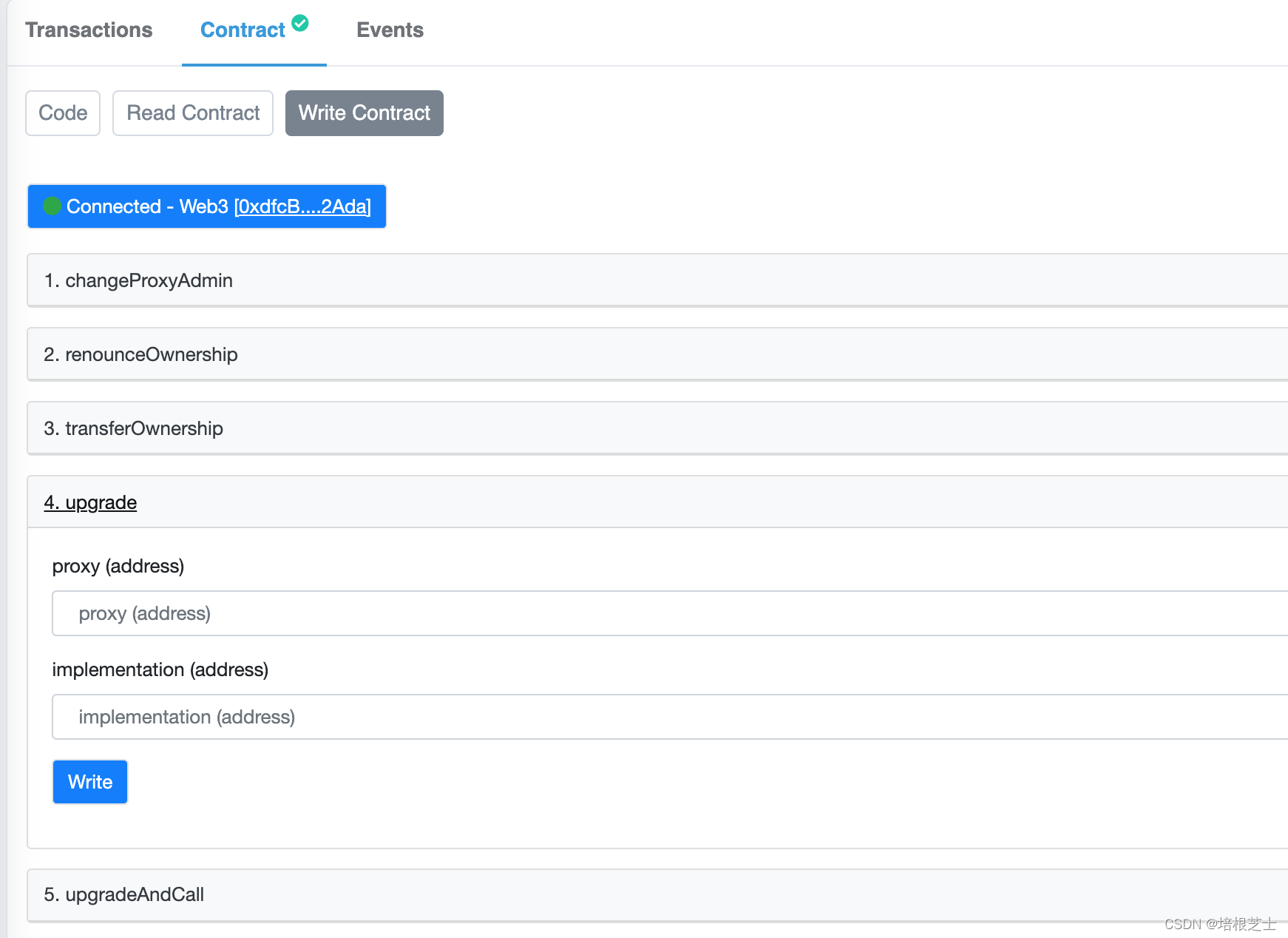
proxy:TransparentUpgradeableProxy合约的地址
implementation:BoxV2合约的地址
然后需要在MetaMask(或你正使用的钱包)中签署交易。
现在,我们可以与升级后的合约进行交互。 我们需要使用代理地址与BoxV2进行交互。 然后,我们可以调用新的“增量”功能,观察到整个升级过程中都保持了状态。
进入truffle控制台
truffle console --network rinkebytruffle(rinkeby)> box = await Box.deployed()
truffle(rinkeby)> boxV2 = await BoxV2.at(box.address)
truffle(rinkeby)> (await boxV2.retrieve()).toString()
'42'
truffle(rinkeby)> await boxV2.increment()
{ tx:
...
truffle(rinkeby)> (await boxV2.retrieve()).toString()
'43'
尝试通过RVM将RubyGems升级到版本1.8.10并出现此错误:$rvmrubygemslatestRemovingoldRubygemsfiles...Installingrubygems-1.8.10forruby-1.9.2-p180...ERROR:Errorrunning'GEM_PATH="/Users/foo/.rvm/gems/ruby-1.9.2-p180:/Users/foo/.rvm/gems/ruby-1.9.2-p180@global:/Users/foo/.rvm/gems/ruby-1.9.2-p180:/Users/foo/.rvm/gems/rub
我在我的Rails项目中使用Pow和powifygem。现在我尝试升级我的ruby版本(从1.9.3到2.0.0,我使用RVM)当我切换ruby版本、安装所有gem依赖项时,我通过运行railss并访问localhost:3000确保该应用程序正常运行以前,我通过使用pow访问http://my_app.dev来浏览我的应用程序。升级后,由于错误Bundler::RubyVersionMismatch:YourRubyversionis1.9.3,butyourGemfilespecified2.0.0,此url不起作用我尝试过的:重新创建pow应用程序重启pow服务器更新战俘
我实际上是在尝试使用RVM在我的OSX10.7.5上更新ruby,并在输入以下命令后:rvminstallruby我得到了以下回复:Searchingforbinaryrubies,thismighttakesometime.Checkingrequirementsforosx.Installingrequirementsforosx.Updatingsystem.......Errorrunning'requirements_osx_brew_update_systemruby-2.0.0-p247',pleaseread/Users/username/.rvm/log/138121
我是Google云的新手,我正在尝试对其进行首次部署。我的第一个部署是RubyonRails项目。我基本上是在关注thisguideinthegoogleclouddocumentation.唯一的区别是我使用的是我自己的项目,而不是他们提供的“helloworld”项目。这是我的app.yaml文件runtime:customvm:trueentrypoint:bundleexecrackup-p8080-Eproductionconfig.ruresources:cpu:0.5memory_gb:1.3disk_size_gb:10当我转到我的项目目录并运行gcloudprevie
我最近决定从我的系统中卸载RVM。在thispage提出的一些论点说服我:实际上,我的决定是,我根本不想担心Ruby的多个版本。我只想使用1.9.2-p290版本而不用担心其他任何事情。但是,当我在我的Mac上运行ruby--version时,它告诉我我的版本是1.8.7。我四处寻找如何简单地从我的Mac上卸载这个Ruby,但奇怪的是我没有找到任何东西。似乎唯一想卸载Ruby的人运行linux,而使用Mac的每个人都推荐RVM。如何从我的Mac上卸载Ruby1.8.7?我想升级到1.9.2-p290版本,并且我希望我的系统上只有一个版本。 最佳答案
我可以在Azure网站上部署RubyonRails吗? 最佳答案 还没有。目前仅支持.NET和PHP。 关于ruby-on-rails-RubyonRails可以部署在Azure网站上吗?,我们在StackOverflow上找到一个类似的问题: https://stackoverflow.com/questions/12964010/
前置步骤我们都操作完了,这篇开始介绍jenkins的集成。话不多说,看操作1、登录进入jenkins后会让你选择安装插件,选择第一个默认的就行。安装完成后设置账号密码,重新登录。2、配置JDK和Git都需要执行路径,所以需要先把执行路径找到,先进入服务器的docker容器,2.1JDK的路径root@69eef9ee86cf:/usr/bin#echo$JAVA_HOME/usr/local/openjdk-82.2Git的路径root@69eef9ee86cf:/#whichgit/usr/bin/git3、先配置JDK和Git。点击:ManageJenkins>>GlobalToolCon
深度学习部署:Windows安装pycocotools报错解决方法1.pycocotools库的简介2.pycocotools安装的坑3.解决办法更多Ai资讯:公主号AiCharm本系列是作者在跑一些深度学习实例时,遇到的各种各样的问题及解决办法,希望能够帮助到大家。ERROR:Commanderroredoutwithexitstatus1:'D:\Anaconda3\python.exe'-u-c'importsys,setuptools,tokenize;sys.argv[0]='"'"'C:\\Users\\46653\\AppData\\Local\\Temp\\pip-instal
我完全不是程序员,正在学习使用Ruby和Rails框架进行编程。我目前正在使用Ruby1.8.7和Rails3.0.3,但我想知道我是否应该升级到Ruby1.9,因为我真的没有任何升级的“遗留”成本。缺点是什么?我是否会遇到与普通gem的兼容性问题,或者甚至其他我不太了解甚至无法预料的问题? 最佳答案 你应该升级。不要坚持从1.8.7开始。如果您发现不支持1.9.2的gem,请避免使用它们(因为它们很可能不被维护)。如果您对gem是否兼容1.9.2有任何疑问,您可以在以下位置查看:http://www.railsplugins.or
Ocra无法处理需要“tk”的应用程序require'tk'puts'nope'用奥克拉http://github.com/larsch/ocra不起作用(如链接中的一个问题所述)问题:https://github.com/larsch/ocra/issues/29(Ocra是1.9的"new"rubyscript2exe,本质上它用于将rb脚本部署为可执行文件)唯一的问题似乎是缺少tcl的DLL文件我不认为这是一个问题据我所知,问题是缺少tk的DLL文件如果它们是已知的,则可以在执行ocra时将它们包括在内有没有办法知道tk工作所需的DLL依赖项? 最佳答
