目录
在前面的课程中,我们都是采用 Options API(基于选项的 API ) 来写一个组件的。下面是一个实例:
<template>
  Count is: {{ count }}, doubleCount is: {{ doubleCount }}
  <button @click="add">加</button>
</template>

<script>
export default {
  data() {
    return {
      count: 0,
    };
  },
  computed: {
    doubleCount() {
      return this.count * 2;
    },
  },
  methods: {
    add() {
      this.count++;
    }
  }
}
</script>
当要去理解一个组件时,我们更加关心的是:“这个组件是要干什么(即代码背后的意图)”,而不是:“这个组件用到了什么选项”。
Options API 撰写出来的代码自然采用了后者的表述方式,然而对前者的表述并不好。
在 Options API 中实际上形成了一种强制的约定:
- props 里面设置接收参数
- data 里面设置变量
- computed 里面设置计算属性
- watch 里面设置监听属性
- methods 里面设置事件方法
我们会发现: Options API 都约定了我们该在哪个位置做什么事,这在一定程度上也强制我们进行了代码分割。这就为展示背后的逻辑关注点设置了障碍。我们必须不断地在选项代码块之间“跳转”,以找到与该关注点相关的部分。
尤其是在大型组件中,数据与方法会很多,而数据与其相关联的方法就会被其他数据和方法分隔的很远,往往很难被看出它们之间的关联。
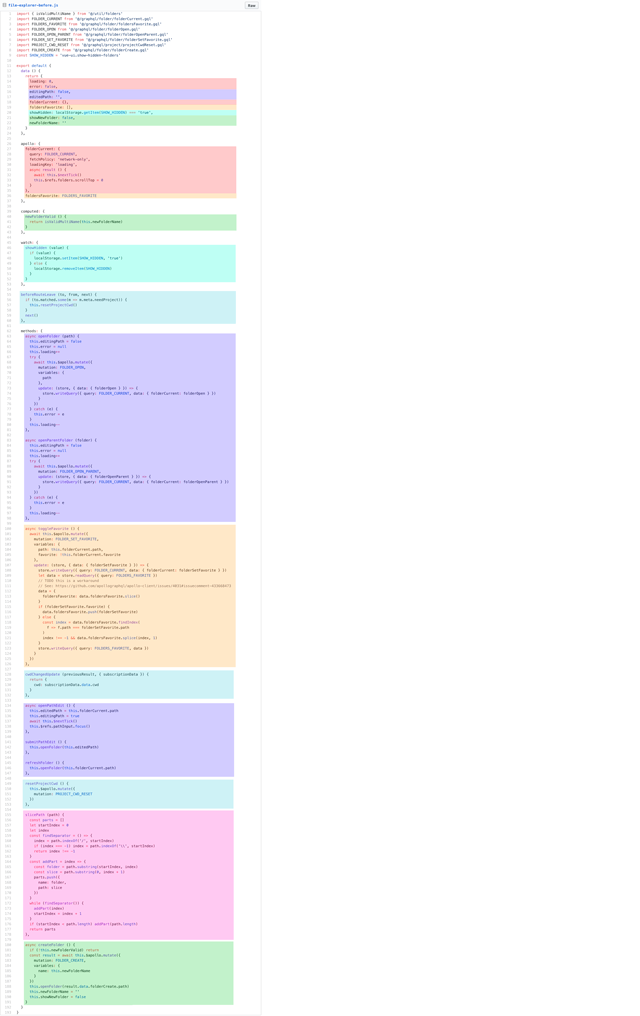
这是一个大型组件的示例,其中逻辑关注点是按颜色分组。
这种碎片化使得理解和维护复杂组件变得困难。选项的分离掩盖了潜在的逻辑问题。此外,在处理单个逻辑关注点时,我们必须不断地“跳转”相关代码的选项块。
如果我们能够将与同一个逻辑关注点相关的代码配置在一起,这样会更好。而这正是组合式 API 使我们能够做到的。
Composition API:组合式 API;一组低侵入式的、函数式的 API,使得我们能够更灵活地【组合】组件的逻辑。
这是有别于 Options API 的一种函数式 API。无需通过很多选项来完成业务逻辑,Composition API提供了一个setup函数,我们可以将data数据、计算属性、方法等等,都放在setup函数中,这样就可以对业务进行集中处理了。
采用Composition API来重写上面的组件:
<template>
  Count is: {{ state.count }}, doubleCount is: {{ state.doubleCount }}
  <button @click="add">加</button>
</template>

<script>
import { reactive, computed } from "vue";

export default {
  setup() {
    const state = reactive({
      count: 0,
      doubleCount: computed(() => state.count * 2),
    });

    function add() {
      state.count++;
    }

    return {
      state,
      add
    }
  }
}
</script>
还有一个 setup 函数,setup 函数是一个新的组件选项。作为在组件内使用 Composition API 的入口点,如果 setup 返回一个对象,则对象的属性将会被合并到组件模板的渲染上下文,我们就可以在模板里使用对应的属性和方法。
setup 函数是一个新的组件选项,它是在组件内使用 Composition API 的入口点。它会在Vue实例创建完成前被调用。所以,setup函数中没有this指针
<template>
  <div></div>
</template>

<script>
export default {
  setup() {
	//这里书写本地状态(data数据)、计算属性或方法等
    console.log('setup函数');
  }
}
</script>
如果 setup 返回一个对象,则对象的属性将会被合并到组件模板的渲染上下文,我们就可以在模板里使用对应的属性和方法。所以,我们可以将本地状态(data数据)、方法、计算属性等写在 setup 函数中。
<template>
  Count is: {{ count }}
</template>

<script>
export default {
  setup() {
    let count = 10;

    return {
      count
    }
  }
}
</script>
上面代码中,在 setup 函数中声明了一个 count 数据。然后使用 return 返回需要暴露的内容。运行之后可以看到:视图能够正确显示count数据。
setup函数总结:
- setup函数是Composition API 的入口点,是它的核心。
- 由于执行 setup 时,组件实例尚未被创建,因此在 setup 中不能使用 this。
- setup中定义的东西必须要return出去,才能被使用或绑定视图。
上面实例中,虽然视图能够显示数据。但当改变数据时,视图却不会得到响应。
<template>
  Count is: {{ count }}
  <button @click="add">加</button>
</template>

<script>
export default {
  setup() {
    let count = 10;

    function add(){
      count++;       //setup函数中没有this指针
    }

    return {
      count,
      add
    }
  }
}
</script>
原因很简单,count只是声明的一个普通数据,不具备响应功能。
在 Vue 3.0 中,我们可以通过一个 ref 函数来实现响应式数据监听。ref 接受一个参数,并将其包裹在一个带有 value 属性的对象中返回,然后可以使用该 value 属性访问或更改响应式变量的值:
<template>
  Count is: {{ count }}
  <button @click="add">加</button>
</template>

<script>
//注意:要导入ref
import {ref} from 'vue';

export default {
  setup() {
    let count = ref(10);  //count成为响应式数据。

    function add(){
      count.value++;       //使用value属性获取响应数据
    }

    return {
      count,
      add
    }
  }
}
</script>
为什么要将值封装在一个对象中,看似没有必要,但为了保持 JavaScript 中不同数据类型的行为统一,这是必须的。因为在 JavaScript 中,Number 或 String 等基本类型是通过值传递的,而不是通过引用传递的:

上面实例中,操作数据时需要使用 value 属性,比较麻烦。
可以使用 reactive 与 toRefs 解决这个问题。首先使用 reactive 创建响应式对象,封装数据。
<template>
  <p>Count is: {{ state.count }}</p>
  <button @click="add">加</button>
  <p>{{ state.user.username }}</p>
</template>

<script>
//注意:要导入ref
import {reactive} from 'vue';

export default {
  setup() {
    //所有响应数据都声明在这里,包括对象、数组
    const state = reactive({
      count: 10,
      user:{
        userId: 1,
        username: '张三'
      }
    })

    function add(){
      state.count++;       //这里可以不使用value了
    }

    return {
      state,
      add
    }
  }
}
</script>
此时不用使用 value 属性了。
但是因为只有state是响应式数据,而state中的那些数据还不是响应式的。所以在视图访问数据时都需要使用 state 作为前缀才可以。这就比较麻烦了。
此时我们可以使用 toRefs 进行优化。toRefs可以将state中的每一个数据进行展开,且都包装成响应数据。这样视图层就可以直接使用了。
<template>
  <p>Count is: {{ count }}</p>
  <button @click="add">加</button>
  <p>{{ user.username }}</p>
</template>

<script>
//注意:要导入ref
import {reactive, toRefs} from 'vue';

export default {
  setup() {
    //所有响应数据都声明在这里,包括对象、数组
    const state = reactive({
      count: 10,
      user:{
        userId: 1,
        username: '张三'
      }
    })

    function add(){
      state.count++;       //这里可以不使用value了
    }

    return {
      ...toRefs(state),    //这里使用使用 ...toRefs(state)
      add
    }
  }
}
</script>
- 在返回时使用 ...toRefs(state) ,这样视图层就可以不使用 state 前缀了。
- 为什么要使用 ... 参数扩展运输符呢?因为toRefs(state) 将state对象展开,并包装成多个响应数据。
<template>
  <p>Count is: {{ count }}</p>
  <p>doubleCount is: {{ doubleCount }}</p>
  <button @click="add">加</button>
  <p>{{ user.username }}</p>
</template>

<script>
//注意:要导入ref
import { reactive, toRefs, computed } from "vue";

export default {
  setup() {
    //所有响应数据都声明在这里,包括对象、数组
    const state = reactive({
      count: 10,
      user: {
        userId: 1,
        username: "张三",
      },
      doubleCount: computed(() => {    //使用computed函数
        return state.count * 2;
      }),
    });

    function add() {
      state.count++; //这里可以不使用value了
    }

    return {
      ...toRefs(state),
      add,
    };
  },
};
</script>
- 首先要import导入computed。
- 在reactive({})中声明computed即可。
到现在为止,响应式数据就都可以处理了。
<template>
  <div>
    {{ num }}
    <button @click="add">加</button>
  </div>
</template>

<script>
import { reactive, toRefs, watch } from "vue";

export default {
  setup() {
    const state = reactive({
      num: 0,
    });

    watch(state,(newValue, oldValue) => {
        console.log(newValue, oldValue);
      }
    );

    function add() {
      state.num++;
    }

    return {
      ...toRefs(state),
      add,
    };
  },
};
</script>
- 使用watch函数来进行数据监听。watch函数有两个参数。
- 第一个参数:要监听的数据。
- 第二个参数:触发监听时的处理函数(包括newValue, oldValue)
上面实例中直接监听state响应对象。但我们知道,在state中会有很多数据,如果只想监听其中的某个数据,就需要换一种写法:
<template>
  <div>我是子组件</div>
</template>

<script>
export default {
  setup(props, context) {
    console.log(props.msg)
  },
  props: {
    msg: String,
  },
};
</script>

<style>
</style>
父组件(HomeView.vue):
<template>
  <div>
    <Hello msg="hello"></Hello>
  </div>
</template>

<script>
import Hello from '../components/Hello.vue'
import { reactive, toRefs, computed } from "vue";

export default {
  setup() {
    const state = reactive({

    });
    return {
      ...toRefs(state),
    };
  },
  components:{
    Hello
  }
};
</script>
注意,要先import导入子组件,然后使用components挂载子组件。
setup() 函数的 context 是子组件向父组件传值的参数。
子组件(Hello.vue):
<template>
  <div>
    <div>我是子组件</div>
    <button @click="send">给父组件发数据</button>
  </div>
</template>

<script>
export default {
  setup(props, context) {
    function send() {
      context.emit("childmsg", "hello world!");
    }

    return {
      send,
    };
  },
  props: {
    msg: String,
  },
};
</script>

<style>
</style>
父组件(HomeView.vue):
<template>
  <div>
    <Hello msg="hello" @childmsg="get"></Hello>
    <p>我是父组件,接受子组件传的值:{{welcome}}</p>
  </div>
</template>

<script>
import Hello from '../components/Hello.vue'
import { reactive, toRefs, computed } from "vue";

export default {
  setup() {
    //所有响应数据都声明在这里,包括对象、数组
    const state = reactive({
      welcome: ''
    });

    function get(param) {
      state.welcome = param;
    }

    return {
      ...toRefs(state),
      get
    };
  },
  components:{
    Hello
  }
};
</script>下面我们会将前面学过的知识点都改写为Composition API的形式。而且,Vue3兼容Options API和Composition API两种写法。所以这两种写法都要会。
我们学过provide与inject可用于多级组件直接传递数据,下面学习provide与inject在Composition API中的使用。
创建孙子组件(SubHello.vue)
<template>
  <div>
    <div>我是孙组件</div>
  </div>
</template>

<script>
import { inject } from "vue";

export default {
  setup(props, context) {

    console.log(inject('msg'))

    return {};
  }
};
</script>
在孙子组件中import导入inject,并使用inject接收上级组件的传值。
<template>
  <div>
    <div>我是子组件</div>
    <SubHello></SubHello>
  </div>
</template>

<script>
import SubHello from './SubHello.vue'

export default {
  setup(props, context) {

    return {};
  },
  components:{
      SubHello
  }
};
</script>

<style>
</style><template>
<div>
<Hello></Hello>
</div>
</template>
<script>
import Hello from "../components/Hello.vue";
import { provide } from "vue";
export default {
setup() {
provide('msg','hello');
},
components:{
Hello
}
};
</script>注意,由于父组件向孙子组件传递数据是单向的,所以孙子组件不能修改传递的值。如果子组件
在 setup () 内部调用生命周期钩子:
| 选项式API | setup () 内部调用生命周期钩子 |
| beforeCreate() | setup() |
| created() | setup() |
| beforeMount() | onBeforeMount() |
| mounted() | onMounted() |
| beforeUpdate() | onBeforeUpdate() |
| updated() | onUpdated() |
| beforeUnmount() | onBeforeUnmount() |
| unmounted() | onUnmounted() |
- 注意:在Composition API中没有beforeCreate()和created()这里两个声明周期函数了,统一使用setup()。
实例:
<template>
  <div>
    {{ num }}
    <button @click="add">加</button>
  </div>
</template>

<script>
import { reactive,toRefs,onBeforeMount,onMounted,onBeforeUpdate,onUpdated,onBeforeUnmount,onUnmounted } from "vue";

export default {
  setup() {
    const state = reactive({
      num: 1,
    });

    function add() {
      state.num++;
    }

    onBeforeMount(() => {
      console.log("DOM挂载前!");
    });

    onMounted(() => {
      console.log("DOM挂载后!");
    });

    onBeforeUpdate(() => {
      console.log("数据更新前!");
    })

    onUpdated(() => {
      console.log("数据更新后!");
    })

    onBeforeUnmount(() => {
      console.log("实例卸载前!");
    })

    onUnmounted(() => {
      console.log("实例卸载后!");
    })

    return {
      ...toRefs(state),
      add,
    };
  },
};
</script>下面学习如何在Composition API中使用路由。
打开App.vue组件,这里已经有了路由。当然,是使用router-link标签来实现的。现在我们将它改成编程式路由。
<template>
  <nav>
    <!--
    <router-link to="/">Home</router-link> |
    <router-link to="/about">About</router-link>
    -->
    <button @click="toHome">Home</button>
    <button @click="toAbout">About</button>
  </nav>
  <router-view />
</template>

<script>
import { useRouter } from "vue-router";

export default{
  setup() {
    const router = useRouter();

    function toHome(){
      router.push('/');
    }

    function toAbout(){
      router.push({path:'/about',query:{name:'zhangsan'}});
    }

    return {
      toHome,
      toAbout
    }
  },
}
</script>
- 先import导入useRouter模块。
- 通过useRouter模块获取router对象。以后的路由写法就与前面所学一样了。
下面是获取路由参数,打开AboutView.vue文件
<template>
  <div>
  </div>
</template>

<script>
import { useRoute } from "vue-router";

export default {
  setup(){
    const route = useRoute();

    console.log(route.query.name);
  }
}
</script>
通过同样的方式获取route对象后就可以获取路由参数了。
下面学习如何在Composition API中使用Vuex。
<template>
  <div>
  </div>
</template>

<script>
import { useStore } from "vuex";

export default {
  setup() {
    const store = useStore();
    console.log(store.state.num);
    console.log(store.getters.newnum);
  }
};
</script>
- 先import导入useStore模块。
- 通过useStore模块获取store对象。就可以通过store对象获取Vuex中的所有数据了。
前面我们知道在Vue中,可以使用ref来获取DOM对象。下面学习如何在Composition API中使用ref。
<template>
  <div ref="myRef">获取单个DOM元素</div>
</template>

<script>
import { ref, onMounted } from 'vue';

export default {
  setup() {
    const myRef = ref(null);   //ref(null)是一个固定的写法

    onMounted(() => {
      console.dir(myRef.value);
    });
    return {
      myRef
    };
  }
};
</script>
- 在HTML标签中使用 ref 属性标识一个DOM对象。
- 需要 import 导入 ref 对象。
- 使用 const myRef = ref(null); 的方式获取包装好的DOM对象,命名为HTML中的 ref 属性名。并且此数据需要暴露出去。
- 使用 value 属性即可获取 DOM对象。
<template>
  <div>
    <input type="text" v-model="newItem" />
    <button @click="handleAdd">添加</button>
  </div>
</template>

<script>
import {reactive, toRefs} from 'vue';

export default {
  setup(props, context){
    const state = reactive({
      newItem: ""
    })

    function handleAdd() {
      if (state.newItem == "") {
        alert("不能为空");
        return;
      }
      //注意:这里使用setup参数context来出发父组件事件
      context.emit("submitNewItem", state.newItem);
      state.newItem = "";
    }

    return {
      ...toRefs(state),
      handleAdd
    }
  }
}
</script><template>
<ol>
<li v-for="(item, index) in list" :key="index" @click="judgeItem(index)">
{{ item }}
</li>
</ol>
</template>
<script>
export default {
setup(props, context) {
//这里分别使用了setup的两个参数
function judgeItem(index) {
if (props.listType) {
context.emit("handleDelete", index);
} else {
context.emit("handleJudge", index);
}
}
return {
judgeItem
};
},
props: {
list: {
type: Array,
required: true,
},
listType: {
type: Boolean,
default: false,
},
},
};
</script><template>
<div>
<h1>todoList</h1>
<AddNew @submitNewItem="addNewItem"></AddNew>
<TheList :list="todoList" @handleJudge="toDone"></TheList>
<hr />
<TheList :list="doneList" :listType="true" @handleDelete="toDelete"></TheList>
</div>
</template>
<script>
import AddNew from "../components/AddNew.vue";
import TheList from "../components/TheList.vue";
import {reactive, toRefs} from 'vue';
export default {
setup(){
const state = reactive({
todoList: [], //待办事项
doneList: [] //完成事项
})
function addNewItem(newItem){
state.todoList.push(newItem);
}
function toDone(index){
state.doneList.push(state.todoList.splice(index,1)[0]);
}
function toDelete(index){
state.doneList.splice(index,1);
}
return {
...toRefs(state),
addNewItem,
toDone,
toDelete
}
},
components: {
AddNew,
TheList,
},
};
</script>在Composition API中,在setup函数中声明的数据、函数等内容,都需要通过 return 对外暴露,才能被组件的视图模板(template)使用,这就造成了书写上的不方便。于是,Vue官方又给我们推出了一个新的setup语法糖。
使用setup语法糖,就可以不用写setup函数了。并且,数据和函数也不用返回,组件也不需要注册了。
<template>
</template>

<script setup>
//此处直接写setup函数中的内容
</script>

<style>
</style>
- 在script标签中使用setup属性即可。
- 运行时,script标签中的内容会被重新编译成 setup() 函数的形式。
- 而且,声明的数据、函数不需要通过 return 暴露,即可被 template所使用
<template>
  <div>
    <p>{{ num }}</p>
    <button @click="add">加</button>
  </div>
</template>

<script setup>
let num = 10;
//const num = 10;

//由于num不是响应数据,所以改变num是无效的。
const add = ()=>{
  alert("触发了此方法");
  num++;
}
</script>
直接声明的数据不是响应式的,数据改变时不会响应到视图模板中。
<template>
  <div>
    <p>{{ num }}</p>
    <p>{{ dept.deptno }},{{ dept.dname }},{{ dept.loc }}</p>
    <ul>
      <li v-for="user in userArr" :key="user.userId">
        {{user.userId}},{{user.userName}},{{user.userAge}}
      </li>
    </ul>
    <button @click="add">加</button>
  </div>
</template>

<script setup>
import { reactive, ref } from "vue";

const num = ref(10);

const dept = reactive({
  deptno: 20,
  dname: "技术部",
  loc: '沈阳市',
});

const userArr = ref([
  {
    userId: 100,
    userName: "张三",
    userAge: 25,
  },
  {
    userId: 101,
    userName: "李四",
    userAge: 26,
  },
  {
    userId: 102,
    userName: "王五",
    userAge: 27,
  },
]);

const add = () => {
  num.value++;      //注意:要使用value属性获取
  dept.deptno++;
  //userArr.value[0].userAge++;
  userArr.value = [];
}
</script>
ref 和 reactive 都可以做响应式数据,它们的区别如下:
- reactive:用于定义引用类型。只能修改数据,不能改变其引用。
- ref:用于定义基本类型和引用类型。可以修改数据,也可以改变其引用。
- 在方法中修改数据时需要使用 value属性。因为,Ref的本质是通过Reactive创建的,Ref(10) 就相当于:Reactive({value:10});
- 在视图模板调用可以省略value属性的书写。
下面例子演示了computed计算属性、watch监听、生命周期函数的使用。
<template>
  <div>
    {{ num }}
    {{ newNum }}
    <button @click="add">add</button>
  </div>
</template>

<script setup>
import { ref, computed, watch, onMounted } from 'vue';

const num = ref(10);

const newNum = computed(() => {
  return num.value*2;
})

const add = ()=>{
  num.value++;
}

watch(num,(newValue,oldValue)=>{
  console.log(newValue,oldValue);
})

//生命周期函数
onMounted(() => {
  console.log("DOM挂载后!");
});
</script>引入的组件不必注册,可以直接使用。
<template>
  <div class="home">
    <HelloWorld msg="Welcome to Your Vue.js App"/>
  </div>
</template>

<script setup>
// @ is an alias to /src
import HelloWorld from '@/components/HelloWorld.vue'
</script>defineProps用于父组件向子组件传值。
<template>
  <div class="home">
    <HelloWorld msg="Welcome to Your Vue.js App" :num="num"/>
  </div>
</template>

<script setup>
// @ is an alias to /src
import HelloWorld from '@/components/HelloWorld.vue'

const num = 20
</script><template>
<div class="hello">
<h1>{{ msg }},{{ num }}</h1>
</div>
</template>
<script setup>
//const myProps = defineProps(['msg','num']);
const myProps = defineProps({
msg:{
type: String
},
num:{
type: Number,
required: true
}
});
</script>
<style scoped>
</style>defineProps也可以有数组形式和对象形式两种写法。
defineEmits用于子组件向父组件传值。
<template>
  <div class="home">
    <HelloWorld
           msg="Welcome to Your Vue.js App"
           :num="num"
           @childmsg="get"/>
  </div>
</template>

<script setup>
// @ is an alias to /src
import HelloWorld from '@/components/HelloWorld.vue'

const num = 20;

const get = (value) => {
  console.log(value)
}
</script><template>
<div class="hello">
<h1>{{ msg }},{{ num }}</h1>
<button @click="send">给父组件传值</button>
</div>
</template>
<script setup>
const myProps = defineProps(['msg','num']);
const emit = defineEmits(['childmsg']);
const send = () => {
emit('childmsg','子组件向父组件传的值');
}
</script>
<style scoped>
</style><template>
<div>
<input type="text" v-model="newItem" />
<button @click="handleAdd">添加</button>
</div>
</template>
<script setup>
import { ref } from "vue";
const newItem = ref("");
const emit = defineEmits(["submitNewItem"]);
const handleAdd = () => {
if (newItem.value == "") {
alert("不能为空");
return;
}
emit("submitNewItem", newItem.value);
newItem.value = "";
};
</script><template>
<ol>
<li v-for="(item, index) in list" :key="index" @click="judgeItem(index)">
{{ item }}
</li>
</ol>
</template>
<script setup>
const emit = defineEmits(['handleDelete','handleJudge']);
const judgeItem = (index) => {
if (myProps.listType) {
emit("handleDelete", index);
} else {
emit("handleJudge", index);
}
};
const myProps = defineProps({
list: {
type: Array,
required: true,
},
listType: {
type: Boolean,
default: false,
},
});
</script><template>
<div>
<h1>todoList</h1>
<AddNew @submitNewItem="addNewItem"></AddNew>
<TheList :list="todoList" @handleJudge="toDone"></TheList>
<hr />
<TheList
:list="doneList"
:listType="true"
@handleDelete="toDelete"
></TheList>
</div>
</template>
<script setup>
import AddNew from "../components/AddNew.vue";
import TheList from "../components/TheList.vue";
import { reactive } from "vue";
const todoList = reactive([]); //待办事项
const doneList = reactive([]); //完成事项
const addNewItem = (newItem) => {
todoList.push(newItem);
}
const toDone = (index) => {
doneList.push(todoList.splice(index, 1)[0]);
}
const toDelete = (index) => {
doneList.splice(index, 1);
}
</script>我有用于控制用户任务的Rails5API项目,我有以下错误,但并非总是针对相同的Controller和路由。ActionController::RoutingError:uninitializedconstantApi::V1::ApiController我向您描述了一些我的项目,以更详细地解释错误。应用结构路线scopemodule:'api'donamespace:v1do#=>Loginroutesscopemodule:'login'domatch'login',to:'sessions#login',as:'login',via::postend#=>Teamroutessc
在应用开发中,有时候我们需要获取系统的设备信息,用于数据上报和行为分析。那在鸿蒙系统中,我们应该怎么去获取设备的系统信息呢,比如说获取手机的系统版本号、手机的制造商、手机型号等数据。1、获取方式这里分为两种情况,一种是设备信息的获取,一种是系统信息的获取。1.1、获取设备信息获取设备信息,鸿蒙的SDK包为我们提供了DeviceInfo类,通过该类的一些静态方法,可以获取设备信息,DeviceInfo类的包路径为:ohos.system.DeviceInfo.具体的方法如下:ModifierandTypeMethodDescriptionstatic StringgetAbiList()Obt
我正在使用Mandrill的RubyAPIGem并使用以下简单的测试模板:testastic按照Heroku指南中的示例,我有以下Ruby代码:require'mandrill'm=Mandrill::API.newrendered=m.templates.render'test-template',[{:header=>'someheadertext',:main_section=>'Themaincontentblock',:footer=>'asdf'}]mail(:to=>"JaysonLane",:subject=>"TestEmail")do|format|format.h
项目介绍随着我国经济迅速发展,人们对手机的需求越来越大,各种手机软件也都在被广泛应用,但是对于手机进行数据信息管理,对于手机的各种软件也是备受用户的喜爱小学生兴趣延时班预约小程序的设计与开发被用户普遍使用,为方便用户能够可以随时进行小学生兴趣延时班预约小程序的设计与开发的数据信息管理,特开发了小程序的设计与开发的管理系统。小学生兴趣延时班预约小程序的设计与开发的开发利用现有的成熟技术参考,以源代码为模板,分析功能调整与小学生兴趣延时班预约小程序的设计与开发的实际需求相结合,讨论了小学生兴趣延时班预约小程序的设计与开发的使用。开发环境开发说明:前端使用微信微信小程序开发工具:后端使用ssm:VU
我正在尝试使用Ruby2.0.0和Rails4.0.0提供的API从imgur中提取图像。我已尝试按照Ruby2.0.0文档中列出的各种方式构建http请求,但均无济于事。代码如下:require'net/http'require'net/https'defimgurheaders={"Authorization"=>"Client-ID"+my_client_id}path="/3/gallery/image/#{img_id}.json"uri=URI("https://api.imgur.com"+path)request,data=Net::HTTP::Get.new(path
Rails相对较新。我正在尝试调用一个API,它应该向我返回一个唯一的URL。我的应用程序中捆绑了HTTParty。我已经创建了一个UniqueNumberController,并且我已经阅读了几个HTTParty指南,直到我想要什么,但也许我只是有点迷路,真的不知道该怎么做。基本上,我需要做的就是调用API,获取它返回的URL,然后将该URL插入到用户的数据库中。谁能给我指出正确的方向或与我分享一些代码? 最佳答案 假设API为JSON格式并返回如下数据:{"url":"http://example.com/unique-url"
关闭。这个问题是opinion-based.它目前不接受答案。想要改进这个问题?更新问题,以便editingthispost可以用事实和引用来回答它.关闭4年前。Improvethisquestion我的公司有一个巨大的数据库,该数据库接收来自多个来源的(许多)事件,用于监控和报告目的。到目前为止,数据中的每个新仪表板或图形都是一个新的Rails应用程序,在巨大的数据库中有额外的表,并且可以完全访问数据库内容。最近,有一个想法让外部(不是我们公司,而是姊妹公司)客户访问我们的数据,并且决定我们应该公开一个只读的RESTfulAPI来查询我们的数据。我的观点是-我们是否也应该为我们的自己
我读了"BingSearchAPI-QuickStart"但我不知道如何在Ruby中发出这个http请求(Weary)如何在Ruby中翻译“Stream_context_create()”?这是什么意思?"BingSearchAPI-QuickStart"我想使用RubySDK,但我发现那些已被弃用前(Rbing)https://github.com/mikedemers/rbing您知道Bing搜索API的最新包装器(仅限Web的结果)吗? 最佳答案 好吧,经过一个小时的挫折,我想出了一个办法来做到这一点。这段代码很糟糕,因为它是
给定一个数组a,什么是实现其组合直到第n的最佳方法?例如:a=%i[abc]n=2#Expected=>[[],[:a],[:b],[:c],[:a,b],[:b,:c],[:c,:a]] 最佳答案 做如下:a=%w[abc]n=30.upto(n).flat_map{|i|a.combination(i).to_a}#=>[[],["a"],["b"],["c"],["a","b"],#["a","c"],["b","c"],["a","b","c"]] 关于ruby-最多n的组合,我
我想合并多个事件记录关系例如,apple_companies=Company.where("namelike?","%apple%")banana_companies=Company.where("namelike?","%banana%")我想结合这两个关系。不是合并,合并是apple_companies.merge(banana_companies)=>Company.where("namelike?andnamelike?","%apple%","%banana%")我要Company.where("名字像?还是名字像?","%apple%","%banana%")之后,我会写代

 https://blog.csdn.net/weixin_53919192/category_11897910.html?spm=1001.2014.3001.5482